


本頁面說明如何為使用 Looker 資料來源的資料代理撰寫系統指令,這些資料來源是以 Looker 探索為基礎。
編寫的背景資訊是資料代理擁有者可提供的指引,用於塑造資料代理的行為,並調整 API 的回覆。有效的編寫情境可為對話式數據分析 API 資料代理提供實用情境,以便回答有關資料來源的問題。
如果是 Looker 資料來源,您可以結合結構化情境和系統指令,提供編寫的情境。請盡可能透過結構化背景資訊欄位提供背景資訊。接著,您可以使用 system_instruction 參數,提供結構化欄位未涵蓋的補充指引。系統指示是一種編寫的脈絡資訊,資料代理擁有者可提供給代理,告知其角色、語氣和整體行為。系統指令通常比結構化脈絡資訊更任意形式。
雖然結構化情境欄位和系統指令都是選用項目,但提供完善的情境資訊,可讓代理提供更準確且相關的回覆。建立資料代理時,您提供的任何結構化背景資訊都會自動新增至系統指令。
定義結構化情境
您可以為資料代理提供結構化情境中的黃金問題和答案。定義結構化情境後,您可以使用直接 HTTP 要求或 Python SDK,將其提供給資料代理。
如果是 Looker 資料來源,精確查詢會擷取至 looker_golden_queries 鍵,用於定義自然語言問題和對應 Looker 查詢的組合。只要提供一組自然語言問題和對應的探索中繼資料,就能引導代理提供更優質、更一致的結果。本頁提供 Looker 精確查詢範例。
如要定義各個 Looker 精確查詢,請為下列兩個欄位提供值:
natural_language_questions:使用者可能提出的自然語言問題looker_query:與自然語言問題對應的 Looker 精確查詢
以下是名為「Airports」的探索中,natural_language_questions - looker_query 配對的範例:
  natural_language_questions: ["What are the major airport codes and cities in CA?"]
  looker_query": {
        "model": "airports",
        "explore": "airports",
        "fields": ["airports.city", "airports.code"],
        "filters": [
          {
            "field": "airports.major",
            "value": "Y"
          },
          {
            "field": "airports.state",
            "value": "CA"
          }
        ]
  }
定義 Looker 精確查詢
為 natural_language_questions 和 looker_query 欄位提供值,為特定探索定義 Looker 精確查詢。針對 natural_language_questions 欄位,請思考使用者可能會對該探索提出的問題,並以自然語言寫下這些問題。您可以在這個欄位的值中加入多個問題。您可以從「探索」的查詢中繼資料取得 looker_query 欄位的值。
LookerQuery 物件支援下列欄位:
model(字串):用於生成查詢的 LookML 模型。這是必填欄位。explore(字串):用於產生查詢的探索。這是必填欄位。fields[](字串):要從探索擷取的欄位,包括維度和測量指標。此為選填欄位。filters[](物件 (Filter)):要套用至「探索」的篩選器。此為選填欄位。sorts[](字串):要套用至探索的排序。此為選填欄位。limit(字串):要套用至探索的資料列限制。此為選填欄位。
您可以透過下列方式擷取「探索」的查詢中繼資料:
從「探索」使用者介面擷取查詢中繼資料
- 在「探索」中,選取「Explore actions menu」(探索動作選單),然後選取「Get LookML」(取得 LookML)。
- 選取「資訊主頁」分頁標籤。
- 從 LookML 複製查詢詳細資料。舉例來說,下圖顯示名為「Order Items」的探索 LookML:
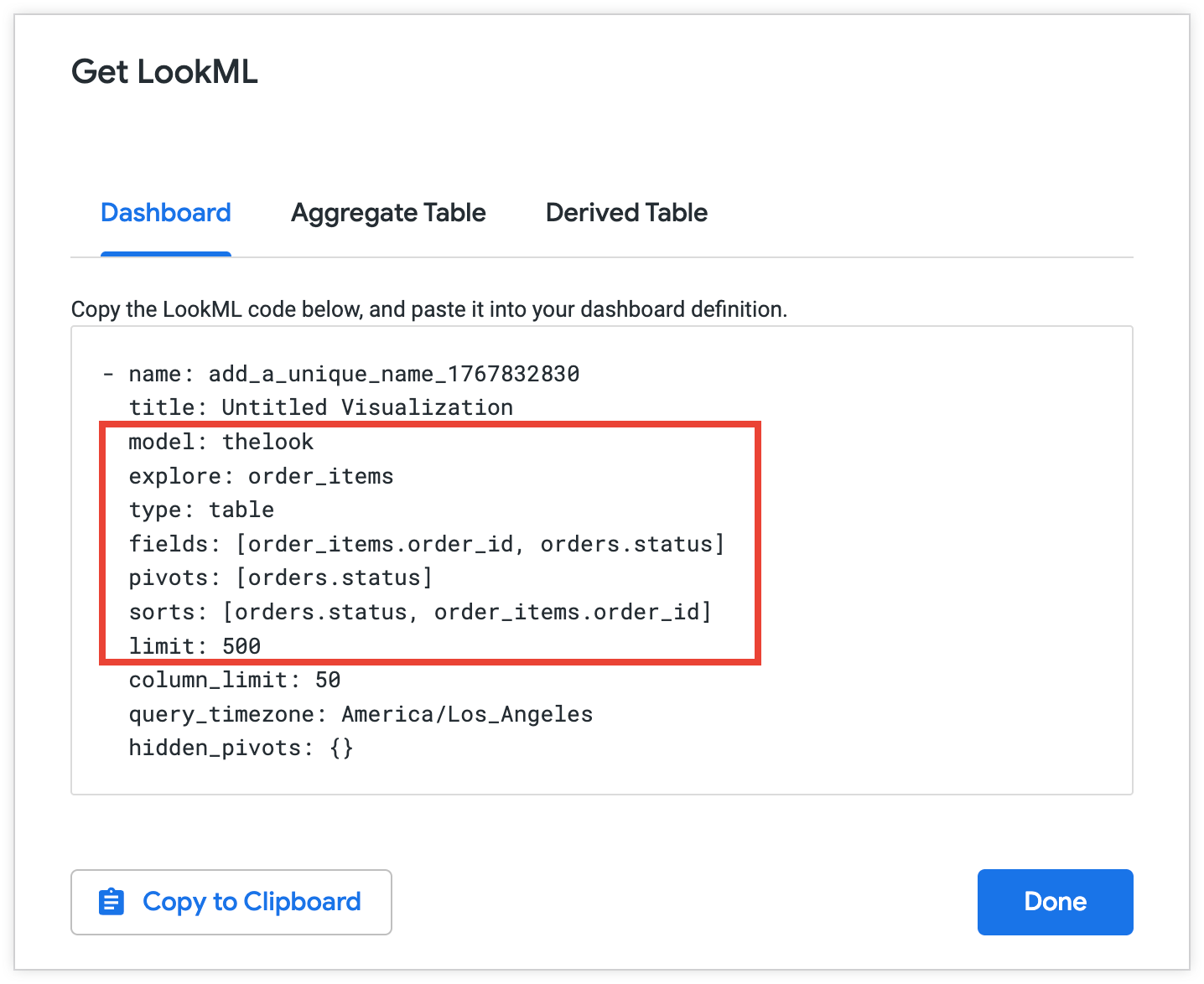
複製所選中繼資料,用於 Looker 精確查詢:
  model: thelook
  explore: order_items
  fields: [order_items.order_id, orders.status]
  sorts: [orders.status, order_items.order_id]
  limit: 500
使用 Looker API 擷取 Looker 查詢物件
如要使用 Looker API 擷取探索資訊,請按照下列步驟操作:
- 在「探索」中,依序選取「探索動作
選單」
和「共用」。Looker 會顯示網址,您可以複製網址來分享探索。分享網址通常類似
https://looker.yourcompany/x/vwGSbfc。共用網址結尾的vwGSbfc是共用網址。 - 複製共用網址。
- 向 Looker API 提出要求:
GET /queries/slug/Explore_slug,並將探索網址短代碼做為字串傳遞至Explore_slug。在要求中,加入您想傳回的探索查詢中繼資料欄位。詳情請參閱「Get Query for Slug」API 參考資料頁面。 - 從 API 回應複製查詢中繼資料。
Looker 精確查詢範例
下列範例說明如何透過直接 HTTP 要求和 Python SDK,為 airports 探索提供精確查詢。
HTTP
在直接 HTTP 要求中,為 looker_golden_queries 鍵提供 Looker 精確查詢物件清單。每個物件都必須包含 natural_Language_questions 鍵和對應的 looker_query 鍵。
looker_golden_queries = [
  {
    "natural_language_questions": ["What is the highest observed positive longitude?"],
    "looker_query": {
      "model": "airports",
      "explore": "airports",
      "fields": ["airports.longitude"],
      "filters": [
        {
          "field": "airports.longitude",
          "value": ">0"
        }
      ],
      "sorts": ["airports.longitude desc"],
      "limit": "1"
    }
  },
 {
    "natural_language_questions": ["What are the major airport codes and cities in CA?", "Can you list the cities and airport codes of airports in CA?"],
    "looker_query": {
      "model": "airports",
      "explore": "airports",
      "fields": ["airports.city", "airports.code"],
      "filters": [
        {
          "field": "airports.major",
          "value": "Y"
        },
        {
          "field": "airports.state",
          "value": "CA"
        }
      ]
    }
  },
]
Python SDK
使用 Python SDK 時,您可以提供 LookerGoldenQuery 物件清單。請為每個物件提供 natural_language_questions 和 looker_query 參數的值。
looker_golden_queries = [geminidataanalytics.LookerGoldenQuery(
      natural_language_questions=[
          "What is the highest observed positive longitude?"
      ],
      looker_query=geminidataanalytics.LookerQuery(
          model="airports",
          explore="airports",
          fields=["airports.longitude"],
          filters=[
              geminidataanalytics.LookerQuery.Filter(
                  field="airports.longitude", value=">0"
              )
          ],
          sorts=["airports.longitude desc"],
          limit="1",
      ),
  ),
  geminidataanalytics.LookerGoldenQuery(
      natural_language_questions=[
          "What are the major airport codes and cities in CA?",
          "Can you list the cities and airport codes of airports in CA?",
      ],
      looker_query=geminidataanalytics.LookerQuery(
          model="airports",
          explore="airports",
          fields=["airports.city", "airports.code"],
          filters=[
              geminidataanalytics.LookerQuery.Filter(
                  field="airports.major", value="Y"
              ),
              geminidataanalytics.LookerQuery.Filter(
                  field="airports.state", value="CA"
              ),
          ],
      ),
  ),
]
在系統指令中定義其他背景資訊
系統指令包含一系列重要元件和物件,可為資料代理提供資料來源的詳細資料,以及代理在回答問題時的角色指引。您可以在 system_instruction 參數中,以 YAML 格式字串的形式,向資料代理提供系統指令。
下列 YAML 範本範例說明如何為 Looker 資料來源建構系統指令:
-   system_instruction: str # Describe the expected behavior of the agent
-   glossaries: # Define business terms, jargon, and abbreviations that are relevant to your use case
    -   glossary:
            -   term: str
            -   description: str
            -   synonyms: list[str]
-   additional_descriptions: # List any additional general instructions
    -   text: str
系統指令主要元件說明
以下各節提供 Looker 系統指令重要元件的範例。這些金鑰包括:
system_instruction
使用 system_instruction 鍵定義代理的角色和人物設定。這項初始指令會設定 API 回覆的語氣和風格,並協助代理瞭解其核心目的。
舉例來說,您可以將代理定義為虛構電子商務商店的銷售分析師,如下所示:
-   system_instruction: You are an expert sales analyst for a fictitious
    ecommerce store. You will answer questions about sales, orders, and customer
    data. Your responses should be concise and data-driven.
glossaries
glossaries 鍵會列出與資料和用途相關,但尚未出現在資料中的業務術語、行話和縮寫定義。舉例來說,您可以根據特定業務情境,定義常見的業務狀態和「忠實顧客」等字詞,如下所示:
-   glossaries:
    -   glossary:
            -   term: Loyal Customer
            -   description: A customer who has made more than one purchase.
                Maps to the dimension 'user_order_facts.repeat_customer' being
                'Yes'. High value loyal customers are those with high
                'user_order_facts.lifetime_revenue'.
            -   synonyms:
                -   repeat customer
                -   returning customer
additional_descriptions
additional_descriptions 鍵會列出系統指令其他部分未涵蓋的任何其他一般指令或背景資訊。舉例來說,您可以使用 additional_descriptions 鍵提供代理資訊,如下所示:
-   additional_descriptions:
    -   text: The user is typically a Sales Manager, Product Manager, or
        Marketing Analyst. They need to understand performance trends, build
        customer lists for campaigns, and analyze product sales.
範例:Looker 中的系統指令
以下範例說明虛構銷售分析師代理的系統指令:
-   system_instruction: "You are an expert sales, product, and operations
    analyst for our e-commerce store. Your primary function is to answer
    questions by querying the 'Order Items' Explore. Always be concise and
    data-driven. When asked about 'revenue' or 'sales', use
    'order_items.total_sale_price'. For 'profit' or 'margin', use
    'order_items.total_gross_margin'. For 'customers' or 'users', use
    'users.count'. The default date for analysis is 'order_items.created_date'
    unless specified otherwise. For advanced statistical questions, such as
    correlation or regression analysis, use the Python tool to fetch the
    necessary data, perform the calculation, and generate a plot (like a scatter
    plot or heatmap)."
-   glossaries:
    -   term: Revenue
    -   description: The total monetary value from items sold. Maps to the
        measure 'order_items.total_sale_price'.
    -   synonyms:
        -   sales
        -   total sales
        -   income
        -   turnover
    -   term: Profit
    -   description: Revenue minus the cost of goods sold. Maps to the measure
        'order_items.total_gross_margin'.
    -   synonyms:
        -   margin
        -   gross margin
        -   contribution
    -   term: Buying Propensity
    -   description: Measures the likelihood of a customer to purchase again
        soon. Primarily maps to the 'order_items.30_day_repeat_purchase_rate'
        measure.
    -   synonyms:
        -   repeat purchase rate
        -   repurchase likelihood
        -   customer velocity
    -   term: Customer Lifetime Value
    -   description: The total revenue a customer has generated over their
        entire history with us. Maps to 'user_order_facts.lifetime_revenue'.
    -   synonyms:
        -   CLV
        -   LTV
        -   lifetime spend
        -   lifetime value
    -   term: Loyal Customer
    -   description: "A customer who has made more than one purchase. Maps to
        the dimension 'user_order_facts.repeat_customer' being 'Yes'. High value
        loyal customers are those with high
        'user_order_facts.lifetime_revenue'."
    -   synonyms:
        -   repeat customer
        -   returning customer
    -   term: Active Customer
    -   description: "A customer who is currently considered active based on
        their recent purchase history. Mapped to
        'user_order_facts.currently_active_customer' being 'Yes'."
    -   synonyms:
        -   current customer
        -   engaged shopper
    -   term: Audience
    -   description: A list of customers, typically identified by their email
        address, for marketing or analysis purposes.
    -   synonyms:
        -   audience list
        -   customer list
        -   segment
    -   term: Return Rate
    -   description: The percentage of items that are returned by customers
        after purchase. Mapped to 'order_items.return_rate'.
    -   synonyms:
        -   returns percentage
        -   RMA rate
    -   term: Processing Time
    -   description: The time it takes to prepare an order for shipment from the
        moment it is created. Maps to 'order_items.average_days_to_process'.
    -   synonyms:
        -   fulfillment time
        -   handling time
    -   term: Inventory Turn
    -   description: "A concept related to how quickly stock is sold. This can
        be analyzed using 'inventory_items.days_in_inventory' (lower days means
        higher turn)."
    -   synonyms:
        -   stock turn
        -   inventory turnover
        -   sell-through
    -   term: New vs Returning Customer
    -   description: "A classification of whether a purchase was a customer's
        first ('order_facts.is_first_purchase' is Yes) or if they are a repeat
        buyer ('user_order_facts.repeat_customer' is Yes)."
    -   synonyms:
        -   customer type
        -   first-time buyer
-   additional_descriptions:
    -   text: The user is typically a Sales Manager, Product Manager, or
        Marketing Analyst. They need to understand performance trends, build
        customer lists for campaigns, and analyze product sales.
    -   text: This agent can answer complex questions by joining data about
        sales line items, products, users, inventory, and distribution centers.
後續步驟
定義構成自訂情境的結構化欄位和系統指令後,您可以使用下列其中一種呼叫,將該情境提供給對話式數據分析 API:
- 建立永久資料代理:在要求主體的
published_context物件中加入編寫的脈絡,設定代理在多個對話中持續執行的行為。詳情請參閱「建立資料代理」(HTTP) 或「設定有狀態或無狀態對話的背景資訊」(Python SDK)。 - 傳送無狀態要求:在對話要求的
inline_context物件中提供編寫的脈絡,定義代理在該特定 API 呼叫中的行為。詳情請參閱「建立無狀態多輪對話」(HTTP) 或「使用 API 提問」(Python SDK)。 - 傳送查詢資料要求:如果是資料庫資料來源,請在查詢資料要求的
agent_context_reference物件中,提供已建立內容集的 ID。詳情請參閱「定義資料庫資料來源的資料代理背景資訊」。