


콜백은 Python 코드를 사용하여 특정 에이전트의 실행 프로세스에 연결하는 강력한 메커니즘을 제공하는 고급 기능입니다. 콜백을 사용하면 미리 정의된 특정 시점에서 에이전트의 동작을 관찰하고, 맞춤설정하고, 제어할 수도 있습니다.
다양한 콜백 유형을 활용할 수 있으며 각 콜백 유형은 대화 턴의 특정 시점에 실행됩니다. 이러한 유형은 아래 섹션에 설명되어 있습니다.
Python 런타임 및 클래스
Python 콜백 코드에서는 코드를 작성하는 데 도움이 되는 특정 클래스와 함수에 액세스할 수 있습니다. 자세한 내용은 Python 런타임 참조를 참고하세요.
샌드박스 및 네트워킹 제한
Python 콜백 코드는 샌드박스 환경 내에서 실행됩니다. 이 환경에는 다음과 같은 제한사항이 있습니다.
- 비공개 네트워크 액세스 (PNA) 없음: 서비스 디렉터리가 구성된 경우에도 콜백이 비공개 IP 주소에 직접 액세스하거나 비공개 DNS 도메인을 확인할 수 없습니다. 비공개 네트워크 내의 리소스에 액세스해야 하는 경우 비공개 네트워크 액세스를 지원하는 도구 유형 (예: OpenAPI 또는 MCP 도구)을 대신 사용해야 합니다.
- 공개 인터넷 액세스: 콜백은 인터넷에서 공개적으로 사용할 수 있는 엔드포인트에만 액세스할 수 있습니다.
콜백 유형
콜백 유형에 따라 기본 콜백 함수는 특정 이름이어야 합니다. 이렇게 하면 콜백 코드 내에서 원하는 이름의 도우미 함수를 정의할 수 있습니다.
각 콜백 유형은 대화 차례의 특정 시점에서 실행됩니다.
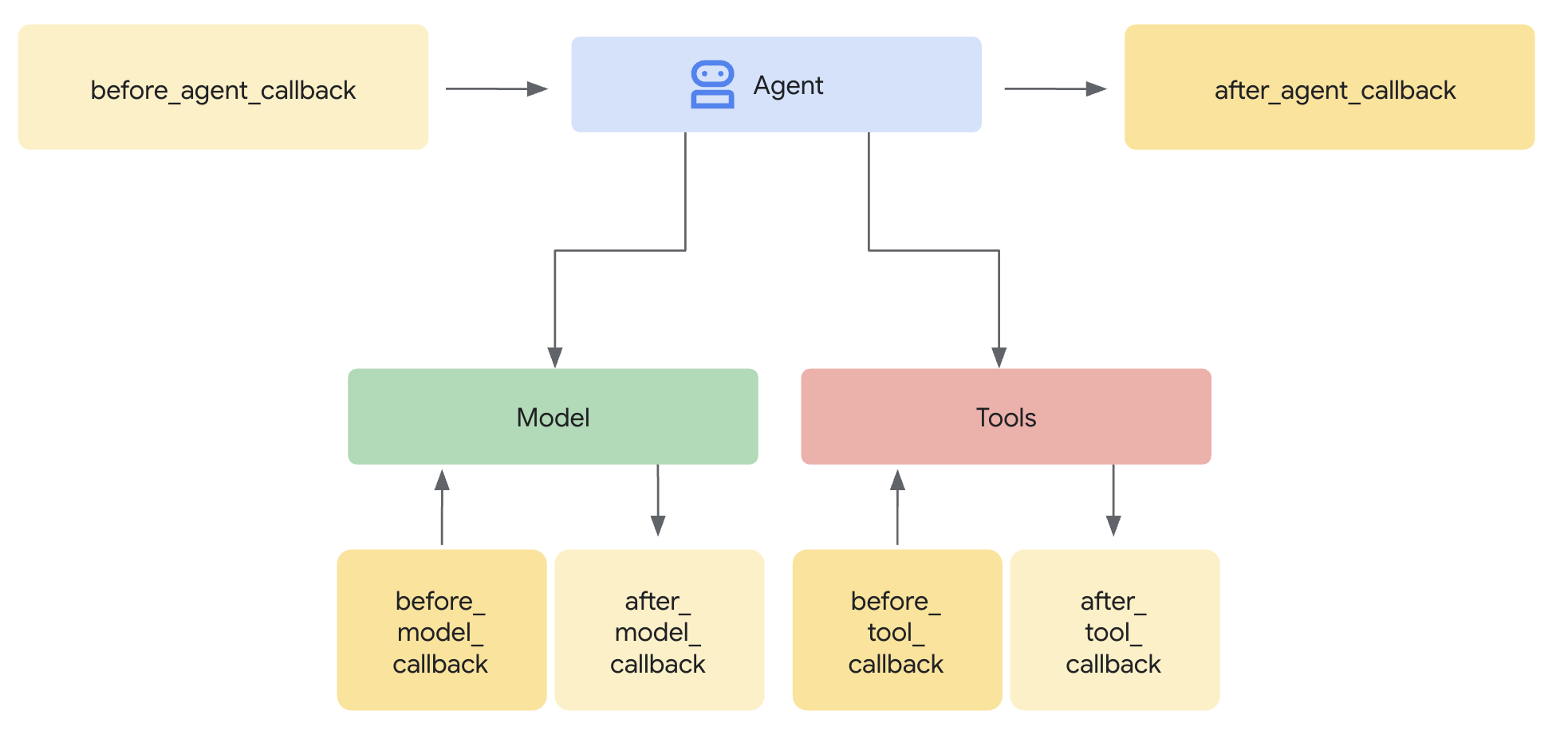
특정 유형의 콜백을 여러 개 정의하면 정의한 순서대로 실행됩니다.
아래 섹션에서는 각 콜백 유형을 설명하며, 각 유형에 대해 다음 정보가 설명됩니다.
| X | X |
|---|---|
| 이름 | 필수 콜백 함수 이름 |
| 실행 | 대화 차례 내 실행 지점입니다. |
| 목적 | 콜백을 사용하기에 유용한 시나리오 |
| 인수 | 함수의 입력 인수입니다. |
| 돌려주기 | 함수의 반환 값입니다. |
| ADK 콜백 | 해당 ADK 콜백 문서 링크 |
에이전트가 시작되기 전 (before_agent_callback)
| X | X |
|---|---|
| 이름 | before_agent_callback |
| 실행 | 상담사가 호출되기 전에 호출됩니다. |
| 목적 | 에이전트에 필요한 리소스나 상태를 설정하거나, 세션 상태의 유효성을 검사하거나, 에이전트 호출을 방지하는 데 유용합니다. |
| 인수 | CallbackContext |
| 돌려주기 | Content(선택사항): 설정된 경우 에이전트가 호출되지 않고 제공된 응답이 사용됩니다. |
| ADK 콜백 | before_agent_callback |
코드 샘플:
import random

def before_agent_callback(
  callback_context: CallbackContext
) -> Optional[Content]:
  username = callback_context.variables.get("username", None)
  if not username:
    # default user
    final_name = "Default Name"
  else:
    # add a random integer to the username
    final_name = f"{username} {random.randint(1,10)}"
  # update the username variable
  callback_context.variables["username"] = final_name
에이전트 완료 후 (after_agent_callback)
| X | X |
|---|---|
| 이름 | after_agent_callback |
| 실행 | 에이전트가 완료된 후 호출됩니다. |
| 목적 | 정리 작업, 실행 후 유효성 검사, 최종 상태 수정 또는 에이전트 대답 업데이트에 유용합니다. |
| 인수 | CallbackContext |
| 돌려주기 | Content(선택사항): 설정된 경우 에이전트의 출력을 제공된 출력으로 바꿉니다. |
| ADK 콜백 | after_agent_callback |
코드 샘플:
def after_agent_callback(
  callback_context: CallbackContext
) -> Optional[Content]:
  if callback_context.agent_name == "Routing Agent":
    counter = callback_context.variables.get("counter", 0)
    counter += 1
    # increment the invoked counter for this agent
    callback_context.variables["counter"] = int(counter)
LLM 호출 전 (before_model_callback)
| X | X |
|---|---|
| 이름 | before_model_callback |
| 실행 | 모델 요청 전에 호출됩니다. |
| 목적 | 모델 요청을 검사/수정하거나 모델 사용을 방지하는 데 유용합니다. |
| 인수 | CallbackContext, LlmRequest |
| 돌려주기 | LlmResponse: 설정된 경우 모델 호출이 건너뛰고 응답이 모델에서 온 것처럼 사용됩니다. |
| ADK 콜백 | before model callback |
코드 샘플:
def before_model_callback(
  callback_context: CallbackContext,
  llm_request: LlmRequest
) -> Optional[LlmResponse]:
  """
  This callback executes *before* a request is sent to the LLM.

  By returning an `LlmResponse` object, we are intercepting the call to the
  LLM. The LLM will *not* be called, and the framework will instead use the
  `LlmResponse` we provide as if it came from the model.

  This is the core mechanism for implementing input guardrails, prompt
  validation, or serving responses from a cache. Here, we force the agent to
  call a function instead of thinking with the LLM.
  """
  # Modify the shared session state.
  callback_context.variables['foo'] = 'baz'

  # Skip the LLM call and return a custom response telling the agent to
  # execute a specific function.
  return LlmResponse(
    content=Content(parts=[Part(
      function_call=FunctionCall(
        name="function_name", args={"arg_name": "arg_value"}))],
      role="model"))
LLM 호출 후 (after_model_callback)
| X | X |
|---|---|
| 이름 | after_model_callback |
| 실행 | 모델 응답을 받은 후 호출됩니다. |
| 목적 | 모델 응답의 형식 재지정, 모델에서 생성된 민감한 정보 검열, 변수에서 사용할 수 있도록 모델에서 정형 데이터 파싱, 모델 오류 처리에 유용합니다. |
| 인수 | CallbackContext, LlmResponse |
| 돌려주기 | LlmResponse: 설정된 경우 모델 응답을 제공된 응답으로 바꿉니다. |
| ADK 콜백 | after model callback |
코드 샘플:
def after_model_callback(
  callback_context: CallbackContext,
  llm_response: LlmResponse
) -> Optional[LlmResponse]:
  """
  This callback executes *after* a response has been received from the LLM,
  but before the agent processes it.

  The `llm_response` parameter contains the actual data from the LLM.
  By returning `None`, we are approving this response and allowing the agent
  to use it as-is.

  If we returned a new `LlmResponse` object, it would *replace* the original,
  which is useful for redacting sensitive information, enforcing output
  formatting, or adding disclaimers.
  """
  # Returning None allows the LLM's actual response to be used.
  return None
도구 호출 전 (before_tool_callback)
| X | X |
|---|---|
| 이름 | before_tool_callback |
| 실행 | 도구 호출 전에 호출됩니다. |
| 목적 | 도구 인수를 검사 및 수정하거나, 도구 실행 전 승인 검사를 수행하거나, 도구 수준 캐싱을 구현하는 데 유용합니다. |
| 인수 | 도구, Dict[str,Any]: 도구 입력, CallbackContext |
| 돌려주기 | Dict[str,Any] : 설정된 경우 도구 실행이 건너뛰고 이 출력이 모델에 제공됩니다. |
| ADK 콜백 | before tool callback |
코드 샘플:
def before_tool_callback(
  tool: Tool,
  input: dict[str, Any],
  callback_context: CallbackContext
) -> Optional[dict[str, Any]]:
  """
  This callback executes *before* a specific tool is called by the agent.

  Here, we modify the input arguments intended for the tool and then return
  a dictionary. By returning a dictionary instead of `None`, we are
  overriding the default behavior. The actual tool function will *not* be
  executed. Instead, the dictionary we return will be treated as the
  llm.tool's result and passed back to the LLM for the next step.

  This is ideal for validating tool inputs, applying policies, or returning
  mocked/cached data for testing.
  """
  # Modify the shared session state.
  callback_context.variables['foo'] = 'baz'

  # Modify the arguments for the tool call in-place.
  input['input_arg'] = 'updated_val1'
  input['additional_arg'] = 'updated_val2'

  # Override the tool call and return a mocked result.
  return {"result": "ok"}
도구 호출 후 (after_tool_callback)
| X | X |
|---|---|
| 이름 | after_tool_callback |
| 실행 | 도구 완료 후 호출됩니다. |
| 목적 | 모델에 다시 보내기 전에 도구 응답을 검사 및 수정하거나, 도구 결과를 후처리하거나, 도구 응답의 특정 부분을 변수에 저장하는 데 유용합니다. |
| 인수 | 도구, Dict[str,Any]: 도구 입력, CallbackContext, Dict[str,Any]: 도구 응답 |
| 돌려주기 | Dict[str,Any]: 설정된 경우 모델에 제공되는 도구 응답을 재정의합니다. |
| ADK 콜백 | 도구 콜백 후 |
코드 샘플:
# Previous tool was named `get_user_info`
# Previous tool returned the payload:
# {"username": "Patrick", "fave_food": ["pizza"]}

def after_tool_callback(
  tool: Tool,
  input: dict[str, Any],
  callback_context: CallbackContext,
  tool_response: dict
) -> Optional[dict]:

  if tool.name == "get_user_info":
    tool_response["username"] = "Gary"
    tool_response["pet"] = "dog"

    # Override tool response
    return tool_response
채널 및 모달리티별 작업
Python 도구나 콜백을 구현할 때는 모든 모달리티와 채널에서 동일한 동작을 갖는 것이 가장 좋지만, 채널별 또는 모달리티별 동작이 필요한 경우도 있습니다. _session 전역 변수를 사용하여 대화의 채널 또는 모달리티를 확인할 수 있습니다.
콜백 만들기
콜백을 만들려면 다음 단계를 따르세요.
- 상담사 설정을 엽니다.
- 코드 추가를 클릭합니다.
- 콜백 유형을 선택합니다.
- Python 코드를 제공해 줘.
- 저장을 클릭합니다.
맞춤 페이로드 (custom_payloads)
맞춤 페이로드를 사용하면 에이전트의 응답 내에 보충적인 비텍스트 구조화된 데이터 (일반적으로 JSON 형식)를 포함할 수 있습니다. 이 페이로드는 에이전트가 외부 시스템 또는 클라이언트 애플리케이션과 상호작용하는 방식을 안내하거나 보강하는 데 유용합니다.
페이로드 값은 대규모 언어 모델 (LLM)에 표시되지 않으며 최종 응답을 생성하는 데만 사용됩니다.
맞춤 페이로드는 콜백, 특히 before_model_callback 또는 after_model_callback를 사용하여 생성되고 설정됩니다.
맞춤 페이로드는 일반적으로 풍부한 구조화된 상호작용을 지원하는 데 중점을 두고 여러 용도로 사용할 수 있습니다.
- 상담사 에스컬레이션/인계: 라우팅 안내(예: 라우팅할 특정 대기열)를 제공하여 상호작용을 인간 상담사에게 트랜스퍼하는 데 자주 사용됩니다.
- 리치 콘텐츠 및 클라이언트 측 작업:
리치 위젯 및 기타 리치 콘텐츠를 채팅 환경에 직접 삽입할 수 있습니다.
이는 특히 맞춤 채팅 통합에 유용합니다.
- 예를 들어 통화 도우미와 같은 인터페이스를 사용하는 고객에게 이미지 URL 또는 빠른 답장 칩과 옵션을 표시하는 경우가 있습니다.
- 응답 구성:
다양한 방식으로 반환되도록 맞춤 페이로드를 구성할 수 있습니다.
- 명시적 페이로드만 결정론적으로 반환합니다.
- LLM 생성 텍스트 응답과 함께 페이로드를 반환합니다.
- 정적 텍스트 응답으로 페이로드 반환
에이전트 설정
맞춤 페이로드는 콜백을 사용해서만 생성하고 설정할 수 있습니다.
페이로드는 application/json의 mime_type로 Blob으로 설정됩니다.
Part.from_json(data=payload_string)
after_model_callback 샘플
다음은 추가 맞춤 페이로드 응답과 함께 모델 응답을 반환하는 after_model_callback의 샘플입니다.
import json

def after_model_callback(callback_context: CallbackContext, llm_response: LlmResponse) -> Optional[LlmResponse]:
 """
 Adds a custom payload to every model response which is a text
 """
 if (llm_response.content.parts[0].text is not None):
   # construct payload
   payload_dict = { "custom_payload_key": "custom_payload_value"}
   payload_json_string = json.dumps(payload_dict)

   new_parts = []
   # Keep the origial agent response part, as model only sees text in the historical context.
   new_parts.append(Part(text=llm_response.content.parts[0].text))

   # Append custom payload
   new_parts.append(Part.from_json(data=payload_json_string))

   return LlmResponse(content=Content(parts=new_parts))
before_model_callback 샘플
특정 도구가 트리거된 후 추가 맞춤 페이로드를 반환하는 before_model_callback의 샘플입니다.
import json

def has_escalate(llm_request: LlmRequest) -> bool:
  for content in llm_request.contents:
    for part in content.parts:
      if part.function_call and part.function_call.name == 'escalate':
        return True
  return False

def before_model_callback(callback_context: CallbackContext, llm_request: LlmRequest) -> Optional[LlmResponse]:
  # checks if `escalate` tool is being called
  if not has_escalate(llm_request):
    return None
  payload_dict = { "escalate": "user ask for escalation"}
  payload_json_string = json.dumps(payload_dict)

  return LlmResponse(content=Content(parts=[Part(text="ESCALATE!!!"), Part.from_json(data=payload_json_string)]))
런타임에 응답의 페이로드 확인
페이로드는 RunSession과 BidiRunSession 모두의 payload 필드에 구조체로 채워집니다.
페이로드 값은 LLM에 표시되지 않습니다.