

The Agent-to-Agent (A2A) protocol is an open messaging standard that enables autonomous AI agents to communicate and coordinate tasks across disparate systems.
In CX Agent Studio, A2A Protocol tools allow your agent application to delegate tasks to external remote agents, or allow external applications and orchestrators to invoke your CX Agent Studio agents using standardized messaging.
How A2A works
The A2A protocol in CX Agent Studio operates using a delegation model.
Delegation model
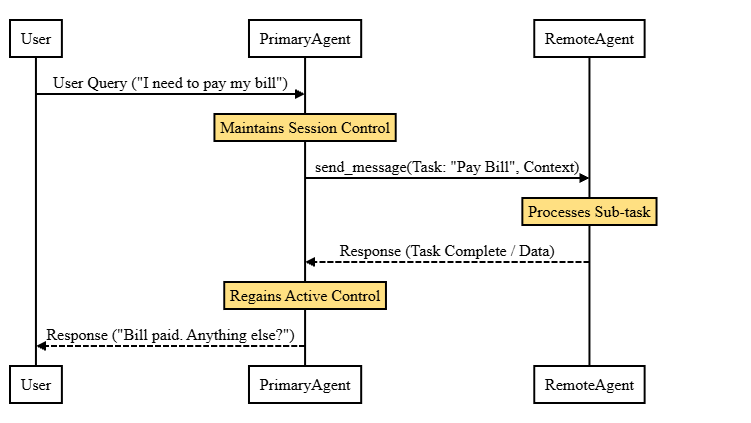
In the delegation model, the initiating CX Agent Studio agent acts as the primary orchestrator and retains overall session control:
- Session ownership: The primary agent maintains the user conversation session. When a specialized sub-task is required, the primary agent invokes the remote agent as a tool.
- Control flow: The remote agent processes the request and returns structured response data. Control immediately returns to the primary agent, which summarizes or incorporates the results for the end user.
- Context transfer: The primary agent transmits only the parameters and conversational context necessary for the delegated task.
Text-based communication
All inter-agent communication in the A2A protocol is text-based:
- If an end user interacts with a primary agent over a voice channel (such as telephony or WebRTC), the speech is first converted to text.
- The primary agent sends the text transcript and parameters to the remote sub-agent in an HTTP request payload.
- Raw audio streams and embeddings are not transmitted across the A2A network interface.
Billing
If both the primary and remote sessions are in CX Agent Studio and are in the same project, you will be billed for 1 session.
Otherwise, for primary and remote sessions across multiple projects or third-party systems, you will be billed for 2 sessions.
Authentication and access control
Authentication requirements depend on the direction of communication and the target service.
| Direction | Target destination | Authentication mechanism | Required IAM role | Description |
|---|---|---|---|---|
| Inbound (External to CX Agent Studio) | CX Agent Studio agent application | OAuth 2.0 access token | roles/ces.client |
Required for external callers to invoke the CX Agent Studio inbound endpoint. |
| Outbound (CX Agent Studio to CX Agent Studio) | CX Agent Studio agent in another project | Service agent | roles/ces.client |
Granted to the calling project's service agent on the target project. |
| Outbound (CX Agent Studio to Cloud Run) | Cloud Run service | Service agent ID token | roles/run.invoker |
Granted to the calling project's service agent on the Cloud Run service. |
| Outbound (CX Agent Studio to Vertex AI) | Vertex AI Agent Engine | Service agent OAuth | roles/aiplatform.user |
Granted to the calling project's service agent on the target project. |
| Outbound (CX Agent Studio to third-party) | External endpoint (such as ServiceNow or Salesforce) | API Key or OAuth | Managed using Secret Manager | Stored credentials injected during tool execution. |
Service agent identity
Outbound requests from CX Agent Studio use the CX Agent Studio service agent:
service-PROJECT_NUMBER@gcp-sa-ces.iam.gserviceaccount.com
Replace PROJECT_NUMBER with your Google Cloud project number.
Inbound authentication
When an external application, custom agent, or orchestrator calls into CX Agent Studio,
it must pass a valid Google-issued OAuth 2.0 access token in the Authorization header:
Testing: Generate a temporary access token for your active account:
gcloud auth print-access-tokenProgrammatic clients: Use Application Default Credentials (ADC):
gcloud auth application-default print-access-tokenProduction: Use a dedicated Google service account with the
roles/ces.client(Customer Engagement Suite Client) role.
Prerequisites
Before configuring A2A Protocol tools:
Enable the Gemini Enterprise for Customer Experience API (
ces.googleapis.com) on your project:gcloud services enable ces.googleapis.com --project=PROJECT_IDEnsure the calling principal or service account has been granted the
Customer Engagement Suite Clientrole (roles/ces.client).
Configure an A2A Protocol tool
To connect your primary agent to an external remote agent:
- Open the CX Agent Studio console.
- Select your project and open your agent application.
- In the agent builder, click the Tools icon.
- Click the + (Add) button to create a new tool.
- Select the A2A Protocol tool card.
- Configure your agent card using either the UI Form or the JSON editor.
- In the URL field, enter the remote agent's base endpoint URL
(for example,
https://ces.googleapis.com/v1/projects/PROJECT_ID/locations/LOCATION/apps/APP_IDor your Cloud Run service URL). Don't append/message:sendto the URL; CX Agent Studio automatically appends/message:sendat runtime. - Select the appropriate authentication type for the endpoint.
- Click Create.
Agent card example
The following sample JSON defines an agent card for a remote weather agent:
{
  "name": "weather_agent",
  "description": "Agent capable of querying weather conditions and local time for given locations.",
  "version": "0.1.0",
  "supportedInterfaces": [
    {
      "url": "https://ces.googleapis.com/v1/projects/PROJECT_ID/locations/LOCATION/apps/APP_ID",
      "protocolBinding": "HTTP+JSON",
      "protocolVersion": "1.0"
    }
  ],
  "skills": [
    {
      "id": "get_weather",
      "name": "get_weather",
      "description": "Retrieves weather conditions for a specified location.",
      "tags": [
        "weather",
        "forecast"
      ],
      "examples": [],
      "inputModes": [],
      "outputModes": []
    },
    {
      "id": "get_current_time",
      "name": "get_current_time",
      "description": "Retrieves current local time for a specified city or timezone.",
      "tags": [
        "time",
        "clock"
      ],
      "examples": [],
      "inputModes": [],
      "outputModes": []
    }
  ]
}
Add routing instructions
Instruct your primary agent when to delegate to the A2A tool. For example:
If the user asks for weather information or local time, use {@TOOL: weather_agent}.
Pass the city or location specified by the user.
If the tool returns an error, inform the user that weather details are temporarily unavailable.
Inbound messaging
External systems can send messages directly to a CX Agent Studio agent application using the inbound A2A messaging endpoint.
Inbound endpoint URL
Send HTTP POST requests to the following endpoint:
https://ces.googleapis.com/v1/projects/PROJECT_ID/locations/LOCATION/apps/APP_ID/message:send
Replace the following:
PROJECT_ID: Your Google Cloud project ID.LOCATION: The region hosting your agent application (such asus-central1).APP_ID: The unique identifier of your CX Agent Studio agent application.
Request payload schema
The JSON payload structure for sending an inbound message:
{
  "message": {
    "messageId": "msg-MY_UNIQUE_MESSAGE_UUID",
    "role": "ROLE_USER",
    "content": [
      {
        "text": "Hello! I would like help checking my account balance."
      }
    ],
    "metadata": {
      "gecx_a2a_agent_context": "MY_SERIALIZED_AGENT_CONTEXT_STRING"
    }
  }
}
Example request using curl
You can test inbound messaging using curl:
curl -X POST \
  -H "Authorization: Bearer $(gcloud auth application-default print-access-token)" \
  -H "X-Goog-User-Project: PROJECT_ID" \
  -H "Content-Type: application/json" \
  -d '{
    "message": {
      "messageId": "msg-'"$(uuidgen)"'",
      "role": "ROLE_USER",
      "content": [
        {
          "text": "Hello!"
        }
      ]
    }
  }' \
  "https://ces.googleapis.com/v1/projects/PROJECT_ID/locations/LOCATION/apps/APP_ID/message:send"
Context and state management
The A2A protocol uses the AgentContext message
to manage variables and session states between agents.
Context is passed in the metadata of the SendMessageRequest
using the gecx_a2a_agent_context key.
Variable mapping
When delegating a task, you can map variables between the primary and remote agents:
- Outbound mapping:
RemoteAgentTool.input_variable_mappingcomputes theAgentContext.variablessent to the remote agent. - Inbound mapping:
RemoteAgentTool.output_variable_mappingupdates the primary agent's variables when the remote agent responds.
For inbound requests (external client to CX Agent Studio),
the application deserializes the gecx_a2a_agent_context metadata
and writes the AgentContext.variables directly into the current session.
The updated variables are written back to AgentContext.variables
when responding to the client.
Session closure
The primary agent monitors AgentContext.session_metadata.closed
to determine when a remote session ends:
- Outbound requests always set
closedtofalse. If the remote agent's response setsclosedtotrue, the A2A connection is terminated. - For inbound responses back to the client,
the CX Agent Studio app sets
closedtotrueif the session has ended.
Stateful mode
Remote sessions with CXAS apps are always stateful. Primary and remotev CXAS sessions will share the same session ID and remote sessions will keep the conversation history between the primary and the remote agents.
For remote sessions with third-party systems, the remote sessions will be stateless by default and remote agent will receive each message from the primary agent as a new session (aka a new context ID).
You can enable the RemoteAgentTool.stateful_agent field
to automatically cache and reuse the first context ID
returned by the remote agent.
This cached context ID is used for the remainder of the session
unless the remote agent responds with
AgentContext.session_metadata.closed == true.
If the session is closed,
the cache is reset and a new context ID will be cached on the next tool call.
Deploy a remote sub-agent
You can deploy custom remote agents on Google Cloud services to act as sub-agents for CX Agent Studio.
Deploy to Cloud Run
To host an agent built with the Agent Development Kit (ADK) on Cloud Run:
Create a
Dockerfilein your agent project directory:FROM python:3.11-slim WORKDIR /app COPY pyproject.toml requirements.txt ./ RUN pip install --no-cache-dir -r requirements.txt RUN pip install --no-cache-dir "google-adk[a2a]==1.32.0" "a2a-sdk[all]==0.3.26" COPY . . ENV PORT=8080 ENV PYTHONUNBUFFERED=1 EXPOSE 8080 CMD ["python", "-m", "app.a2a_rest_server"]Deploy the container to Cloud Run:
gcloud run deploy my-adk-agent \
  --project=PROJECT_ID \
  --region=us-central1 \
  --source=. \
  --memory=4Gi \
  --no-cpu-throttling
Grant the
roles/run.invokerrole on the Cloud Run service to your calling project's CX Agent Studio service agent.Follow the steps in Configure an A2A Protocol tool to attach the Cloud Run service URL to CX Agent Studio.
Deploy to Vertex AI Agent Engine
To deploy an ADK agent onto Vertex AI Agent Engine:
Define your dependencies in
requirements.txt:a2a-sdk==0.3.26 google-adk[a2a]>=1.15.0,<2.0.0Deploy the engine using the Vertex AI SDK:
import os
import sys
from google.protobuf import json_format
import vertexai
from vertexai.agent_engines import _agent_engines

sys.path.append("./")
from app.agent_runtime_app import agent_runtime

client = vertexai.Client(project="PROJECT_ID", location="us-central1")

ops = agent_runtime.register_operations()
class_methods_proto = _agent_engines._generate_class_methods_spec_or_raise(
    agent_engine=agent_runtime,
    operations=ops
)
class_methods_list = [
    json_format.MessageToDict(cm, preserving_proto_field_name=True)
    for cm in class_methods_proto
]

agent_config = {
    "entrypoint_module": "app.agent_runtime_app",
    "entrypoint_object": "agent_runtime",
    "source_packages": ["app", "requirements.txt"],
    "requirements_file": "requirements.txt",
    "class_methods": class_methods_list,
    "agent_framework": "google-adk",
    "env_vars": {
        "GOOGLE_CLOUD_LOCATION": "us-central1",
    },
    "min_instances": 1,
    "max_instances": 10,
    "resource_limits": {"cpu": "4", "memory": "8Gi"},
}

engine = client.agent_engines.create(config=agent_config)
print(f"Deployed Engine Resource Name: {engine.api_resource.name}")
Grant the
roles/aiplatform.userrole on the target project to your calling project's CX Agent Studio service agent.Follow the steps in Configure an A2A Protocol tool to attach the Agent Engine endpoint to CX Agent Studio.
Connect to third-party endpoints
CX Agent Studio can delegate tasks to external third-party endpoints, such as ServiceNow or Salesforce.
When configuring the tool in the console:
- Follow the steps in Configure an A2A Protocol tool.
- Select the authentication method required by the third-party endpoint (such as API key or OAuth).
- Store credentials securely using Secret Manager.
A2A Protocol tools compared to Agent as a tool
CX Agent Studio provides multiple methods for coordinating multi-agent workflows.
| Feature | Agent as a tool | A2A Protocol tool |
|---|---|---|
| Scope | Intra-application (agents within the same CX Agent Studio app). | Inter-application (external agents, remote services, or third-party platforms). |
| Communication | Direct in-memory / internal execution. | Network HTTP requests using the A2A messaging standard. |
| Use cases | Reusing internal sub-agents without handing off the session. | Calling custom ADK agents on Cloud Run, Vertex AI, or external APIs. |
| Protocol | Platform-internal tool execution. | Standardized A2A JSON payload over REST. |
LLM tool execution
Under the hood, A2A protocol calls operate through standard LLM tool calling:
- When an A2A tool is assigned to an agent, the tool description and skill definitions are provided to the model as function declarations.
- When the model decides to delegate a sub-task, it generates a function call event.
- The CX Agent Studio runtime intercepts the function call, translates the parameters into an A2A HTTP request, and sends it to the configured remote endpoint.
- The response returned by the remote agent is passed back to the model to continue generating the conversation response.
To learn more about how agents are encapsulated as callable tools, see the ADK AgentTool implementation on GitHub.