

This page provides architectural guidance and operational strategies for migrating existing container workloads or modernizing Java workloads into containers that run on Google Kubernetes Engine (GKE) or Cloud Run.
If you are a cloud architect, application developer, or DevOps engineer, use the information on this page to evaluate containerization pathways, push images to Artifact Registry, and assess and containerize Java workloads by using Google Cloud Modernization Hub.
Before you read this page, you should have an inventory of your containerized and virtualized workloads, and an understanding of your target orchestration and scaling requirements.
Migration patterns
The following diagram illustrates container modernization paths:
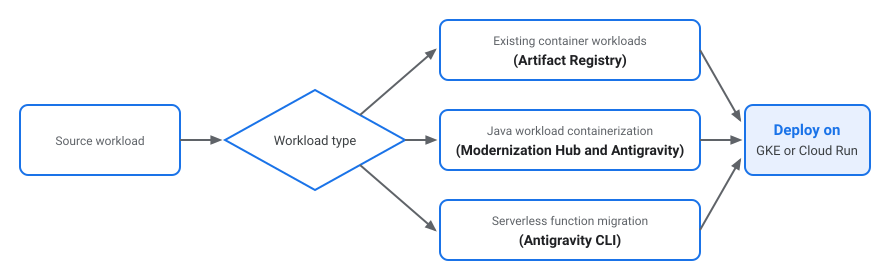
Each path addresses a specific workload architecture:
- Existing container workloads: if your applications are already packaged as Docker or Open Container Initiative (OCI) images, push them to Artifact Registry and deploy directly to GKE or Cloud Run.
- Java workloads: if your Java workloads run on virtual machines, use Modernization Hub and Antigravity to evaluate transformation paths, refactor environment-specific dependencies, and package Java workloads into containers.
- Serverless functions: if your applications run as AWS Lambda functions, use Antigravity CLI to containerize event handlers into standard HTTP microservices for deployment on Cloud Run.
Java workload containerization
Modernization Hub and AI-assisted refactoring tools help you modernize Java workloads into OCI-compliant container images:
- Refactor and generate manifests: use Antigravity and the Antigravity CLI to resolve environment-specific blockers and generate standardized Dockerfiles and Kubernetes deployment YAML configurations.
- Deploy to managed runtimes: build and push container images to Artifact Registry, and run the containerized Java workloads on GKE or Cloud Run.
What's next
- Mainframe modernization overview
- Migrate containers to GKE
- Migrate Amazon EKS to GKE
- Modernization Hub documentation
- GKE documentation
- Cloud Run documentation