

This document provides an overview for workload management in Google Distributed Cloud (GDC) air-gapped. The following topics are covered:
Although some of the workload deployment designs are recommended, it's not required to follow them exactly as prescribed. Each GDC universe has unique requirements and considerations that must be satisfied on a case-by-case basis.
This document is for IT administrators within the platform administrator group who are responsible for managing resources within their organization, and application developers within the application operator group who are responsible for developing and maintaining applications in a GDC universe.
For more information, see Audiences for GDC air-gapped documentation.
Where to deploy workloads
On the GDC platform, operations to deploy virtual machine (VM) workloads and container workloads are different. The following diagram illustrates workload separation within the data plane layer of your organization.
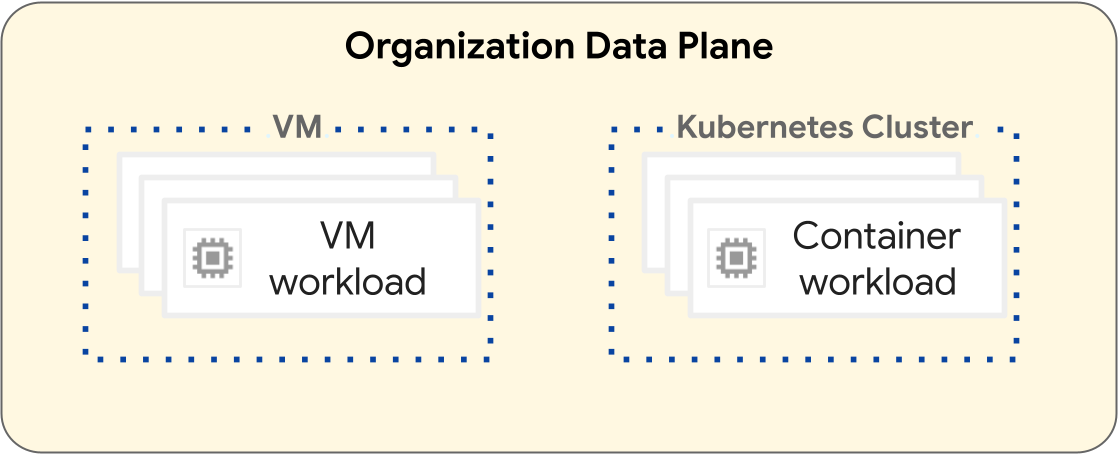
VM-based workloads operate within a VM. Conversely, container workloads operate within a Kubernetes cluster. The fundamental separation between VMs and Kubernetes clusters provide isolation boundaries between your VM workloads and container workloads. For more information, see Resource hierarchy.
The following sections introduce the differences between each workload type and their deployment lifecycle.
VM-based workloads
You can create VMs to host your VM-based workloads. You have many configuration options for your VM's shape and size to help best meet your VM-based workload requirements. You must create a VM in a project, which can have many VM workloads. VMs are a child resource of a project. For more information, see the VMs overview.
Projects containing only VM-based workloads don't require a Kubernetes cluster. Therefore, you don't need to provision Kubernetes clusters for VM-based workloads.
Container-based workloads
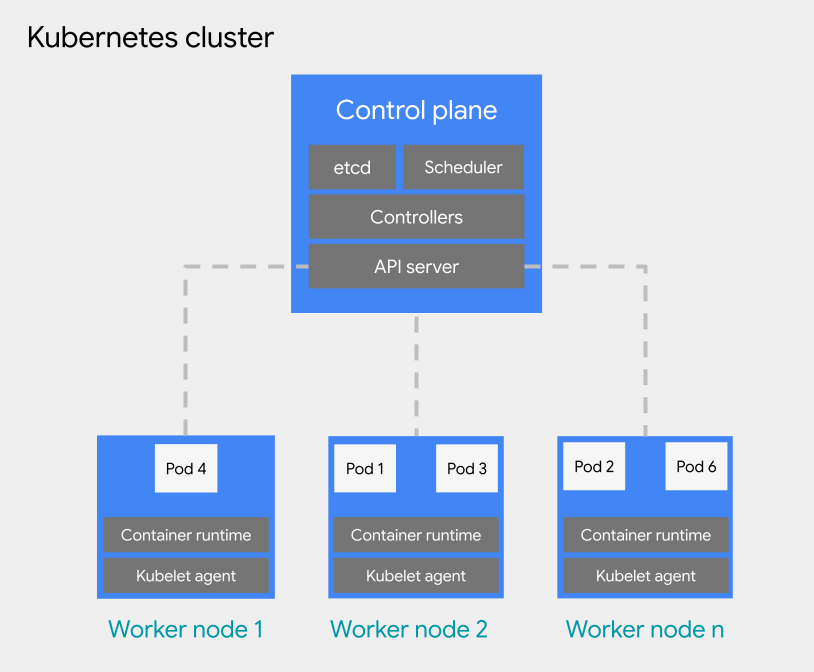
You can deploy container-based workloads to a pod on a Kubernetes cluster. A Kubernetes cluster consists of the following node types:
Control plane node: runs the management services, such as scheduling, etcd, and an API server.
Worker node: runs your pods and container applications.
There are two configuration types for Kubernetes clusters:
- Shared clusters: An organization-scoped Kubernetes cluster that can span multiple projects and is not managed by a single project, but rather, is attached to them.
- Standard clusters: A project-scoped Kubernetes cluster that manages cluster resources within a project, and cannot span multiple projects.
For more information, see Kubernetes cluster configurations.
Kubernetes clusters offer various resource hierarchical options, since shared clusters are organization-scoped and standard clusters are project-scoped. This is a fundamental difference that Kubernetes clusters have compared to VMs. A VM is a child resource of a project, and cannot be configured to operate outside of a project. For more information about how to design your Kubernetes cluster infrastructure, see Best practices for designing Kubernetes clusters.
For pod scheduling within a Kubernetes cluster, GDC adopts the general Kubernetes concepts of scheduling, preemption, and eviction. Best practices on scheduling pods within a cluster vary based on the requirements of your workload.
For more information about Kubernetes clusters, see the Kubernetes cluster overview. For more information about managing your containers in a Kubernetes cluster, see Container workloads in GDC.
Best practices for designing Kubernetes clusters
This section introduces best practices for designing Kubernetes clusters:
- Create separate clusters per software development environment
- Create fewer, larger clusters
- Create fewer, larger node pools within a cluster
Consider each best practice to design a resilient cluster design for your container workload lifecycle.
Create separate clusters per software development environment
In addition to separate projects per software development
environment,
we recommend that you design separate Kubernetes clusters per software
development environment. A software development environment is an area within
your GDC universe intended for all operations that
correspond to a designated lifecycle phase. For example, if you have three
software development environments named development, staging, and
production in your organization, you could create a separate set of Kubernetes
clusters for each environment and attach projects to each cluster based on your
needs.
We recommend using standard clusters in pre-production lifecycles that are scoped to a single project, allowing for any destructive processes related to testing to be isolated away from production projects, whereas shared clusters are ideal for production environments that can span multiple projects. A shared cluster that hosts production workloads that spans across multiple projects provides a shared deployment area where standard clusters scoped to a single project can promote their workloads directly to the production environment.
Defined standard clusters for each software development environment assumes that pre-production workloads within a software development environment are confined to that cluster. A Kubernetes cluster might be further subdivided into multiple node pools or use taints for workload isolation.
By separating Kubernetes clusters by software development environment, you isolate resource consumption, access policies, maintenance events, and cluster-level configuration changes between your production and non-production workloads.
The following diagram shows a sample Kubernetes cluster design for multiple workloads that span projects, clusters, software development environments, and machine classes provided by differing node pools.
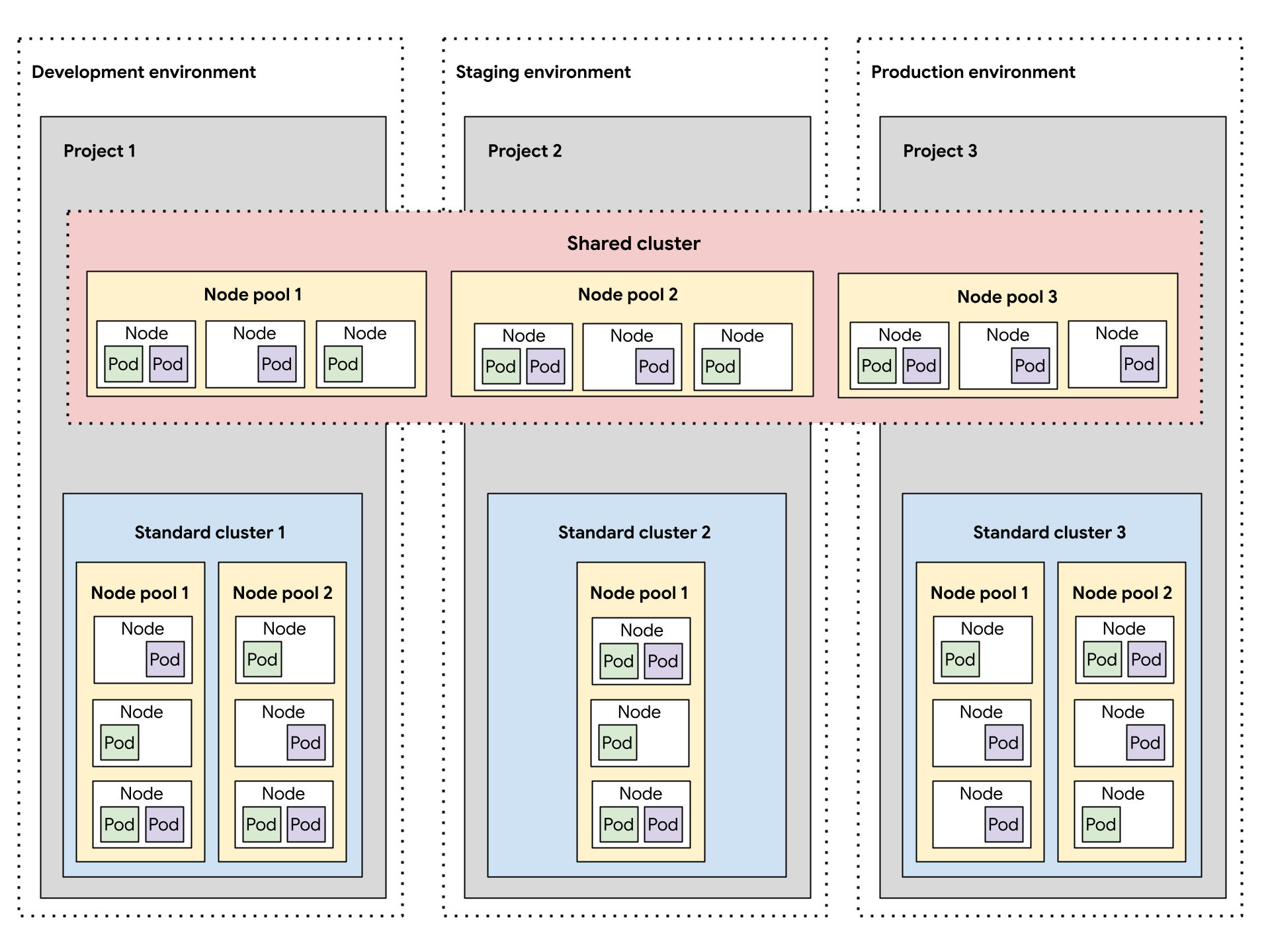
This sample architecture assumes that workloads within the development, staging, and production software development environments can share clusters. Each environment has a separate standard cluster, which are further subdivided into multiple node pools for different machine class requirements. The shared cluster spans all the software development environments, providing a common deployment area for all environments.
Alternatively, designing multiple standard clusters per software development environment is useful for container operations like the following scenarios:
- You have some workloads pinned to a specific Kubernetes version, so you maintain different clusters at different versions.
- You have some workloads that require different cluster configuration needs, such as the backup policy, so you create multiple clusters with different configurations.
- You run copies of a cluster in parallel to facilitate disruptive version upgrades or a blue-green deployment strategy.
- You build an experimental workload that risks throttling the API server or other single point of failures within a cluster, so you isolate it from existing workloads.
You must adapt your software development environments to the requirements set by your container operations.
Create fewer clusters
For efficient resource utilization, we recommend designing the fewest number of Kubernetes clusters that meet your requirements for separating software development environments and container operations. Each additional cluster incurs additional overhead resource consumption, such as additional control plane nodes required. Therefore, a larger cluster with many workloads utilizes underlying compute resources more efficiently than many small clusters.
When there are multiple clusters with similar configurations, it creates additional maintenance overhead to monitor cluster capacity and plan for cross-cluster dependencies.
If a cluster is approaching capacity, we recommend that you add additional nodes to a cluster instead of creating a new cluster.
Create fewer node pools within a cluster
For efficient resource utilization, we recommend designing fewer, larger node pools within a Kubernetes cluster.
Configuring multiple node pools is useful when you need to schedule pods that require a different machine class than others. Create a node pool for each machine class your workloads require, and set the node capacity to autoscaling to allow for efficient usage of compute resources.