

This document describes the Kubernetes cluster options and capabilities available in Google Distributed Cloud (GDC) air-gapped. Kubernetes clusters provide a managed Kubernetes service with Google Kubernetes Engine (GKE) that lets you deploy and run container workloads using industry standard Kubernetes methodologies.
This document is for audiences such as IT administrators within the platform administrator group and application developers within the application operator group who are responsible for managing container workloads within their organization. For more information, see Audiences for GDC air-gapped documentation.
GKE in a disconnected environment
GKE on GDC is a managed Kubernetes service that brings core features and functionality of GKE to your disconnected environment. For the purposes of documentation, clusters managed by GKE on GDC are termed Kubernetes clusters. For more information about Kubernetes concepts, see Start learning about Kubernetes.
GKE on GDC lets you create and manage container workloads in your disconnected environment similarly to using GKE in the public Google Cloud.
The following table provides a comparison between clusters in GDC and Google Cloud:
| Feature | Description | GKE on GDC | GKE on Google Cloud |
|---|---|---|---|
| Fully disconnected | Operable in an environment with no connection to the internet. | Yes | No |
| Backup solution | Service for creating copies of data and configurations for a cluster to ensure data protection and enable recovery from failures, errors, or cyberattacks. | Backup for GDC | Backup for GKE |
| Integrated logging and monitoring | Service that combines collecting and analyzing logs with monitoring key performance indicators for a comprehensive view of cluster behavior. | Prometheus, Grafana, and Loki | Cloud Logging and Cloud Monitoring |
| Managed container registry | Service that hosts and organizes container images, handling infrastructure, availability, and security for the images. | Managed Harbor Service | Artifact Registry |
| Container isolation | Ability to keep container applications and their dependencies separate and independent from each other and the host system. | Yes | Yes |
| GPU and TPU support | High performance computing units that allow for enhanced processing capabilities. | GPUs only | GPUs and TPUs |
| Horizontal pod autoscaling | Automated adjustment of the number of pod replicas in a deployment or other workload based on observed metrics like CPU or memory usage. | Yes | Yes |
| Linux containers | Isolated environment for running applications on a Linux host. | Yes | Yes |
| UI for clusters | Graphical interface that provides a user-friendly, visual way to manage and monitor a cluster. | Shared cluster only | Yes |
| UI for cluster resources | Graphical interface that provides a user-friendly, visual way to manage and monitor the container workloads of a cluster. | View only | Yes |
For more information about GKE and its full set of features available in public Google Cloud, see Explore GKE documentation.
Benefits of Kubernetes clusters
GKE on GDC provides key benefits for your Kubernetes clusters, such as the following:
- Multi-cluster lifecycle management: Deploy multiple clusters in GDC simultaneously for a variety of hosted instances for your container workloads.
- Fully supported Kubernetes distribution: Create clusters bundled with up-to-date standard Kubernetes features.
- Cost visibility: Monitor real-time usage and insights, helping you continuously monitor your Kubernetes costs.
- Multi-team management: Give multiple groups of users access to Kubernetes clusters for flexible management boundaries.
- Automated Kubernetes workflows: Rely on automatic node provisioning and horizontal pod autoscaling to seamlessly manage your container workloads.
All of these features come standard with GKE on GDC, and are available for use with clusters created by the managed Kubernetes service.
GDC cluster architecture
Kubernetes clusters are logically separated from each other to provide different failure domains and isolation guarantees. In some cases, they are even physically separated.
You configure a Kubernetes cluster as either a shared cluster or a standard cluster. A shared cluster spans multiple projects. A standard cluster is scoped to a single project. For more information, see Kubernetes cluster configurations.
A Kubernetes cluster consists of a control plane and worker machines called nodes. The control plane and nodes make up the Kubernetes cluster orchestration system. GKE on GDC manages the entire underlying infrastructure of clusters, including the control plane and all system components. You are responsible for managing the worker nodes that run your containerized workloads.
The following diagram shows the architecture of a Kubernetes cluster:
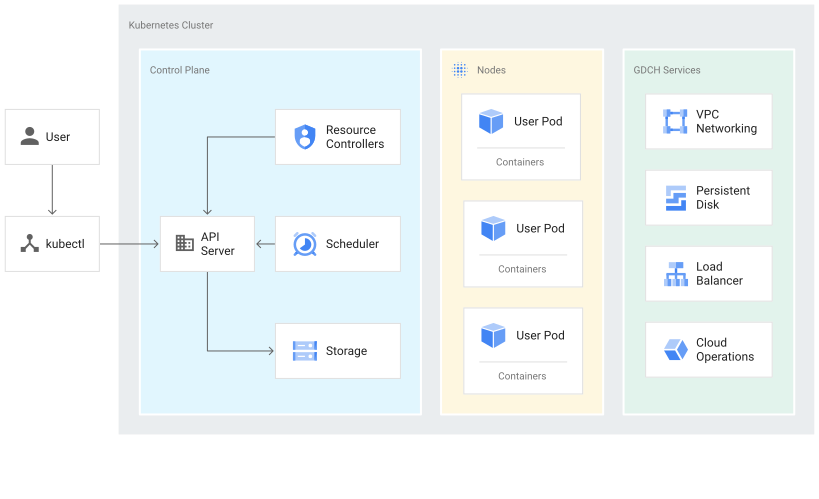
This diagram shows a Kubernetes cluster with the following components:
- Control plane, which includes an API server and predefined services such as storage and default pod scheduling.
- Worker nodes that run container workloads.
- GDC services, such as VPC networking and load balancing, which are provided by the GKE on GDC managed service.
About the control plane
The control plane runs processes such as the Kubernetes API server, scheduler, and core resource controllers. GKE on GDC manages the control plane lifecycle from cluster creation to deletion. This includes upgrades to the Kubernetes version running on the control plane, which GDC performs automatically, or manually at your request if you prefer to upgrade earlier than the automatic schedule.
Control plane and the Kubernetes API
The control plane is the unified endpoint for your cluster. You interact with
the control plane through Kubernetes API calls. The control plane runs the
Kubernetes API server process, or kube-apiserver, to handle API requests. You
can make Kubernetes API calls in the following ways:
- Direct calls: KRM
- Indirect calls: Kubernetes command-line clients, such as the kubectl CLI or the GDC console.
The API server process is the hub for all communication for the cluster. All internal cluster components such as nodes, system processes, and application controllers act as clients of the API server.
Your API requests tell Kubernetes what your chosen state is for the objects in your cluster. Kubernetes attempts to constantly maintain that state. Kubernetes lets you configure objects in the API either imperatively or declaratively.
Worker node management
The control plane manages what runs on all of the cluster's nodes. The control plane schedules workloads and manages the workloads' lifecycle, scaling, and upgrades. The control plane also manages network and storage resources for those workloads. The control plane and nodes communicate with each other using Kubernetes APIs.
About nodes
Nodes are the worker machines that run your containerized applications and other workloads. The individual machines are virtual machines (VMs) that GKE on GDC creates. The control plane manages and receives updates on each node's self-reported status.
A node runs the services necessary to support the containers that make up your cluster's workloads. These include the runtime and the Kubernetes node agent, or kubelet, which communicates with the control plane and is responsible for starting and running containers scheduled on the node.
GKE on GDC also runs a number of system containers that run as per-node agents, called DaemonSets, that provide features such as log collection and intra-cluster network connectivity.
Nodes are grouped into a node pool, which is a set of nodes within a cluster that share the same configuration and characteristics. You can't configure a single node in a node pool.
Custom node pools are useful when scheduling pods that require more resources than others, such as more memory or local disk space. You can use node taints if you need more control over scheduling pods.
For more information, see Manage node pools.
Kubernetes cluster configurations
The following cluster configurations are available with the GKE on GDC service to manage your container workloads in an organization:
- Shared cluster: An organization-scoped Kubernetes cluster that spans multiple projects and is not managed by a single project, but rather, is attached to them.
- Standard cluster: A project-scoped Kubernetes cluster that manages cluster resources within a project, and can't span multiple projects.
You can choose the cluster that best fits your requirements for managing container workloads. For more information, see Kubernetes cluster configurations.
GPU workloads in a cluster
GDC provides NVIDIA GPU support for Kubernetes clusters, and they run your GPU devices as user workloads. For example, you might prefer running artificial intelligence (AI) and machine learning (ML) notebooks in a GPU environment. You must configure your cluster to support GPU devices by provisioning GPU machines for them. For a list of supported machine types for Kubernetes clusters in GDC, see Cluster node machines.
GPUs are statically allocated. The first four GPUs are always dedicated to workloads like pretrained AI and ML APIs. These GPUs don't run on a Kubernetes cluster. The remaining GPUs are available to Kubernetes clusters. AI and ML notebooks run on Kubernetes clusters.
Be sure to allocate GPU machines for the correct cluster types to let components such as AI and ML APIs run in your cluster. For more information, see Create a shared cluster or Create a standard cluster.
Limitations for GKE on GDC
The following GKE capabilities are limitations not available for GKE on GDC:
- Automated cluster management
- Automatic node repairs: Kubernetes clusters in GDC can't automatically fix nodes when they become unhealthy.
- Automatic cluster upgrades: GDC Kubernetes clusters can't automatically upgrade nodes with new Kubernetes version updates. You must manually upgrade a cluster to incorporate new Kubernetes updates.
- Cluster autoscaling: Kubernetes clusters in GDC can't automatically adjust their node size based on workload demands.
- GKE Autopilot: GDC doesn't offer a fully managed operational mode for Kubernetes clusters to handle infrastructure.
- Vertical pod autoscaling: CPU and memory requests and limits for pods within a GDC Kubernetes cluster can't automatically adjust based on workload demands.
- Multi-Cloud
- Attach multi-cloud clusters: GDC can't manage Kubernetes clusters that were created in other cloud environments.
- Connect gateway: GDC can't connect clusters from other cloud providers with your Google Cloud identity for authentication.
- Multi Cluster Ingress: Kubernetes clusters in GDC can't share load balancing resources across clusters.
- Operations
- Multi-zone resource management: Kubernetes clusters and containers in GDC don't span multiple zones as a global resource.
- Windows container support: Container applications in GDC can't run in isolated environments on a Windows host.