


הסוכן המובנה מראש שיצרתם בשלב הקודם דורש webhook. במדריך הזה נשתמש בפונקציות Cloud Run כדי לארח את ה-webhook, כי הן פשוטות. אבל יש עוד הרבה דרכים לארח שירות webhook. בדוגמה הזו נעשה שימוש בשפת התכנות Go, אבל אפשר להשתמש בכל שפה שנתמכת על ידי פונקציות Cloud Run.
יצירת הפונקציה
אפשר ליצור פונקציות Cloud Run באמצעות מסוף Google Cloud (למשאבי העזרה, לפתיחת המסוף). כדי ליצור פונקציה למדריך הזה:
חשוב שהנציג שלכם ב-Dialogflow והפונקציה יהיו שייכים לאותו פרויקט. זו הדרך הקלה ביותר להעניק ל-Dialogflow גישה מאובטחת לפונקציה. לפני שיוצרים את הפונקציה, צריך לבחור את הפרויקט במסוף Google Cloud .
פותחים את דף הסקירה הכללית של Cloud Run functions.
לוחצים על Create Function (יצירת פונקציה) ומגדירים את השדות הבאים:
- סביבה: דור ראשון
- שם הפונקציה: tutorial-telecommunications-webhook
- Region: אם ציינתם אזור לסוכן, צריך להשתמש באותו אזור.
- HTTP Trigger type: HTTP
- כתובת URL: לוחצים על לחצן ההעתקה ושומרים את הערך. תצטרכו את כתובת ה-URL הזו כשמגדירים את ה-webhook.
- אימות: נדרש אימות
- נדרש HTTPS: מסומן
לוחצים על Save.
לוחצים על הבא (אין צורך בהגדרות מיוחדות של זמן ריצה, build, חיבורים או אבטחה).
מגדירים את השדות הבאים:
- Runtime (זמן ריצה): בוחרים את זמן הריצה העדכני של Go.
- קוד מקור: עורך מוטבע
- נקודת כניסה: HandleWebhookRequest
מחליפים את הקוד בקוד הבא:
package cxtwh

import (
	"context"
	"encoding/json"
	"fmt"
	"log"
	"net/http"
	"os"
	"strings"

	"cloud.google.com/go/spanner"
  "google.golang.org/grpc/codes"
)

// client is a Spanner client, created only once to avoid creation
// for every request.
// See: https://cloud.google.com/functions/docs/concepts/go-runtime#one-time_initialization
var client *spanner.Client

func init() {
	// If using a database, these environment variables will be set.
	pid := os.Getenv("PROJECT_ID")
	iid := os.Getenv("SPANNER_INSTANCE_ID")
	did := os.Getenv("SPANNER_DATABASE_ID")
	if pid != "" && iid != "" && did != "" {
		db := fmt.Sprintf("projects/%s/instances/%s/databases/%s",
			pid, iid, did)
		log.Printf("Creating Spanner client for %s", db)
		var err error
		// Use the background context when creating the client,
		// but use the request context for calls to the client.
		// See: https://cloud.google.com/functions/docs/concepts/go-runtime#contextcontext
		client, err = spanner.NewClient(context.Background(), db)
		if err != nil {
			log.Fatalf("spanner.NewClient: %v", err)
		}
	}
}

type fulfillmentInfo struct {
	Tag string `json:"tag"`
}

type sessionInfo struct {
	Session    string         `json:"session"`
	Parameters map[string]any `json:"parameters"`
}

type text struct {
	Text []string `json:"text"`
}

type responseMessage struct {
	Text text `json:"text"`
}

type fulfillmentResponse struct {
	Messages []responseMessage `json:"messages"`
}

// webhookRequest is used to unmarshal a WebhookRequest JSON object. Note that
// not all members need to be defined--just those that you need to process.
// As an alternative, you could use the types provided by the Dialogflow protocol buffers:
// https://pkg.go.dev/google.golang.org/genproto/googleapis/cloud/dialogflow/cx/v3#WebhookRequest
type webhookRequest struct {
	FulfillmentInfo fulfillmentInfo `json:"fulfillmentInfo"`
	SessionInfo     sessionInfo     `json:"sessionInfo"`
}

// webhookResponse is used to marshal a WebhookResponse JSON object. Note that
// not all members need to be defined--just those that you need to process.
// As an alternative, you could use the types provided by the Dialogflow protocol buffers:
// https://pkg.go.dev/google.golang.org/genproto/googleapis/cloud/dialogflow/cx/v3#WebhookResponse
type webhookResponse struct {
	FulfillmentResponse fulfillmentResponse `json:"fulfillmentResponse"`
	SessionInfo         sessionInfo         `json:"sessionInfo"`
}

// detectCustomerAnomaly handles same-named tag.
func detectCustomerAnomaly(ctx context.Context, request webhookRequest) (
	webhookResponse, error) {
	// Create session parameters that are populated in the response.
	// This example hard codes values, but a real system
	// might look up this value in a database.
	p := map[string]any{
		"anomaly_detect":        "false",
		"purchase":              "device protection",
		"purchase_amount":       "12.25",
		"bill_without_purchase": "54.34",
		"total_bill":            "66.59",
		"first_month":           "January 1",
	}
	// Build and return the response.
	response := webhookResponse{
		SessionInfo: sessionInfo{
			Parameters: p,
		},
	}
	return response, nil
}

// validatePhoneLine handles same-named tag.
func validatePhoneLine(ctx context.Context, request webhookRequest) (
	webhookResponse, error) {
	// Create session parameters that are populated in the response.
	// This example hard codes values, but a real system
	// might look up this value in a database.
	p := map[string]any{
		"domestic_coverage":   "true",
		"phone_line_verified": "true",
	}
	// Build and return the response.
	response := webhookResponse{
		SessionInfo: sessionInfo{
			Parameters: p,
		},
	}
	return response, nil
}

// cruisePlanCoverage handles same-named tag.
func cruisePlanCoverage(ctx context.Context, request webhookRequest) (
	webhookResponse, error) {
	// Get the existing parameter values
	port := request.SessionInfo.Parameters["destination"].(string)
	port = strings.ToLower(port)
	// Check if the port is covered
	covered := "false"
	if client != nil {
		// A Spanner client exists, so access the database.
		// See: https://pkg.go.dev/cloud.google.com/go/spanner#ReadOnlyTransaction.ReadRow
		row, err := client.Single().ReadRow(ctx,
			"Destinations",
			spanner.Key{port},
			[]string{"Covered"})
		if err != nil {
			if spanner.ErrCode(err) == codes.NotFound {
				log.Printf("Port %s not found", port)
			} else {
				return webhookResponse{}, err
			}
		} else {
			// A row was returned, so check the value
			var c bool
			err := row.Column(0, &c)
			if err != nil {
				return webhookResponse{}, err
			}
			if c {
				covered = "true"
			}
		}
	} else {
		// No Spanner client exists, so use hardcoded list of ports.
		coveredPorts := map[string]bool{
			"anguilla": true,
			"canada":   true,
			"mexico":   true,
		}
		_, ok := coveredPorts[port]
		if ok {
			covered = "true"
		}
	}
	// Create session parameters that are populated in the response.
	// This example hard codes values, but a real system
	// might look up this value in a database.
	p := map[string]any{
		"port_is_covered": covered,
	}
	// Build and return the response.
	response := webhookResponse{
		SessionInfo: sessionInfo{
			Parameters: p,
		},
	}
	return response, nil
}

// internationalCoverage handles same-named tag.
func internationalCoverage(ctx context.Context, request webhookRequest) (
	webhookResponse, error) {
	// Get the existing parameter values
	destination := request.SessionInfo.Parameters["destination"].(string)
	destination = strings.ToLower(destination)
	// Hardcoded list of covered international monthly destinations
	coveredMonthly := map[string]bool{
		"anguilla":  true,
		"australia": true,
		"brazil":    true,
		"canada":    true,
		"chile":     true,
		"england":   true,
		"france":    true,
		"india":     true,
		"japan":     true,
		"mexico":    true,
		"singapore": true,
	}
	// Hardcoded list of covered international daily destinations
	coveredDaily := map[string]bool{
		"brazil":    true,
		"canada":    true,
		"chile":     true,
		"england":   true,
		"france":    true,
		"india":     true,
		"japan":     true,
		"mexico":    true,
		"singapore": true,
	}
	// Check coverage
	coverage := "neither"
	_, monthly := coveredMonthly[destination]
	_, daily := coveredDaily[destination]
	if monthly && daily {
		coverage = "both"
	} else if monthly {
		coverage = "monthly_only"
	} else if daily {
		coverage = "daily_only"
	}
	// Create session parameters that are populated in the response.
	// This example hard codes values, but a real system
	// might look up this value in a database.
	p := map[string]any{
		"coverage": coverage,
	}
	// Build and return the response.
	response := webhookResponse{
		SessionInfo: sessionInfo{
			Parameters: p,
		},
	}
	return response, nil
}

// cheapestPlan handles same-named tag.
func cheapestPlan(ctx context.Context, request webhookRequest) (
	webhookResponse, error) {
	// Create session parameters that are populated in the response.
	// This example hard codes values, but a real system
	// might look up this value in a database.
	p := map[string]any{
		"monthly_cost":   70,
		"daily_cost":     100,
		"suggested_plan": "monthly",
	}
	// Build and return the response.
	response := webhookResponse{
		SessionInfo: sessionInfo{
			Parameters: p,
		},
	}
	return response, nil
}

// Define a type for handler functions.
type handlerFn func(ctx context.Context, request webhookRequest) (
	webhookResponse, error)

// Create a map from tag to handler function.
var handlers map[string]handlerFn = map[string]handlerFn{
	"detectCustomerAnomaly": detectCustomerAnomaly,
	"validatePhoneLine":     validatePhoneLine,
	"cruisePlanCoverage":    cruisePlanCoverage,
	"internationalCoverage": internationalCoverage,
	"cheapestPlan":          cheapestPlan,
}

// handleError handles internal errors.
func handleError(w http.ResponseWriter, err error) {
	log.Printf("ERROR: %v", err)
	http.Error(w,
		fmt.Sprintf("ERROR: %v", err),
		http.StatusInternalServerError)
}

// HandleWebhookRequest handles WebhookRequest and sends the WebhookResponse.
func HandleWebhookRequest(w http.ResponseWriter, r *http.Request) {
	var request webhookRequest
	var response webhookResponse
	var err error

	// Read input JSON
	if err = json.NewDecoder(r.Body).Decode(&request); err != nil {
		handleError(w, err)
		return
	}
	log.Printf("Request: %+v", request)

	// Get the tag from the request, and call the corresponding
	// function that handles that tag.
	tag := request.FulfillmentInfo.Tag
	if fn, ok := handlers[tag]; ok {
		response, err = fn(r.Context(), request)
	} else {
		err = fmt.Errorf("Unknown tag: %s", tag)
	}
	if err != nil {
		handleError(w, err)
		return
	}
	log.Printf("Response: %+v", response)

	// Send response
	if err = json.NewEncoder(w).Encode(&response); err != nil {
		handleError(w, err)
		return
	}
}
לוחצים על פריסה.
מחכים עד שאינדיקטור הסטטוס מראה שהפונקציה נפרסה בהצלחה. בזמן ההמתנה, כדאי לבדוק את הקוד שפרסתם.
הגדרת ה-webhook של הסוכן
עכשיו, כשה-webhook קיים כשירות, צריך לשייך אותו לסוכן. כדי להגדיר את ה-webhook לסוכן:
- פותחים את מסוף Dialogflow CX.
- בוחרים את הפרויקט ב-Google Cloud.
- בוחרים את הסוכן.
- לוחצים על הכרטיסייה ניהול.
- לוחצים על Webhooks.
- לוחצים על ה-webhook הקיים (שנוצר על ידי הסוכן המובנה).
- מעדכנים את Webhook URL לכתובת ה-URL של ה-webhook ששמרתם כשיצרתם את הפונקציה.
- מגדירים את Subtype (סוג משנה) בתור Standard (רגיל).
- לוחצים על Save.
התנסות בסוכן
הסוכן מוכן עכשיו לשימוש. לוחצים על הלחצן Test Agent (בדיקת הסוכן) כדי לפתוח את הסימולטור. נסה לנהל את השיחה הבאה עם הסוכן:
| תור בשיחה | את/ה | סוכן |
|---|---|---|
| 1 | שלום | היי, אני סוכן וירטואלי בתחום הטלקומוניקציה. אני יכול לעזור לך לפתור בעיות שקשורות לחיוב ולתוכניות, לפתור בעיות ולהוסיף תוכניות נסיעה ושיט. איך אוכל לעזור לך היום? |
| 2 | אני רוצה להוסיף תוכנית שיוט | אבדוק את זה בשבילך. מה מספר הטלפון שלך אצלנו? |
| 3 | 123-123-1234 | כמה ימים תימשך ההפלגה? |
| 4 | 7 | אפשרות 1 כוללת שיחות והודעות טקסט. העלות היא $[XX] ליום. מידע נוסף זמין כאן [URL]. אפשרות 2 כוללת שיחות, הודעות טקסט ונתונים. העלות היא $[XX] ליום. מידע נוסף זמין כאן [URL]. איזה תוכנית קרוז ברצונך להוסיף? |
| 5 | אפשרות 1 | הבנתי. הוספתי את התוכנית הזו לחשבון שלך. יכול להיות שתצטרכו כיסוי גם ביבשה במהלך השייט. באיזה נמל תעצרו? |
| 6 | מקסיקו | וכמה ימים תשהו שם? |
| 7 | 3 | חדשות טובות! במקסיקו יש כיסוי בחינם ביבשה. הכול מוכן. יש עוד משהו שאוכל לעזור בו היום? |
השיחה הזו נוהלה על ידי התהליך Cruise Plan.
בפנייה השישית בשיחה,
ציינת את 'מקסיקו' כנמל היעד.
יציאת היעד ומספר הימים שבהם נשארים ביעד מתועדים כפרמטרים של הטופס destination ו-trip_duration בדף Collect Port.
אפשר לעיין בסוכן כדי למצוא את הגדרות הפרמטרים האלה.
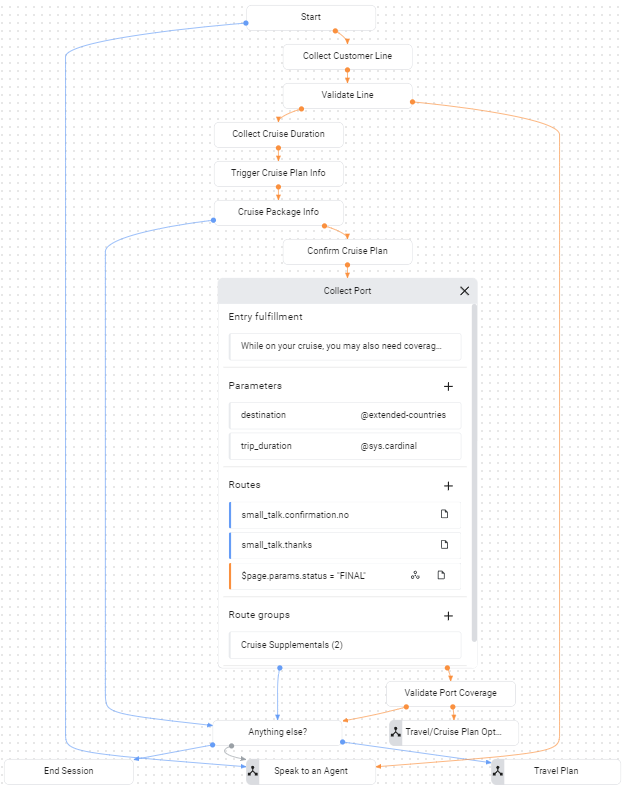
בדף Collect Port, יש מסלול מותנה להשלמת הטופס:
$page.params.status = "FINAL".
אחרי שמספקים את שני הפרמטרים של הטופס, מתבצעת קריאה לנתיב הזה.
הנתיב הזה קורא ל-webhook ומספק את תג cruisePlanCoverage ל-webhook.
אם בודקים את קוד ה-webhook שלמעלה, אפשר לראות שהתג הזה מפעיל את אותה פונקציה בעלת שם.
הפונקציה הזו קובעת אם היעד שצוין כלול בתוכנית. הפונקציה בודקת אם משתני סביבה ספציפיים מוגדרים עם מידע להתחברות למסד הנתונים. אם משתני הסביבה האלה לא מוגדרים, הפונקציה משתמשת ברשימה של יעדים שמוגדרת בתוך הקוד. בשלבים הבאים, תשנו את הסביבה של הפונקציה כדי שהיא תאחזר נתונים ממסד נתונים, במטרה לאמת את הכיסוי של התוכנית ליעדים.
פתרון בעיות
קוד ה-webhook כולל הצהרות רישום ביומן. אם נתקלתם בבעיות, נסו לצפות ביומנים של הפונקציה.
מידע נוסף
מידע נוסף על השלבים שלמעלה: