שליחת עבודה

אפשר לשלוח עבודה לאשכול קיים של Managed Service for Apache Spark באמצעות בקשת HTTP או בקשה פרוגרמטית של jobs.submit API, באמצעות כלי שורת הפקודה gcloud של Google Cloud CLI בחלון טרמינל מקומי או ב-Cloud Shell, או ממסוףGoogle Cloud שנפתח בדפדפן מקומי. אפשר גם להתחבר באמצעות SSH למופע הראשי באשכול, ואז להריץ משימה ישירות מהמופע בלי להשתמש ב-Managed Service for Apache Spark.

איך שולחים משרה

המסוף

פותחים את הדף Managed Service for Apache Spark Submit a job בדפדפן במסוף Google Cloud .

דוגמה לעבודת Spark

כדי לשלוח עבודת Spark לדוגמה, ממלאים את השדות בדף Submit a job (שליחת עבודה) באופן הבא:

  1. בוחרים את שם האשכול מתוך רשימת האשכולות.
  2. מגדירים את סוג העבודה לערך Spark.
  3. מגדירים את Main class or jar (הכיתה או קובץ ה-JAR הראשיים) ל-org.apache.spark.examples.SparkPi.
  4. מגדירים את Arguments (ארגומנטים) לארגומנט היחיד 1000.
  5. הוספת file:///usr/lib/spark/examples/jars/spark-examples.jar אל קבצי Jar:
    1. file:/// מציין סכמת Hadoop LocalFileSystem. ‫Managed Service for Apache Spark installed /usr/lib/spark/examples/jars/spark-examples.jar on the cluster's master node when it created the cluster.
    2. לחלופין, אפשר לציין נתיב ב-Cloud Storage‏ (gs://your-bucket/your-jarfile.jar) או נתיב במערכת הקבצים המבוזרת של Hadoop‏ (hdfs://path-to-jar.jar) לאחד מקובצי ה-JAR.

לוחצים על שליחה כדי להתחיל את העבודה. אחרי שהמשימה מתחילה, היא מתווספת לרשימת המשימות.
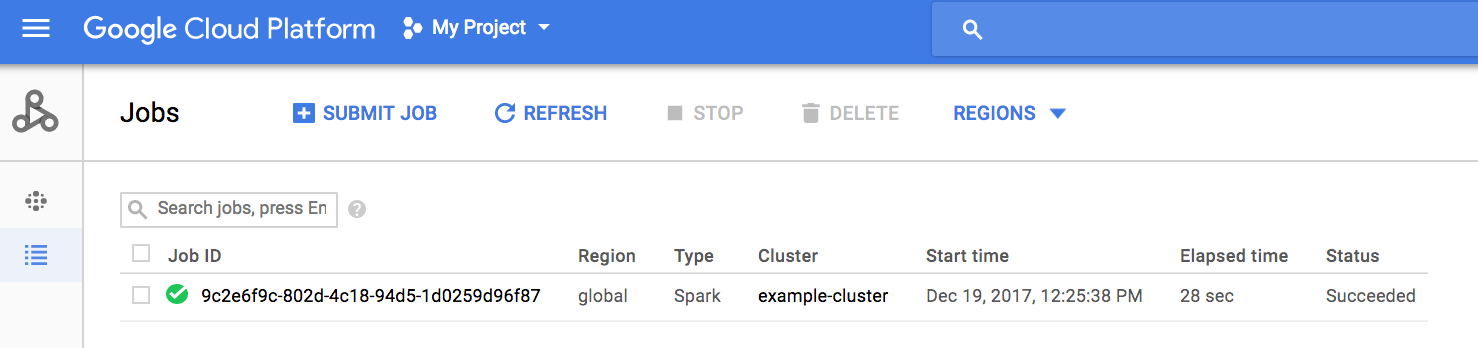
לוחצים על מזהה המשימה כדי לפתוח את הדף משימות, שבו אפשר לראות את הפלט של מנהל ההתקן של המשימה. הפלט של העבודה הזו כולל שורות ארוכות שחורגות מהרוחב של חלון הדפדפן, ולכן אפשר לסמן את התיבה Line wrapping כדי להציג את כל טקסט הפלט בתוך התצוגה, וכך לראות את התוצאה המחושבת של pi.
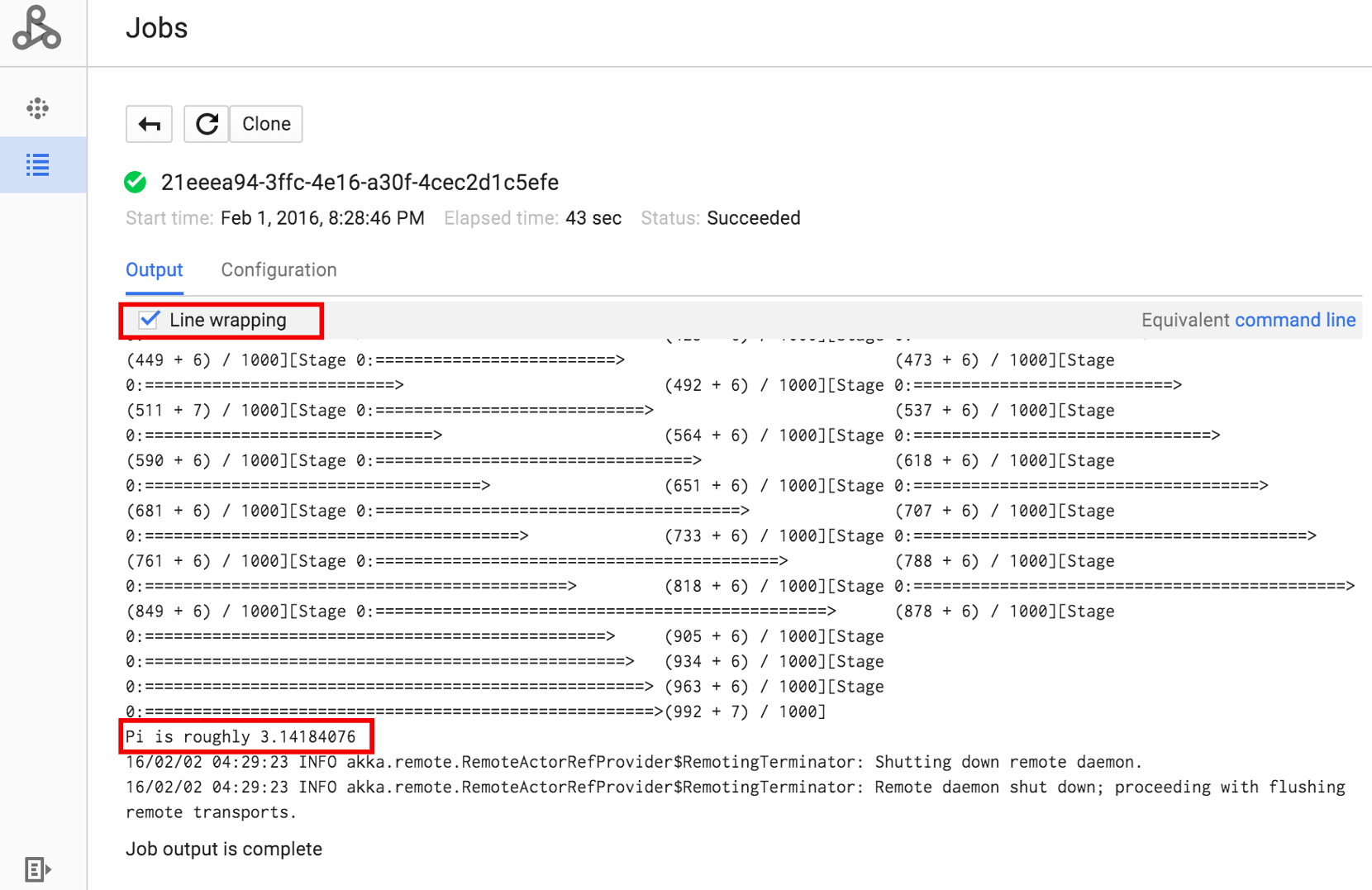
אפשר להציג את הפלט של מנהל התהליכים של העבודה משורת הפקודה באמצעות הפקודה gcloud dataproc jobs wait שמוצגת בהמשך (מידע נוסף זמין במאמר בנושא הצגת פלט של עבודה – פקודת GCLOUD). מעתיקים ומדביקים את מזהה הפרויקט כערך של הדגל --project ואת מזהה המשרה (שמופיע ברשימת המשרות) כארגומנט האחרון.

gcloud dataproc jobs wait job-id \
    --project=project-id \
    --region=region

קטעי קוד מהפלט של ה-driver עבור עבודת SparkPi הדגימה שצוינה למעלה:

...
2015-06-25 23:27:23,810 INFO [dag-scheduler-event-loop]
scheduler.DAGScheduler (Logging.scala:logInfo(59)) - Stage 0 (reduce at
SparkPi.scala:35) finished in 21.169 s

2015-06-25 23:27:23,810 INFO [task-result-getter-3] cluster.YarnScheduler
(Logging.scala:logInfo(59)) - Removed TaskSet 0.0, whose tasks have all
completed, from pool

2015-06-25 23:27:23,819 INFO [main] scheduler.DAGScheduler
(Logging.scala:logInfo(59)) - Job 0 finished: reduce at SparkPi.scala:35,
took 21.674931 s

Pi is roughly 3.14189648
...
Job [c556b47a-4b46-4a94-9ba2-2dcee31167b2] finished successfully.

driverOutputUri:
gs://sample-staging-bucket/google-cloud-dataproc-metainfo/cfeaa033-749e-48b9-...
...

gcloud

כדי לשלוח משימה לאשכול של Managed Service for Apache Spark, מריצים את הפקודה gcloud dataproc jobs submit של ה-CLI של gcloud באופן מקומי בחלון טרמינל או ב-Cloud Shell.

gcloud dataproc jobs submit job-command \
    --cluster=cluster-name \
    --region=region \
    other dataproc-flags \
    -- job-args
דוגמה לשליחת עבודת PySpark
  1. הצגת רשימה של hello-world.py שנגישים באופן ציבורי וממוקמים ב-Cloud Storage.
    gcloud storage cat gs://dataproc-examples/pyspark/hello-world/hello-world.py
    
    רשימת קבצים:

    #!/usr/bin/python
    import pyspark
    sc = pyspark.SparkContext()
    rdd = sc.parallelize(['Hello,', 'world!'])
    words = sorted(rdd.collect())
    print(words)
  2. שולחים את משימת Pyspark אל Managed Service for Apache Spark.
    gcloud dataproc jobs submit pyspark \
        gs://dataproc-examples/pyspark/hello-world/hello-world.py \
        --cluster=cluster-name  \
        --region=region
    
    פלט בטרמינל:
    Waiting for job output...
    …
    ['Hello,', 'world!']
    Job finished successfully.
    
דוגמה לשליחת עבודת Spark
  1. מריצים את הדוגמה SparkPi שהותקנה מראש בצומת הראשי של אשכול Managed Service for Apache Spark.
    gcloud dataproc jobs submit spark \
        --cluster=cluster-name \
        --region=region \
        --class=org.apache.spark.examples.SparkPi \
        --jars=file:///usr/lib/spark/examples/jars/spark-examples.jar \
        -- 1000
    
    פלט בטרמינל:
    Job [54825071-ae28-4c5b-85a5-58fae6a597d6] submitted.
    Waiting for job output…
    …
    Pi is roughly 3.14177148
    …
    Job finished successfully.
    …
    

REST

בקטע הזה נסביר איך לשלוח משימת Spark כדי לחשב את הערך המשוער של pi באמצעות API‏ jobs.submit של Managed Service for Apache Spark.

לפני שמשתמשים בנתוני הבקשה, צריך להחליף את הנתונים הבאים:

  • project-id: Google Cloud מזהה הפרויקט
  • region: cluster region
  • clusterName: שם האשכול

ה-method של ה-HTTP וכתובת ה-URL:

POST https://dataproc.googleapis.com/v1/projects/project-id/regions/region/jobs:submit

תוכן בקשת JSON:

{
  "job": {
    "placement": {
      "clusterName": "cluster-name"
    },
    "sparkJob": {
      "args": [
        "1000"
      ],
      "mainClass": "org.apache.spark.examples.SparkPi",
      "jarFileUris": [
        "file:///usr/lib/spark/examples/jars/spark-examples.jar"
      ]
    }
  }
}

כדי לשלוח את הבקשה צריך להרחיב אחת מהאפשרויות הבאות:

אתם אמורים לקבל תגובת JSON שדומה לזו:

{
  "reference": {
    "projectId": "project-id",
    "jobId": "job-id"
  },
  "placement": {
    "clusterName": "cluster-name",
    "clusterUuid": "cluster-Uuid"
  },
  "sparkJob": {
    "mainClass": "org.apache.spark.examples.SparkPi",
    "args": [
      "1000"
    ],
    "jarFileUris": [
      "file:///usr/lib/spark/examples/jars/spark-examples.jar"
    ]
  },
  "status": {
    "state": "PENDING",
    "stateStartTime": "2020-10-07T20:16:21.759Z"
  },
  "jobUuid": "job-Uuid"
}
Google Cloud

Java

  1. התקנה של ספריית הלקוח
  2. הגדרת Application Default Credentials
  3. מריצים את הקוד.
    
    import com.google.api.gax.longrunning.OperationFuture;
    import com.google.cloud.dataproc.v1.Job;
    import com.google.cloud.dataproc.v1.JobControllerClient;
    import com.google.cloud.dataproc.v1.JobControllerSettings;
    import com.google.cloud.dataproc.v1.JobMetadata;
    import com.google.cloud.dataproc.v1.JobPlacement;
    import com.google.cloud.dataproc.v1.SparkJob;
    import com.google.cloud.storage.Blob;
    import com.google.cloud.storage.Storage;
    import com.google.cloud.storage.StorageOptions;
    import java.io.IOException;
    import java.util.concurrent.ExecutionException;
    import java.util.regex.Matcher;
    import java.util.regex.Pattern;
    
    public class SubmitJob {
    
      public static void submitJob() throws IOException, InterruptedException {
        // TODO(developer): Replace these variables before running the sample.
        String projectId = "your-project-id";
        String region = "your-project-region";
        String clusterName = "your-cluster-name";
        submitJob(projectId, region, clusterName);
      }
    
      public static void submitJob(String projectId, String region, String clusterName)
          throws IOException, InterruptedException {
        String myEndpoint = String.format("%s-dataproc.googleapis.com:443", region);
    
        // Configure the settings for the job controller client.
        JobControllerSettings jobControllerSettings =
            JobControllerSettings.newBuilder().setEndpoint(myEndpoint).build();
    
        // Create a job controller client with the configured settings. Using a try-with-resources
        // closes the client,
        // but this can also be done manually with the .close() method.
        try (JobControllerClient jobControllerClient =
            JobControllerClient.create(jobControllerSettings)) {
    
          // Configure cluster placement for the job.
          JobPlacement jobPlacement = JobPlacement.newBuilder().setClusterName(clusterName).build();
    
          // Configure Spark job settings.
          SparkJob sparkJob =
              SparkJob.newBuilder()
                  .setMainClass("org.apache.spark.examples.SparkPi")
                  .addJarFileUris("file:///usr/lib/spark/examples/jars/spark-examples.jar")
                  .addArgs("1000")
                  .build();
    
          Job job = Job.newBuilder().setPlacement(jobPlacement).setSparkJob(sparkJob).build();
    
          // Submit an asynchronous request to execute the job.
          OperationFuture<Job, JobMetadata> submitJobAsOperationAsyncRequest =
              jobControllerClient.submitJobAsOperationAsync(projectId, region, job);
    
          Job response = submitJobAsOperationAsyncRequest.get();
    
          // Print output from Google Cloud Storage.
          Matcher matches =
              Pattern.compile("gs://(.*?)/(.*)").matcher(response.getDriverOutputResourceUri());
          matches.matches();
    
          Storage storage = StorageOptions.getDefaultInstance().getService();
          Blob blob = storage.get(matches.group(1), String.format("%s.000000000", matches.group(2)));
    
          System.out.println(
              String.format("Job finished successfully: %s", new String(blob.getContent())));
    
        } catch (ExecutionException e) {
          // If the job does not complete successfully, print the error message.
          System.err.println(String.format("submitJob: %s ", e.getMessage()));
        }
      }
    }

Python

  1. התקנה של ספריית הלקוח
  2. הגדרת Application Default Credentials
  3. מריצים את הקוד
    import re
    
    
    from google.cloud import dataproc_v1 as dataproc
    from google.cloud import storage
    
    
    def submit_job(project_id, region, cluster_name):
        # Create the job client.
        job_client = dataproc.JobControllerClient(
            client_options={"api_endpoint": f"{region}-dataproc.googleapis.com:443"}
        )
    
        # Create the job config. 'main_jar_file_uri' can also be a
        # Google Cloud Storage URL.
        job = {
            "placement": {"cluster_name": cluster_name},
            "spark_job": {
                "main_class": "org.apache.spark.examples.SparkPi",
                "jar_file_uris": ["file:///usr/lib/spark/examples/jars/spark-examples.jar"],
                "args": ["1000"],
            },
        }
    
        operation = job_client.submit_job_as_operation(
            request={"project_id": project_id, "region": region, "job": job}
        )
        response = operation.result()
    
        # Dataproc job output gets saved to the Google Cloud Storage bucket
        # allocated to the job. Use a regex to obtain the bucket and blob info.
        matches = re.match("gs://(.*?)/(.*)", response.driver_output_resource_uri)
    
        output = (
            storage.Client()
            .get_bucket(matches.group(1))
            .blob(f"{matches.group(2)}.000000000")
            .download_as_bytes()
            .decode("utf-8")
        )
    
        print(f"Job finished successfully: {output}")


Go

  1. התקנה של ספריית הלקוח
  2. הגדרת Application Default Credentials
  3. מריצים את הקוד.
    import (
    	"context"
    	"fmt"
    	"io"
    	"log"
    	"regexp"
    
    	dataproc "cloud.google.com/go/dataproc/apiv1"
    	"cloud.google.com/go/dataproc/apiv1/dataprocpb"
    	"cloud.google.com/go/storage"
    	"google.golang.org/api/option"
    )
    
    func submitJob(w io.Writer, projectID, region, clusterName string) error {
    	// projectID := "your-project-id"
    	// region := "us-central1"
    	// clusterName := "your-cluster"
    	ctx := context.Background()
    
    	// Create the job client.
    	endpoint := fmt.Sprintf("%s-dataproc.googleapis.com:443", region)
    	jobClient, err := dataproc.NewJobControllerClient(ctx, option.WithEndpoint(endpoint))
    	if err != nil {
    		log.Fatalf("error creating the job client: %s\n", err)
    	}
    
    	// Create the job config.
    	submitJobReq := &dataprocpb.SubmitJobRequest{
    		ProjectId: projectID,
    		Region:    region,
    		Job: &dataprocpb.Job{
    			Placement: &dataprocpb.JobPlacement{
    				ClusterName: clusterName,
    			},
    			TypeJob: &dataprocpb.Job_SparkJob{
    				SparkJob: &dataprocpb.SparkJob{
    					Driver: &dataprocpb.SparkJob_MainClass{
    						MainClass: "org.apache.spark.examples.SparkPi",
    					},
    					JarFileUris: []string{"file:///usr/lib/spark/examples/jars/spark-examples.jar"},
    					Args:        []string{"1000"},
    				},
    			},
    		},
    	}
    
    	submitJobOp, err := jobClient.SubmitJobAsOperation(ctx, submitJobReq)
    	if err != nil {
    		return fmt.Errorf("error with request to submitting job: %w", err)
    	}
    
    	submitJobResp, err := submitJobOp.Wait(ctx)
    	if err != nil {
    		return fmt.Errorf("error submitting job: %w", err)
    	}
    
    	re := regexp.MustCompile("gs://(.+?)/(.+)")
    	matches := re.FindStringSubmatch(submitJobResp.DriverOutputResourceUri)
    
    	if len(matches) < 3 {
    		return fmt.Errorf("regex error: %s", submitJobResp.DriverOutputResourceUri)
    	}
    
    	// Dataproc job output gets saved to a GCS bucket allocated to it.
    	storageClient, err := storage.NewClient(ctx)
    	if err != nil {
    		return fmt.Errorf("error creating storage client: %w", err)
    	}
    
    	obj := fmt.Sprintf("%s.000000000", matches[2])
    	reader, err := storageClient.Bucket(matches[1]).Object(obj).NewReader(ctx)
    	if err != nil {
    		return fmt.Errorf("error reading job output: %w", err)
    	}
    
    	defer reader.Close()
    
    	body, err := io.ReadAll(reader)
    	if err != nil {
    		return fmt.Errorf("could not read output from Dataproc Job: %w", err)
    	}
    
    	fmt.Fprintf(w, "Job finished successfully: %s", body)
    
    	return nil
    }
    

Node.js

  1. התקנה של ספריית הלקוח
  2. הגדרת Application Default Credentials
  3. מריצים את הקוד
    const dataproc = require('@google-cloud/dataproc');
    const {Storage} = require('@google-cloud/storage');
    
    // TODO(developer): Uncomment and set the following variables
    // projectId = 'YOUR_PROJECT_ID'
    // region = 'YOUR_CLUSTER_REGION'
    // clusterName = 'YOUR_CLUSTER_NAME'
    
    // Create a client with the endpoint set to the desired cluster region
    const jobClient = new dataproc.v1.JobControllerClient({
      apiEndpoint: `${region}-dataproc.googleapis.com`,
      projectId: projectId,
    });
    
    async function submitJob() {
      const job = {
        projectId: projectId,
        region: region,
        job: {
          placement: {
            clusterName: clusterName,
          },
          sparkJob: {
            mainClass: 'org.apache.spark.examples.SparkPi',
            jarFileUris: [
              'file:///usr/lib/spark/examples/jars/spark-examples.jar',
            ],
            args: ['1000'],
          },
        },
      };
    
      const [jobOperation] = await jobClient.submitJobAsOperation(job);
      const [jobResponse] = await jobOperation.promise();
    
      const matches =
        jobResponse.driverOutputResourceUri.match('gs://(.*?)/(.*)');
    
      const storage = new Storage();
    
      const output = await storage
        .bucket(matches[1])
        .file(`${matches[2]}.000000000`)
        .download();
    
      // Output a success message.
      console.log(`Job finished successfully: ${output}`);

שליחת משימה ישירות באשכול

אם רוצים להריץ משימה ישירות באשכול בלי להשתמש ב-Managed Service for Apache Spark, צריך להתחבר ל-SSH של צומת הראשי באשכול, ואז להריץ את המשימה בצומת הראשי.

אחרי שיוצרים חיבור SSH למכונת ה-VM הראשית, מריצים פקודות בחלון טרמינל בצומת הראשי של האשכול כדי:

  1. פותחים מעטפת Spark.
  2. מריצים משימת Spark פשוטה כדי לספור את מספר השורות בקובץ Python (בן שבע שורות) hello-world שנמצא בקובץ Cloud Storage שנגיש לכולם.
  3. יוצאים מהמעטפת.

    user@cluster-name-m:~$ spark-shell
    ...
    scala> sc.textFile("gs://dataproc-examples"
    + "/pyspark/hello-world/hello-world.py").count
    ...
    res0: Long = 7
    scala> :quit
    

הרצת משימות bash ב-Managed Service for Apache Spark

יכול להיות שתרצו להריץ סקריפט bash כעבודה של Managed Service for Apache Spark, או כי המנועים שבהם אתם משתמשים לא נתמכים כסוג עבודה ברמה העליונה של Managed Service for Apache Spark, או כי אתם צריכים לבצע הגדרה נוספת או חישוב של ארגומנטים לפני הפעלת עבודה באמצעות hadoop או spark-submit מהסקריפט.

דוגמה ל-Pig

נניח שהעתקתם סקריפט bash בשם hello.sh ל-Cloud Storage:

gcloud storage cp hello.sh gs://${BUCKET}/hello.sh

מכיוון שהפקודה pig fs משתמשת בנתיבי Hadoop, צריך להעתיק את הסקריפט מ-Cloud Storage ליעד שצוין כ-file:/// כדי לוודא שהוא נמצא במערכת הקבצים המקומית ולא ב-HDFS. הפקודות הבאות shמתייחסות למערכת הקבצים המקומית באופן אוטומטי, ולא צריך להוסיף את הקידומת file:///.

gcloud dataproc jobs submit pig --cluster=${CLUSTER} --region=${REGION} \
    -e='fs -cp -f gs://${BUCKET}/hello.sh file:///tmp/hello.sh; sh chmod 750 /tmp/hello.sh; sh /tmp/hello.sh'

לחלופין, מכיוון שהמשימות של Managed Service for Apache Spark שולחות קובץ בשלבי הארגומנט --jars לספרייה זמנית שנוצרת למשך משך החיים של המשימה, אפשר לציין את סקריפט ה-Shell של Cloud Storage כארגומנט --jars:

gcloud dataproc jobs submit pig --cluster=${CLUSTER} --region=${REGION} \
    --jars=gs://${BUCKET}/hello.sh \
    -e='sh chmod 750 ${PWD}/hello.sh; sh ${PWD}/hello.sh'

שימו לב שהארגומנט --jars יכול גם להפנות לסקריפט מקומי:

gcloud dataproc jobs submit pig --cluster=${CLUSTER} --region=${REGION} \
    --jars=hello.sh \
    -e='sh chmod 750 ${PWD}/hello.sh; sh ${PWD}/hello.sh'