


Google Managed Service for Apache Spark 集群附带的一些默认开源组件(例如 Apache Hadoop 和 Apache Spark)提供了网页界面。这些界面可用于管理和监控集群资源和设施,例如 YARN 资源管理器、Hadoop 分布式文件系统 (HDFS)、MapReduce 和 Spark。组件网关让 Managed Service for Apache Spark 的默认组件和可选组件可以安全访问 Web 端点。
使用受支持的 Managed Service for Apache Spark 映像版本创建的集群可以实现对组件网页界面的访问,无需依赖 SSH 隧道或修改防火墙规则来允许入站流量。
注意事项
- 用户必须具有 dataproc.clusters.use Identity and Access Management 权限才能访问已启用的组件网页界面。请参阅 Managed Service for Apache Spark 角色。
- 组件网关可用于访问 REST API(例如 Apache Hadoop YARN 和 Apache Livy)以及历史记录服务器。
- 启用组件网关后,Managed Service for Apache Spark 会向集群的第一个主节点添加以下服务:
- Apache Knox。默认的 Knox 网关 SSL 证书的有效期为自集群创建之日起 13 个月。如果该证书过期,所有组件网关网页界面网址都会变为无效。如需获取新证书,请参阅重新生成组件网关 SSL 证书。
- 反向代理
- 组件网关不支持直接访问
node:port接口,而是自动代理特定的服务子集。如果要访问节点 (node:port) 上的服务,请使用 SSH SOCKS 代理。
创建具有组件网关的集群
Google Cloud 控制台
使用 Google Cloud 控制台创建集群时,Managed Service for Apache Spark 组件界面(通过组件网关)默认处于启用状态。如需停用此设置,请清除在界面中启用组件复选框:
- 打开创建集群页面。
- 点击其他配置以展开该部分。
- 修改可选组件。
- 在随即打开的面板中,选中或清除在界面中启用组件复选框。
- 点击保存。
gcloud CLI 命令
在终端窗口或 Cloud Shell 中以本地方式运行 gcloud CLI gcloud dataproc clusters create 命令。
gcloud dataproc clusters create cluster-name \
    --enable-component-gateway \
    --region=region \
    other args ...
REST API
将 EndpointConfig.enableHttpPortAccess 属性设置为 true(作为 clusters.create 请求的一部分)。
使用组件网关网址访问网页界面
在集群上启用组件网关后,您可以通过点击 Google Cloud 控制台上提供的链接,连接集群第一个主实例节点上运行的组件网页界面。组件网关还通过将端口名映射为网址来设置 endpointConfig.httpPorts。作为使用控制台的替代方法,您可以使用 gcloud 命令行工具或 Dataproc REST API 查看此映射信息,然后将网址复制并粘贴到浏览器中以连接组件的界面。
控制台
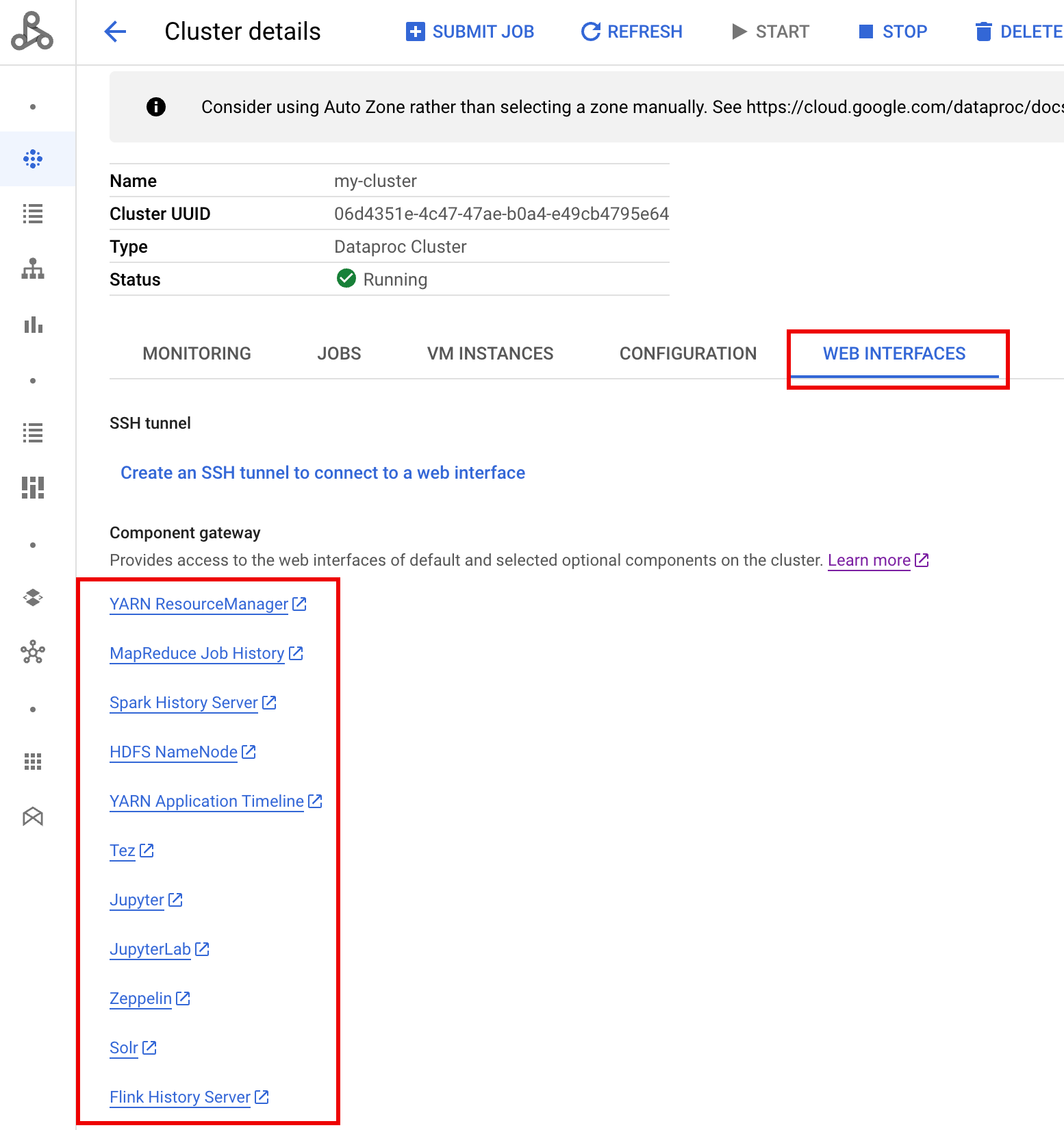
前往 Google Cloud 控制台上的 Managed Service for Apache Spark 集群表单,然后选择您的集群以打开集群详细信息表单。点击网页界面标签页以显示组件网关链接列表,这些链接指向安装在集群上的默认组件和可选组件的网页界面。点击链接以在本地浏览器中打开集群的主节点上运行的网页界面。
gcloud CLI 命令
在终端窗口或 Cloud Shell 中以本地方式运行 gcloud CLI gcloud dataproc clusters describe 命令。
gcloud dataproc clusters describe cluster-name \
    --region=region
输出示例
...
config:
  endpointConfig:
    enableHttpPortAccess: true
    httpPorts:
      HDFS NameNode:
 https://584bbf70-7a12-4120-b25c-31784c94dbb4-dot-dataproc.google.com/hdfs/
      MapReduce Job History:
 https://584bbf70-7a12-4120-b25c-31784c94dbb4-dot-dataproc.google.com/jobhistory/
      Spark HistoryServer:
 https://584bbf70-7a12-4120-b25c-31784c94dbb4-dot-dataproc.google.com/sparkhistory/
      YARN ResourceManager:
 https://584bbf70-7a12-4120-b25c-31784c94dbb4-dot-dataproc.google.com/yarn/
      YARN Application Timeline:
 https://584bbf70-7a12-4120-b25c-31784c94dbb4-dot-dataproc.google.com/apphistory/
...
REST API
调用 clusters.get 获取端口名称到网址的 endpointConfig.httpPorts 映射。将组件网关与 VPC-SC 搭配使用
组件网关支持 VPC Service Controls。为强制执行服务边界,通过组件网关对界面发送的请求视为 Dataproc API 表面的一部分,控制 dataproc.googleapis.com 权限的所有访问权限政策也将控制对组件网关界面的访问权限
Component Gateway 还支持依赖于专用 Google 连接的 VPC-SC 配置,以用于没有外部 IP 地址的 Managed Service for Apache Spark 集群,但您必须手动配置网络,以允许从 Managed Service for Apache Spark 主虚拟机通过受限的 Google 虚拟 IP 范围 199.36.153.4/30 访问 *.dataproc.cloud.google.com,方法如下:
- 按照相关说明为所有 Google API 配置专用 Google 连接。
- 使用 Cloud DNS 配置 DNS 或在 Managed Service for Apache Spark 主实例节点上本地配置 DNS 以允许访问
*.dataproc.cloud.google.com。
使用 Cloud DNS 配置 DNS
创建一个 Cloud DNS 地区,将发往 *.dataproc.cloud.google.com 的流量映射到受限的 Google API 虚拟 IP 地址范围。
为您的 VPC 网络创建一个托管专用地区。
gcloud dns managed-zones create ZONE_NAME \
 --visibility=private \
 --networks=https://www.googleapis.com/compute/v1/projects/PROJECT_ID/global/networks/NETWORK_NAME \
 --description=DESCRIPTION \
 --dns-name=dataproc.cloud.google.com \
 --project=PROJECT_ID
ZONE_NAME 是您要创建的区域的名称。例如
vpc。以下每个步骤都会用到该地区名称。PROJECT_ID 是托管 VPC 网络的项目的 ID。
NETWORK_NAME 为 VPC 网络的名称。
DESCRIPTION 是可选的,用于提供有关托管式区域的直观易懂说明。
启动一项事务。
gcloud dns record-sets transaction start --zone=ZONE_NAME
- ZONE_NAME 是您的地区名称。
添加 DNS 记录。
gcloud dns record-sets transaction add --name=*.dataproc.cloud.google.com. \ --type=A 199.36.153.4 199.36.153.5 199.36.153.6 199.36.153.7 \ --zone=ZONE_NAME \ --ttl=300- ZONE_NAME 是您的地区名称。
gcloud dns record-sets transaction add --name=dataproc.cloud.google.com. \ --type=A 199.36.153.4 199.36.153.5 199.36.153.6 199.36.153.7 \ --zone=ZONE_NAME \ --ttl=300- ZONE_NAME 是您的地区名称。
执行事务。
gcloud dns record-sets transaction execute --zone=ZONE_NAME --project=PROJECT_ID
ZONE_NAME 是您的地区名称。
PROJECT_ID 是托管您的 VPC 网络的项目的 ID。
使用初始化操作在 Managed Service for Apache Spark 主节点上本地配置 DNS
您可以在 Managed Service for Apache Spark 主节点上本地配置 DNS,以允许专用连接到 dataproc.cloud.google.com。此过程适用于短期测试和开发。不建议在生产工作负载中使用。
将初始化操作暂存至 Cloud Storage。
cat <<EOF >component-gateway-vpc-sc-dns-init-action.sh #!/bin/bash readonly ROLE="$(/usr/share/google/get_metadata_value attributes/dataproc-role)" if [[ "${ROLE}" == 'Master' ]]; then readonly PROXY_ENDPOINT=$(grep "^dataproc.proxy.agent.endpoint=" \ "/etc/google-managed-spark/dataproc.properties" | \ tail -n 1 | cut -d '=' -f 2- | sed -r 's/\\([#!=:])/\1/g') readonly HOSTNAME=$(echo ${PROXY_ENDPOINT} | \ sed -n -E 's;^https://([^/?#]*).*;\1;p') echo "199.36.153.4 ${HOSTNAME} # Component Gateway VPC-SC" >> "/etc/hosts" fi EOF gcloud storage cp component-gateway-vpc-sc-dns-init-action.sh gs://BUCKET/- BUCKET 是可从 Managed Service for Apache Spark 集群访问的 Cloud Storage 存储桶。
创建使用暂存的初始化操作并启用组件网关的 Managed Service for Apache Spark 集群。
gcloud dataproc clusters create cluster-name \
    --region=region \
    --initialization-actions=gs://BUCKET/component-gateway-vpc-sc-dns-init-action.sh \
    --enable-component-gateway \
    other args ...
- BUCKET 是第 1 步中使用的 Cloud Storage 存储桶。
通过组件网关以编程方式使用 HTTP API
组件网关是一种采用 Apache Knox 的代理。可通过 https://component-gateway-base-url/component-path 获取由 Apache Knox 公开的端点。
如需使用组件网关以编程方式进行身份验证,请使用 OAuth 2.0 不记名令牌传递标头 Proxy-Authorization。
$ ACCESS_TOKEN="$(gcloud auth print-access-token)"
$ curl -H "Proxy-Authorization: Bearer ${ACCESS_TOKEN}" "https://xxxxxxxxxxxxxxx-dot-us-central1.dataproc.googleusercontent.com/yarn/jmx"
{
  "beans" : [ {
    "name" : "Hadoop:service=ResourceManager,name=RpcActivityForPort8031",
    "modelerType" : "RpcActivityForPort8031",
    "tag.port" : "8031",
    "tag.Context" : "rpc",
    "tag.NumOpenConnectionsPerUser" : "{\"yarn\":2}",
    "tag.Hostname" : "demo-cluster-m",
    "ReceivedBytes" : 1928581096,
    "SentBytes" : 316939850,
    "RpcQueueTimeNumOps" : 7230574,
    "RpcQueueTimeAvgTime" : 0.09090909090909091,
    "RpcProcessingTimeNumOps" : 7230574,
    "RpcProcessingTimeAvgTime" : 0.045454545454545456,
...
在将请求转发到 Apache Knox 之前,组件网关会删除 Proxy-Authorization 标头。
如需查找组件网关基准网址,请运行:gcloud dataproc clusters describe
$ gcloud dataproc clusters describe <var>cluster-name</var> \
--region=<var>region</var>
...
endpointConfig:
enableHttpPortAccess: true
httpPorts:
HDFS NameNode: https://xxxxxxxxxxxxxxx-dot-us-central1.dataproc.googleusercontent.com/hdfs/dfshealth.html
MapReduce Job History: https://xxxxxxxxxxxxxxx-dot-us-central1.dataproc.googleusercontent.com/jobhistory/
Spark History Server: https://xxxxxxxxxxxxxxx-dot-us-central1.dataproc.googleusercontent.com/sparkhistory/
Tez: https://xxxxxxxxxxxxxxx-dot-us-central1.dataproc.googleusercontent.com/apphistory/tez-ui/
YARN Application Timeline: https://xxxxxxxxxxxxxxx-dot-us-central1.dataproc.googleusercontent.com/apphistory/
YARN ResourceManager: https://xxxxxxxxxxxxxxx-dot-us-central1.dataproc.googleusercontent.com/yarn/
...
基础网址是 httpPorts 下网址的架构和授权部分。在此示例中,该网址为 https://xxxxxxxxxxxxxxx-dot-us-central1.dataproc.googleusercontent.com/。
重新生成组件网关 SSL 证书
组件网关默认 Knox 网关 SSL 证书的有效期:
对于使用映像版本 2.0.93、2.1.41、2.2.7 及更高版本创建的集群,从 Managed Service for Apache Spark 集群创建之日起算 5 年。
对于使用早期映像版本创建的集群,从 Managed Service for Apache Spark 集群创建之日起算 13 个月。
如果证书过期,所有组件网关网页界面网址都会变为无效。
如果贵组织提供了 SSL 证书,请从该组织获取新证书,然后将旧证书替换为新证书。
如果您使用的是默认的自签名 SSL 证书,请按照以下步骤进行续订:
使用 SSH 连接到具有
m-0名称后缀的 Managed Service for Apache Spark 集群主服务器节点。在
/var/lib/knox/security/keystores/gateway.jks路径中找到gateway.jks。keytool -list -v -keystore /var/lib/knox/security/keystores/gateway.jks
将
gateway.jks文件移至备份目录。mv /var/lib/knox/security/keystores/gateway.jks /tmp/backup/gateway.jks
通过重启 Knox 服务来创建新的自签名证书。
systemctl restart knox
验证组件网关和 Knox 状态。
systemctl status google-dataproc-component-gateway
systemctl status knox
后续步骤
- 创建包含 Managed Service for Apache Spark 组件的集群。