


部署 Dataproc Metastore 服務
本頁說明如何建立 Dataproc Metastore 服務,並從 Managed Service for Apache Spark 叢集連線至該服務。接著,您將透過 SSH 連線至叢集、啟動 Apache Hive 執行個體,並執行一些基本查詢。
Dataproc Metastore 提供完全相容的 Hive Metastore (HMS),這是開放原始碼大數據生態系統中管理技術中繼資料的既定標準。這項服務可協助您管理資料湖泊的元資料,並在您使用的各種資料處理工具之間提供互通性。
如要直接在 Google Cloud 控制台中,按照這項工作的逐步指南操作,請按一下「Guide me」(逐步引導):
事前準備
- 登入 Google Cloud 帳戶。如果您是 Google Cloud新手,歡迎 建立帳戶,親自評估產品在實際工作環境中的成效。新客戶還能獲得價值 $300 美元的免費抵免額,可用於執行、測試及部署工作負載。
-
In the Google Cloud console, on the project selector page, select or create a Google Cloud project.
Roles required to select or create a project
- Select a project: Selecting a project doesn't require a specific IAM role—you can select any project that you've been granted a role on.
-
Create a project: To create a project, you need the Project Creator role
(
roles/resourcemanager.projectCreator), which contains theresourcemanager.projects.createpermission. Learn how to grant roles.
-
Verify that billing is enabled for your Google Cloud project.
Enable the Dataproc Metastore, Dataproc APIs.
Roles required to enable APIs
To enable APIs, you need the Service Usage Admin IAM role (
roles/serviceusage.serviceUsageAdmin), which contains theserviceusage.services.enablepermission. Learn how to grant roles.-
In the Google Cloud console, on the project selector page, select or create a Google Cloud project.
Roles required to select or create a project
- Select a project: Selecting a project doesn't require a specific IAM role—you can select any project that you've been granted a role on.
-
Create a project: To create a project, you need the Project Creator role
(
roles/resourcemanager.projectCreator), which contains theresourcemanager.projects.createpermission. Learn how to grant roles.
-
Verify that billing is enabled for your Google Cloud project.
Enable the Dataproc Metastore, Dataproc APIs.
Roles required to enable APIs
To enable APIs, you need the Service Usage Admin IAM role (
roles/serviceusage.serviceUsageAdmin), which contains theserviceusage.services.enablepermission. Learn how to grant roles.
必要的角色
如要取得建立 Dataproc Metastore 和 Managed Service for Apache Spark 叢集所需的權限,請要求管理員授予您下列 IAM 角色:
-
如要授予所有 Dataproc Metastore 資源的完整存取權,包括設定 IAM 權限:
(
roles/metastore.admin) 在使用者帳戶或服務帳戶上 -
如要授予 Dataproc Metastore 資源的完整控制權:使用者帳戶或服務帳戶的 Dataproc Metastore 編輯者 (
roles/metastore.editor) -
如要建立 Managed Service for Apache Spark 叢集,請按照下列步驟操作:
(
roles/dataproc.worker) 在服務帳戶上
如要進一步瞭解如何授予角色,請參閱「管理專案、資料夾和組織的存取權」。
這些預先定義的角色具備建立 Dataproc Metastore 和 Managed Service for Apache Spark 叢集所需的權限。如要查看確切的必要權限,請展開「Required permissions」(必要權限) 部分:
所需權限
如要建立 Dataproc Metastore 和 Managed Service for Apache Spark 叢集,您必須具備下列權限:
- 如要建立 Dataproc Metastore 服務: metastore.services.create (使用者帳戶或服務帳戶)
-
如要建立 Managed Service for Apache Spark 叢集,請執行下列步驟:
Managed Service for Apache Spark 工作人員 (
roles/dataproc.worker) 在服務帳戶上
建立 Dataproc Metastore 服務
以下操作說明會引導您使用預設設定,建立基本的 Dataproc Metastore 服務。
控制台
前往 Google Cloud 控制台的「Dataproc Metastore」頁面。
在導覽選單中,按一下「+ 建立」。
「建立 Metastore 服務」對話方塊隨即開啟。
選取「Dataproc Metastore 2」。
在「Service name」(服務名稱) 欄位中輸入
example-service。在「資料位置」欄位中,選取「
us-central1」。其餘服務設定選項請使用預設值。
如要建立並啟動服務,請按一下「Submit」(提交)。
新的 Metastore 服務會顯示在「Dataproc Metastore」頁面。服務準備就緒前,狀態會顯示「正在建立」。準備就緒後,狀態會變更為「有效」。佈建服務可能需要幾分鐘。
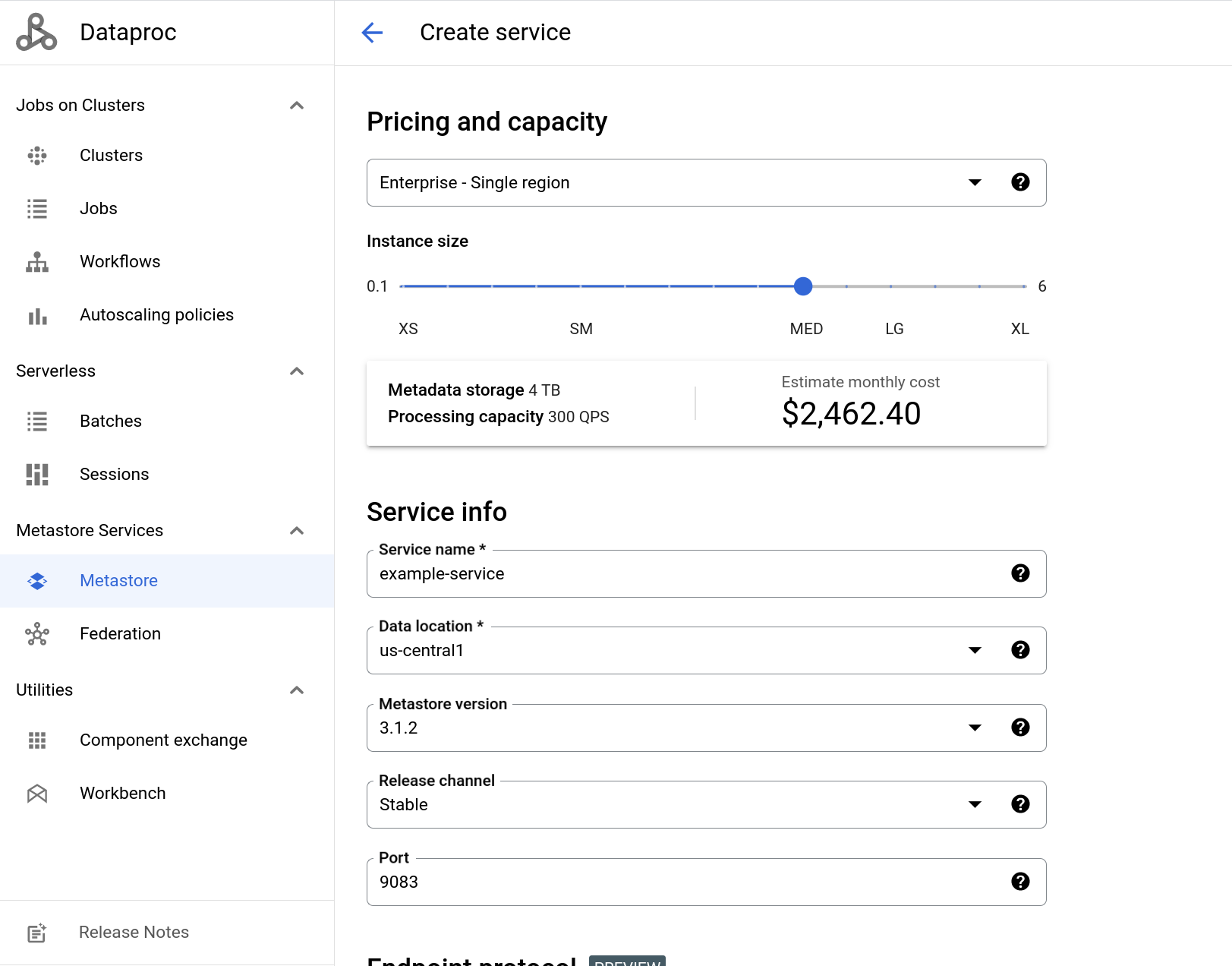
以下螢幕截圖顯示「建立服務」頁面範例,其中使用了一些預設值。
gcloud CLI
 gcloud metastore services create example-service \
     --location=us-central1 \
     --instance-size=MEDIUM
REST
按照 API 操作說明,使用 APIs Explorer 建立服務。
建立 Managed Service for Apache Spark 叢集並連線至 Dataproc Metastore
接著,您要建立 Managed Service for Apache Spark 叢集,並從該叢集連線至 Metastore。完成後,叢集就會使用中繼存放區服務做為 HMS。 您在這裡建立的叢集會使用系統提供的預設設定。
控制台
前往 Google Cloud 控制台的「Dataproc Clusters」(Dataproc 叢集) 頁面。
在導覽列中,選取「+ 建立叢集」。
「建立叢集」對話方塊隨即開啟,提供多種基礎架構選項供您選擇。
在「Compute Engine 上的叢集」列中,選取「建立」。
系統會開啟「在 Compute Engine 上建立 Managed Service for Apache Spark 叢集」頁面。
在「叢集名稱」欄位中輸入
example-cluster。在「Region」(區域) 和「Zone」(可用區) 選單中,選取「
us-central1」。其餘「設定叢集」選項請使用系統提供的預設值。
在導覽選單中,按一下「Customize cluster (optional)」(自訂叢集 (選用)) 分頁標籤。
在「Dataproc Metastore」專區中,選取您先前建立的 Metastore 服務。
如果您完全按照本教學課程操作,則名稱為
example-service。其餘服務設定選項請使用系統提供的預設值。
如要建立叢集,請按一下「Create」(建立)。
新叢集會顯示在「叢集」清單中。在叢集準備好可以使用之前,叢集狀態會顯示為「佈建中」。準備就緒後,狀態會變更為「有效」。佈建叢集可能需要幾分鐘。
gcloud CLI
如要使用提供的預設設定建立叢集,請執行下列 gcloud dataproc clusters create 指令:
 gcloud dataproc clusters create example-cluster \
    --dataproc-metastore=projects/PROJECT_ID/locations/us-central1/services/example-service \
    --region=us-central1
將 PROJECT_ID 替換為您建立 Dataproc Metastore 服務的專案 ID。
REST
按照 API 操作說明,使用 API Explorer 建立叢集。
使用 Managed Service for Apache Spark 叢集連線至 Apache Hive
接下來的步驟將說明如何在 Apache Hive 中執行一些範例指令,建立資料庫和資料表。
接著,在 Managed Service for Apache Spark 叢集上開啟 SSH 工作階段,並啟動 Hive 工作階段。
瀏覽器視窗會開啟節點上的主目錄,並顯示類似下列內容的輸出結果:
Connected, host fingerprint: ssh-rsa ...
Linux cluster-1-m 3.16.0-0.bpo.4-amd64 ...
...
example-cluster@cluster-1-m:~$
如要啟動 Hive 並建立資料庫和資料表,請在 SSH 工作階段中執行下列指令:
啟動 Hive。
hive建立名為
myDatabase的資料庫。create database myDatabase;顯示您建立的資料庫。
show databases;使用您建立的資料庫。
use myDatabase;建立名為
myTable的資料表。create table myTable(id int,name string);列出
myDatabase下方的資料表。show tables;說明您建立的資料表結構定義。
desc MyTable;
執行這些指令後,輸出內容會類似下方示例:
$hive

hive> show databases;
OK
default
hive> create database myDatabase;
OK
hive> use myDatabase;
OK
hive> create table myTable(id int,name string);
OK
hive> show tables;
OK
myTable
hive> desc myTable;
OK
id                      int
name                    string
清除所用資源
為了避免系統向您的 Google Cloud 帳戶收取本頁面所用資源的費用,請按照下列步驟操作。
- 前往 Google Cloud 控制台的「Manage resources」(管理資源) 頁面。
- 如果您要刪除的專案已附加至某個機構,請展開「名稱」欄中的「機構」清單。
- 在專案清單中選取要刪除的專案,然後點選「Delete」(刪除)。
- 在對話方塊中輸入專案 ID,然後按一下 [Shut down] (關閉) 以刪除專案。
或者,您也可以刪除本教學課程中使用的資源:
刪除 Dataproc Metastore 服務。
控制台
在 Google Cloud 控制台中,開啟「Dataproc Metastore」頁面:
在服務清單中選取
example-service。按一下導覽列中的「刪除」。
系統會開啟「刪除服務」對話方塊。
在對話方塊中按一下「刪除」。
服務不再顯示於「服務清單」。
gcloud CLI
如要刪除服務,請執行下列
gcloud metastore services delete指令。gcloud metastore services delete example-service \ --location=us-central1REST
按照 API 操作說明,使用 API Explorer 刪除服務。
系統會立即刪除所有項目。
刪除使用 Dataproc Metastore 服務的 Managed Service for Apache Spark 叢集。