


查看資料歷程,瞭解專案資源與建立這些資源的程序之間的關係。這些關係會顯示資料資產 (例如資料表和資料集) 如何透過查詢和管道等程序轉換。本指南說明如何在 Google Cloud 控制台中查看資料歷程詳細資料,或使用 Data Lineage API 擷取這些資料。
角色和權限
啟用 Data Lineage API 後,資料歷程就會自動追蹤歷程資訊。您不需要任何管理員或編輯者角色,即可擷取資料資產的沿襲。
如要查看資料沿襲,您需要具備特定的 Identity and Access Management (IAM) 權限。系統會擷取多個專案的沿襲資訊,因此您需要多個專案的權限。
在 Knowledge Catalog、BigQuery 或 Vertex AI 中查看歷程時,您必須具備在查看歷程的專案中查看歷程資訊的權限。
查看其他專案中記錄的歷程時:您需要有權限,才能查看這些專案中記錄的歷程資訊。
如要取得查看資料歷程所需的權限,請要求管理員授予您下列 IAM 角色:
- 資料歷程檢視者 (
roles/datalineage.viewer) 在記錄歷程的專案和查看歷程的專案中 -
查看 BigQuery 資料表詳細資料:
資料表儲存專案的 BigQuery 資料檢視者 (
roles/bigquery.dataViewer) -
查看 BigQuery 工作詳細資料:
工作運算專案的 BigQuery 資源檢視器 (
roles/bigquery.resourceViewer) -
查看其他編目資產的詳細資料:
在儲存目錄項目的專案中,使用 Dataplex Catalog 檢視者 (
roles/dataplex.catalogViewer)
如要進一步瞭解如何授予角色,請參閱「管理專案、資料夾和組織的存取權」。
這些預先定義的角色具備查看資料沿襲所需的權限。如要查看確切的必要權限,請展開「Required permissions」(必要權限) 部分:
所需權限
如要查看資料歷程,必須具備下列權限:
-
查看 BigQuery 資料表詳細資料:
bigquery.tables.get- 資料表的儲存空間專案 -
查看 BigQuery 工作詳細資料:
bigquery.jobs.get- 工作的運算專案
資料歷程檢視畫面類型
您可以在 Google Cloud 控制台中,以互動式圖表或結構化清單的形式查看歷程資訊。
如要詳細瞭解圖表元素 (例如節點、邊緣、程序圖示和標籤),以及清單檢視畫面中可用的資料欄,請參閱「關於 Knowledge Catalog 中的資料沿襲視覺化」。
啟用資料歷程
啟用資料歷程,即可開始自動追蹤支援系統的歷程資訊。根據預設,啟用 API 後,系統會為大多數支援的服務啟動歷程追蹤功能。如要控管 Managed Service for Apache Spark 歷程資料的擷取作業,請參閱「控管服務的歷程資料擷取作業」。
您必須在查看歷程的專案,以及記錄歷程的專案中,啟用 Data Lineage API。詳情請參閱「專案類型」。
- 如要擷取沿襲資訊,請完成下列步驟:
在您查看歷程的專案中,啟用 Data Lineage API 和 Dataplex API。
控管服務的沿襲資料擷取作業
您可以在專案、資料夾或機構層級,選擇性啟用或停用特定服務的自動歷程追蹤功能。
如要進一步瞭解如何透過資源樹狀結構以階層方式套用這些設定,請參閱「控管沿襲資料的擷取作業」。
查看歷程
如要追蹤資料在系統間的轉換和移動方式,可以使用 Google Cloud 控制台或 API 查看資料歷程。
控制台
您可以在 Google Cloud 控制台中,從各種起點存取資料歷程資訊:
- Knowledge Catalog:前往 Knowledge Catalog 的「Search」(搜尋) 頁面,選取「Knowledge Catalog」做為搜尋模式,搜尋要查看的項目,然後按一下該項目。詳情請參閱「在 Knowledge Catalog 中搜尋資源」。
- BigQuery:前往 BigQuery 頁面,開啟要查看資料歷程的資料表。
- Vertex AI:前往「資料集」或「模型登錄」頁面,然後點選要查看資料沿革的資料集或模型。
如要查看沿襲圖,請按照下列步驟操作:
按一下「歷程」分頁標籤。
系統會開啟預設的「圖表」檢視畫面,顯示系統和區域的資料表層級歷程。詳情請參閱「沿襲圖表檢視畫面」。
如要手動探索歷程圖,請按一下節點旁邊的「展開」,一次載入五個節點。
詳情請參閱「手動探索歷程圖」。
在「Graph」檢視畫面中,按一下節點。
系統會開啟「詳細資料」面板,顯示資產資訊,例如完整名稱和類型。詳情請參閱「節點詳細資料」。
在「圖表」檢視畫面中,按一下含有程序圖示的邊緣。
「查詢」面板隨即開啟。詳情請參閱「檢查轉換邏輯」和「稽核及執行記錄」。
- 如要檢查轉換邏輯,請按一下「詳細資料」分頁標籤。
- 如要查看稽核記錄和執行作業記錄,請按一下「執行作業」分頁標籤。
在「沿襲關係探索器」面板中,選取篩選條件 (例如「方向」、「依附元件類型」或「時間範圍」),然後按一下「套用」。
這會在特定區域中開啟焦點檢視畫面 (預覽)。這個檢視畫面會自動展開圖表,最多顯示三層節點。詳情請參閱「套用篩選器,取得焦點式歷程檢視畫面」。
在聚焦的「圖表」檢視畫面中選取節點,然後在節點的詳細資料面板中,按一下「Visualize Path」,即可從所選節點回溯至根項目,以視覺化方式呈現歷程路徑 (僅限聚焦檢視畫面)。
詳情請參閱「歷程路徑視覺化」。
如要查看資料欄層級的歷程 (僅適用於 BigQuery 和 Managed Service for Apache Spark 工作),請執行下列其中一項操作:
- 在聚焦的「圖表」檢視畫面中,按一下表格中的「欄」圖示。
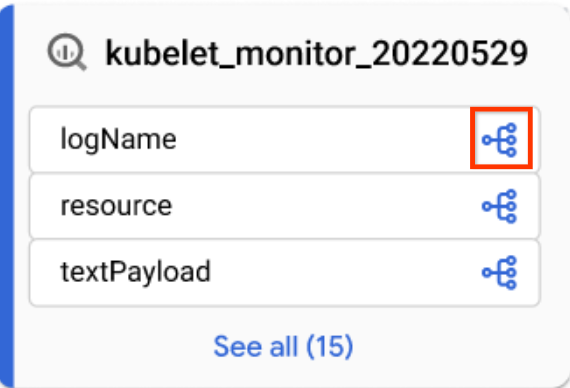
「欄」圖示 - 在「歷程探索工具」面板中,依資料欄名稱篩選,然後按一下「套用」。
詳情請參閱資料欄層級歷程。
- 在聚焦的「圖表」檢視畫面中,按一下表格中的「欄」圖示。
按一下 「重設」。
這項操作會移除所有套用的篩選條件,並將您帶往圖表檢視畫面的開頭。
按一下「清單」即可切換至清單檢視畫面。
「清單」檢視畫面提供簡化且詳細的歷程表格表示法,適用於資料表和資料欄層級的歷程,並與「圖表」檢視畫面同步。根據預設,系統會顯示簡易清單檢視畫面,您可以切換至詳細清單檢視畫面,分析個別來源與目標之間的關係。您可以設定要顯示的資料欄,並匯出沿襲資料。詳情請參閱「歷程清單檢視」。
Java
import com.google.api.gax.rpc.ApiException;
import com.google.cloud.datacatalog.lineage.v1.BatchSearchLinkProcessesRequest;
import com.google.cloud.datacatalog.lineage.v1.EntityReference;
import com.google.cloud.datacatalog.lineage.v1.EventLink;
import com.google.cloud.datacatalog.lineage.v1.LineageClient;
import com.google.cloud.datacatalog.lineage.v1.LineageEvent;
import com.google.cloud.datacatalog.lineage.v1.Link;
import com.google.cloud.datacatalog.lineage.v1.ListLineageEventsRequest;
import com.google.cloud.datacatalog.lineage.v1.ListRunsRequest;
import com.google.cloud.datacatalog.lineage.v1.LocationName;
import com.google.cloud.datacatalog.lineage.v1.ProcessLinks;
import com.google.cloud.datacatalog.lineage.v1.Run;
import com.google.cloud.datacatalog.lineage.v1.SearchLinksRequest;
import java.io.IOException;
import java.util.ArrayList;
import java.util.HashSet;
import java.util.LinkedList;
import java.util.List;
import java.util.Queue;
import java.util.Set;

public class ViewLineageExample {

  public static void main(String[] args) throws IOException {
    // TODO(developer): Replace these variables before running the sample.
    String projectId = "my-project-id";
    String location = "us";
    String targetFullyQualifiedName = "bigquery:my-project-id.my_dataset.my_table";
    int maxDepth = 3;

    viewLineage(projectId, location, targetFullyQualifiedName, maxDepth);
  }

  static class Node {
    String fqn;
    int depth;
    Node(String fqn, int depth) {
      this.fqn = fqn;
      this.depth = depth;
    }
  }

  public static void viewLineage(
      String projectId, String location, String targetFullyQualifiedName, int maxDepth)
      throws IOException {
    // Initialize client that will be used to send requests. This client only needs
    // to be created once, and can be reused for multiple requests.
    try (LineageClient client = LineageClient.create()) {
      String parent = LocationName.of(projectId, location).toString();

      Set<String> visitedNodes = new HashSet<>();
      Queue<Node> queue = new LinkedList<>();

      visitedNodes.add(targetFullyQualifiedName);
      queue.offer(new Node(targetFullyQualifiedName, 0));

      while (!queue.isEmpty()) {
        Node current = queue.poll();
        System.out.printf("\nExploring node (Depth %d): %s\n", current.depth, current.fqn);

        if (current.depth >= maxDepth) {
          continue;
        }

        EntityReference targetEntity =
            EntityReference.newBuilder().setFullyQualifiedName(current.fqn).build();
        SearchLinksRequest searchLinksRequest =
            SearchLinksRequest.newBuilder().setParent(parent).setTarget(targetEntity).build();

        List<String> linkNames = new ArrayList<>();
        try {
          // 1. Search for links related to the target entity
          for (Link link : client.searchLinks(searchLinksRequest).iterateAll()) {
            linkNames.add(link.getName());
          }
        } catch (ApiException e) {
          System.out.printf("  Failed to retrieve links for %s: %s\n", current.fqn, e.getMessage());
          continue;
        }

        if (linkNames.isEmpty()) {
          continue;
        }

        // 2. Batch search for processes in chunks of 100
        for (int i = 0; i < linkNames.size(); i += 100) {
          List<String> batch = linkNames.subList(i, Math.min(linkNames.size(), i + 100));
          BatchSearchLinkProcessesRequest batchSearchRequest =
              BatchSearchLinkProcessesRequest.newBuilder()
                  .setParent(parent)
                  .addAllLinks(batch)
                  .build();

          try {
            for (ProcessLinks processLinks :
                client.batchSearchLinkProcesses(batchSearchRequest).iterateAll()) {
              String processName = processLinks.getProcess();
              System.out.printf("  Process: %s\n", processName);

              // 3. List runs for the process
              ListRunsRequest runsRequest =
                  ListRunsRequest.newBuilder().setParent(processName).build();
              for (Run run : client.listRuns(runsRequest).iterateAll()) {
                System.out.printf("    Run: %s\n", run.getName());

                // 4. List events for the run
                ListLineageEventsRequest eventsRequest =
                    ListLineageEventsRequest.newBuilder().setParent(run.getName()).build();
                for (LineageEvent event : client.listLineageEvents(eventsRequest).iterateAll()) {
                  for (EventLink eventLink : event.getLinksList()) {
                    String sourceFqn = eventLink.getSource().getFullyQualifiedName();
                    // If exploring upstream, queue the source
                    if (!sourceFqn.isEmpty() && !visitedNodes.contains(sourceFqn)) {
                      visitedNodes.add(sourceFqn);
                      queue.offer(new Node(sourceFqn, current.depth + 1));
                    }
                  }
                }
              }
            }
          } catch (ApiException e) {
            System.out.printf("  Failed to retrieve processes/runs: %s\n", e.getMessage());
          }
        }
      }
    }
  }
}
Python
from google.cloud import datacatalog_lineage_v1
from google.api_core.exceptions import GoogleAPICallError

def view_lineage(project_id: str, location: str, target_fully_qualified_name: str, max_depth: int = 3):
    """Retrieves lineage for a given entity using a depth-limited search."""
    client = datacatalog_lineage_v1.LineageClient()
    parent = f"projects/{project_id}/locations/{location}"

    # Store visited nodes to avoid infinite loops in cyclic graphs
    visited_nodes = set([target_fully_qualified_name])
    queue = [(target_fully_qualified_name, 0)]

    while queue:
        current_node, current_depth = queue.pop(0)
        print(f"\nExploring node (Depth {current_depth}): {current_node}")

        if current_depth >= max_depth:
            continue

        target_entity = datacatalog_lineage_v1.EntityReference(
            fully_qualified_name=current_node
        )
        search_links_request = datacatalog_lineage_v1.SearchLinksRequest(
            parent=parent,
            target=target_entity,
        )

        try:
            links = list(client.search_links(request=search_links_request))
        except GoogleAPICallError as e:
            print(f"  Failed to retrieve links for {current_node}: {e.message}")
            continue

        if not links:
            continue

        # Extract link names to query processes in batches
        link_names = [link.name for link in links]

        # Batch max size is 100
        for i in range(0, len(link_names), 100):
            batch = link_names[i:i + 100]
            batch_request = datacatalog_lineage_v1.BatchSearchLinkProcessesRequest(
                parent=parent,
                links=batch
            )

            try:
                for process_links in client.batch_search_link_processes(request=batch_request):
                    process_name = process_links.process
                    print(f"  Process: {process_name}")

                    runs_request = datacatalog_lineage_v1.ListRunsRequest(parent=process_name)
                    for run in client.list_runs(request=runs_request):
                        print(f"    Run: {run.name}")

                        events_request = datacatalog_lineage_v1.ListLineageEventsRequest(parent=run.name)
                        for event in client.list_lineage_events(request=events_request):
                            for event_link in event.links:
                                source_fqn = event_link.source.fully_qualified_name

                                # If exploring upstream, queue the source
                                if source_fqn and source_fqn not in visited_nodes:
                                    visited_nodes.add(source_fqn)
                                    queue.append((source_fqn, current_depth + 1))

            except GoogleAPICallError as e:
                 print(f"  Failed to retrieve processes/runs: {e.message}")
調整歷程圖表
如要修正歷程圖,可以使用「歷程探索器」中的醒目顯示和篩選選項:
如要搜尋特定專案、資料集或實體名稱,請使用「篩選器」面板。
套用篩選器後,符合篩選條件的沿襲節點會視為相符節點。您可以調整相符和不相符節點的顯示方式。
在沿襲圖中,按一下「清除篩選器」按鈕旁的「更多動作」 圖示,即可查看顯示選項。
選取下列其中一個選項,或同時選取兩者:

你可以同時選取這兩個選項。如果同時選取這兩個選項,系統會隱藏未經過濾的節點,並在經過濾的圖表檢視中醒目顯示相符的節點。
後續步驟
- 追蹤 BigQuery 資料表副本和查詢工作的資料歷程。
- 瞭解資料歷程資訊模型。
- 瞭解資料歷程的注意事項和限制。
- 瞭解資料歷程稽核記錄。
- 瞭解如何排解資料歷程問題。
- 瞭解如何整合 OpenLineage。
- 瞭解如何搭配使用資料沿襲與 Managed Service for Apache Spark。