אפשר להציג את שושלת הנתונים כדי להבין את הקשרים בין המשאבים בפרויקט לבין התהליכים שיצרו אותם. הקשרים האלה מראים איך נכסי נתונים, כמו טבלאות ומערכי נתונים, עוברים טרנספורמציה בתהליכים כמו שאילתות וצינורות נתונים. במדריך הזה מוסבר איך לראות את הפרטים של שרשרת מקורות הנתונים במסוף Google Cloud או לאחזר אותם באמצעות Data Lineage API.
תפקידים והרשאות
כשמפעילים את Data Lineage API, המערכת עוקבת אחרי מידע על מקור הנתונים באופן אוטומטי. לא צריך הרשאות אדמין או עריכה כדי לתעד את מקורות הנתונים של נכסי הנתונים.
כדי לראות את שרשרת מקורות הנתונים, אתם צריכים הרשאות ספציפיות לניהול זהויות והרשאות גישה (IAM). פרטי השושלת נאספים בכל הפרויקטים, ולכן צריך הרשאות בכמה פרויקטים.
כשמציגים את היסטוריית השינויים ב-Knowledge Catalog, ב-BigQuery או ב-Vertex AI: צריך הרשאות להצגת פרטים על היסטוריית השינויים בפרויקט שבו מציגים אותה.
כשמציגים את היסטור השינויים שנרשם בפרויקטים אחרים: צריך הרשאות להצגת פרטי היסטור השינויים בפרויקטים שבהם הוא נרשם.
כדי לקבל את ההרשאות שדרושות בשביל להציג את היסטוריית הנתונים, אתם צריכים לבקש מהאדמין לתת לכם את התפקידים הבאים ב-IAM:
- Data Lineage Viewer (
roles/datalineage.viewer) בפרויקט שבו מתועד שרשרת המקורות, ובפרויקט שבו מוצגת שרשרת המקורות -
הצגת פרטי הטבלה ב-BigQuery:
BigQuery Data Viewer (
roles/bigquery.dataViewer) בפרויקט האחסון של הטבלה -
צפייה בפרטי משימה ב-BigQuery:
BigQuery Resource Viewer (
roles/bigquery.resourceViewer) בפרויקט המחשוב של המשימה -
הצגת פרטים של נכסים אחרים שמופיעים בקטלוג:
Dataplex Catalog Viewer (
roles/dataplex.catalogViewer) בפרויקט שבו מאוחסנים רשומות הקטלוג
להסבר על מתן תפקידים, ראו איך מנהלים את הגישה ברמת הפרויקט, התיקייה והארגון.
התפקידים המוגדרים מראש כוללים את ההרשאות שנדרשות לצפייה ב-Data Lineage. כדי לראות בדיוק אילו הרשאות נדרשות, אפשר להרחיב את הקטע ההרשאות הנדרשות:
ההרשאות הנדרשות
כדי להציג את מקורות הנתונים, נדרשות ההרשאות הבאות:
-
הצגת פרטים של טבלה ב-BigQuery:
bigquery.tables.get– פרויקט האחסון של הטבלה -
הצגת פרטי המשימה ב-BigQuery:
bigquery.jobs.get- פרויקט החישוב של המשימה
יכול להיות שתקבלו את ההרשאות האלה באמצעות תפקידים בהתאמה אישית או תפקידים מוגדרים מראש אחרים.
סוגים של תצוגות של שרשרת מקורות הנתונים
אפשר לראות את פרטי השושלת בתרשים אינטראקטיבי או ברשימה מובנית במסוף Google Cloud .
תיאור מפורט של רכיבי הגרף (כמו צמתים, קשתות, סמלי תהליך ותוויות) והעמודות שזמינות בתצוגות הרשימה מופיע במאמר מידע על ויזואליזציה של השתלשלות הנתונים ב-Knowledge Catalog.
הפעלת שושלת נתונים
מפעילים את תכונת שרשרת המקורות כדי להתחיל לעקוב באופן אוטומטי אחרי מידע על שרשרת המקורות במערכות נתמכות. כברירת מחדל, הפעלת ה-API מפעילה מעקב אחר מקורות נתונים ברוב השירותים הנתמכים. כדי לשלוט בהטמעת שושלת הנתונים ב-Managed Service for Apache Spark, אפשר לעיין במאמר בנושא שליטה בהטמעת שושלת נתונים בשירות.
צריך להפעיל את Data Lineage API גם בפרויקט שבו צופים ב-lineage וגם בפרויקטים שבהם מתועד ה-lineage. מידע נוסף זמין במאמר בנושא סוגי פרויקטים.
- כדי לתעד את פרטי השושלת:
-
בדף Project selector במסוף Google Cloud , בוחרים את הפרויקט שבו רוצים לתעד את היחסים בין מקורות הנתונים.
מפעילים את Data Lineage API.
- חוזרים על השלבים הקודמים לכל פרויקט שבו רוצים לתעד את שרשרת המקור.
-
בפרויקט שבו רוצים לראות את מקור הנתונים, מפעילים את Data Lineage API ואת Dataplex API.
שליטה בהטמעת שרשרת המקורות בשביל שירות
אפשר להפעיל או להשבית באופן סלקטיבי את המעקב האוטומטי אחר מקורות נתונים בשירותים ספציפיים ברמת הפרויקט, התיקייה או הארגון.
לפרטים על אופן היישום ההיררכי של ההגדרות האלה דרך עץ המשאבים, אפשר לעיין במאמר שליטה בהטמעת שושלת הנתונים.
דרישות מוקדמות
כדי לשלוט בהטמעה של שושלת הנתונים, צריך להשתמש ב-Data Lineage API. חשוב לוודא שיש לכם פרויקט לקוח שמוגדר לחיוב ולמכסה, כי Data Lineage API הוא API שמבוסס על לקוחות.
מפעילים את
datalineage.googleapis.comAPI בפרויקט הלקוח. מידע נוסף זמין במאמר בנושא הפעלת שושלת נתונים.מגדירים את פרויקט הלקוח. בדוגמאות הבאות משתמשים בכותרת
X-Goog-User-Project. מידע נוסף זמין במאמר בנושא פרמטרים של המערכת.
אחזור ההגדרה הנוכחית
כדי לבדוק אם הפעלתם את ההטמעה של שושלת הנתונים במשאב מסוים, או כדי לקבל את הערך etag לפני שמשנים את ההגדרה, צריך לאחזר את ההגדרה הנוכחית.
C#
C#
לפני שמנסים את הדוגמה הזו, צריך לפעול לפי C#ההוראות להגדרה במאמר התחלה מהירה של מעקב אחר מקורות נתונים באמצעות ספריות לקוח. מידע נוסף מופיע במאמרי העזרה של Data Lineage C# API.
כדי לבצע אימות ב-Data Lineage, צריך להגדיר את Application Default Credentials. מידע נוסף זמין במאמר הגדרת אימות לסביבת פיתוח מקומית.
המשך
Go
לפני שמנסים את הדוגמה הזו, צריך לפעול לפי Goההוראות להגדרה במאמר התחלה מהירה של מעקב אחר מקורות נתונים באמצעות ספריות לקוח. מידע נוסף מופיע במאמרי העזרה של Data Lineage Go API.
כדי לבצע אימות ב-Data Lineage, צריך להגדיר את Application Default Credentials. מידע נוסף זמין במאמר הגדרת אימות לסביבת פיתוח מקומית.
Java
Java
לפני שמנסים את הדוגמה הזו, צריך לפעול לפי Javaההוראות להגדרה במאמר התחלה מהירה של מעקב אחר מקורות נתונים באמצעות ספריות לקוח. מידע נוסף מופיע במאמרי העזרה של Data Lineage Java API.
כדי לבצע אימות ב-Data Lineage, צריך להגדיר את Application Default Credentials. מידע נוסף זמין במאמר הגדרת אימות לסביבת פיתוח מקומית.
Python
Python
לפני שמנסים את הדוגמה הזו, צריך לפעול לפי Pythonההוראות להגדרה במאמר התחלה מהירה של מעקב אחר מקורות נתונים באמצעות ספריות לקוח. מידע נוסף מופיע במאמרי העזרה של Data Lineage Python API.
כדי לבצע אימות ב-Data Lineage, צריך להגדיר את Application Default Credentials. מידע נוסף זמין במאמר הגדרת אימות לסביבת פיתוח מקומית.
gcloud
כדי לראות את הגדרות השושלת הנוכחיות, משתמשים בפקודה gcloud datalineage config describe. אתם יכולים לאחזר את ההגדרה של פרויקט, תיקייה או ארגון.
בדוגמה הבאה אפשר לראות איך מקבלים את ההגדרות של הפרויקט הנוכחי:
gcloud datalineage config describe
לדוגמה, כדי לקבל את ההגדרה של פרויקט ספציפי, משתמשים בדגל --project:
gcloud datalineage config describe --project=PROJECT_ID
מחליפים את מה שכתוב בשדות הבאים:
-
PROJECT_ID: מזהה הפרויקט שרוצים להציג את ההגדרה שלו.
כדי לראות את ההגדרות הנוכחיות של הטמעת שושלת הנתונים של שירות בתיקייה או בארגון, מחליפים את --project= ב:PROJECT_ID
--folder=אם רוצים לראות את הגדרות הטמעת הנתונים בתיקייה.FOLDER_ID--organization=אם רוצים לראות את הגדרות הטמעת הנתונים בארגון.ORGANIZATION_ID
REST
כדי לראות את הגדרת שרשרת המקורות הנוכחית, משתמשים בשיטה projects.locations.config.get. אפשר לאחזר את ההגדרה של פרויקט, תיקייה או ארגון.
בדוגמה הבאה אפשר לראות איך מקבלים את ההגדרה של פרויקט:
לפני שמשתמשים בנתוני הבקשה, צריך להחליף את הנתונים הבאים:
-
CLIENT_PROJECT_ID: המזהה של פרויקט הלקוח שמשמש לחיוב או למכסות. -
PROJECT_ID: מזהה הפרויקט שרוצים להציג את ההגדרה שלו.
ה-method של ה-HTTP וכתובת ה-URL:
GET https://datalineage.googleapis.com/v1/projects/PROJECT_ID/locations/global/config
כדי לשלוח את הבקשה צריך להרחיב אחת מהאפשרויות הבאות:
הפקודה מחזירה את אחד מהפלט הבאים:
- אם לא תספקו הגדרות להעברת נתוני שושלת, תקבלו פלט עם אובייקט
ingestionריק:{ "name": "projects/123456789012/locations/global/config", "ingestion": {} }
כלומר, השירות משתמש בהגדרת ברירת המחדל להעברת נתוני שושלת. בדוגמה הזו, הגדרת הטמעת שרשרת המקורות בשירות המנוהל ל-Apache Spark היא
enabled. - אם מפעילים את הטמעת שרשרת המקורות באופן מפורש, מקבלים את הפלט הבא:
{ "name": "projects/123456789012/locations/global/config", "ingestion": { "rules": [ { "integrationSelector": { "integration": "DATAPROC" }, "lineageEnablement": { "enabled": true } } ] }, "etag": "1a2b3c4d5e" }
- אם השבתתם את ההטמעה של שרשרת המקור, תקבלו את הפלט הבא:
{ "name": "projects/123456789012/locations/global/config", "ingestion": { "rules": [ { "integrationSelector": { "integration": "DATAPROC" }, "lineageEnablement": { "enabled": false } } ] }, "etag": "1a2b3c4d5e" }
כדי לקבל את ההגדרה של תיקייה או ארגון, מחליפים את projects/ ב-PROJECT_IDfolders/ או ב-FOLDER_IDorganizations/.ORGANIZATION_ID
השדה etag בתגובה הוא סכום ביקורת שנוצר על ידי השרת על סמך הערך הנוכחי של ההגדרה. כשמעדכנים הגדרה באמצעות השיטה patch, אפשר לכלול בגוף הבקשה את הערך etag שהוחזר מבקשת get מהזמן האחרון. אם תספקו את etag, Knowledge Catalog ישתמש בו כדי לוודא שההגדרה לא השתנתה מאז בקשת הקריאה האחרונה שלכם. אם יש אי-התאמה, בקשת העדכון נכשלת. כך לא יקרה ששינויים שתבצעו יחליפו בטעות הגדרות שמשתמשים אחרים ביצעו בתרחישים של קריאה, שינוי וכתיבה. אם לא תספקו etag בבקשת patch, קטלוג הידע ידרוס את ההגדרה ללא תנאי.
השבתת הטמעה של היסטוריית השימוש בשירות
כדי לנהל עלויות, לאכוף מדיניות של ניהול נתונים או להחריג פרויקטים של פיתוח ועומסי עבודה אחרים שלא מפיקים תועלת ממעקב אחר מקורות נתונים, אפשר להשבית את ההטמעה של מקורות נתונים בשירות.
Java
package com.google.cloud.datacatalog.lineage.configmanagement.v1.samples;
import com.google.api.gax.rpc.NotFoundException;
import com.google.cloud.datacatalog.lineage.configmanagement.v1.Config;
import com.google.cloud.datacatalog.lineage.configmanagement.v1.Config.Ingestion;
import com.google.cloud.datacatalog.lineage.configmanagement.v1.Config.Ingestion.IngestionRule;
import com.google.cloud.datacatalog.lineage.configmanagement.v1.Config.Ingestion.IngestionRule.IntegrationSelector;
import com.google.cloud.datacatalog.lineage.configmanagement.v1.Config.Ingestion.IngestionRule.IntegrationSelector.Integration;
import com.google.cloud.datacatalog.lineage.configmanagement.v1.Config.Ingestion.IngestionRule.LineageEnablement;
import com.google.cloud.datacatalog.lineage.configmanagement.v1.ConfigManagementServiceClient;
import com.google.cloud.datacatalog.lineage.configmanagement.v1.ConfigName;
import com.google.cloud.datacatalog.lineage.configmanagement.v1.GetConfigRequest;
import com.google.cloud.datacatalog.lineage.configmanagement.v1.UpdateConfigRequest;
public class DisableLineageIngestion {
public static void main(String[] args) throws Exception {
// TODO(developer): Replace these variables before running the sample.
String projectId = "your-project-id";
String location = "global";
disableLineageIngestion(projectId, location);
}
// Disables lineage ingestion for a specific service
// (Managed Service for Apache Spark).
public static void disableLineageIngestion(String projectId, String location) throws Exception {
// Initialize client that will be used to send requests. This client only needs to be created
// once, and can be reused for multiple requests.
try (ConfigManagementServiceClient client = ConfigManagementServiceClient.create()) {
// Format the resource name.
String name = ConfigName.ofProjectLocationName(projectId, location).toString();
Config.Builder configBuilder = Config.newBuilder().setName(name);
// It is a best practice to read the existing config to preserve other rules
// and use the etag for optimistic concurrency control.
try {
GetConfigRequest getRequest = GetConfigRequest.newBuilder().setName(name).build();
Config existingConfig = client.getConfig(getRequest);
configBuilder.mergeFrom(existingConfig);
} catch (NotFoundException e) {
// If config doesn't exist, we will proceed by creating a new one.
}
// Create an integration selector for the service you want to disable.
IntegrationSelector selector =
IntegrationSelector.newBuilder().setIntegration(Integration.DATAPROC).build();
// Set lineage enablement to false to disable tracking.
LineageEnablement enablement = LineageEnablement.newBuilder().setEnabled(false).build();
// Build the ingestion rule.
IngestionRule disableRule =
IngestionRule.newBuilder()
.setIntegrationSelector(selector)
.setLineageEnablement(enablement)
.build();
// Preserve existing rules except for the one we are modifying, then add the new rule.
// We clear the ingestion block out of the configBuilder entirely to reconstruct it.
Ingestion.Builder ingestionBuilder = Ingestion.newBuilder();
if (configBuilder.hasIngestion()) {
for (IngestionRule rule : configBuilder.getIngestion().getRulesList()) {
// Keep all existing rules EXCEPT the one targeting DATAPROC
if (rule.getIntegrationSelector().getIntegration() != Integration.DATAPROC) {
ingestionBuilder.addRules(rule);
}
}
}
ingestionBuilder.addRules(disableRule);
// Update the config builder with the reconstructed ingestion settings.
configBuilder.setIngestion(ingestionBuilder.build());
// Build the update request.
UpdateConfigRequest request = UpdateConfigRequest.newBuilder()
.setConfig(configBuilder.build())
.build();
// Update the config.
Config response = client.updateConfig(request);
System.out.printf("Successfully updated config: %s\n", response.getName());
}
}
}
Python
from google.api_core.exceptions import NotFound
from google.cloud.datacatalog.lineage import configmanagement_v1
def disable_lineage_ingestion(project_id: str, location: str = "global") -> configmanagement_v1.Config:
"""Disables lineage ingestion for a specific service.
Args:
project_id: The ID of your Google Cloud project.
location: The region location, usually 'global'.
Returns:
The updated Configuration object.
"""
# Initialize client that will be used to send requests.
client = configmanagement_v1.ConfigManagementServiceClient()
# The config name format
name = f"projects/{project_id}/locations/{location}/config"
try:
# Retrieve the existing config to preserve other configurations and
# obtain the latest etag for optimistic concurrency control.
config = client.get_config(name=name)
# Filter out existing rules for the integration we are updating
new_rules = [
rule for rule in config.ingestion.rules
if rule.integration_selector.integration != configmanagement_v1.Config.Ingestion.IngestionRule.IntegrationSelector.Integration.DATAPROC
]
except NotFound:
# If the config does not exist, start fresh
config = configmanagement_v1.Config(name=name)
new_rules = []
# Define the integration to disable tracking for (e.g., DATAPROC).
integration_selector = configmanagement_v1.Config.Ingestion.IngestionRule.IntegrationSelector(
integration=configmanagement_v1.Config.Ingestion.IngestionRule.IntegrationSelector.Integration.DATAPROC
)
# Set lineage enablement to False to disable tracking.
lineage_enablement = configmanagement_v1.Config.Ingestion.IngestionRule.LineageEnablement(
enabled=False
)
# Create the ingestion rule.
disable_rule = configmanagement_v1.Config.Ingestion.IngestionRule(
integration_selector=integration_selector,
lineage_enablement=lineage_enablement,
)
# Append the new disabling rule and assign it back to the config ingestion rules
new_rules.append(disable_rule)
config.ingestion = configmanagement_v1.Config.Ingestion(rules=new_rules)
# Create the update request using the config (which includes the etag if it existed).
request = configmanagement_v1.UpdateConfigRequest(
config=config,
)
# Make the request to update the config
response = client.update_config(request=request)
print(f"Successfully updated config: {response.name}")
return response
gcloud
כדי להשבית את הטמעת שושלת הנתונים בשירות ספציפי, משתמשים בפקודה gcloud datalineage config update עם מחרוזת JSON מוטבעת או עם נתיב לקובץ JSON שבו הערך של lineageEnablement.enabled מוגדר ל-false עבור integration ספציפי.
בדוגמה הבאה מוצג איך להשבית את ההטמעה של שושלת נתונים של שירות בפרויקט באמצעות מחרוזת JSON מוטמעת:
gcloud datalineage config update --project=PROJECT_ID \
--config='{
"ingestion": {
"rules": [
{
"integrationSelector": {
"integration": "INTEGRATION"
},
"lineageEnablement": {
"enabled": false
}
}
]
},
"etag": "ETAG"
}'
מחליפים את מה שכתוב בשדות הבאים:
-
PROJECT_ID: מזהה הפרויקט שרוצים לעדכן את ההגדרה שלו. -
INTEGRATION: השילוב שעבורו הגדרתם את התצורה. לדוגמה,DATAPROCאוBIGQUERY. -
ETAG: הערךetagשמוחזר מבקשתgetעדכנית בגוף הבקשה, שמשמש לאימות שההגדרה לא השתנתה מאז בקשת הקריאה האחרונה.
כדי לעדכן את ההגדרה באמצעות קובץ JSON, מריצים את הפקודה:
gcloud datalineage config update --project=PROJECT_ID --config=CONFIG_FILE
מחליפים את מה שכתוב בשדות הבאים:
-
CONFIG_FILE: הנתיב לקובץ ה-JSON שמכיל את ההגדרה.
כדי להשבית את ההטמעה של נתוני שושלת של שירות בתיקייה או בארגון, מחליפים את --project= ב:PROJECT_ID
--folder=אם רוצים לעדכן את הגדרות ההעברה של נתונים לתיקייה.FOLDER_ID--organization=אם רוצים לעדכן את הגדרות הטמעת הנתונים בארגון.ORGANIZATION_ID
REST
כדי להשבית את ההטמעה של נתוני שושלת עבור שירות ספציפי, צריך להשתמש בשיטה projects.locations.config.patch עם כלל הטמעה שמגדיר את lineageEnablement.enabled ל-false עבור integration ספציפי.
כדי למנוע החלפה לא מכוונת של הגדרות שמשתמשים אחרים יצרו בתרחישים של קריאה-שינוי-כתיבה, אפשר לכלול את השדה etag בגוף הבקשה. מידע נוסף מופיע במאמר בנושא קבלת ההגדרה הנוכחית.
לפני שמשתמשים בנתוני הבקשה, צריך להחליף את הנתונים הבאים:
-
CLIENT_PROJECT_ID: המזהה של פרויקט הלקוח שמשמש לחיוב או למכסות. -
PROJECT_ID: מזהה הפרויקט שרוצים לעדכן את ההגדרה שלו. -
ETAG: הערךetagשמוחזר מבקשתgetעדכנית. -
INTEGRATION:integrationשהגדרתם עבורו את התצורה. לדוגמה,DATAPROC.
ה-method של ה-HTTP וכתובת ה-URL:
PATCH https://datalineage.googleapis.com/v1/projects/PROJECT_ID/locations/global/config
תוכן בקשת JSON:
{
"ingestion": {
"rules": [
{
"integrationSelector": {
"integration": "INTEGRATION"
},
"lineageEnablement": {
"enabled": false
}
}
]
},
"etag": "ETAG"
}
כדי לשלוח את הבקשה צריך להרחיב אחת מהאפשרויות הבאות:
אתם אמורים לקבל תגובת JSON שדומה לזו:
{
"name": "projects/PROJECT_ID/locations/global/config",
"ingestion": {
"rules": [
{
"integrationSelector": {
"integration": "INTEGRATION"
},
"lineageEnablement": {
"enabled": false
}
}
]
},
"etag": "1a2b3c4d5e"
}
כדי להשבית את ההטמעה של שרשרת המקורות בתיקייה או בארגון, מחליפים את projects/ ב-PROJECT_IDfolders/ או ב-FOLDER_IDorganizations/.ORGANIZATION_ID
הפעלת הטמעה של היסטוריית השימוש בשירות
כדי להמשיך את המעקב אחרי השבתה, או כדי להפעיל שילוב שהושבת כברירת מחדל, מפעילים את ההטמעה של שושלת הנתונים בשירות.
Java
package com.google.cloud.datacatalog.lineage.configmanagement.v1.samples;
import com.google.api.gax.rpc.NotFoundException;
import com.google.cloud.datacatalog.lineage.configmanagement.v1.Config;
import com.google.cloud.datacatalog.lineage.configmanagement.v1.Config.Ingestion;
import com.google.cloud.datacatalog.lineage.configmanagement.v1.Config.Ingestion.IngestionRule;
import com.google.cloud.datacatalog.lineage.configmanagement.v1.Config.Ingestion.IngestionRule.IntegrationSelector;
import com.google.cloud.datacatalog.lineage.configmanagement.v1.Config.Ingestion.IngestionRule.IntegrationSelector.Integration;
import com.google.cloud.datacatalog.lineage.configmanagement.v1.Config.Ingestion.IngestionRule.LineageEnablement;
import com.google.cloud.datacatalog.lineage.configmanagement.v1.ConfigManagementServiceClient;
import com.google.cloud.datacatalog.lineage.configmanagement.v1.ConfigName;
import com.google.cloud.datacatalog.lineage.configmanagement.v1.GetConfigRequest;
import com.google.cloud.datacatalog.lineage.configmanagement.v1.UpdateConfigRequest;
public class EnableLineageIngestion {
public static void main(String[] args) throws Exception {
// TODO(developer): Replace these variables before running the sample.
String projectId = "your-project-id";
String location = "global";
enableLineageIngestion(projectId, location);
}
// Enables lineage ingestion for a specific service
// (Managed Service for Apache Spark).
public static void enableLineageIngestion(String projectId, String location) throws Exception {
// Initialize client that will be used to send requests. This client only needs to be created
// once, and can be reused for multiple requests.
try (ConfigManagementServiceClient client = ConfigManagementServiceClient.create()) {
// Format the resource name.
String name = ConfigName.ofProjectLocationName(projectId, location).toString();
Config.Builder configBuilder = Config.newBuilder().setName(name);
// It is a best practice to read the existing config to preserve other rules
// and use the etag for optimistic concurrency control.
try {
GetConfigRequest getRequest = GetConfigRequest.newBuilder().setName(name).build();
Config existingConfig = client.getConfig(getRequest);
configBuilder.mergeFrom(existingConfig);
} catch (NotFoundException e) {
// If config doesn't exist, we will proceed by creating a new one.
}
// Create an integration selector for the service you want to enable (e.g., DATAPROC).
IntegrationSelector selector =
IntegrationSelector.newBuilder().setIntegration(Integration.DATAPROC).build();
// Set lineage enablement to true to enable tracking.
LineageEnablement enablement = LineageEnablement.newBuilder().setEnabled(true).build();
// Build the ingestion rule.
IngestionRule enableRule =
IngestionRule.newBuilder()
.setIntegrationSelector(selector)
.setLineageEnablement(enablement)
.build();
// Preserve existing rules except for the one we are modifying, then add the new rule.
// We clear the ingestion block out of the configBuilder entirely to reconstruct it.
Ingestion.Builder ingestionBuilder = Ingestion.newBuilder();
if (configBuilder.hasIngestion()) {
for (IngestionRule rule : configBuilder.getIngestion().getRulesList()) {
// Keep all existing rules EXCEPT the one targeting DATAPROC
if (rule.getIntegrationSelector().getIntegration() != Integration.DATAPROC) {
ingestionBuilder.addRules(rule);
}
}
}
ingestionBuilder.addRules(enableRule);
// Update the config builder with the reconstructed ingestion settings.
configBuilder.setIngestion(ingestionBuilder.build());
// Build the update request.
UpdateConfigRequest request = UpdateConfigRequest.newBuilder()
.setConfig(configBuilder.build())
.build();
// Update the config.
Config response = client.updateConfig(request);
System.out.printf("Successfully updated config: %s\n", response.getName());
}
}
}
Python
from google.api_core.exceptions import NotFound
from google.cloud.datacatalog.lineage import configmanagement_v1
def enable_lineage_ingestion(project_id: str, location: str = "global") -> configmanagement_v1.Config:
"""Enables lineage ingestion for a specific service like Dataproc
(Managed Service for Apache Spark).
Args:
project_id: The ID of your Google Cloud project.
location: The region location, usually 'global'.
Returns:
The updated Configuration object.
"""
# Initialize client that will be used to send requests.
client = configmanagement_v1.ConfigManagementServiceClient()
# The config name format
name = f"projects/{project_id}/locations/{location}/config"
try:
# Retrieve the existing config to preserve other configurations and
# obtain the latest etag for optimistic concurrency control.
config = client.get_config(name=name)
# Filter out existing rules for the integration we are updating
new_rules = [
rule for rule in config.ingestion.rules
if rule.integration_selector.integration != configmanagement_v1.Config.Ingestion.IngestionRule.IntegrationSelector.Integration.DATAPROC
]
except NotFound:
# If the config does not exist, start fresh
config = configmanagement_v1.Config(name=name)
new_rules = []
# Define the integration to enable tracking for (e.g., DATAPROC).
integration_selector = configmanagement_v1.Config.Ingestion.IngestionRule.IntegrationSelector(
integration=configmanagement_v1.Config.Ingestion.IngestionRule.IntegrationSelector.Integration.DATAPROC
)
# Set lineage enablement to True to enable tracking.
lineage_enablement = configmanagement_v1.Config.Ingestion.IngestionRule.LineageEnablement(
enabled=True
)
# Create the ingestion rule.
enable_rule = configmanagement_v1.Config.Ingestion.IngestionRule(
integration_selector=integration_selector,
lineage_enablement=lineage_enablement,
)
# Append the new enabling rule and assign it back to the config ingestion rules
new_rules.append(enable_rule)
config.ingestion = configmanagement_v1.Config.Ingestion(rules=new_rules)
# Create the update request using the config (which includes the etag if it existed).
request = configmanagement_v1.UpdateConfigRequest(
config=config,
)
# Make the request to update the config
response = client.update_config(request=request)
print(f"Successfully updated config: {response.name}")
return response
gcloud
כדי להפעיל את ההטמעה של שושלת הנתונים בשירות ספציפי, משתמשים בפקודה gcloud datalineage config update עם מחרוזת JSON מוטבעת או עם נתיב לקובץ JSON שבו הערך של lineageEnablement.enabled מוגדר ל-true עבור integration ספציפי. השילובים הקיימים כוללים את Managed Service for Apache Spark, BigQuery ו-Managed Airflow.
בדוגמה הבאה מוצג אופן ההפעלה של הטמעת שירות ב-Data Lineage של פרויקט באמצעות מחרוזת JSON מוטבעת:
gcloud datalineage config update --project=PROJECT_ID \
--config='{
"ingestion": {
"rules": [
{
"integrationSelector": {
"integration": "INTEGRATION"
},
"lineageEnablement": {
"enabled": true
}
}
]
},
"etag": "ETAG"
}'
מחליפים את מה שכתוב בשדות הבאים:
-
PROJECT_ID: מזהה הפרויקט שרוצים לעדכן את ההגדרה שלו. -
INTEGRATION: השילוב שהגדרתם עבורו את התצורה (לדוגמה,DATAPROCאוBIGQUERY). -
ETAG: הערךetagשמוחזר מבקשתgetעדכנית בגוף הבקשה, שמשמש לאימות שההגדרה לא השתנתה מאז בקשת הקריאה האחרונה.
כדי לעדכן את ההגדרה באמצעות קובץ JSON, מריצים את הפקודה:
gcloud datalineage config update --project=PROJECT_ID --config=CONFIG_FILE
מחליפים את מה שכתוב בשדות הבאים:
-
CONFIG_FILE: הנתיב לקובץ ה-JSON שמכיל את ההגדרה.
כדי להפעיל את ההטמעה של שירות בתיקייה או בארגון, מחליפים את --project= ב:PROJECT_ID
--folder=אם רוצים לעדכן את הגדרות ההעברה של נתונים לתיקייה.FOLDER_ID--organization=אם רוצים לעדכן את הגדרות הטמעת הנתונים בארגון.ORGANIZATION_ID
REST
כדי להפעיל את ההטמעה של שושלת הנתונים בשירות ספציפי, צריך להשתמש בשיטה projects.locations.config.patch עם כלל הטמעה שמגדיר את lineageEnablement.enabled ל-true עבור integration ספציפי. השילובים הקיימים כוללים את Managed Service for Apache Spark, BigQuery ו-Managed Airflow.
כדי למנוע החלפה לא מכוונת של הגדרות שמשתמשים אחרים יצרו בתרחישים של קריאה-שינוי-כתיבה, אפשר לכלול את השדה etag בגוף הבקשה. מידע נוסף מופיע במאמר בנושא קבלת ההגדרה הנוכחית.
לפני שמשתמשים בנתוני הבקשה, צריך להחליף את הנתונים הבאים:
-
CLIENT_PROJECT_ID: המזהה של פרויקט הלקוח שמשמש לחיוב או למכסות. -
PROJECT_ID: מזהה הפרויקט שרוצים לעדכן את ההגדרה שלו. -
ETAG: הערךetagשמוחזר מבקשתgetעדכנית. -
INTEGRATION:integrationשהגדרתם עבורו את התצורה. לדוגמה,DATAPROC.
ה-method של ה-HTTP וכתובת ה-URL:
PATCH https://datalineage.googleapis.com/v1/projects/PROJECT_ID/locations/global/config
תוכן בקשת JSON:
{
"ingestion": {
"rules": [
{
"integrationSelector": {
"integration": "INTEGRATION"
},
"lineageEnablement": {
"enabled": true
}
}
]
},
"etag": "ETAG"
}
כדי לשלוח את הבקשה צריך להרחיב אחת מהאפשרויות הבאות:
אתם אמורים לקבל תגובת JSON שדומה לזו:
{
"name": "projects/PROJECT_ID/locations/global/config",
"ingestion": {
"rules": [
{
"integrationSelector": {
"integration": "INTEGRATION"
},
"lineageEnablement": {
"enabled": true
}
}
]
},
"etag": "1a2b3c4d5e"
}
כדי להפעיל את ההטמעה של שירות לתיקייה או לארגון, מחליפים את projects/ ב-PROJECT_IDfolders/ או ב-FOLDER_IDorganizations/.ORGANIZATION_ID
הצגת השושלת
מידע נוסף ודוגמאות זמינים במאמר חיפוש שושלת רב-אזורית באמצעות אוטומציה בצד השרת. בדוגמאות הבאות של API, שמוצגות בכרטיסיות, מודגם מעבר ידני בגרף בצד הלקוח.כדי לעקוב אחרי השינויים בנתונים והתנועה שלהם בין מערכות, אפשר להציג את שרשרת המקורות של הנתונים באמצעות Google Cloud המסוף או ה-API.
המסוף
אפשר לגשת למידע על מקורות הנתונים במסוף Google Cloud מנקודות התחלה שונות:
- Knowledge Catalog: עוברים לדף חיפוש של Knowledge Catalog, בוחרים באפשרות Knowledge Catalog כמצב החיפוש, מחפשים את הרשומה שרוצים לראות ואז לוחצים עליה. מידע נוסף זמין במאמר חיפוש משאבים ב-Knowledge Catalog.
- BigQuery: עוברים לדף BigQuery ופותחים את הטבלה שרוצים לראות את שרשרת המקורות שלה.
- Vertex AI: עוברים לדף Datasets או Model Registry ולוחצים על מערך הנתונים או על המודל שרוצים לראות את שרשרת המקורות שלהם.
כדי לראות את גרף שרשרת היוחסין:
לוחצים על הכרטיסייה Lineage (מקורות נתונים).
תצוגת הגרף תיפתח כברירת מחדל, ותציג את השושלת ברמת הטבלה במערכות ובאזורים שונים. מידע נוסף זמין במאמר בנושא תצוגת גרף של שרשרת היוחסין.
כדי לעיין בתרשים השושלת באופן ידני, לוחצים על הרחבה ליד צומת כדי לטעון עוד חמישה צמתים בכל פעם.
מידע נוסף זמין במאמר בנושא עיון ידני בתרשים השושלת.
לוחצים על צומת בתצוגה Graph.
ייפתח החלונית פרטים עם מידע על הנכס, כמו שם מלא וסוג. מידע נוסף זמין במאמר פרטי הצומת.
הערה: מערכות כמו Vertex AI Pipelines יוצרות נתוני שושלת עבור מודלים ומערכי נתונים של Vertex AI. לגבי הנכסים האלה, אפשר ללחוץ על Open in Vertex AI (פתיחה ב-Vertex AI) בחלונית Details (פרטים) כדי לראות את פרטי גרף השושלת ישירות ב-Vertex AI. לוחצים על קצה עם סמל של תהליך בתצוגה תרשים.
החלונית שאילתה תיפתח. מידע נוסף זמין במאמרים בנושא בדיקת לוגיקת הטרנספורמציה וביקורת והיסטוריה של הרצות.
- כדי לבדוק את לוגיקת השינוי, לוחצים על הכרטיסייה פרטים.
- כדי לראות את הביקורת ואת היסטוריית ההרצות, לוחצים על הכרטיסייה Runs (הרצות).
הערה: בתרשים של שרשרת ההעברה, הסמל
מופיע לפני תהליכי Vertex AI (כמו רכיבים ותבניות). אם תהליך מסוים מקוטלג ב-Knowledge Catalog עם שם דומיין מלא (FQN), אפשר ללחוץ עליו כדי לראות את הפרטים שלו, או ללחוץ על Open in Vertex AI (פתיחה ב-Vertex AI) בחלונית Details (פרטים) כדי לראות את הגרף ב-Vertex AI. כדי לראות את ההיסטוריה של פעולות מורכבות יותר – כמו נתוני אימון, נתוני בדיקה או היפרפרמטרים שהוחלו – אפשר לעיין במאמר מעקב אחר ההיסטוריה של ארטיפקטים של צינורות.בחלונית Lineage explorer, בוחרים קריטריונים לסינון – לדוגמה, Direction, Dependency type או Time range – ואז לוחצים על Apply.
תיפתח תצוגה ממוקדת באזור ספציפי (גרסת Preview). בתצוגה הזו, התרשים מתרחב אוטומטית עד לשלוש רמות של צמתים. מידע נוסף זמין במאמר החלת מסננים לתצוגה ממוקדת של שרשרת מקורות הנתונים.
בתצוגה הממוקדת Graph, בוחרים צומת, ואז בחלונית הפרטים של הצומת לוחצים על Visualize Path כדי להציג את נתיב השושלת מהצומת שנבחר בחזרה אל רשומת הבסיס (רק בתצוגה הממוקדת).
מידע נוסף זמין במאמר בנושא הדמיה של נתיב שושלת.
כדי לראות את שרשרת המקורות ברמת העמודה (רק למשימות של BigQuery ו-Managed Service for Apache Spark), מבצעים אחת מהפעולות הבאות:
- בתצוגת תרשים ממוקדת, לוחצים על סמל העמודה בטבלה.
סמל העמודות - בחלונית Lineage explorer (כלי לבדיקת מקורות נתונים), מסננים לפי שם העמודה ולוחצים על Apply (החלה).
מידע נוסף זמין במאמר בנושא Column-level lineage (היסטוריה ברמת העמודה).
- בתצוגת תרשים ממוקדת, לוחצים על סמל העמודה בטבלה.
לוחצים על איפוס.
הפעולה הזו מסירה את כל המסננים שהופעלו ומעבירה אתכם לתחילת תצוגת הגרף.
לוחצים על רשימה כדי לעבור לתצוגת הרשימה.
בתצוגה רשימה מוצגים ייצוגים טבלאיים פשוטים ומפורטים של שושלת נתונים ברמת הטבלה וברמת העמודה, שמתעדכנים באופן אוטומטי עם התצוגה גרף. כברירת מחדל, מוצגת תצוגת רשימה פשוטה, ואפשר לעבור לתצוגת רשימה מפורטת כדי לנתח קשרים בין מקורות ליעדים. אתם יכולים להגדיר אילו עמודות יוצגו ולייצא נתוני שושלת. מידע נוסף זמין במאמר בנושא תצוגת רשימה של שרשרת היוחסין.
Java
import com.google.api.gax.rpc.ApiException;
import com.google.cloud.datacatalog.lineage.v1.BatchSearchLinkProcessesRequest;
import com.google.cloud.datacatalog.lineage.v1.EntityReference;
import com.google.cloud.datacatalog.lineage.v1.EventLink;
import com.google.cloud.datacatalog.lineage.v1.LineageClient;
import com.google.cloud.datacatalog.lineage.v1.LineageEvent;
import com.google.cloud.datacatalog.lineage.v1.Link;
import com.google.cloud.datacatalog.lineage.v1.ListLineageEventsRequest;
import com.google.cloud.datacatalog.lineage.v1.ListRunsRequest;
import com.google.cloud.datacatalog.lineage.v1.LocationName;
import com.google.cloud.datacatalog.lineage.v1.ProcessLinks;
import com.google.cloud.datacatalog.lineage.v1.Run;
import com.google.cloud.datacatalog.lineage.v1.SearchLinksRequest;
import java.io.IOException;
import java.util.ArrayList;
import java.util.HashSet;
import java.util.LinkedList;
import java.util.List;
import java.util.Queue;
import java.util.Set;
public class ViewLineageExample {
public static void main(String[] args) throws IOException {
// TODO(developer): Replace these variables before running the sample.
String projectId = "my-project-id";
String location = "us";
String targetFullyQualifiedName = "bigquery:my-project-id.my_dataset.my_table";
int maxDepth = 3;
viewLineage(projectId, location, targetFullyQualifiedName, maxDepth);
}
static class Node {
String fqn;
int depth;
Node(String fqn, int depth) {
this.fqn = fqn;
this.depth = depth;
}
}
public static void viewLineage(
String projectId, String location, String targetFullyQualifiedName, int maxDepth)
throws IOException {
// Initialize client that will be used to send requests. This client only needs
// to be created once, and can be reused for multiple requests.
try (LineageClient client = LineageClient.create()) {
String parent = LocationName.of(projectId, location).toString();
Set<String> visitedNodes = new HashSet<>();
Queue<Node> queue = new LinkedList<>();
visitedNodes.add(targetFullyQualifiedName);
queue.offer(new Node(targetFullyQualifiedName, 0));
while (!queue.isEmpty()) {
Node current = queue.poll();
System.out.printf("\nExploring node (Depth %d): %s\n", current.depth, current.fqn);
if (current.depth >= maxDepth) {
continue;
}
EntityReference targetEntity =
EntityReference.newBuilder().setFullyQualifiedName(current.fqn).build();
SearchLinksRequest searchLinksRequest =
SearchLinksRequest.newBuilder().setParent(parent).setTarget(targetEntity).build();
List<String> linkNames = new ArrayList<>();
try {
// 1. Search for links related to the target entity
for (Link link : client.searchLinks(searchLinksRequest).iterateAll()) {
linkNames.add(link.getName());
}
} catch (ApiException e) {
System.out.printf(" Failed to retrieve links for %s: %s\n", current.fqn, e.getMessage());
continue;
}
if (linkNames.isEmpty()) {
continue;
}
// 2. Batch search for processes in chunks of 100
for (int i = 0; i < linkNames.size(); i += 100) {
List<String> batch = linkNames.subList(i, Math.min(linkNames.size(), i + 100));
BatchSearchLinkProcessesRequest batchSearchRequest =
BatchSearchLinkProcessesRequest.newBuilder()
.setParent(parent)
.addAllLinks(batch)
.build();
try {
for (ProcessLinks processLinks :
client.batchSearchLinkProcesses(batchSearchRequest).iterateAll()) {
String processName = processLinks.getProcess();
System.out.printf(" Process: %s\n", processName);
// 3. List runs for the process
ListRunsRequest runsRequest =
ListRunsRequest.newBuilder().setParent(processName).build();
for (Run run : client.listRuns(runsRequest).iterateAll()) {
System.out.printf(" Run: %s\n", run.getName());
// 4. List events for the run
ListLineageEventsRequest eventsRequest =
ListLineageEventsRequest.newBuilder().setParent(run.getName()).build();
for (LineageEvent event : client.listLineageEvents(eventsRequest).iterateAll()) {
for (EventLink eventLink : event.getLinksList()) {
String sourceFqn = eventLink.getSource().getFullyQualifiedName();
// If exploring upstream, queue the source
if (!sourceFqn.isEmpty() && !visitedNodes.contains(sourceFqn)) {
visitedNodes.add(sourceFqn);
queue.offer(new Node(sourceFqn, current.depth + 1));
}
}
}
}
}
} catch (ApiException e) {
System.out.printf(" Failed to retrieve processes/runs: %s\n", e.getMessage());
}
}
}
}
}
}
Python
from google.cloud import datacatalog_lineage_v1
from google.api_core.exceptions import GoogleAPICallError
def view_lineage(project_id: str, location: str, target_fully_qualified_name: str, max_depth: int = 3):
"""Retrieves lineage for a given entity using a depth-limited search."""
client = datacatalog_lineage_v1.LineageClient()
parent = f"projects/{project_id}/locations/{location}"
# Store visited nodes to avoid infinite loops in cyclic graphs
visited_nodes = set([target_fully_qualified_name])
queue = [(target_fully_qualified_name, 0)]
while queue:
current_node, current_depth = queue.pop(0)
print(f"\nExploring node (Depth {current_depth}): {current_node}")
if current_depth >= max_depth:
continue
target_entity = datacatalog_lineage_v1.EntityReference(
fully_qualified_name=current_node
)
search_links_request = datacatalog_lineage_v1.SearchLinksRequest(
parent=parent,
target=target_entity,
)
try:
links = list(client.search_links(request=search_links_request))
except GoogleAPICallError as e:
print(f" Failed to retrieve links for {current_node}: {e.message}")
continue
if not links:
continue
# Extract link names to query processes in batches
link_names = [link.name for link in links]
# Batch max size is 100
for i in range(0, len(link_names), 100):
batch = link_names[i:i + 100]
batch_request = datacatalog_lineage_v1.BatchSearchLinkProcessesRequest(
parent=parent,
links=batch
)
try:
for process_links in client.batch_search_link_processes(request=batch_request):
process_name = process_links.process
print(f" Process: {process_name}")
runs_request = datacatalog_lineage_v1.ListRunsRequest(parent=process_name)
for run in client.list_runs(request=runs_request):
print(f" Run: {run.name}")
events_request = datacatalog_lineage_v1.ListLineageEventsRequest(parent=run.name)
for event in client.list_lineage_events(request=events_request):
for event_link in event.links:
source_fqn = event_link.source.fully_qualified_name
# If exploring upstream, queue the source
if source_fqn and source_fqn not in visited_nodes:
visited_nodes.add(source_fqn)
queue.append((source_fqn, current_depth + 1))
except GoogleAPICallError as e:
print(f" Failed to retrieve processes/runs: {e.message}")
שיפור ההצגה החזותית של שרשרת המקור
כדי לשפר את התצוגה החזותית של שרשרת המקור, אפשר להשתמש באפשרויות ההדגשה והסינון בכלי לבדיקת שרשרת המקור:
כדי לחפש פרויקטים, מערכי נתונים או שמות ישויות ספציפיים, משתמשים בחלונית Filters (מסננים).
אחרי שמחילים מסננים, צמתי שושלת שתואמים לקריטריונים של המסנן נחשבים לצמתים תואמים. אתם יכולים לשנות את האופן שבו מוצגים צמתים תואמים ולא תואמים.
בתרשים השושלת, לוחצים על סמל האפשרויות הנוספות שנמצא לצד הלחצן ניקוי המסננים כדי לראות את אפשרויות התצוגה.
בוחרים אחת מהאפשרויות הבאות או את שתיהן:
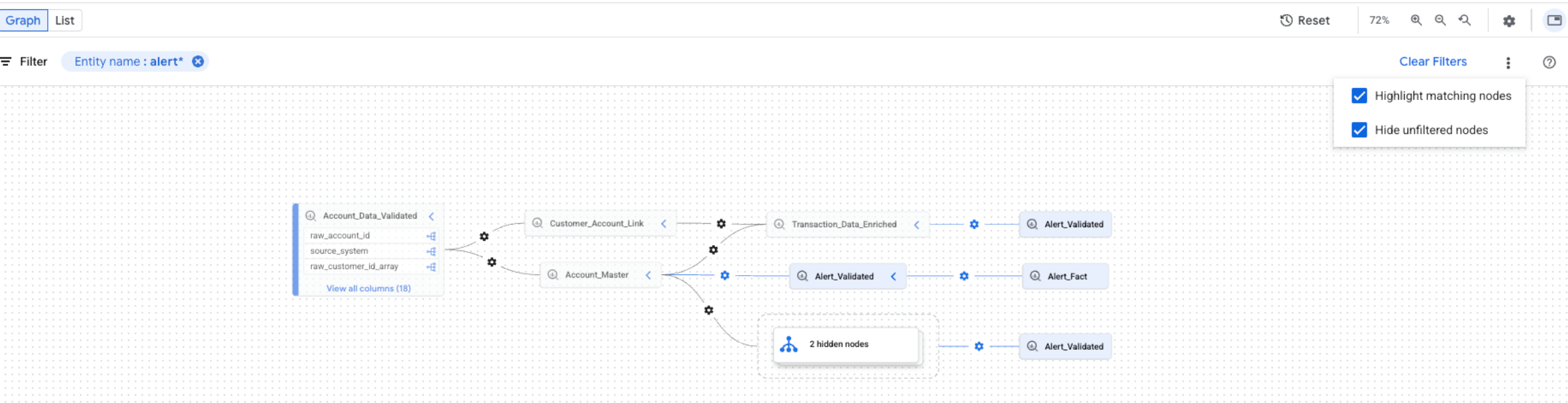
אפשר לבחור את שתי האפשרויות בו-זמנית. אם שתי האפשרויות מסומנות, הצמתים שלא מסוננים מוסתרים, והצמתים התואמים מודגשים בתצוגת הגרף המסונן.
המאמרים הבאים
- מעקב אחרי מקורות הנתונים של טבלה ב-BigQuery, כולל עבודות העתקה ושאילתות.
- מידע נוסף על מודל המידע של שושלת הנתונים
- מידע על שיקולים ומגבלות בנוגע למקורות נתונים
- מידע נוסף על כתיבה ביומני ביקורת של שושלת הנתונים
- פתרון בעיות בשושלת הנתונים
- איך משלבים עם OpenLineage
- איך משתמשים ב-data lineage עם Managed Service for Apache Spark