Lihat silsilah data untuk memahami hubungan antara resource project Anda dan proses yang membuatnya. Hubungan ini menunjukkan bagaimana aset data, seperti tabel dan set data, diubah oleh proses seperti kueri dan pipeline. Panduan ini menjelaskan cara melihat detail silsilah data di konsol Google Cloud atau mengambilnya menggunakan Data Lineage API.
Peran dan izin
Silsilah data melacak informasi silsilah secara otomatis saat Anda mengaktifkan Data Lineage API. Anda tidak memerlukan peran administrator atau editor untuk merekam silsilah aset data.
Untuk melihat silsilah data, Anda memerlukan izin Identity and Access Management (IAM) tertentu. Informasi silsilah dicatat di seluruh project, sehingga Anda memerlukan izin di beberapa project.
Saat melihat silsilah di Knowledge Catalog, BigQuery, atau Vertex AI: Anda memerlukan izin untuk melihat informasi silsilah di project tempat Anda melihatnya.
Saat melihat silsilah yang direkam dalam project lain: Anda memerlukan izin untuk melihat informasi silsilah dalam project tempat silsilah tersebut direkam.
Untuk mendapatkan izin yang Anda perlukan untuk melihat silsilah data, minta administrator untuk memberi Anda peran IAM berikut:
- Viewer Silsilah Data (
roles/datalineage.viewer) pada project tempat silsilah dicatat, dan project tempat silsilah dilihat -
Melihat detail tabel BigQuery:
BigQuery Data Viewer (
roles/bigquery.dataViewer) pada project penyimpanan tabel -
Melihat detail tugas BigQuery:
BigQuery Resource Viewer (
roles/bigquery.resourceViewer) di project komputasi tugas -
Melihat detail aset yang dikatalogkan lainnya:
Pelihat Katalog Dataplex (
roles/dataplex.catalogViewer) pada project tempat entri katalog disimpan
Untuk mengetahui informasi selengkapnya tentang pemberian peran, lihat Mengelola akses ke project, folder, dan organisasi.
Peran bawaan ini berisi izin yang diperlukan untuk melihat silsilah data. Untuk melihat izin yang benar-benar diperlukan, perluas bagian Izin yang diperlukan:
Izin yang diperlukan
Izin berikut diperlukan untuk melihat asal data:
-
Lihat detail tabel BigQuery:
bigquery.tables.get- project penyimpanan tabel -
Melihat detail tugas BigQuery:
bigquery.jobs.get- project komputasi tugas
Anda mungkin juga bisa mendapatkan izin ini dengan peran khusus atau peran bawaan lainnya.
Jenis tampilan silsilah data
Anda dapat melihat informasi silsilah sebagai grafik interaktif atau daftar terstruktur di konsol Google Cloud .
Untuk deskripsi mendetail tentang elemen grafik (seperti node, tepi, ikon proses, dan label) serta kolom yang tersedia di tampilan daftar, lihat Tentang visualisasi silsilah data di Knowledge Catalog.
Mengaktifkan silsilah data
Aktifkan silsilah data untuk mulai melacak informasi silsilah secara otomatis untuk sistem yang didukung. Secara default, mengaktifkan API akan mengaktifkan pelacakan asal untuk sebagian besar layanan yang didukung. Untuk mengontrol penyerapan silsilah Managed Service untuk Apache Spark, lihat Mengontrol penyerapan silsilah untuk layanan.
Anda harus mengaktifkan Data Lineage API di project tempat Anda melihat silsilah dan project tempat silsilah dicatat. Untuk mengetahui informasi selengkapnya, lihat Jenis project.
- Untuk merekam informasi silsilah, selesaikan langkah-langkah berikut:
-
Di konsol Google Cloud , di halaman Project selector, pilih project tempat Anda ingin merekam silsilah.
Aktifkan Data Lineage API.
- Ulangi langkah-langkah sebelumnya untuk setiap project yang ingin Anda rekam silsilahnya.
-
Di project tempat Anda melihat silsilah, aktifkan Data Lineage API dan Dataplex API.
Mengontrol penyerapan silsilah untuk layanan
Anda dapat mengaktifkan atau menonaktifkan pelacakan silsilah otomatis secara selektif untuk layanan tertentu di tingkat project, folder, atau organisasi.
Untuk mengetahui detail tentang cara penerapan konfigurasi ini secara hierarkis melalui hierarki resource, lihat Mengontrol penyerapan silsilah.
Prasyarat
Untuk mengontrol penyerapan silsilah, Anda harus menggunakan Data Lineage API. Pastikan Anda telah mengonfigurasi project klien untuk penagihan dan kuota, karena Data Lineage API adalah API berbasis klien.
Aktifkan
datalineage.googleapis.comAPI di project klien Anda. Untuk mengetahui informasi selengkapnya, lihat Mengaktifkan silsilah data.Tetapkan project klien. Untuk contoh berikut, gunakan header
X-Goog-User-Project. Untuk mengetahui informasi selengkapnya, lihat Parameter sistem.
Mendapatkan konfigurasi saat ini
Untuk memeriksa apakah penyerapan silsilah diaktifkan untuk resource atau untuk mendapatkan nilai etag sebelum Anda mengubah konfigurasi, ambil konfigurasi saat ini.
C#
C#
Sebelum mencoba contoh ini, ikuti petunjuk penyiapan C# di Panduan memulai Data Lineage menggunakan library klien. Untuk mengetahui informasi selengkapnya, lihat dokumentasi referensi C# API Data Lineage.
Untuk melakukan autentikasi ke Data Lineage, siapkan Kredensial Default Aplikasi. Untuk mengetahui informasi selengkapnya, lihat Menyiapkan autentikasi untuk lingkungan pengembangan lokal.
Go
Go
Sebelum mencoba contoh ini, ikuti petunjuk penyiapan Go di Panduan memulai Data Lineage menggunakan library klien. Untuk mengetahui informasi selengkapnya, lihat dokumentasi referensi Go API Data Lineage.
Untuk melakukan autentikasi ke Data Lineage, siapkan Kredensial Default Aplikasi. Untuk mengetahui informasi selengkapnya, lihat Menyiapkan autentikasi untuk lingkungan pengembangan lokal.
Java
Java
Sebelum mencoba contoh ini, ikuti petunjuk penyiapan Java di Panduan memulai Data Lineage menggunakan library klien. Untuk mengetahui informasi selengkapnya, lihat dokumentasi referensi Java API Data Lineage.
Untuk melakukan autentikasi ke Data Lineage, siapkan Kredensial Default Aplikasi. Untuk mengetahui informasi selengkapnya, lihat Menyiapkan autentikasi untuk lingkungan pengembangan lokal.
Python
Python
Sebelum mencoba contoh ini, ikuti petunjuk penyiapan Python di Panduan memulai Data Lineage menggunakan library klien. Untuk mengetahui informasi selengkapnya, lihat dokumentasi referensi Python API Data Lineage.
Untuk melakukan autentikasi ke Data Lineage, siapkan Kredensial Default Aplikasi. Untuk mengetahui informasi selengkapnya, lihat Menyiapkan autentikasi untuk lingkungan pengembangan lokal.
gcloud
Untuk melihat konfigurasi silsilah saat ini, gunakan perintah
gcloud datalineage config describe. Anda dapat mengambil konfigurasi untuk project, folder, atau organisasi.
Contoh berikut menunjukkan cara mendapatkan konfigurasi untuk project saat ini:
gcloud datalineage config describe
Misalnya, untuk mendapatkan konfigurasi project tertentu, gunakan flag --project:
gcloud datalineage config describe --project=PROJECT_ID
Ganti kode berikut:
PROJECT_ID: ID project yang konfigurasinya ingin Anda lihat.
Untuk melihat konfigurasi penyerapan silsilah saat ini dari layanan untuk folder atau organisasi, ganti --project= dengan:PROJECT_ID
--folder=jika Anda ingin melihat setelan penyerapan data untuk folder.FOLDER_ID--organization=jika Anda ingin melihat setelan penyerapan data untuk organisasi.ORGANIZATION_ID
REST
Untuk melihat konfigurasi silsilah saat ini, gunakan metode
projects.locations.config.get. Anda dapat mengambil konfigurasi untuk project, folder, atau organisasi.
Contoh berikut menunjukkan cara mendapatkan konfigurasi untuk project:
Sebelum menggunakan salah satu data permintaan, lakukan penggantian berikut:
CLIENT_PROJECT_ID: ID project klien Anda yang digunakan untuk penagihan atau kuota.PROJECT_ID: ID project yang konfigurasinya ingin Anda lihat.
Metode HTTP dan URL:
GET https://datalineage.googleapis.com/v1/projects/PROJECT_ID/locations/global/config
Untuk mengirim permintaan Anda, perluas salah satu opsi berikut:
Perintah akan menampilkan salah satu output berikut:
- Jika Anda tidak memberikan setelan penyerapan silsilah apa pun, Anda akan mendapatkan output dengan objek
ingestionkosong:{ "name": "projects/123456789012/locations/global/config", "ingestion": {} }
Artinya, layanan menggunakan setelan penyerapan silsilah default. Dalam contoh ini, setelan penyerapan silsilah untuk Managed Service untuk Apache Spark adalah
enabled. - Jika Anda mengaktifkan penyerapan silsilah secara eksplisit, Anda akan mendapatkan
output berikut:
{ "name": "projects/123456789012/locations/global/config", "ingestion": { "rules": [ { "integrationSelector": { "integration": "DATAPROC" }, "lineageEnablement": { "enabled": true } } ] }, "etag": "1a2b3c4d5e" }
- Jika penyerapan silsilah dinonaktifkan, Anda akan mendapatkan output berikut:
{ "name": "projects/123456789012/locations/global/config", "ingestion": { "rules": [ { "integrationSelector": { "integration": "DATAPROC" }, "lineageEnablement": { "enabled": false } } ] }, "etag": "1a2b3c4d5e" }
Untuk mendapatkan konfigurasi folder atau organisasi, ganti
projects/ dengan PROJECT_IDfolders/ atau FOLDER_IDorganizations/.ORGANIZATION_ID
Kolom etag dalam respons adalah checksum yang dihasilkan oleh server berdasarkan nilai konfigurasi saat ini. Saat memperbarui konfigurasi menggunakan
metode patch, Anda dapat menyertakan nilai etag yang ditampilkan dari
permintaan get terbaru dalam isi permintaan. Jika Anda memberikan etag,
Knowledge Catalog akan menggunakannya untuk memverifikasi bahwa konfigurasi tidak berubah
sejak permintaan baca terakhir Anda. Jika ada ketidakcocokan, permintaan update akan gagal. Hal ini mencegah Anda secara tidak sengaja menimpa konfigurasi yang dibuat oleh pengguna lain dalam skenario baca-ubah-tulis. Jika Anda tidak memberikan etag
dalam permintaan patch, Katalog Pengetahuan akan mengganti konfigurasi
tanpa syarat.
Menonaktifkan penyerapan silsilah untuk layanan
Untuk mengelola biaya, menerapkan kebijakan tata kelola data, atau mengecualikan project pengembangan dan beban kerja lainnya yang tidak mendapatkan manfaat dari pelacakan asal-usul, nonaktifkan penyerapan asal-usul untuk layanan.
Java
package com.google.cloud.datacatalog.lineage.configmanagement.v1.samples;
import com.google.api.gax.rpc.NotFoundException;
import com.google.cloud.datacatalog.lineage.configmanagement.v1.Config;
import com.google.cloud.datacatalog.lineage.configmanagement.v1.Config.Ingestion;
import com.google.cloud.datacatalog.lineage.configmanagement.v1.Config.Ingestion.IngestionRule;
import com.google.cloud.datacatalog.lineage.configmanagement.v1.Config.Ingestion.IngestionRule.IntegrationSelector;
import com.google.cloud.datacatalog.lineage.configmanagement.v1.Config.Ingestion.IngestionRule.IntegrationSelector.Integration;
import com.google.cloud.datacatalog.lineage.configmanagement.v1.Config.Ingestion.IngestionRule.LineageEnablement;
import com.google.cloud.datacatalog.lineage.configmanagement.v1.ConfigManagementServiceClient;
import com.google.cloud.datacatalog.lineage.configmanagement.v1.ConfigName;
import com.google.cloud.datacatalog.lineage.configmanagement.v1.GetConfigRequest;
import com.google.cloud.datacatalog.lineage.configmanagement.v1.UpdateConfigRequest;
public class DisableLineageIngestion {
public static void main(String[] args) throws Exception {
// TODO(developer): Replace these variables before running the sample.
String projectId = "your-project-id";
String location = "global";
disableLineageIngestion(projectId, location);
}
// Disables lineage ingestion for a specific service
// (Managed Service for Apache Spark).
public static void disableLineageIngestion(String projectId, String location) throws Exception {
// Initialize client that will be used to send requests. This client only needs to be created
// once, and can be reused for multiple requests.
try (ConfigManagementServiceClient client = ConfigManagementServiceClient.create()) {
// Format the resource name.
String name = ConfigName.ofProjectLocationName(projectId, location).toString();
Config.Builder configBuilder = Config.newBuilder().setName(name);
// It is a best practice to read the existing config to preserve other rules
// and use the etag for optimistic concurrency control.
try {
GetConfigRequest getRequest = GetConfigRequest.newBuilder().setName(name).build();
Config existingConfig = client.getConfig(getRequest);
configBuilder.mergeFrom(existingConfig);
} catch (NotFoundException e) {
// If config doesn't exist, we will proceed by creating a new one.
}
// Create an integration selector for the service you want to disable.
IntegrationSelector selector =
IntegrationSelector.newBuilder().setIntegration(Integration.DATAPROC).build();
// Set lineage enablement to false to disable tracking.
LineageEnablement enablement = LineageEnablement.newBuilder().setEnabled(false).build();
// Build the ingestion rule.
IngestionRule disableRule =
IngestionRule.newBuilder()
.setIntegrationSelector(selector)
.setLineageEnablement(enablement)
.build();
// Preserve existing rules except for the one we are modifying, then add the new rule.
// We clear the ingestion block out of the configBuilder entirely to reconstruct it.
Ingestion.Builder ingestionBuilder = Ingestion.newBuilder();
if (configBuilder.hasIngestion()) {
for (IngestionRule rule : configBuilder.getIngestion().getRulesList()) {
// Keep all existing rules EXCEPT the one targeting DATAPROC
if (rule.getIntegrationSelector().getIntegration() != Integration.DATAPROC) {
ingestionBuilder.addRules(rule);
}
}
}
ingestionBuilder.addRules(disableRule);
// Update the config builder with the reconstructed ingestion settings.
configBuilder.setIngestion(ingestionBuilder.build());
// Build the update request.
UpdateConfigRequest request = UpdateConfigRequest.newBuilder()
.setConfig(configBuilder.build())
.build();
// Update the config.
Config response = client.updateConfig(request);
System.out.printf("Successfully updated config: %s\n", response.getName());
}
}
}
Python
from google.api_core.exceptions import NotFound
from google.cloud.datacatalog.lineage import configmanagement_v1
def disable_lineage_ingestion(project_id: str, location: str = "global") -> configmanagement_v1.Config:
"""Disables lineage ingestion for a specific service.
Args:
project_id: The ID of your Google Cloud project.
location: The region location, usually 'global'.
Returns:
The updated Configuration object.
"""
# Initialize client that will be used to send requests.
client = configmanagement_v1.ConfigManagementServiceClient()
# The config name format
name = f"projects/{project_id}/locations/{location}/config"
try:
# Retrieve the existing config to preserve other configurations and
# obtain the latest etag for optimistic concurrency control.
config = client.get_config(name=name)
# Filter out existing rules for the integration we are updating
new_rules = [
rule for rule in config.ingestion.rules
if rule.integration_selector.integration != configmanagement_v1.Config.Ingestion.IngestionRule.IntegrationSelector.Integration.DATAPROC
]
except NotFound:
# If the config does not exist, start fresh
config = configmanagement_v1.Config(name=name)
new_rules = []
# Define the integration to disable tracking for (e.g., DATAPROC).
integration_selector = configmanagement_v1.Config.Ingestion.IngestionRule.IntegrationSelector(
integration=configmanagement_v1.Config.Ingestion.IngestionRule.IntegrationSelector.Integration.DATAPROC
)
# Set lineage enablement to False to disable tracking.
lineage_enablement = configmanagement_v1.Config.Ingestion.IngestionRule.LineageEnablement(
enabled=False
)
# Create the ingestion rule.
disable_rule = configmanagement_v1.Config.Ingestion.IngestionRule(
integration_selector=integration_selector,
lineage_enablement=lineage_enablement,
)
# Append the new disabling rule and assign it back to the config ingestion rules
new_rules.append(disable_rule)
config.ingestion = configmanagement_v1.Config.Ingestion(rules=new_rules)
# Create the update request using the config (which includes the etag if it existed).
request = configmanagement_v1.UpdateConfigRequest(
config=config,
)
# Make the request to update the config
response = client.update_config(request=request)
print(f"Successfully updated config: {response.name}")
return response
gcloud
Untuk menonaktifkan penyerapan silsilah untuk layanan tertentu,
gunakan perintah gcloud datalineage config update dengan string JSON inline atau jalur ke file JSON yang menetapkan lineageEnablement.enabled ke false untuk integration tertentu.
Contoh berikut menunjukkan cara menonaktifkan penyerapan silsilah layanan untuk project menggunakan string JSON inline:
gcloud datalineage config update --project=PROJECT_ID \
--config='{
"ingestion": {
"rules": [
{
"integrationSelector": {
"integration": "INTEGRATION"
},
"lineageEnablement": {
"enabled": false
}
}
]
},
"etag": "ETAG"
}'
Ganti kode berikut:
PROJECT_ID: ID project yang konfigurasinya ingin Anda perbarui.INTEGRATION: Integrasi yang Anda tetapkan konfigurasinya. MisalnyaDATAPROCatauBIGQUERY.ETAG: Nilaietagyang ditampilkan dari permintaangetterbaru di isi permintaan, digunakan untuk memverifikasi bahwa konfigurasi tidak berubah sejak permintaan baca terakhir Anda.
Untuk memperbarui konfigurasi menggunakan file JSON, jalankan:
gcloud datalineage config update --project=PROJECT_ID --config=CONFIG_FILE
Ganti kode berikut:
CONFIG_FILE: Jalur ke file JSON yang berisi konfigurasi.
Untuk menonaktifkan penyerapan silsilah layanan untuk folder atau organisasi, ganti --project= dengan:PROJECT_ID
--folder=jika Anda ingin memperbarui setelan penyerapan data untuk folder.FOLDER_ID--organization=jika Anda ingin memperbarui setelan penyerapan data untuk organisasi.ORGANIZATION_ID
REST
Untuk menonaktifkan penyerapan silsilah untuk layanan tertentu, gunakan metode projects.locations.config.patch dengan aturan penyerapan yang menetapkan lineageEnablement.enabled ke false untuk integration tertentu.
Untuk mencegah konfigurasi yang dibuat oleh pengguna lain secara tidak sengaja ditimpa dalam skenario baca-ubah-tulis, Anda dapat menyertakan kolom etag dalam isi permintaan. Untuk mengetahui informasi selengkapnya, lihat Mendapatkan konfigurasi saat ini.
Sebelum menggunakan salah satu data permintaan, lakukan penggantian berikut:
CLIENT_PROJECT_ID: ID project klien Anda yang digunakan untuk penagihan atau kuota.PROJECT_ID: ID project yang konfigurasinya ingin Anda perbarui.ETAG: Nilaietagyang ditampilkan dari permintaangetterbaru.INTEGRATION:integrationyang Anda tetapkan konfigurasi untuknya. Misalnya,DATAPROC.
Metode HTTP dan URL:
PATCH https://datalineage.googleapis.com/v1/projects/PROJECT_ID/locations/global/config
Meminta isi JSON:
{
"ingestion": {
"rules": [
{
"integrationSelector": {
"integration": "INTEGRATION"
},
"lineageEnablement": {
"enabled": false
}
}
]
},
"etag": "ETAG"
}
Untuk mengirim permintaan Anda, perluas salah satu opsi berikut:
Anda akan melihat respons JSON seperti berikut:
{
"name": "projects/PROJECT_ID/locations/global/config",
"ingestion": {
"rules": [
{
"integrationSelector": {
"integration": "INTEGRATION"
},
"lineageEnablement": {
"enabled": false
}
}
]
},
"etag": "1a2b3c4d5e"
}
Untuk menonaktifkan penyerapan silsilah untuk folder atau organisasi, ganti
projects/ dengan PROJECT_IDfolders/ atau FOLDER_IDorganizations/.ORGANIZATION_ID
Mengaktifkan penyerapan silsilah untuk layanan
Untuk melanjutkan pelacakan setelah menonaktifkannya, atau untuk mengaktifkan integrasi yang dinonaktifkan secara default, aktifkan penyerapan silsilah untuk layanan.
Java
package com.google.cloud.datacatalog.lineage.configmanagement.v1.samples;
import com.google.api.gax.rpc.NotFoundException;
import com.google.cloud.datacatalog.lineage.configmanagement.v1.Config;
import com.google.cloud.datacatalog.lineage.configmanagement.v1.Config.Ingestion;
import com.google.cloud.datacatalog.lineage.configmanagement.v1.Config.Ingestion.IngestionRule;
import com.google.cloud.datacatalog.lineage.configmanagement.v1.Config.Ingestion.IngestionRule.IntegrationSelector;
import com.google.cloud.datacatalog.lineage.configmanagement.v1.Config.Ingestion.IngestionRule.IntegrationSelector.Integration;
import com.google.cloud.datacatalog.lineage.configmanagement.v1.Config.Ingestion.IngestionRule.LineageEnablement;
import com.google.cloud.datacatalog.lineage.configmanagement.v1.ConfigManagementServiceClient;
import com.google.cloud.datacatalog.lineage.configmanagement.v1.ConfigName;
import com.google.cloud.datacatalog.lineage.configmanagement.v1.GetConfigRequest;
import com.google.cloud.datacatalog.lineage.configmanagement.v1.UpdateConfigRequest;
public class EnableLineageIngestion {
public static void main(String[] args) throws Exception {
// TODO(developer): Replace these variables before running the sample.
String projectId = "your-project-id";
String location = "global";
enableLineageIngestion(projectId, location);
}
// Enables lineage ingestion for a specific service
// (Managed Service for Apache Spark).
public static void enableLineageIngestion(String projectId, String location) throws Exception {
// Initialize client that will be used to send requests. This client only needs to be created
// once, and can be reused for multiple requests.
try (ConfigManagementServiceClient client = ConfigManagementServiceClient.create()) {
// Format the resource name.
String name = ConfigName.ofProjectLocationName(projectId, location).toString();
Config.Builder configBuilder = Config.newBuilder().setName(name);
// It is a best practice to read the existing config to preserve other rules
// and use the etag for optimistic concurrency control.
try {
GetConfigRequest getRequest = GetConfigRequest.newBuilder().setName(name).build();
Config existingConfig = client.getConfig(getRequest);
configBuilder.mergeFrom(existingConfig);
} catch (NotFoundException e) {
// If config doesn't exist, we will proceed by creating a new one.
}
// Create an integration selector for the service you want to enable (e.g., DATAPROC).
IntegrationSelector selector =
IntegrationSelector.newBuilder().setIntegration(Integration.DATAPROC).build();
// Set lineage enablement to true to enable tracking.
LineageEnablement enablement = LineageEnablement.newBuilder().setEnabled(true).build();
// Build the ingestion rule.
IngestionRule enableRule =
IngestionRule.newBuilder()
.setIntegrationSelector(selector)
.setLineageEnablement(enablement)
.build();
// Preserve existing rules except for the one we are modifying, then add the new rule.
// We clear the ingestion block out of the configBuilder entirely to reconstruct it.
Ingestion.Builder ingestionBuilder = Ingestion.newBuilder();
if (configBuilder.hasIngestion()) {
for (IngestionRule rule : configBuilder.getIngestion().getRulesList()) {
// Keep all existing rules EXCEPT the one targeting DATAPROC
if (rule.getIntegrationSelector().getIntegration() != Integration.DATAPROC) {
ingestionBuilder.addRules(rule);
}
}
}
ingestionBuilder.addRules(enableRule);
// Update the config builder with the reconstructed ingestion settings.
configBuilder.setIngestion(ingestionBuilder.build());
// Build the update request.
UpdateConfigRequest request = UpdateConfigRequest.newBuilder()
.setConfig(configBuilder.build())
.build();
// Update the config.
Config response = client.updateConfig(request);
System.out.printf("Successfully updated config: %s\n", response.getName());
}
}
}
Python
from google.api_core.exceptions import NotFound
from google.cloud.datacatalog.lineage import configmanagement_v1
def enable_lineage_ingestion(project_id: str, location: str = "global") -> configmanagement_v1.Config:
"""Enables lineage ingestion for a specific service like Dataproc
(Managed Service for Apache Spark).
Args:
project_id: The ID of your Google Cloud project.
location: The region location, usually 'global'.
Returns:
The updated Configuration object.
"""
# Initialize client that will be used to send requests.
client = configmanagement_v1.ConfigManagementServiceClient()
# The config name format
name = f"projects/{project_id}/locations/{location}/config"
try:
# Retrieve the existing config to preserve other configurations and
# obtain the latest etag for optimistic concurrency control.
config = client.get_config(name=name)
# Filter out existing rules for the integration we are updating
new_rules = [
rule for rule in config.ingestion.rules
if rule.integration_selector.integration != configmanagement_v1.Config.Ingestion.IngestionRule.IntegrationSelector.Integration.DATAPROC
]
except NotFound:
# If the config does not exist, start fresh
config = configmanagement_v1.Config(name=name)
new_rules = []
# Define the integration to enable tracking for (e.g., DATAPROC).
integration_selector = configmanagement_v1.Config.Ingestion.IngestionRule.IntegrationSelector(
integration=configmanagement_v1.Config.Ingestion.IngestionRule.IntegrationSelector.Integration.DATAPROC
)
# Set lineage enablement to True to enable tracking.
lineage_enablement = configmanagement_v1.Config.Ingestion.IngestionRule.LineageEnablement(
enabled=True
)
# Create the ingestion rule.
enable_rule = configmanagement_v1.Config.Ingestion.IngestionRule(
integration_selector=integration_selector,
lineage_enablement=lineage_enablement,
)
# Append the new enabling rule and assign it back to the config ingestion rules
new_rules.append(enable_rule)
config.ingestion = configmanagement_v1.Config.Ingestion(rules=new_rules)
# Create the update request using the config (which includes the etag if it existed).
request = configmanagement_v1.UpdateConfigRequest(
config=config,
)
# Make the request to update the config
response = client.update_config(request=request)
print(f"Successfully updated config: {response.name}")
return response
gcloud
Untuk mengaktifkan penyerapan silsilah untuk layanan tertentu,
gunakan perintah gcloud datalineage config update dengan string JSON inline atau jalur ke file JSON yang menetapkan lineageEnablement.enabled ke true untuk integration tertentu. Integrasi saat ini mencakup Managed Service untuk Apache Spark, BigQuery, dan Managed Airflow.
Contoh berikut menunjukkan cara mengaktifkan penyerapan silsilah layanan untuk project menggunakan string JSON inline:
gcloud datalineage config update --project=PROJECT_ID \
--config='{
"ingestion": {
"rules": [
{
"integrationSelector": {
"integration": "INTEGRATION"
},
"lineageEnablement": {
"enabled": true
}
}
]
},
"etag": "ETAG"
}'
Ganti kode berikut:
PROJECT_ID: ID project yang konfigurasinya ingin Anda perbarui.INTEGRATION: Integrasi yang Anda tetapkan konfigurasinya (misalnya,DATAPROCatauBIGQUERY).ETAG: Nilaietagyang ditampilkan dari permintaangetterbaru di isi permintaan, digunakan untuk memverifikasi bahwa konfigurasi tidak berubah sejak permintaan baca terakhir Anda.
Untuk memperbarui konfigurasi menggunakan file JSON, jalankan:
gcloud datalineage config update --project=PROJECT_ID --config=CONFIG_FILE
Ganti kode berikut:
CONFIG_FILE: Jalur ke file JSON yang berisi konfigurasi.
Untuk mengaktifkan penyerapan silsilah layanan untuk folder atau organisasi, ganti --project= dengan:PROJECT_ID
--folder=jika Anda ingin memperbarui setelan penyerapan data untuk folder.FOLDER_ID--organization=jika Anda ingin memperbarui setelan penyerapan data untuk organisasi.ORGANIZATION_ID
REST
Untuk mengaktifkan penyerapan silsilah untuk layanan tertentu, gunakan metode projects.locations.config.patch dengan aturan penyerapan yang menetapkan lineageEnablement.enabled ke true untuk integration tertentu. Integrasi saat ini mencakup Managed Service untuk Apache Spark, BigQuery, dan Managed Airflow.
Untuk mencegah konfigurasi yang dibuat oleh pengguna lain secara tidak sengaja ditimpa dalam skenario baca-ubah-tulis, Anda dapat menyertakan kolom etag dalam isi permintaan. Untuk mengetahui informasi selengkapnya, lihat Mendapatkan konfigurasi saat ini.
Sebelum menggunakan salah satu data permintaan, lakukan penggantian berikut:
CLIENT_PROJECT_ID: ID project klien Anda yang digunakan untuk penagihan atau kuota.PROJECT_ID: ID project yang konfigurasinya ingin Anda perbarui.ETAG: Nilaietagyang ditampilkan dari permintaangetterbaru.INTEGRATION:integrationyang Anda tetapkan konfigurasi untuknya. Misalnya,DATAPROC.
Metode HTTP dan URL:
PATCH https://datalineage.googleapis.com/v1/projects/PROJECT_ID/locations/global/config
Meminta isi JSON:
{
"ingestion": {
"rules": [
{
"integrationSelector": {
"integration": "INTEGRATION"
},
"lineageEnablement": {
"enabled": true
}
}
]
},
"etag": "ETAG"
}
Untuk mengirim permintaan Anda, perluas salah satu opsi berikut:
Anda akan melihat respons JSON seperti berikut:
{
"name": "projects/PROJECT_ID/locations/global/config",
"ingestion": {
"rules": [
{
"integrationSelector": {
"integration": "INTEGRATION"
},
"lineageEnablement": {
"enabled": true
}
}
]
},
"etag": "1a2b3c4d5e"
}
Untuk mengaktifkan penyerapan silsilah layanan untuk folder atau organisasi, ganti
projects/ dengan PROJECT_IDfolders/ atau
FOLDER_IDorganizations/.ORGANIZATION_ID
Melihat silsilah
Untuk melacak cara data ditransformasi dan berpindah di seluruh sistem, Anda dapat melihat silsilah data menggunakan konsol Google Cloud atau API.
Konsol
Anda dapat mengakses informasi silsilah data di konsol Google Cloud dari berbagai titik awal:
- Knowledge Catalog: Buka halaman Penelusuran Knowledge Catalog, pilih Knowledge Catalog sebagai mode penelusuran, telusuri entri yang ingin Anda lihat, lalu klik entri tersebut. Untuk mengetahui informasi selengkapnya, lihat Menelusuri resource di Knowledge Catalog.
- BigQuery: Buka halaman BigQuery dan buka tabel yang silsilah datanya ingin Anda lihat.
- Vertex AI: Buka halaman Datasets atau Model Registry, lalu klik set data atau model yang ingin Anda lihat asal-usul datanya.
Untuk melihat grafik silsilah, ikuti langkah-langkah berikut:
Klik tab Silsilah.
Tampilan Graph default akan terbuka, yang menampilkan silsilah tingkat tabel di seluruh sistem dan region. Untuk mengetahui informasi selengkapnya, lihat Tampilan grafik silsilah.
Untuk menjelajahi grafik silsilah secara manual, klik Luaskan di samping node untuk memuat lima node lagi sekaligus.
Untuk mengetahui informasi selengkapnya, lihat Menjelajahi grafik silsilah secara manual.
Klik node dalam tampilan Graph.
Panel Detail akan terbuka dengan informasi tentang aset, seperti nama dan jenis yang sepenuhnya memenuhi syarat. Untuk mengetahui informasi selengkapnya, lihat Detail node.
Klik tepi dengan ikon proses di tampilan Grafik.
Panel Query akan terbuka. Untuk mengetahui informasi selengkapnya, lihat Memeriksa logika transformasi dan Audit dan histori proses.
- Untuk memeriksa logika transformasi, klik tab Detail.
- Untuk melihat audit dan histori operasi, klik tab Operasi.
Di panel Lineage explorer, pilih kriteria filter—misalnya, Arah, Jenis dependensi, atau Rentang waktu—lalu klik Terapkan.
Tindakan ini akan membuka tampilan fokus dalam wilayah tertentu (Pratinjau). Tampilan ini secara otomatis meluaskan grafik hingga tiga tingkat node. Untuk mengetahui informasi selengkapnya, lihat Menerapkan filter untuk tampilan silsilah yang terfokus.
Dalam tampilan Grafik yang difokuskan, pilih sebuah node, lalu di panel detail node, klik Visualisasikan Jalur untuk memvisualisasikan jalur silsilah dari node yang dipilih kembali ke entri root (hanya dalam tampilan yang difokuskan).
Untuk mengetahui informasi selengkapnya, lihat Visualisasi jalur silsilah.
Untuk melihat silsilah tingkat kolom (hanya untuk tugas BigQuery dan Managed Service for Apache Spark), lakukan salah satu hal berikut:
- Dalam tampilan Grafik yang difokuskan, klik ikon kolom pada tabel.
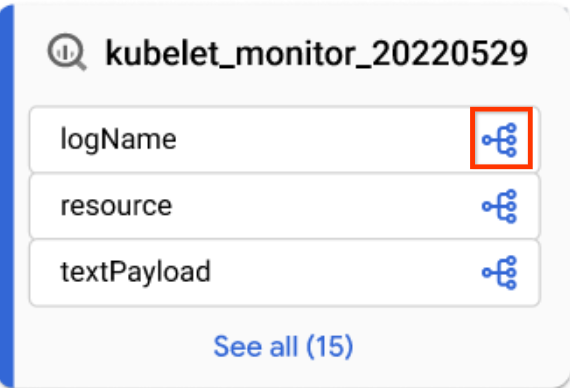
Ikon kolom - Di panel Penjelajah silsilah, filter menurut nama kolom, lalu klik Terapkan.
Untuk mengetahui informasi selengkapnya, lihat Silsilah tingkat kolom.
- Dalam tampilan Grafik yang difokuskan, klik ikon kolom pada tabel.
Klik Reset.
Tindakan ini akan menghapus semua filter yang diterapkan dan membawa Anda ke awal tampilan grafik.
Klik Daftar untuk beralih ke tampilan daftar.
Tampilan Daftar menawarkan representasi tabular silsilah yang disederhanakan dan mendetail untuk silsilah tingkat tabel dan tingkat kolom, yang disinkronkan dengan tampilan Grafik. Secara default, tampilan daftar yang disederhanakan ditampilkan, dan Anda dapat beralih ke tampilan daftar detail untuk menganalisis hubungan sumber-target individual. Anda dapat mengonfigurasi kolom yang ditampilkan dan mengekspor data silsilah. Untuk mengetahui informasi selengkapnya, lihat Tampilan daftar silsilah.
Java
import com.google.api.gax.rpc.ApiException;
import com.google.cloud.datacatalog.lineage.v1.BatchSearchLinkProcessesRequest;
import com.google.cloud.datacatalog.lineage.v1.EntityReference;
import com.google.cloud.datacatalog.lineage.v1.EventLink;
import com.google.cloud.datacatalog.lineage.v1.LineageClient;
import com.google.cloud.datacatalog.lineage.v1.LineageEvent;
import com.google.cloud.datacatalog.lineage.v1.Link;
import com.google.cloud.datacatalog.lineage.v1.ListLineageEventsRequest;
import com.google.cloud.datacatalog.lineage.v1.ListRunsRequest;
import com.google.cloud.datacatalog.lineage.v1.LocationName;
import com.google.cloud.datacatalog.lineage.v1.ProcessLinks;
import com.google.cloud.datacatalog.lineage.v1.Run;
import com.google.cloud.datacatalog.lineage.v1.SearchLinksRequest;
import java.io.IOException;
import java.util.ArrayList;
import java.util.HashSet;
import java.util.LinkedList;
import java.util.List;
import java.util.Queue;
import java.util.Set;
public class ViewLineageExample {
public static void main(String[] args) throws IOException {
// TODO(developer): Replace these variables before running the sample.
String projectId = "my-project-id";
String location = "us";
String targetFullyQualifiedName = "bigquery:my-project-id.my_dataset.my_table";
int maxDepth = 3;
viewLineage(projectId, location, targetFullyQualifiedName, maxDepth);
}
static class Node {
String fqn;
int depth;
Node(String fqn, int depth) {
this.fqn = fqn;
this.depth = depth;
}
}
public static void viewLineage(
String projectId, String location, String targetFullyQualifiedName, int maxDepth)
throws IOException {
// Initialize client that will be used to send requests. This client only needs
// to be created once, and can be reused for multiple requests.
try (LineageClient client = LineageClient.create()) {
String parent = LocationName.of(projectId, location).toString();
Set<String> visitedNodes = new HashSet<>();
Queue<Node> queue = new LinkedList<>();
visitedNodes.add(targetFullyQualifiedName);
queue.offer(new Node(targetFullyQualifiedName, 0));
while (!queue.isEmpty()) {
Node current = queue.poll();
System.out.printf("\nExploring node (Depth %d): %s\n", current.depth, current.fqn);
if (current.depth >= maxDepth) {
continue;
}
EntityReference targetEntity =
EntityReference.newBuilder().setFullyQualifiedName(current.fqn).build();
SearchLinksRequest searchLinksRequest =
SearchLinksRequest.newBuilder().setParent(parent).setTarget(targetEntity).build();
List<String> linkNames = new ArrayList<>();
try {
// 1. Search for links related to the target entity
for (Link link : client.searchLinks(searchLinksRequest).iterateAll()) {
linkNames.add(link.getName());
}
} catch (ApiException e) {
System.out.printf(" Failed to retrieve links for %s: %s\n", current.fqn, e.getMessage());
continue;
}
if (linkNames.isEmpty()) {
continue;
}
// 2. Batch search for processes in chunks of 100
for (int i = 0; i < linkNames.size(); i += 100) {
List<String> batch = linkNames.subList(i, Math.min(linkNames.size(), i + 100));
BatchSearchLinkProcessesRequest batchSearchRequest =
BatchSearchLinkProcessesRequest.newBuilder()
.setParent(parent)
.addAllLinks(batch)
.build();
try {
for (ProcessLinks processLinks :
client.batchSearchLinkProcesses(batchSearchRequest).iterateAll()) {
String processName = processLinks.getProcess();
System.out.printf(" Process: %s\n", processName);
// 3. List runs for the process
ListRunsRequest runsRequest =
ListRunsRequest.newBuilder().setParent(processName).build();
for (Run run : client.listRuns(runsRequest).iterateAll()) {
System.out.printf(" Run: %s\n", run.getName());
// 4. List events for the run
ListLineageEventsRequest eventsRequest =
ListLineageEventsRequest.newBuilder().setParent(run.getName()).build();
for (LineageEvent event : client.listLineageEvents(eventsRequest).iterateAll()) {
for (EventLink eventLink : event.getLinksList()) {
String sourceFqn = eventLink.getSource().getFullyQualifiedName();
// If exploring upstream, queue the source
if (!sourceFqn.isEmpty() && !visitedNodes.contains(sourceFqn)) {
visitedNodes.add(sourceFqn);
queue.offer(new Node(sourceFqn, current.depth + 1));
}
}
}
}
}
} catch (ApiException e) {
System.out.printf(" Failed to retrieve processes/runs: %s\n", e.getMessage());
}
}
}
}
}
}
Python
from google.cloud import datacatalog_lineage_v1
from google.api_core.exceptions import GoogleAPICallError
def view_lineage(project_id: str, location: str, target_fully_qualified_name: str, max_depth: int = 3):
"""Retrieves lineage for a given entity using a depth-limited search."""
client = datacatalog_lineage_v1.LineageClient()
parent = f"projects/{project_id}/locations/{location}"
# Store visited nodes to avoid infinite loops in cyclic graphs
visited_nodes = set([target_fully_qualified_name])
queue = [(target_fully_qualified_name, 0)]
while queue:
current_node, current_depth = queue.pop(0)
print(f"\nExploring node (Depth {current_depth}): {current_node}")
if current_depth >= max_depth:
continue
target_entity = datacatalog_lineage_v1.EntityReference(
fully_qualified_name=current_node
)
search_links_request = datacatalog_lineage_v1.SearchLinksRequest(
parent=parent,
target=target_entity,
)
try:
links = list(client.search_links(request=search_links_request))
except GoogleAPICallError as e:
print(f" Failed to retrieve links for {current_node}: {e.message}")
continue
if not links:
continue
# Extract link names to query processes in batches
link_names = [link.name for link in links]
# Batch max size is 100
for i in range(0, len(link_names), 100):
batch = link_names[i:i + 100]
batch_request = datacatalog_lineage_v1.BatchSearchLinkProcessesRequest(
parent=parent,
links=batch
)
try:
for process_links in client.batch_search_link_processes(request=batch_request):
process_name = process_links.process
print(f" Process: {process_name}")
runs_request = datacatalog_lineage_v1.ListRunsRequest(parent=process_name)
for run in client.list_runs(request=runs_request):
print(f" Run: {run.name}")
events_request = datacatalog_lineage_v1.ListLineageEventsRequest(parent=run.name)
for event in client.list_lineage_events(request=events_request):
for event_link in event.links:
source_fqn = event_link.source.fully_qualified_name
# If exploring upstream, queue the source
if source_fqn and source_fqn not in visited_nodes:
visited_nodes.add(source_fqn)
queue.append((source_fqn, current_depth + 1))
except GoogleAPICallError as e:
print(f" Failed to retrieve processes/runs: {e.message}")
Memperbaiki visualisasi silsilah
Untuk menyempurnakan visualisasi silsilah, Anda dapat menggunakan opsi penyorotan dan pemfilteran di Penjelajah silsilah:
Untuk menelusuri project, set data, atau nama entitas tertentu, gunakan panel Filter.
Setelah Anda menerapkan filter, node silsilah yang cocok dengan kriteria filter Anda dianggap sebagai node yang cocok. Anda dapat menyempurnakan cara node yang cocok dan tidak cocok ditampilkan.
Dalam grafik silsilah, klik ikon Tindakan lainnya yang ada di samping tombol Hapus filter untuk melihat opsi tampilan.
Pilih salah satu atau kedua opsi berikut:
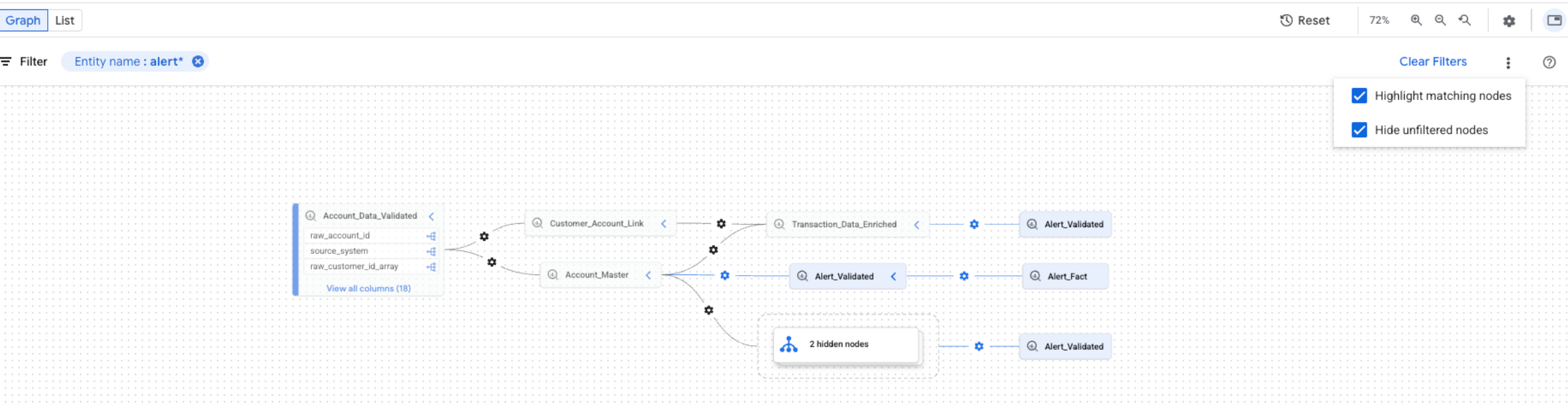
Anda dapat memilih kedua opsi secara bersamaan. Jika kedua opsi dipilih, node yang tidak difilter akan disembunyikan, dan node yang cocok akan ditandai dalam tampilan grafik yang difilter.
Langkah berikutnya
- Melacak silsilah data untuk tugas kueri dan salinan tabel BigQuery.
- Pelajari model informasi silsilah data.
- Pelajari pertimbangan dan batasan asal-usul data.
- Pelajari logging audit silsilah data.
- Pelajari cara memecahkan masalah silsilah data.
- Pelajari cara berintegrasi dengan OpenLineage.
- Pelajari cara menggunakan silsilah data dengan Managed Service untuk Apache Spark.