

Knowledge Catalog data quality tasks let you define and run data quality checks across tables in BigQuery and Cloud Storage. Knowledge Catalog data quality tasks also let you apply regular data controls in BigQuery environments.
When to create Knowledge Catalog data quality tasks
Knowledge Catalog data quality tasks can help you with the following:
- Validate data as part of a data production pipeline.
- Routinely monitor the quality of datasets against your expectations.
- Build data quality reports for regulatory requirements.
Benefits
- Customizable specifications. You can use the highly flexible YAML syntax to declare your data quality rules.
- Serverless implementation. Knowledge Catalog does not need any infrastructure setup.
- Zero-copy and automatic pushdown. YAML checks are converted to SQL and pushed down to BigQuery, resulting in no data copy.
- Schedulable data quality checks. You can schedule data quality checks through the serverless scheduler in Knowledge Catalog, or use the Dataplex API through external schedulers like Managed Airflow for pipeline integration.
- Managed experience. Knowledge Catalog uses an open source data quality engine, CloudDQ, to run data quality checks. However, Knowledge Catalog provides a seamless managed experience for performing your data quality checks.
How data quality tasks work
The following diagram shows how Knowledge Catalog data quality tasks work:
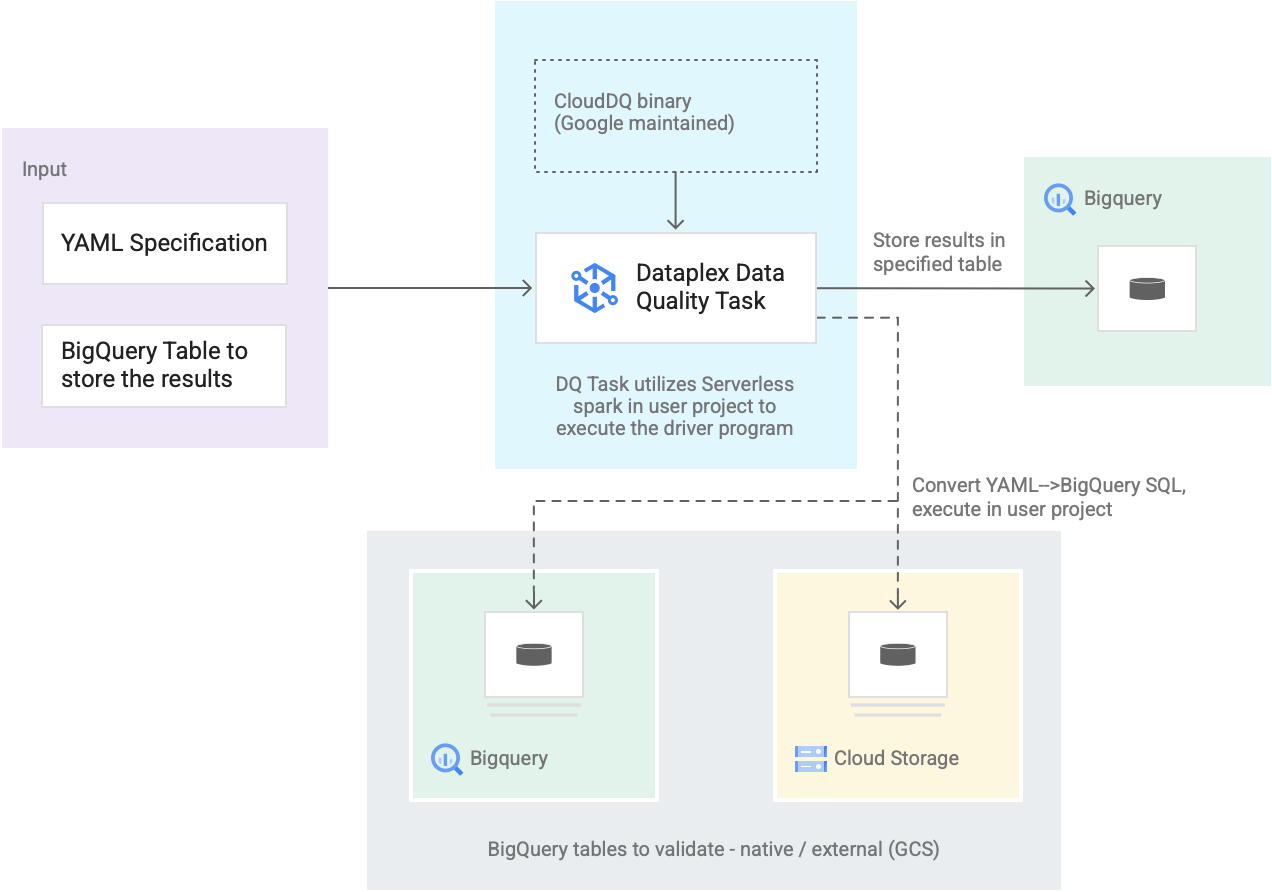
- Input from users
- YAML specification: A set of one or more YAML files that define data quality rules based on the specification syntax. You store the YAML files in a Cloud Storage bucket in your project. Users can run multiple rules simultaneously, and those rules can be applied to different BigQuery tables, including tables across different datasets or Google Cloud projects. The specification supports incremental runs for only validating new data. To create a YAML specification, see Create a specification file.
- BigQuery result table: A user-specified table where the data quality validation results are stored. The Google Cloud project in which this table resides can be a different project than the one in which the Knowledge Catalog data quality task is used.
- Tables to validate
- Within the YAML specification, you need to specify which tables you want to validate for which rules, also known as a rule binding. The tables can be BigQuery native tables or BigQuery external tables in Cloud Storage. The YAML specification lets you specify tables inside or outside a Knowledge Catalog zone.
- BigQuery and Cloud Storage tables that are validated in a single run can belong to different projects.
- Knowledge Catalog data quality task: A Knowledge Catalog data quality task is configured with a prebuilt, maintained CloudDQ PySpark binary and takes the YAML specification and BigQuery result table as the input. Similar to other Knowledge Catalog tasks, the Knowledge Catalog data quality task runs on a serverless Spark environment, converts the YAML specification to BigQuery queries, and then runs those queries on the tables that are defined in the specification file.
Pricing
When you run Knowledge Catalog data quality tasks, you are charged for BigQuery and Managed Service for Apache Spark (Batches) usage.
The Knowledge Catalog data quality task converts the specification file to BigQuery queries and runs them in the user project. See BigQuery pricing.
Knowledge Catalog uses Spark to run the prebuilt, Google-maintained open source CloudDQ driver program to convert user specification to BigQuery queries. See Managed Service for Apache Spark pricing.
There are no charges for using Knowledge Catalog to organize data or using the serverless scheduler in Knowledge Catalog to schedule data quality checks. See Knowledge Catalog pricing.