

Knowledge Catalog (formerly Dataplex Universal Catalog) provides a unified, structured metadata management platform across your distributed data estate. It automatically discovers, indexes, and organizes technical structures, business context, data quality metrics, and operational relationships.
By organizing metadata into a flexible, extensible metamodel, Knowledge Catalog establishes the structural foundation of the Active Context Graph within Google's Agentic Data Cloud. This context graph lets data teams discover and govern assets while empowering generative AI agents to retrieve grounded, trusted business context.
Knowledge Catalog metamodel
Knowledge Catalog organizes metadata through a modular hierarchy of containers, assets, schemas, and relationships:
- Containers and assets: Entry groups organize entries, which represent individual data assets and their schema columns.
- Structured enrichment: Aspect types define schemas for aspects, which attach structured metadata to entries, columns, or relationships.
- Standards and governance: Entry types define templates that enforce required aspects on entries.
- Relationships: Entry link types define relationships (entry links) connecting related entries and business terms.
The following table summarizes the distinction between system-managed resources (provided automatically by Google Cloud) and user-defined custom resources:
| Metamodel element | System-managed (built-in) | User-defined (custom) |
|---|---|---|
| Entry groups | Predefined per project for Google Cloud services (for example,
@bigquery, @spanner, @pubsub). |
Created by users to group and manage custom data assets and permissions. |
| Entries | Automatically populated from Google Cloud sources (such as BigQuery tables, views, datasets, and models). | Created by users to represent bespoke data sources, files, or third-party databases. |
| Aspect types | Predefined system templates (for example, Schema,
Overview, Contacts, DataQuality,
Lineage). |
Created by users to define domain-specific metadata schemas (such as PII classification or SLA tiers). |
| Aspects | Populated automatically from source systems, query logs, or automated scans. | Created by users, pipelines, or agents and attached to entries, columns, or entry links. |
| Entry types | Predefined templates representing Google Cloud resource types. | Defined by users to specify mandatory and optional aspects for custom data assets. |
| Entry links | Built-in relationship types (such as synonym,
definition, schema-join,
related). |
Instances created between specific entries or columns to model cross-system connections. |
The following sections describe the primary components that make up the Knowledge Catalog metamodel.
Entry groups
An entry group (EntryGroup) is a regional container for entries and entry
links that acts as the administrative and security boundary for managing those
resources.
Use entry groups to configure the following:
- Identity and Access Management access control: Grant view or edit permissions to specific teams on an entry group without modifying individual entry permissions.
- Location and project attribution: Group assets by geographic region and project ownership.
For Google Cloud sources, Knowledge Catalog creates
system entry groups per project automatically (such as @bigquery or
@spanner). For custom data sources, you create custom entry groups.
For example, a finance team can create a custom entry group named
production_finance_data to manage access permissions for all finance-related
custom entries in a single location.

For more information, see Entry groups.
Entries and schema paths
An entry (Entry) represents a single data asset. An entry can represent a
structured database table, an analytical model, an unstructured object table, or
a custom external dataset.
Key components of an entry include the following:
- Entry identifier: A unique resource name within its parent entry group.
- Entry type: The template that defines the entry's structure and required aspects.
- Aspects: Structured metadata attributes attached to the entry.
- Schema paths (columns): Specific subsections or fields within the data asset, such as a column in a BigQuery table or a field in a JSON schema.
Columns let you attach metadata to individual fields within an asset. You don't
define columns manually; they are populated when you attach an aspect of type
schema to an entry. You can reference nested fields using dot notation paths
(for example, customer.address.postal_code).
For example, a BigQuery table named
orders_project.sales.customer_orders is represented as an entry. To describe
the email_address field within that table as containing sensitive
information, you attach a classification aspect directly to the
email_address column path.
For more information, see Entries.
Aspect types
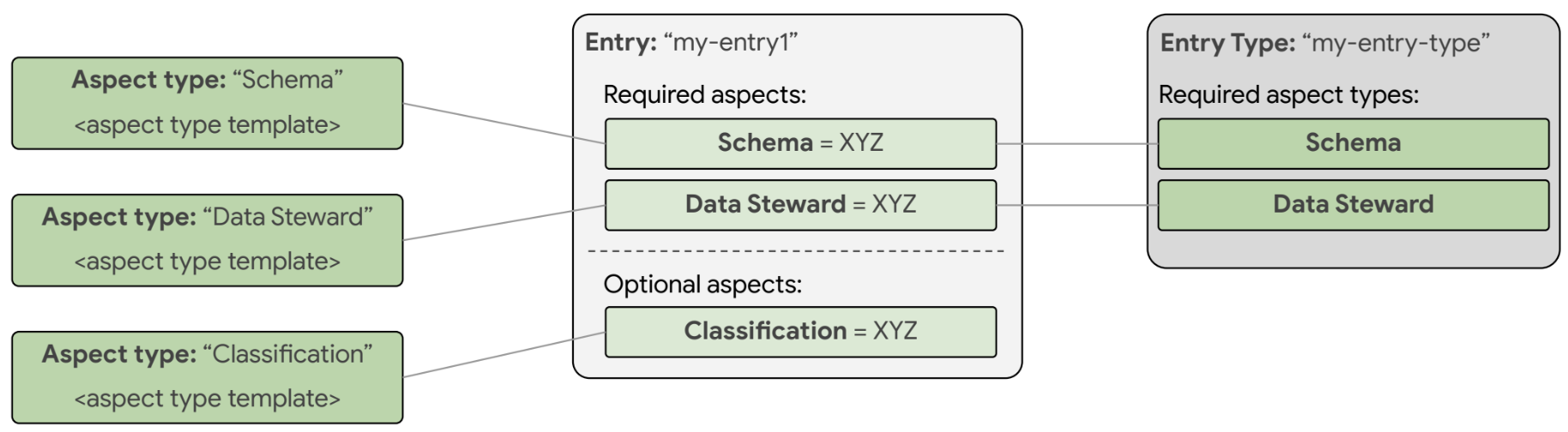
An aspect type (AspectType) is a reusable schema template that defines the
fields, data types, and validation rules for an aspect. Every aspect is an
instance of an aspect type.
Aspect types can be system-defined (provided by Google Cloud) or custom (created by your organization).
When you define the metadata_template for a custom aspect type, you can use
the following supported data types:
| Field data type | Description | Example use case |
|---|---|---|
string |
Text value (UTF-8). | Owner email, data classification label, department name. |
integer / number |
Numeric values (integers or floating-point numbers). | Data retention days, SLA target percentage, priority rank. |
boolean |
True or false flag. | contains_pii: true, is_certified: false. |
enum |
A predefined list of allowed string values. | Environment: ["DEV", "STAGING", "PROD"]. |
datetime / timestamp |
ISO 8601 formatted date and time. | Last certified date, compliance review deadline. |
record |
A nested structured object containing child fields. | ContactInfo { name: string, email: string, phone: string }. |
array |
A list of repeated values of any primitive or record type. | List of secondary data owners: ["user1@example.com", "user2@example.com"]. |
map |
Key-value string pairs for extensible attributes. | Custom deployment tags: {"cost_center": "1042", "tier": "gold"}. |
For example, to define a reusable template for contact information, you can
create an aspect type named ContactInfo with fields for owner_name
(string), email (string), and support_channel (string).
For more information, see Aspect types.
Aspects
An aspect (Aspect) is a set of related metadata fields that conforms to an
aspect type. Aspects are attached to an entry, an entry path (column), or an
entry link to describe that resource.
Unlike legacy tagging systems, aspects in Knowledge Catalog are encapsulated directly within their parent entries or entry links, which lets you perform atomic read and write operations.
Aspects are used across multiple functions:
- Technical structure: The
Schemaaspect describes table columns, data types, and descriptions. - Business context: Custom aspects describe ownership, compliance, and lifecycle status.
- Operational trust: Data quality aspects record automated rule scan results and validation scores.
- Unstructured entity graphs: The
GraphProfileaspect captures AI-extracted entities and relationship edges from raw files.
For example, you can create an instance of the ContactInfo aspect type with
values {"owner_name": "Alex", "email": "alex@example.com"} and attach it to the
customer_orders entry.
For more information, see Aspects.
Entry types
An entry type (EntryType) is a governance template for creating custom
entries. It enforces metadata quality standards by establishing the required
aspect types that must be attached to an entry of that type.
When you create an entry of a specific entry type,
Knowledge Catalog validates that all aspect types
marked as required in the entry type are present and valid.
For example, you can create an entry type named CertifiedDataProduct
that specifies the OwnerInfo and DataRetentionPolicy aspect types as
required. Any new entry created with this entry type must include these aspects
before you can save it.
For more information, see Entry types.
Entry links and entry link types
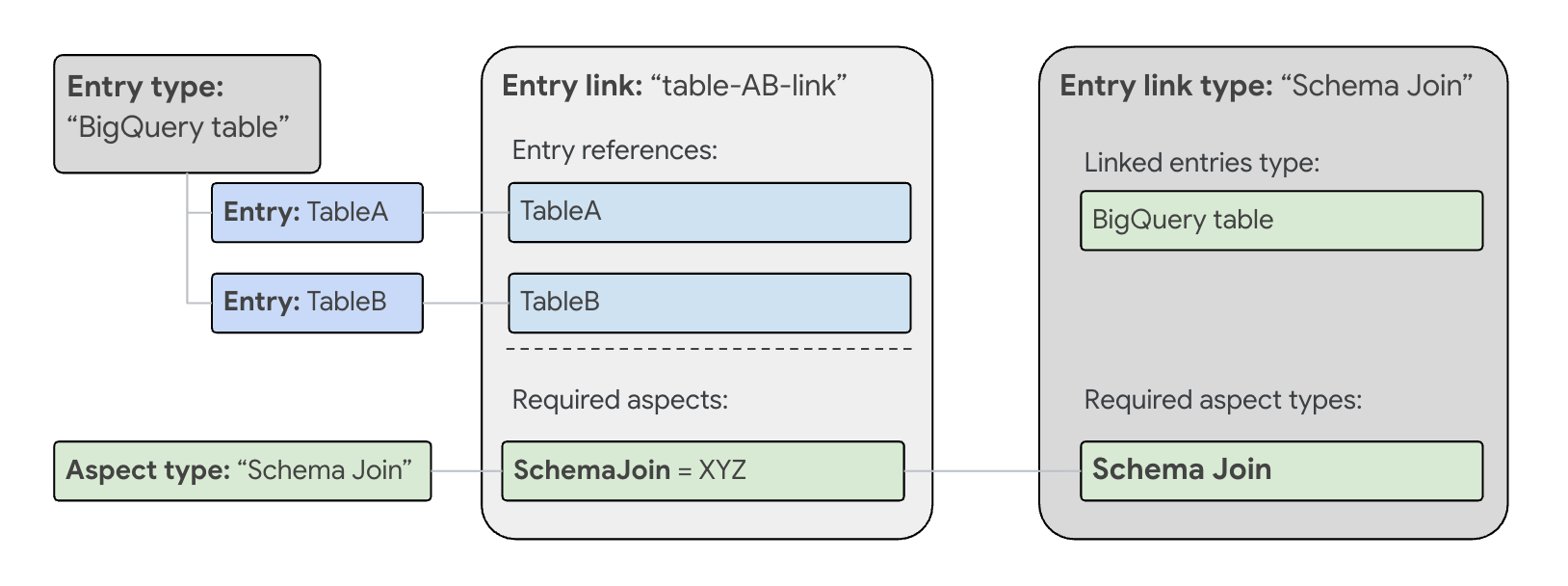
An entry link (EntryLink) establishes a semantic relationship between two data
entries or between specific columns within entries. Every entry link is an
instance of an entry link type (EntryLinkType).
Entry links can be directional or non-directional:
- Symmetric (non-directional): Relationships where both sides are peers
(for example,
synonym,related, orschema-join). - Asymmetric (directional): Relationships with an explicit source and
target (for example,
definition, linking a business glossary term to a table column).
You can also attach aspects directly to entry links (except for schema-join
links). This lets you describe the relationship itself, such as recording join
confidence scores, transformation rules, or mapping notes.
Knowledge Catalog supports the following built-in entry link types:
synonym: Connects equivalent business concepts or alternative terms.related: Connects loosely coupled assets across systems.definition: Connects business glossary definitions to physical columns or entries.schema-join: Connects tables that can be joined along matching foreign key or schema paths.
For more information, see
EntryLinks REST reference.
Business glossaries and terms
A business glossary lets you establish a formal business taxonomy by defining glossaries, categories, and business terms.
Using entry links of type definition or synonym, you can map business terms
directly to physical entries and column paths. When users or AI agents search
the catalog using natural language, the search engine resolves these business
terms to locate the correct physical data assets.
For more information, see Manage business glossaries.
Supported Google Cloud sources
Knowledge Catalog automatically ingests metadata from the following Google Cloud sources. For some services, such as AlloyDB for PostgreSQL and Cloud SQL, you must first enable Knowledge Catalog integration before metadata can be ingested:
Analytics and lakehouse
- BigQuery datasets, tables, views, models, routines, connections, and linked datasets
- BigQuery sharing (formerly Analytics Hub) exchanges and listings
- Dataform repositories and code assets
- Dataproc Metastore services, databases, and tables
Iceberg REST Catalog tables (including Google Cloud Lakehouse runtime catalog IRC, Databricks Unity IRC, AWS Glue Data Catalog IRC, and Snowflake Horizon IRC)
AI and Machine learning
- Vertex AI models, datasets, feature groups, feature views, and online store instances
Business intelligence
- Looker (Google Cloud core) instances, dashboards, dashboard elements, Looks, LookML projects, models, Explores, and views (Preview)
Databases
- Bigtable instances, clusters, and tables (including column family details)
- Spanner instances, databases, tables, and views
Streaming and messaging
- Pub/Sub topics
Unstructured data
Operational databases
- AlloyDB for PostgreSQL clusters, instances, databases, schemas, tables, and views (Preview). Knowledge Catalog retrieves metadata only from AlloyDB primary instances and not from read replicas. For more information, see Manage your AlloyDB for PostgreSQL resources using Knowledge Catalog.
- Cloud SQL instances, databases, schemas, tables, views. Knowledge Catalog retrieves metadata only from Cloud SQL primary instances and not from read replicas. For more information, see Manage your Cloud SQL resources using Knowledge Catalog.
To import metadata from a third-party source into Knowledge Catalog, you can use Knowledge Catalog connectors or a managed connectivity pipeline. For more information, see About Knowledge Catalog Connectors and Managed connectivity overview.
Project and location constraints
Catalog resources in Knowledge Catalog are housed within specific Google Cloud projects and geographic locations. The following scoping constraints apply:
| Resource | Location rule | Project rule |
|---|---|---|
| Entries | The entry's location must match the location of its EntryType,
or the EntryType must be global. |
Can reference global or same-project entry types. |
| Aspects on entries | The aspect's AspectType must be stored in the same location
as the entry, or the AspectType must be global. |
Can reference global or same-project aspect types. |
| Entry links | The entry link's location must match its EntryLinkType, or
the EntryLinkType must be global. |
Can link entries residing across different projects within the same organization. |
| Entry types | Composed of aspect types stored in the same location as the entry type,
or aspect types that are global. |
If an entry type references custom aspect types, the aspect types must be in the same project and location. |
Metadata change feeds
Knowledge Catalog can stream metadata change events in near-real-time using metadata change feeds.
A metadata change feed publishes notifications about entry creation, updates, or deletion to a Pub/Sub topic that you configure. Subscriber clients can consume these events to automate operational workflows, such as triggering data quality evaluations when a schema changes or updating downstream governance dashboards.
For more information, see About metadata change feeds.
Pricing
Knowledge Catalog uses the metadata storage SKU to charge for stored metadata volume. For more information, see Knowledge Catalog pricing.
There are no charges for the following:
- Creating and managing catalog metamodel resources (entry types, aspect types, entry groups, entries, and entry links).
- Search API calls and search queries performed in the Google Cloud console.
What's next
Add metadata to a table
Discover assets and attach custom aspect metadata to a BigQuery table.
Ingest custom data sources
Define entry types and ingest custom metadata from external databases and pipelines.
Manage business glossaries
Build a business taxonomy and map terms directly to physical tables and columns.
Search and discover assets
Discover resources across Google Cloud and custom sources using search predicates.
Retrieve context for AI agents
Retrieve LLM-ready metadata and Active Context to ground generative AI agents.
Transition from Data Catalog
Migrate tag templates, custom entries, and workflows to Knowledge Catalog.