

This document describes the Incentives page, where you can track the status of your spend-based milestone and incremental workload credit programs, and the Rapid Migration and Modernization Program (RaMP) incentives. These are all promotional credits that you might earn as part of a custom Google Cloud pricing contract.
Overview of incentives tracking
The Incentives program tracking page serves as the single source of truth for understanding and monitoring the conditional incentives built into your Google Cloud contracts.
Conditional incentives require you to meet specific spend or usage milestones within a defined timeframe to unlock rewards. These rewards can be:
Spend-based credits: Credit amounts issued to your account after meeting spend thresholds. Examples of spend-based milestone programs include the following:
A program that gives you 25% in credit for every dollar you spend, after you reach the milestone of spending $100 on BigQuery in a month.
A program that gives you $30 in credit every time you spend $200 on Compute Engine resources.
Rapid Migration and Modernization Program (RaMP): View and track credits related to your RaMP agreement.
RaMP tracking and incentive guide. Learn more about the steps and rules for RaMP incentive qualification, reward calculation, and incentive usage.
RaMP workload tagging guide. To unlock your outcome-based incentives, map your workloads to the RaMP program through "tagging" to track your actual consumption.
For information on custom Google Cloud contracts, contact Google Cloud sales, or your Google Cloud Technical Account Manager.
The incentive programs that you achieve act as a payment method, and are automatically applied to your costs. Credits are typically applied to your Cloud Billing account within 45 days of achieving the applicable RaMP or spend-based milestone, or for monthly milestones, on a rolling monthly basis (typically within 45 days of month-end).
In reports and Cloud Billing data export to BigQuery,
the incentive program credits that you earn appear as PROMOTION type credits.
Permissions required to access the Incentives page
To access the Incentives page for your Cloud Billing account, you need a role on your Cloud Billing account that includes the following permission:
billing.credits.list
To gain this permissions using a predefined role, you need to be assigned to one of the following Cloud Billing IAM roles on your Cloud Billing account:
For more information about billing permissions, see:
- Overview of access control
- Understanding predefined Identity and Access Management roles for Cloud Billing
Access the Incentives page in the Google Cloud console
If you have a contract that includes RaMP incentives or spend-based milestone credits, access the Incentives page to view a summary of each program and the status of the credit milestones associated with each program.
In the Google Cloud console, go to your Cloud Billing account.
At the prompt, choose the Cloud Billing account for which you'd like to view the Incentives page.
The Billing Overview page opens.
From the Billing navigation menu, click Incentives.
Navigate the Incentives dashboard
The Incentives program tracker dashboard is designed to give you both a high-level summary and a detailed tabular view of your active and historical incentive programs.
Summary scorecard
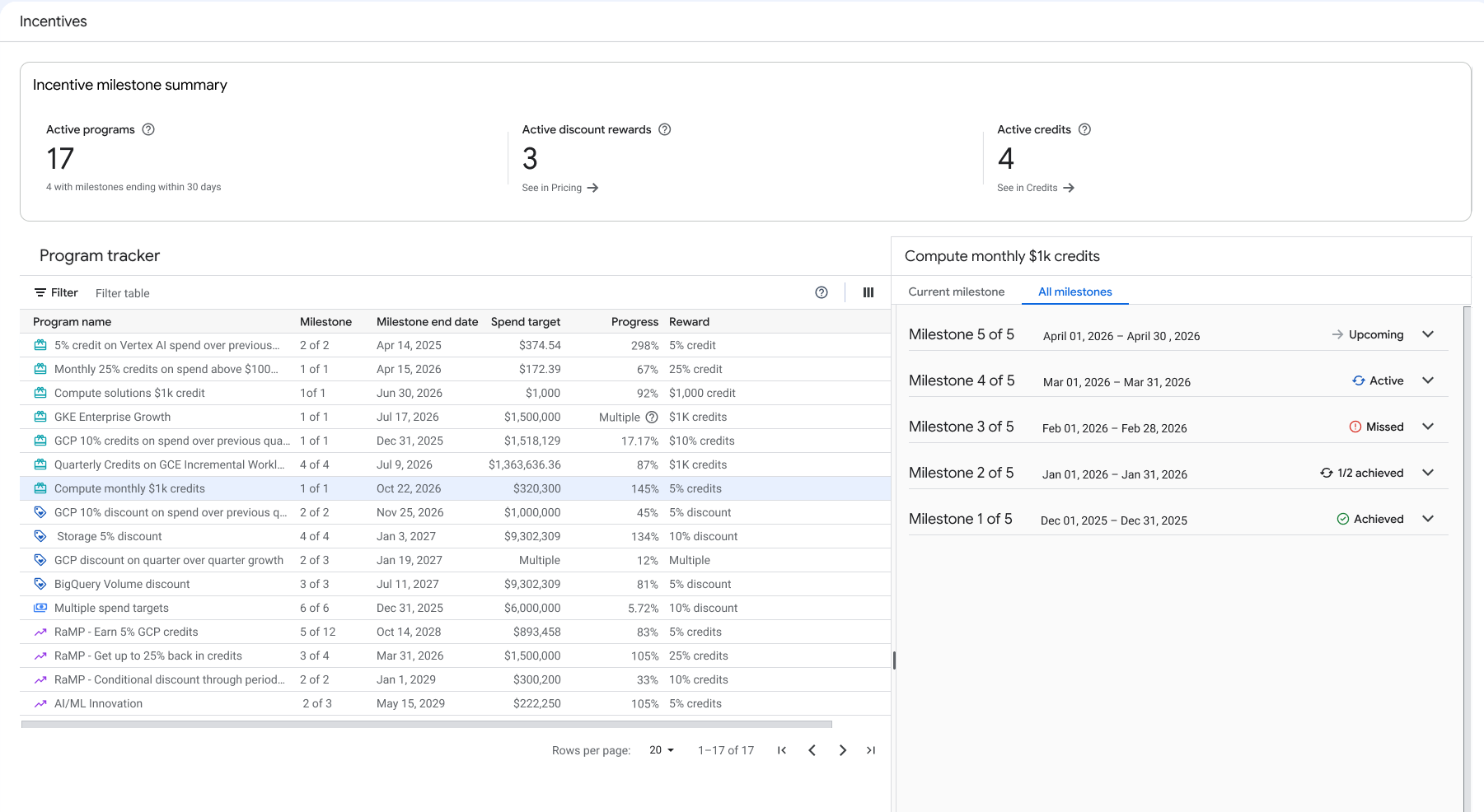
At the top of the page, the Summary Scorecard displays key aggregate metrics for your active programs, such as active milestone counts and progress.
Program tracker table and statuses
The Program tracker table lists your incentive programs, showing the program name, milestone index, milestone end date, spend target, progress, and reward.
Select a program to view its details in the milestone status panel. The milestone status panel uses visual indicators to show the status of each milestone in the program:
- Active: The milestone is open for earning.
- Achieved: The conditions to earn the reward have been met.
- Upcoming: The milestone period hasn't started yet.
- Missed: The milestone period ended without meeting the conditions to earn the reward.
- X/Y achieved: For multi-tier programs, indicates progress (for example, "1/2 achieved" means 1 of 2 milestones achieved).
Program types and milestone details
On the Incentives page, you can view the conditions, scope, targets, progress, and issued rewards for all of your RaMP and spend-based milestone credit programs (including incremental workloads) on one page.
Program types include the following:
- Conditional credits: Programs that consist of a single condition that unlocks a single reward.
- Incremental Workload Credits (IWC): Programs that track your spend incrementally over time, typically with multiple milestones.
- Rapid Migration and Modernization Program (RaMP) incentives: RaMP workloads that are tagged and qualify for RaMP incentives.
View the details of a current program milestone
In the Program tracker table, select a program to view its details in the milestone status panel.
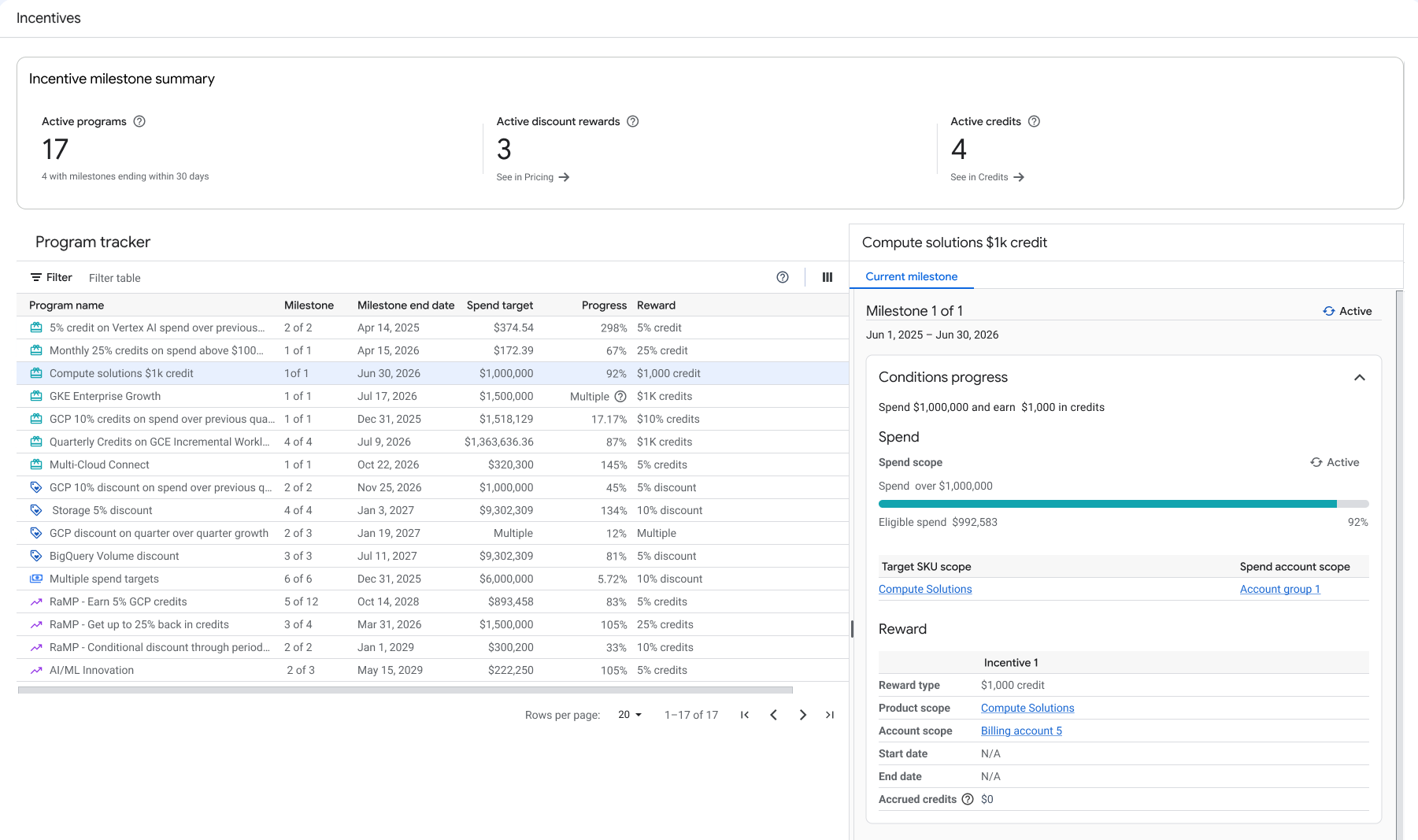
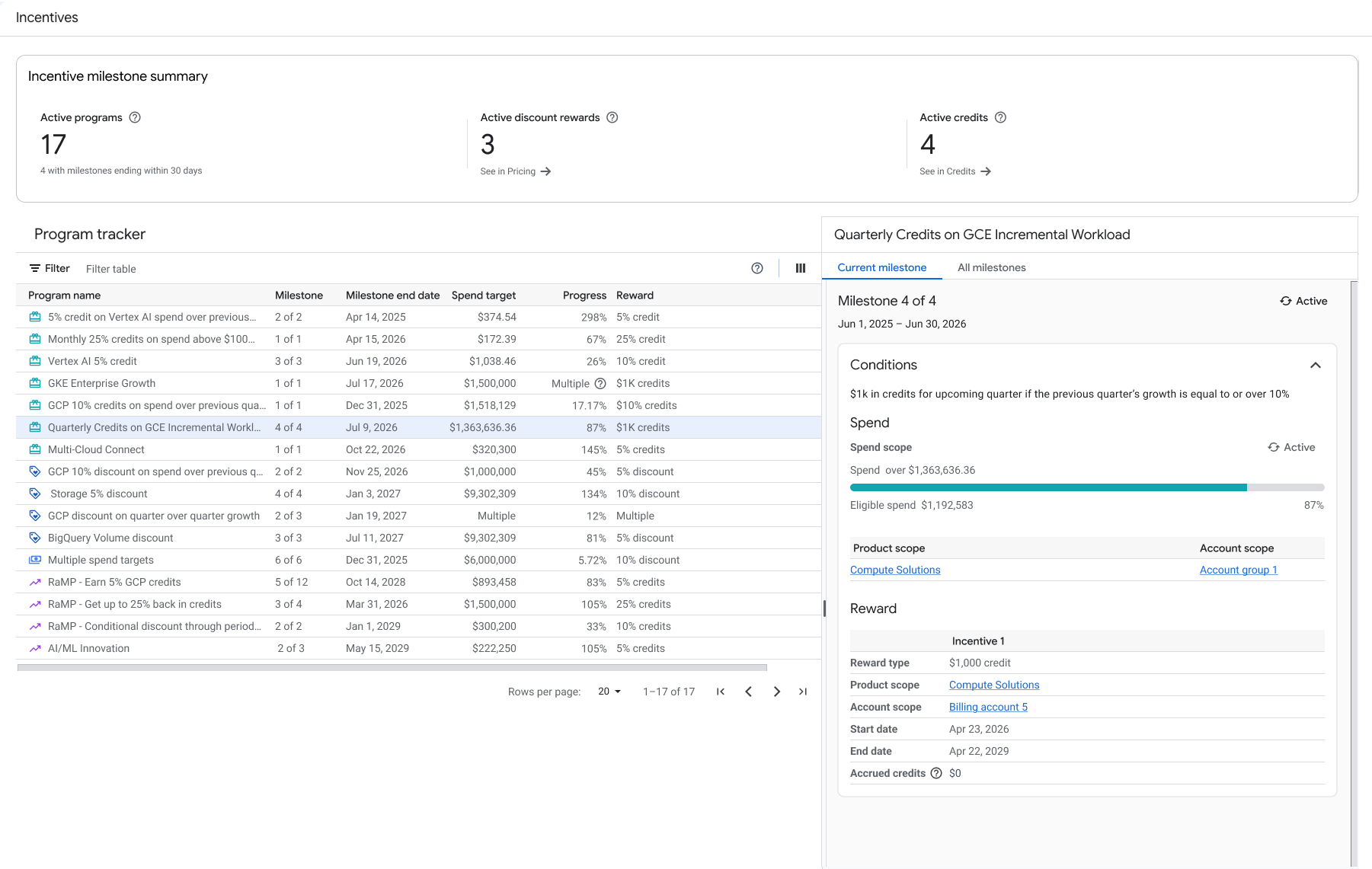
Select the Current milestone tab to view the details of the current milestone in the selected program.
| Conditional spend-based milestone program | Incremental Workload Credits (IWC) program |
|---|---|
|
|
View all milestones in a program, including program history
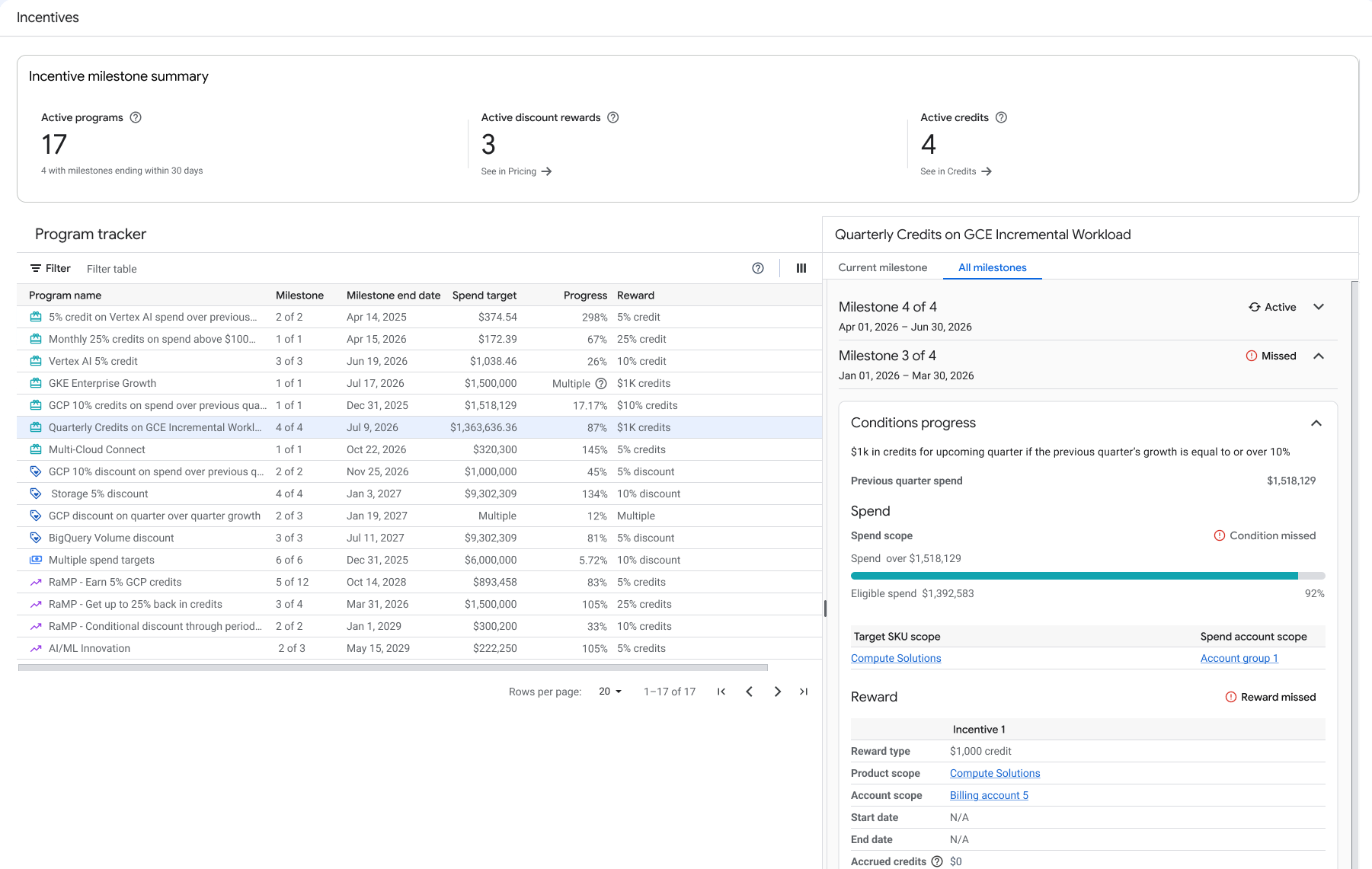
In the Program tracker table, select a program to view its details in the milestone status panel.
Select the All milestones tab to view a list of milestones in the selected program.
To view the history of a milestone, expand the milestone to see past achievements and rewards earned.
Analyze your costs and credits in reports
When you earn incentive rewards, they are applied as PROMOTION type credits,
and are automatically applied to your eligible costs. You can use the cost
table report or the Cloud Billing export to BigQuery
to analyze your usage costs, and see the detailed breakdown of how your
incentive program credits are applied to reduce your costs.
View credits for a specific invoice in the cost table report
The cost table report helps you reconcile the costs and credits on a specific invoice or statement. To view your incentive program credits in the cost table, use the following configuration:
Open the cost table in the Google Cloud console.
Click Table configuration , and from the Group by menu, select No grouping.
Click Column display options, and enable the Credit type, Credit name, and Credit ID columns.
In the Filters section, select the following options:
- Select an Invoice month.
- Optionally, if you know the services that your credits are applied to, select them from the Services menu.
- Under Savings, in the Other savings section, select Promotional credits, and clear all of the other Savings options.
In the cost table, click the Credit type column header to sort the rows by the type of credit.
Your incentive program credits are shown with the credit type
PROMOTION, broken down by each SKU they apply to. Use the Credit name column to identify the credits that are part of the same milestone.To download your report as a comma-separated value (CSV) file, click Download to CSV.
Learn more about using the cost table report to analyze your costs.
View credits in the billing export to BigQuery
You can use the Cloud Billing export to BigQuery to export detailed billing data to a BigQuery dataset, and use the data for detailed analysis of your costs.
In your exported data, the name of the credit is in the credits.full_name
column. The following queries show examples of data that you can get about
credits from your BigQuery export.
Example: get all promotional credits for usage before a specific date
This example gets all the line items for credits that were applied before March 1, 2024:
SELECT
c.full_name AS CreditName, c.type AS CreditType,
 usage_start_time AS UsageStart, cost AS Cost
FROM `project_name.dataset_name.gcp_billing_export_resource_v1_XXXXXX_XXXXXX_XXXXXX`,
 UNNEST(credits) AS c
WHERE
 c.type = "PROMOTION"
AND
 DATE(TIMESTAMP_TRUNC(usage_start_time, DAY, 'US/Pacific')) < '2024-03-01';
Example: get information about specific promotional credits
This example uses the name of the credit to get all the usage that the credit was applied to.
SELECT
c.full_name AS CreditName, c.type AS CreditType,
 usage_start_time AS UsageStart, cost AS Cost
FROM `project_name.dataset_name.gcp_billing_export_resource_v1_XXXXXX_XXXXXX_XXXXXX`,
 UNNEST(credits) AS c
WHERE
 c.full_name LIKE "%example%";
Learn more about the Cloud Billing data export to BigQuery.
Frequently Asked Questions (FAQ)
- Why was the "Spend-based Milestones" page replaced?
- How often is the progress data updated?
- What is the difference between "Earn Scope" and "Reward Scope"?
- Why was the "Spend-based Milestones" page replaced?
The new "Incentives program tracker" page expands support to cover both spend-based milestones and RaMP in a unified view, improving clarity and auditability of your contract benefits.
- How often is the progress data updated?
Progress calculations are refreshed daily, but can be delayed up to three days based on the latest cost data. This delay means that the data might lag spend reflected on cost reports and BigQuery exports.
- What is the difference between "Earn Scope" and "Reward Scope"?
-
- Earn Scope: Defines the spend and accounts that count towards meeting the milestone.
- Reward Scope: Defines where the credit is applied after the milestone is earned.