

Application Design Center lets platform and development teams design and deploy applications on Google Cloud. By creating and sharing templates, platform teams ensure that applications follow organizational standards while reducing deployment time for developers.
Benefits of App Design Center
App Design Center helps you streamline workflows by focusing on the following outcomes:
- Accelerate delivery: provide preconfigured, policy-aligned templates that remove manual reviews. Developers can deploy with confidence, knowing configurations are approved.
- Ensure governance: build organizational standards into templates so every deployment follows security and compliance rules from the start.
- Standardize patterns: create a central catalog of reusable templates to reduce complexity and improve scalability across teams.
A platform team can establish a library of templates that are compliant with your organizational standards. When developers need to create a new application, they select a verified template and deploy it in minutes, rather than weeks.
Application use cases
You can use App Design Center to accelerate the delivery of common approaches to business problems, for example:
- Web application platforms: deploy scalable, three-tier architectures that separate your frontend, backend, and data layers for improved security and performance.
- Microservice modernization: quickly deploy containerized services that scale automatically to meet demand, without the complexity of managing underlying servers.
- AI-powered experiences: implement generative AI templates, such as Retrieval-Augmented Generation (RAG), to transform your data into useful insights.
Design and deployment approaches
To determine the best design and deployment approach for your purpose, use the following table:
| Your goal | Primary benefit | Approach |
|---|---|---|
| Visualize your architecture | Real-time suggestions and visual layout | Design canvas |
| Rapid prototyping | AI-driven starting points from requirements | Natural language chat |
| Automation and integration | Repeatable, programmable workflows | REST API |
| Command-line management | Efficient terminal-based operations | Google Cloud CLI |
Validate application designs
App Design Center lets you validate your application infrastructure against organizational security policies defined by an administrator in Security Command Center.
By attaching security frameworks to your templates, you can perform application assessments directly in the design canvas. These assessments evaluate the application design and generate a security scorecard that highlights policy violations. You can resolve these findings manually or with Gemini assistance before deployment.
For more information, see Enforce security policies.
Team collaboration workflow
Platform teams and developers work together to move from business requirements to a working application using the following example workflow:
- Set up collaboration: platform administrators create spaces and assign team access.
- Design templates: platform engineers create and verify templates with built-in guardrails and security policies.
- Enable self-service: platform engineers publish verified templates to a catalog.
- Deploy your application: application developers select a template, customize an application, assess against security policies, and deploy.
- Manage and iterate: application developers monitor performance and apply template updates as business needs evolve.
App Design Center workflows
The following diagram illustrates App Design Center workflows and outcomes.
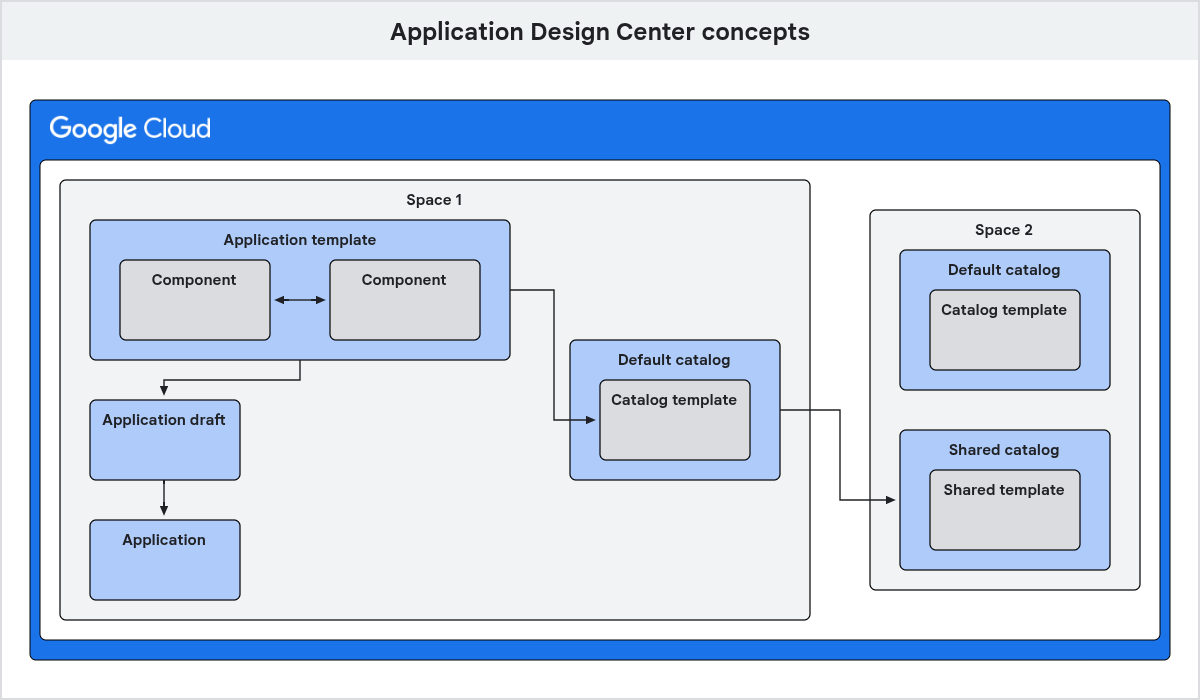
The following sections describe how these elements drive your workflows:
Spaces for team collaboration
A space is an exclusive area where a platform team designs templates and deploys applications. This isolation ensures that team-specific configurations and experimental applications don't affect other groups. The platform team can then selectively share templates with the rest of the organization by adding the templates to a catalog.
Approved component building blocks
Components are the building blocks you use to design your applications. You can select from the following types of components:
- Google components: components designed by Google that incorporate Google Cloud best practices and default security configurations.
- Imported components: your own components that you import to App Design Center, based on your own Terraform modules.
By using these components, you ensure that every part of your application follows security and performance standards. Components can include:
Assets: supporting resources that help you control other resources, such as service accounts or secrets.
Services: network or API interfaces, such as load balancers or databases, that expose functionality to your clients.
Workloads: running applications, such as containers or virtual machine groups, that execute your application logic.
Security governance with templates
A template is an approved design. By using templates, platform teams can embed security and compliance rules into the very foundation of their applications. You can create and use the following templates:
- Application template: platform teams create and collaborate on the following application templates in their space.
- Catalog template: platform teams add a catalog template to their space's catalog, which they share with other spaces.
- Shared template: development teams can modify and deploy a shared template that was shared with their space.
If requirements change, you can update a template and notify developers to apply those changes, ensuring your entire fleet of deployed applications stays secure and up to date.
Template reuse with catalogs
A catalog acts as a central repository for templates that are created and approved for sharing by the platform team. Sharing catalogs between spaces avoids duplicated effort for common projects, and streamlines startup times.
Each space can have the following catalog types:
- Default catalog: a catalog where platform teams add templates to share with other spaces.
- Shared catalog: a catalog that has been shared to your space from another space.
Deployment standardization
An application draft is a customized version of a template that is ready to deploy. When the development team deploys the draft, it becomes an application. This model gives developers the flexibility to configure their specific application, while building on top of a standardized, governed foundation.
What's next
- See a complete list of definitions for key concepts.
- Set up your environment to start designing and sharing patterns.
- To get started quickly with a preconfigured template, see Quickstart: Customize and deploy a Google template.
- Build your first architecture with Gemini assistance.
- Create an application template to share with your development teams.