

Create a high-security Google Kubernetes Engine (GKE) cluster and workload optimized for production. This guide describes the following templates, which you can use to deploy a production web application:
Enterprise-grade production GKE cluster template: create the foundational infrastructure required for a production application. This template sets up a secure, private GKE cluster optimized for integrity, advanced networking, and disaster recovery.
Enterprise-grade production GKE workload (Preview): deploy a helm chart that includes the configuration for a highly available stateless web application. The workload is configured to enhance security, reliability, and service continuity.
For example, you might deploy the cluster and workload templates to address the following business needs:
| Example | Business need | Implementation |
|---|---|---|
| Global trading platform | A financial institution requires a low latency, globally distributed trading platform with maximum uptime, stringent security, and auditable compliance to handle high-frequency trades. | Use globally distributed, multi-regional clusters with advanced networking to ensure ultra-low latency and resilience. Implement strong network policies, private cluster configurations, and advanced security features for data protection and regulatory compliance. |
| Multi-tenant SaaS platform | A software-as-a-service (SaaS) provider needs to host a highly scalable, secure, and cost-optimized platform for thousands of enterprise customers, requiring strict tenant isolation, dynamic resource allocation, and continuous delivery of new features without downtime. | Use multi-tenant clusters with robust namespace isolation, network segmentation, and quota management to ensure fair resource sharing and security between tenants. |
| Real-time inference for critical operations | An organization needs to deploy AI/ML models for real-time inference in mission-critical fraud detection applications, demanding extremely low latency, high throughput, and the ability to rapidly adapt to new model versions with full auditability. | Configure clusters with specialized node pools for AI inference. Ensure low-latency network connectivity and enable efficient traffic routing to inference endpoints. |
Architecture
The following image shows the components and connections in the template:
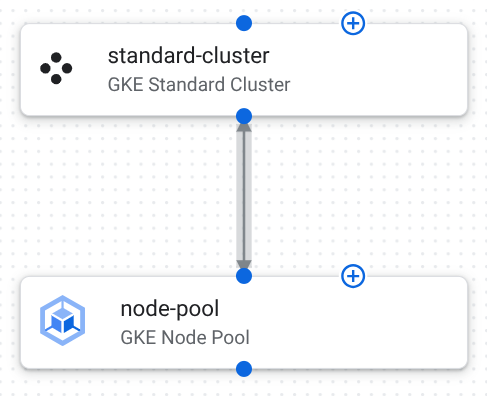
The following describes the component configurations in this template:
GKE Standard cluster: a cluster where your workload runs.
The following table describes the cluster configuration in this template:
Configuration Purpose location: us-central1Ensures data locality and compliance within a geographical boundary. A multi-zonal setup within the region provides high availability. network: projects/PROJECT_ID/global/networks/enterprise-vpcSpecifies a pre-existing VPC that is typically designed for network segmentation and connectivity. subnetwork: projects/PROJECT_ID/regions/us-central1/subnetworks/gke-subnetSpecifies a subnetwork for the cluster in the VPC that is typically designed with proper IP allocation and network isolation. master_authorized_networks_config: [{"cidr_block": "10.0.0.0/8", "display_name": "Internal Network"}]Restricts access to the control plane endpoint to specific, trusted IP CIDR blocks. This prevents unauthorized access to cluster management APIs. private_cluster_config.enable_private_endpoint: trueEnsures that the control plane is only accessible using internal IP addresses within the VPC or authorized networks. This enhances security by removing public exposure. private_cluster_config.enable_private_nodes: trueEnsures all worker nodes have only private IP addresses, isolating them from the public internet and reducing the attack surface. release_channel: STABLEPredictable and thoroughly tested updates maintain stability in a production environment. network_policy.enabled: trueEnables Kubernetes Network Policy, which provides control over pod-to-pod communication for enhanced security and micro-segmentation. binary_authorization: trueEnforces deployment policies, ensuring only trusted and signed container images can run on the cluster. database_encryption: {"state": "ENCRYPTED_WITH_CMEK", "key_name": "projects/PROJECT_ID/locations/us-central1/keyRings/gke-keyring/cryptoKeys/gke-etcd-key"}Customer-Managed Encryption Keys (CMEK) encrypt the database, providing data security and meeting compliance requirements. workload_identity_config: {"enabled": true}Allows Kubernetes service accounts to act as Google Cloud service accounts, enabling fine-grained, secure access to resources using IAM. logging_configandmonitoring_configare set to{"component_config": {"enable_components": ["SYSTEM_COMPONENTS", "WORKLOADS"]}}Integrates with Cloud Logging and Cloud Monitoring, ensuring comprehensive observability, auditing, and alerting for production workloads. maintenance_policy: {"daily_maintenance_window": {"start_time": "03:00"}, "recurring_window": {"start_time": "00:00", "end_time": "04:00", "recurrence": "FREQ=WEEKLY;BYDAY=SAT,SUN"}}Maintenance windows control when GKE performs automatic upgrades, minimizing disruption to critical applications. enable_shielded_nodes: trueShielded GKE Nodes provide security features like secure boot and integrity monitoring to protect against rootkits and boot-level malware. gateway_api_config: {"channel": "CHANNEL_STANDARD"}Advanced traffic management for complex routing, load balancing, and API management in enterprise applications. security_posture_config: {"mode": "ENTERPRISE", "vulnerability_mode": "VULNERABILITY_ENTERPRISE"}Advanced security posture management, including vulnerability scanning and policy enforcement. GKE node pool: a group of worker nodes that run the application's containers.
The following table describes the node pool configurations in this template:
Configuration Purpose location: us-central1.Specifies the region where this node pool is created. Similar to the cluster's location, this ensures the node pool resources are in a single geographical area. autoscaling: {"max_node_count":3, "min_node_count":1}.Configures the cluster autoscaler for this node pool. Ensures that the node pool always maintains at least one node, and sets the upper limit to three nodes to control costs and resource consumption. node_config: {"machine_type":"e2-medium", "oauth_scopes":["https://www.googleapis.com/auth/cloud-platform"], "shielded_instance_config":{"enable_secure_boot":true}}.Groups configurations for the nodes within this pool. The machine type is a balance of CPU and memory suitable for general-purpose workloads. Defines the access granted to the service account. Enables Secure Boot for the Shielded VM instances, helping protect against boot-level malware.
Helm chart configuration
The following table lists the helm chart configurations, which have been customized for deploying and scaling a basic web application on GKE.
| Configuration | Purpose |
|---|---|
replicaCount: 3 |
Creates three initial replicas to establish an initial level of redundancy and basic high availability for the application. |
image.repository: gcr.io/google-samples/hello-app |
Uses a basic web server Docker image as a placeholder. |
resources.requests: {"cpu": "100m", "memory": "128Mi"} |
Specifies the minimum amount of CPU and memory that are reserved for each pod, ensuring available resources and efficient scheduling. |
resources.limits: {"cpu": "250m", "memory": "256Mi"} |
Specifies the maximum amount of CPU and memory that are reserved for each pod, preventing resource monopolization by a single pod. |
networkPolicy.enabled: true |
Activates Kubernetes Network Policies for the application, which lets you define rules for how pods communicate with each other and other network endpoints, enforcing network segmentation and isolation. |
service: {"type": "ClusterIP", "port": 80} |
Configures the service for internal access within the cluster on the standard HTTP port. |
pdb: {"enabled": true, "minAvailable": 1} |
Enables a Pod Disruption Budget to ensure that at least one replica remains available during voluntary disruptions, maintaining high availability. |
Create your web application
Use the Enterprise-grade production GKE cluster and workload templates to deploy your web application.
Deploy your web infrastructure
Configure and deploy the Enterprise-grade production GKE cluster template to create the foundational infrastructure where your web workload runs.
Duplicate and deploy the Enterprise-grade production GKE cluster template as an application.
A GKE cluster is created in the deployment project that you choose.
Configure the components. For more information, see the following:
Click Deploy. The application deploys after several minutes.
In the Application details panel, click the Outputs tab.
Identify the cluster_id for your application. You'll use this information when you deploy your helm chart.
Deploy your web workload
Use the Enterprise-grade production GKE workload template to deploy your web workload into the cluster you created. You'll deploy a helm chart that includes your web workload configuration.
From the Google catalog page, on the Enterprise-grade production GKE workload template, click Create new application.
In the Name field, enter a unique name for your application.
In the GKE Deployment Target area, do the following:
From the Project list, select the project where you deployed the GKE cluster from your Enterprise-grade production GKE cluster application.
From the Region list, select the region where you deployed the GKE cluster.
From the Clusters list, select the deployed GKE cluster.
From the Namespace list, enter the namespace for your workload. If you didn't change the name, enter
default.Click Create application.
The application is created and the configuration files are displayed.
In the Helm chart panel, do the following:
Review the configuration details.
Optional: customize the configuration to meet your unique needs.
To deploy the helm chart to your cluster, click Deploy.
For detailed steps, see Deploy applications.
After several minutes, the helm chart configuration deploys to your GKE cluster.
What's next
- To learn how to duplicate and customize templates, see Quickstart: Customize and deploy a Google template.
- Define your own configurations by designing application templates.
- Identify general architectural best practices with the Google Cloud Architecture Framework.