


您目前查看的是 Apigee 和 Apigee Hybrid 說明文件。
查看
Apigee Edge 說明文件。
InvalidTimeout
錯誤訊息
透過 Apigee 使用者介面或 API 部署 API Proxy 時失敗,並顯示以下錯誤訊息:
Error Saving Revision revision_number
CacheLookupTimeoutInSeconds value value should be greater than zero.
錯誤訊息範例
Error Saving Revision 2
CacheLookupTimeoutInSeconds -1 value should be greater than zero.
錯誤螢幕截圖範例

原因
如果 ResponseCache 政策的 <CacheLookupTimeoutInSeconds> 元素設為負數,API Proxy 的部署作業就會失敗。
舉例來說,如果 <CacheLookupTimeoutInSeconds> 為 -1,API Proxy 的部署作業就會失敗。
診斷
找出 ResponseCache 政策中
<CacheLookupTimeoutInSeconds>元素使用的無效值。您可以在錯誤訊息中找到這項資訊。舉例來說,在下列錯誤中,<CacheLookupTimeoutInSeconds>元素使用的無效值為-1:CacheLookupTimeoutInSeconds -1 value should be greater than zero.檢查發生失敗的特定 API Proxy 中的所有 ResponseCache 政策。可能有一或多項 ResponseCache 政策指定了
<CacheLookupTimeoutInSeconds>元素。舉例來說,下列政策設定會將
<CacheLookupTimeoutInSeconds>設為-1,與錯誤訊息中的內容相符:<?xml version="1.0" encoding="UTF-8" standalone="yes"?> <ResponseCache async="false" continueOnError="false" enabled="true" name="Response-Cache-1"> <DisplayName>Response Cache-1</DisplayName> <Properties/> <CacheKey> <Prefix/> <KeyFragment ref="request.uri" type="string"/> </CacheKey> <Scope>Exclusive</Scope> <ExpirySettings> <ExpiryDate/> <TimeOfDay/> <TimeoutInSec ref="">3600</TimeoutInSec> </ExpirySettings> <CacheLookupTimeoutInSeconds>-1</CacheLookupTimeoutInSeconds> </ResponseCache>如果
<CacheLookupTimeoutInSeconds>指定為負整數,這就是錯誤原因。
解析度
請確保 ResponseCache 政策的 <CacheLookupTimeoutInSeconds> 元素值一律指定為非負整數。
如要修正上述 ResponseCache 政策範例,您可以將 <CacheLookupTimeoutInSeconds> element 修改為 30。
<?xml version="1.0" encoding="UTF-8" standalone="yes"?>
<ResponseCache async="false" continueOnError="false" enabled="true" name="Response-Cache-1">
    <DisplayName>Response Cache-1</DisplayName>
    <Properties/>
    <CacheKey>
        <Prefix/>
        <KeyFragment ref="request.uri" type="string"/>
    </CacheKey>
    <Scope>Exclusive</Scope>
    <ExpirySettings>
        <ExpiryDate/>
        <TimeOfDay/>
        <TimeoutInSec ref="">3600</TimeoutInSec>
    </ExpirySettings>
    <CacheLookupTimeoutInSeconds>30</CacheLookupTimeoutInSeconds>
</ResponseCache>
InvalidCacheResourceReference
錯誤訊息
透過 Apigee 使用者介面或 API 部署 API Proxy 時失敗,並顯示以下錯誤訊息:
Error Deploying Revision revision_number to environment
Invalid cache resource reference cache_resource in Step definition response_cache_policy_name. Context Revision:revision_number;APIProxy:ResponseCache;Organization:organization;Environment:environment
錯誤訊息範例
Error Deploying Revision 2 to prod
Invalid cache resource reference itemscache in Step definition ItemsResponseCache. Context Revision:2;APIProxy:StoresInventory;Organization:kkalckstein-eval;Environment:prod
錯誤螢幕截圖範例

原因
如果 ResponseCache 政策中的 <CacheResource> 元素設為 API Proxy 部署環境中不存在的名稱,就會發生這個錯誤。
診斷
找出 Response Cache 政策的
<CacheResource>元素中使用的無效快取,以及發生錯誤的環境。您可以在錯誤訊息中找到這兩項資訊。舉例來說,在下列錯誤中,無效快取的名稱為itemscache,環境名稱為prod。Invalid cache resource reference itemscache in Step definition ItemsResponseCache. Context Revision:2;APIProxy:StoresInventory;Organization:kkalckstein-eval;Environment:prod檢查發生失敗的特定 API Proxy 中的所有 ResponseCache 政策。找出在
<CacheResource>元素中指定無效快取 (在步驟 1 中識別) 的特定 ResponseCache 政策。舉例來說,下列政策將
<CacheResource>的值指定為itemscache,與錯誤訊息中的內容相符:<?xml version="1.0" encoding="UTF-8" standalone="yes"?> <ResponseCache async="false" continueOnError="false" enabled="true" name="ItemsResponseCache"> <DisplayName>ItemsResponseCache</DisplayName> <Properties/> <CacheKey> <Prefix/> <KeyFragment ref="request.uri" type="string"/> </CacheKey> <CacheResource>itemscache</CacheResource> <Scope>Exclusive</Scope> <ExpirySettings> <ExpiryDate/> <TimeOfDay/> <TimeoutInSec ref="">3600</TimeoutInSec> </ExpirySettings> <SkipCacheLookup/> <SkipCachePopulation/> </ResponseCache>確認特定環境 (步驟 1 中識別) 是否已定義快取 (步驟 2 中判斷)。
在 Apigee UI 中,前往「APIs」>「Environment Configuration」,然後在特定環境的「Caches」分頁中,檢查快取是否存在。如果快取不存在,就是造成錯誤的原因。
舉例來說,請注意下方螢幕截圖中,名為
itemscache的快取不存在。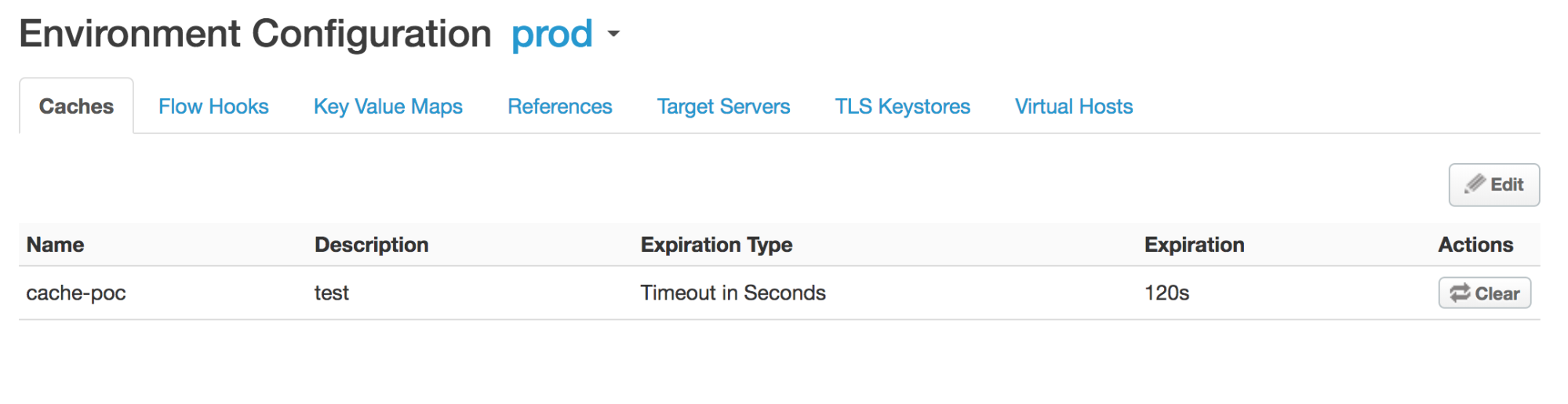
由於
prod環境中未定義名為itemscache的快取,因此您會收到以下錯誤訊息:Invalid cache resource reference does_not_exist in Step definition Response-Cache-1. Context Revision:2;APIProxy:ResponseCache;Organization:kkalckstein-eval;Environment:prod
解析度
確認 <CacheResource> 元素中指定的快取名稱已在要部署 API Proxy 的環境中建立。
ResponseCacheStepAttachmentNotAllowedReq
錯誤訊息
透過 Apigee 使用者介面或 API 部署 API Proxy 時失敗,並顯示以下錯誤訊息:
Error Deploying Revision revision_number to environment
Response cache step definition response_cache_policy_name can not be attached more than once in the request path.
錯誤訊息範例
Error Deploying Revision 2 to test
Response cache step definition Response-Cache-1 can not be attached more than once in the request path.
錯誤螢幕截圖範例

原因
如果同一個 ResponseCache 政策附加至 API Proxy 任何流程中的多個要求路徑,就會發生這個錯誤。
舉例來說,如果您在 Proxy 和目標端點的要求 Preflow 中附加相同的 ResponseCache 政策,就會發生這個錯誤。
診斷
找出附加多次的 ResponseCache 政策名稱。您可以在錯誤訊息中找到這項資訊。舉例來說,在下列錯誤中,ResponseCache 政策的名稱為 Response‑Cache‑1。
Error Deploying Revision 2 to test
Response cache step definition Response-Cache-1 can not be attached more than once in the request path.
檢查發生錯誤的 API Proxy 中,Proxy 和目標端點的所有要求流程。如果兩個以上的請求流程附加了相同的 ResponseCache 政策,就會導致這個錯誤。
在下列範例中,系統會在預設 Proxy 端點 PreFlow 的要求路徑,以及預設目標端點 PreFlow 中,設定相同的 ResponseCache 政策
Response-Cache-1:<?xml version="1.0" encoding="UTF-8" standalone="yes"?> <ProxyEndpoint name="default"> <Description/> <FaultRules/> <PreFlow name="PreFlow"> <Request> <Step> <Name>Response-Cache-1</Name> </Step> </Request> ... <?xml version="1.0" encoding="UTF-8" standalone="yes"?> <TargetEndpoint name="default"> <Description/> <FaultRules/> <PreFlow name="PreFlow"> <Request/> <Response/> </PreFlow> <PostFlow name="PostFlow"> <Request> <Step> <Name>Response-Cache-1</Name> </Step> </Request> ...
解析度
請確保 API Proxy 的所有流程中,只有一個要求路徑附加了 ResponseCache 政策。
如要修正上述範例,請從其中一個要求流程中移除 ResponseCache 政策 Response-Cache-1。
ResponseCacheStepAttachmentNotAllowedResp
錯誤訊息
透過 Apigee 使用者介面或 API 部署 API Proxy 時失敗,並顯示以下錯誤訊息:
Error Deploying Revision revision_number to environment
Response cache step definition response_cache_policy_name can not be attached more than once in the response path.
錯誤訊息範例
Error Deploying Revision 2 to test
Response cache step definition Response-Cache-1 can not be attached more than once in the response path.
錯誤螢幕截圖範例

原因
如果相同的 ResponseCache 政策附加至 API Proxy 任何流程中的多個回應路徑,就會發生這個錯誤。
舉例來說,如果您在 Proxy 和目標端點的回應 Preflow 中附加相同的 ResponseCache 政策,就會發生這個錯誤。
診斷
找出附加多次的 ResponseCache 政策名稱。這項資訊會顯示在錯誤訊息中。舉例來說,在下列錯誤中,ResponseCache 政策的名稱為
Response-Cache-1。Error Deploying Revision 2 to test Response cache step definition Response-Cache-1 can not be attached more than once in the response path.檢查發生錯誤的 API Proxy 中,Proxy 和目標端點的所有要求流程。如果兩個以上的回應流程附加了相同的 ResponseCache 政策,就會導致這個錯誤。
在下列範例中,系統會在預設 Proxy 端點 PreFlow 的回應路徑,以及預設目標端點 PreFlow 中,設定相同的 ResponseCache 政策
Response-Cache-1:<?xml version="1.0" encoding="UTF-8" standalone="yes"?> <ProxyEndpoint name="default"> <Description/> <FaultRules/> <PreFlow name="PreFlow"> <Request> <Step> <Name>Response-Cache</Name> </Step> </Request> <Response> <Step> <Name>Response-Cache-1</Name> </Step> </Response> </PreFlow> ... <?xml version="1.0" encoding="UTF-8" standalone="yes"?> <TargetEndpoint name="default"> <Description/> <FaultRules/> <PreFlow name="PreFlow"> <Request/> <Response/> </PreFlow> <PostFlow name="PostFlow"> <Request/> <Response> <Step> <Name>Response-Cache-1</Name> </Step> </Response> </PostFlow> ...
解析度
請確保在 API Proxy 的所有流程中,只有一個回應路徑附加了 ResponseCache 政策。
如要修正上述範例,請從其中一個回應路徑移除 ResponseCache 政策 Response-Cache-1。
InvalidMessagePatternForErrorCode
錯誤訊息
透過 Apigee UI 或 API 部署 API Proxy 時失敗,並顯示下列任一錯誤訊息:
Error Deploying Revision revision_number to environment
Invalid message pattern found for error code steps.cache.InvalidSkipCacheLookUpCondition.
或
Error Deploying Revision revision_number to environment
Invalid message pattern found for error code steps.cache.InvalidSkipCachePopulationCondition.
錯誤訊息範例
Error Deploying Revision 2 to prod
Invalid message pattern found for error code steps.cache.InvalidSkipCacheLookUpCondition.
或
Error Deploying Revision 2 to prod
Invalid message pattern found for error code steps.cache.InvalidSkipCachePopulationCondition.
錯誤螢幕截圖範例

或

原因
如果 ResponseCache 政策中的 <SkipCacheLookup> 或 <SkipCachePopulation> 元素含有無效條件,就會發生這個錯誤。
診斷
檢查發生錯誤的 API Proxy 中的所有 ResponseCache 政策,並確認是否有任何政策為
<SkipCacheLookup>和/或<SkipCachePopulation>元素指定條件。檢查為
<SkipCacheLookup>和/或<SkipCachePopulation>元素指定的條件是否無效。如果是,這就是錯誤原因。在下列範例中,
<SkipCachePopulation>元素使用 JavaScript 運算子 === 檢查值和型別是否相等,但這是無效的。<?xml version="1.0" encoding="UTF-8" standalone="yes"?> <ResponseCache async="false" continueOnError="false" enabled="true" name="Response-Cache-1"> <DisplayName>Response Cache-1</DisplayName> <Properties/> <CacheKey> <Prefix/> <KeyFragment ref="request.uri" type="string"/> </CacheKey> <Scope>Exclusive</Scope> <ExpirySettings> <ExpiryDate/> <TimeOfDay/> <TimeoutInSec ref="">3600</TimeoutInSec> </ExpirySettings> <CacheLookupTimeoutInSeconds>2</CacheLookupTimeoutInSeconds> <SkipCacheLookup>request.header.bypass-cache === "true"</SkipCacheLookup> </ResponseCache>由於運算子
===無效,因此您會收到下列錯誤訊息:Invalid message pattern found for error code steps.cache.InvalidSkipCacheLookUpCondition.
解析度
請確保為 <SkipCacheLookup> 和/或 <SkipCachePopulation> 元素指定的條件一律有效。
如要修正上述範例 ResponseCache 政策,可以修改 <SkipCacheLookup>,使用 = 運算子:
<?xml version="1.0" encoding="UTF-8" standalone="yes"?>
<ResponseCache async="false" continueOnError="false" enabled="true" name="Response-Cache-1">
    <DisplayName>Response Cache-1</DisplayName>
    <Properties/>
    <CacheKey>
        <Prefix/>
        <KeyFragment ref="request.uri" type="string"/>
    </CacheKey>
    <Scope>Exclusive</Scope>
    <ExpirySettings>
        <ExpiryDate/>
        <TimeOfDay/>
        <TimeoutInSec ref="">3600</TimeoutInSec>
    </ExpirySettings>
    <CacheLookupTimeoutInSeconds>2</CacheLookupTimeoutInSeconds>
    <SkipCacheLookup>request.header.bypass-cache = "true"</SkipCacheLookup>
</ResponseCache>
CacheNotFound
錯誤訊息
透過 Apigee UI 或 API 部署 API Proxy 時,會產生類似以下的錯誤訊息,且 API Proxy 的部署狀態會標示為部分部署:
Error: Cache : cache_resource, not found in organization : organization__environment.
錯誤訊息範例
Error Cache : Response-Cache-1, not found in organization : kkalckstein-eval__prod
原因
如果錯誤訊息中提及的特定快取未在特定 Message Processor 元件上建立,就會發生這個錯誤。
解析度
如需協助,請與 Apigee 支援團隊聯絡。