


Halaman ini berlaku untuk Apigee dan Apigee hybrid.
Lihat dokumentasi Apigee Edge.
InvalidCacheResourceReference
Pesan Error
Deployment proxy API melalui UI atau API Apigee gagal dengan pesan error ini:
Error Deploying Revision revision_number to environment
Invalid cache resource reference [cache_resource] in Step definition [populate_cache_policy_name]. Context Revision:[revision_number];APIProxy:[apiproxy_name];Organization:[organization];Environment:[environment]
Contoh Pesan Error
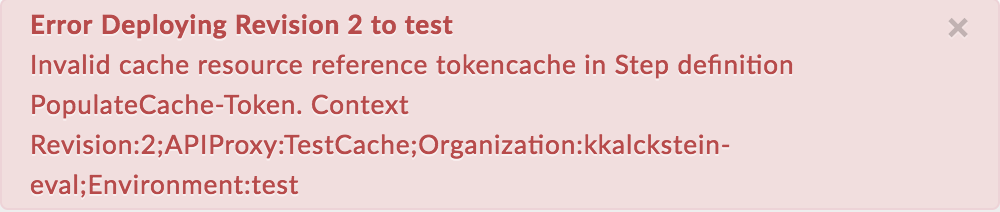
Error Deploying Revision 2 to test
Invalid cache resource reference tokencache in Step definition PopulateCache-Token. Context Revision:2;APIProxy:TestCache;Organization:kkalckstein-eval;Environment:test
Contoh Screenshot Error
Penyebab
Error ini terjadi jika elemen <CacheResource> dalam kebijakan PopulateCache disetel ke nama yang tidak ada di lingkungan tempat proxy API di-deploy.
Diagnosis
Identifikasi nama kebijakan PopulateCache, cache tidak valid yang digunakan dalam elemen
<CacheResource>kebijakan, dan lingkungan tempat terjadinya error. Anda dapat menemukan semua item ini dalam pesan error. Misalnya, dalam error berikut, nama kebijakan PopulateCache adalahPopulateCache-Token, nama cache yang tidak valid adalahtokencache, dan nama lingkungan adalahtest.Invalid cache resource reference tokencache in Step definition PopulateCache-Token. Context Revision:2;APIProxy:TestCache;Organization:kkalckstein-eval;Environment:testPeriksa XML kebijakan PopulateCache yang gagal dan verifikasi apakah nama cache yang ditentukan untuk elemen
<CacheResource>cocok dengan pesan error.Dalam contoh ini, nama cache yang ditentukan dalam elemen
<CacheResource>adalahtokencache:<?xml version="1.0" encoding="UTF-8" standalone="yes"?> <PopulateCache async="false" continueOnError="false" enabled="true" name="PopulateCache-Token"> <DisplayName>PopulateCache-Token</DisplayName> <Properties/> <CacheKey> <Prefix/> <KeyFragment ref="request.queryparam.client_id"/> </CacheKey> <CacheResource>tokencache</CacheResource> <Scope>Exclusive</Scope> <ExpirySettings> <TimeoutInSec>3600</TimeoutInSec> </ExpirySettings> <Source>token</Source> </PopulateCache>Verifikasi apakah cache (ditentukan pada langkah #1) telah ditentukan di lingkungan tertentu (diidentifikasi pada langkah #1).
Di UI Apigee, buka ADMIN > Environment > test, lalu periksa apakah cache ada di tab Caches pada Environment Configuration. Jika cache tidak ada, maka itulah penyebab error.
Misalnya, perhatikan pada screenshot di bawah bahwa cache bernama
tokencachetidak ada.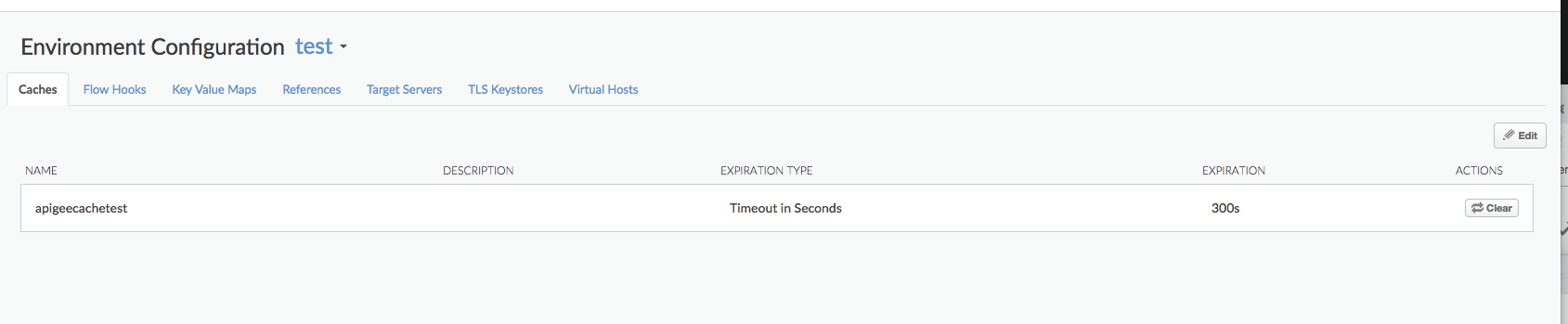
Karena cache bernama
tokencachetidak ditentukan di lingkungantest, Anda akan mendapatkan error:Invalid cache resource reference tokencache in Step definition PopulateCache-Token. Context Revision:2;APIProxy:TestCache;Organization:kkalckstein-eval;Environment:test
Resolusi
Pastikan cache yang ditentukan dalam elemen <CacheResource> kebijakan PopulateCache telah dibuat di lingkungan tempat Anda ingin men-deploy proxy API.
CacheNotFound
Pesan Error
Deployment proxy API melalui UI atau API Apigee akan menghasilkan pesan error seperti ini, dan status deployment Proxy API ditandai sebagai di-deploy sebagian:
Error: Cache : cache_resource, not found in organization : organization__environment.
Contoh Pesan Error
Error Cache : configCache, not found in organization : kkalckstein-eval__test
Penyebab
Error ini terjadi jika cache tertentu yang disebutkan dalam pesan error belum dibuat pada komponen Message Processor tertentu. Prosesor Pesan adalah komponen internal Apigee yang memproses alur traffic API melalui Apigee.
Resolusi
Hubungi Dukungan Apigee untuk mendapatkan bantuan.