

Stai visualizzando la documentazione di Apigee e Apigee hybrid.
Visualizza la documentazione di
Apigee Edge.
InvalidTimeout
Messaggio di errore
Il deployment del proxy API tramite l'API o la UI Apigee non riesce e viene visualizzato questo messaggio di errore:
Error Saving Revision revision_number
CacheLookupTimeoutInSeconds value value should be greater than zero.
Esempio di messaggio di errore
Error Saving Revision 2
CacheLookupTimeoutInSeconds -1 value should be greater than zero.
Screenshot di esempio dell'errore

Causa
Se l'elemento <CacheLookupTimeoutInSeconds> di un criterio LookupCache è impostato su un numero negativo, il deployment del proxy API non va a buon fine.
Ad esempio, se l'elemento <CacheLookupTimeoutInSeconds> è -1, il deployment del proxy API non va a buon fine.
Diagnosi
Identifica il valore non valido specificato per l'elemento
<CacheLookupTimeoutInSeconds>nel criterio LookupCache. Puoi trovare queste informazioni nel messaggio di errore. Ad esempio, nel seguente errore, il valore non valido utilizzato per l'elemento<CacheLookupTimeoutInSeconds>è-1:CacheLookupTimeoutInSeconds -1 value should be greater than zero.Esamina tutte le norme LookupCache nel proxy API specifico in cui si è verificato l'errore. Potrebbero essere presenti una o più policy LookupCache in cui è specificato l'elemento
<CacheLookupTimeoutInSeconds>. Identifica la policy LookUpCache in cui il valore non valido (identificato nel passaggio 1 sopra) è specificato per l'elemento<CacheLookupTimeoutInSeconds>.Ad esempio, la seguente configurazione dei criteri specifica il valore di
<CacheLookupTimeoutInSeconds>di-1, che corrisponde al messaggio di errore:<?xml version="1.0" encoding="UTF-8" standalone="yes"?> <LookupCache async="false" continueOnError="false" enabled="true" name="LookupCache-Token"> <DisplayName>LookupCache-Token</DisplayName> <Properties/> <CacheKey> <Prefix/> <KeyFragment ref="request.queryparam.client_id"/> </CacheKey> <CacheLookupTimeoutInSeconds>-1</CacheLookupTimeoutInSeconds> <Scope>Exclusive</Scope> <ExpirySettings> <TimeoutInSec>3600</TimeoutInSec> </ExpirySettings> <AssignTo>usertoken</AssignTo> </LookupCache>Se
<CacheLookupTimeoutInSeconds>è specificato come numero intero negativo, questo è il motivo dell'errore.
Risoluzione
Assicurati che il valore dell'elemento <CacheLookupTimeoutInSeconds> del criterio LookupCache sia sempre specificato come numero intero non negativo.
Per correggere la norma LookupCache di esempio mostrata sopra, puoi modificare l'elemento <CacheLookupTimeoutInSeconds> in 30.
<?xml version="1.0" encoding="UTF-8" standalone="yes"?>
<LookupCache async="false" continueOnError="false" enabled="true" name="LookupCache-Token">
    <DisplayName>LookupCache-Token</DisplayName>
    <Properties/>
    <CacheKey>
        <Prefix/>
        <KeyFragment ref="request.queryparam.client_id"/>
    </CacheKey>
    <CacheResource>tokencache</CacheResource>
    <CacheLookupTimeoutInSeconds>30</CacheLookupTimeoutInSeconds>
    <Scope>Exclusive</Scope>
    <ExpirySettings>
        <TimeoutInSec>3600</TimeoutInSec>
    </ExpirySettings>
    <AssignTo>usertoken</AssignTo>
</LookupCache>
InvalidCacheResourceReference
Messaggio di errore
Il deployment del proxy API tramite l'API o la UI Apigee non riesce e viene visualizzato questo messaggio di errore:
Error Deploying Revision revision_number to environment
Invalid cache resource reference [cache_resource] in Step definition [populate_cache_policy_name]. Context Revision:[revision_number];APIProxy:ResponseCache;Organization:[organization];Environment:[environment]
Esempio di messaggio di errore
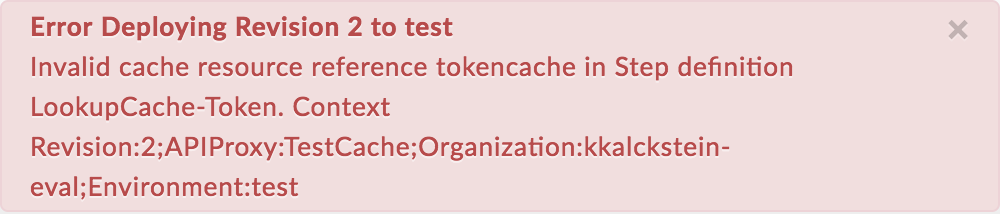
Error Deploying Revision 2 to test
Invalid cache resource reference tokencache in Step definition LookupCache-Token. Context Revision:2;APIProxy:TestCache;Organization:kkalckstein-eval;Environment:test
Screenshot di esempio dell'errore
Causa
Questo errore si verifica se l'elemento <CacheResource> è impostato su un nome che non esiste nell'ambiente in cui viene eseguito il deployment del proxy API.
Diagnosi
Identifica la cache non valida utilizzata nell'elemento
<CacheResource>del criterio LookupCache e l'ambiente in cui si è verificato l'errore. Puoi trovare entrambi gli elementi nel messaggio di errore. Ad esempio, nel seguente errore, il nome della cache non valida ètokencachee il nome dell'ambiente ètest.Invalid cache resource reference tokencache in Step definition LookupCache-Token. Context Revision:2;APIProxy:TestCache;Organization:kkalckstein-eval;Environment:testEsamina tutte le norme LookupCache nel proxy API specifico in cui si è verificato l'errore. Identifica la policy LookupCache specifica in cui è specificata la cache non valida (identificata nel passaggio 1) nell'elemento
<CacheResource>.Ad esempio, la seguente policy specifica il valore di
<CacheResource>cometokencache, che corrisponde al messaggio di errore:<?xml version="1.0" encoding="UTF-8" standalone="yes"?> <LookupCache async="false" continueOnError="false" enabled="true" name="LookupCache-Token"> <DisplayName>LookupCache-Token</DisplayName> <Properties/> <CacheKey> <Prefix/> <KeyFragment ref="request.queryparam.client_id"/> </CacheKey> <CacheResource>tokencache</CacheResource> <CacheLookupTimeoutInSeconds/> <Scope>Exclusive</Scope> <ExpirySettings> <TimeoutInSec>3600</TimeoutInSec> </ExpirySettings> <AssignTo>usertoken</AssignTo> </LookupCache>Verifica se la cache (determinata nel passaggio 1) è stata definita nell'ambiente specifico (identificato nel passaggio 1).
Nell'interfaccia utente di Apigee, vai ad ADMIN > Environment > test e verifica se la cache esiste nella scheda Cache di Environment Configuration (Configurazione ambiente). Se la cache non esiste, questo è il motivo dell'errore.
Ad esempio, nello screenshot riportato di seguito nota che la cache denominata
tokencachenon esiste.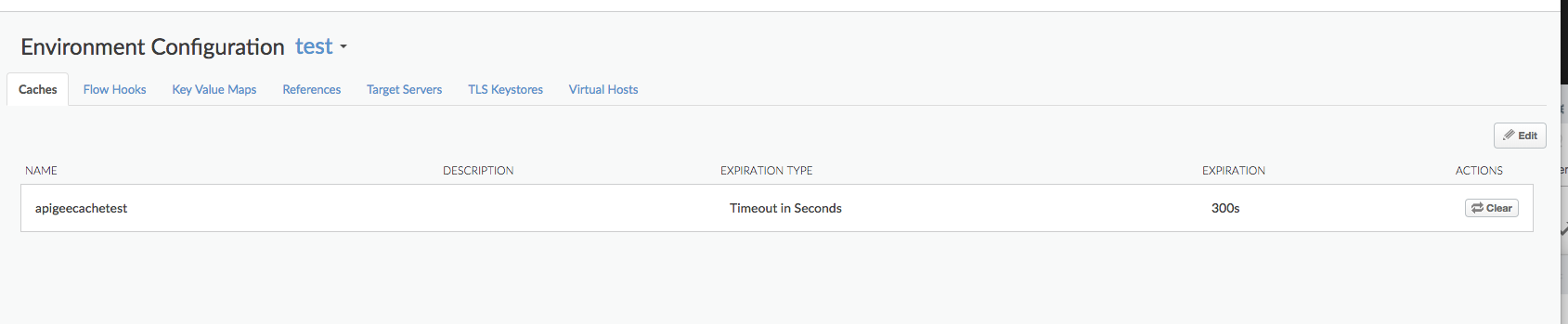
Poiché la cache denominata
tokencachenon è definita nell'ambientetest, viene visualizzato l'errore:Invalid cache resource reference tokencache in Step definition LookupCache-Token. Context Revision:2;APIProxy:TestCache;Organization:kkalckstein-eval;Environment:test
Risoluzione
Assicurati che il nome della cache specificato nell'elemento <CacheResource> sia stato creato nell'ambiente in cui vuoi eseguire il deployment del proxy API.
CacheNotFound
Messaggio di errore
Il deployment del proxy API tramite l'interfaccia utente o l'API Apigee genera un messaggio di errore come questo e lo stato del deployment del proxy API viene contrassegnato come parzialmente eseguito:
Error: Cache : cache_resource, not found in organization : organization__environment.
Esempio di messaggio di errore
Error Cache : configCache, not found in organization : kkalckstein-eval__test
Causa
Questo errore si verifica se la cache specifica menzionata nel messaggio di errore non è stata creata in un componente specifico del processore di messaggi.
Risoluzione
Contatta l'assistenza Apigee per ricevere aiuto.