
Distributed Cloud software only for VMware lets you deploy and manage Google Kubernetes Engine (GKE) clusters in a VMware vSphere environment. You can run and upgrade containerized applications in your data center while using Google Cloud features and infrastructure.
To run software-only clusters directly on physical servers, see the Distributed Cloud software only for bare metal overview.
Why use Distributed Cloud software only for VMware?
Running Distributed Cloud software only for VMware on your existing vSphere infrastructure lets you modernize applications with GKE while keeping the virtualization platform, storage, and operational processes that your teams already use.
Integration with your vSphere environment
Google Distributed Cloud runs cluster nodes as virtual machines in your existing vCenter environment, so you can add containerized workloads to the vSphere hosts that you already operate. Clusters store data in vSphere datastores backed by vSAN, VMFS, or NFS, and you can assign different datastores to individual node pools. The vSphere Container Storage Interface (CSI) driver provisions persistent volumes for stateful workloads. For details, see Storage.
Centralized management with on-premises data
Manage, monitor, and troubleshoot clusters from the Google Cloud console, the Google Cloud CLI, or Terraform by using the GKE On-Prem API, without logging in to the admin workstation. Your applications and business data stay in your data center; Google Cloud receives only cluster metadata, health, and usage information. For details, see Data that stays in your data center.
Enterprise reliability and operations
Google Distributed Cloud includes production-ready operational features:
- High availability: High-availability admin clusters and user cluster control planes use three control plane nodes, so you can administer your environment even if a node fails.
- Automatic node repair: Periodic health checks detect unhealthy nodes, and node auto repair repairs them automatically. This feature is enabled by default.
- Cluster autoscaling: The cluster autoscaler adds or removes nodes in a node pool based on the resource requests of your workloads.
- Flexible load balancing: Use the bundled MetalLB load balancer, which runs on your cluster nodes, or configure a third-party load balancer such as F5 BIG-IP or Citrix. For details, see Overview of load balancing.
How it works
Google Distributed Cloud extends GKE to let you create clusters on physical servers in a vSphere environment. You manage these on-premises clusters in Google Cloud alongside cloud-based clusters as part of a unified fleet.
In GKE clusters running in Google Cloud, Google manages the Kubernetes control plane and network infrastructure. For Google Distributed Cloud clusters running in your data center, Google Cloud provides administrative and control plane software that is downloaded and deployed onto your vSphere virtual machines as part of the installation and upgrade processes.
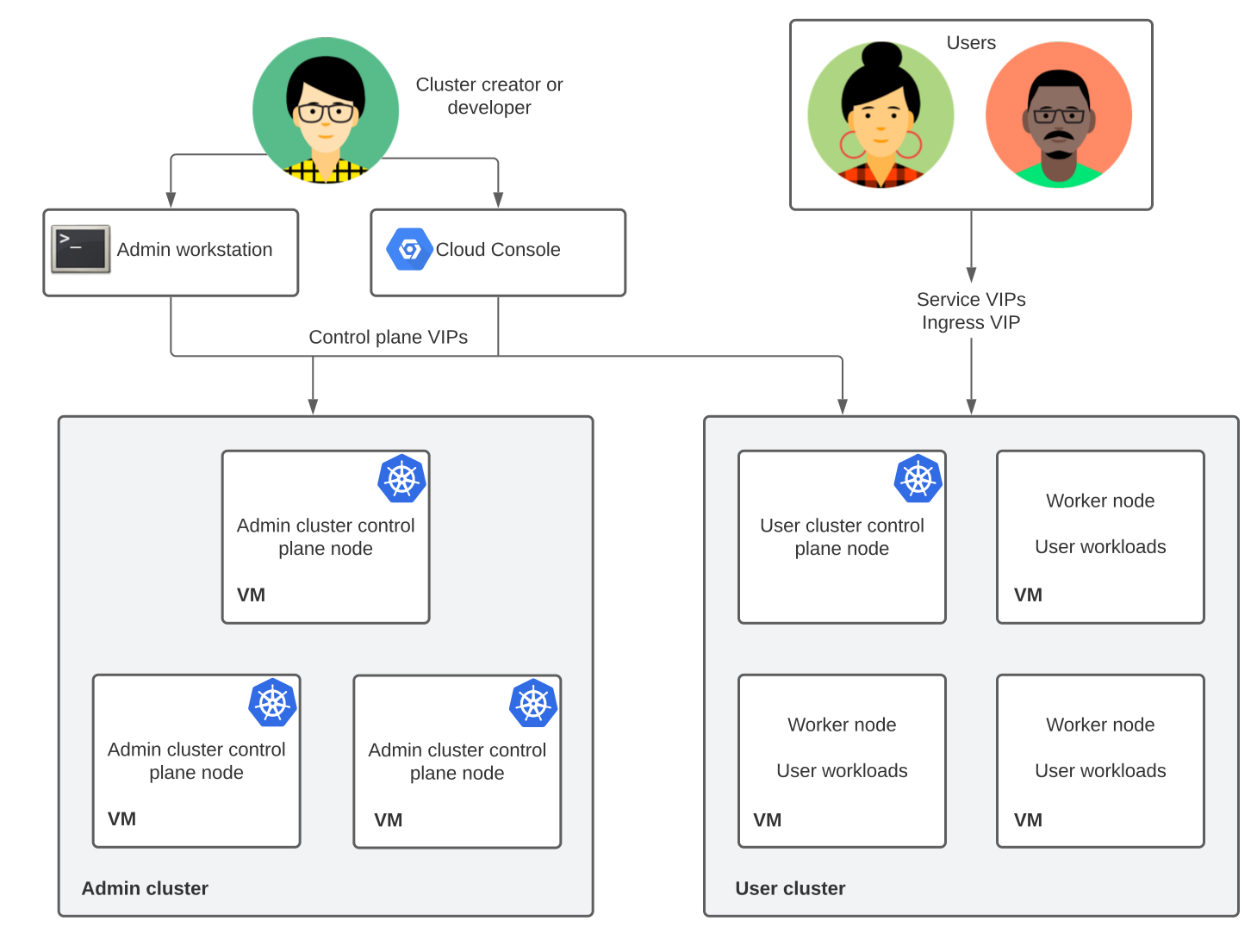
The following diagram shows the architecture of a completed installation with an admin cluster and a user cluster:
Key components
The following components make up an installation of Distributed Cloud software only for VMware:
- Admin cluster: Manages one or more user clusters. Admin clusters consist of one or more control plane nodes running on dedicated virtual machines.
- User cluster: Runs your containerized workloads. Each user cluster consists of at least one control plane node and one or more worker nodes.
- Admin workstation: A dedicated virtual machine that includes cluster
configuration files and management tools:
gkectl: Creates, updates, and manages cluster deployments.kubectl: Interacts with admin and user clusters to manage workloads.
- Google Cloud console: A web interface in Google Cloud for viewing cluster health and performing lifecycle operations without logging in to the admin workstation.
- Virtual IP addresses (VIPs): Virtual IPs configured during installation.
Cluster administrators and developers use
kubectland control plane VIPs to access control planes in admin and user clusters. Application users and developers use Service and Ingress VIPs to access and expose workloads, respectively. For details, see Plan your IP addresses.
Connecting to the fleet
All user clusters are members of a fleet, which is a logical grouping of Kubernetes clusters that provides unified management across environments. Fleets let you view clusters together in the Google Cloud console and use fleet-enabled features to manage, govern, and operate workloads at scale.
Each cluster connects to Google Cloud through the Connect Agent, which deploys automatically during cluster installation. Fleet membership also determines billing for Distributed Cloud software only for VMware.
Pricing
On-premises clusters created using Google Distributed Cloud are billed per vCPU. To enable billing, enable the Anthos API in your Google Cloud project.
For full pricing information, including how to contact sales, see Google Kubernetes Engine pricing.
Versions
This documentation covers all supported versions of Google Distributed Cloud. Where relevant, Google also retains limited information for older, unsupported versions in this documentation.
For supported versions and release policies, see the following resources:
- Version Support Policy: Maintenance schedules and support windows.
- Versioning: Supported minor versions and available patches.
Starting with the 1.29 release, we no longer create a directory for the previous minor release. Differences in behavior are noted in the documentation. When a new feature becomes available, the supported version for the feature is documented.
Documentation for version 1.16 and earlier is archived at:
https://cloud.google.com/anthos/clusters/docs/on-prem/VERSION/
Replace VERSION with a minor version from 1.0 to 1.16 and copy the URL to the address bar in your browser.
Where your data is stored
When you run Distributed Cloud software only for VMware, your clusters, applications, and business data stay in your data center. By default,Google Distributed Cloud sends Google Cloud information about your clusters, such as their settings, health, and usage, but it doesn't send your application data.
Data that stays in your data center
The following data stays in your data center:
- Containers, Pods, PersistentVolumes, and the data that your applications process.
- All Kubernetes objects are stored in your control plane
and
etcddatabase. - The admin cluster's control plane stores self-signed
etcdprivate keys, user cluster keys, and cluster certificate authorities (CAs). - Application secrets, OAuth tokens, SSH private keys,
container registry credentials, vCenter and F5 BIG-IP credentials, and
service account key files, stored in
etcdor on your administrator workstation. They aren't sent to the GKE On-Prem API and are removed from diagnostic snapshots. - Your admin cluster, user cluster, and credentials configuration files are stored on your administrator workstation.
- Audit logs are written to disk on admin cluster control plane nodes and user clusters.
- You can choose to upload diagnostic snapshots to Cloud Storage.
Data that's sent to Google Cloud
The following table shows what's sent, how it's used and stored, and whether you can turn it off:
| Data | What's sent | Use and storage | Default |
|---|---|---|---|
| Connection and fleet registration ( gkehub.googleapis.com,
gkeconnect.googleapis.com) |
|
Manage clusters from the
Google Cloud console, the connect gateway, and fleet
with the Connect Agent. Your kube-apiserver authenticates, authorizes, and
audit-logs each request. |
Required |
| Cluster settings and status ( gkeonprem.googleapis.com) |
|
Lets you manage clusters with the Google Cloud console, the
Google Cloud CLI, or Terraform. The GKE On-Prem API stores this data in the region set
in gkeOnPremAPI.location. |
On in version 1.16 and later, if the GKE On-Prem API is
enabled in your Google Cloud project. To turn it off, set
gkeOnPremAPI.enabled to false. |
| Billing usage ( anthos.googleapis.com) |
vCPU capacity, node count, and license entitlement status. | Used for metering, billing, and license checks. | Required. Billing records are buffered during an outage and sent later. |
| System health data ( logging.googleapis.com, monitoring.googleapis.com,
opsconfigmonitoring.googleapis.com) |
|
Used for Cloud Monitoring, Google Cloud console status views, and
Customer Care troubleshooting. Stored in the Google Cloud project
set in stackdriver.projectID. Metrics stored
in stackdriver.clusterLocation region, and logs follow your Log Router
settings. |
On for system logs and metrics, which full
Customer Care support and SLA coverage require. Off
for application logs and metrics, unless you set
enableCloudLoggingForApplications or
enableGMPForApplications to true in the
Stackdriver resource. |
| Audit logs ( anthosaudit.googleapis.com) |
Admin Activity audit logs: who changed what
through the kube-apiserver, and when. Entries include the time,
cluster, host or VM, user or service account, RBAC role, operation, and
result. Read requests aren't recorded. |
Stored in Cloud Audit Logs in the Google Cloud project set in
cloudAuditLogging.projectID, in the _Required
bucket, and kept for 400 days. |
Optional. To turn it on, fill in the
cloudAuditLogging section. For admin clusters, you can turn it on
only at creation. To turn it off for a user cluster, delete the section and
update the cluster. |
What's next
- To start a minimal proof-of-concept installation, see Set up minimal infrastructure.
- To plan a production deployment, see the installation overview.