

BiDiStreamingAnalyzeContent API は、会話エージェントと Agent Assist の両方で、次世代の音声とマルチモーダル エクスペリエンスを実現するための主要な API です。この API は、音声データのストリーミングを容易にし、文字起こしまたは人間のエージェントの提案を返します。
以前の API とは異なり、簡素化された音声構成では、人間同士の会話のサポートが最適化され、締め切り時間が 15 分に延長されています。この API は、ライブ翻訳を除き、StreamingAnalyzeContent がサポートするすべての Agent Assist 機能もサポートしています。
ストリーミングの基本
次の図は、ストリームの仕組みを示しています。
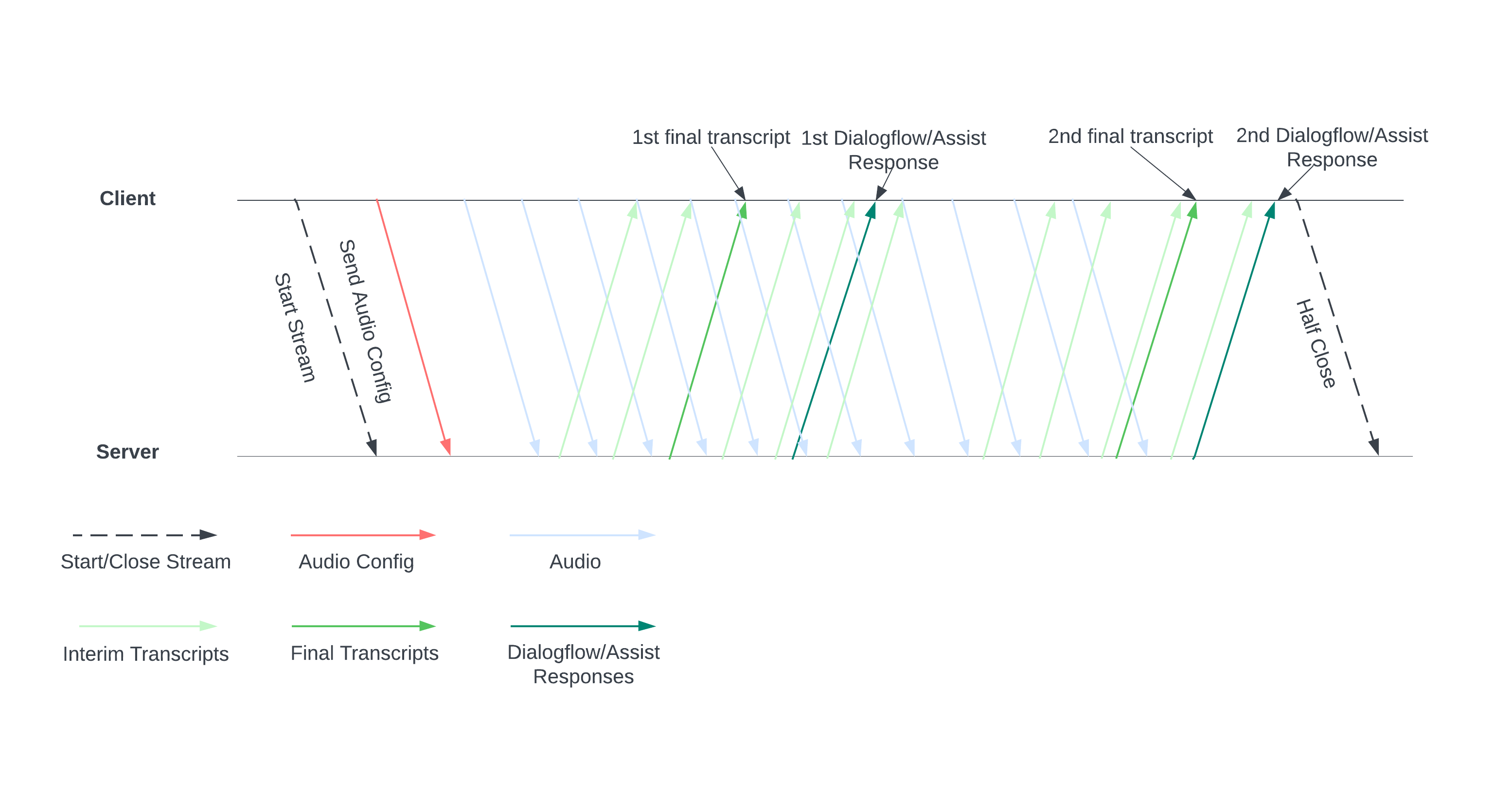
サーバーに音声構成を送信して、ストリームを開始します。音声ファイルを送信すると、サーバーから文字起こしや人間のエージェントへの提案が返されます。より多くの音声データを送信して、より多くの文字起こしと候補を取得します。このやり取りは、ストリームを半分閉じて終了するまで続きます。
ストリーミング ガイド
会話の実行時に BiDiStreamingAnalyzeContent API を使用するには、次のガイドラインに沿って操作します。
BiDiStreamingAnalyzeContentメソッドを呼び出し、次のフィールドを設定します。BiDiStreamingAnalyzeContentRequest.participant- (省略可)
BiDiStreamingAnalyzeContentRequest.voice_session_config.input_audio_sample_rate_hertz(指定すると、ConversationProfile.stt_config.sample_rate_hertzの構成がオーバーライドされます)。 - (省略可)
BiDiStreamingAnalyzeContentRequest.voice_session_config.input_audio_encoding(指定すると、ConversationProfile.stt_config.audio_encodingの構成がオーバーライドされます)。
- 最初の
BiDiStreamingAnalyzeContentリクエストでストリームを準備し、音声構成を設定します。 - 後続のリクエストでは、
BiDiStreamingAnalyzeContentRequest.audioを介して音声バイトをストリームに送信します。 - 音声ペイロードを含む 2 番目のリクエストを送信すると、ストリームから
BidiStreamingAnalyzeContentResponsesが返されます。- 中間と最終の文字起こし結果は、
BiDiStreamingAnalyzeContentResponse.recognition_resultコマンドで取得できます。 - 人間のエージェントの候補と処理済みの会話メッセージには、次のコマンド
BiDiStreamingAnalyzeContentResponse.analyze_content_responseでアクセスできます。
- 中間と最終の文字起こし結果は、
- ストリームはいつでも半分閉じることができます。ストリームを半分閉じると、サーバーは残りの認識結果と、Agent Assist の候補を含むレスポンスを返送します。
- 次の場合に、新しいストリームを開始または再開します。
- ストリームが破損しています。たとえば、ストリームが停止すべきでないときに停止した。
- 会話がリクエストの最大時間である 15 分に近づいています。
- 音質を最適化するには、ストリームを開始するときに、
BiDiStreamingAnalyzeContentResponse.recognition_resultの最後のspeech_end_offsetの後に生成された音声データをis_final=trueを使用してBidiStreamingAnalyzeContentに送信します。
Python クライアント ライブラリを使用して API を使用する
クライアント ライブラリを使用すると、特定のコード言語から Google API にアクセスできます。BidiStreamingAnalyzeContent で Agent Assist に Python クライアント ライブラリを使用するには、次の手順を行います。
from google.cloud import dialogflow_v2beta1
from google.api_core.client_options import ClientOptions
from google.cloud import storage

import time
import google.auth
import participant_management
import conversation_management


PROJECT_ID="your-project-id"
CONVERSATION_PROFILE_ID="your-conversation-profile-id"
BUCKET_NAME="your-audio-bucket-name"

SAMPLE_RATE =48000
# Calculate the bytes with Sample_rate_hertz * bit Depth / 8 -> bytes
# 48000(sample/second) * 16(bits/sample) / 8 = 96000 byte per second,
# 96000 / 10 = 9600 we send 0.1 second to the stream API
POINT_ONE_SECOND_IN_BYTES = 9600
FOLDER_PTAH_FOR_CUSTOMER_AUDIO="your-customer-audios-files-path"
FOLDER_PTAH_FOR_AGENT_AUDIO="your-agent-audios-file-path"
client_options = ClientOptions(api_endpoint="dialogflow.googleapis.com")
credentials, _ = google.auth.default(scopes=["https://www.googleapis.com/auth/cloud-platform",
                                             "https://www.googleapis.com/auth/dialogflow"])

storage_client = storage.Client(credentials = credentials, project=PROJECT_ID)

participant_client = dialogflow_v2beta1.ParticipantsClient(client_options=client_options,
                                                           credentials=credentials)

def download_blob(bucket_name, folder_path, audio_array : list):
    """Uploads a file to the bucket."""
    bucket = storage_client.bucket(bucket_name, user_project=PROJECT_ID)
    blobs = bucket.list_blobs(prefix=folder_path)
    for blob in blobs:
      if not blob.name.endswith('/'):
          audio_array.append(blob.download_as_string())

def request_iterator(participant : dialogflow_v2beta1.Participant, audios):
    """Iterate the request for bidi streaming analyze content
    """

    yield dialogflow_v2beta1.BidiStreamingAnalyzeContentRequest(
        config={
            "participant": participant.name,
            "voice_session_config": {
                "input_audio_encoding": dialogflow_v2beta1.AudioEncoding.AUDIO_ENCODING_LINEAR_16,
                "input_audio_sample_rate_hertz": SAMPLE_RATE,
            },
        }
    )
    print(f"participant {participant}")

    for i in range(0, len(audios)):
      audios_array = audio_request_iterator(audios[i])
      for chunk in audios_array:
        if not chunk:
            break
        yield dialogflow_v2beta1.BidiStreamingAnalyzeContentRequest(
        input={
            "audio":chunk
            },
        )
        time.sleep(0.1)
    time.sleep(0.1)

def participant_bidi_streaming_analyze_content(participant, audios):
    """call bidi streaming analyze content API
    """
    bidi_responses = participant_client.bidi_streaming_analyze_content(
        requests=request_iterator(participant, audios)
    )

    for response in bidi_responses:
        bidi_streaming_analyze_content_response_handler(response)

def bidi_streaming_analyze_content_response_handler(response: dialogflow_v2beta1.BidiStreamingAnalyzeContentResponse):
    """Call Bidi Streaming Analyze Content
    """
    if  response.recognition_result:
         print(f"Recognition result: { response.recognition_result.transcript}", )

def audio_request_iterator(audio):
    """Iterate the request for bidi streaming analyze content
    """
    total_audio_length = len(audio)
    print(f"total audio length {total_audio_length}")
    array = []
    for i in range(0, total_audio_length, POINT_ONE_SECOND_IN_BYTES):
        chunk = audio[i : i + POINT_ONE_SECOND_IN_BYTES]
        array.append(chunk)
        if not chunk:
            break
    return array

def python_client_handler():
    """Downloads audios from the google cloud storage bucket and stream to
    the Bidi streaming AnalyzeContent site.
    """
    print("Start streaming")
    conversation = conversation_management.create_conversation(
        project_id=PROJECT_ID, conversation_profile_id=CONVERSATION_PROFILE_ID_STAGING
    )
    conversation_id = conversation.name.split("conversations/")[1].rstrip()
    human_agent = human_agent = participant_management.create_participant(
        project_id=PROJECT_ID, conversation_id=conversation_id, role="HUMAN_AGENT"
    )

    end_user =    end_user = participant_management.create_participant(
        project_id=PROJECT_ID, conversation_id=conversation_id, role="END_USER"
    )

    end_user_requests = []
    agent_request= []
    download_blob(BUCKET_NAME, FOLDER_PTAH_FOR_CUSTOMER_AUDIO, end_user_requests)
    download_blob(BUCKET_NAME, FOLDER_PTAH_FOR_AGENT_AUDIO, agent_request)

    participant_bidi_streaming_analyze_content( human_agent, agent_request)
    participant_bidi_streaming_analyze_content( end_user, end_user_requests)

    conversation_management.complete_conversation(PROJECT_ID, conversation_id)
テレフォニー SipRec 統合を有効にする
テレフォニー SipRec 統合を有効にして、音声処理に BidiStreamingAnalyzeContent を使用できます。音声処理は、Agent Assist コンソールまたは直接 API リクエストを使用して構成します。
コンソール
BidiStreamingAnalyzeContent を使用するようにオーディオ処理を設定する手順は次のとおりです。
Agent Assist コンソールに移動し、プロジェクトを選択します。
[会話プロファイル] > プロファイルの名前をクリックします。
[電話の設定] に移動します。
[双方向ストリーミング API を使用する] をクリックして有効にし、[保存] をクリックします。
API
ConversationProfile.use_bidi_streaming でフラグを構成して、API を直接呼び出して会話プロファイルを作成または更新できます。
構成の例:
{
"name": "projects/PROJECT_ID/locations/global/conversationProfiles/CONVERSATION_PROFILE_ID",f
"displayName": "CONVERSATION_PROFILE_NAME",
"automatedAgentConfig": {
},
"humanAgentAssistantConfig": {
  "notificationConfig": {
    "topic": "projects/PROJECT_ID/topics/FEATURE_SUGGESTION_TOPIC_ID",
    "messageFormat": "JSON"
      },
  },
"useBidiStreaming": true,
"languageCode": "en-US"
}
割り当て
同時 BidiStreamingAnalyzeContent リクエストの数は、新しい割り当て ConcurrentBidiStreamingSessionsPerProjectPerRegion によって制限されます。割り当ての使用状況と割り当て上限の引き上げをリクエストする方法については、 Google Cloud 割り当てガイドをご覧ください。
割り当ての場合、グローバルと米国マルチリージョンの Dialogflow エンドポイントに対する BidiStreamingAnalyzeContent リクエストの使用量は us-central1 リージョンにあります。