

VMware Cloud Foundation components and networking
This page describes VMware Cloud Foundation (VCF) domains, management appliances, networking constructs, and automation tools in VMware solution on Google Cloud.
VMware Cloud Foundation (VCF) combines compute (vSphere), storage (vSAN), networking (NSX), and cloud management services into an integrated software-defined data center (SDDC) platform. In VMware solution, you deploy VCF on dedicated bare-metal Compute Engine instances in your Google Cloud project by using your own portable VCF subscription.
VCF domains and core components
A VMware solution VCF deployment uses the following architectural building blocks:
- Management domain: The initial SDDC cluster created during VCF bring-up that hosts the core cloud management appliances, including vCenter Server, SDDC Manager, and the NSX Manager cluster. For details on VCF bring-up, see Deploy a new VCF fleet or a new VCF instance in the Broadcom documentation.
- VI workload domains: Policy-based resource containers provisioned by SDDC Manager to run your tenant and production workloads on dedicated compute, vSAN storage, and NSX networking resources.
- VMware SDDC Manager: Central management software that automates the bring-up, configuration, and lifecycle management (LCM) of VCF domains and software bundles.
- NSX Federation: Provides multi-site networking, centralized security policy enforcement, and disaster recovery orchestration across multiple VCF instances or regions.
VCF management appliances
The following table lists the VCF management and edge appliances and the number of virtual machines (VMs) deployed for Simple versus high availability (HA) topologies:
| Appliance type | Purpose | Simple topology VMs | HA topology VMs |
|---|---|---|---|
| SDDC Manager | Automates deployment, configuration, and lifecycle management of VCF components | 1 | 1 |
| vCenter Server | Centralized management platform for ESXi hosts, clusters, and virtualized compute resources | 1 | 1 |
| NSX Manager | Provides network virtualization and security management across the VCF fabric | 1 | 3 (plus cluster VIP) |
| VCF Fleet Manager | Centralized fleet-level management appliance for multi-site VCF orchestration | 1 | 1 |
| VCF Operations | Provides performance monitoring, log analytics, capacity planning, and operational visibility | 1 | 3 (primary, replica, and data node plus load balancer VIP) |
| VCF Automation | Offers self-service cloud automation, infrastructure provisioning, and catalog orchestration | 1 | 3 (clustered plus VIP) |
| Collector appliance | Gathers metrics, traces, and telemetry data across VCF services for operations and monitoring | 1 | 1 |
| NSX Edge | Provides Tier-0 and Tier-1 north-south routing and edge connectivity for workload traffic | 2 | 2 or more (scales up to 8 active edges based on throughput requirements) |
Underlay VPC subnets and dynamic interfaces (NICs)
VMware solution operates across two distinct network layers, as shown in the following diagram (click to enlarge):
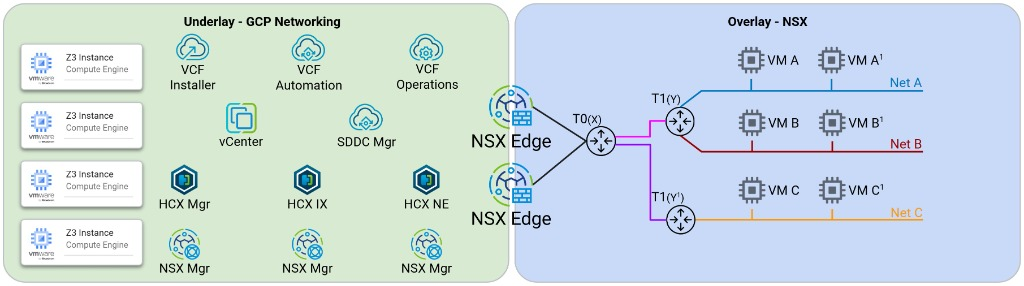
- Underlay (Google Cloud VPC): The routed virtual network that hosts bare-metal ESXi instances, VMkernel interfaces, and core management appliances (vCenter Server, SDDC Manager, and NSX Manager nodes).
- Overlay (VMware NSX SDN): The virtualized network fabric where workload VMs reside, decoupled from VPC IP addressing. ESXi hosts tunnel workload traffic across host Tunnel Endpoints (TEPs) by using Geneve encapsulation.
To isolate VMware traffic types over the Google Cloud VPC underlay, each bare-metal node uses a primary interface and dedicated 802.1Q VLAN-tagged dynamic network interfaces (NICs) connected to separate VPC subnets:
- Primary network interface (
nic0): Carries untagged ESXi host management traffic (vmk0) and connects to your management VPC subnet. - Dynamic NIC for vSAN (
nic0.VLAN_ID): Carries storage clustering traffic (vmk2) between ESXi hosts. - Dynamic NIC for vMotion (
nic0.VLAN_ID): Carries live VM migration traffic (vmk1) between bare-metal hosts. - Dynamic NIC for NSX TEP (
nic0.VLAN_ID): Carries encapsulated Geneve tunnel endpoint traffic (vmk10orvmk3) for NSX overlay networks. - Additional Dynamic NICs: Optional VLAN-tagged sub-interfaces (
nic0.VLAN_ID) for NSX Edge uplinks (NSX-Uplink) or dedicated VLAN workload segments.
Network endpoint groups (NEGs)
VMware solution uses zonal network endpoint groups (NEGs)
and regional internal passthrough Network Load Balancers with the Fast IP Move
(GARP_RA) policy to support live vMotion and HA failover for VCF management
appliances running in the VPC underlay:
- Automatic membership: When you deploy nodes through the guided deployment workflow or E2E Terraform modules, each node's primary and NSX uplink interfaces are registered with the corresponding zonal NEG.
- Cluster requirement: All nodes in a vSphere cluster located in a single zone must belong to the same NEG for their primary and TEP interfaces so that regional load balancers can steer appliance VIP traffic to whichever ESXi host runs the management VM.
VMware solution toolkit
The VMware solution toolkit
is an open-source collection of Terraform modules and Python automation scripts
developed by Google Cloud. The toolkit automates VPC and bare-metal
provisioning, configures ESXi vSwitch0 port groups and vSAN datastores, sets
up Cloud DNS records, deploys the VCF Installer appliance from the regional
offline depot, and generates a validated VCF bring-up JSON specification.
What's next
- Learn more about host NIC mappings and Layer 2 broadcast domains in Underlay VPC networking, Layer 2 MAC learning, and DNS.
- Understand high availability and vMotion for VCF appliances in High availability load balancing for VCF appliances.
- Review overlay and BGP routing topologies in NSX overlay and edge routing.
- Follow the step-by-step guide to Deploy nodes and configure appliance networking by using the console or Prepare nodes and deploy VCF by using the toolkit.