

NSX overlay and edge routing
VMware solution on Google Cloud uses VMware NSX to provide software-defined networking (SDN) and security for your VMware Cloud Foundation (VCF) workload virtual machines (VMs). This document describes how NSX overlay networking interacts with the Google Cloud Virtual Private Cloud (VPC) underlay and compares the routing architectures between NSX Edge nodes and your VPC network.
Overview of NSX in Google Cloud
In VMware solution, the Google Cloud VPC network provides the
physical and virtualized underlay for your bare-metal ESXi hosts
(Compute Engine z3-highmem-192-highlssd-metal instances) and management
appliances. VMware NSX sits on top of this underlay to provide an abstracted
network topology for your VCF workload VMs:
- Geneve overlay encapsulation: ESXi hosts and NSX Edge nodes establish
Transport Endpoint (TEP) interfaces (
vmk10orvmk3) on the dedicatedNSX-TEPVPC subnet. Workload VM traffic is encapsulated in Geneve packets (UDP port6081) and routed between host TEPs over the Google Cloud VPC underlay using a maximum transmission unit (MTU) of8896bytes. - Decoupled IP addressing: Workload VMs connected to NSX overlay segments can use arbitrary IP address ranges without consuming IP addresses from the underlying Google Cloud VPC subnets or hitting VPC subnet IP quotas.
- Multi-tier routing architecture:
- Tier-1 (T1) gateways: Provide east-west routing between overlay segments, localized DHCP services, and gateway firewall rules.
- Tier-0 (T0) gateways: Provide north-south routing between the NSX overlay environment and the underlying Google Cloud VPC network.
- Distributed security: The NSX Distributed Firewall (DFW) enforces stateful microsegmentation policies directly at the virtual network interface card (vNIC) of each workload VM, regardless of which overlay segment or ESXi host the VM resides on.
Underlay versus overlay topology
The network architecture is divided into two distinct layers—the Google Cloud VPC underlay and the VMware NSX overlay—as shown in the following diagram (click to enlarge):
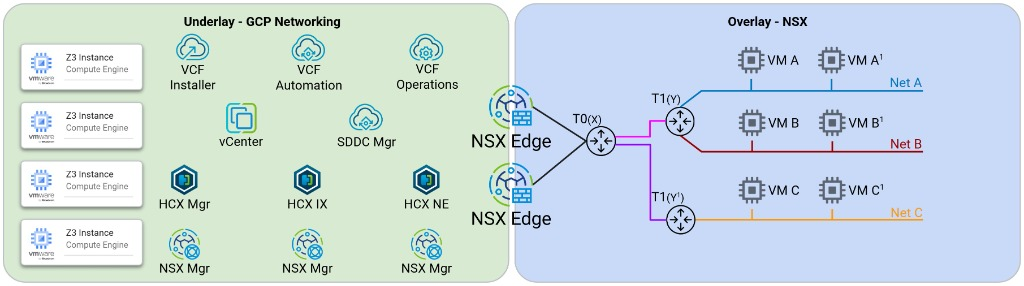
The following table summarizes the components and responsibilities of each network layer:
| Network layer | Primary components | Responsibilities |
|---|---|---|
| Google Cloud VPC underlay |
|
|
| NSX SDN overlay |
|
|
Advanced architecture use cases
You can structure your NSX and VPC topologies to support different isolation and multi-tenancy requirements:
- Consolidated workload domains in a single VPC: Deploy your VCF
management domain and one or more VI workload domains within a single
Google Cloud VPC network. Each workload domain uses dedicated
vSAN,vMotion, andNSX-TEPsubnets within the same VPC while sharing or isolating NSX Edge clusters for north-south routing. - Multi-VPC mappings: Connect distinct NSX Tier-0 gateways or separate NSX Edge clusters to isolated Google Cloud VPC networks (for example, separate VPCs for production workloads, perimeter networks, and shared services). This topology preserves strict VPC-level firewall and routing boundaries in Google Cloud while maintaining centralized VCF lifecycle management.
NSX Edge routing
To route traffic between NSX overlay segments and your Google Cloud VPC
network, NSX Edge VMs must exchange routes or forward packets over the
NSX-Uplink VPC subnet. You can configure north-south routing between NSX
Tier-0 gateways and your VPC network by using either of the following options:
- Option 1: VPC static routing (active-standby)
- Option 2: Dynamic BGP routing by using Network Connectivity Center Router Appliance (active-active)
Option 1: VPC static routing (active-standby)
In a static routing topology, an active-standby pair of NSX Edge nodes uses a
floating virtual IP address (VIP) on the NSX-Uplink VPC subnet fronted by a
regional internal passthrough Network Load Balancer, as shown in the following
diagram (click to enlarge):
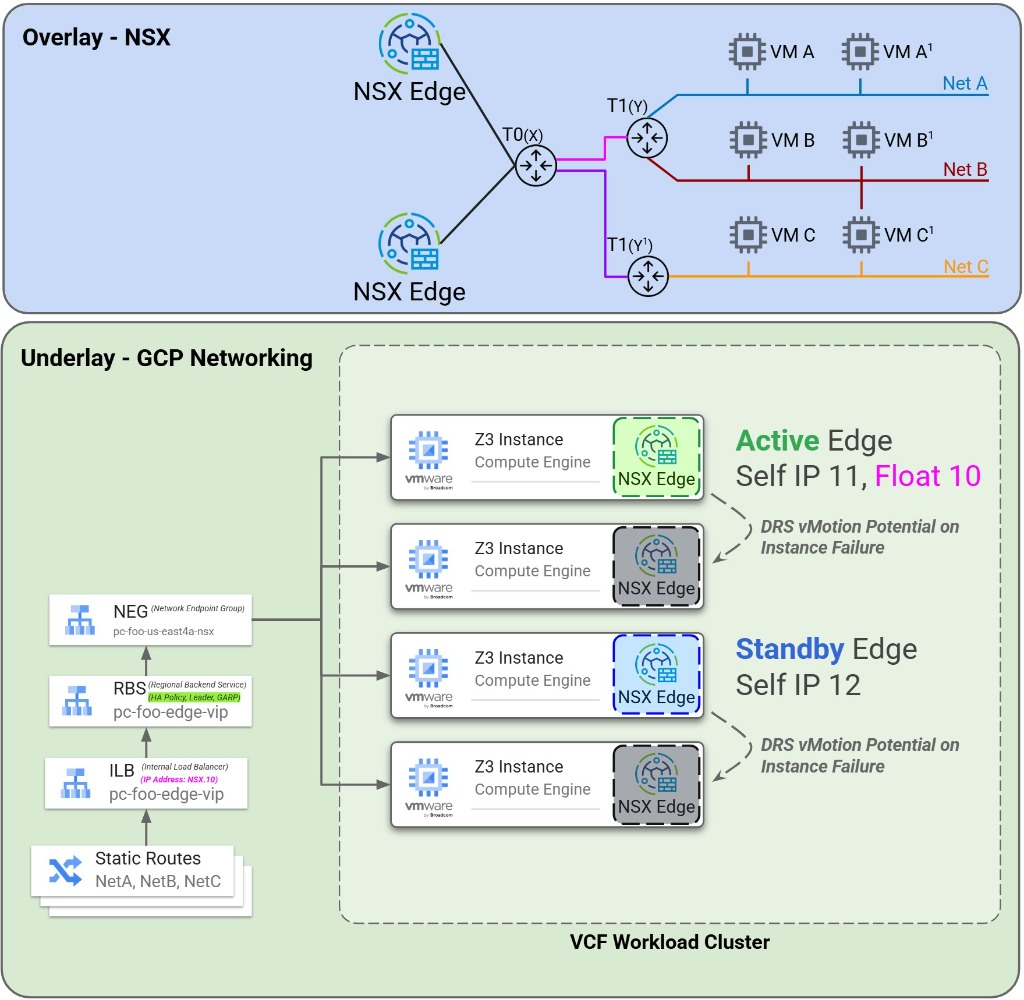
- Routing mechanism: You create custom static routes in your Google Cloud VPC route table that specify your NSX overlay workload CIDR blocks as the destination and the NSX Edge floating VIP (or internal load balancer forwarding rule) as the next hop.
- High availability: When you use a regional internal backend service with
the
GARP_RAhigh-availability policy (or an alias IP range handover), traffic automatically redirects to the standby NSX Edge node if the active Edge node fails. - Use case: Best suited for smaller deployments or static overlay topologies where workload CIDR blocks don't change frequently and single-edge bandwidth meets your throughput requirements.
Option 2: Dynamic BGP routing by using Network Connectivity Center Router Appliance (active-active)
To configure dynamic route exchange and horizontal bandwidth scaling, use Border Gateway Protocol (BGP) peering between your NSX Tier-0 gateway and Cloud Router by using Network Connectivity Center Router Appliance, as shown in the following diagram (click to enlarge):
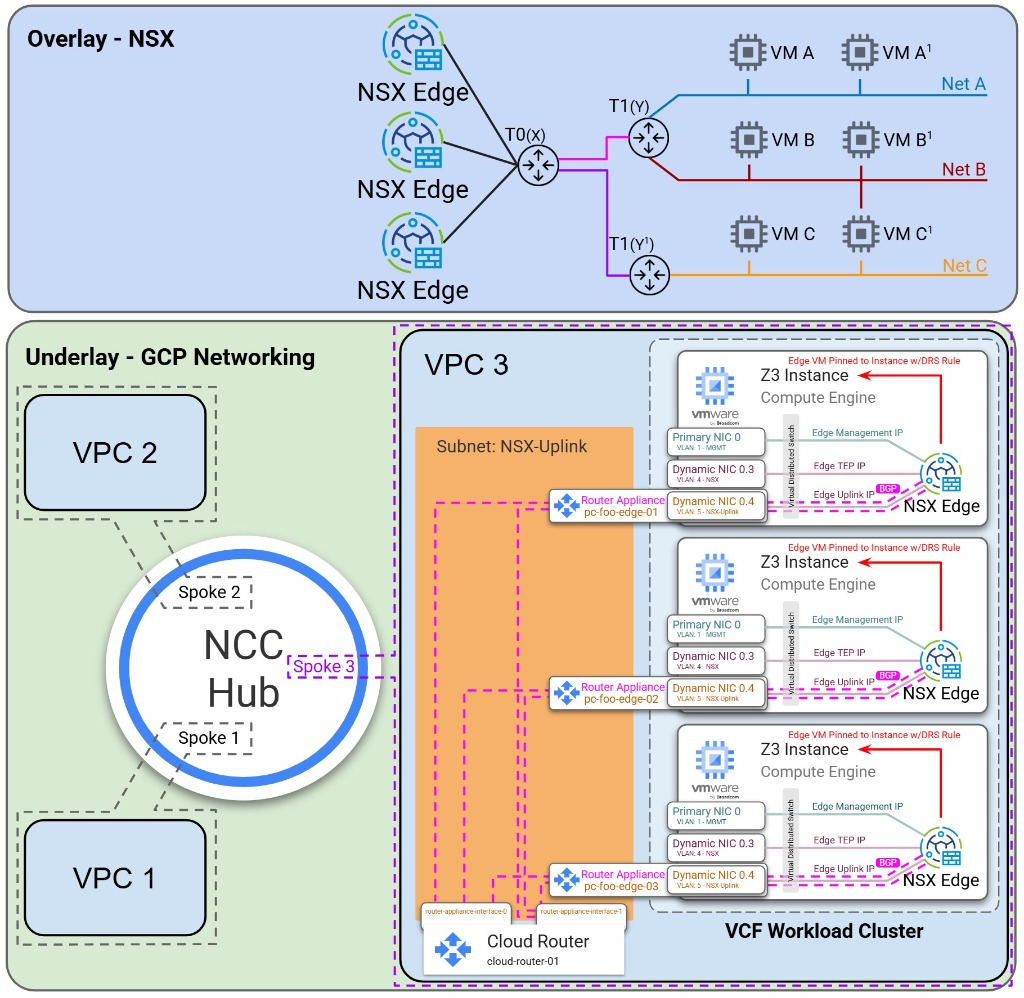
- Dynamic route exchange: The NSX Tier-0 gateway automatically advertises
newly created NSX overlay segment CIDR blocks to Cloud Router over BGP,
and learns VPC and on-premises routes (
0.0.0.0/0or specific prefixes) through custom route advertisements. This architecture eliminates manual VPC static route updates. - Active-active ECMP scaling: Supports Equal-Cost Multi-Path (ECMP) routing across up to eight active NSX Edge nodes per Tier-0 gateway, scaling north-south throughput and supporting failover with Bidirectional Forwarding Detection (BFD).
- Edge-to-host pinning requirement: Because an NSX Edge VM runs inside an
ESXi host, its virtual uplink interface maps to a specific Dynamic NIC on
the underlying bare-metal Compute Engine instance. To ensure that
Cloud Router forwards BGP and data plane traffic to the exact bare-metal
host where each NSX Edge VM resides, you must configure VMware Distributed
Resource Scheduler (DRS) affinity rules (
VM-Hostaffinity rules) to pin each NSX Edge VM to its designated ESXi host. - Redundant BGP sessions: Configure dual BGP sessions between each NSX
Edge node's uplink interfaces on the
NSX-Uplinksubnet and redundant Cloud Router interfaces to maintain continuous control plane availability during host maintenance events.
What's next
- Review Underlay VPC networking, Layer 2 MAC learning, and DNS to understand how Dynamic NICs map to ESXi physical adapters.
- Learn about High availability load balancing for VCF appliances for VCF management VMs and NSX Edge nodes.
- Read the Deployment options overview.