

Architecture overview
This document provides an architectural overview of VMware solution on Google Cloud.
VMware solution runs VMware Cloud Foundation (VCF) 9.1 on dedicated Compute Engine bare-metal instances in your Google Cloud project. The bare-metal instances connect directly to your Virtual Private Cloud (VPC) network and use local NVMe SSDs for VMware vSAN storage.
The following diagram shows the high-level architecture of VMware solution in a consumer project and how it maps to a VCF fleet (click to enlarge):
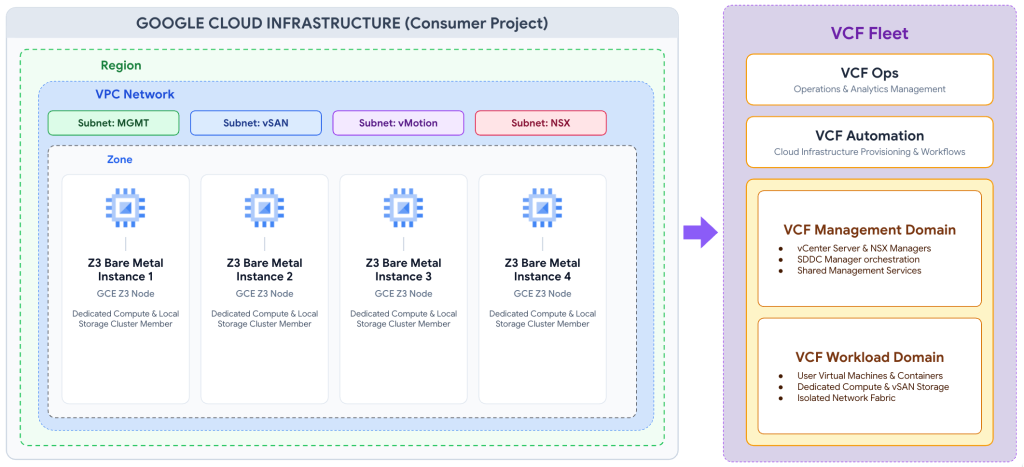
Infrastructure component alignment
VMware solution aligns Google Cloud infrastructure constructs with VCF components as follows:
- Google Cloud consumer project and Virtual Private Cloud (VPC) network: Serves as the top-level administrative boundary that contains your VPC network, subnets, firewall rules, and compute resources.
- Bare-metal nodes and ESXi hosts: Dedicated Compute Engine
bare-metal instances (
z3-highmem-192-highlssd-metal) equipped with local NVMe SSDs running VMware ESXi. - Placement policies and vSphere clusters: Compute Engine spread placement policies control the physical distribution of instances within a zone to protect vSphere clusters against localized hardware disruptions.
- Availability domains and vSAN fault domains: Logical resource groupings within a zone that provide physical hardware isolation and map 1:1 to VMware vSAN fault domains.
The following table summarizes the supported Compute Engine bare-metal machine type:
| Machine type | vCPUs (physical cores) | Memory (GiB) | Local NVMe SSD storage (TiB) | Network bandwidth |
|---|---|---|---|---|
z3-highmem-192-highlssd-metal |
192 (96) | 1,536 | 70.31 | 200 Gbps |
Network architecture
VMware solution deploys bare-metal hosts and management appliances directly in your VPC network, as shown in the following diagram (click to enlarge):
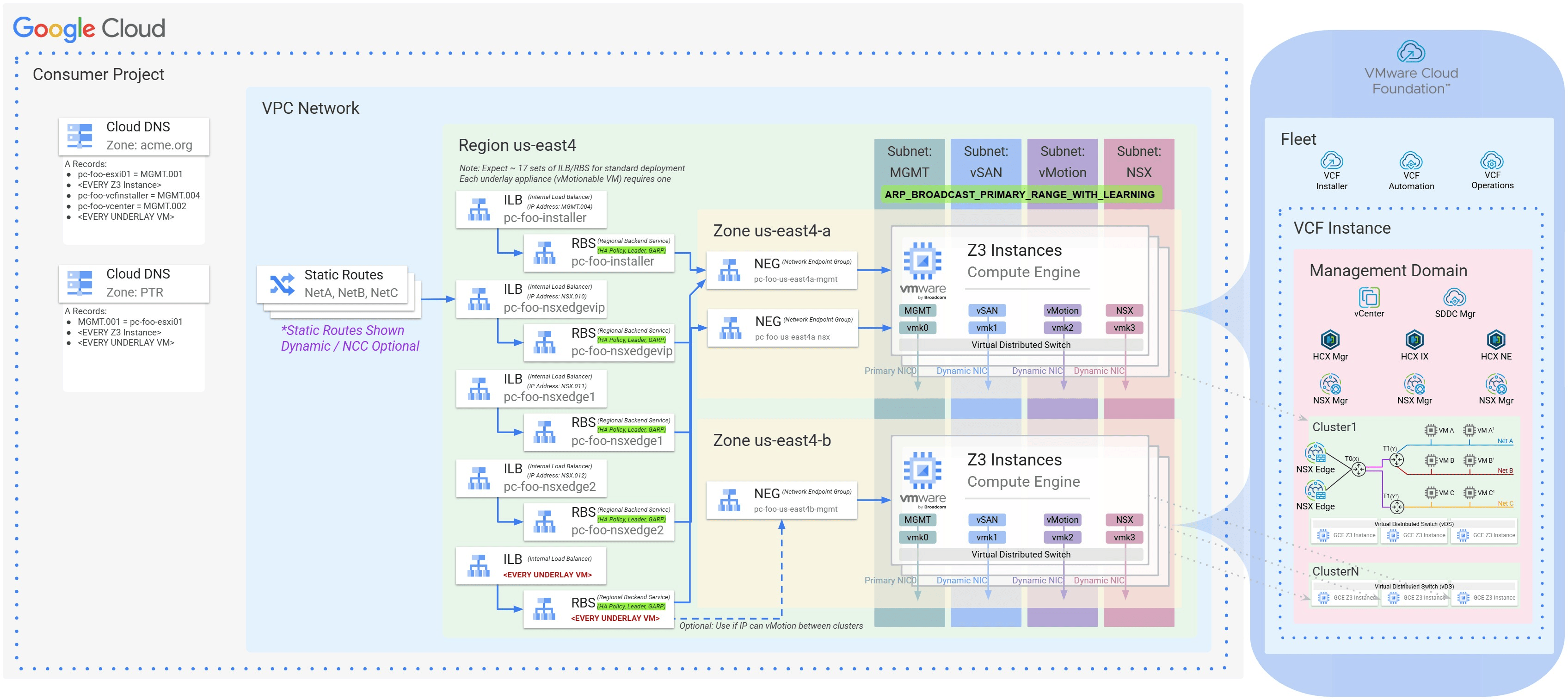
Underlay VPC networking and interface mapping
Underlay networking maps physical and virtual interfaces between Compute Engine and VMware ESXi as follows:
- Hardware-to-virtual interface mapping: Each bare-metal host connects
through a 200 Gbps network interface. Compute Engine presents this
interface to ESXi as a primary virtual network interface (
nic0) for untagged management traffic and dynamic sub-interfaces (nic0.2,nic0.3,nic0.4, and additional VLAN interfaces) for 802.1Q VLAN-tagged traffic. - Traffic segmentation: The VMware Virtual Distributed Switch (VDS)
separates VMkernel ports across dedicated regional VPC subnets, including
vmk0for management,vmk1for vMotion,vmk2for vSAN storage, andvmk10(orvmk3) for NSX Tunnel Endpoints (TEPs). - Layer 2 emulation and dynamic MAC learning: Designated VPC subnets intercept Address Resolution Protocol (ARP) and Gratuitous ARP (GARP) frames. This capability programs the Google Cloud Andromeda data plane to dynamically learn VMware MAC addresses and emulate Layer 2 broadcast domains across instances.
For more information, see Underlay VPC networking, Layer 2 MAC learning, and DNS.
High availability load balancing for VCF appliances
Management virtual appliances run on the VPC underlay and use Google Cloud load balancing for high availability:
- Layer 3 underlay appliance deployment: Management appliances that require direct VPC access—such as vCenter Server, SDDC Manager, and clustered NSX Manager nodes—reside directly on underlay VPC subnets.
- Fast IP Move (
GARP_RA): Because a routed VPC network does not rely on physical switch MAC learning, VMware solution uses regional internal passthrough Network Load Balancers and regional backend services to support vMotion mobility and failover. When a management appliance migrates or fails over to another ESXi host, the appliance emits a GARP frame, and the load balancer immediately steers virtual IP (VIP) traffic to the target host interface.
For more information, see High availability load balancing for VCF appliances.
Overlay architecture and north-south routing
VMware NSX manages workload networking and connects to the VPC underlay by using one of two routing models:
- Decoupled overlay fabric: VMware NSX abstracts workload networking by encapsulating guest VM traffic in Geneve frames across host TEPs. This encapsulation decouples workload IP address spaces and Distributed Firewall (DFW) policies from the VPC underlay.
- Static VPC routing (active-standby): VPC static routes direct overlay workload CIDR ranges to a shared floating VIP fronted by a regional internal passthrough Network Load Balancer.
- Dynamic BGP routing by using Network Connectivity Center (active-active): Up to eight NSX Tier-0 Edge nodes establish external BGP (eBGP) peering sessions with Cloud Router instances by using the Network Connectivity Center Router Appliance model. This design supports Equal-Cost Multi-Path (ECMP) routing and automatic prefix exchange.
For more information, see NSX overlay and edge routing.
Storage architecture
Compute Engine bare-metal instances include directly attached local NVMe
SSDs that serve as the physical storage for your hyperconverged infrastructure.
Each z3-highmem-192-highlssd-metal host provides dedicated local NVMe SSD
storage directly to VMware ESXi.
You use VMware vSAN Express Storage Architecture (ESA) as your primary hyperconverged storage platform. vSAN ESA is optimized for local NVMe flash devices and supports compression, encryption, and RAID-5/RAID-6 erasure coding. In addition, vSAN fault domains map 1:1 to Google Cloud availability domains in your placement policy to maintain physical failure isolation across your cluster.
Supplemental file and block storage
To scale storage capacity independently without adding bare-metal compute nodes, you can connect your environment to Google Cloud NetApp Volumes as follows:
- NFS datastores: Mount NetApp Volumes NFS volumes as supplemental vSphere datastores with support for volume snapshots, cloning, and replication.
- iSCSI block storage: Attach NetApp Volumes iSCSI LUNs for guest operating systems and workload storage extensions by using multipathing over your VPC network.
What's next
- Explore host interface and DNS design in Underlay VPC networking, Layer 2 MAC learning, and DNS.
- Learn how underlay load balancing supports appliance mobility in High availability load balancing for VCF appliances.
- Review overlay routing topologies in NSX overlay and edge routing.
- Read the Shared responsibility model.