


本文档介绍了如何对使用智能体开发套件 (ADK) 框架构建的 AI 代理进行插桩。ADK 框架包含 OpenTelemetry 插桩,可从代理的关键操作中收集遥测数据。启用内置插桩后,该插桩会将文本提示和代理回答等信息发送到您的 Google Cloud 项目。本文档概述了所需的更改,并提供了示例应用的链接。
使用 ADK 的应用还可以收集多模态提示和回答。本文档介绍了如何收集文本提示和回答。如果您想收集多模态数据,则需要进行额外配置。如需了解详情,请参阅收集和查看多模态提示和回答。
ADK 提供的默认可观测性可能无法满足您的应用场景需求。您可以使用 OpenTelemetry 添加其他插桩库,以捕获应用其他部分的遥测数据,也可以使用自己的自定义插桩来捕获应用特有数据,从而获得更精细的可观测性。 例如,在您的应用中,您可以编写插桩代码来执行以下操作:
- 跟踪代理调用的工具的资源消耗情况。
- 跟踪应用特有验证的失败情况、业务规则的违反情况或自定义错误恢复机制。
- 跟踪代理回答以领域特有标准为评判准则的质量得分。
对生成式 AI 应用进行插桩以收集遥测数据
如需对 AI 代理进行插桩以收集日志、指标和跟踪记录数据,请执行以下操作:
本部分的其余内容将介绍上述步骤。
安装 OpenTelemetry 软件包
添加以下 OpenTelemetry 插桩和导出器软件包:
uv add 'google-adk>=1.17.0' \
  'opentelemetry-instrumentation-google-genai>=0.4b0' \
  'opentelemetry-instrumentation-sqlite3' \
  'opentelemetry-exporter-gcp-logging' \
  'opentelemetry-exporter-otlp-proto-grpc' \
  'opentelemetry-instrumentation-vertexai>=2.0b0'
日志数据使用 Cloud Logging API 或 Cloud Monitoring API 发送到您的 Google Cloud 项目。opentelemetry-exporter-gcp-logging 库会调用 Cloud Logging API 中的端点。
系统不会收集指标数据。通常,不使用基于收集器的解决方案的应用会包含 opentelemetry-exporter-gcp-monitoring 库。此库会调用 Cloud Monitoring API 中的端点。
跟踪记录数据会使用实现了 OpenTelemetry 协议的 Telemetry (OTLP) API 发送到 Google Cloud 。opentelemetry-exporter-otlp-proto-grpc 库会调用 Telemetry (OTLP) API 端点。
您的跟踪记录数据以通常与 OpenTelemetry 协议定义的 proto 文件一致的格式存储。不过,在存储之前,字段可能会从 OpenTelemetry 特定的数据类型转换为 JSON 数据类型。如需详细了解存储格式,请参阅跟踪记录数据的架构。
配置 ADK 环境
1.17.0 版及更高版本的 ADK 框架内置了对 OpenTelemetry 的支持,并支持将 OpenTelemetry 遥测数据发送到Google Cloud Observability。如要启用此功能,您需要配置 ADK 环境:
如果您使用
adk web命令运行应用,请添加--otel_to_cloud标志。在
opentelemetry.env文件中,设置以下环境变量:OTEL_SERVICE_NAME='adk-sql-agent' OTEL_PYTHON_LOGGING_AUTO_INSTRUMENTATION_ENABLED='true'配置 OpenTelemetry 以使用最新的生成式 AI 语义惯例。
OTEL_SEMCONV_STABILITY_OPT_IN='gen_ai_latest_experimental'将 OpenTelemetry 配置为以事件形式附加消息。
OTEL_INSTRUMENTATION_GENAI_CAPTURE_MESSAGE_CONTENT='EVENT_ONLY'如需详细了解允许的枚举值,请参阅
genai/types.py。我们建议您还将以下环境变量添加到
opentelemetry.env文件中:ADK_CAPTURE_MESSAGE_CONTENT_IN_SPANS='false'此环境变量具有以下作用:
- 防止 ADK 插桩附加超过属性大小限制的 span 属性。
- 防止个人身份信息 (PII) 作为属性附加到 span。
您可能需要设置其他环境变量。例如,如果您部署到 Gemini Enterprise Agent Platform,则还需要设置以下环境变量:
GOOGLE_CLOUD_AGENT_ENGINE_ENABLE_TELEMETRY='true'
下载并运行示例应用
此示例代码实现了一个使用 ADK 构建的生成式 AI 代理。该代理使用 OpenTelemetry 进行插桩,并配置为将指标、跟踪记录和日志发送到您的 Google Cloud 项目。发送到您项目的遥测数据包括生成式 AI 提示和回答。
ADK 代理角色
生成式 AI 代理定义为可完全访问临时 SQLite 数据库的 SQL 专家。该代理使用智能体开发套件构建,并使用 SQLDatabaseToolkit 访问数据库。数据库最初是空的。
准备工作
- 登录您的 Google Cloud 账号。如果您是 Google Cloud新手,请 创建一个账号来评估我们的产品在实际场景中的表现。新客户还可获享 $300 赠金,用于运行、测试和部署工作负载。
-
安装 Google Cloud CLI。
-
如果您使用的是外部身份提供方 (IdP),则必须先 使用联合身份登录 gcloud CLI。
-
如需初始化 gcloud CLI,请运行以下命令:
gcloud init -
选择或创建项目所需的角色
- 选择项目:选择项目不需要特定的 IAM 角色,您可以选择已获授角色的任何项目。
-
创建项目:如需创建项目,您需要拥有 Project Creator 角色 (
roles/resourcemanager.projectCreator),该角色包含resourcemanager.projects.create权限。了解如何授予角色。
-
创建 Google Cloud 项目:
gcloud projects create PROJECT_ID
将
PROJECT_ID替换为您要创建的 Google Cloud 项目的名称。 -
选择您创建的 Google Cloud 项目:
gcloud config set project PROJECT_ID
将
PROJECT_ID替换为您的 Google Cloud 项目名称。
启用 Vertex AI、Service Usage、Telemetry、Cloud Logging、Cloud Monitoring 和 Cloud Trace API(如果尚未启用):
启用 API 所需的角色
如需启用 API,您需要拥有
serviceusage.services.enable权限。如果您创建了项目,则可能已经通过 Owner 角色 (roles/owner) 拥有此权限。否则,您可以通过 Service Usage Admin 角色 (roles/serviceusage.serviceUsageAdmin) 获取此权限。了解如何授予角色。gcloud services enable aiplatform.googleapis.com
serviceusage.googleapis.com telemetry.googleapis.com logging.googleapis.com monitoring.googleapis.com cloudtrace.googleapis.com -
安装 Google Cloud CLI。
-
如果您使用的是外部身份提供方 (IdP),则必须先 使用联合身份登录 gcloud CLI。
-
如需初始化 gcloud CLI,请运行以下命令:
gcloud init -
选择或创建项目所需的角色
- 选择项目:选择项目不需要特定的 IAM 角色,您可以选择已获授角色的任何项目。
-
创建项目:如需创建项目,您需要拥有 Project Creator 角色 (
roles/resourcemanager.projectCreator),该角色包含resourcemanager.projects.create权限。了解如何授予角色。
-
创建 Google Cloud 项目:
gcloud projects create PROJECT_ID
将
PROJECT_ID替换为您要创建的 Google Cloud 项目的名称。 -
选择您创建的 Google Cloud 项目:
gcloud config set project PROJECT_ID
将
PROJECT_ID替换为您的 Google Cloud 项目名称。
启用 Vertex AI、Service Usage、Telemetry、Cloud Logging、Cloud Monitoring 和 Cloud Trace API(如果尚未启用):
启用 API 所需的角色
如需启用 API,您需要拥有
serviceusage.services.enable权限。如果您创建了项目,则可能已经通过 Owner 角色 (roles/owner) 拥有此权限。否则,您可以通过 Service Usage Admin 角色 (roles/serviceusage.serviceUsageAdmin) 获取此权限。了解如何授予角色。gcloud services enable aiplatform.googleapis.com
serviceusage.googleapis.com telemetry.googleapis.com logging.googleapis.com monitoring.googleapis.com cloudtrace.googleapis.com -
如需获得让示例应用写入日志、指标和跟踪记录数据所需的权限,请让管理员为您授予项目的以下 IAM 角色:
- Cloud Telemetry Traces Writer (
roles/telemetry.tracesWriter) - Logs Writer (
roles/logging.logWriter) - Monitoring Metric Writer (
roles/monitoring.metricWriter) - Vertex AI User (
roles/aiplatform.user)
如果您在 Cloud Shell、 Google Cloud 资源或本地开发环境中运行示例,则只需具备这些权限即可。
- Cloud Telemetry Traces Writer (
确保您指定了配额项目。Vertex AI API (
aiplatform.googleapis.com) 要求指定配额项目。如需了解详情,请参阅设置配额项目。 例如,以下命令可以设置配额项目。gcloud config set billing/quota_project PROJECT_ID
启动应用
如需启动示例应用,请执行以下操作:
在 Cloud Shell 中,克隆代码库:
git clone https://github.com/GoogleCloudPlatform/opentelemetry-samples.git转到示例目录:
cd opentelemetry-samples/python/adk-sql-agent该示例包含一个
.env文件,用于设置两个环境变量。一个变量控制着 SDK 使用的端点。另一个变量用于设置位置。如果您希望使用其他模型,请修改
main.py。确保所选模型支持.env文件中指定的位置。如需了解模型,请参阅 Google 模型。创建虚拟环境并运行示例:
uv run --env-file opentelemetry.env adk web --otel_to_cloud应用会显示类似以下内容的消息:
Appplication startup complete
Uvicorn running on http://127.0.0.1:8080
如需与代理互动,请选择上一步输出中显示的网址。
展开选择应用,然后从代理列表中选择
sql_agent。
与代理互动
如需与代理互动,请向其提问或发出命令。例如,您可以提出以下问题:
What can you do for me ?
同样,由于 sql_agent 具有 SQL 专家角色,因此您可以要求它为您的应用创建表,并编写查询来使用所创建的表。代理创建的临时数据库只能受在运行应用的机器上创建的 .db 文件的支持。
下方展示了 sql_agent 与用户之间的互动示例:

生成式 AI 代理执行的操作不是确定性的,因此您可能会看到针对同一提示的不同回答。
退出应用
如需退出应用,请在用于启动应用的 shell 中输入 Ctrl-C。
查看跟踪记录、指标和日志
本部分介绍如何查看生成式 AI 事件。
准备工作
如需获得查看日志、指标和跟踪记录数据所需的权限,请让管理员为您授予项目的以下 IAM 角色:
- Logs Viewer (
roles/logging.viewer) - Monitoring Viewer (
roles/monitoring.viewer) - Cloud Trace User (
roles/cloudtrace.user)
如需详细了解如何授予角色,请参阅管理对项目、文件夹和组织的访问权限。
查看遥测数据
如需查看应用创建的生成式 AI 事件,请访问 Trace 探索器页面:
-
在 Google Cloud 控制台中,前往
 Trace 探索器页面:
您也可以使用搜索栏查找此页面。
在工具栏中,依次选择添加过滤条件、Span 名称和
call_llm。下面展示了过滤数据后的 Trace 探索器页面:
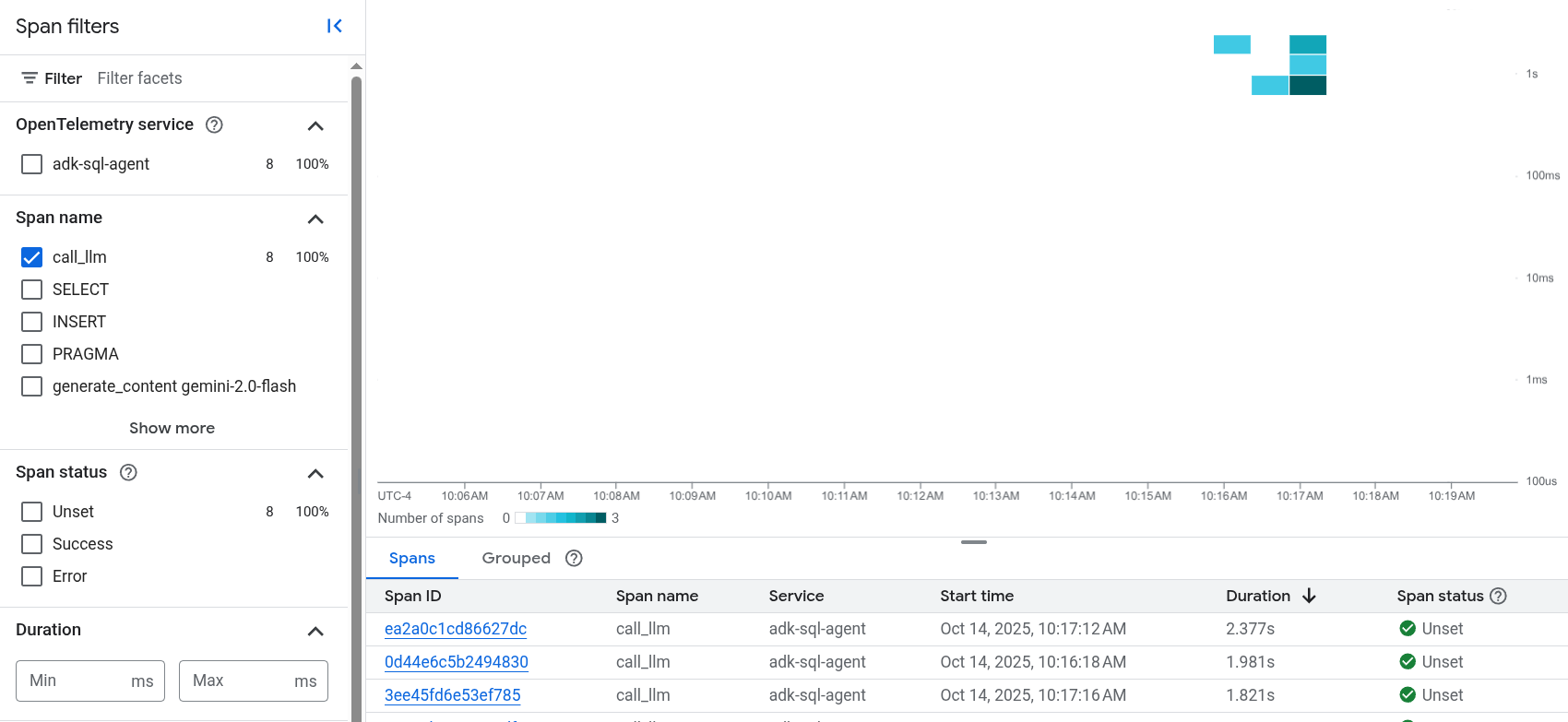
如果您之前从未使用过 Cloud Trace,Google Cloud Observability 需要创建一个数据库来存储跟踪记录数据。创建数据库可能需要几分钟时间,在此期间,您无法查看任何跟踪记录数据。
如需浏览 span 和日志数据,请在 Span 表格中选择 span。
系统会打开详细信息页面。此页面会显示关联的跟踪记录及其 span。页面上的表格会显示您所选 span 的详细信息。这些信息包括:
输入/输出标签页会显示生成式 AI 代理的事件。如需详细了解这些事件,请参阅查看生成式 AI 事件。
以下屏幕截图展示了一条跟踪记录,其中一个 span 的名称为
call_llm。该 span 会调用为该代理提供支持的 LLM(大语言模型)。在此示例中,它是 Gemini。 Gemini span 包含以下生成式 AI 事件: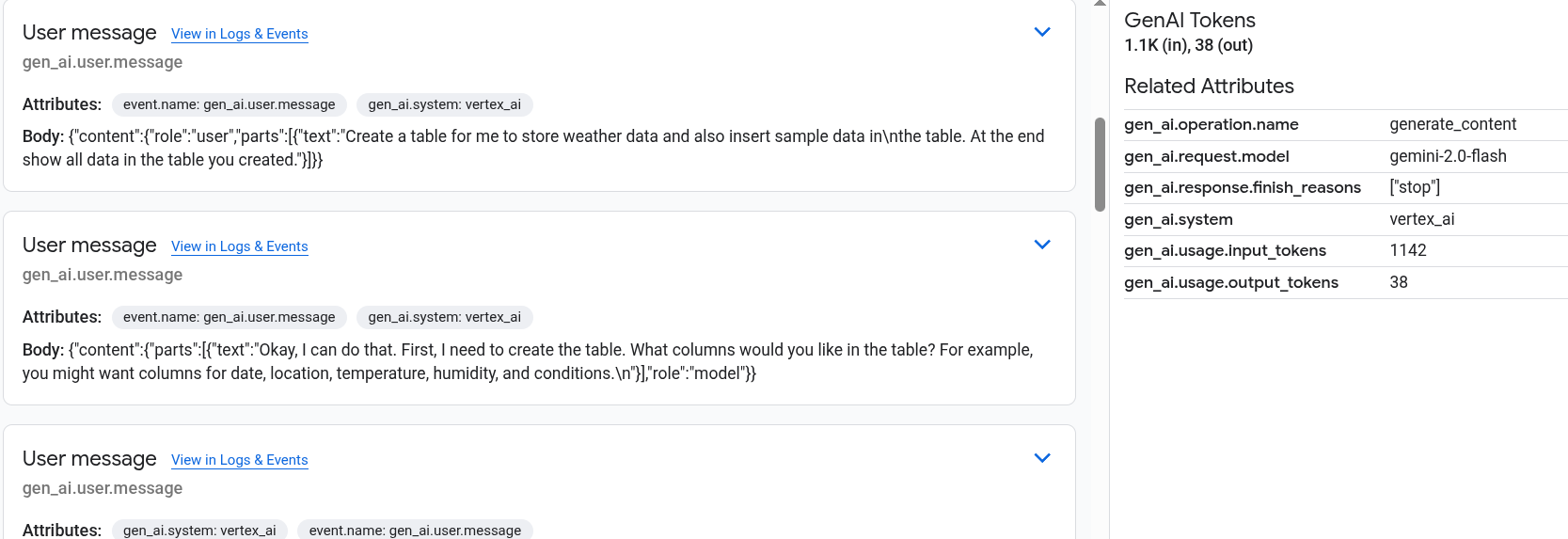
日志和事件标签页会列出与该 span 关联的日志条目和事件。如果您想在 Logs Explorer 中查看日志数据,请在该标签页的工具栏中选择查看日志。
日志数据包含
sql_agent的回答。例如,对于示例运行,JSON 载荷包含以下内容:{ "logName": "projects/my-project/logs/otel_python_inprocess_log_name_temp", "jsonPayload": { "content": { "parts": [ 0: { "text": "Now I can create the table." } 1: {1} ], "role": "model" } }, ... }
该示例经过插桩,可将指标数据发送到您的 Google Cloud 项目,但不会生成任何指标。