

A leaf operator has no children. The types of leaf operators are:
Database schema
The queries and execution plans on this page are based on the following database schema:
CREATE TABLE Singers (
  SingerId   INT64 NOT NULL,
  FirstName  STRING(1024),
  LastName   STRING(1024),
  SingerInfo BYTES(MAX),
  BirthDate  DATE
) PRIMARY KEY(SingerId);

CREATE INDEX SingersByFirstLastName ON Singers(FirstName, LastName);

CREATE TABLE Albums (
  SingerId        INT64 NOT NULL,
  AlbumId         INT64 NOT NULL,
  AlbumTitle      STRING(MAX),
  MarketingBudget INT64
) PRIMARY KEY(SingerId, AlbumId),
  INTERLEAVE IN PARENT Singers ON DELETE CASCADE;

CREATE INDEX AlbumsByAlbumTitle ON Albums(AlbumTitle);

CREATE INDEX AlbumsByAlbumTitle2 ON Albums(AlbumTitle) STORING (MarketingBudget);

CREATE TABLE Songs (
  SingerId  INT64 NOT NULL,
  AlbumId   INT64 NOT NULL,
  TrackId   INT64 NOT NULL,
  SongName  STRING(MAX),
  Duration  INT64,
  SongGenre STRING(25)
) PRIMARY KEY(SingerId, AlbumId, TrackId),
  INTERLEAVE IN PARENT Albums ON DELETE CASCADE;

CREATE INDEX SongsBySingerAlbumSongNameDesc ON Songs(SingerId, AlbumId, SongName DESC), INTERLEAVE IN Albums;

CREATE INDEX SongsBySongName ON Songs(SongName);

CREATE TABLE Concerts (
  VenueId      INT64 NOT NULL,
  SingerId     INT64 NOT NULL,
  ConcertDate  DATE NOT NULL,
  BeginTime    TIMESTAMP,
  EndTime      TIMESTAMP,
  TicketPrices ARRAY<INT64>
) PRIMARY KEY(VenueId, SingerId, ConcertDate);
You can use the following Data Manipulation Language (DML) statements to add data to these tables:
INSERT INTO Singers (SingerId, FirstName, LastName, BirthDate)
VALUES (1, "Marc", "Richards", "1970-09-03"),
       (2, "Catalina", "Smith", "1990-08-17"),
       (3, "Alice", "Trentor", "1991-10-02"),
       (4, "Lea", "Martin", "1991-11-09"),
       (5, "David", "Lomond", "1977-01-29");

INSERT INTO Albums (SingerId, AlbumId, AlbumTitle)
VALUES (1, 1, "Total Junk"),
       (1, 2, "Go, Go, Go"),
       (2, 1, "Green"),
       (2, 2, "Forever Hold Your Peace"),
       (2, 3, "Terrified"),
       (3, 1, "Nothing To Do With Me"),
       (4, 1, "Play");

INSERT INTO Songs (SingerId, AlbumId, TrackId, SongName, Duration, SongGenre)
VALUES (2, 1, 1, "Let's Get Back Together", 182, "COUNTRY"),
       (2, 1, 2, "Starting Again", 156, "ROCK"),
       (2, 1, 3, "I Knew You Were Magic", 294, "BLUES"),
       (2, 1, 4, "42", 185, "CLASSICAL"),
       (2, 1, 5, "Blue", 238, "BLUES"),
       (2, 1, 6, "Nothing Is The Same", 303, "BLUES"),
       (2, 1, 7, "The Second Time", 255, "ROCK"),
       (2, 3, 1, "Fight Story", 194, "ROCK"),
       (3, 1, 1, "Not About The Guitar", 278, "BLUES");
Array unnest
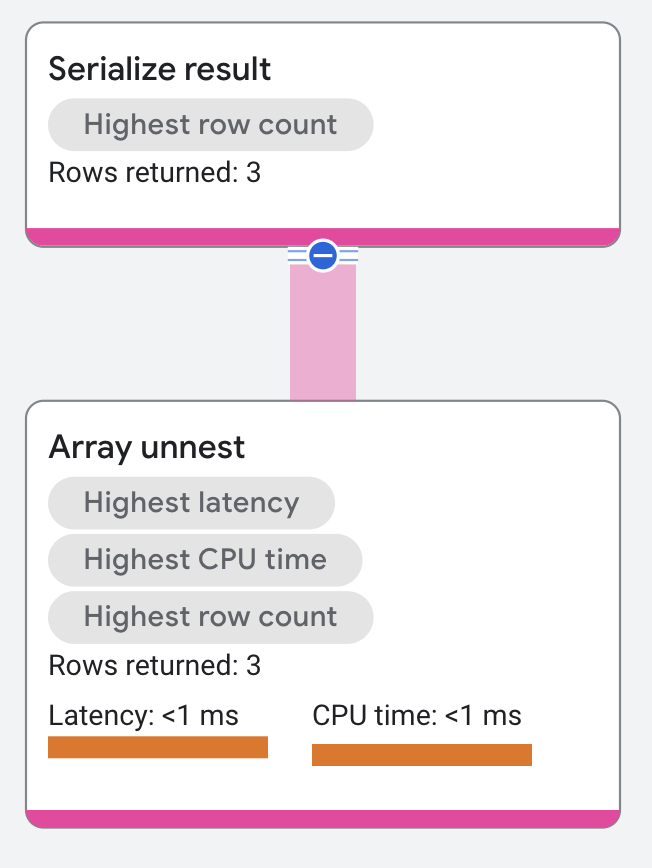
An array unnest operator flattens an input array into rows of elements. Each resulting row contains up to two columns: the value from the array and the optional zero-based position in the array.
The following query demonstrates this operator:
SELECT a, b FROM UNNEST([1,2,3]) a WITH OFFSET b;

/*---+---+
 | a | b |
 +---+---+
 | 1 | 0 |
 | 2 | 1 |
 | 3 | 2 |
 +---+---*/
The query flattens the array [1,2,3] in column a and shows the array
position in column b.
The execution plan appears as follows:
Properties and execution statistics
A property of an operator describes a trait that is used when the operator is executed. An execution statistic is a value collected during query execution to help you assess performance of the operator.
Properties
| Name | Description |
|---|---|
| Execution method | In Row execution, the operator processes one row at a time. In Batch execution, the operator processes a batch of rows at once. |
Execution statistics
| Name | Description |
|---|---|
| Latency | Elapsed time of all the executions done in the operator. |
| Cumulative latency | The total time of the current operator and its descendants. |
| CPU time | Sum of CPU time spent executing the operator. |
| Cumulative CPU time | The total CPU time spent executing the operator and its descendants. |
| Execution time | The total amount of time taken to run the query and process results. |
| Rows returned | The number of rows output by this operator |
| Number of executions | The number of times the operator was executed. Some executions can run in parallel. |
Generate relation
A generate relation operator returns zero or more rows.
Properties and execution statistics
A property of an operator describes a trait that is used when the operator is executed. An execution statistic is a value collected during query execution to help you assess performance of the operator.
Properties
| Name | Description |
|---|---|
| Execution method | In Row execution, the operator processes one row at a time. In Batch execution, the operator processes a batch of rows at once. |
Execution statistics
| Name | Description |
|---|---|
| Latency | Elapsed time of all the executions done in the operator. |
| Cumulative latency | The total time of the current operator and its descendants. |
| CPU time | Sum of CPU time spent executing the operator. |
| Cumulative CPU time | The total CPU time spent executing the operator and its descendants. |
| Execution time | The total amount of time taken to run the query and process results. |
| Rows returned | The number of rows output by this operator |
| Number of executions | The number of times the operator was executed. Some executions can run in parallel. |
Unit relation
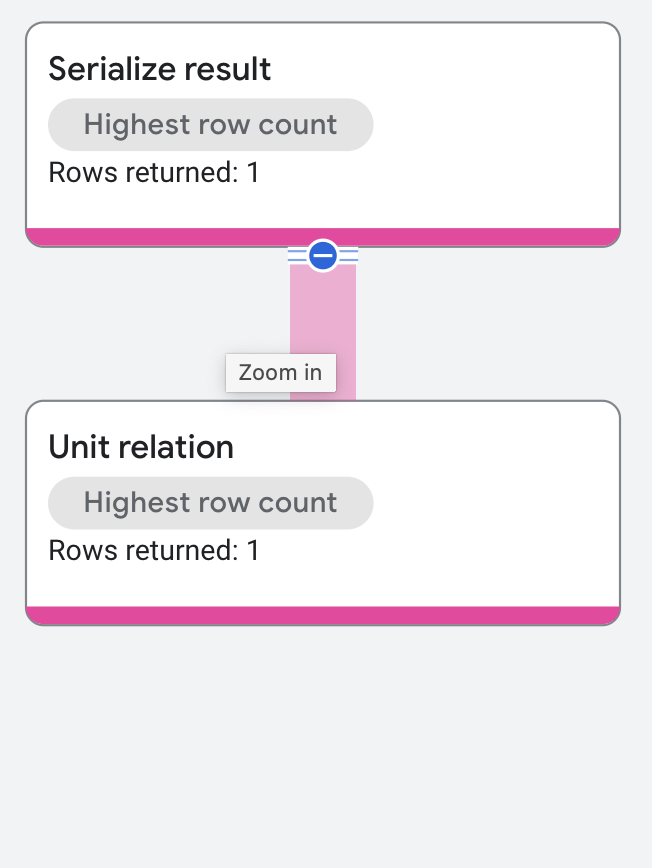
The unit relation returns one row. It is a special case of the generate relation operator.
The following query demonstrates this operator:
SELECT 1 + 2 AS Result;

/*--------+
 | Result |
 +--------+
 | 3      |
 +--------*/
The execution plan appears as follows:
Properties and execution statistics
A property of an operator describes a trait that is used when the operator is executed. An execution statistic is a value collected during query execution to help you assess performance of the operator.
Properties
| Name | Description |
|---|---|
| Execution method | In Row execution, the operator processes one row at a time. In Batch execution, the operator processes a batch of rows at once. |
Execution statistics
| Name | Description |
|---|---|
| Latency | Elapsed time of all the executions done in the operator. |
| Cumulative latency | The total time of the current operator and its descendants. |
| CPU time | Sum of CPU time spent executing the operator. |
| Cumulative CPU time | The total CPU time spent executing the operator and its descendants. |
| Execution time | The total amount of time taken to run the query and process results. |
| Rows returned | The number of rows output by this operator |
| Number of executions | The number of times the operator was executed. Some executions can run in parallel. |
Empty relation
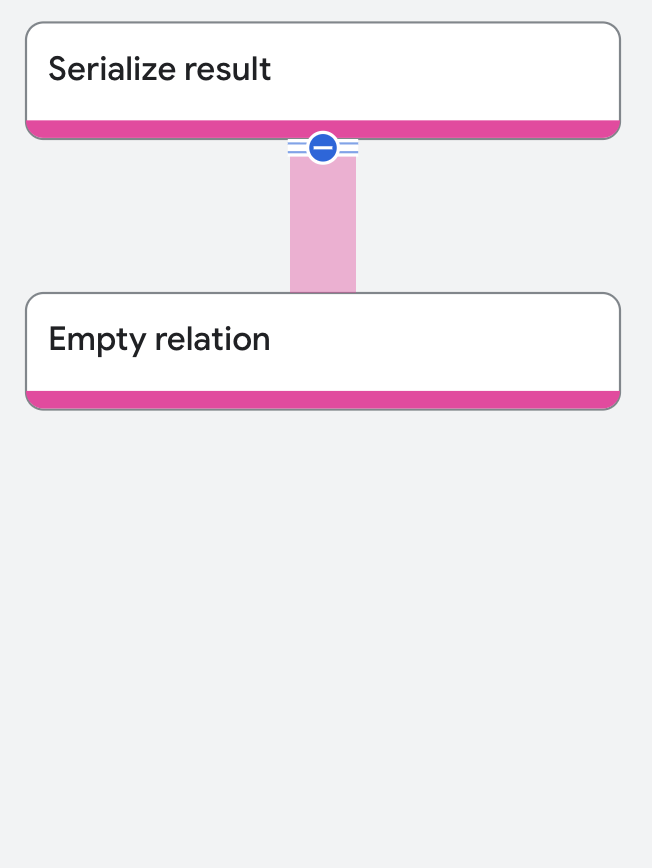
The empty relation returns no rows. It is a special case of the generate relation operator.
The following query demonstrates this operator:
SELECT *
FROM   albums
LIMIT  0

/*
No result
*/
The execution plan appears as follows:
Properties and execution statistics
A property of an operator describes a trait that is used when the operator is executed. An execution statistic is a value collected during query execution to help you assess performance of the operator.
Properties
| Name | Description |
|---|---|
| Execution method | In Row execution, the operator processes one row at a time. In Batch execution, the operator processes a batch of rows at once. |
Execution statistics
| Name | Description |
|---|---|
| Latency | Elapsed time of all the executions done in the operator. |
| Cumulative latency | The total time of the current operator and its descendants. |
| CPU time | Sum of CPU time spent executing the operator. |
| Cumulative CPU time | The total CPU time spent executing the operator and its descendants. |
| Execution time | The total amount of time taken to run the query and process results. |
| Rows returned | The number of rows output by this operator |
| Number of executions | The number of times the operator was executed. Some executions can run in parallel. |
Scan
A scan operator scans a source of rows and returns them. These are the types of scan operators:
- Table scan: Scans a table.
- Index scan: Scans an index.
- Batch scan: Scans occur on intermediate tables created by other relational operators (for example, a table created by a distributed cross apply).
Whenever possible, Spanner applies predicates on keys as part of a scan. Scans execute more efficiently when Spanner applies predicates, because the scan does not need to read the entire table or index. Predicates appear in the execution plan as:
- Seekable condition: The seekable condition applies if Spanner
can determine a specific row to access in the table. In general, this
happens when the filter is on a prefix of the primary key. For example, if
the primary key consists of
Col1andCol2, then aWHEREclause that includes explicit values forCol1, orCol1andCol2is seekable. In that case, Spanner reads data only within the key range.
If a query must look up all rows in a table, a full scan occurs, which appears
in the execution plan as full scan: true.
The following query demonstrates this operator:
SELECT s.lastname
FROM   singers@{FORCE_INDEX=SingersByFirstLastName} as s
WHERE  s.firstname = 'Catalina';

/*----------+
 | LastName |
 +----------+
 | Smith    |
 +----------*/
The execution plan segment appears as follows:
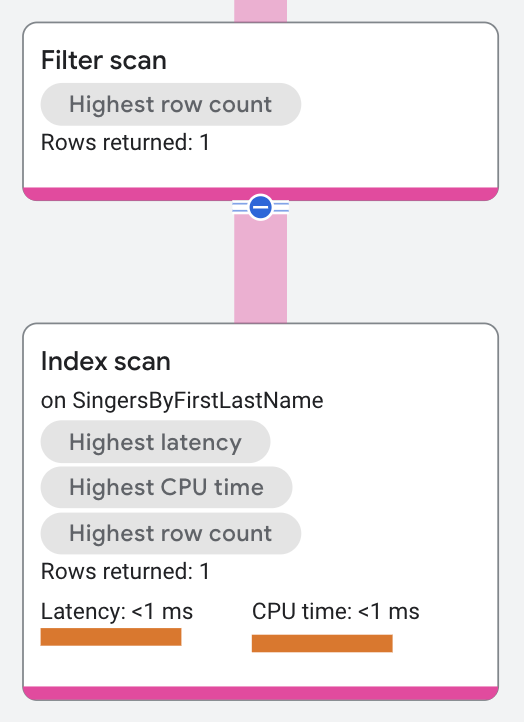
In the execution plan, the top-level distributed union
operator sends subplans to remote servers. Each subplan has a
serialize result
operator and an index scan operator. The predicate
Key Predicate: FirstName = 'Catalina' restricts the scan to rows in the index
SingersByFirstLastname that have FirstName equal to Catalina. The index
scan returns the output to the serialize result operator.
Spanner tightly couples scans with Filter Scan and considers them a single operator. If there is no Seek Condition, the operator shows as Full Scan.
Properties and execution statistics
A property of an operator describes a trait that is used when the operator is executed. An execution statistic is a value collected during query execution to help you assess performance of the operator.
The Scan operator has additional distinct properties and execution statistics.Properties
| Name | Description |
|---|---|
| Scan method | Can be Row, Batch, or Automatic. In Row execution, the operator processes one row at a time. In Batch execution, the operator processes a batch of rows at once. In Automatic execution, the operator starts scanning using the Row method but can change to Batch when needed. |
| Seek condition | A predicate on the primary key used to perform efficient lookups of a
table. This property means that the entire table doesn't need to be
scanned to produce the wanted set of rows. This property is only
applicable to Table Scans and Index Scans. |
| Variable assignment | List of the columns read from the table. |
| Execution method | In Row execution, the operator processes one row at a time. In Batch execution, the operator processes a batch of rows at once. |
Execution statistics
| Name | Description |
|---|---|
| Scanned rows | The number of rows read during scan. |
| Seek count | The number of look-ups or seeks performed by this Scan Operator. |
| Latency | Elapsed time of all the executions done in the operator. |
| Cumulative latency | The total time of the current operator and its descendants. |
| CPU time | Sum of CPU time spent executing the operator. |
| Cumulative CPU time | The total CPU time spent executing the operator and its descendants. |
| Execution time | The total amount of time taken to run the query and process results. |
| Rows returned | The number of rows output by this operator |
| Number of executions | The number of times the operator was executed. Some executions can run in parallel. |
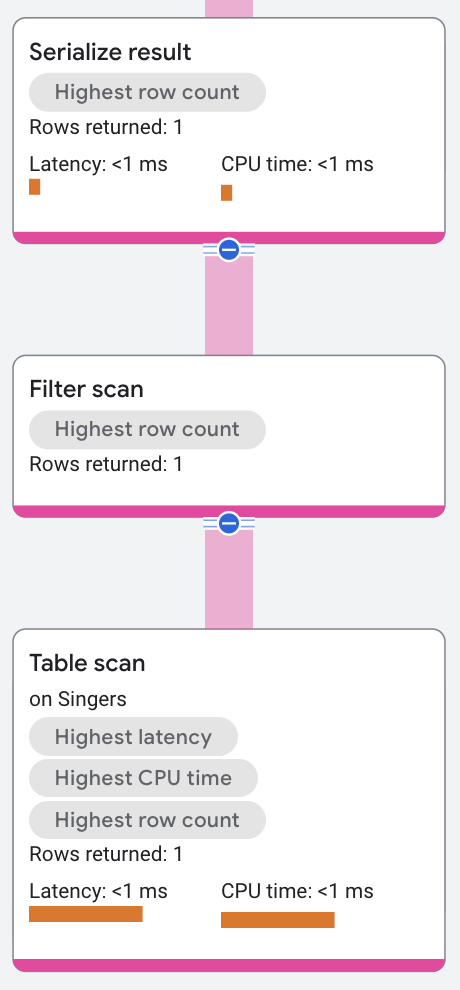
Filter scan
A filter scan operator always appears on top of a table or index scan. It works with the scan to reduce the number of rows read from the database, and the resulting scan is typically faster than with a filter. Spanner applies the filter scan in certain conditions:
- Residual condition: Any other condition where Spanner can evaluate the scan to limit the amount of data read.
The following query demonstrates this operator:
SELECT lastname
FROM   singers
WHERE  singerid = 1

/*----------+
 | LastName |
 +----------+
 | Richards |
 +----------*/
The execution plan appears as follows:
Properties and execution statistics
A property of an operator describes a trait that is used when the operator is executed. An execution statistic is a value collected during query execution to help you assess performance of the operator.
The Filter scan operator has additional distinct properties.Properties
| Name | Description |
|---|---|
| Residual condition | A predicate applied after the row is read. |
| Execution method | In Row execution, the operator processes one row at a time. In Batch execution, the operator processes a batch of rows at once. |
Execution statistics
| Name | Description |
|---|---|
| Latency | Elapsed time of all the executions done in the operator. |
| Cumulative latency | The total time of the current operator and its descendants. |
| CPU time | Sum of CPU time spent executing the operator. |
| Cumulative CPU time | The total CPU time spent executing the operator and its descendants. |
| Execution time | The total amount of time taken to run the query and process results. |
| Rows returned | The number of rows output by this operator |
| Number of executions | The number of times the operator was executed. Some executions can run in parallel. |