בדיקת תמונות לאיתור מידע אישי רגיש

במאמר הזה מוסבר איך להשתמש ב-Cloud Data Loss Prevention API כדי לזהות טקסט רגיש ואובייקטים בתמונה. הכלי Sensitive Data Protection מחזיר את המיקום של כל מידע אישי רגיש שהוא מזהה.

בהינתן תמונה כקלט, Sensitive Data Protection מזהה מידע אישי רגיש בתמונה. הפלט של פעולת בדיקה כולל את infoTypes שזוהו, את רמת הסבירות להתאמה, ואת ערכי האורך והקואורדינטות של הפיקסלים שמציינים את האזורים שבהם Sensitive Data Protection מצא את המידע האישי הרגיש. הקואורדינטות בפינה הימנית התחתונה של התמונה הן (0,0).

בדיקת תמונה לכל סוגי המידע שמוגדרים כברירת מחדל

כדי לבדוק אם יש בתמונה מידע אישי רגיש, שולחים תמונה בקידוד base64 לשיטה content.inspect. אם לא מציינים סוגי מידע ספציפיים (infoTypes) לחיפוש, Sensitive Data Protection מחפש את סוגי המידע הנפוצים ביותר.

כדי לבדוק תמונה לגבי כל סוגי המידע שמוגדרים כברירת מחדל, פועלים לפי השלבים הבאים:

  1. מקודדים את התמונה כ-base64.
  2. שליחת בקשה לשיטה content.inspect של DLP API. בבקשה נדרשת רק התמונה בקידוד Base64.

לדוגמה, התמונה הזו של מסמך.
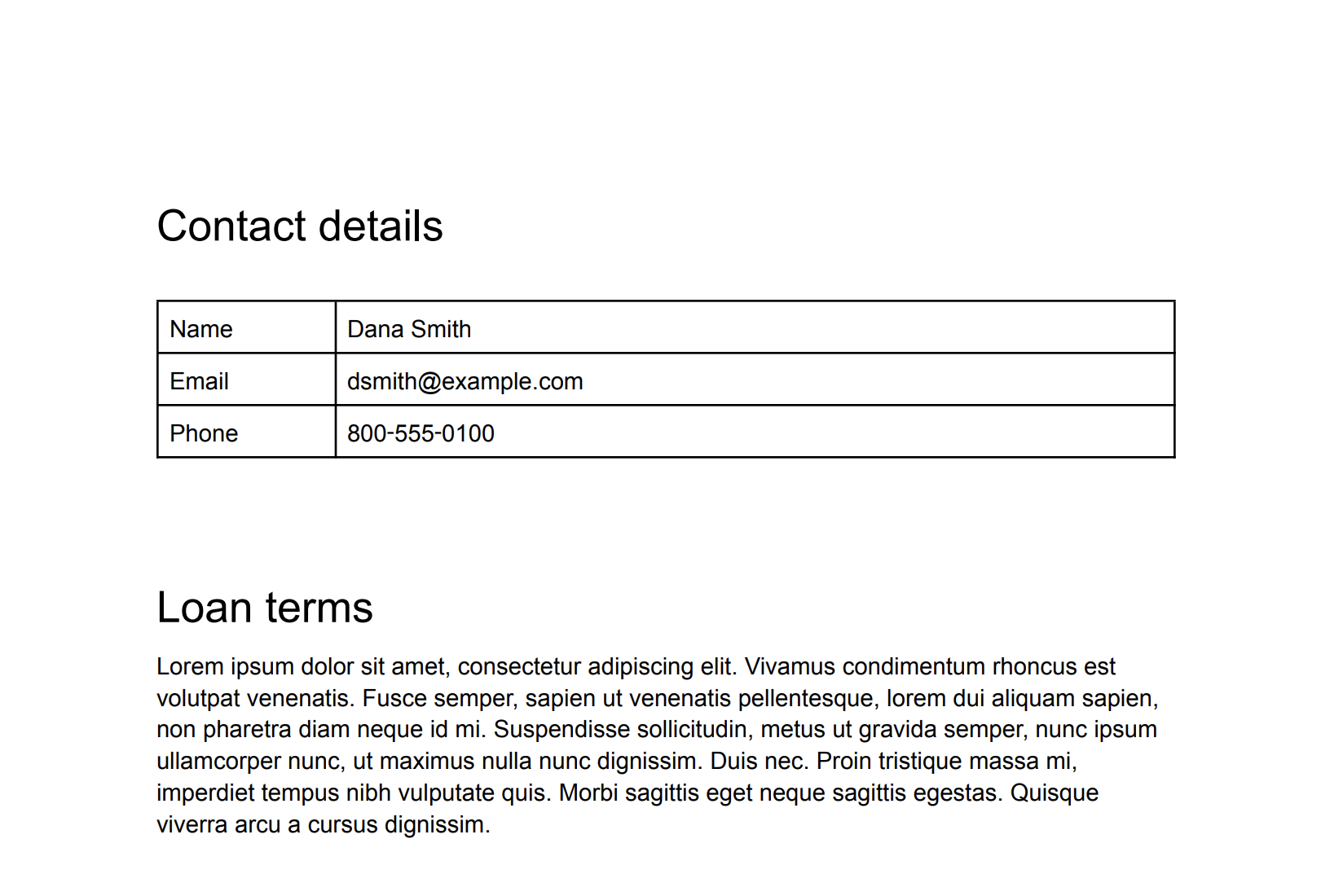
תמונה מקורית שמכילה פרטים ליצירת קשר של אדם מסוים.
התמונה המקורית (לחצו כדי להגדיל).

C#

מידע על התקנת ספריית הלקוח של Sensitive Data Protection והשימוש בה מופיע במאמר ספריות הלקוח של Sensitive Data Protection.

כדי לבצע אימות ב-Sensitive Data Protection, צריך להגדיר את Application Default Credentials. מידע נוסף זמין במאמר הגדרת אימות לסביבת פיתוח מקומית.


using System;
using System.IO;
using System.Linq;
using Google.Api.Gax.ResourceNames;
using Google.Cloud.Dlp.V2;
using Google.Protobuf;

public class InspectImageForSensitiveDataWithInfoTypes
{
    public static InspectContentResponse InspectImage(
        string projectId,
        string filePath)
    {
        // Instantiate dlp client.
        var dlp = DlpServiceClient.Create();

        // Construct the content item.
        var contentItem = new ContentItem
        {
            ByteItem = new ByteContentItem
            {
                Type = ByteContentItem.Types.BytesType.ImagePng,
                Data = ByteString.FromStream(new FileStream(filePath, FileMode.Open))
            }
        };

        // Construct the request.
        var request = new InspectContentRequest
        {
            ParentAsLocationName = new LocationName(projectId, "global"),
            Item = contentItem,
            InspectConfig = new InspectConfig
            {
                IncludeQuote = true,
                InfoTypes =
                    {
                        new InfoType { Name = "PHONE_NUMBER" },
                        new InfoType { Name = "EMAIL_ADDRESS" },
                        new InfoType { Name = "PERSON_NAME" }
                    }
            }
        };

        // Call the API.
        var response = dlp.InspectContent(request);

        // Inspect the response.
        var resultFindings = response.Result.Findings;

        Console.WriteLine($"Findings: {resultFindings.Count}\n");

        foreach (var f in resultFindings)
        {
            var data = from location in f.Location.ContentLocations
                       from b in location.ImageLocation.BoundingBoxes
                       select new { b.Height, b.Width, b.Top, b.Left };
            Console.WriteLine("Info type: " + f.InfoType.Name);
            Console.WriteLine("\tImageLocations: " + string.Join(',', data));
            Console.WriteLine("\tQuote: " + f.Quote);
            Console.WriteLine("\tLikelihood: " + f.Likelihood + "\n");
        }

        return response;
    }
}

Go

מידע על התקנת ספריית הלקוח של Sensitive Data Protection והשימוש בה מופיע במאמר ספריות הלקוח של Sensitive Data Protection.

כדי לבצע אימות ב-Sensitive Data Protection, צריך להגדיר את Application Default Credentials. מידע נוסף זמין במאמר הגדרת אימות לסביבת פיתוח מקומית.

import (
	"context"
	"fmt"
	"io"
	"os"

	dlp "cloud.google.com/go/dlp/apiv2"
	"cloud.google.com/go/dlp/apiv2/dlppb"
)

// inspectImageFileAllInfoTypes inspects a image for sensitive data with infoTypes
func inspectImageFileAllInfoTypes(w io.Writer, projectID, inputPath string) error {
	// projectId := "your-project-id"
	// inputPath := "your-input-path"

	ctx := context.Background()

	// Initialize a client once and reuse it to send multiple requests. Clients
	// are safe to use across goroutines. When the client is no longer needed,
	// call the Close method to cleanup its resources.
	client, err := dlp.NewClient(ctx)
	if err != nil {
		return err
	}

	// Closing the client safely cleans up background resources.
	defer client.Close()

	// read the image file
	data, err := os.ReadFile(inputPath)
	if err != nil {
		return err
	}

	// Create and send the request.
	req := &dlppb.InspectContentRequest{
		Parent: fmt.Sprintf("projects/%s/locations/global", projectID),
		Item: &dlppb.ContentItem{
			// Specify the content to be inspected.
			DataItem: &dlppb.ContentItem_ByteItem{
				ByteItem: &dlppb.ByteContentItem{
					Type: dlppb.ByteContentItem_IMAGE_JPEG,
					Data: data,
				},
			},
		},
	}

	// Send the request.
	resp, err := client.InspectContent(ctx, req)
	if err != nil {
		return fmt.Errorf("InspectContent: %w", err)
	}

	// Process the results.
	fmt.Fprintf(w, "Findings: %d\n", len(resp.Result.Findings))
	for _, f := range resp.Result.Findings {
		fmt.Fprintf(w, "\tQuote: %s\n", f.Quote)
		fmt.Fprintf(w, "\tInfo type: %s\n", f.InfoType.Name)
		fmt.Fprintf(w, "\tLikelihood: %s\n", f.Likelihood)
	}
	return nil

}

Java

מידע על התקנת ספריית הלקוח של Sensitive Data Protection והשימוש בה מופיע במאמר ספריות הלקוח של Sensitive Data Protection.

כדי לבצע אימות ב-Sensitive Data Protection, צריך להגדיר את Application Default Credentials. מידע נוסף זמין במאמר הגדרת אימות לסביבת פיתוח מקומית.


import com.google.cloud.dlp.v2.DlpServiceClient;
import com.google.privacy.dlp.v2.ByteContentItem;
import com.google.privacy.dlp.v2.ByteContentItem.BytesType;
import com.google.privacy.dlp.v2.ContentItem;
import com.google.privacy.dlp.v2.Finding;
import com.google.privacy.dlp.v2.InspectContentRequest;
import com.google.privacy.dlp.v2.InspectContentResponse;
import com.google.privacy.dlp.v2.LocationName;
import com.google.protobuf.ByteString;
import java.io.FileInputStream;
import java.io.IOException;

class InspectImageFileAllInfoTypes {

  public static void main(String[] args) throws IOException {
    // TODO(developer): Replace these variables before running the sample.
    String projectId = "my-project-id";
    String inputPath = "src/test/resources/sensitive-data-image.jpeg";
    inspectImageFileAllInfoTypes(projectId, inputPath);
  }

  static void inspectImageFileAllInfoTypes(String projectId, String inputPath) throws IOException {
    // Initialize client that will be used to send requests. This client only needs to be created
    // once, and can be reused for multiple requests. After completing all of your requests, call
    // the "close" method on the client to safely clean up any remaining background resources.
    try (DlpServiceClient dlp = DlpServiceClient.create()) {
      // Specify the content to be inspected.
      ByteString fileBytes = ByteString.readFrom(new FileInputStream(inputPath));
      ByteContentItem byteItem =
          ByteContentItem.newBuilder().setType(BytesType.IMAGE_JPEG).setData(fileBytes).build();

      // Construct the Inspect request to be sent by the client.
      // Do not specify the type of info to inspect.
      InspectContentRequest request =
          InspectContentRequest.newBuilder()
              .setParent(LocationName.of(projectId, "global").toString())
              .setItem(ContentItem.newBuilder().setByteItem(byteItem).build())
              .build();

      // Use the client to send the API request.
      InspectContentResponse response = dlp.inspectContent(request);

      // Parse the response and process results.
      System.out.println("Findings: " + response.getResult().getFindingsCount());
      for (Finding f : response.getResult().getFindingsList()) {
        System.out.println("\tQuote: " + f.getQuote());
        System.out.println("\tInfo type: " + f.getInfoType().getName());
        System.out.println("\tLikelihood: " + f.getLikelihood());
      }
    }
  }
}

Node.js

מידע על התקנת ספריית הלקוח של Sensitive Data Protection והשימוש בה מופיע במאמר ספריות הלקוח של Sensitive Data Protection.

כדי לבצע אימות ב-Sensitive Data Protection, צריך להגדיר את Application Default Credentials. מידע נוסף זמין במאמר הגדרת אימות לסביבת פיתוח מקומית.

// Imports the Google Cloud Data Loss Prevention library
const DLP = require('@google-cloud/dlp');
const mime = require('mime');
const fs = require('fs');

// Instantiates a client
const dlp = new DLP.DlpServiceClient();

// The project ID to run the API call under
// const projectId = 'my-project';

// Image Path
// const imagePath = './test.jpeg';

async function inspectImageFileAllType() {
  let fileBytes = null;
  let fileTypeConstant = null;
  try {
    // Load Image
    fileTypeConstant =
      ['image/jpeg', 'image/bmp', 'image/png', 'image/svg'].indexOf(
        mime.getType(imagePath)
      ) + 1;
    fileBytes = Buffer.from(fs.readFileSync(imagePath)).toString('base64');
  } catch (error) {
    console.error(error.message);
    return;
  }
  // Specify the content to be inspected.
  const item = {
    byteItem: {
      type: fileTypeConstant,
      data: fileBytes,
    },
  };

  // Construct the Inspect request to be sent by the client.
  // Do not specify the type of info to inspect.
  const request = {
    parent: `projects/${projectId}/locations/global`,
    item: item,
    inspectConfig: {
      includeQuote: true,
    },
  };

  // Use the client to send the API request.
  const [response] = await dlp.inspectContent(request);

  // Print findings.
  const findings = response.result.findings;
  if (findings.length > 0) {
    console.log(`Findings: ${findings.length}\n`);
    findings.forEach(finding => {
      console.log(`InfoType: ${finding.infoType.name}`);
      console.log(`\tQuote: ${finding.quote}`);
      console.log(`\tLikelihood: ${finding.likelihood} \n`);
    });
  } else {
    console.log('No findings.');
  }
}
inspectImageFileAllType();

PHP

מידע על התקנת ספריית הלקוח של Sensitive Data Protection והשימוש בה מופיע במאמר ספריות הלקוח של Sensitive Data Protection.

כדי לבצע אימות ב-Sensitive Data Protection, צריך להגדיר את Application Default Credentials. מידע נוסף זמין במאמר הגדרת אימות לסביבת פיתוח מקומית.

use Google\Cloud\Dlp\V2\ByteContentItem;
use Google\Cloud\Dlp\V2\ByteContentItem\BytesType;
use Google\Cloud\Dlp\V2\Client\DlpServiceClient;
use Google\Cloud\Dlp\V2\ContentItem;
use Google\Cloud\Dlp\V2\InspectContentRequest;
use Google\Cloud\Dlp\V2\Likelihood;

/**
 * Inspect image for sensitive data with infoTypes.
 * To inspect an image for sensitive data, you submit a base64-encoded image to the Cloud DLP API's
 * content.inspect method. Unless you specify information types (infoTypes) to search for, Cloud DLP
 * searches for the most common infoTypes.
 *
 * @param string $projectId         The Google Cloud project id to use as a parent resource.
 * @param string $inputPath         The image path to inspect.
 */
function inspect_image_all_infotypes(
    // TODO(developer): Replace sample parameters before running the code.
    string $projectId,
    string $inputPath = './test/data/test.png'
): void {
    // Instantiate a client.
    $dlp = new DlpServiceClient();

    // Get the bytes of the file.
    $fileBytes = (new ByteContentItem())
        ->setType(BytesType::IMAGE_PNG)
        ->setData(file_get_contents($inputPath));

    $parent = "projects/$projectId/locations/global";

    // Specify what content you want the service to Inspect.
    $item = (new ContentItem())
        ->setByteItem($fileBytes);

    // Run request.
    $inspectContentRequest = (new InspectContentRequest())
        ->setParent($parent)
        ->setItem($item);
    $response = $dlp->inspectContent($inspectContentRequest);

    // Print the results.
    $findings = $response->getResult()->getFindings();
    if (count($findings) == 0) {
        printf('No findings.' . PHP_EOL);
    } else {
        printf('Findings:' . PHP_EOL);
        foreach ($findings as $finding) {
            printf('  Info type: %s' . PHP_EOL, $finding->getInfoType()->getName());
            printf('  Likelihood: %s' . PHP_EOL, Likelihood::name($finding->getLikelihood()));
        }
    }
}

Python

מידע על התקנת ספריית הלקוח של Sensitive Data Protection והשימוש בה מופיע במאמר ספריות הלקוח של Sensitive Data Protection.

כדי לבצע אימות ב-Sensitive Data Protection, צריך להגדיר את Application Default Credentials. מידע נוסף זמין במאמר הגדרת אימות לסביבת פיתוח מקומית.

import google.cloud.dlp


def inspect_image_file_all_infotypes(
    project: str,
    filename: str,
    include_quote: bool = True,
) -> None:
    """Uses the Data Loss Prevention API to analyze strings for protected data in image file.
    Args:
        project: The Google Cloud project id to use as a parent resource.
        filename: The path to the file to inspect.
        include_quote: Boolean for whether to display a quote of the detected
            information in the results.

    Returns:
        None; the response from the API is printed to the terminal.
    """

    # Instantiate a client.
    dlp = google.cloud.dlp_v2.DlpServiceClient()

    # Construct the byte_item, containing the image file's byte data.
    with open(filename, mode="rb") as f:
        byte_item = {"type_": "IMAGE", "data": f.read()}

    # Convert the project id into a full resource id.
    parent = f"projects/{project}"

    # Call the API.
    response = dlp.inspect_content(
        request={
            "parent": parent,
            "inspect_config": {"include_quote": include_quote},
            "item": {"byte_item": byte_item},
        }
    )

    # Print out the results.
    print("Findings: ", response.result.findings.count)
    if response.result.findings:
        for finding in response.result.findings:
            print(f"Quote: {finding.quote}")
            print(f"Info type: {finding.info_type.name}")
            print(f"Likelihood: {finding.likelihood}")
    else:
        print("No findings.")

REST

כדי לבדוק את התמונה הזו ולראות אילו סוגי מידע מוגדרים כברירת מחדל, שולחים את קובץ ה-JSON הבא לשיטה content.inspect:

{
  "item": {
    "byteItem": {
      "data": "BASE64_ENCODED_IMAGE",
      "type": "IMAGE_PNG"
    }
  }
}

הפלט אמור להיראות כך:

{
  "result": {
    "findings": [
      {
        "infoType": {
          "name": "PERSON_NAME",
          "sensitivityScore": {
            "score": "SENSITIVITY_MODERATE"
          }
        },
        "likelihood": "LIKELY",
        "location": {
          "contentLocations": [
            {
              "imageLocation": {
                "boundingBoxes": [
                  {
                    "top": 383,
                    "left": 419,
                    "width": 82,
                    "height": 38
                  },
                  {
                    "top": 383,
                    "left": 494,
                    "width": 91,
                    "height": 37
                  }
                ]
              }
            }
          ]
        },
        "createTime": "2025-05-22T20:27:03.730Z",
        "findingId": "2025-05-22T20:27:03.731510Z4997664074931396457"
      },
      {
        "infoType": {
          "name": "EMAIL_ADDRESS",
          "sensitivityScore": {
            "score": "SENSITIVITY_MODERATE"
          }
        },
        "likelihood": "VERY_LIKELY",
        "location": {
          "contentLocations": [
            {
              "imageLocation": {
                "boundingBoxes": [
                  {
                    "top": 445,
                    "left": 390,
                    "width": 357,
                    "height": 48
                  }
                ]
              }
            }
          ]
        },
        "createTime": "2025-05-22T20:27:03.728Z",
        "findingId": "2025-05-22T20:27:03.731538Z284444825812417100"
      },
      {
        "infoType": {
          "name": "PHONE_NUMBER",
          "sensitivityScore": {
            "score": "SENSITIVITY_MODERATE"
          }
        },
        "likelihood": "VERY_LIKELY",
        "location": {
          "contentLocations": [
            {
              "imageLocation": {
                "boundingBoxes": [
                  {
                    "top": 515,
                    "left": 404,
                    "width": 223,
                    "height": 34
                  }
                ]
              }
            }
          ]
        },
        "createTime": "2025-05-22T20:27:03.729Z",
        "findingId": "2025-05-22T20:27:03.731544Z7910624062018243126"
      },
      {
        "infoType": {
          "name": "PERSON_NAME",
          "sensitivityScore": {
            "score": "SENSITIVITY_MODERATE"
          }
        },
        "likelihood": "UNLIKELY",
        "location": {
          "contentLocations": [
            {
              "imageLocation": {
                "boundingBoxes": [
                  {
                    "top": 798,
                    "left": 473,
                    "width": 81,
                    "height": 45
                  }
                ]
              }
            }
          ]
        },
        "createTime": "2025-05-22T20:27:03.730Z",
        "findingId": "2025-05-22T20:27:03.731551Z2345136870450870227"
      },
      {
        "infoType": {
          "name": "PERSON_NAME",
          "sensitivityScore": {
            "score": "SENSITIVITY_MODERATE"
          }
        },
        "likelihood": "UNLIKELY",
        "location": {
          "contentLocations": [
            {
              "imageLocation": {
                "boundingBoxes": [
                  {
                    "top": 837,
                    "left": 1166,
                    "width": 46,
                    "height": 45
                  }
                ]
              }
            }
          ]
        },
        "createTime": "2025-05-22T20:27:03.730Z",
        "findingId": "2025-05-22T20:27:03.731557Z6725780456697828166"
      },
      {
        "infoType": {
          "name": "PERSON_NAME",
          "sensitivityScore": {
            "score": "SENSITIVITY_MODERATE"
          }
        },
        "likelihood": "UNLIKELY",
        "location": {
          "contentLocations": [
            {
              "imageLocation": {
                "boundingBoxes": [
                  {
                    "top": 915,
                    "left": 453,
                    "width": 141,
                    "height": 43
                  }
                ]
              }
            }
          ]
        },
        "createTime": "2025-05-22T20:27:03.730Z",
        "findingId": "2025-05-22T20:27:03.731562Z7328853308213386463"
      },
      {
        "infoType": {
          "name": "PERSON_NAME",
          "sensitivityScore": {
            "score": "SENSITIVITY_MODERATE"
          }
        },
        "likelihood": "UNLIKELY",
        "location": {
          "contentLocations": [
            {
              "imageLocation": {
                "boundingBoxes": [
                  {
                    "top": 915,
                    "left": 1180,
                    "width": 105,
                    "height": 43
                  }
                ]
              }
            }
          ]
        },
        "createTime": "2025-05-22T20:27:03.730Z",
        "findingId": "2025-05-22T20:27:03.731569Z5618332947461439057"
      }
    ]
  }
}

בדוגמה הזו, Sensitive Data Protection מצא את ה-infoTypes הבאים, אבל מידת הביטחון בהתאמה משתנה לגבי כל אחד מהם:

  • PERSON_NAME
  • EMAIL_ADDRESS
  • PHONE_NUMBER

למידע נוסף על שימוש ב-DLP API עם JSON, אפשר לעיין במדריך לתחילת העבודה עם JSON.

חשוב לדעת שב-Sensitive Data Protection נעשה לעיתים קרובות שימוש בכמה תיבות כדי לציין איפה מופיע מופע יחיד של מידע אישי רגיש בתמונה.

בדיקת תמונה לאיתור סוגי מידע ספציפיים

כדי לבדוק אם תמונה מכילה רק סוגים מסוימים של מידע אישי רגיש, צריך לציין את ה-infoTypes המובנים התואמים.

כדי לבדוק תמונה מסוימת ולחפש בה סוגי מידע ספציפיים, פועלים לפי השלבים הבאים:

  1. מקודדים את התמונה כ-base64.
  2. שליחת בקשה ל-method‏ content.inspect של DLP API. הבקשה צריכה לכלול את הפרטים הבאים:

C#

מידע על התקנת ספריית הלקוח של Sensitive Data Protection והשימוש בה מופיע במאמר ספריות הלקוח של Sensitive Data Protection.

כדי לבצע אימות ב-Sensitive Data Protection, צריך להגדיר את Application Default Credentials. מידע נוסף זמין במאמר הגדרת אימות לסביבת פיתוח מקומית.


using System;
using System.IO;
using System.Linq;
using Google.Api.Gax.ResourceNames;
using Google.Cloud.Dlp.V2;
using Google.Protobuf;

public class InspectImageForSensitiveDataWithListedInfoTypes
{
    public static InspectContentResponse InspectImage(
        string projectId,
        string filePath)
    {
        // Instantiate dlp client.
        var dlp = DlpServiceClient.Create();

        // Construct the content item by providing the image file and its type.
        var contentItem = new ContentItem
        {
            ByteItem = new ByteContentItem
            {
                Type = ByteContentItem.Types.BytesType.ImagePng,
                Data = ByteString.FromStream(new FileStream(filePath, FileMode.Open))
            }
        };

        // Specify the type of info the inspection will look for.
        var infoTypes = new InfoType[]
        {
            new InfoType { Name = "PHONE_NUMBER" },
            new InfoType { Name = "EMAIL_ADDRESS" },
            new InfoType { Name = "US_SOCIAL_SECURITY_NUMBER" }
        };

        // Construct the Inspect config.
        var inspectConfig = new InspectConfig
        {
            InfoTypes = { infoTypes },
            IncludeQuote = true
        };

        // Construct the request.
        var request = new InspectContentRequest
        {
            ParentAsLocationName = new LocationName(projectId, "global"),
            InspectConfig = inspectConfig,
            Item = contentItem
        };

        // Call the API.
        InspectContentResponse response = dlp.InspectContent(request);

        // Inspect the response.
        var resultFindings = response.Result.Findings;

        Console.WriteLine($"Findings: {resultFindings.Count}");

        foreach (var f in resultFindings)
        {
            var data = from location in f.Location.ContentLocations
                       from b in location.ImageLocation.BoundingBoxes
                       select new { b.Height, b.Width, b.Top, b.Left };

            Console.WriteLine("Info type: " + f.InfoType.Name);
            Console.WriteLine("\tQuote: " + f.Quote);
            Console.WriteLine("\tImageLocations: " + string.Join(",", data));
            Console.WriteLine("\tLikelihood: " + f.Likelihood);
        }

        return response;
    }
}

Go

מידע על התקנת ספריית הלקוח של Sensitive Data Protection והשימוש בה מופיע במאמר ספריות הלקוח של Sensitive Data Protection.

כדי לבצע אימות ב-Sensitive Data Protection, צריך להגדיר את Application Default Credentials. מידע נוסף זמין במאמר הגדרת אימות לסביבת פיתוח מקומית.

import (
	"context"
	"fmt"
	"io"
	"os"

	dlp "cloud.google.com/go/dlp/apiv2"
	"cloud.google.com/go/dlp/apiv2/dlppb"
)

// inspectImageFileListedInfoTypes inspects an image for sensitive data listed infoTypes.
func inspectImageFileListedInfoTypes(w io.Writer, projectID, filePath string) error {
	// projectId := "my-project-id"
	// filePath := "testdata/image.jpg"

	ctx := context.Background()

	// Initialize a client once and reuse it to send multiple requests. Clients
	// are safe to use across goroutines. When the client is no longer needed,
	// call the Close method to cleanup its resources.
	client, err := dlp.NewClient(ctx)
	if err != nil {
		return err
	}

	// Closing the client safely cleans up background resources.
	defer client.Close()

	// Read a image file
	data, err := os.ReadFile(filePath)
	if err != nil {
		return err
	}

	// Specify the type and content to be inspected.
	item := &dlppb.ContentItem{
		DataItem: &dlppb.ContentItem_ByteItem{
			ByteItem: &dlppb.ByteContentItem{
				Type: dlppb.ByteContentItem_IMAGE_JPEG,
				Data: data,
			},
		},
	}

	// Construct the configuration for the Inspect request.
	inspectConfig := &dlppb.InspectConfig{
		InfoTypes: []*dlppb.InfoType{
			{Name: "PHONE_NUMBER"},
			{Name: "EMAIL_ADDRESS"},
			{Name: "US_SOCIAL_SECURITY_NUMBER"},
		},
		IncludeQuote: true,
	}

	// Construct the Inspect request to be sent by the client.
	req := &dlppb.InspectContentRequest{
		Parent:        fmt.Sprintf("projects/%s/locations/global", projectID),
		Item:          item,
		InspectConfig: inspectConfig,
	}

	// Send the request.
	resp, err := client.InspectContent(ctx, req)
	if err != nil {
		return err
	}

	// Process the results.
	fmt.Fprintf(w, "Findings: %d\n", len(resp.Result.Findings))
	for _, f := range resp.Result.Findings {
		fmt.Fprintf(w, "\tQuote: %s\n", f.Quote)
		fmt.Fprintf(w, "\tInfo type: %s\n", f.InfoType.Name)
		fmt.Fprintf(w, "\tLikelihood: %s\n", f.Likelihood)
	}
	return nil
}

Java

מידע על התקנת ספריית הלקוח של Sensitive Data Protection והשימוש בה מופיע במאמר ספריות הלקוח של Sensitive Data Protection.

כדי לבצע אימות ב-Sensitive Data Protection, צריך להגדיר את Application Default Credentials. מידע נוסף זמין במאמר הגדרת אימות לסביבת פיתוח מקומית.


import com.google.cloud.dlp.v2.DlpServiceClient;
import com.google.privacy.dlp.v2.ByteContentItem;
import com.google.privacy.dlp.v2.ByteContentItem.BytesType;
import com.google.privacy.dlp.v2.ContentItem;
import com.google.privacy.dlp.v2.Finding;
import com.google.privacy.dlp.v2.InfoType;
import com.google.privacy.dlp.v2.InspectConfig;
import com.google.privacy.dlp.v2.InspectContentRequest;
import com.google.privacy.dlp.v2.InspectContentResponse;
import com.google.privacy.dlp.v2.LocationName;
import com.google.protobuf.ByteString;
import java.io.FileInputStream;
import java.io.IOException;
import java.util.ArrayList;
import java.util.List;

class InspectImageFileListedInfoTypes {

  public static void main(String[] args) throws IOException {
    // TODO(developer): Replace these variables before running the sample.
    String projectId = "my-project-id";
    String inputPath = "src/test/resources/sensitive-data-image.jpeg";
    inspectImageFileListedInfoTypes(projectId, inputPath);
  }

  static void inspectImageFileListedInfoTypes(String projectId, String inputPath)
      throws IOException {
    // Initialize client that will be used to send requests. This client only needs to be created
    // once, and can be reused for multiple requests. After completing all of your requests, call
    // the "close" method on the client to safely clean up any remaining background resources.
    try (DlpServiceClient dlp = DlpServiceClient.create()) {
      // Specify the content to be inspected.
      ByteString fileBytes = ByteString.readFrom(new FileInputStream(inputPath));
      ByteContentItem byteItem =
          ByteContentItem.newBuilder().setType(BytesType.IMAGE_JPEG).setData(fileBytes).build();

      // Specify the type of info the inspection will look for.
      List<InfoType> infoTypes = new ArrayList<>();
      // See https://cloud.google.com/dlp/docs/infotypes-reference for complete list of info types
      for (String typeName :
          new String[] {"US_SOCIAL_SECURITY_NUMBER", "EMAIL_ADDRESS", "PHONE_NUMBER"}) {
        infoTypes.add(InfoType.newBuilder().setName(typeName).build());
      }

      // Construct the configuration for the Inspect request.
      InspectConfig inspectConfig = InspectConfig.newBuilder().addAllInfoTypes(infoTypes).build();

      // Construct the Inspect request to be sent by the client.
      InspectContentRequest request =
          InspectContentRequest.newBuilder()
              .setParent(LocationName.of(projectId, "global").toString())
              .setItem(ContentItem.newBuilder().setByteItem(byteItem).build())
              .setInspectConfig(inspectConfig)
              .build();

      // Use the client to send the API request.
      InspectContentResponse response = dlp.inspectContent(request);

      // Parse the response and process results.
      System.out.println("Findings: " + response.getResult().getFindingsCount());
      for (Finding f : response.getResult().getFindingsList()) {
        System.out.println("\tQuote: " + f.getQuote());
        System.out.println("\tInfo type: " + f.getInfoType().getName());
        System.out.println("\tLikelihood: " + f.getLikelihood());
      }
    }
  }
}

Node.js

מידע על התקנת ספריית הלקוח של Sensitive Data Protection והשימוש בה מופיע במאמר ספריות הלקוח של Sensitive Data Protection.

כדי לבצע אימות ב-Sensitive Data Protection, צריך להגדיר את Application Default Credentials. מידע נוסף זמין במאמר הגדרת אימות לסביבת פיתוח מקומית.

// Imports the Google Cloud Data Loss Prevention library
const DLP = require('@google-cloud/dlp');
const mime = require('mime');
const fs = require('fs');

// Instantiates a client
const dlp = new DLP.DlpServiceClient();

// The project ID to run the API call under
// const imagePath = './test.pdf';

// InfoTypes
const infoTypes = [
  {name: 'PHONE_NUMBER'},
  {name: 'EMAIL_ADDRESS'},
  {name: 'US_SOCIAL_SECURITY_NUMBER'},
];

async function inspectImageFileListedInfoTypes() {
  let fileBytes = null;
  let fileTypeConstant = null;
  try {
    // Load Image
    fileTypeConstant =
      ['image/jpeg', 'image/bmp', 'image/png', 'image/svg'].indexOf(
        mime.getType(imagePath)
      ) + 1;
    fileBytes = Buffer.from(fs.readFileSync(imagePath)).toString('base64');
  } catch (error) {
    console.log(error);
    return;
  }
  // Specify item to inspect
  const item = {
    byteItem: {
      type: fileTypeConstant,
      data: fileBytes,
    },
  };

  // Specify inspect configuration to match information with mentioned infotypes.
  const inspectConfig = {
    infoTypes: infoTypes,
    includeQuote: true,
  };

  // Combine configurations into a request for the service.
  const request = {
    parent: `projects/${projectId}/locations/global`,
    inspectConfig: inspectConfig,
    item: item,
  };

  // Use the client to send the request.
  const [response] = await dlp.inspectContent(request);

  // Print Findings
  const findings = response.result.findings;
  if (findings.length > 0) {
    console.log(`Findings: ${findings.length}\n`);
    findings.forEach(finding => {
      console.log(`InfoType: ${finding.infoType.name}`);
      console.log(`\tQuote: ${finding.quote}`);
      console.log(`\tLikelihood: ${finding.likelihood} \n`);
    });
  } else {
    console.log('No findings.');
  }
}
inspectImageFileListedInfoTypes();

PHP

מידע על התקנת ספריית הלקוח של Sensitive Data Protection והשימוש בה מופיע במאמר ספריות הלקוח של Sensitive Data Protection.

כדי לבצע אימות ב-Sensitive Data Protection, צריך להגדיר את Application Default Credentials. מידע נוסף זמין במאמר הגדרת אימות לסביבת פיתוח מקומית.

use Google\Cloud\Dlp\V2\ByteContentItem;
use Google\Cloud\Dlp\V2\ByteContentItem\BytesType;
use Google\Cloud\Dlp\V2\Client\DlpServiceClient;
use Google\Cloud\Dlp\V2\ContentItem;
use Google\Cloud\Dlp\V2\InfoType;
use Google\Cloud\Dlp\V2\InspectConfig;
use Google\Cloud\Dlp\V2\InspectContentRequest;
use Google\Cloud\Dlp\V2\Likelihood;

/**
 * Inspect an image for sensitive data with listed infoTypes.
 * If you want to inspect an image for only certain sensitive data types, specify their corresponding
 * built-in infoTypes.
 *
 * @param string $projectId         The Google Cloud project id to use as a parent resource.
 * @param string $inputPath         The image path to inspect.
 */
function inspect_image_listed_infotypes(
    // TODO(developer): Replace sample parameters before running the code.
    string $projectId,
    string $inputPath = './test/data/test.png'
): void {
    // Instantiate a client.
    $dlp = new DlpServiceClient();

    // Get the bytes of the file.
    $fileBytes = (new ByteContentItem())
        ->setType(BytesType::IMAGE_PNG)
        ->setData(file_get_contents($inputPath));

    $parent = "projects/$projectId/locations/global";

    // Specify what content you want the service to Inspect.
    $item = (new ContentItem())
        ->setByteItem($fileBytes);

    // Create inspect config configuration.
    $inspectConfig = (new InspectConfig())
        // The infoTypes of information to match.
        ->setInfoTypes([
            (new InfoType())->setName('PHONE_NUMBER'),
            (new InfoType())->setName('EMAIL_ADDRESS'),
            (new InfoType())->setName('US_SOCIAL_SECURITY_NUMBER')
        ]);

    // Run request.
    $inspectContentRequest = (new InspectContentRequest())
        ->setParent($parent)
        ->setInspectConfig($inspectConfig)
        ->setItem($item);
    $response = $dlp->inspectContent($inspectContentRequest);

    // Print the results.
    $findings = $response->getResult()->getFindings();
    if (count($findings) == 0) {
        printf('No findings.' . PHP_EOL);
    } else {
        printf('Findings:' . PHP_EOL);
        foreach ($findings as $finding) {
            printf('  Info type: %s' . PHP_EOL, $finding->getInfoType()->getName());
            printf('  Likelihood: %s' . PHP_EOL, Likelihood::name($finding->getLikelihood()));
        }
    }
}

Python

מידע על התקנת ספריית הלקוח של Sensitive Data Protection והשימוש בה מופיע במאמר ספריות הלקוח של Sensitive Data Protection.

כדי לבצע אימות ב-Sensitive Data Protection, צריך להגדיר את Application Default Credentials. מידע נוסף זמין במאמר הגדרת אימות לסביבת פיתוח מקומית.

from typing import List

import google.cloud.dlp


def inspect_image_file_listed_infotypes(
    project: str,
    filename: str,
    info_types: List[str],
    include_quote: bool = True,
) -> None:
    """Uses the Data Loss Prevention API to analyze strings in an image for
    data matching the given infoTypes.
    Args:
        project: The Google Cloud project id to use as a parent resource.
        filename: The path of the image file to inspect.
        info_types:  A list of strings representing infoTypes to look for.
            A full list of info type categories can be fetched from the API.
        include_quote: Boolean for whether to display a matching snippet of
            the detected information in the results.
    """

    # Instantiate a client.
    dlp = google.cloud.dlp_v2.DlpServiceClient()

    # Prepare info_types by converting the list of strings into a list of
    # dictionaries.
    info_types = [{"name": info_type} for info_type in info_types]

    # Construct the configuration dictionary.
    inspect_config = {
        "info_types": info_types,
        "include_quote": include_quote,
    }

    # Construct the byte_item, containing the image file's byte data.
    with open(filename, mode="rb") as f:
        byte_item = {"type_": "IMAGE", "data": f.read()}

    # Convert the project id into a full resource id.
    parent = f"projects/{project}"

    # Call the API.
    response = dlp.inspect_content(
        request={
            "parent": parent,
            "inspect_config": inspect_config,
            "item": {"byte_item": byte_item},
        }
    )

    # Print out the results.
    if response.result.findings:
        for finding in response.result.findings:
            print(f"Info type: {finding.info_type.name}")
            if include_quote:
                print(f"Quote: {finding.quote}")
            print(f"Likelihood: {finding.likelihood} \n")
    else:
        print("No findings.")

REST

נבחן את התמונה המקורית מהקטע הקודם. כדי לבדוק רק כתובות אימייל ומספרי טלפון, שולחים את ה-JSON הבא לשיטה content.inspect.

{
  "item": {
    "byteItem": {
      "data": "BASE64_ENCODED_IMAGE",
      "type": "IMAGE_PNG"
    }
  },
  "inspectConfig": {
    "infoTypes": [
      {
        "name": "PHONE_NUMBER"
      },
      {
        "name": "EMAIL_ADDRESS"
      }
    ]
  }
}

הפלט אמור להיראות כך:

{
  "result": {
    "findings": [
      {
        "infoType": {
          "name": "EMAIL_ADDRESS",
          "sensitivityScore": {
            "score": "SENSITIVITY_MODERATE"
          }
        },
        "likelihood": "VERY_LIKELY",
        "location": {
          "contentLocations": [
            {
              "imageLocation": {
                "boundingBoxes": [
                  {
                    "top": 445,
                    "left": 390,
                    "width": 357,
                    "height": 48
                  }
                ]
              }
            }
          ]
        },
        "createTime": "2025-05-22T20:59:48.653Z",
        "findingId": "2025-05-22T20:59:48.654873Z3907900286477341146"
      },
      {
        "infoType": {
          "name": "PHONE_NUMBER",
          "sensitivityScore": {
            "score": "SENSITIVITY_MODERATE"
          }
        },
        "likelihood": "VERY_LIKELY",
        "location": {
          "contentLocations": [
            {
              "imageLocation": {
                "boundingBoxes": [
                  {
                    "top": 515,
                    "left": 404,
                    "width": 223,
                    "height": 34
                  }
                ]
              }
            }
          ]
        },
        "createTime": "2025-05-22T20:59:48.653Z",
        "findingId": "2025-05-22T20:59:48.654914Z7486984971818202511"
      }
    ]
  }
}

למידע נוסף על שימוש ב-DLP API עם JSON, אפשר לעיין במדריך לתחילת העבודה עם JSON.

בדיקת תמונה לאיתור אובייקטים רגישים

כדי לבדוק אם יש בתמונה אובייקטים רגישים, מציינים בבקשה את הגלאים המובנים של סוג המידע של האובייקט.

כדי לבדוק אם יש בתמונה סוגי מידע ספציפיים של אובייקטים, פועלים לפי השלבים הבאים:

  1. מקודדים את התמונה כ-base64.
  2. שליחת בקשה ל-method‏ content.inspect של DLP API. הבקשה צריכה לכלול את הפרטים הבאים:

לדוגמה, התמונה הבאה.

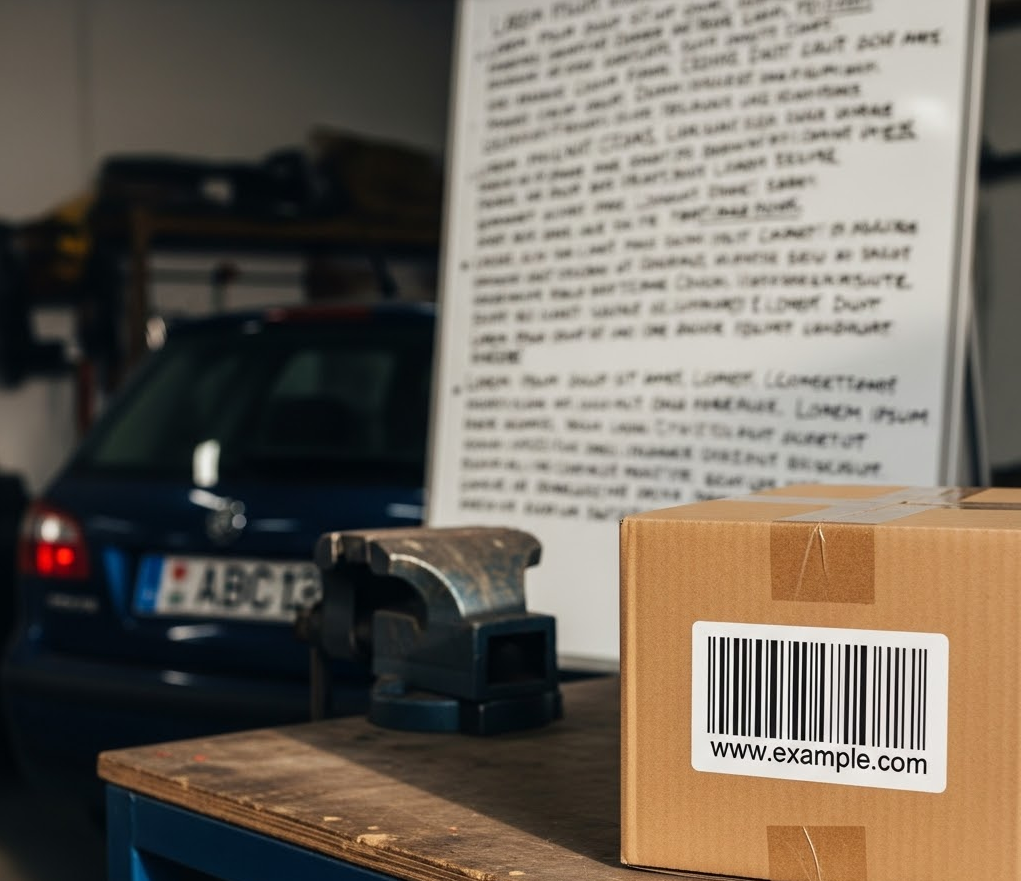
תמונה שנוצרה על ידי AI ומכילה ברקוד, לוחית רישוי ולוח מחיק.
תמונה שנוצרה על ידי AI ומכילה ברקוד, לוחית רישוי ולוח מחיק (לחצו כדי להגדיל).

כדי לבדוק את התמונה הזו ולחפש בה מידע על סוגי מידע ספציפיים של אובייקטים, שולחים את קובץ ה-JSON הבא לשיטה content.inspect:

{
  "item": {
    "byteItem": {
      "data": "BASE64_ENCODED_IMAGE",
      "type": "IMAGE_PNG"
    }
  },
  "inspectConfig": {
    "infoTypes": [
      {
        "name": "OBJECT_TYPE/BARCODE"
      },
      {
        "name": "OBJECT_TYPE/LICENSE_PLATE"
      },
      {
        "name": "OBJECT_TYPE/WHITEBOARD"
      }
    ]
  }
}

הפלט אמור להיראות כך:

{
  "result": {
    "findings": [
      {
        "infoType": {
          "name": "OBJECT_TYPE/WHITEBOARD",
          "sensitivityScore": {
            "score": "SENSITIVITY_LOW"
          }
        },
        "likelihood": "LIKELY",
        "location": {
          "contentLocations": [
            {
              "imageLocation": {
                "boundingBoxes": [
                  {
                    "left": 427,
                    "width": 561,
                    "height": 678
                  }
                ]
              }
            }
          ]
        },
        "createTime": "2025-05-22T22:25:09.564718Z",
        "findingId": "2025-05-22T22:25:09.564721Z3400818180961962648"
      },
      {
        "infoType": {
          "name": "OBJECT_TYPE/LICENSE_PLATE",
          "sensitivityScore": {
            "score": "SENSITIVITY_MODERATE"
          }
        },
        "likelihood": "LIKELY",
        "location": {
          "contentLocations": [
            {
              "imageLocation": {
                "boundingBoxes": [
                  {
                    "top": 554,
                    "left": 137,
                    "width": 187,
                    "height": 70
                  }
                ]
              }
            }
          ]
        },
        "createTime": "2025-05-22T22:25:09.564752Z",
        "findingId": "2025-05-22T22:25:09.564753Z2359274424382836782"
      },
      {
        "infoType": {
          "name": "OBJECT_TYPE/BARCODE",
          "sensitivityScore": {
            "score": "SENSITIVITY_LOW"
          }
        },
        "likelihood": "LIKELY",
        "location": {
          "contentLocations": [
            {
              "imageLocation": {
                "boundingBoxes": [
                  {
                    "top": 569,
                    "left": 666,
                    "width": 306,
                    "height": 274
                  }
                ]
              }
            }
          ]
        },
        "createTime": "2025-05-22T22:25:09.564762Z",
        "findingId": "2025-05-22T22:25:09.564762Z1655085669963455621"
      }
    ]
  }
}

למידע נוסף על שימוש ב-DLP API עם JSON, אפשר לעיין במדריך לתחילת העבודה עם JSON.

דוגמאות לקוד

בהמשך מוצג קוד לדוגמה בכמה שפות שמדגים איך להשתמש ב-Sensitive Data Protection כדי לבדוק תמונה לאיתור מידע אישי רגיש.

C#

מידע על התקנת ספריית הלקוח של Sensitive Data Protection והשימוש בה מופיע במאמר ספריות הלקוח של Sensitive Data Protection.

כדי לבצע אימות ב-Sensitive Data Protection, צריך להגדיר את Application Default Credentials. מידע נוסף זמין במאמר הגדרת אימות לסביבת פיתוח מקומית.


using System;
using System.Collections.Generic;
using System.IO;
using System.Linq;
using Google.Api.Gax.ResourceNames;
using Google.Cloud.Dlp.V2;
using Google.Protobuf;

public class InspectImage
{
    public static InspectContentResponse Inspect(
        string projectId,
        string filePath,
        IEnumerable<InfoType> infoTypes = null)
    {
        // Instantiate dlp client.
        var dlp = DlpServiceClient.Create();

        // Construct the content item by setting the type of image and data to be inspected.
        var contentItem = new ContentItem
        {
            ByteItem = new ByteContentItem
            {
                Type = ByteContentItem.Types.BytesType.ImagePng,
                Data = ByteString.FromStream(new FileStream(filePath, FileMode.Open))
            }
        };

        // Construct the Inspect config by specifying the type of info to be inspected.
        var inspectConfig = new InspectConfig
        {
            InfoTypes =
            {
                infoTypes ?? new InfoType[]
                {
                    new InfoType { Name = "PHONE_NUMBER" },
                    new InfoType { Name = "EMAIL_ADDRESS" },
                    new InfoType { Name = "CREDIT_CARD_NUMBER" }
                }
            },
            IncludeQuote = true
        };

        // Construct the request.
        var request = new InspectContentRequest
        {
            ParentAsLocationName = new LocationName(projectId, "global"),
            InspectConfig = inspectConfig,
            Item = contentItem
        };

        // Call the API.
        InspectContentResponse response = dlp.InspectContent(request);

        // Inspect the response.
        var resultFindings = response.Result.Findings;

        Console.WriteLine($"Findings: {resultFindings.Count}\n");

        // Print the results.
        foreach (var f in resultFindings)
        {
            var data = from location in f.Location.ContentLocations
                       from b in location.ImageLocation.BoundingBoxes
                       select new { b.Height, b.Width, b.Top, b.Left };

            Console.WriteLine("Info type: " + f.InfoType.Name);
            Console.WriteLine("\tQuote: " + f.Quote);
            Console.WriteLine("\tImageLocations: " + string.Join(",", data));
            Console.WriteLine("\tLikelihood: " + f.Likelihood);
        }

        return response;
    }
}

Go

מידע על התקנת ספריית הלקוח של Sensitive Data Protection והשימוש בה מופיע במאמר ספריות הלקוח של Sensitive Data Protection.

כדי לבצע אימות ב-Sensitive Data Protection, צריך להגדיר את Application Default Credentials. מידע נוסף זמין במאמר הגדרת אימות לסביבת פיתוח מקומית.

import (
	"context"
	"fmt"
	"io"
	"os"

	dlp "cloud.google.com/go/dlp/apiv2"
	"cloud.google.com/go/dlp/apiv2/dlppb"
)

// inspectImageFile inspects an image file for sensitive data
func inspectImageFile(w io.Writer, projectID, filePath string) error {
	// projectId := "my-project-id"
	// filePath := "inspect/testdata/test.png"

	ctx := context.Background()

	// Initialize a client once and reuse it to send multiple requests. Clients
	// are safe to use across goroutines. When the client is no longer needed,
	// call the Close method to cleanup its resources.
	client, err := dlp.NewClient(ctx)
	if err != nil {
		return err
	}

	// Closing the client safely cleans up background resources.
	defer client.Close()

	// Read a image file
	data, err := os.ReadFile(filePath)
	if err != nil {
		return err
	}

	// Specify the type and content to be inspected.
	item := &dlppb.ContentItem{
		DataItem: &dlppb.ContentItem_ByteItem{
			ByteItem: &dlppb.ByteContentItem{
				Type: dlppb.ByteContentItem_IMAGE,
				Data: data,
			},
		},
	}

	// Construct the configuration for the Inspect request.
	inspectConfig := &dlppb.InspectConfig{
		InfoTypes: []*dlppb.InfoType{
			{Name: "PHONE_NUMBER"},
			{Name: "EMAIL_ADDRESS"},
			{Name: "CREDIT_CARD_NUMBER"},
		},
		IncludeQuote: true,
	}

	// Construct the Inspect request to be sent by the client.
	req := &dlppb.InspectContentRequest{
		Parent:        fmt.Sprintf("projects/%s/locations/global", projectID),
		Item:          item,
		InspectConfig: inspectConfig,
	}

	// Send the request.
	resp, err := client.InspectContent(ctx, req)
	if err != nil {
		return err
	}

	// Process the results.
	fmt.Fprintf(w, "Findings: %d\n", len(resp.Result.Findings))
	for _, f := range resp.Result.Findings {
		fmt.Fprintf(w, "\tQuote: %s\n", f.Quote)
		fmt.Fprintf(w, "\tInfo type: %s\n", f.InfoType.Name)
		fmt.Fprintf(w, "\tLikelihood: %s\n", f.Likelihood)
	}
	return nil
}

Java

מידע על התקנת ספריית הלקוח של Sensitive Data Protection והשימוש בה מופיע במאמר ספריות הלקוח של Sensitive Data Protection.

כדי לבצע אימות ב-Sensitive Data Protection, צריך להגדיר את Application Default Credentials. מידע נוסף זמין במאמר הגדרת אימות לסביבת פיתוח מקומית.


import com.google.cloud.dlp.v2.DlpServiceClient;
import com.google.privacy.dlp.v2.ByteContentItem;
import com.google.privacy.dlp.v2.ByteContentItem.BytesType;
import com.google.privacy.dlp.v2.ContentItem;
import com.google.privacy.dlp.v2.Finding;
import com.google.privacy.dlp.v2.InfoType;
import com.google.privacy.dlp.v2.InspectConfig;
import com.google.privacy.dlp.v2.InspectContentRequest;
import com.google.privacy.dlp.v2.InspectContentResponse;
import com.google.privacy.dlp.v2.LocationName;
import com.google.protobuf.ByteString;
import java.io.FileInputStream;
import java.io.IOException;
import java.util.ArrayList;
import java.util.List;

public class InspectImageFile {

  public static void main(String[] args) throws Exception {
    // TODO(developer): Replace these variables before running the sample.
    String projectId = "your-project-id";
    String filePath = "path/to/image.png";
    inspectImageFile(projectId, filePath);
  }

  // Inspects the specified image file.
  public static void inspectImageFile(String projectId, String filePath) throws IOException {
    // Initialize client that will be used to send requests. This client only needs to be created
    // once, and can be reused for multiple requests. After completing all of your requests, call
    // the "close" method on the client to safely clean up any remaining background resources.
    try (DlpServiceClient dlp = DlpServiceClient.create()) {
      // Specify the type and content to be inspected.
      ByteString fileBytes = ByteString.readFrom(new FileInputStream(filePath));
      ByteContentItem byteItem =
          ByteContentItem.newBuilder().setType(BytesType.IMAGE).setData(fileBytes).build();
      ContentItem item = ContentItem.newBuilder().setByteItem(byteItem).build();

      // Specify the type of info the inspection will look for.
      List<InfoType> infoTypes = new ArrayList<>();
      // See https://cloud.google.com/dlp/docs/infotypes-reference for complete list of info types
      for (String typeName : new String[] {"PHONE_NUMBER", "EMAIL_ADDRESS", "CREDIT_CARD_NUMBER"}) {
        infoTypes.add(InfoType.newBuilder().setName(typeName).build());
      }

      // Construct the configuration for the Inspect request.
      InspectConfig config =
          InspectConfig.newBuilder().addAllInfoTypes(infoTypes).setIncludeQuote(true).build();

      // Construct the Inspect request to be sent by the client.
      InspectContentRequest request =
          InspectContentRequest.newBuilder()
              .setParent(LocationName.of(projectId, "global").toString())
              .setItem(item)
              .setInspectConfig(config)
              .build();

      // Use the client to send the API request.
      InspectContentResponse response = dlp.inspectContent(request);

      // Parse the response and process results.
      System.out.println("Findings: " + response.getResult().getFindingsCount());
      for (Finding f : response.getResult().getFindingsList()) {
        System.out.println("\tQuote: " + f.getQuote());
        System.out.println("\tInfo type: " + f.getInfoType().getName());
        System.out.println("\tLikelihood: " + f.getLikelihood());
      }
    }
  }
}

Node.js

מידע על התקנת ספריית הלקוח של Sensitive Data Protection והשימוש בה מופיע במאמר ספריות הלקוח של Sensitive Data Protection.

כדי לבצע אימות ב-Sensitive Data Protection, צריך להגדיר את Application Default Credentials. מידע נוסף זמין במאמר הגדרת אימות לסביבת פיתוח מקומית.

// Imports the Google Cloud Data Loss Prevention library
const DLP = require('@google-cloud/dlp');
const mime = require('mime');
const fs = require('fs');

// Instantiates a client
const dlp = new DLP.DlpServiceClient();

// The project ID to run the API call under
// const imagePath = './test.jpeg';

// InfoTypes
const infoTypes = [
  {name: 'PHONE_NUMBER'},
  {name: 'EMAIL_ADDRESS'},
  {name: 'CREDIT_CARD_NUMBER'},
];

async function inspectImageFile() {
  let fileBytes = null;
  let fileTypeConstant = null;
  try {
    // Load Image
    fileTypeConstant =
      ['image/jpeg', 'image/bmp', 'image/png', 'image/svg'].indexOf(
        mime.getType(imagePath)
      ) + 1;
    fileBytes = Buffer.from(fs.readFileSync(imagePath)).toString('base64');
  } catch (error) {
    console.log(error);
    return;
  }

  // Specify item to inspect
  const item = {
    byteItem: {
      type: fileTypeConstant,
      data: fileBytes,
    },
  };

  // Specify inspect configuration to match information with mentioned infotypes.
  const inspectConfig = {
    infoTypes: infoTypes,
    includeQuote: true,
  };

  // Combine configurations into a request for the service.
  const request = {
    parent: `projects/${projectId}/locations/global`,
    inspectConfig: inspectConfig,
    item: item,
  };

  // Use the client to send the request.
  const [response] = await dlp.inspectContent(request);

  // Print Findings
  const findings = response.result.findings;
  if (findings.length > 0) {
    console.log(`Findings: ${findings.length}\n`);
    findings.forEach(finding => {
      console.log(`InfoType: ${finding.infoType.name}`);
      console.log(`\tQuote: ${finding.quote}`);
      console.log(`\tLikelihood: ${finding.likelihood} \n`);
    });
  } else {
    console.log('No findings.');
  }
}
inspectImageFile();

PHP

מידע על התקנת ספריית הלקוח של Sensitive Data Protection והשימוש בה מופיע במאמר ספריות הלקוח של Sensitive Data Protection.

כדי לבצע אימות ב-Sensitive Data Protection, צריך להגדיר את Application Default Credentials. מידע נוסף זמין במאמר הגדרת אימות לסביבת פיתוח מקומית.

use Google\Cloud\Dlp\V2\ByteContentItem;
use Google\Cloud\Dlp\V2\ByteContentItem\BytesType;
use Google\Cloud\Dlp\V2\Client\DlpServiceClient;
use Google\Cloud\Dlp\V2\ContentItem;
use Google\Cloud\Dlp\V2\InfoType;
use Google\Cloud\Dlp\V2\InspectConfig;
use Google\Cloud\Dlp\V2\InspectContentRequest;
use Google\Cloud\Dlp\V2\Likelihood;

/**
 * @param string $projectId
 * @param string $filepath
 */
function inspect_image_file(string $projectId, string $filepath): void
{
    // Instantiate a client.
    $dlp = new DlpServiceClient();

    // Get the bytes of the file
    $fileBytes = (new ByteContentItem())
        ->setType(BytesType::IMAGE_PNG)
        ->setData(file_get_contents($filepath));

    // Construct request
    $parent = "projects/$projectId/locations/global";
    $item = (new ContentItem())
        ->setByteItem($fileBytes);
    $inspectConfig = (new InspectConfig())
        // The infoTypes of information to match
        ->setInfoTypes([
            (new InfoType())->setName('PHONE_NUMBER'),
            (new InfoType())->setName('EMAIL_ADDRESS'),
            (new InfoType())->setName('CREDIT_CARD_NUMBER')
        ])
        // Whether to include the matching string
        ->setIncludeQuote(true);

    // Run request
    $inspectContentRequest = (new InspectContentRequest())
        ->setParent($parent)
        ->setInspectConfig($inspectConfig)
        ->setItem($item);
    $response = $dlp->inspectContent($inspectContentRequest);

    // Print the results
    $findings = $response->getResult()->getFindings();
    if (count($findings) == 0) {
        print('No findings.' . PHP_EOL);
    } else {
        print('Findings:' . PHP_EOL);
        foreach ($findings as $finding) {
            print('  Quote: ' . $finding->getQuote() . PHP_EOL);
            print('  Info type: ' . $finding->getInfoType()->getName() . PHP_EOL);
            $likelihoodString = Likelihood::name($finding->getLikelihood());
            print('  Likelihood: ' . $likelihoodString . PHP_EOL);
        }
    }
}

Python

מידע על התקנת ספריית הלקוח של Sensitive Data Protection והשימוש בה מופיע במאמר ספריות הלקוח של Sensitive Data Protection.

כדי לבצע אימות ב-Sensitive Data Protection, צריך להגדיר את Application Default Credentials. מידע נוסף זמין במאמר הגדרת אימות לסביבת פיתוח מקומית.

import google.cloud.dlp


def inspect_image_file(
    project: str,
    filename: str,
    include_quote: bool = True,
) -> None:
    """Uses the Data Loss Prevention API to analyze strings for
    protected data in image file.
    Args:
        project: The Google Cloud project id to use as a parent resource.
        filename: The path to the file to inspect.
        include_quote: Boolean for whether to display a quote of the detected
            information in the results.
    """
    # Instantiate a client.
    dlp = google.cloud.dlp_v2.DlpServiceClient()

    # Prepare info_types by converting the list of strings into a list of
    # dictionaries.
    info_types = ["PHONE_NUMBER", "EMAIL_ADDRESS", "CREDIT_CARD_NUMBER"]
    info_types = [{"name": info_type} for info_type in info_types]

    # Construct the configuration for the Inspect request.
    inspect_config = {
        "info_types": info_types,
        "include_quote": include_quote,
    }

    # Construct the byte_item, containing the image file's byte data.
    with open(filename, mode="rb") as f:
        byte_item = {"type_": "IMAGE", "data": f.read()}

    # Convert the project id into a full resource id.
    parent = f"projects/{project}/locations/global"

    # Call the API.
    response = dlp.inspect_content(
        request={
            "parent": parent,
            "inspect_config": inspect_config,
            "item": {"byte_item": byte_item},
        }
    )

    # Parse the response and process results.
    if response.result.findings:
        for finding in response.result.findings:
            print(f"Quote: {finding.quote}")
            print(f"Info type: {finding.info_type.name}")
            print(f"Likelihood: {finding.likelihood}")
    else:
        print("No findings.")

רוצה לנסות?

אתם יכולים לנסות בעצמכם כל אחת מהדוגמאות האלה, או להתנסות בתמונות משלכם, ב-API Explorer בדף ההפניה של content.inspect:

לדף API Explorer

המאמרים הבאים