חישוב של k-anonymity עבור מערך נתונים

K-anonymity היא מאפיין של מערך נתונים שמציין את האפשרות לזהות מחדש את הרשומות שלו. מערך נתונים הוא k-אנונימי אם המזהים למחצה של כל אדם במערך הנתונים זהים לפחות ל-k – 1 אנשים אחרים שנכללים גם הם במערך הנתונים.

אפשר לחשב את ערך ה-k-anonymity על סמך עמודה אחת או יותר, או שדות, של קבוצת נתונים. בנושא הזה נסביר איך לחשב ערכי אנונימיות מסוג k עבור קבוצת נתונים באמצעות Sensitive Data Protection. לפני שממשיכים, מומלץ לעיין בנושא המושג ניתוח סיכונים כדי לקבל מידע נוסף על k-anonymity או על ניתוח סיכונים באופן כללי.

לפני שמתחילים

לפני שממשיכים, חשוב לוודא שביצעתם את הפעולות הבאות:

  1. נכנסים לחשבון Google.
  2. בדף לבחירת הפרויקט במסוף Google Cloud , בוחרים פרויקט ב- Google Cloud או יוצרים אותו.
  3. כניסה לדף לבחירת הפרויקט
  4. מוודאים שהחיוב מופעל בפרויקט Google Cloud . איך מוודאים שהחיוב מופעל בפרויקט?
  5. מפעילים את התכונה Sensitive Data Protection.
  6. הפעלת Sensitive Data Protection

  7. בוחרים מערך נתונים ב-BigQuery לניתוח. ‫Sensitive Data Protection מחשב את מדד האנונימיות k על ידי סריקה של טבלה ב-BigQuery.
  8. קובעים מזהה (אם רלוונטי) ולפחות מזהה למחצה אחד במערך הנתונים. מידע נוסף זמין במאמר מונחים וטכניקות לניתוח סיכונים.

חישוב k-anonymity

הכלי Sensitive Data Protection מבצע ניתוח סיכונים בכל פעם שמריצים משימת ניתוח סיכונים. קודם צריך ליצור את העבודה באמצעות מסוףGoogle Cloud , שליחת בקשת DLP API או שימוש בספריית לקוח של Sensitive Data Protection.

המסוף

  1. נכנסים לדף Create risk analysis במסוף Google Cloud .

    כניסה לדף Create risk analysis

  2. בקטע Choose input data (בחירת נתוני קלט), מציינים את הטבלה ב-BigQuery שרוצים לסרוק. לשם כך, מזינים את מזהה הפרויקט שמכיל את הטבלה, את מזהה מערך הנתונים של הטבלה ואת שם הטבלה.

  3. בקטע Privacy metric to compute (מדד הפרטיות לחישוב), בוחרים באפשרות k-anonymity (אנונימיות מסוג k).

  4. בקטע מזהה משימה, אפשר לתת לעבודה מזהה מותאם אישית ולבחור מיקום משאב שבו Sensitive Data Protection יעבד את הנתונים. בסיום, לוחצים על המשך.

  5. בקטע Define fields, מציינים מזהים ומזהים למחצה עבור משימת הסיכון של k-anonymity. Sensitive Data Protection ניגש למטא-נתונים של טבלה ב-BigQuery שציינתם בשלב הקודם ומנסה לאכלס את רשימת השדות.

    1. מסמנים את התיבה המתאימה כדי לציין ששדה מסוים הוא מזהה (ID) או מזהה למחצה (QI). צריך לבחור 0 או 1 מזהים ולפחות 1 מזהים למחצה.
    2. אם Sensitive Data Protection לא מצליחה לאכלס את השדות, לוחצים על הזנת שם השדה כדי להזין באופן ידני שדה אחד או יותר, ומגדירים כל אחד מהם כמזהה או כמזהה למחצה. בסיום, לוחצים על המשך.
  6. בקטע הוספת פעולות, אפשר להוסיף פעולות אופציונליות שיבוצעו כשהעבודה לזיהוי סיכונים תסתיים. האפשרויות הזמינות הן:

    • Save to BigQuery (שמירה ב-BigQuery): שומר את תוצאות הסריקה של ניתוח הסיכונים בטבלה ב-BigQuery.
    • פרסום ב-Pub/Sub: פרסום התראה בנושא Pub/Sub.

    • שליחת הודעה באימייל: יישלח אליכם אימייל עם התוצאות. כשמסיימים, לוחצים על יצירה.

תהליך ניתוח הסיכון של k-anonymity מתחיל באופן מיידי.

C#

מידע על התקנת ספריית הלקוח של Sensitive Data Protection והשימוש בה מופיע במאמר ספריות הלקוח של Sensitive Data Protection.

כדי לבצע אימות ב-Sensitive Data Protection, צריך להגדיר את Application Default Credentials. מידע נוסף זמין במאמר הגדרת אימות לסביבת פיתוח מקומית.


using Google.Api.Gax.ResourceNames;
using Google.Cloud.Dlp.V2;
using Google.Cloud.PubSub.V1;
using Newtonsoft.Json;
using System;
using System.Collections.Generic;
using System.Linq;
using System.Threading;
using System.Threading.Tasks;
using static Google.Cloud.Dlp.V2.Action.Types;
using static Google.Cloud.Dlp.V2.PrivacyMetric.Types;

public class RiskAnalysisCreateKAnonymity
{
    public static AnalyzeDataSourceRiskDetails.Types.KAnonymityResult KAnonymity(
        string callingProjectId,
        string tableProjectId,
        string datasetId,
        string tableId,
        string topicId,
        string subscriptionId,
        IEnumerable<FieldId> quasiIds)
    {
        var dlp = DlpServiceClient.Create();

        // Construct + submit the job
        var KAnonymityConfig = new KAnonymityConfig
        {
            QuasiIds = { quasiIds }
        };

        var config = new RiskAnalysisJobConfig
        {
            PrivacyMetric = new PrivacyMetric
            {
                KAnonymityConfig = KAnonymityConfig
            },
            SourceTable = new BigQueryTable
            {
                ProjectId = tableProjectId,
                DatasetId = datasetId,
                TableId = tableId
            },
            Actions =
            {
                new Google.Cloud.Dlp.V2.Action
                {
                    PubSub = new PublishToPubSub
                    {
                        Topic = $"projects/{callingProjectId}/topics/{topicId}"
                    }
                }
            }
        };

        var submittedJob = dlp.CreateDlpJob(
            new CreateDlpJobRequest
            {
                ParentAsProjectName = new ProjectName(callingProjectId),
                RiskJob = config
            });

        // Listen to pub/sub for the job
        var subscriptionName = new SubscriptionName(callingProjectId, subscriptionId);
        var subscriber = SubscriberClient.CreateAsync(
            subscriptionName).Result;

        // SimpleSubscriber runs your message handle function on multiple
        // threads to maximize throughput.
        var done = new ManualResetEventSlim(false);
        subscriber.StartAsync((PubsubMessage message, CancellationToken cancel) =>
        {
            if (message.Attributes["DlpJobName"] == submittedJob.Name)
            {
                Thread.Sleep(500); // Wait for DLP API results to become consistent
                done.Set();
                return Task.FromResult(SubscriberClient.Reply.Ack);
            }
            else
            {
                return Task.FromResult(SubscriberClient.Reply.Nack);
            }
        });

        done.Wait(TimeSpan.FromMinutes(10)); // 10 minute timeout; may not work for large jobs
        subscriber.StopAsync(CancellationToken.None).Wait();

        // Process results
        var resultJob = dlp.GetDlpJob(new GetDlpJobRequest
        {
            DlpJobName = DlpJobName.Parse(submittedJob.Name)
        });

        var result = resultJob.RiskDetails.KAnonymityResult;

        for (var bucketIdx = 0; bucketIdx < result.EquivalenceClassHistogramBuckets.Count; bucketIdx++)
        {
            var bucket = result.EquivalenceClassHistogramBuckets[bucketIdx];
            Console.WriteLine($"Bucket {bucketIdx}");
            Console.WriteLine($"  Bucket size range: [{bucket.EquivalenceClassSizeLowerBound}, {bucket.EquivalenceClassSizeUpperBound}].");
            Console.WriteLine($"  {bucket.BucketSize} unique value(s) total.");

            foreach (var bucketValue in bucket.BucketValues)
            {
                // 'UnpackValue(x)' is a prettier version of 'x.toString()'
                Console.WriteLine($"    Quasi-ID values: [{String.Join(',', bucketValue.QuasiIdsValues.Select(x => UnpackValue(x)))}]");
                Console.WriteLine($"    Class size: {bucketValue.EquivalenceClassSize}");
            }
        }

        return result;
    }

    public static string UnpackValue(Value protoValue)
    {
        var jsonValue = JsonConvert.DeserializeObject<Dictionary<string, object>>(protoValue.ToString());
        return jsonValue.Values.ElementAt(0).ToString();
    }
}

Go

מידע על התקנת ספריית הלקוח של Sensitive Data Protection והשימוש בה מופיע במאמר ספריות הלקוח של Sensitive Data Protection.

כדי לבצע אימות ב-Sensitive Data Protection, צריך להגדיר את Application Default Credentials. מידע נוסף זמין במאמר הגדרת אימות לסביבת פיתוח מקומית.

import (
	"context"
	"fmt"
	"io"
	"strings"
	"time"

	dlp "cloud.google.com/go/dlp/apiv2"
	"cloud.google.com/go/dlp/apiv2/dlppb"
	"cloud.google.com/go/pubsub"
)

// riskKAnonymity computes the risk of the given columns using K Anonymity.
func riskKAnonymity(w io.Writer, projectID, dataProject, pubSubTopic, pubSubSub, datasetID, tableID string, columnNames ...string) error {
	// projectID := "my-project-id"
	// dataProject := "bigquery-public-data"
	// pubSubTopic := "dlp-risk-sample-topic"
	// pubSubSub := "dlp-risk-sample-sub"
	// datasetID := "nhtsa_traffic_fatalities"
	// tableID := "accident_2015"
	// columnNames := "state_number" "county"
	ctx := context.Background()
	client, err := dlp.NewClient(ctx)
	if err != nil {
		return fmt.Errorf("dlp.NewClient: %w", err)
	}

	// Create a PubSub Client used to listen for when the inspect job finishes.
	pubsubClient, err := pubsub.NewClient(ctx, projectID)
	if err != nil {
		return err
	}
	defer pubsubClient.Close()

	// Create a PubSub subscription we can use to listen for messages.
	// Create the Topic if it doesn't exist.
	t := pubsubClient.Topic(pubSubTopic)
	topicExists, err := t.Exists(ctx)
	if err != nil {
		return err
	}
	if !topicExists {
		if t, err = pubsubClient.CreateTopic(ctx, pubSubTopic); err != nil {
			return err
		}
	}

	// Create the Subscription if it doesn't exist.
	s := pubsubClient.Subscription(pubSubSub)
	subExists, err := s.Exists(ctx)
	if err != nil {
		return err
	}
	if !subExists {
		if s, err = pubsubClient.CreateSubscription(ctx, pubSubSub, pubsub.SubscriptionConfig{Topic: t}); err != nil {
			return err
		}
	}

	// topic is the PubSub topic string where messages should be sent.
	topic := "projects/" + projectID + "/topics/" + pubSubTopic

	// Build the QuasiID slice.
	var q []*dlppb.FieldId
	for _, c := range columnNames {
		q = append(q, &dlppb.FieldId{Name: c})
	}

	// Create a configured request.
	req := &dlppb.CreateDlpJobRequest{
		Parent: fmt.Sprintf("projects/%s/locations/global", projectID),
		Job: &dlppb.CreateDlpJobRequest_RiskJob{
			RiskJob: &dlppb.RiskAnalysisJobConfig{
				// PrivacyMetric configures what to compute.
				PrivacyMetric: &dlppb.PrivacyMetric{
					Type: &dlppb.PrivacyMetric_KAnonymityConfig_{
						KAnonymityConfig: &dlppb.PrivacyMetric_KAnonymityConfig{
							QuasiIds: q,
						},
					},
				},
				// SourceTable describes where to find the data.
				SourceTable: &dlppb.BigQueryTable{
					ProjectId: dataProject,
					DatasetId: datasetID,
					TableId:   tableID,
				},
				// Send a message to PubSub using Actions.
				Actions: []*dlppb.Action{
					{
						Action: &dlppb.Action_PubSub{
							PubSub: &dlppb.Action_PublishToPubSub{
								Topic: topic,
							},
						},
					},
				},
			},
		},
	}
	// Create the risk job.
	j, err := client.CreateDlpJob(ctx, req)
	if err != nil {
		return fmt.Errorf("CreateDlpJob: %w", err)
	}
	fmt.Fprintf(w, "Created job: %v\n", j.GetName())

	// Wait for the risk job to finish by waiting for a PubSub message.
	// This only waits for 10 minutes. For long jobs, consider using a truly
	// asynchronous execution model such as Cloud Functions.
	ctx, cancel := context.WithTimeout(ctx, 10*time.Minute)
	defer cancel()
	err = s.Receive(ctx, func(ctx context.Context, msg *pubsub.Message) {
		// If this is the wrong job, do not process the result.
		if msg.Attributes["DlpJobName"] != j.GetName() {
			msg.Nack()
			return
		}
		msg.Ack()
		time.Sleep(500 * time.Millisecond)
		j, err := client.GetDlpJob(ctx, &dlppb.GetDlpJobRequest{
			Name: j.GetName(),
		})
		if err != nil {
			fmt.Fprintf(w, "GetDlpJob: %v", err)
			return
		}
		h := j.GetRiskDetails().GetKAnonymityResult().GetEquivalenceClassHistogramBuckets()
		for i, b := range h {
			fmt.Fprintf(w, "Histogram bucket %v\n", i)
			fmt.Fprintf(w, "  Size range: [%v,%v]\n", b.GetEquivalenceClassSizeLowerBound(), b.GetEquivalenceClassSizeUpperBound())
			fmt.Fprintf(w, "  %v unique values total\n", b.GetBucketSize())
			for _, v := range b.GetBucketValues() {
				var qvs []string
				for _, qv := range v.GetQuasiIdsValues() {
					qvs = append(qvs, qv.String())
				}
				fmt.Fprintf(w, "    QuasiID values: %s\n", strings.Join(qvs, ", "))
				fmt.Fprintf(w, "    Class size: %v\n", v.GetEquivalenceClassSize())
			}
		}
		// Stop listening for more messages.
		cancel()
	})
	if err != nil {
		return fmt.Errorf("Receive: %w", err)
	}
	return nil
}

Java

מידע על התקנת ספריית הלקוח של Sensitive Data Protection והשימוש בה מופיע במאמר ספריות הלקוח של Sensitive Data Protection.

כדי לבצע אימות ב-Sensitive Data Protection, צריך להגדיר את Application Default Credentials. מידע נוסף זמין במאמר הגדרת אימות לסביבת פיתוח מקומית.


import com.google.api.core.SettableApiFuture;
import com.google.cloud.dlp.v2.DlpServiceClient;
import com.google.cloud.pubsub.v1.AckReplyConsumer;
import com.google.cloud.pubsub.v1.MessageReceiver;
import com.google.cloud.pubsub.v1.Subscriber;
import com.google.privacy.dlp.v2.Action;
import com.google.privacy.dlp.v2.Action.PublishToPubSub;
import com.google.privacy.dlp.v2.AnalyzeDataSourceRiskDetails.KAnonymityResult;
import com.google.privacy.dlp.v2.AnalyzeDataSourceRiskDetails.KAnonymityResult.KAnonymityEquivalenceClass;
import com.google.privacy.dlp.v2.AnalyzeDataSourceRiskDetails.KAnonymityResult.KAnonymityHistogramBucket;
import com.google.privacy.dlp.v2.BigQueryTable;
import com.google.privacy.dlp.v2.CreateDlpJobRequest;
import com.google.privacy.dlp.v2.DlpJob;
import com.google.privacy.dlp.v2.FieldId;
import com.google.privacy.dlp.v2.GetDlpJobRequest;
import com.google.privacy.dlp.v2.LocationName;
import com.google.privacy.dlp.v2.PrivacyMetric;
import com.google.privacy.dlp.v2.PrivacyMetric.KAnonymityConfig;
import com.google.privacy.dlp.v2.RiskAnalysisJobConfig;
import com.google.privacy.dlp.v2.Value;
import com.google.pubsub.v1.ProjectSubscriptionName;
import com.google.pubsub.v1.ProjectTopicName;
import com.google.pubsub.v1.PubsubMessage;
import java.io.IOException;
import java.util.Arrays;
import java.util.List;
import java.util.concurrent.ExecutionException;
import java.util.concurrent.TimeUnit;
import java.util.concurrent.TimeoutException;
import java.util.stream.Collectors;

@SuppressWarnings("checkstyle:AbbreviationAsWordInName")
class RiskAnalysisKAnonymity {

  public static void main(String[] args) throws Exception {
    // TODO(developer): Replace these variables before running the sample.
    String projectId = "your-project-id";
    String datasetId = "your-bigquery-dataset-id";
    String tableId = "your-bigquery-table-id";
    String topicId = "pub-sub-topic";
    String subscriptionId = "pub-sub-subscription";
    calculateKAnonymity(projectId, datasetId, tableId, topicId, subscriptionId);
  }

  public static void calculateKAnonymity(
      String projectId, String datasetId, String tableId, String topicId, String subscriptionId)
      throws ExecutionException, InterruptedException, IOException {
    // Initialize client that will be used to send requests. This client only needs to be created
    // once, and can be reused for multiple requests. After completing all of your requests, call
    // the "close" method on the client to safely clean up any remaining background resources.
    try (DlpServiceClient dlpServiceClient = DlpServiceClient.create()) {

      // Specify the BigQuery table to analyze
      BigQueryTable bigQueryTable =
          BigQueryTable.newBuilder()
              .setProjectId(projectId)
              .setDatasetId(datasetId)
              .setTableId(tableId)
              .build();

      // These values represent the column names of quasi-identifiers to analyze
      List<String> quasiIds = Arrays.asList("Age", "Mystery");

      // Configure the privacy metric for the job
      List<FieldId> quasiIdFields =
          quasiIds.stream()
              .map(columnName -> FieldId.newBuilder().setName(columnName).build())
              .collect(Collectors.toList());
      KAnonymityConfig kanonymityConfig =
          KAnonymityConfig.newBuilder().addAllQuasiIds(quasiIdFields).build();
      PrivacyMetric privacyMetric =
          PrivacyMetric.newBuilder().setKAnonymityConfig(kanonymityConfig).build();

      // Create action to publish job status notifications over Google Cloud Pub/Sub
      ProjectTopicName topicName = ProjectTopicName.of(projectId, topicId);
      PublishToPubSub publishToPubSub =
          PublishToPubSub.newBuilder().setTopic(topicName.toString()).build();
      Action action = Action.newBuilder().setPubSub(publishToPubSub).build();

      // Configure the risk analysis job to perform
      RiskAnalysisJobConfig riskAnalysisJobConfig =
          RiskAnalysisJobConfig.newBuilder()
              .setSourceTable(bigQueryTable)
              .setPrivacyMetric(privacyMetric)
              .addActions(action)
              .build();

      // Build the request to be sent by the client
      CreateDlpJobRequest createDlpJobRequest =
          CreateDlpJobRequest.newBuilder()
              .setParent(LocationName.of(projectId, "global").toString())
              .setRiskJob(riskAnalysisJobConfig)
              .build();

      // Send the request to the API using the client
      DlpJob dlpJob = dlpServiceClient.createDlpJob(createDlpJobRequest);

      // Set up a Pub/Sub subscriber to listen on the job completion status
      final SettableApiFuture<Boolean> done = SettableApiFuture.create();

      ProjectSubscriptionName subscriptionName =
          ProjectSubscriptionName.of(projectId, subscriptionId);

      MessageReceiver messageHandler =
          (PubsubMessage pubsubMessage, AckReplyConsumer ackReplyConsumer) -> {
            handleMessage(dlpJob, done, pubsubMessage, ackReplyConsumer);
          };
      Subscriber subscriber = Subscriber.newBuilder(subscriptionName, messageHandler).build();
      subscriber.startAsync();

      // Wait for job completion semi-synchronously
      // For long jobs, consider using a truly asynchronous execution model such as Cloud Functions
      try {
        done.get(15, TimeUnit.MINUTES);
      } catch (TimeoutException e) {
        System.out.println("Job was not completed after 15 minutes.");
        return;
      } finally {
        subscriber.stopAsync();
        subscriber.awaitTerminated();
      }

      // Build a request to get the completed job
      GetDlpJobRequest getDlpJobRequest =
          GetDlpJobRequest.newBuilder().setName(dlpJob.getName()).build();

      // Retrieve completed job status
      DlpJob completedJob = dlpServiceClient.getDlpJob(getDlpJobRequest);
      System.out.println("Job status: " + completedJob.getState());
      System.out.println("Job name: " + dlpJob.getName());

      // Get the result and parse through and process the information
      KAnonymityResult kanonymityResult = completedJob.getRiskDetails().getKAnonymityResult();
      List<KAnonymityHistogramBucket> histogramBucketList =
          kanonymityResult.getEquivalenceClassHistogramBucketsList();
      for (KAnonymityHistogramBucket result : histogramBucketList) {
        System.out.printf(
            "Bucket size range: [%d, %d]\n",
            result.getEquivalenceClassSizeLowerBound(), result.getEquivalenceClassSizeUpperBound());

        for (KAnonymityEquivalenceClass bucket : result.getBucketValuesList()) {
          List<String> quasiIdValues =
              bucket.getQuasiIdsValuesList().stream()
                  .map(Value::toString)
                  .collect(Collectors.toList());

          System.out.println("\tQuasi-ID values: " + String.join(", ", quasiIdValues));
          System.out.println("\tClass size: " + bucket.getEquivalenceClassSize());
        }
      }
    }
  }

  // handleMessage injects the job and settableFuture into the message reciever interface
  private static void handleMessage(
      DlpJob job,
      SettableApiFuture<Boolean> done,
      PubsubMessage pubsubMessage,
      AckReplyConsumer ackReplyConsumer) {
    String messageAttribute = pubsubMessage.getAttributesMap().get("DlpJobName");
    if (job.getName().equals(messageAttribute)) {
      done.set(true);
      ackReplyConsumer.ack();
    } else {
      ackReplyConsumer.nack();
    }
  }
}

Node.js

מידע על התקנת ספריית הלקוח של Sensitive Data Protection והשימוש בה מופיע במאמר ספריות הלקוח של Sensitive Data Protection.

כדי לבצע אימות ב-Sensitive Data Protection, צריך להגדיר את Application Default Credentials. מידע נוסף זמין במאמר הגדרת אימות לסביבת פיתוח מקומית.

// Import the Google Cloud client libraries
const DLP = require('@google-cloud/dlp');
const {PubSub} = require('@google-cloud/pubsub');

// Instantiates clients
const dlp = new DLP.DlpServiceClient();
const pubsub = new PubSub();

// The project ID to run the API call under
// const projectId = 'my-project';

// The project ID the table is stored under
// This may or (for public datasets) may not equal the calling project ID
// const tableProjectId = 'my-project';

// The ID of the dataset to inspect, e.g. 'my_dataset'
// const datasetId = 'my_dataset';

// The ID of the table to inspect, e.g. 'my_table'
// const tableId = 'my_table';

// The name of the Pub/Sub topic to notify once the job completes
// TODO(developer): create a Pub/Sub topic to use for this
// const topicId = 'MY-PUBSUB-TOPIC'

// The name of the Pub/Sub subscription to use when listening for job
// completion notifications
// TODO(developer): create a Pub/Sub subscription to use for this
// const subscriptionId = 'MY-PUBSUB-SUBSCRIPTION'

// A set of columns that form a composite key ('quasi-identifiers')
// const quasiIds = [{ name: 'age' }, { name: 'city' }];
async function kAnonymityAnalysis() {
  const sourceTable = {
    projectId: tableProjectId,
    datasetId: datasetId,
    tableId: tableId,
  };
  // Construct request for creating a risk analysis job

  const request = {
    parent: `projects/${projectId}/locations/global`,
    riskJob: {
      privacyMetric: {
        kAnonymityConfig: {
          quasiIds: quasiIds,
        },
      },
      sourceTable: sourceTable,
      actions: [
        {
          pubSub: {
            topic: `projects/${projectId}/topics/${topicId}`,
          },
        },
      ],
    },
  };

  // Create helper function for unpacking values
  const getValue = obj => obj[Object.keys(obj)[0]];

  // Run risk analysis job
  const [topicResponse] = await pubsub.topic(topicId).get();
  const subscription = await topicResponse.subscription(subscriptionId);
  const [jobsResponse] = await dlp.createDlpJob(request);
  const jobName = jobsResponse.name;
  console.log(`Job created. Job name: ${jobName}`);
  // Watch the Pub/Sub topic until the DLP job finishes
  await new Promise((resolve, reject) => {
    const messageHandler = message => {
      if (message.attributes && message.attributes.DlpJobName === jobName) {
        message.ack();
        subscription.removeListener('message', messageHandler);
        subscription.removeListener('error', errorHandler);
        resolve(jobName);
      } else {
        message.nack();
      }
    };

    const errorHandler = err => {
      subscription.removeListener('message', messageHandler);
      subscription.removeListener('error', errorHandler);
      reject(err);
    };

    subscription.on('message', messageHandler);
    subscription.on('error', errorHandler);
  });
  setTimeout(() => {
    console.log(' Waiting for DLP job to fully complete');
  }, 500);
  const [job] = await dlp.getDlpJob({name: jobName});
  const histogramBuckets =
    job.riskDetails.kAnonymityResult.equivalenceClassHistogramBuckets;

  histogramBuckets.forEach((histogramBucket, histogramBucketIdx) => {
    console.log(`Bucket ${histogramBucketIdx}:`);
    console.log(
      `  Bucket size range: [${histogramBucket.equivalenceClassSizeLowerBound}, ${histogramBucket.equivalenceClassSizeUpperBound}]`
    );

    histogramBucket.bucketValues.forEach(valueBucket => {
      const quasiIdValues = valueBucket.quasiIdsValues
        .map(getValue)
        .join(', ');
      console.log(`  Quasi-ID values: {${quasiIdValues}}`);
      console.log(`  Class size: ${valueBucket.equivalenceClassSize}`);
    });
  });
}
await kAnonymityAnalysis();

PHP

מידע על התקנת ספריית הלקוח של Sensitive Data Protection והשימוש בה מופיע במאמר ספריות הלקוח של Sensitive Data Protection.

כדי לבצע אימות ב-Sensitive Data Protection, צריך להגדיר את Application Default Credentials. מידע נוסף זמין במאמר הגדרת אימות לסביבת פיתוח מקומית.

use Google\Cloud\Dlp\V2\RiskAnalysisJobConfig;
use Google\Cloud\Dlp\V2\BigQueryTable;
use Google\Cloud\Dlp\V2\DlpJob\JobState;
use Google\Cloud\Dlp\V2\Action;
use Google\Cloud\Dlp\V2\Action\PublishToPubSub;
use Google\Cloud\Dlp\V2\Client\DlpServiceClient;
use Google\Cloud\Dlp\V2\CreateDlpJobRequest;
use Google\Cloud\Dlp\V2\FieldId;
use Google\Cloud\Dlp\V2\GetDlpJobRequest;
use Google\Cloud\Dlp\V2\PrivacyMetric;
use Google\Cloud\Dlp\V2\PrivacyMetric\KAnonymityConfig;
use Google\Cloud\PubSub\PubSubClient;

/**
 * Computes the k-anonymity of a column set in a Google BigQuery table.
 *
 * @param string    $callingProjectId  The project ID to run the API call under
 * @param string    $dataProjectId     The project ID containing the target Datastore
 * @param string    $topicId           The name of the Pub/Sub topic to notify once the job completes
 * @param string    $subscriptionId    The name of the Pub/Sub subscription to use when listening for job
 * @param string    $datasetId         The ID of the dataset to inspect
 * @param string    $tableId           The ID of the table to inspect
 * @param string[]  $quasiIdNames      Array columns that form a composite key (quasi-identifiers)
 */
function k_anonymity(
    string $callingProjectId,
    string $dataProjectId,
    string $topicId,
    string $subscriptionId,
    string $datasetId,
    string $tableId,
    array $quasiIdNames
): void {
    // Instantiate a client.
    $dlp = new DlpServiceClient();
    $pubsub = new PubSubClient();
    $topic = $pubsub->topic($topicId);

    // Construct risk analysis config
    $quasiIds = array_map(
        function ($id) {
            return (new FieldId())->setName($id);
        },
        $quasiIdNames
    );

    $statsConfig = (new KAnonymityConfig())
        ->setQuasiIds($quasiIds);

    $privacyMetric = (new PrivacyMetric())
        ->setKAnonymityConfig($statsConfig);

    // Construct items to be analyzed
    $bigqueryTable = (new BigQueryTable())
        ->setProjectId($dataProjectId)
        ->setDatasetId($datasetId)
        ->setTableId($tableId);

    // Construct the action to run when job completes
    $pubSubAction = (new PublishToPubSub())
        ->setTopic($topic->name());

    $action = (new Action())
        ->setPubSub($pubSubAction);

    // Construct risk analysis job config to run
    $riskJob = (new RiskAnalysisJobConfig())
        ->setPrivacyMetric($privacyMetric)
        ->setSourceTable($bigqueryTable)
        ->setActions([$action]);

    // Listen for job notifications via an existing topic/subscription.
    $subscription = $topic->subscription($subscriptionId);

    // Submit request
    $parent = "projects/$callingProjectId/locations/global";
    $createDlpJobRequest = (new CreateDlpJobRequest())
        ->setParent($parent)
        ->setRiskJob($riskJob);
    $job = $dlp->createDlpJob($createDlpJobRequest);

    // Poll Pub/Sub using exponential backoff until job finishes
    // Consider using an asynchronous execution model such as Cloud Functions
    $attempt = 1;
    $startTime = time();
    do {
        foreach ($subscription->pull() as $message) {
            if (
                isset($message->attributes()['DlpJobName']) &&
                $message->attributes()['DlpJobName'] === $job->getName()
            ) {
                $subscription->acknowledge($message);
                // Get the updated job. Loop to avoid race condition with DLP API.
                do {
                    $getDlpJobRequest = (new GetDlpJobRequest())
                        ->setName($job->getName());
                    $job = $dlp->getDlpJob($getDlpJobRequest);
                } while ($job->getState() == JobState::RUNNING);
                break 2; // break from parent do while
            }
        }
        print('Waiting for job to complete' . PHP_EOL);
        // Exponential backoff with max delay of 60 seconds
        sleep(min(60, pow(2, ++$attempt)));
    } while (time() - $startTime < 600); // 10 minute timeout

    // Print finding counts
    printf('Job %s status: %s' . PHP_EOL, $job->getName(), JobState::name($job->getState()));
    switch ($job->getState()) {
        case JobState::DONE:
            $histBuckets = $job->getRiskDetails()->getKAnonymityResult()->getEquivalenceClassHistogramBuckets();

            foreach ($histBuckets as $bucketIndex => $histBucket) {
                // Print bucket stats
                printf('Bucket %s:' . PHP_EOL, $bucketIndex);
                printf(
                    '  Bucket size range: [%s, %s]' . PHP_EOL,
                    $histBucket->getEquivalenceClassSizeLowerBound(),
                    $histBucket->getEquivalenceClassSizeUpperBound()
                );

                // Print bucket values
                foreach ($histBucket->getBucketValues() as $percent => $valueBucket) {
                    // Pretty-print quasi-ID values
                    print('  Quasi-ID values:' . PHP_EOL);
                    foreach ($valueBucket->getQuasiIdsValues() as $index => $value) {
                        print('    ' . $value->serializeToJsonString() . PHP_EOL);
                    }
                    printf(
                        '  Class size: %s' . PHP_EOL,
                        $valueBucket->getEquivalenceClassSize()
                    );
                }
            }

            break;
        case JobState::FAILED:
            printf('Job %s had errors:' . PHP_EOL, $job->getName());
            $errors = $job->getErrors();
            foreach ($errors as $error) {
                var_dump($error->getDetails());
            }
            break;
        case JobState::PENDING:
            print('Job has not completed. Consider a longer timeout or an asynchronous execution model' . PHP_EOL);
            break;
        default:
            print('Unexpected job state. Most likely, the job is either running or has not yet started.');
    }
}

Python

מידע על התקנת ספריית הלקוח של Sensitive Data Protection והשימוש בה מופיע במאמר ספריות הלקוח של Sensitive Data Protection.

כדי לבצע אימות ב-Sensitive Data Protection, צריך להגדיר את Application Default Credentials. מידע נוסף זמין במאמר הגדרת אימות לסביבת פיתוח מקומית.


import concurrent.futures

from typing import List

import google.cloud.dlp
from google.cloud.dlp_v2 import types
import google.cloud.pubsub


def k_anonymity_analysis(
    project: str,
    table_project_id: str,
    dataset_id: str,
    table_id: str,
    topic_id: str,
    subscription_id: str,
    quasi_ids: List[str],
    timeout: int = 300,
) -> None:
    """Uses the Data Loss Prevention API to compute the k-anonymity of a
        column set in a Google BigQuery table.
    Args:
        project: The Google Cloud project id to use as a parent resource.
        table_project_id: The Google Cloud project id where the BigQuery table
            is stored.
        dataset_id: The id of the dataset to inspect.
        table_id: The id of the table to inspect.
        topic_id: The name of the Pub/Sub topic to notify once the job
            completes.
        subscription_id: The name of the Pub/Sub subscription to use when
            listening for job completion notifications.
        quasi_ids: A set of columns that form a composite key.
        timeout: The number of seconds to wait for a response from the API.

    Returns:
        None; the response from the API is printed to the terminal.
    """

    # Create helper function for unpacking values
    def get_values(obj: types.Value) -> int:
        return int(obj.integer_value)

    # Instantiate a client.
    dlp = google.cloud.dlp_v2.DlpServiceClient()

    # Convert the project id into a full resource id.
    topic = google.cloud.pubsub.PublisherClient.topic_path(project, topic_id)
    parent = f"projects/{project}/locations/global"

    # Location info of the BigQuery table.
    source_table = {
        "project_id": table_project_id,
        "dataset_id": dataset_id,
        "table_id": table_id,
    }

    # Convert quasi id list to Protobuf type
    def map_fields(field: str) -> dict:
        return {"name": field}

    quasi_ids = map(map_fields, quasi_ids)

    # Tell the API where to send a notification when the job is complete.
    actions = [{"pub_sub": {"topic": topic}}]

    # Configure risk analysis job
    # Give the name of the numeric column to compute risk metrics for
    risk_job = {
        "privacy_metric": {"k_anonymity_config": {"quasi_ids": quasi_ids}},
        "source_table": source_table,
        "actions": actions,
    }

    # Call API to start risk analysis job
    operation = dlp.create_dlp_job(request={"parent": parent, "risk_job": risk_job})

    def callback(message: google.cloud.pubsub_v1.subscriber.message.Message) -> None:
        if message.attributes["DlpJobName"] == operation.name:
            # This is the message we're looking for, so acknowledge it.
            message.ack()

            # Now that the job is done, fetch the results and print them.
            job = dlp.get_dlp_job(request={"name": operation.name})
            print(f"Job name: {job.name}")
            histogram_buckets = (
                job.risk_details.k_anonymity_result.equivalence_class_histogram_buckets
            )
            # Print bucket stats
            for i, bucket in enumerate(histogram_buckets):
                print(f"Bucket {i}:")
                if bucket.equivalence_class_size_lower_bound:
                    print(
                        "   Bucket size range: [{}, {}]".format(
                            bucket.equivalence_class_size_lower_bound,
                            bucket.equivalence_class_size_upper_bound,
                        )
                    )
                    for value_bucket in bucket.bucket_values:
                        print(
                            "   Quasi-ID values: {}".format(
                                map(get_values, value_bucket.quasi_ids_values)
                            )
                        )
                        print(
                            "   Class size: {}".format(
                                value_bucket.equivalence_class_size
                            )
                        )
            subscription.set_result(None)
        else:
            # This is not the message we're looking for.
            message.drop()

    # Create a Pub/Sub client and find the subscription. The subscription is
    # expected to already be listening to the topic.
    subscriber = google.cloud.pubsub.SubscriberClient()
    subscription_path = subscriber.subscription_path(project, subscription_id)
    subscription = subscriber.subscribe(subscription_path, callback)

    try:
        subscription.result(timeout=timeout)
    except concurrent.futures.TimeoutError:
        print(
            "No event received before the timeout. Please verify that the "
            "subscription provided is subscribed to the topic provided."
        )
        subscription.close()

REST

כדי להריץ ניתוח סיכונים חדש לחישוב של k-anonymity, שולחים בקשה למשאב projects.dlpJobs, כאשר PROJECT_ID מציין את מזהה הפרויקט:

https://dlp.googleapis.com/v2/projects/PROJECT_ID/dlpJobs

הבקשה מכילה אובייקט RiskAnalysisJobConfig, שכולל את המאפיינים הבאים:

  • אובייקט PrivacyMetric. כאן מציינים שמחשבים k-anonymity על ידי הכללת אובייקט KAnonymityConfig.

  • אובייקט BigQueryTable כדי לציין את הטבלה ב-BigQuery שרוצים לסרוק, צריך לכלול את כל הפרטים הבאים:

    • projectId: מזהה הפרויקט שמכיל את הטבלה.
    • datasetId: מזהה מערך הנתונים של הטבלה.
    • tableId: שם הטבלה.
  • קבוצה של אובייקטים מסוג Action אחד או יותר, שמייצגים פעולות להפעלה, בסדר שצוין, בסיום העבודה. כל אובייקט Action יכול להכיל אחת מהפעולות הבאות:

    • SaveFindings object: שומר את התוצאות של סריקת ניתוח הסיכונים בטבלה ב-BigQuery.
    • PublishToPubSub object: פרסום התראה בנושא Pub/Sub.

    • JobNotificationEmails object: נשלח אליכם אימייל עם התוצאות.

    באובייקט KAnonymityConfig מציינים את הפרטים הבאים:

    • quasiIds[]: מזהים למחצה (אובייקטים מסוג FieldId) שצריך לסרוק ולהשתמש בהם כדי לחשב את האנונימיות מסוג k. כשמציינים כמה מזהים למחצה, הם נחשבים כמפתח מורכב יחיד. אין תמיכה במבנים ובסוגי נתונים חוזרים, אבל יש תמיכה בשדות בתוך שדות, בתנאי שהם לא מבנים בעצמם או שהם לא בתוך שדה חוזר.
    • entityId: ערך מזהה אופציונלי, שאם הוא מוגדר, מציין שכל השורות שמתאימות לכל entityId נפרד צריכות להיות מקובצות יחד לחישוב של k-אנונימיות. בדרך כלל, entityId היא עמודה שמייצגת משתמש ייחודי, כמו מספר לקוח או מזהה משתמש. כשסמל entityId מופיע בכמה שורות עם ערכים שונים של מזהים למחצה, השורות האלה יצורפו ליצירת קבוצה מרובה שתשמש כמזהים למחצה של הישות הזו. מידע נוסף על מזהי ישויות זמין במאמר מזהי ישויות וחישוב אנונימיות מסוג k בנושא ניתוח סיכונים.

ברגע ששולחים בקשה ל-DLP API, מתחילה משימת ניתוח הסיכון.

הצגת רשימה של משימות ניתוח סיכונים שהושלמו

אפשר לראות רשימה של משימות ניתוח הסיכונים שהופעלו בפרויקט הנוכחי.

המסוף

כדי להציג רשימה של משימות ניתוח סיכונים שפועלות ושל משימות שהופעלו בעבר במסוףGoogle Cloud :

  1. במסוף Google Cloud , פותחים את Sensitive Data Protection.

    מעבר אל Sensitive Data Protection

  2. לוחצים על הכרטיסייה משימות וטריגרים של משימות בחלק העליון של הדף.

  3. לוחצים על הכרטיסייה Risk jobs (משימות בסיכון).

מופיע פרסום המשרה עם סיכון.

פרוטוקול

כדי לראות את רשימת המשימות של ניתוח הסיכונים שפועלות כרגע ואלה שפעלו בעבר, שולחים בקשת GET למשאב projects.dlpJobs. הוספת מסנן של סוג העבודה (?type=RISK_ANALYSIS_JOB) מצמצמת את התגובה רק למשרות של ניתוח סיכונים.

https://dlp.googleapis.com/v2/projects/PROJECT_ID/dlpJobs?type=RISK_ANALYSIS_JOB

התגובה שתקבלו מכילה ייצוג JSON של כל משימות ניתוח הסיכונים הנוכחיות והקודמות.

צפייה בתוצאות של משימת k-anonymity

ב-Sensitive Data Protection ב- Google Cloud console יש תרשימים מובנים של משימות k-anonymity שהושלמו. אחרי שמבצעים את ההוראות שבקטע הקודם, ברשימת המשימות של ניתוח הסיכונים, בוחרים את המשימה שרוצים לראות את התוצאות שלה. אם ההרצה של העבודה הסתיימה בהצלחה, החלק העליון של הדף פרטי ניתוח הסיכונים ייראה כך:
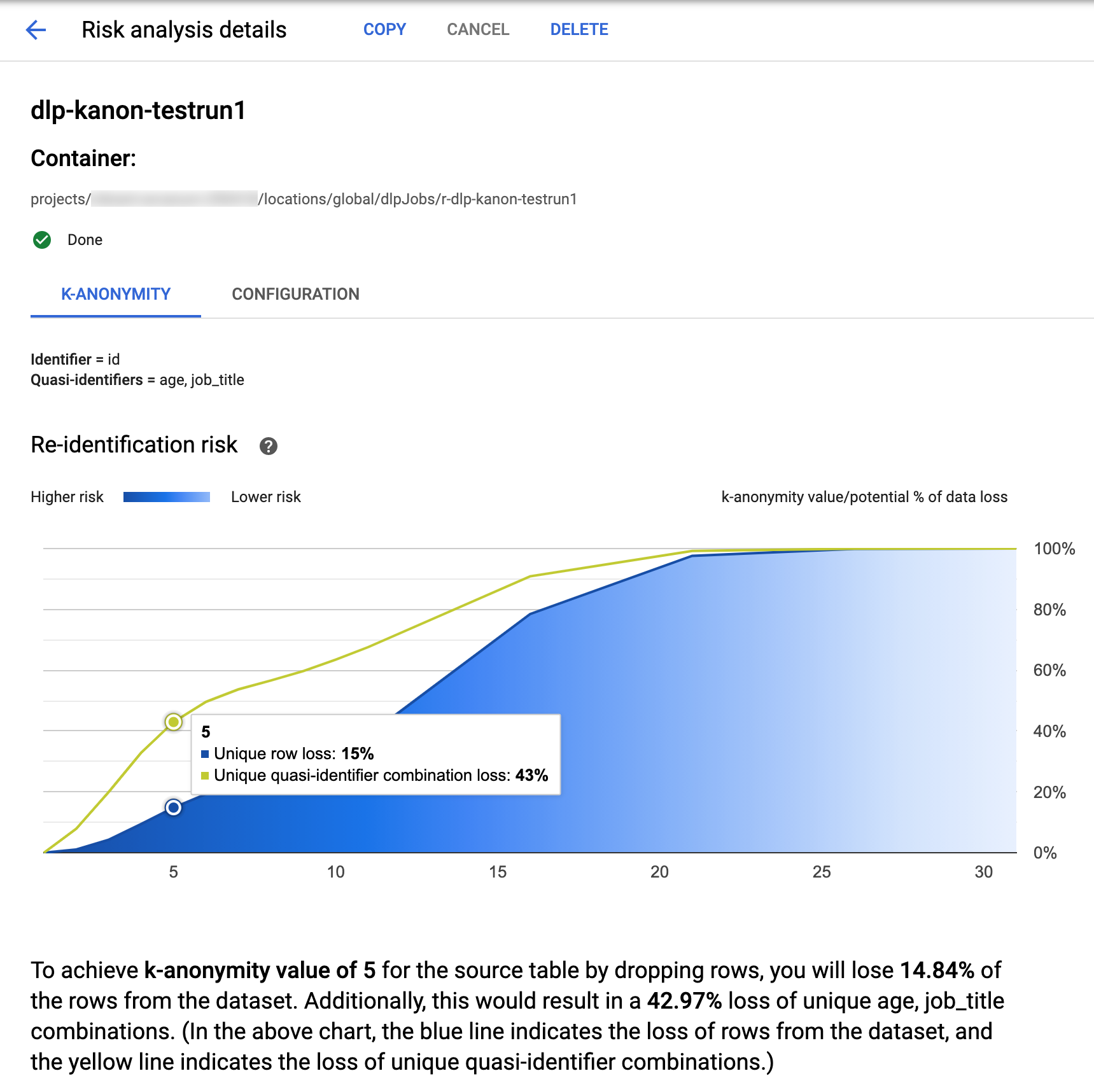
בחלק העליון של הדף מופיע מידע על משימת הסיכון של אנונימיות k, כולל מזהה המשימה ומיקום המשאב בקטע Container.

כדי לראות את התוצאות של חישוב ה-k-anonymity, לוחצים על הכרטיסייה K-anonymity. כדי לראות את ההגדרה של ניתוח הסיכונים, לוחצים על הכרטיסייה Configuration.

בכרטיסייה K-anonymity מופיעים קודם מזהה הישות (אם יש) והמזהים למחצה שמשמשים לחישוב k-anonymity.

תרשים סיכון

בתרשים Re-identification risk, בציר y מוצג אחוז אובדן הנתונים הפוטנציאלי עבור שורות ייחודיות ושילובים ייחודיים של מזהים למחצה, כדי להשיג בציר x ערך של k-anonymity. הצבע של התרשים מציין גם את הסיכון הפוטנציאלי. גוונים כהים יותר של כחול מציינים סיכון גבוה יותר, וגוונים בהירים יותר מציינים סיכון נמוך יותר.

ערכים גבוהים יותר של k-anonymity מצביעים על סיכון נמוך יותר לשחזור פרטי זיהוי. עם זאת, כדי להשיג ערכי אנונימיות k גבוהים יותר, תצטרכו להסיר אחוזים גבוהים יותר מסך השורות ושילובים ייחודיים רבים יותר של מזהים למחצה, מה שעלול להקטין את התועלת של הנתונים. כדי לראות ערך ספציפי של אחוז הפסד פוטנציאלי עבור ערך מסוים של k-אנונימיות, מעבירים את העכבר מעל התרשים. כפי שמוצג בצילום המסך, מופיע הסבר קצר בתרשים.

כדי לראות פרטים נוספים על ערך ספציפי של k-anonymity, לוחצים על נקודה על הגרף המתאימה. הסבר מפורט מופיע מתחת לתרשים, וטבלת נתונים לדוגמה מופיעה בהמשך הדף.

טבלת נתוני סיכון לדוגמה

המרכיב השני בדף התוצאות של משימת הסיכון הוא טבלת נתוני הדגימה. היא מציגה שילובים של מזהים למחצה עבור ערך נתון של k-אנונימיות.
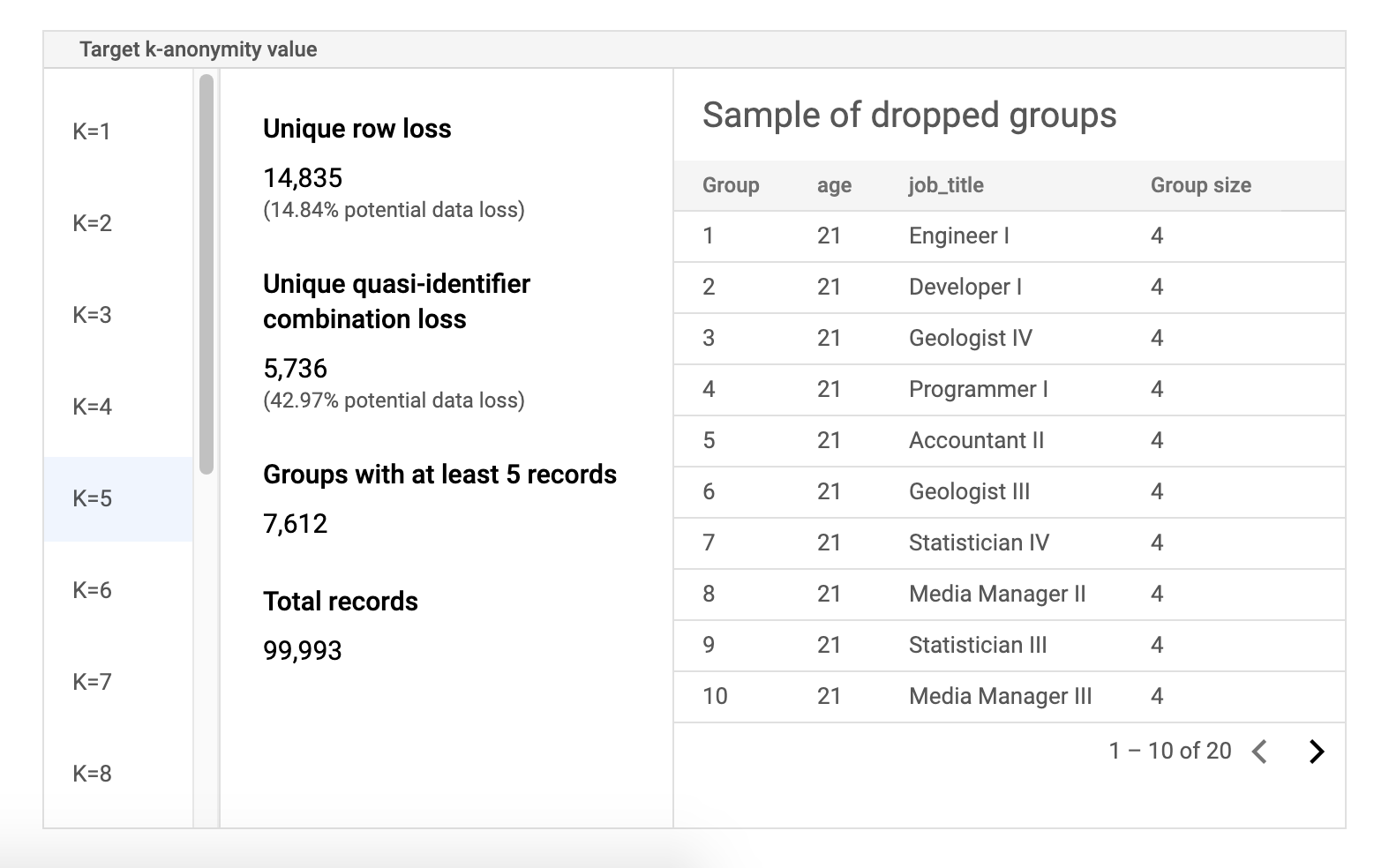
בעמודה הראשונה בטבלה מפורטים ערכי ה-k-אנונימיות. לוחצים על ערך של אנונימיות מסוג k כדי לראות נתוני מדגם תואמים שצריך להסיר כדי להשיג את הערך הזה.

בעמודה השנייה מוצג אובדן הנתונים הפוטנציאלי של שורות ייחודיות ושילובים של מזהים למחצה, וגם מספר הקבוצות עם לפחות k רשומות והמספר הכולל של הרשומות.

בעמודה האחרונה מוצגת דוגמה של קבוצות שמשתפות שילוב של מזהה למחצה, לצד מספר הרשומות שקיימות לשילוב הזה.

אחזור פרטי משימה באמצעות REST

כדי לאחזר את התוצאות של ניתוח הסיכון של אנונימיות מסוג k באמצעות REST API, שולחים את בקשת ה-GET הבאה למשאב projects.dlpJobs. מחליפים את PROJECT_ID במזהה הפרויקט ואת JOB_ID במזהה של המשימה שרוצים לקבל את התוצאות שלה. מזהה המשרה הוחזר כשמתחילים את המשרה, ואפשר גם לאחזר אותו על ידי רשימת כל המשרות.

GET https://dlp.googleapis.com/v2/projects/PROJECT_ID/dlpJobs/JOB_ID

הבקשה מחזירה אובייקט JSON שמכיל מופע של העבודה. תוצאות הניתוח נמצאות בתוך המפתח "riskDetails", באובייקט AnalyzeDataSourceRiskDetails. מידע נוסף מופיע בהפניית ה-API של המשאב DlpJob.

דוגמת קוד: חישוב של k-anonymity עם מזהה ישות

בדוגמה הזו נוצרת משימה של ניתוח סיכונים שמחשבת את k-anonymity עם מזהה ישות.

מידע נוסף על מזהי ישויות זמין במאמר מזהי ישויות וחישוב אנונימיות מסוג k.

C#

מידע על התקנת ספריית הלקוח של Sensitive Data Protection והשימוש בה מופיע במאמר ספריות הלקוח של Sensitive Data Protection.

כדי לבצע אימות ב-Sensitive Data Protection, צריך להגדיר את Application Default Credentials. מידע נוסף זמין במאמר הגדרת אימות לסביבת פיתוח מקומית.


using System;
using System.Collections.Generic;
using System.Linq;
using Google.Api.Gax.ResourceNames;
using Google.Cloud.Dlp.V2;
using Newtonsoft.Json;

public class CalculateKAnonymityOnDataset
{
    public static DlpJob CalculateKAnonymitty(
        string projectId,
        string datasetId,
        string sourceTableId,
        string outputTableId)
    {
        // Construct the dlp client.
        var dlp = DlpServiceClient.Create();

        // Construct the k-anonymity config by setting the EntityId as user_id column
        // and two quasi-identifiers columns.
        var kAnonymity = new PrivacyMetric.Types.KAnonymityConfig
        {
            EntityId = new EntityId
            {
                Field = new FieldId { Name = "Name" }
            },
            QuasiIds =
            {
                new FieldId { Name = "Age" },
                new FieldId { Name = "Mystery" }
            }
        };

        // Construct risk analysis job config by providing the source table, privacy metric
        // and action to save the findings to a BigQuery table.
        var riskJob = new RiskAnalysisJobConfig
        {
            SourceTable = new BigQueryTable
            {
                ProjectId = projectId,
                DatasetId = datasetId,
                TableId = sourceTableId,
            },
            PrivacyMetric = new PrivacyMetric
            {
                KAnonymityConfig = kAnonymity,
            },
            Actions =
            {
                new Google.Cloud.Dlp.V2.Action
                {
                    SaveFindings = new Google.Cloud.Dlp.V2.Action.Types.SaveFindings
                    {
                        OutputConfig = new OutputStorageConfig
                        {
                            Table = new BigQueryTable
                            {
                                ProjectId = projectId,
                                DatasetId = datasetId,
                                TableId = outputTableId
                            }
                        }
                    }
                }
            }
        };

        // Construct the request by providing RiskJob object created above.
        var request = new CreateDlpJobRequest
        {
            ParentAsLocationName = new LocationName(projectId, "global"),
            RiskJob = riskJob
        };

        // Send the job request.
        DlpJob response = dlp.CreateDlpJob(request);

        Console.WriteLine($"Job created successfully. Job name: ${response.Name}");

        return response;
    }
}

Go

מידע על התקנת ספריית הלקוח של Sensitive Data Protection והשימוש בה מופיע במאמר ספריות הלקוח של Sensitive Data Protection.

כדי לבצע אימות ב-Sensitive Data Protection, צריך להגדיר את Application Default Credentials. מידע נוסף זמין במאמר הגדרת אימות לסביבת פיתוח מקומית.

import (
	"context"
	"fmt"
	"io"
	"strings"
	"time"

	dlp "cloud.google.com/go/dlp/apiv2"
	"cloud.google.com/go/dlp/apiv2/dlppb"
)

// Uses the Data Loss Prevention API to compute the k-anonymity of a
// column set in a Google BigQuery table.
func calculateKAnonymityWithEntityId(w io.Writer, projectID, datasetId, tableId string, columnNames ...string) error {
	// projectID := "your-project-id"
	// datasetId := "your-bigquery-dataset-id"
	// tableId := "your-bigquery-table-id"
	// columnNames := "age" "job_title"

	ctx := context.Background()

	// Initialize a client once and reuse it to send multiple requests. Clients
	// are safe to use across goroutines. When the client is no longer needed,
	// call the Close method to cleanup its resources.
	client, err := dlp.NewClient(ctx)
	if err != nil {
		return err
	}

	// Closing the client safely cleans up background resources.
	defer client.Close()

	// Specify the BigQuery table to analyze
	bigQueryTable := &dlppb.BigQueryTable{
		ProjectId: "bigquery-public-data",
		DatasetId: "samples",
		TableId:   "wikipedia",
	}

	// Configure the privacy metric for the job
	// Build the QuasiID slice.
	var q []*dlppb.FieldId
	for _, c := range columnNames {
		q = append(q, &dlppb.FieldId{Name: c})
	}

	entityId := &dlppb.EntityId{
		Field: &dlppb.FieldId{
			Name: "id",
		},
	}

	kAnonymityConfig := &dlppb.PrivacyMetric_KAnonymityConfig{
		QuasiIds: q,
		EntityId: entityId,
	}

	privacyMetric := &dlppb.PrivacyMetric{
		Type: &dlppb.PrivacyMetric_KAnonymityConfig_{
			KAnonymityConfig: kAnonymityConfig,
		},
	}

	// Specify the bigquery table to store the findings.
	// The "test_results" table in the given BigQuery dataset will be created if it doesn't
	// already exist.
	outputbigQueryTable := &dlppb.BigQueryTable{
		ProjectId: projectID,
		DatasetId: datasetId,
		TableId:   tableId,
	}

	// Create action to publish job status notifications to BigQuery table.
	outputStorageConfig := &dlppb.OutputStorageConfig{
		Type: &dlppb.OutputStorageConfig_Table{
			Table: outputbigQueryTable,
		},
	}

	findings := &dlppb.Action_SaveFindings{
		OutputConfig: outputStorageConfig,
	}

	action := &dlppb.Action{
		Action: &dlppb.Action_SaveFindings_{
			SaveFindings: findings,
		},
	}

	// Configure the risk analysis job to perform
	riskAnalysisJobConfig := &dlppb.RiskAnalysisJobConfig{
		PrivacyMetric: privacyMetric,
		SourceTable:   bigQueryTable,
		Actions: []*dlppb.Action{
			action,
		},
	}

	// Build the request to be sent by the client
	req := &dlppb.CreateDlpJobRequest{
		Parent: fmt.Sprintf("projects/%s/locations/global", projectID),
		Job: &dlppb.CreateDlpJobRequest_RiskJob{
			RiskJob: riskAnalysisJobConfig,
		},
	}

	// Send the request to the API using the client
	dlpJob, err := client.CreateDlpJob(ctx, req)
	if err != nil {
		return err
	}
	fmt.Fprintf(w, "Created job: %v\n", dlpJob.GetName())

	// Build a request to get the completed job
	getDlpJobReq := &dlppb.GetDlpJobRequest{
		Name: dlpJob.Name,
	}

	timeout := 15 * time.Minute
	startTime := time.Now()

	var completedJob *dlppb.DlpJob

	// Wait for job completion
	for time.Since(startTime) <= timeout {
		completedJob, err = client.GetDlpJob(ctx, getDlpJobReq)
		if err != nil {
			return err
		}

		if completedJob.GetState() == dlppb.DlpJob_DONE {
			break
		}

		time.Sleep(30 * time.Second)

	}

	if completedJob.GetState() != dlppb.DlpJob_DONE {
		fmt.Println("Job did not complete within 15 minutes.")
	}

	// Retrieve completed job status
	fmt.Fprintf(w, "Job status: %v", completedJob.State)
	fmt.Fprintf(w, "Job name: %v", dlpJob.Name)

	// Get the result and parse through and process the information
	kanonymityResult := completedJob.GetRiskDetails().GetKAnonymityResult()

	for _, result := range kanonymityResult.GetEquivalenceClassHistogramBuckets() {
		fmt.Fprintf(w, "Bucket size range: [%d, %d]\n", result.GetEquivalenceClassSizeLowerBound(), result.GetEquivalenceClassSizeLowerBound())

		for _, bucket := range result.GetBucketValues() {
			quasiIdValues := []string{}
			for _, v := range bucket.GetQuasiIdsValues() {
				quasiIdValues = append(quasiIdValues, v.GetStringValue())
			}
			fmt.Fprintf(w, "\tQuasi-ID values: %s", strings.Join(quasiIdValues, ","))
			fmt.Fprintf(w, "\tClass size: %d", bucket.EquivalenceClassSize)
		}
	}

	return nil

}

Java

מידע על התקנת ספריית הלקוח של Sensitive Data Protection והשימוש בה מופיע במאמר ספריות הלקוח של Sensitive Data Protection.

כדי לבצע אימות ב-Sensitive Data Protection, צריך להגדיר את Application Default Credentials. מידע נוסף זמין במאמר הגדרת אימות לסביבת פיתוח מקומית.


import com.google.cloud.dlp.v2.DlpServiceClient;
import com.google.privacy.dlp.v2.Action;
import com.google.privacy.dlp.v2.Action.SaveFindings;
import com.google.privacy.dlp.v2.AnalyzeDataSourceRiskDetails.KAnonymityResult;
import com.google.privacy.dlp.v2.AnalyzeDataSourceRiskDetails.KAnonymityResult.KAnonymityEquivalenceClass;
import com.google.privacy.dlp.v2.AnalyzeDataSourceRiskDetails.KAnonymityResult.KAnonymityHistogramBucket;
import com.google.privacy.dlp.v2.BigQueryTable;
import com.google.privacy.dlp.v2.CreateDlpJobRequest;
import com.google.privacy.dlp.v2.DlpJob;
import com.google.privacy.dlp.v2.EntityId;
import com.google.privacy.dlp.v2.FieldId;
import com.google.privacy.dlp.v2.GetDlpJobRequest;
import com.google.privacy.dlp.v2.LocationName;
import com.google.privacy.dlp.v2.OutputStorageConfig;
import com.google.privacy.dlp.v2.PrivacyMetric;
import com.google.privacy.dlp.v2.PrivacyMetric.KAnonymityConfig;
import com.google.privacy.dlp.v2.RiskAnalysisJobConfig;
import com.google.privacy.dlp.v2.Value;
import java.io.IOException;
import java.time.Duration;
import java.util.Arrays;
import java.util.List;
import java.util.concurrent.TimeUnit;
import java.util.stream.Collectors;

@SuppressWarnings("checkstyle:AbbreviationAsWordInName")
public class RiskAnalysisKAnonymityWithEntityId {

  public static void main(String[] args) throws IOException, InterruptedException {
    // TODO(developer): Replace these variables before running the sample.
    // The Google Cloud project id to use as a parent resource.
    String projectId = "your-project-id";
    // The BigQuery dataset id to be used and the reference table name to be inspected.
    String datasetId = "your-bigquery-dataset-id";
    String tableId = "your-bigquery-table-id";
    calculateKAnonymityWithEntityId(projectId, datasetId, tableId);
  }

  // Uses the Data Loss Prevention API to compute the k-anonymity of a column set in a Google
  // BigQuery table.
  public static void calculateKAnonymityWithEntityId(
      String projectId, String datasetId, String tableId) throws IOException, InterruptedException {
    // Initialize client that will be used to send requests. This client only needs to be created
    // once, and can be reused for multiple requests. After completing all of your requests, call
    // the "close" method on the client to safely clean up any remaining background resources.
    try (DlpServiceClient dlpServiceClient = DlpServiceClient.create()) {

      // Specify the BigQuery table to analyze
      BigQueryTable bigQueryTable =
          BigQueryTable.newBuilder()
              .setProjectId(projectId)
              .setDatasetId(datasetId)
              .setTableId(tableId)
              .build();

      // These values represent the column names of quasi-identifiers to analyze
      List<String> quasiIds = Arrays.asList("Age", "Mystery");

      // Create a list of FieldId objects based on the provided list of column names.
      List<FieldId> quasiIdFields =
          quasiIds.stream()
              .map(columnName -> FieldId.newBuilder().setName(columnName).build())
              .collect(Collectors.toList());

      // Specify the unique identifier in the source table for the k-anonymity analysis.
      FieldId uniqueIdField = FieldId.newBuilder().setName("Name").build();
      EntityId entityId = EntityId.newBuilder().setField(uniqueIdField).build();
      KAnonymityConfig kanonymityConfig = KAnonymityConfig.newBuilder()
              .addAllQuasiIds(quasiIdFields)
              .setEntityId(entityId)
              .build();

      // Configure the privacy metric to compute for re-identification risk analysis.
      PrivacyMetric privacyMetric =
          PrivacyMetric.newBuilder().setKAnonymityConfig(kanonymityConfig).build();

      // Specify the bigquery table to store the findings.
      // The "test_results" table in the given BigQuery dataset will be created if it doesn't
      // already exist.
      BigQueryTable outputbigQueryTable =
          BigQueryTable.newBuilder()
              .setProjectId(projectId)
              .setDatasetId(datasetId)
              .setTableId("test_results")
              .build();

      // Create action to publish job status notifications to BigQuery table.
      OutputStorageConfig outputStorageConfig =
          OutputStorageConfig.newBuilder().setTable(outputbigQueryTable).build();
      SaveFindings findings =
          SaveFindings.newBuilder().setOutputConfig(outputStorageConfig).build();
      Action action = Action.newBuilder().setSaveFindings(findings).build();

      // Configure the risk analysis job to perform
      RiskAnalysisJobConfig riskAnalysisJobConfig =
          RiskAnalysisJobConfig.newBuilder()
              .setSourceTable(bigQueryTable)
              .setPrivacyMetric(privacyMetric)
              .addActions(action)
              .build();

      // Build the request to be sent by the client
      CreateDlpJobRequest createDlpJobRequest =
          CreateDlpJobRequest.newBuilder()
              .setParent(LocationName.of(projectId, "global").toString())
              .setRiskJob(riskAnalysisJobConfig)
              .build();

      // Send the request to the API using the client
      DlpJob dlpJob = dlpServiceClient.createDlpJob(createDlpJobRequest);

      // Build a request to get the completed job
      GetDlpJobRequest getDlpJobRequest =
          GetDlpJobRequest.newBuilder().setName(dlpJob.getName()).build();

      DlpJob completedJob = null;
      // Wait for job completion
      try {
        Duration timeout = Duration.ofMinutes(15);
        long startTime = System.currentTimeMillis();
        do {
          completedJob = dlpServiceClient.getDlpJob(getDlpJobRequest);
          TimeUnit.SECONDS.sleep(30);
        } while (completedJob.getState() != DlpJob.JobState.DONE
            && System.currentTimeMillis() - startTime <= timeout.toMillis());
      } catch (InterruptedException e) {
        System.out.println("Job did not complete within 15 minutes.");
      }

      // Retrieve completed job status
      System.out.println("Job status: " + completedJob.getState());
      System.out.println("Job name: " + dlpJob.getName());

      // Get the result and parse through and process the information
      KAnonymityResult kanonymityResult = completedJob.getRiskDetails().getKAnonymityResult();
      for (KAnonymityHistogramBucket result :
          kanonymityResult.getEquivalenceClassHistogramBucketsList()) {
        System.out.printf(
            "Bucket size range: [%d, %d]\n",
            result.getEquivalenceClassSizeLowerBound(), result.getEquivalenceClassSizeUpperBound());

        for (KAnonymityEquivalenceClass bucket : result.getBucketValuesList()) {
          List<String> quasiIdValues =
              bucket.getQuasiIdsValuesList().stream()
                  .map(Value::toString)
                  .collect(Collectors.toList());

          System.out.println("\tQuasi-ID values: " + String.join(", ", quasiIdValues));
          System.out.println("\tClass size: " + bucket.getEquivalenceClassSize());
        }
      }
    }
  }
}

Node.js

מידע על התקנת ספריית הלקוח של Sensitive Data Protection והשימוש בה מופיע במאמר ספריות הלקוח של Sensitive Data Protection.

כדי לבצע אימות ב-Sensitive Data Protection, צריך להגדיר את Application Default Credentials. מידע נוסף זמין במאמר הגדרת אימות לסביבת פיתוח מקומית.

// Imports the Google Cloud Data Loss Prevention library
const DLP = require('@google-cloud/dlp');

// Instantiates a client
const dlp = new DLP.DlpServiceClient();

// The project ID to run the API call under.
// const projectId = "your-project-id";

// The ID of the dataset to inspect, e.g. 'my_dataset'
// const datasetId = 'my_dataset';

// The ID of the table to inspect, e.g. 'my_table'
// const sourceTableId = 'my_source_table';

// The ID of the table where outputs are stored
// const outputTableId = 'my_output_table';

async function kAnonymityWithEntityIds() {
  // Specify the BigQuery table to analyze.
  const sourceTable = {
    projectId: projectId,
    datasetId: datasetId,
    tableId: sourceTableId,
  };

  // Specify the unique identifier in the source table for the k-anonymity analysis.
  const uniqueIdField = {name: 'Name'};

  // These values represent the column names of quasi-identifiers to analyze
  const quasiIds = [{name: 'Age'}, {name: 'Mystery'}];

  // Configure the privacy metric to compute for re-identification risk analysis.
  const privacyMetric = {
    kAnonymityConfig: {
      entityId: {
        field: uniqueIdField,
      },
      quasiIds: quasiIds,
    },
  };
  // Create action to publish job status notifications to BigQuery table.
  const action = [
    {
      saveFindings: {
        outputConfig: {
          table: {
            projectId: projectId,
            datasetId: datasetId,
            tableId: outputTableId,
          },
        },
      },
    },
  ];

  // Configure the risk analysis job to perform.
  const riskAnalysisJob = {
    sourceTable: sourceTable,
    privacyMetric: privacyMetric,
    actions: action,
  };
  // Combine configurations into a request for the service.
  const createDlpJobRequest = {
    parent: `projects/${projectId}/locations/global`,
    riskJob: riskAnalysisJob,
  };

  // Send the request and receive response from the service
  const [createdDlpJob] = await dlp.createDlpJob(createDlpJobRequest);
  const jobName = createdDlpJob.name;

  // Waiting for a maximum of 15 minutes for the job to get complete.
  let job;
  let numOfAttempts = 30;
  while (numOfAttempts > 0) {
    // Fetch DLP Job status
    [job] = await dlp.getDlpJob({name: jobName});

    // Check if the job has completed.
    if (job.state === 'DONE') {
      break;
    }
    if (job.state === 'FAILED') {
      console.log('Job Failed, Please check the configuration.');
      return;
    }
    // Sleep for a short duration before checking the job status again.
    await new Promise(resolve => {
      setTimeout(() => resolve(), 30000);
    });
    numOfAttempts -= 1;
  }

  // Create helper function for unpacking values
  const getValue = obj => obj[Object.keys(obj)[0]];

  // Print out the results.
  const histogramBuckets =
    job.riskDetails.kAnonymityResult.equivalenceClassHistogramBuckets;

  histogramBuckets.forEach((histogramBucket, histogramBucketIdx) => {
    console.log(`Bucket ${histogramBucketIdx}:`);
    console.log(
      `  Bucket size range: [${histogramBucket.equivalenceClassSizeLowerBound}, ${histogramBucket.equivalenceClassSizeUpperBound}]`
    );

    histogramBucket.bucketValues.forEach(valueBucket => {
      const quasiIdValues = valueBucket.quasiIdsValues
        .map(getValue)
        .join(', ');
      console.log(`  Quasi-ID values: {${quasiIdValues}}`);
      console.log(`  Class size: ${valueBucket.equivalenceClassSize}`);
    });
  });
}
await kAnonymityWithEntityIds();

PHP

מידע על התקנת ספריית הלקוח של Sensitive Data Protection והשימוש בה מופיע במאמר ספריות הלקוח של Sensitive Data Protection.

כדי לבצע אימות ב-Sensitive Data Protection, צריך להגדיר את Application Default Credentials. מידע נוסף זמין במאמר הגדרת אימות לסביבת פיתוח מקומית.

use Google\Cloud\Dlp\V2\Action;
use Google\Cloud\Dlp\V2\Action\SaveFindings;
use Google\Cloud\Dlp\V2\BigQueryTable;
use Google\Cloud\Dlp\V2\Client\DlpServiceClient;
use Google\Cloud\Dlp\V2\CreateDlpJobRequest;
use Google\Cloud\Dlp\V2\DlpJob\JobState;
use Google\Cloud\Dlp\V2\EntityId;
use Google\Cloud\Dlp\V2\FieldId;
use Google\Cloud\Dlp\V2\GetDlpJobRequest;
use Google\Cloud\Dlp\V2\OutputStorageConfig;
use Google\Cloud\Dlp\V2\PrivacyMetric;
use Google\Cloud\Dlp\V2\PrivacyMetric\KAnonymityConfig;
use Google\Cloud\Dlp\V2\RiskAnalysisJobConfig;

/**
 * Computes the k-anonymity of a column set in a Google BigQuery table with entity id.
 *
 * @param string    $callingProjectId  The project ID to run the API call under.
 * @param string    $datasetId         The ID of the dataset to inspect.
 * @param string    $tableId           The ID of the table to inspect.
 * @param string[]  $quasiIdNames      Array columns that form a composite key (quasi-identifiers).
 */

function k_anonymity_with_entity_id(
    // TODO(developer): Replace sample parameters before running the code.
    string $callingProjectId,
    string $datasetId,
    string $tableId,
    array  $quasiIdNames
): void {
    // Instantiate a client.
    $dlp = new DlpServiceClient();

    // Specify the BigQuery table to analyze.
    $bigqueryTable = (new BigQueryTable())
        ->setProjectId($callingProjectId)
        ->setDatasetId($datasetId)
        ->setTableId($tableId);

    // Create a list of FieldId objects based on the provided list of column names.
    $quasiIds = array_map(
        function ($id) {
            return (new FieldId())
                ->setName($id);
        },
        $quasiIdNames
    );

    // Specify the unique identifier in the source table for the k-anonymity analysis.
    $statsConfig = (new KAnonymityConfig())
        ->setEntityId((new EntityId())
            ->setField((new FieldId())
                ->setName('Name')))
        ->setQuasiIds($quasiIds);

    // Configure the privacy metric to compute for re-identification risk analysis.
    $privacyMetric = (new PrivacyMetric())
        ->setKAnonymityConfig($statsConfig);

    // Specify the bigquery table to store the findings.
    // The "test_results" table in the given BigQuery dataset will be created if it doesn't
    // already exist.
    $outBigqueryTable = (new BigQueryTable())
        ->setProjectId($callingProjectId)
        ->setDatasetId($datasetId)
        ->setTableId('test_results');

    $outputStorageConfig = (new OutputStorageConfig())
        ->setTable($outBigqueryTable);

    $findings = (new SaveFindings())
        ->setOutputConfig($outputStorageConfig);

    $action = (new Action())
        ->setSaveFindings($findings);

    // Construct risk analysis job config to run.
    $riskJob = (new RiskAnalysisJobConfig())
        ->setPrivacyMetric($privacyMetric)
        ->setSourceTable($bigqueryTable)
        ->setActions([$action]);

    // Submit request.
    $parent = "projects/$callingProjectId/locations/global";
    $createDlpJobRequest = (new CreateDlpJobRequest())
        ->setParent($parent)
        ->setRiskJob($riskJob);
    $job = $dlp->createDlpJob($createDlpJobRequest);

    $numOfAttempts = 10;
    do {
        printf('Waiting for job to complete' . PHP_EOL);
        sleep(10);
        $getDlpJobRequest = (new GetDlpJobRequest())
            ->setName($job->getName());
        $job = $dlp->getDlpJob($getDlpJobRequest);
        if ($job->getState() == JobState::DONE) {
            break;
        }
        $numOfAttempts--;
    } while ($numOfAttempts > 0);

    // Print finding counts
    printf('Job %s status: %s' . PHP_EOL, $job->getName(), JobState::name($job->getState()));
    switch ($job->getState()) {
        case JobState::DONE:
            $histBuckets = $job->getRiskDetails()->getKAnonymityResult()->getEquivalenceClassHistogramBuckets();

            foreach ($histBuckets as $bucketIndex => $histBucket) {
                // Print bucket stats.
                printf('Bucket %s:' . PHP_EOL, $bucketIndex);
                printf(
                    '  Bucket size range: [%s, %s]' . PHP_EOL,
                    $histBucket->getEquivalenceClassSizeLowerBound(),
                    $histBucket->getEquivalenceClassSizeUpperBound()
                );

                // Print bucket values.
                foreach ($histBucket->getBucketValues() as $percent => $valueBucket) {
                    // Pretty-print quasi-ID values.
                    printf('  Quasi-ID values:' . PHP_EOL);
                    foreach ($valueBucket->getQuasiIdsValues() as $index => $value) {
                        print('    ' . $value->serializeToJsonString() . PHP_EOL);
                    }
                    printf(
                        '  Class size: %s' . PHP_EOL,
                        $valueBucket->getEquivalenceClassSize()
                    );
                }
            }

            break;
        case JobState::FAILED:
            printf('Job %s had errors:' . PHP_EOL, $job->getName());
            $errors = $job->getErrors();
            foreach ($errors as $error) {
                var_dump($error->getDetails());
            }
            break;
        case JobState::PENDING:
            printf('Job has not completed. Consider a longer timeout or an asynchronous execution model' . PHP_EOL);
            break;
        default:
            printf('Unexpected job state. Most likely, the job is either running or has not yet started.');
    }
}

Python

מידע על התקנת ספריית הלקוח של Sensitive Data Protection והשימוש בה מופיע במאמר ספריות הלקוח של Sensitive Data Protection.

כדי לבצע אימות ב-Sensitive Data Protection, צריך להגדיר את Application Default Credentials. מידע נוסף זמין במאמר הגדרת אימות לסביבת פיתוח מקומית.

import time
from typing import List

import google.cloud.dlp_v2
from google.cloud.dlp_v2 import types


def k_anonymity_with_entity_id(
    project: str,
    source_table_project_id: str,
    source_dataset_id: str,
    source_table_id: str,
    entity_id: str,
    quasi_ids: List[str],
    output_table_project_id: str,
    output_dataset_id: str,
    output_table_id: str,
) -> None:
    """Uses the Data Loss Prevention API to compute the k-anonymity using entity_id
        of a column set in a Google BigQuery table.
    Args:
        project: The Google Cloud project id to use as a parent resource.
        source_table_project_id: The Google Cloud project id where the BigQuery table
            is stored.
        source_dataset_id: The id of the dataset to inspect.
        source_table_id: The id of the table to inspect.
        entity_id: The column name of the table that enables accurately determining k-anonymity
         in the common scenario wherein several rows of dataset correspond to the same sensitive
         information.
        quasi_ids: A set of columns that form a composite key.
        output_table_project_id: The Google Cloud project id where the output BigQuery table
            is stored.
        output_dataset_id: The id of the output BigQuery dataset.
        output_table_id: The id of the output BigQuery table.
    """

    # Instantiate a client.
    dlp = google.cloud.dlp_v2.DlpServiceClient()

    # Location info of the source BigQuery table.
    source_table = {
        "project_id": source_table_project_id,
        "dataset_id": source_dataset_id,
        "table_id": source_table_id,
    }

    # Specify the bigquery table to store the findings.
    # The output_table_id in the given BigQuery dataset will be created if it doesn't
    # already exist.
    dest_table = {
        "project_id": output_table_project_id,
        "dataset_id": output_dataset_id,
        "table_id": output_table_id,
    }

    # Convert quasi id list to Protobuf type
    def map_fields(field: str) -> dict:
        return {"name": field}

    #  Configure column names of quasi-identifiers to analyze
    quasi_ids = map(map_fields, quasi_ids)

    # Tell the API where to send a notification when the job is complete.
    actions = [{"save_findings": {"output_config": {"table": dest_table}}}]

    # Configure the privacy metric to compute for re-identification risk analysis.
    # Specify the unique identifier in the source table for the k-anonymity analysis.
    privacy_metric = {
        "k_anonymity_config": {
            "entity_id": {"field": {"name": entity_id}},
            "quasi_ids": quasi_ids,
        }
    }

    # Configure risk analysis job.
    risk_job = {
        "privacy_metric": privacy_metric,
        "source_table": source_table,
        "actions": actions,
    }

    # Convert the project id into a full resource id.
    parent = f"projects/{project}/locations/global"

    # Call API to start risk analysis job.
    response = dlp.create_dlp_job(
        request={
            "parent": parent,
            "risk_job": risk_job,
        }
    )
    job_name = response.name
    print(f"Inspection Job started : {job_name}")

    # Waiting for a maximum of 15 minutes for the job to be completed.
    job = dlp.get_dlp_job(request={"name": job_name})
    no_of_attempts = 30
    while no_of_attempts > 0:
        # Check if the job has completed
        if job.state == google.cloud.dlp_v2.DlpJob.JobState.DONE:
            break
        if job.state == google.cloud.dlp_v2.DlpJob.JobState.FAILED:
            print("Job Failed, Please check the configuration.")
            return

        # Sleep for a short duration before checking the job status again
        time.sleep(30)
        no_of_attempts -= 1

        # Get the DLP job status
        job = dlp.get_dlp_job(request={"name": job_name})

    if job.state != google.cloud.dlp_v2.DlpJob.JobState.DONE:
        print("Job did not complete within 15 minutes.")
        return

    # Create helper function for unpacking values
    def get_values(obj: types.Value) -> str:
        return str(obj.string_value)

    # Print out the results.
    print(f"Job name: {job.name}")
    histogram_buckets = (
        job.risk_details.k_anonymity_result.equivalence_class_histogram_buckets
    )
    # Print bucket stats
    for i, bucket in enumerate(histogram_buckets):
        print(f"Bucket {i}:")
        if bucket.equivalence_class_size_lower_bound:
            print(
                f"Bucket size range: [{bucket.equivalence_class_size_lower_bound}, "
                f"{bucket.equivalence_class_size_upper_bound}]"
            )
            for value_bucket in bucket.bucket_values:
                print(
                    f"Quasi-ID values: {get_values(value_bucket.quasi_ids_values[0])}"
                )
                print(f"Class size: {value_bucket.equivalence_class_size}")
        else:
            print("No findings.")

המאמרים הבאים