

This page describes search use cases, their respective performance tiers, and how to check the AI Commerce Search in Gemini Enterprise for Customer Experience console for an assessment of your data quality and which performance tiers you have unlocked. Each performance tier is automatically activated when you satisfy all of its upgrade-blocking data requirements. You must also meet the requirements for all previous tiers to upgrade to the next tier.
Search use cases
Search provides search results for two use cases:
- Text query search, used when your shoppers look for items on your application by entering text queries and getting a set of relevant results.
- Browse search, used when your shoppers land on a particular category page, such as the "Appliances" category web page of a home improvement store's retail site and browse the sorted items in that category.
For more about the differences between these use cases, see About text search and browse search.
Unlock search performance tiers
Text query search and browse search have different performance tiers that increasingly improve your search results. Unlocking performance tiers relies on the user event and catalog data that you upload to AI Commerce Search.
The following performance tiers are available for both use cases, text query search and browse:
Text query search
TIER 1
Relevance
Results are returned based on degree of relevance to the query, such as how black a dress is when a black dress is queried.
Minimum data requirements
- Catalog
- Text query
Data checks
- Products should have a description.
- At least 95% of search requests should have query expansion enabled.
- Ratio of
detail-page-viewevents to search events should be at least 4 percent. - Products should have unique titles that are distinguishable in search queries.
- Product title should contain at least 2 words.
- At least 95% of products should have titles.
- Products should have a valid and accessible URI.
- There should be at least 5 custom searchable attributes in the catalog.
- The exact match field for all products shouldn't contain any real word and it should be exactly one token.
TIER 2
Relevance and popularity
- Refines TIER 1 for the most popular items in the queried search.
- Equally relevant products are ranked by the popularity of the product on your site.
Data checks
Upgrade blocking to unlock Tier 2:
- At least 100,000 text search and browse events must have been imported or recorded in the last 90 days.
Performance critical:
- At least 95% of events in the last 90 days should be joined with products.
- At least 1.5% of search events with later pages over the last 7 days, meaning, they include all associated search result pages and their product impressions.
- At least 95% of search events over the last 7 days should be associated with product impressions.
- At least 10,000
detail-page-view,add-to-cart, andpurchaseevents over the last 90 days. - At least 70% of search requests over the last 90 days should have associated events.
- At least 95% search events over the last 90 days have attribution tokens.
- At least 100,000 events associated with the most popular visitor ID over the last 7 days.
TIER 3
Revenue-optimized
To unlock revenue optimization, model more than 250,000 search events with at least one user interaction.
Data checks
Upgrade blocking to unlock Tier 3:
95% of products must have a price for revenue optimization to work properly. This requires primary products or at least one of their variants to be priced. When the product goes out of stock, rather than clear the price, give the product the attribute of
out-of-stock.At least 250,000 search events must be associated with user interaction (followed by a
detail-page-view,add-to-cart, orpurchaseevent with the same visitor ID and one of the products included in the search event) in the last 90 days.At least 250,000 search user events must have
detail-page-viewevents that occurred immediately after the search event to meet the threshold. This metric is calculated over the last 30 days, if you uploaded more than 100 million events in that time. Otherwise, the time window is 90 days.At least 100 products must have had at least one
detail-page-viewevent that are attributable to a search event. This metric is calculated over the last 30 days if you have uploaded over 100 million events in the last 30 days. Otherwise, the time window is 90 days.
Performance critical:
Search events should be either associated with a query (text) or a category page (browse). There shouldn't be any search events where both are empty. Ideally, you should have a large number of search events with both fields filled.
Search requests shouldn't have an empty query. Ideally, similar to search events, search requests should have either the query (text) and the page category (browse) filled. This metric is calculated as a percentage of all search requests in the last 60 days.
At least 20 for every 1,000
detail-page-viewevents should beadd-to-cartevents from the last 90 days to meet this threshold.For every 1,000
add-to-cartevents, there should be at least 25purchaseevents from the last 90 days.
TIER 4
Personalized revenue
Tier 4 builds on Tier 3 by adding personalization capabilities.
Data checks
Upgrade blocking to unlock Tier 4:
At least 100,000
searchevents in the last 30 days must be served by AI Commerce Search (not a legacy engine).Never cache personalized search results. Caching is detected when multiple search user events with different visitor IDs have the same attribution token. This metric is calculated over the 100,000 most recent search events with a Vertex AI token.
A consistent
visitorId(anduserIdfor logged-in users) must be tracked across events and search requests. There must be a more than a 10% match rate of visitor IDs betweenSearchRequestsand user events for the most recent 100,000 user events.
Performance critical:
To improve personalization quality, at least 10% of visitor IDs should match between search API requests and search events.
At least 1% of search events should have user IDs set.
At least 1% of search requests should have a user ID set.
Browse
BRONZE
Baseline browse for random results
- Any search result that fits your filters, in random order.
Minimum data requirements
- Catalog
- Category page (browse) query
SILVER
Popularity
- Results are returned based only on relevance to the category.
Data checks
Upgrade blocking to unlock Silver:
- At least 100,000 text search or browse events must be imported or recorded from the last 90 days.
Performance critical:
Products should have a valid and accessible URI. (Recommended: > 95.0%)
At least 95% of products should have titles. (Recommended: > 95.0%)
Product titles should contain at least 2 words. (Recommended: > 80.0%)
Products should have a description. (Recommended: > 90.0%)
Products should have unique titles that are distinguishable in search queries. (Recommended: < 50.0%)
At least 90% of browse requests should have filter and page_category set. This metric is calculated over the last 60 days. (Recommended: > 90.0%)
Import or record more
detail-page-view,add-to-cartandpurchaseevents from the last 90 days. (Recommended: > 10000)Browse requests with very few results may be due to an overly restrictive filter. This metric is calculated over the last 60 days. (Recommended: < 10.0%)
Browse requests with too many products may indicate that your request filter is missing category restricts. This metric is calculated over the last 60 days. (Recommended: < 10.0%)
Import or record more
details-page-viewevents from the last 90 days. (Recommended: > 0.04)
GOLD
Revenue-optimized ranking
This tier optimizes product ranking within browsed categories for revenue-based goals.
Data checks
Upgrade blocking to unlock Gold:
At least 95% of searched products must have valid price information. Requires primary products or at least one of their variants priced. When the product goes out of stock, don't clear its price.
At least 250,000 browse search user events followed by a
detail-page-view,add-to-cart, orpurchaseevent with the same visitor ID and with one of the products included in the search event over the last 90 days.At least 250,000 imported or recorded
detail-page-viewevents that occurred immediately after browse events to meet the threshold over the last 90 days.At least 100 imported or recorded
detail-page-viewevents for a variety of products over the last 90 days.
Performance critical:
At least 95% of browse requests and events should have filter values that match exactly. This metric is calculated over the last 60 days. (Recommended: > 95.0%)
At least 95% of browse requests and events should have page_category values that match exactly. This metric is calculated over the last 60 days. (Recommended: > 95.0%)
At least 95% of browse events should have attribution tokens. This metric is calculated over the last 90 days. (Recommended: > 95.0%)
At least 70% of browse requests should have associated user events. This metric is calculated over the last 60 days. (Recommended: > 70.0%)
Search events shouldn't have both the query and page category empty. (Recommended: < 5.0%)
Search events shouldn't have both the query and page category filled. (Recommended: < 10.0%)
Browse requests should have page categories populated. Browse requests without page categories are not revenue optimized because we don't know which page the user is on. This metric is calculated over the last 60 days. (Recommended: < 5.0%)
Search requests should have either query or page category populated, but not both. This metric is calculated over the last 60 days. (Recommended: < 10.0%)
For every 1,000
add-to-cartevents, there should be at least 25purchaseevents from the last 90 days. (Recommended: > 0.02)For every 1,000
detail-page-viewevents, there should be at least 20add-to-cartevents from the last 90 days. (Recommended: > 0.025)
PLATINUM
Personalized revenue-optimized ranking
This tier provides personalized product ranking within browsed categories, aiming to optimize revenue based on individual user behavior and preferences.
Data checks
Upgrade blocking to unlock Platinum:
At least 100,000 AI Commerce Search browse user events must have a Vertex AI attribution token over the last 90 days. Ensure all browse impressions are recorded as events and include the attribution token.
At least 99.0% of browse results served by Vertex AI must be non-cached. Personalized results shouldn't be cached. Caching is detected when multiple browse user events with different visitor IDs have the same attribution token. This is calculated over the 100,000 most recent browse events with a Vertex AI token.
At least 10.0% of visitor IDs must match between the browse API requests and the corresponding browse user events. This is calculated over the 100,000 most recent browse events served by Vertex AI.
Performance critical:
Import or record more user events with user IDs to improve personalization quality. This metric is calculated over the last 7 days. (Recommended: > 1.0%)
To improve personalization quality the user ID value in search requests should match the user ID in corresponding search events. This metric is calculated over the last 60 days. (Recommended: > 10.0%)
The AI Commerce Search in Gemini Enterprise for Customer Experience console provides a page where you can check if you have met each tier's data requirements.
The next sections show how to sign up for data quality alerts that notify you which of the tiers your data falls into, given your current parameters. These alerts also serve as a guide for your specific use case data requirements for best optimizing your search results.
Check your data quality
After uploading your data, go to the AI Commerce Search in Gemini Enterprise for Customer Experience console to see data check metrics for each performance tier for your use case.
Go to the Data quality page in the AI Commerce Search in Gemini Enterprise for Customer Experience console.
Go to the Data quality pageView the data check metrics for your search use case:
- For text search metrics, click the Search tab.
- For browse search metrics, click the Browse tab.
Check each performance tier's score card of issues at the top of the page.
- If it is labeled "In use": You have satisfied all blocking issues for that tier and have unlocked it.
- If there are 0 blocking issues: You have satisfied the data checks for that tier. If there are 0 blocking issues for this tier and all previous tiers, it takes about 24 hours to train and prepare the model and activate the newly unlocked tier.
- If there are any blocking issues: Check that tier's metrics to see which data issues to address to unlock that tier.
View each performance tier's data check metric table to see a list of issues that can block tier upgrades or impact search performance.
Check the Status column for the priority level of each data check metric:
- Upgrade blocking: Identifies data issues that prevent search from upgrading your use case to the next performance tier. To unlock a tier, satisfy all upgrade blocking data checks for that performance tier (and those of its previous tiers).
- Performance critical: Identifies data issues that don't block an upgrade, but can have a significant impact on text search or browse search performance.
- Compliant: Indicates that this data check has passed.
- Unavailable: Indicates that a non-upgrade blocking data check is not yet completed. Values for these metrics are displayed as N/A. It can take up to 24 hours after importing data to compute some data checks.
For more information about any metric, click Details to see a detail panel that displays that metric's description, data check timestamp, and threshold values.
Check the thresholds in a metric's Details panel for the values needed to satisfy that metric's data check and improve results. Not all thresholds apply to all metrics:
- Blocking threshold: A required threshold to meet for satisfying this metric's data check.
- Critical threshold: A highly recommended threshold to meet. Not meeting this threshold can have a significant negative impact on performance.
- Warning threshold: A recommended threshold to meet. Not meeting this threshold can have a minor impact on performance.
To import more data to satisfy any data issues, see Import historical user events or Import catalog information in the public documentation.
Best practices
- In search requests and in user events, provide user IDs in addition to visitor IDs for signed-in users. This allows search to personalize results for the user based on users' signed-in events across devices.
- Send user events in real time instead of in batch uploads with a delay. This helps search personalize using a user's most recent activity on your site.
- Upload all user events. For example, don't submit only events that are attributable to searches.
Feature selection for upper revenue-optimized tiers
AI Commerce Search has been upgraded for retailers whose data has reached the upper performance tiers that unlock revenue-optimized search capabilities. These retailers in these upper tiers can now make use of feature selection:
- For browse: Silver and Gold
- For search: Tiers 3 and 4
Why the ranking upgrade?
Large AI Commerce Search customers have up to 10,000 custom attributes in their product catalog, while the ranking model previously had only 20 static product features (such as price and average rating) shared across all customers. This resulted in the ranking model having very incomplete product data, and no ability to customize the product features to different retail domains and use cases like fashion, hardware or home goods.
The inability to model custom attributes led some users to put the attributes they considered important into the static (fixed) product features. However, this required manual effort and clearly only worked for a small number of attributes.
Dynamic custom feature selection
AI Commerce Search has upgraded its revenue-optimized tiers to auto select custom attributes. The upgrade involves incorporating relevant custom attributes into the ranking process:
- Goes through all custom attributes for each retailer and chooses the most useful ones to be added to the set of static product features.
- Displays selected attributes for each retailer.
- Repeats the feature selection process on a regular basis (once every 30 days).
In sum, AI Commerce Search not only gives the ranking model access up to 100 times or more potential new features to select from for the model, but each customer's attributes are also refreshed regularly to adapt to seasonal sales and other dynamic data changes.
The upgraded ranking solution provides more powerful search insights, utilizing regularly refreshed custom attributes to drive data quality.
Full product knowledge
- Feature selection: The AI Commerce Search algorithm selects up to 20 most important custom attributes for each retailer.
- Benefits: Improved ranking accuracy by leveraging additional information about products, such as sale codes and product or style specifications.
- Visibility: Retailers can view the selected custom attributes and ensure they are maintained and up-to-date.
- Customization and learning: Customers can identify patterns in selected custom attributes and add other relevant ones to further increase ranking performance.
How to see which attributes are being used
If a customer has the higher tiers enabled with sufficient user event data points, the new custom attributes information is now visible in the Console, listed under the Text search and/or Browse search tab in the Data quality page of the AI Commerce Search in Gemini Enterprise for Customer Experience. Here, it tells you which custom attributes were chosen by the AI Commerce Search system.
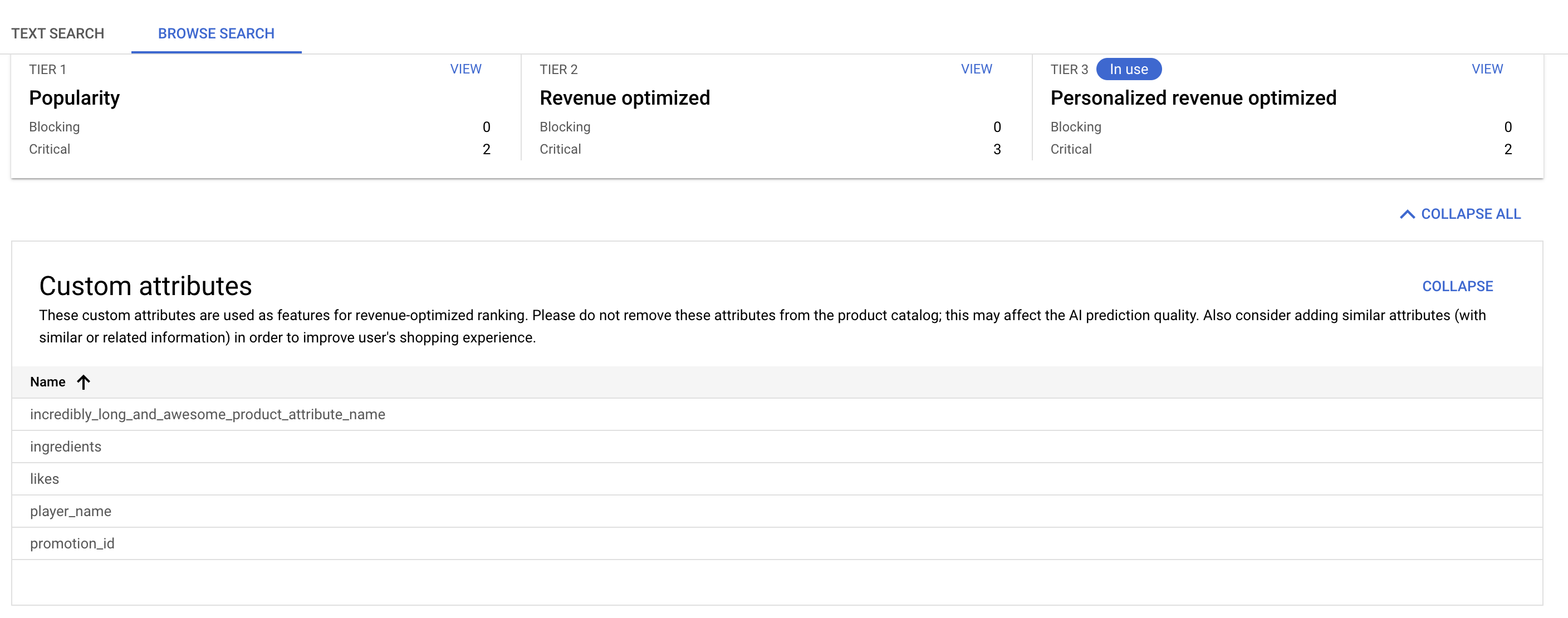
What to do with the custom attributes
- Maintain and don't delete or deprecate attributes that were chosen because it might affect the model.
- Improve coverage for auto selected attributes, filling in these fields for more products
- Examine trends in which custom attributes are autoselected. If you have other similar attributes, add them to your catalog. They will become candidates for selection by the feature search algorithm.
- Correctly annotate numeric attributes by assigning them numeric values rather than string values. For example, provide a numeric value of
10.5, instead of text ("10.5").
Turn off personalization
To turn off personalization, set
ServingConfig.personalizationSpec to mode.DISABLED.
Data quality alerts
The data quality alerts are triggered if a metric value on the dashboard changes from satisfying to non satisfying. Alerts are sent by emails.
If you want to see Cloud Monitoring related alerts, go to Set up alerts.
View data quality
Go to the Data quality page in the AI Commerce Search in Gemini Enterprise for Customer Experience console.
Go to the Data quality pageReview rows, metrics, and alerts: One row corresponds to one metric, and one metric corresponds to one alert.
Set up data quality alerts
REST
Call the UpdateAlertConfig API.
curl -X PATCH -H "Authorization: Bearer $(gcloud auth print-access-token)" \
    -H "Content-Type: application/json" -H "X-GFE-SSL: yes" -H "X-Goog-User-Project: PROJECT_ID" \
 "https://retail.googleapis.com/v2alpha/projects/PROJECT_ID/alertConfig" \
--data '
{
  "alertPolicies": [
    {
      "alertGroup": "search-data-quality",
      "enrollStatus": "ENROLLED",
      "recipients": [
        {
          "emailAddress": "EMAIL_ADDRESS_1"
        },
        {
          "emailAddress": "EMAIL_ADDRESS_2"
        }
      ]
    }
  ]
}'
Replace the following:
PROJECT_ID: The ID of your Google Cloud project.EMAIL_ADDRESS_1,EMAIL_ADDRESS_2: The email addresses that you want to enroll in for the alerts. They should be SMTP compliant. At most 20 email addresses can be added to one alert policy.
Console
Go to the Data quality page in the AI Commerce Search in Gemini Enterprise for Customer Experience console.
Go to the Data quality pageAt the top, click settings Configure alerts.
Add at least one email address. The email addresses should be compliant to SMTP (Simple Mail Transfer Protocol). At most, you can add up to 20 email addresses to one alert policy.
Click Submit.
Disable data quality alerts
REST
Call the UpdateAlertConfig API.
curl -X PATCH -H "Authorization: Bearer $(gcloud auth print-access-token)" \
    -H "Content-Type: application/json" -H "X-GFE-SSL: yes" -H "X-Goog-User-Project: PROJECT_ID" \
 "https://retail.googleapis.com/v2alpha/projects/PROJECT_ID/alertConfig" \
--data '
{
  "alertPolicies": [
    {
      "alertGroup": "search-data-quality",
      "enrollStatus": "DECLINED",
      "recipients": [
      ]
    }
  ]
}'
Replace the following:
PROJECT_ID: The ID of your Google Cloud project.
Console
Go to the Data quality page in the AI Commerce Search in Gemini Enterprise for Customer Experience console.
Go to the Data quality pageClick settings Configure alerts.
Delete all existing emails.
Click Submit.
Troubleshoot
Here is how to solve the following common issues.
Data check isn't passing
If a data check isn't passing, click Details for that metric on the Data quality page to see a more detailed description of that metric and the thresholds to meet that satisfy that data check.
If you have already met the data requirements, check the Timestamp section for when that metric was last computed. If you recently reformatted or ingested a significant amount of data, it might take several hours to re-compute that metric.
If you haven't met the data requirements, you might need to reformat data or collect more data to meet the data check requirements. After you have ensured your data will meet the metric threshold, re-import your formatted data or import your additional data, then wait for the metric to re-compute.
A metric value labeled as N/A
Metrics values are displayed as N/A if no data has been uploaded or if the metrics are not yet computed. It can take up to 24 hours after importing data to compute some data checks.
Performance tier has no blocking issues but isn't in use
To troubleshoot, follow these steps:
Check if there are any blocking data issues for previous tiers. You need to meet the requirements for all previous tiers to upgrade to the next tier.
Wait 24 hours. After all upgrade-blocking data checks have passed, it takes about 24 hours to train and prepare the model and activate the newly unlocked tier.
If the performance tier isn't marked as in-use within two days of passing all of its upgrade-blocking data checks, contact AI Commerce Search support with your project number and project ID for assistance.
Additional data requirement information
For more about AI Commerce Search data requirements, see the documentation:
- General AI Commerce Search requirements when uploading user event data: Requirements for user events
- Minimum user event requirements to get results for search: Search requirements
- Catalog data requirements: Catalog data quality metrics