

Service rate limiting policies let you maintain service availability among trusted clients that might consume an inordinate amount of resources. The policies accomplish this by prioritizing essential client traffic during service overloads, throttling clients that exceed predefined thresholds.
You can combine service rate limiting policies with other types of rate limiting, like Cloud Armor security policies that explicitly ban untrusted clients to prevent abuse. For more information about security policies, see the Security policy overview and Cloud Armor Rate limiting overview.
You attach service rate limiting policies to the forwarding rules of supported load balancers or to Secure Web Proxy gateway resources. For more information about using service rate limiting policies with Secure Web Proxy instances, see Configure service rate limiting policies.
Supported targets
Service rate limiting policies are available for the following targets:
- Regional internal Application Load Balancers
- Secure Web Proxy
Request filtering order
Service rate limiting policies are only one type of filter that's applied to requests. The following diagram shows the order in which the filters are applied:
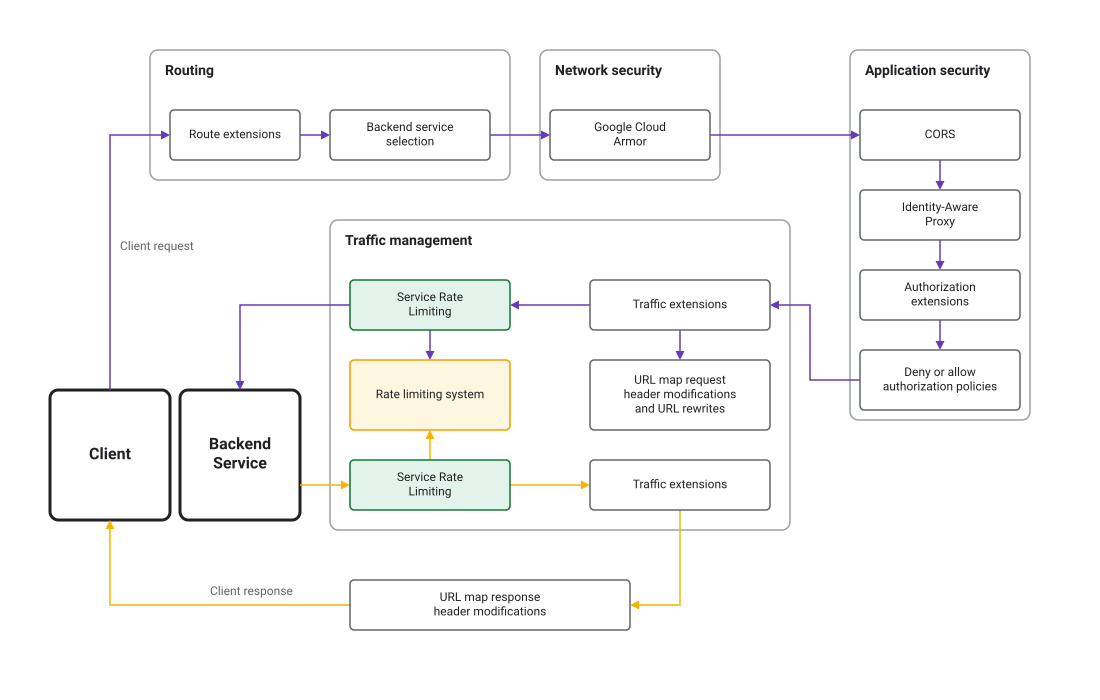
Rules
Each service rate limiting policy contains a list of HTTP rules. Each rule specifies a match condition and a set of rate limiting actions. When a request satisfies the rule's match conditions, the request is evaluated against one or more of your configured rate limiting buckets.
Match conditions
The match conditions and their properties are as follows. Each property can match an exact string, a prefix, a suffix, or a substring:
Source: the source of the request.principal: a list of identities derived from the client's certificate. A match happens when any principal matches with the rule. For more information about using principals for service rate limiting, see Using principals for service rate limiting.
Destination: the destination of the request. If you specify multiple properties, they are combined with a logicalANDoperator.header_set: a list of HTTP headers. A match happens when all headers in theheader_setmatch the rule.hosts: a list of HTTP hosts. A match happens when the request goes to any of the specified hosts in the list.paths: a list of URL paths. A match happens when the request uses any of the specified paths in the list.methods: a list of valid HTTP methods (likeGETorPOST). A match happens when the request uses any of the specified methods in the list.
Note that the source and destination properties are combined with a logical
AND operator to determine if a rule matches a request. This means if you
specify a source and destination, a request must match both to satisfy the
match conditions. In addition, empty rules match all requests.
Rule evaluation order
Rules are evaluated in order from the first rule that's defined in the policy to the last rule that's defined in the policy. The first rule that matches a request applies its rate limit actions to the request, and no further rules are evaluated. If a rule has multiple rate limit actions, and if any one of them exceeds the configured threshold, the request is throttled.
Rate limiting buckets
You configure one or more rate limiting buckets, each of which has one or more rate limiting keys. When a request matches the match conditions of a rule, the request is evaluated against one or more of your configured rate limiting buckets. Then, the bucket applies its configured rate limiting key to identify individual clients and enforces the limit.
In addition to key types, you can configure the following bucket properties:
- Dry-run: in dry-run mode the rule is evaluated, and the matches are tracked, but the rule action isn't applied. This lets you test your rate limiting rules without throttling clients or impacting production traffic.
- User overrides: you can override the default request limits for specific
key values. For example, if you had a bucket with a default limit of 100
requests per minute per client, and that bucket used the
SOURCE_IPkey type, you could override the limit for a specific IP address and instead impose a limit of 200 requests per minute.
Key types
You can identify individual clients for rate limiting by using the following key types for aggregating requests and enforcing rate limits:
- ALL: a single key for all requests that satisfy the rule match condition.
- SOURCE_IP: a unique key for each client IP address whose requests satisfy the rule match condition.
- HTTP_HEADER: a unique key for each unique HTTP header value whose name is configured. The key value is truncated to the first 128 bytes of the header value. The key type defaults to ALL if no such header is present.
- HTTP_PATH: the URL path of the HTTP request. The key value is truncated to the first 128 bytes.
- PRINCIPAL: a string that represents an identity, which is derived from
the client's certificate. The only supported principal type is
CLIENT_CERT_COMMON_NAME.
You can specify one or more key types in each rule. If you specify multiple key
types, the total combination of keys for each client is used as a unique key.
For example, you can use a combination of SOURCE_IP and HTTP_PATH to
apply rate limits on how often a specific IP address can access a specific
endpoint.
Using principals for service rate limiting
To identify the source of traffic with high granularity, you can configure
service rate limiting policies based on identities derived from a client's
certificate. This method requires frontend mTLS
to be enabled on the load balancer and uses the client certificate Common Name (CLIENT_CERT_COMMON_NAME) attribute as a principal selector for
identification.
If no principal selector is specified for identification, CLIENT_CERT_URI_SAN
is used as the default principal selector. This means that the client
certificate's URI SANs are evaluated when making rate limiting decisions.
For principal-based rate limiting to work, the following conditions must apply:
Frontend mTLS must be enabled. If frontend mTLS isn't enabled, the client doesn't present a certificate. As a result, any principal-based rules in the service rate limiting policy find no certificate information to evaluate. For example, a rule checking
CLIENT_CERT_URI_SANsees an empty value.There must be a valid client certificate. Even with mTLS enabled, a client certificate isn't used for rate limiting if the connection was established with a missing or an invalid certificate. This scenario occurs when the mTLS client validation mode is set to the permissive mode
ALLOW_INVALID_OR_MISSING_CLIENT_CERT. In this case as well, any principal-based rules in the service rate limiting policy find no certificate information to evaluate. For example, a rule checkingCLIENT_CERT_URI_SANsees an empty value.
Impact of attribute size limits
Rate limiting decisions are sensitive to the size of client certificate attributes. A request is rejected if an attribute exceeds its size limit and the policy is configured to validate that specific attribute.
A rejection can occur when the policy validates against
CLIENT_CERT_COMMON_NAME and the certificate's Subject (which contains the
Common Name) exceeds the size limit.