

Global external passthrough Network Load Balancers are Layer 4 passthrough load balancers that distribute external traffic among backends (instance groups or network endpoint groups) that can reside in multiple Google Cloud regions. These load balancers are built on Maglevs that are distributed globally, operating together by using Google's global network and control plane.
A global external passthrough Network Load Balancer automatically directs traffic to the backend region closest to the point where user traffic enters Google's global network.
Provided that eligible backends are configured in two or more regions:
If a region is at capacity, the load balancer automatically spills over some of the new user connections in excess of the region's capacity to the next closest region(s) where there is available capacity, while keeping existing connections in the current region.
If a region is down, the load balancer automatically fails over traffic to the next closest region with available capacity.
Global external passthrough Network Load Balancers can receive traffic from:
- Any client on the internet
- Google Cloud VMs with external IPs
- Google Cloud VMs that have internet access through Cloud NAT or instance-based NAT
Use a global external passthrough Network Load Balancer in the following circumstances:
You need a high-performance, passthrough Layer 4 load balancer for TCP, UDP, ESP, GRE, ICMP, and ICMPv6 traffic. The load balancer can handle both IPv4 and IPv6 traffic.
You need to receive the original packets unproxied. For example, if you need the client source IP address to be preserved.
You need to serve traffic to backends in multiple Google Cloud regions at low latency, using the same anycast IP address.
You need your deployment to be resilient to regional backend failures and overloads, automatically and gracefully redirecting traffic to the next closest region with available capacity.
To use a global external passthrough Network Load Balancer, your deployment must meet the following requirement:
- If serving TLS (SSL) traffic, your backends must terminate the SSL traffic. The global external passthrough Network Load Balancer doesn't support SSL termination.
Key features
Global external passthrough Network Load Balancers support the following key features.
High availability by design
The load balancer provides you with two global external anycast IP addresses, each served by a disjoint and isolated global load balancing control and data plane server infrastructure (also known as an availability group) to provide high availability. Clients can use either IP address to connect to the closest healthy backend with available capacity.
The load balancer lets you improve service availability when you create global backend services with backends in multiple Google Cloud regions. If backends in a particular region are down, traffic fails over to the next closest region gracefully.
We recommend deploying backends in at least three Google Cloud regions to ensure resilience to regional outages, even though you are allowed to configure all your backends in a single Google Cloud region.
Latency and load-aware balancing
A global external passthrough Network Load Balancer uses the Premium Tier exclusively. With Premium Tier, incoming traffic from the internet enters Google's high-performance low-latency network at the point of presence (PoP) closest to the user. Similarly, outbound traffic is sent through Google's network, exiting at the PoP closest to the user.
The globally-distributed Maglev load balancers route incoming traffic to the Google Cloud region that is closest to the PoP where traffic enters Google's network, provided the region has healthy backends with available capacity. Otherwise, the load balancer automatically and gracefully spills over traffic to the next closest region that has healthy backends with available capacity.
You determine backend placements and capacities for optimal packet latency and backend efficiency. The backend capacities can be based on the maximum incoming PPS (packet per second) rate, or the maximum CPU utilization, or both. The backend capacities that are configured in a backend service are shared fairly among the IP addresses of all forwarding rules that reference the backend service.
How global external passthrough Network Load Balancers work
A global external passthrough Network Load Balancer has a frontend (the forwarding rule) and a backend
(the backend service and its backend groups). You can use either
instance groups or GCE_VM_IP zonal NEGs as backend groups.
Architecture
The following diagram shows a global external passthrough Network Load Balancer distributing traffic to backends in multiple Google Cloud regions. When the load balancer is created, Google Cloud assigns it two global external anycast IP addresses, served by disjoint and isolated control and data plane infrastructure (also known as availability groups, AG0 and AG1).
The two control and data planes provide high availability, fault tolerance, and resilience for every global external passthrough Network Load Balancer. A failure in the control or data plane of one availability group does not affect the other availability group. Properly configured clients must be able to connect to both of the load balancer's IP addresses. For example, if a client is unable to connect to the AG0 IP address, it must be configured to connect to the AG1 IP address instead.
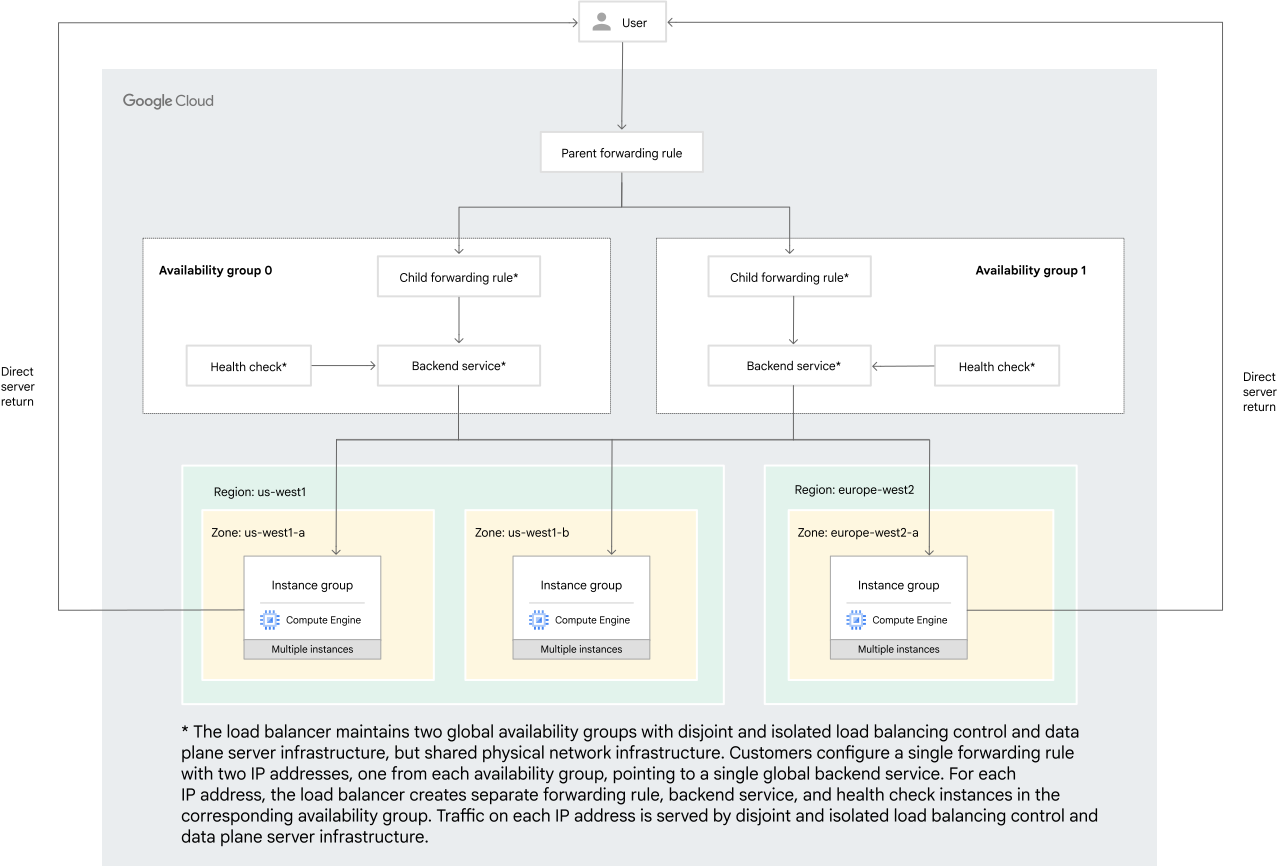
The load balancer consists of the following configuration components.
Two global external IP addresses, one from each availability group (AG0 and AG1). They can be static or ephemeral. For details, see IP addresses.
One global forwarding rule that specifies the two global external IP addresses, one from each availability group (AG0 and AG1). When you create this forwarding rule, Google Cloud generates two read-only child forwarding rules, one for each availability group, to ensure high availability. For details, see Forwarding rules.
One global backend service that defines how traffic is distributed to the backends in multiple Google Cloud regions. The backend groups can be either all instance groups (zonal managed instance groups or zonal unmanaged instance groups) or all zonal NEG backends (zonal NEGs with
GCE_VM_IPendpoints). For details, see Backend services.Global health check associated with the backend service. For details, see Health checks.
Firewall rules that allow your load balancing traffic and health check probes to reach the backend VMs. For details, see Firewall rules.
Direct server return
A global external passthrough Network Load Balancer, like other Passthrough Network Load Balancers, is not a proxy. The load balancer itself doesn't terminate user connections. Load-balanced packets are sent to the backend VMs with their source and destination IP addresses, protocol, and, if applicable, ports, unchanged. The backend VMs then terminate user connections and send the returning packets directly to the clients. The responses don't go back through the load balancer. This process is known as direct server return (DSR).
Local routing for the load balancer's IP address
The global external passthrough Network Load Balancer, like other passthrough Network Load Balancers, does not perform source or destination NAT of the IP address or ports.
The Google Cloud guest environment configures each backend VM with the IP addresses of the load balancer. An entry in the local routing table of the VM configures the load-balanced network interface controller (NIC) of the backend VM to accept packets whose destination IP addresses match each forwarding rule IP address. To learn more, see Check local routing table for the load balancer's IP addresses.
IP addresses for request and return packets
When a backend VM receives a load-balanced packet from a client, the packet's source and destination are as follows:
- Source: an external IP address associated with the client, a Google Cloud VM or a system on the internet.
- Destination: one of the IP addresses of the load balancer's forwarding rule.
Although the guest environment automatically configures local routes so that the VM's operating system accepts traffic destined for the load balancer's IP address, the operating system cannot deliver these packets to your application if the application is configured to listen only on the VM's assigned internal IP address.
To ensure that the operating system delivers packets to your application, configure the application running on backend VMs to do the following:
- Listen on (bind to) the load balancer's forwarding rule IP addresses or any IP
address (
0.0.0.0or::)
- If the load balancer forwarding rule's protocol supports ports, listen on (bind to) a port that's included in the load balancer's forwarding rule
Return packets are sent directly from the load balancer's backend VMs to the client. The return packet's source IP address depends on the protocol:
- TCP is connection-oriented so backend VMs must reply with packets whose source IP addresses match the destination IP address of the requesting packet so that the client can associate the response packets with the appropriate TCP connection.
- UDP, ESP, GRE, ICMP, and ICMPv6 are connectionless. Backend VMs can send response packets whose source IP addresses either match the forwarding rule's IP address or match any assigned external IP address for the VM. Practically speaking, most clients expect the response to come from the same IP address to which they sent packets.
The following table summarizes the source and destination IP addresses for response packets:
| Traffic type | Source | Destination |
|---|---|---|
| TCP | The requesting packet's destination | The requesting packet's source |
| UDP, ESP, GRE, ICMP, and ICMPv6 | For most use cases, the requesting packet's destination1 | The requesting packet's source |
1 When a VM has an external IP address or when you are using Cloud NAT, it is also possible to set the response packet's source IP address to the VM NIC's primary internal IPv4 address. Google Cloud or Cloud NAT changes the response packet's source IP address to either the NIC's external IPv4 address or a Cloud NAT external IPv4 address in order to send the response packet to the client's external IP address. Not using the forwarding rule's IP address as a source is an advanced scenario because the client receives a response packet from an external IP address that doesn't match the IP address to which it sent a request packet.
Components
The following sections describe each configuration component of a global external passthrough Network Load Balancer in detail.
IP addresses
A global external passthrough Network Load Balancer requires two global external IP addresses to provide high availability. The load balancer's forwarding rules use these addresses to accept incoming traffic, and they must belong to the same IP version—IPv4 or IPv6. Google Cloud advertises your load balancer's IP addresses from all points of presence, worldwide. Each load balancer IP address is a global anycast IP address that is supported only in the Premium Tier.
Each of the two IP addresses must come from global external IP address pools
that belong to a distinct availability group. The IP addresses are not
associated with a subnet in a VPC network. In the API,
the availability groups are represented by using the purpose field on the
globalAddresses resource:
PASSTHROUGH_LOAD_BALANCER_AVAILABILITY_GROUP0: for availability group 0 addresses.PASSTHROUGH_LOAD_BALANCER_AVAILABILITY_GROUP1: for availability group 1 addresses.
The IPAddresses field of a forwarding rule resource
specifies zero, one, or two IP addresses:
- If omitted, Google Cloud assigns two ephemeral IP addresses, one from each availability group.
- If you specify one IP address that references an existing static IP address resource from one availability group, Google Cloud assigns an ephemeral IP address from the other availability group.
- If you specify two IP addresses that reference existing static IP address resources, they are required to be from different availability groups.
Use reserved static IP addresses for the forwarding rule if you need to keep the addresses associated with your project for reuse after you delete a forwarding rule or if you need multiple forwarding rules to reference the same IP addresses.
For a global external passthrough Network Load Balancer forwarding rule, the IP addresses can be one of the following:
- A static or ephemeral IPv4 address from a Google-owned global IP address pool.
- A static or ephemeral
/96range of external IPv6 addresses from a Google-owned global IP address pool. - A static IPv4 BYOIP address from a global public delegated prefix.
A global external passthrough Network Load Balancer supports Bring your own IP addresses (BYOIP) for IPv4 addresses only. Support is limited to the v1 BYOIP API. The provisioning of new IPv4 ranges can take up to 4 weeks, and there are no APIs that allow you to control your BGP advertisement status. For details, see Bring your own IP configurations.
The IPAddresses field of a forwarding rule can only be set at creation and
cannot be updated.
Regardless of their origin (Google-owned or BYOIP), the global external IP addresses in Google Cloud are drawn from three distinct types of global external IP address pools:
- IP address pools used by global external passthrough Network Load Balancers for availability group, AG0
- IP address pools used by global external passthrough Network Load Balancers for availability group, AG1
- IP address pools used by global external proxy-based load balancers
Therefore, global external passthrough Network Load Balancers cannot share IP addresses with any other global or regional load balancers.
Global forwarding rules
A global external passthrough Network Load Balancer forwarding rule forms the frontend of the load balancer, specifying the destination IP addresses, protocol, and ports on which the load balancer accepts traffic. Because a global external passthrough Network Load Balancer is not a proxy, it passes traffic to backends without modifying their source and destination IP addresses, protocol, and ports, if the protocol carries port information.
A global external passthrough Network Load Balancer forwarding rule that you configure specifies the following:
- The load balancing scheme is designated as
EXTERNAL_PASSTHROUGH. - The pair of global IP addresses in the
IPAddresses[]field, one from each availability group. - The protocol (
TCP,UDP, orL3_DEFAULT) and port(s).
For each global external passthrough Network Load Balancer forwarding rule that you create
(also known as a parent forwarding rule), Google Cloud
generates two read-only child forwarding rules
for each load balancing stack— AVAILABILITY_GROUP0 and
AVAILABILITY_GROUP1. The child forwarding rule has the same IP protocol, port
and backend service settings as the parent forwarding rule, but has only one of
the two IP addresses of the parent forwarding rule.
The child forwarding rules can be uniquely identified as they have -ag0 and
-ag1 appended to the parent forwarding rule name. They don't consume
additional quota or incur extra costs. Monitoring metrics and health status
are reported at the child forwarding rule level.
Incoming traffic is matched to a forwarding rule, matching the destination IP address, protocol, and port of a packet to a combination of forwarding rule fields—two IP addresses, protocol, and if the protocol is port-based, one of port(s), a range of ports, or all ports. The forwarding rule then directs traffic to the load balancer's backend service.
Forwarding rules for a global external passthrough Network Load Balancer can be configured with either IPv4 or IPv6 addresses. If you want the load balancer to handle both IPv4 and IPv6 traffic, create two forwarding rules:
A forwarding rule for IPv4 traffic that points to IPv4-only or dual-stack backends
A forwarding rule for IPv6 traffic that points to IPv6-only or dual-stack backends
It's possible to have an IPv4 and an IPv6 forwarding rule reference the same backend service, but the backend service must reference backends with dual-stack VM network interfaces.
The IP version of your forwarding rule should match the stack type of the backend VM network interfaces.
| Stack type of backend VM network interfaces | Forwarding rule |
|---|---|
IPv4-only (IPV4_ONLY) VM network interface |
Can be backends only for IPv4 forwarding rules. |
IPv6-only (IPV6_ONLY) VM network interface |
Can be backends only for IPv6 forwarding rules. |
Dual-stack (IPV4_IPV6) VM network interface |
Can be backends for IPv4 forwarding rules, IPv6 forwarding rules, or both. |
Forwarding rule protocols
Global external passthrough Network Load Balancers support the following protocol options for each
forwarding rule: TCP, UDP, and L3_DEFAULT.
Use the TCP and UDP options to configure TCP or UDP load balancing,
respectively. The L3_DEFAULT protocol option enables a
global external passthrough Network Load Balancer to load balance
TCP, UDP, ESP, GRE, ICMP, and ICMPv6
traffic.
In addition to supporting protocols other than TCP and UDP, L3_DEFAULT makes
it possible for a single forwarding rule to serve multiple protocols. For
example, IPsec services typically handle some combination of ESP and
UDP-based IKE and NAT-T traffic. The L3_DEFAULT option allows a single
forwarding rule to be configured to process all of those protocols.
If you're using the L3_DEFAULT protocol, you must configure the forwarding
rule to accept traffic on all ports. Because L3_DEFAULT is a catch-all rule,
as a security best practice, you should configure ingress allow firewall rules
that permit only the IP protocols and ports that you need.
Multiple forwarding rules
You can configure multiple forwarding rules, of which there can be two types:
Multiple forwarding rules for the same IP addresses. You can configure multiple forwarding rules for the same IP address pair as long as no two forwarding rules consume the same protocol and port combinations. Each forwarding rule can have a different backend service, or multiple forwarding rules can have the same backend service.
Multiple forwarding rules that reference the same backend service. You can configure multiple forwarding rules that reference the same backend service. Subject to the conditions noted in the first point, two or more forwarding rules can use the same IP address pair, or each forwarding rule can use a unique IP address pair. Traffic for all IP addresses of all forwarding rules that reference the same backend service share the backend target capacities fairly.
However, you cannot share the same global external IP address between a global external passthrough Network Load Balancer and a global external Application Load Balancer or global external proxy Network Load Balancer.
When using multiple forwarding rules, make sure that you configure the application running on your backend VMs so that it binds to all the external IP address(es) of the load balancer's forwarding rule(s).
Configuring multiple forwarding rules can be useful for the following use cases:
- You need to configure more than one pair of external IP addresses for the same backend service. For example, one forwarding rule for IPv4 addresses and another for IPv6 addresses.
- You need to configure multiple forwarding rules for the same external IP address pair but with different protocols or non-overlapping ports or port ranges. The forwarding rules can use the same or different backend services.
Multiple forwarding rules protocol and port constraints
Google Cloud selects at most one forwarding rule to process an incoming packet. Two or more forwarding rules that use the same global external IP address pair must have unique protocol and port combinations according to these constraints:A forwarding rule configured for all ports of a protocol prevents the creation of other forwarding rules using the same protocol and IP address pair.
Forwarding rules using
TCPorUDPprotocols can be configured to use all ports, or they can be configured for specific ports.For example, if you create a forwarding rule using the IP address pair—
136.124.69.214and136.124.83.205, theTCPprotocol, and all ports, you cannot create any other forwarding rule using the same IP address pair and theTCPprotocol.You can create two forwarding rules, both using the IP address pair and the
TCPprotocol, if each one has unique ports or non-overlapping port ranges. For example, you can create two forwarding rules using the same IP address pair and theTCPprotocol, where one forwarding rule's ports are80,443and the other uses the port range81-442.Only one
L3_DEFAULTforwarding rule can be created per IP address pair.This is because the
L3_DEFAULTprotocol uses all ports by definition. In this context, the all ports term includes protocols without port information.A single
L3_DEFAULTforwarding rule can coexist with other forwarding rules that use specific protocols (TCPorUDP) and the same IP address pair.If you have specific TCP or UDP forwarding rules attached to an IP address pair, you can also attach an
L3_DEFAULTforwarding rule to that same IP address pair to act as a fallback for any traffic that doesn't match the specific forwarding rules. AnL3_DEFAULTforwarding rule processes packets sent to its destination IP address if and only if the packet's destination IP address, protocol, and destination port don't match a protocol-specific forwarding rule.To illustrate this, consider these two scenarios. Forwarding rules in both scenarios use the same IP address pair—
136.124.69.214and136.124.83.205.Scenario 1. The first forwarding rule uses the
L3_DEFAULTprotocol. The second forwarding rule uses theTCPprotocol and all ports. TCP packets sent to any destination port of either of the IP addresses are processed by the second, more specific forwarding rule. Packets using different protocols are processed by the first forwarding rule.Scenario 2. The first forwarding rule uses the
L3_DEFAULTprotocol. The second forwarding rule uses theTCPprotocol and port8080. TCP packets sent to port 8080 of either of the IP addresses are processed by the second forwarding rule. All other packets, including TCP packets sent to different destination ports, are processed by the first forwarding rule.
Forwarding rule selection
Google Cloud selects one or zero forwarding rules to process an incoming packet by using this elimination process, starting with the set of forwarding rule candidates which match the destination IP address of the packet:
Eliminate forwarding rules whose protocol doesn't match the packet's protocol, except for
L3_DEFAULTforwarding rules. Forwarding rules using theL3_DEFAULTprotocol are never eliminated by this step becauseL3_DEFAULTmatches all protocols. For example, if the packet's protocol is TCP, only forwarding rules using theUDPprotocol are eliminated.Eliminate forwarding rules whose port doesn't match the packet's port. Forwarding rules configured for all ports are never eliminated by this step because an all ports forwarding rule matches any port.
At this point, the remaining forwarding rule candidates fall into one of the following categories:
Two forwarding rules remain, an
L3_DEFAULTforwarding rule and a protocol specific forwarding rule. Use the protocol specific forwarding rule to route the packet.A single forwarding rule remains, either an
L3_DEFAULTforwarding rule or a protocol specific forwarding rule. It is used to route the packet.Zero forwarding rule candidates remain and the packet is dropped.
Global backend services
A backend service of a global external passthrough Network Load Balancer distributes incoming traffic across attached backends that can reside in multiple Google Cloud regions. Each backend is composed of an instance group or network endpoint group and information about the backend's serving capacity. Backend serving capacity can be based on CPU utilization or incoming packets per second (PPS) or both. Backend service manages the traffic distribution according to the configured affinity and capacity settings.
The backend service defines the following backend parameters:
Load balancing scheme. To designate a backend service for a global external passthrough Network Load Balancer, the load balancing scheme must be explicitly set to
EXTERNAL_PASSTHROUGH.Protocol. The backend service protocol field is redundant and can only be set to
UNSPECIFIED. Backend services withUNSPECIFIEDprotocol can be used with any forwarding rule regardless of the forwarding rule protocol.Traffic distribution. A backend service distributes traffic according to the configured session affinity, connection tracking policy, load balancing mode and backend capacities, and load balancing locality policy. The backend service can also be configured to enable connection draining and dial down backend capacities. Most of these settings have default values that let you get started quickly.
Health check. A backend service must have an associated health check.
Backends. Backends are the actual endpoints that receive load-balanced traffic. A global external passthrough Network Load Balancer can distribute traffic to either instance groups or zonal NEGs that are located in multiple Google Cloud regions:
If you choose instance groups, you can use zonal managed instance groups, zonal unmanaged instance groups, or a combination of the instance group types. Instance groups support both
RATEandUTILIZATIONas its load balancing mode.If you choose zonal NEGs, you must use
GCE_VM_IPzonal NEGs. NEGs support onlyRATEas its load balancing mode.
VM network interface compatibility with forwarding rules
Because global external passthrough Network Load Balancers don't terminate or translate traffic, the stack type of the backend VM's network interface must be compatible with the forwarding rule IP address version.
| Forwarding rule | Stack type of backend VM's network interfaces |
|---|---|
| IPv4 forwarding rules only | IPv4-only (IPV4_ONLY) or dual-stack (IPV4_IPv6) |
| IPv6 forwarding rules only | IPv6-only (IPV6_ONLY) or dual-stack (IPV4_IPv6) |
| IPv4 and IPv6 forwarding rules | Dual-stack (IPV4_IPv6) |
Backend VM's network interface compatibility with VPC subnets
As shown in the preceding table, you can configure a global external passthrough Network Load Balancer to have backends that contain IPv4-only interfaces, dual-stack interfaces, and IPv6-only interfaces. The following table summarizes which backend VM's network interface types are compatible with each VPC subnet stack type.
| Stack type of VPC subnets | Stack type of backend VM's network interface |
|---|---|
IPV4_ONLY (single-stack)Only IPv4 subnet ranges |
IPv4-only (IPV4_ONLY) |
IPV4_IPV6 (dual-stack)Both IPv4 and IPv6 subnet ranges |
IPv4-only (IPV4_ONLY), dual-stack (IPV4_IPv6),
and IPv6-only (IPV6_ONLY) |
IPV6_ONLY (single-stack)Only IPv6 subnet ranges |
IPv6-only (IPV6_ONLY) |
Note the following:
The IP address assigned to a VM network interface is allocated directly from the underlying VPC subnet.
For IPv6 connectivity, when a VM network interface is assigned to an IPv6-enabled
/64subnet, Google Cloud allocates the VM network interface a/96address range from the first half (/65) of the subnet's/64external IPv6 address range. To learn more, see External IPv6 specifications.When the stack type of the VM network interface is dual-stack (
IPV4_IPv6) or IPv6-only (IPV6_ONLY), you need to choose how the IPv6 address of the VM network interface can be reached by configuring the--ipv6-access-typesetting on the VPC subnet to eitherEXTERNALorINTERNAL. If the subnet's--ipv6-access-typeis set toEXTERNAL, you must also set the--ipv6-network-tieron the VM's network interface toPREMIUM. To learn more, see IPv6 subnet ranges.
Instance group backends and network interfaces
The VPC network and subnet that are associated with an instance group are set implicitly as described in Instance group backends and network interfaces.
To distribute load-balanced traffic to a non-nic0 load balancer target
interface, you can't use instance group backends. Use zonal NEGs with GCE_VM_IP
endpoints instead. For more information, see Backend services and
VPC networks.
Zonal NEG backends and network interfaces
The VPC network and subnet that are associated with a zonal
NEG with GCE_VM_IP endpoints are set when the NEG is created. For more
information and rules for endpoints, see GCE_VM_IP zonal NEG backends and
network interfaces.
Backend services and VPC networks
The backend service isn't associated with any VPC network; however, each backend instance group or zonal NEG is associated with a VPC network, as noted previously. As long as all backends are located in the same project, and as long as all backends are of the same type (instance groups or zonal NEGs), the load balancer and its backends can be either in the same or different VPC networks.
To distribute packets to non-nic0 interfaces, you must meet both of the following
requirements:
You must use zonal NEGs (with
GCE_VM_IPendpoints), not instance groups.The non-
nic0interface must be a load balancer target interface. For more information, seeGCE_VM_IPzonal NEG backends and network interfaces.
Health checks
Health check information is used to determine eligible backends for new connections, and to control whether existing connections persist on unhealthy backends.The load balancer sends health check probes for every forwarding rule IP address separately. Therefore, a global external passthrough Network Load Balancer forwarding rule with two IP addresses are probed for each IP address, doubling the probe frequency on each backend. For more information, see Multiple probes and frequency.
Health check type, protocol, and port
The load balancer's backend service must reference a global health check, using any supported health check protocol and port. The health check protocol and port details don't have to match the forwarding rule protocol and port information.
Because all supported health check protocols rely on TCP
(UDP health checks are not supported), when you use a
global external passthrough Network Load Balancer to balance connections and traffic for other protocols, backend
VMs must run a TCP-based server to answer health check probers. For example, you
can use an HTTP health check combined with running an HTTP server on each
backend VM. In this example, your scripts or software are responsible for
configuring the HTTP server so that it returns status 200 only when the
software listening to load-balanced connections is operational.
For more information about supported health check protocols and ports, see Health check categories, protocols, and ports and How health checks work.
Health check packets
For instance group backends, health check probers send packets to the nic0
network interface of each backend VM. For GCE_VM_IP zonal NEG backends, health
check probers send packets to the network interface in the VPC
subnetwork of the NEG. Health check packets have the
following characteristics:
- Source IP address from the relevant health check probe IP range.
- Destination IP address that matches either of the two IP addresses of the forwarding rule that references the global external passthrough Network Load Balancer backend service. Health check packets are sent to both IP addresses.
- Destination port that matches the port number you specify in the health check.
Applications running on the backend VMs must bind to and listen on relevant IP
address and port combinations. To accomplish this,
configure the application to bind to and listen on the relevant ports of any
of the VM's IP addresses (0.0.0.0 or ::/0). For more information,
see Destination for probe packets.
Firewall rules
Because a global external passthrough Network Load Balancer is not a proxy, it passes traffic to backend VMs without modifying their source and destination IP addresses, protocol, and ports, if the protocol carries port information. Therefore, you must create ingress allow firewall rules or an ingress allow hierarchical firewall policy to control access to the load balancer's backend VMs, specifically, to permit health checks and the traffic that you're load balancing. Otherwise, the implied deny ingress firewall rule blocks incoming packets from all external source IP addresses.
Forwarding rules and ingress allow firewall rules or Hierarchical firewall policies work together in the following way: a forwarding rule specifies the destination IP address, protocol and, if defined, port requirements that a packet must meet to be forwarded to a backend VM. Ingress allow firewall rules control whether the firewall delivers the forwarded packets to the VM or drops it. The Google Cloud default VPC network includes a limited set of pre-populated ingress allow firewall rules.
To accept traffic from any IP address on the internet, you must create an ingress allow firewall rule with the
0.0.0.0/0or::/0source range. To only allow traffic from certain IP address ranges, use more restrictive source ranges.As a security best practice, your ingress allow firewall rules should only permit the IP protocols and ports that you need. Restricting the protocol (and, if possible, port) configuration is especially important when using forwarding rules whose protocol is set to
L3_DEFAULT.L3_DEFAULTforwarding rules forward packets for all supported IP protocols (on all ports if the protocol and packet have port information).Global external passthrough Network Load Balancers use Google Cloud health checks. Therefore, you must always allow traffic from the health check IP address ranges. You can configure these ingress allow firewall rules specific to the protocol and ports of the load balancer's health check.
Traffic distribution
For a global external passthrough Network Load Balancer, traffic distribution is a function of different attributes such as session affinity, connection tracking policy, load balancing mode and backend capacities, and load balancing locality policy. They all come together as a part of a coordinated workflow to optimize your load balancing configuration for reliable performance and efficient resource utilization.
Shared VPC architecture
Note the following points in relation to a Shared VPC architecture for a global external passthrough Network Load Balancer:
Except for the IP address resources, all other resources associated with a global external passthrough Network Load Balancer—forwarding rule, backend service, health check, and backend groups (instance groups or NEGs)—must exist in the same project, and this project can be a host project or a service project.
If the load balancing resources exist in the host project, then the IP address resources must also exist in the host project.
If the load balancing resources exist in a service project, then the IP address resources can be either in the same service project, or in the host project.
The following table outlines where the different components of a global external passthrough Network Load Balancer exist in a Shared VPC architecture.
| Location of load balancing resources1 | Required location of IP address resources |
|---|---|
| Host project | Host project |
| Service project | Service project or host project |
1 Includes the forwarding rule, backend service, health check, and backends (instance groups or NEGs)
Limitations
Backends can only be deployed in the following Google Cloud regions:
- North America:
us-west1,us-west4,us-east4,us-east5 - Europe:
europe-west2,europe-west3 - Asia:
asia-southeast1,asia-south1,asia-northeast1 - South America:
southamerica-east1 - Africa:
africa-south1 - Australia:
australia-southeast1
- North America:
The global external passthrough Network Load Balancer can be configured only in Premium Tier.
You cannot configure a global external passthrough Network Load Balancer using the Google Cloud console. Use either the Google Cloud CLI or the REST API instead.
You cannot use regional managed instance group backends. You can use zonal managed instance groups, zonal unmanaged instance groups, and zonal NEGs with
GCE_VM_IPendpoints.The existing restrictions and guidance for using instance groups in backend services also applies for global external passthrough Network Load Balancer. An instance group that is shared between a global external passthrough Network Load Balancer and regional passthrough Network Load Balancers (regional external passthrough Network Load Balancer or internal passthrough Network Load Balancer) must be configured to use the
RATEbalancing mode on the global external passthrough Network Load Balancer. Regional passthrough Network Load Balancers always use theCONNECTIONbalancing mode.You can share the same global external IP address among multiple global external passthrough Network Load Balancer forwarding rules as long as their configured protocols and ports are not in conflict. However, you cannot share the same global external IP address between a global external passthrough Network Load Balancer and a global external Application Load Balancer or global external proxy Network Load Balancer.
A global external passthrough Network Load Balancer supports Bring your own IP addresses (BYOIP) for IPv4 addresses only. Support is limited to the v1 BYOIP API. The provisioning of new IPv4 ranges can take up to 4 weeks, and there are no APIs that allow you to control your BGP advertisement status. For details, see Bring your own IP configurations.
You can't create more than 10 forwarding rules in a project, and you can't add more than 25 backend groups to a backend service. For details, see Quotas and limits.
You can't deploy a global external passthrough Network Load Balancer in GKE.
You can't use Google Cloud Armor to provide advanced network DDoS protection for global external passthrough Network Load Balancers. For details, see Configure advanced network DDoS protection.
The load balancing locality policy, configured on the backend service of the load balancer, does not support the
WEIGHTED_MAGLEVoption. For global external passthrough Network Load Balancers, onlyMAGLEVis supported.The
PER_SESSIONconnection tracking mode is not supported. Only thePER_CONNECTIONconnection tracking mode is supported.Only the following load balancing modes are supported:
RATEandUTILIZATION. Rate is defined not in terms of requests per second, but incoming packets per second. Instance groups support bothRATEandUTILIZATION, whereas NEGs support onlyRATE.Steering forwarding rules (source IP-based traffic steering) are not supported.
All backends attached to a backend service must be of the same type. A backend service cannot have a mix of instance groups and zonal NEGs.
Monitoring metrics cannot be queried or filtered using the parent global forwarding rules; they must be queried using the Google Cloud-generated child forwarding rules.
Pricing
For pricing information, see Network pricing: Cloud Load Balancing.
What's next
- Set up a global external passthrough Network Load Balancer with VM instance group backends
- Set up a global external passthrough Network Load Balancer with zonal NEG backends
- Balancing modes for passthrough Network Load Balancers
- Target capacity specifications for global external passthrough Network Load Balancers
- Cloud Load Balancing API and gcloud CLI references