

This document provides an overview of using managed workload identity to achieve mutual TLS (mTLS) between an Application Load Balancer and its backends. Managed workload identity automatically provisions and manages X.509 certificates from the Certificate Authority Service.
You can also achieve backend mTLS without managed workload identity. To learn more about backend mTLS without managed workload identity, see Backend authenticated TLS and backend mTLS overview.
Managed workload identity can be configured on the backend service resource of the following load balancers:
- Global external Application Load Balancers
- Regional external Application Load Balancers
- Cross-region internal Application Load Balancers
- Regional internal Application Load Balancers
The information in this document builds on concepts introduced in the following documents:
- Managed workload identities overview
- Secure Production Identity Framework For Everyone (SPIFFE)
- Certificate Authority Service
- Backend authenticated TLS and backend mTLS overview
Introduction to managed workload identity for load balancers
Without managed workload identity, setting up backend mTLS requires the configuration of multiple resources. When you assign a managed identity to a load balancer's backend service, the managed workload identity automatically creates the necessary resources for mTLS, such as the client certificate, trust config, and backend authentication config.
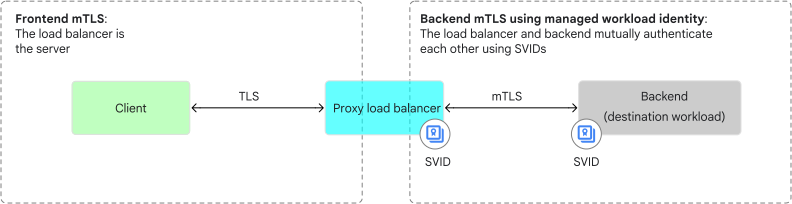
For backend mTLS, the load balancer's backend service resource acts as a source workload that authenticates itself to the backend, which is the destination workload.
You can assign a managed identity—represented by a SPIFFE ID— to the backend service of a load balancer. Google Cloud Certificate Authority Service automatically provisions an X.509 certificate for the SPIFFE ID. This X.509 certificate for the SPIFFE ID is also known as a SPIFFE Verifiable Identity Document (SVID). The backend service of the load balancer and its backends use the SVIDs to authenticate each other through mTLS authentication.
The following diagram shows the load balancer (source workload) and the backend (destination workload) mutually authenticating each other using managed workload identity.
The following is an example of an X.509-SVID that serves as a wrapper for the SPIFFE ID. The SPIFFE ID, represented as a URI, is encoded in the Subject Alternative Name (SAN) of an X.509 certificate.
Issuer:
    C=US
    O=Example Inc.
    CN=Example CA

Validity:
    Not Before: Jun 14 00:00:00 2025 GMT
    Not After : Jun 16 00:00:00 2025 GMT

Subject (Distinguished Name):
    C=US
    O=Example Inc.
    OU=Production
    CN=api.example.com

Subject Public Key Info:
    Public Key Algorithm: RSA Encryption
    RSA Public-Key: (2048 bit)

X.509v3 Extensions:
    Subject Alternative Name (SAN):
        DNS: api.example.com
        URI: spiffe://WORKLOAD_IDENTITY_POOL_ID.global.PROJECT_NUMBER.workload.id.goog/ns/NAMESPACE_ID/sa/MANAGED_IDENTITY_ID
This output includes the following values:
WORKLOAD_IDENTITY_POOL_ID: the workload identity pool IDPROJECT_NUMBER: the project number of your Google Cloud projectNAMESPACE_ID: the namespace IDMANAGED_IDENTITY_ID: the managed identity ID
Benefits of using managed workload identity
The following are some of the benefits of using managed workload identity for backend mTLS:
Enhanced security: by joining a workload identity pool, a Google Cloud load balancer and its backends become part of a trust domain. When used in conjunction with backend mTLS, the load balancer and the backend workloads mutually authenticate each other. This mutual authentication prevents unauthorized workloads from accessing your services and encrypts data in transit.
Automated certificate management: after successful workload attestation, Google Cloud automatically provisions and rotates the X.509 certificates for workloads participating in the workload identity pool's trust domain. This automatic management of X.509 certificates eliminates the complex and error-prone process of manual certificate management.
Interoperable identity: workload identity pools use the SPIFFE framework—a standard for managing identities across distributed systems, enabling authentication and authorization in modern, microservices-based architectures.
Centralized governance: workload identity pools provide a central point of control. Administrators can define trust domains and establish attestation policies to govern which workloads can receive an X.509 certificate for the managed identity.
Certificate requirements
When configuring certificates, ensure that they comply with these requirements:
Modern cryptography tools form the basis of mTLS authentication. Certificates must use either RSA or ECDSA algorithms for key exchange. Hashing algorithms must use SHA-256 or a stronger cryptographic hash function. Hashing algorithms such as MD4, MD5, and SHA-1 aren't supported.
Leaf server certificates that are provided by the backend have the following requirements:
- The basic constraints
extension must not contain
CA=true. - The extended key usage
extension must contain
serverAuth. - The extended key usage
extension must not contain the
codeSigning,timeStamping, orOCSPSigningfields. - The certificate must not be expired.
- The basic constraints
extension must not contain
The leaf client (load balancer) certificates used in backend mTLS are the automatically created Certificate Manager managed identity certificates, and should automatically meet the following requirements:
- The basic constraints
extension must not contain
CA=true. - The extended key usage
extension must contain
clientAuth. - The extended key usage
extension must not contain the
codeSigning,timeStamping, orOCSPSigningfields. - The certificate must not be expired.
- The basic constraints
extension must not contain
To authenticate the server certificates that your backend presents to the load balancer, the root and intermediate certificates that are located in the trust config must meet the following requirements:
- The basic constraints
extension must contain
CA=true. - The key usage
extension must be set to
keyCertSign. - The extended key usage
extension must contain the
serverAuthfield. - The certificate must not be expired.
- The basic constraints
extension must contain
Architecture of backend mTLS using managed workload identity
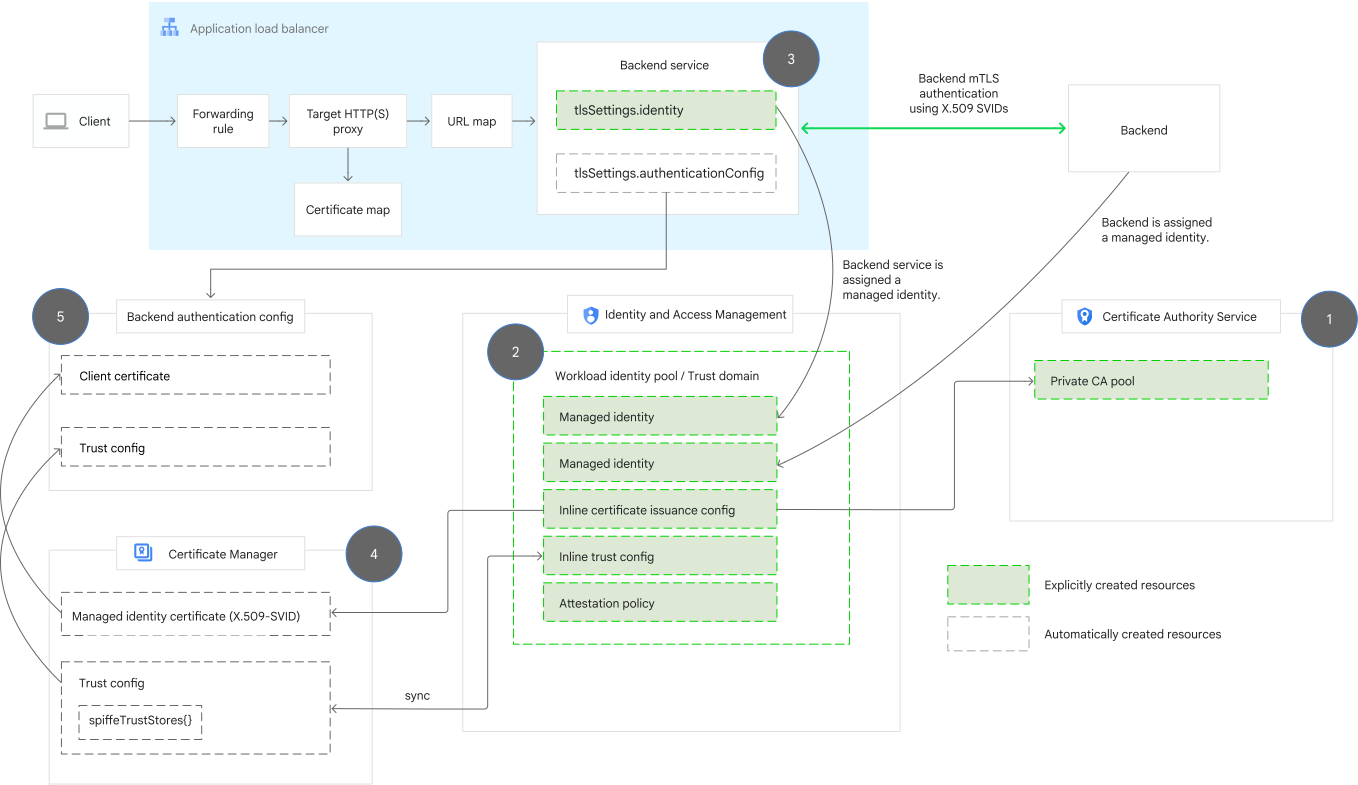
The following components work together to achieve backend mTLS using managed workload identity:
- Backend service of the load balancer (Compute Engine API)
- Identity and Access Management trust domain (Identity and Access Management API)
- Certificate authority pool (Certificate Authority Service API)
- Backend authentication config (Network Security API)
- Certificate Manager trust config (Certificate Manager API)
- Certificate Manager managed identity certificate (Certificate Manager API)
The following diagram shows a managed identity on the backend service of the load balancer, which lets the load balancer authenticate itself to the backend. In the diagram, steps 1-3 represent explicitly created resources, while steps 4-5 represent automatically created resources.
- Configure a Certificate Authority Service CA pool for issuing certificates to managed workload identities.
- Configure a trust domain by creating a workload identity pool. This pool requires a namespace, a managed identity, an attestation policy, an inline certificate issuance config resource, and an inline trust config resource.
- Configure the backend service of the load balancer with the managed identity.
Managed workload identity automatically creates the Certificate Manager managed identity certificate and the Certificate Manager trust config.
The Certificate Manager managed identity certificate is created based on the certificate issuance config in the workload identity pool. The Certificate Manager trust config is in sync with the inline trust config of the workload identity pool.
Managed workload identity automatically creates the backend authentication config.
The Certificate Manager trust config is attached to the backend authentication config. The Certificate Manager managed identity certificate (X.509-SVID) is also attached to the backend authentication config, which is then used to authenticate to the backend.
To learn more about backend mTLS configuration using managed identity, see Set up backend mTLS using managed workload identity.
Resources created during backend mTLS using managed identity
As shown in the preceding architecture diagram, when assigning a managed identity to the backend service, you don't need to configure the backend authentication config, the Certificate Manager trust config, and the Certificate Manager certificate. These resources are created automatically by managed workload identity.
This section takes a closer look at the different parts of the managed identity configuration process focusing on the resources that are created explicitly and those that are created automatically.
Explicitly created resources
The following resources need to be created explicitly while configuring backend mTLS using managed workload identity.
Certificate authority pool
To configure managed workload identities for the load balancer, you first need to configure a certificate authority, and optionally, one or more subordinate CAs. This setup is referred to as a CA hierarchy.
You can use CA Service pools to set up this hierarchy.
The workload identity pool is bound to the CA pool by updating the workload identity pool with the inline certificate issuance config.
Workload identity pool
Managed workload identities are defined within a workload identity pool, which serves as a trust domain.
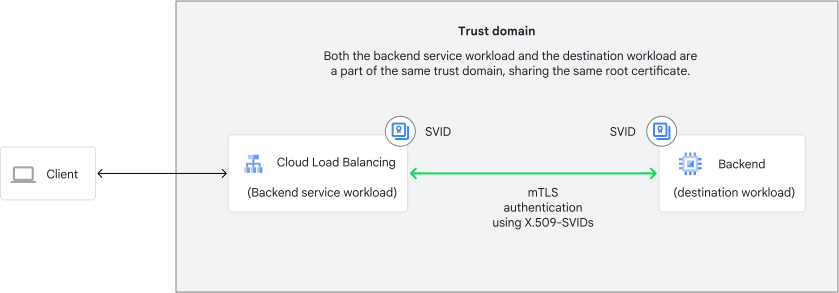
The trust domain represents a logical security boundary within which workloads can authenticate and authorize each other by using their SPIFFE IDs. All workloads within the same trust domain share a common root of trust, which lets the workloads verify each other's identities.
To use managed identities, you need to configure the workload identity pool in a
TRUST_DOMAIN mode. All identities within a pool consist of a
single namespace and an individual workload identifier.
Namespace
Within a workload identity pool, managed workload identities are organized into administrative boundaries called namespaces. Namespaces help you organize and grant access to related workload identities.
Managed workload identity
Managed workload identity is based on the SPIFFE standard, which provides a framework for identifying, authenticating, and securing communications between workloads using a unique SPIFFE ID.
Managed workload identity or a managed identity is a workload identifier that is configured in a workload identity pool. It is attached to a Google Cloud resource. Each managed identity is uniquely identified by a namespace and an individual workload identifier.
In the context of achieving backend mTLS, the managed identity is attached to the backend service resource of the load balancer.
The value of a managed identity is a fully specified SPIFFE ID that must conform to the following format:
spiffe://TRUST_DOMAIN_NAME/ns/NAMESPACE_ID/sa/MANAGED_IDENTITY_ID
A TRUST_DOMAIN_NAME is further expanded as follows:
WORKLOAD_IDENTITY_POOL_ID.global.PROJECT_NUMBER.workload.id.goog
To bring it all together, Compute Engine workloads, such as the backend service resource of a load balancer, can have a managed identity as follows:
spiffe://WORKLOAD_IDENTITY_POOL_ID.global.PROJECT_NUMBER.workload.id.goog/ns/NAMESPACE_ID/sa/MANAGED_IDENTITY_ID
Attestation policy
An attestation policy contains rules for Google Cloud IAM to verify whether the backend service is eligible to receive an X.509 certificate for the managed identity.
If the attestation policy verification passes, IAM requests an X.509 certificate for the managed identity from the Certificate Authority Service. The X.509 certificate is created in the CA pool that is bound to the managed identity. The CA Service provisions the certificate through identity reflection, where the configured SPIFFE ID is reflected onto an X.509 certificate.
Inline certificate issuance config
When you set up a workload identity pool, you configure an inline certificate issuance config. This configuration specifies which CA pool from your Certificate Authority Service instance is used to generate X.509 certificates for the identities within the workload identity pool. The configuration file also specifies the certificate's lifetime, rotation window percentage, and key algorithm.
The CA pool issues X.509 certificates to managed workload identities after the attestation policy enforcement succeeds.
Inline trust config of the workload identity pool
By default, your workloads within the same trust domain can mutually authenticate using managed workload identities. If you want workloads that are in different trust domains to mutually authenticate, then you need to explicitly declare the trust relationship in the workload identity pool. You do this by creating an inline trust config that recognizes and accepts certificates from other trust domains. These certificates are used to build a trust chain and verify the identity of the workloads from other domains.
The inline trust config contains a set of trust anchors that managed workload identity uses to validate peer certificates. The Certificate Manager trust config encapsulates a SPIFFE trust store, which remains in sync with the inline trust config of the workload identity pool.
Because the workload identity pool is bound to the CA pool, the workload identity pool automatically trusts the root certificates of that same CA pool. You don't need to add the pool's CA roots to the inline trust config because that trust is already built-in.
In the following diagram, the load balancer and the backend are a part of the same trust domain, sharing the same root certificate. The root certificate is used to build a trust chain and verify the identity of the workloads within the trust domain.
Backend service (Compute Engine API)
To assign a managed identity to the load balancer,
you need to configure the backend service of the load balancer such that its
tlsSettings attribute points to the new identity property
(backendService.tlsSettings.identity).
Note the following restrictions that apply when using the identity field
on the backend service of the load balancer:
If you set the
identityproperty, you cannot manually set the following fields on thetlsSettingsattribute:tlsSettings.snitlsSettings.subjectAltNamestlsSettings.authenticationConfig
The
identityfield can only be assigned during backend service creation.The
identityfield is immutable. After assigning one to the backend service of the load balancer, it cannot be updated or deleted.
Automatically created resources
After you set the identity property (backendService.tlsSettings.identity)
on the backend service of the load balancer, the following resources in the
Certificate Manager API and Network Security API are created
automatically by managed workload identity.
The automatically created resources are created in the same project as the backend service and use the standard quotas in that project.
Certificate Manager trust config (Certificate Manager API)
The Certificate Manager trust config is created automatically and cannot be directly edited or deleted.
The Certificate Manager trust config contains a field called the
spiffeTrustStores. The spiffeTrustStores field contains the trust bundle
associated with the trust domain of the workload identity pool
and any additional trust bundles
specified by the additionalTrustBundles field
in the workload identity pool's inline trust config. To learn more, see
Verify that the Certificate Manager trust config
contains the spiffeTrustStores field.
To learn more about how the spiffeTrustStores field in the
Certificate Manager trust config allows for the validation of
SPIFFE certificates, see Server certificate validation steps.
Certificate Manager managed identity certificate (Certificate Manager API)
The Certificate Manager managed identity certificate is created automatically by managed workload identity. The Certificate Manager managed identity certificate is read-only and cannot be directly edited or deleted using the Certificate Manager API. The Certificate Manager managed identity certificate is based on the inline certificate issuance config, which is defined in the workload identity pool.
The Certificate Manager managed identity certificate has a
managedIdentity property, which identifies it as a managed identity
certificate. The Certificate Manager managed identity
certificate resource stores the X.509-SVID in PEM-encoded
format. This X.509-SVID contains the SPIFFE ID encoded as a URI in the SAN field.
This SPIFFE ID corresponds to the managed identity in the workload identity pool.
The scope of the Certificate Manager managed identity certificate is
CLIENT_AUTH, which indicates that this certificate is used as a client
certificate in backend mTLS.
Backend authentication config (Network Security API)
The backend authentication config is created automatically by managed workload identity. The backend authentication config is read-only and cannot be edited or deleted directly using the Network Security API.
The Certificate Manager trust config is attached to the backend authentication config.
The Certificate Manager managed identity certificate is also attached to the backend authentication config, and is used as an X.509-SVID in backend mTLS requests between the load balancer and destination workloads.
Server certificate validation steps
When validating the server certificate during backend mTLS, the load balancer does the following:Verify that the server possesses the certificate's private key.
The server proves possession of the private key associated with the certificate it presents to the load balancer by signing a piece of information using its private key and sending it to the load balancer as a part of the
CertificateVerifymessage. The load balancer then verifies this signature using the public key from the server's certificate. If the signature verification fails, it indicates that the backend server doesn't possess the private key corresponding to the certificate. In such cases, the load balancer terminates the TLS handshake without logging any errors.Verify the chain of trust.
The
spiffeTrustStoresfield in the Certificate Manager trust config allows for the validation of SPIFFE certificates. ThespiffeTrustStoresfield in the Certificate Manager trust config is automatically enabled when using managed workload identity. With thespiffeTrustStoresfield enabled, thetrustStoresfield remains empty.The
spiffeTrustStoresfield is a map data structure where the key-value pair is as follows:- The key can be both a trust domain related to a workload identity pool
(in the format ending with
.workload.id.goog), or an additional trust domain. - The value is a
TrustStoreobject. This object contains a collection of trusted root certificates (known as a trust bundle) used to validate SPIFFE certificates from that specific trust domain.
Essentially, this map allows the load balancer to be configured with trust stores from multiple, distinct security domains. When a backend presents its SPIFFE certificate, the load balancer extracts the SPIFFE ID, identifies the trust domain, and uses the
spiffeTrustStoresmap to look up the correct trust store for verifying the chain of trust and validating the certificate.The verification checks include the following:
- The backend's server certificate, intermediate certificates (if provided), and the configured root certificate comply with the certificate requirements.
- For all the certificates in the chain of trust, the subject field in the parent certificate matches the issuer field in the child certificate. This verification helps to ensure that the parent certificate's identity (subject) is the same as the identity listed as the issuer in the child certificate.
- For all the certificates in the chain of trust, the subject key identifier (SKID) of the parent certificate matches the authority key identifier (AKID) in the child certificate. This match confirms that the child certificate was issued by the correct root authority and that it can be trusted because the root's public key is being referenced in the AKID for verifying the certificate's validity.
- The key can be both a trust domain related to a workload identity pool
(in the format ending with
Establish a connection with the backend.
If certificate validation succeeds, the load balancer proceeds with the connection to the backend.
However, if the certificate validation fails, the load balancer terminates the connection to the backend, sends an HTTP
502status code to the client, and logs the termination reason to Cloud Logging. In the event of a certificate validation error, subsequent incoming requests trigger the load balancer to reinitiate the backend connection.The backend connection can also fail if the backend server refuses the connection. With backend mTLS, this can happen because it finds the client certificate to be invalid. When the connection to the backend fails, the load balancer responds to proxied requests with an HTTP
502status code and logs a generic error reason to Cloud Logging.
Error handling and logging
Application Load Balancers provide detailed logging capabilities that allow you to monitor server certificate validation, identify potential issues, and troubleshoot connection problems. This section outlines the different types of errors that can occur during mTLS validation and how they are logged.
If the server certificate validation fails, the connection is terminated and the errors are logged to Cloud Logging. These errors are described in the following table.
| Server certificate status | Logged error |
|---|---|
| The server certificate chain is too long (more than 10 intermediate certificates included with the server certificate). |
server_cert_chain_exceeded_limit
|
A server or an intermediate certificate has an invalid RSA key size. No validation is performed. RSA keys can range from 2048 to 4096 bits. |
server_cert_invalid_rsa_key_size
|
A server or an intermediate certificate is using an unsupported elliptic curve. No validation is performed. Valid curves are P-256 and P-384. |
server_cert_unsupported_elliptic_curve_key
|
A server or an intermediate certificate is using a non-RSA or non-ECDSA algorithm. No validation is performed. |
server_cert_unsupported_key_algorithm
|
The PKI to be used for validation has more than ten intermediate certificates that share the same Subject and Subject Public Key Info. No validation is performed. |
server_cert_pki_too_large
|
An intermediate certificate provided for validation had more than 10 name constraints. |
|
The server certificate has an
|
|
| The time limit is exceeded while attempting to validate the certificate chain. |
server_cert_validation_timed_out
|
The depth or iteration limit is reached while attempting to validate the certificate chain. The maximum depth for a certificate chain is ten, including the root and server certificates. The maximum number of iterations is 100 (certificates examined to validate the server certificate chain). |
server_cert_validation_search_limit_exceeded
|
You configured mTLS without setting up a |
server_cert_validation_not_performed
|
The server did not provide the requested certificate during the handshake. |
server_cert_not_provided
|
The server certificate failed verification with the
|
ssl_certificate_verification_failed
|
Service is unable to perform certificate chain validation. |
server_cert_validation_unavailable
|
| Internal error validating certificate chain. |
server_cert_validation_internal_error
|
Matching |
server_cert_trust_config_not_found
|
| The server certificate payload (including any intermediate certificates) is too large (more than 16 KB). |
server_cert_exceeded_size_limit
|
Limitations
Classic Application Load Balancers don't support backend mTLS.
Backend mTLS isn't supported for global internet NEG backends.
If you assign a managed identity to the backend service (
backendService.tlsSettings.identity), you cannot manually set the following fields on thetlsSettingsproperty of the backend service:backendService.tlsSettings.snibackendService.tlsSettings.subjectAltNamesbackendService.tlsSettings.authenticationConfig
Managed identity can only be assigned at the time of the creation of the backend service.
Managed identity is immutable. After assigning a managed identity to the backend service of the load balancer, it cannot be updated or deleted.