


本教學課程使用 Kueue,說明如何實作工作佇列系統、在 Google Kubernetes Engine (GKE) 上設定不同命名空間之間的工作負載資源和配額共用,以及如何盡量提高叢集使用率。
背景
身為基礎架構工程師或叢集管理員,盡量提高命名空間之間的利用率非常重要。一個命名空間中的工作批次可能無法完全使用指派給該命名空間的完整配額,而另一個命名空間可能有多個待處理的工作。如要在不同命名空間的工作之間有效使用叢集資源,並提高配額管理彈性,您可以在 Kueue 中設定同類群組。同類群組是一組可以相互借用未使用配額的 ClusterQueue。 ClusterQueue 會控管 CPU、記憶體和硬體加速器等資源集區。
如要進一步瞭解這些概念,請參閱 Kueue 說明文件。
目標
本教學課程的適用對象為基礎架構工程師或叢集管理員,他們想在 Kubernetes 上使用 Kueue 實作工作佇列系統,並共用配額。本教學課程會模擬兩個不同命名空間中的兩個團隊,每個團隊都有專屬資源,但可以互相借用。如果工作累積過多,可以將第三組資源做為溢出資源。
使用 Prometheus 運算子監控不同命名空間中的工作和資源分配。
本教學課程涵蓋下列必要步驟:
- 建立 GKE 叢集
- 建立 ResourceFlavors
- 為每個團隊建立 ClusterQueue 和 LocalQueue
- 建立工作並觀察允許的工作負載
- 透過群組借用未使用的配額
- 新增控管 Spot VM 的溢出 ClusterQueue
費用
本教學課程使用下列 Google Cloud計費元件:使用 Pricing Calculator 可根據您的預測使用量來產生費用預估。
完成本教學課程後,您可以刪除建立的資源以避免繼續計費。詳情請參閱「清除所用資源」一節。
事前準備
設定專案
- 登入 Google Cloud 帳戶。如果您是 Google Cloud新手,歡迎 建立帳戶,親自評估產品在實際工作環境中的成效。新客戶還能獲得價值 $300 美元的免費抵免額,可用於執行、測試及部署工作負載。
-
In the Google Cloud console, on the project selector page, click Create project to begin creating a new Google Cloud project.
Roles required to create a project
To create a project, you need the Project Creator role (
roles/resourcemanager.projectCreator), which contains theresourcemanager.projects.createpermission. Learn how to grant roles. -
Verify that billing is enabled for your Google Cloud project.
Enable the GKE API.
Roles required to enable APIs
To enable APIs, you need the Service Usage Admin IAM role (
roles/serviceusage.serviceUsageAdmin), which contains theserviceusage.services.enablepermission. Learn how to grant roles.-
In the Google Cloud console, on the project selector page, click Create project to begin creating a new Google Cloud project.
Roles required to create a project
To create a project, you need the Project Creator role (
roles/resourcemanager.projectCreator), which contains theresourcemanager.projects.createpermission. Learn how to grant roles. -
Verify that billing is enabled for your Google Cloud project.
Enable the GKE API.
Roles required to enable APIs
To enable APIs, you need the Service Usage Admin IAM role (
roles/serviceusage.serviceUsageAdmin), which contains theserviceusage.services.enablepermission. Learn how to grant roles.
設定 Google Cloud CLI 的預設值
在 Google Cloud 控制台中啟動 Cloud Shell 執行個體:
開啟 Cloud Shell下載這個範例應用程式的原始碼:
git clone https://github.com/GoogleCloudPlatform/kubernetes-engine-samples
cd kubernetes-engine-samples/batch/kueue-cohort
設定預設環境變數:
gcloud config set project PROJECT_ID
gcloud config set compute/region COMPUTE_REGION
替換下列值:
- PROJECT_ID:您的 Google Cloud 專案 ID。
- COMPUTE_REGION:Compute Engine 區域。
建立 GKE 叢集
建立名為
kueue-cohort的 GKE 叢集:您將在預設集區中建立 6 個節點 (每個區域 2 個),且不啟用自動調度資源。這些就是團隊一開始可用的所有資源,因此他們必須爭奪這些資源。
稍後您會看到 Kueue 如何管理這兩個團隊傳送至各自佇列的工作負載。
gcloud container clusters create kueue-cohort --location COMPUTE_REGION \ --release-channel rapid --machine-type e2-standard-4 --num-nodes 2叢集建立完成後,結果會類似下列畫面:
kubeconfig entry generated for kueue-cohort. NAME: kueue-cohort LOCATION: us-central1 MASTER_VERSION: 1.26.2-gke.1000 MASTER_IP: 35.224.108.58 MACHINE_TYPE: e2-medium NODE_VERSION: 1.26.2-gke.1000 NUM_NODES: 6 STATUS: RUNNINGSTATUS的RUNNING是kueue-cluster。建立名為
spot的節點集區。這個節點集區使用 Spot VM,且已啟用自動調度資源功能。一開始有 0 個節點,但稍後您會將其提供給團隊,做為溢出容量使用。
gcloud container node-pools create spot --cluster=kueue-cohort --location COMPUTE_REGION  \
--spot --enable-autoscaling --max-nodes 20 --num-nodes 0 \
--machine-type e2-standard-4
將 Kueue 發布版本安裝至叢集:
VERSION=VERSION
kubectl apply -f \
  https://github.com/kubernetes-sigs/kueue/releases/download/$VERSION/manifests.yaml
將 VERSION 替換為 Kueue 最新版本後面的字母 v,例如
v0.4.0。如要進一步瞭解 Kueue 版本,請參閱「Kueue 版本」。等待 Kueue 控制器準備就緒:
watch kubectl -n kueue-system get pods輸出內容應與下列內容類似,您才能繼續:
NAME                                        READY   STATUS    RESTARTS   AGE
kueue-controller-manager-6cfcbb5dc5-rsf8k   2/2     Running   0          3m
建立兩個名為
team-a和team-b的新命名空間:kubectl create namespace team-a kubectl create namespace team-b系統會在每個命名空間中產生工作。
建立 ResourceFlavors
ResourceFlavor 代表叢集節點中的資源變體,例如不同的 VM (例如現成與隨選)、架構 (例如 x86 與 ARM CPU)、品牌和型號 (例如 Nvidia A100 與 T4 GPU)。
ResourceFlavor 會使用節點標籤和汙點,與叢集中的一組節點相符。
在這個資訊清單中:
- ResourceFlavor
on-demand的標籤已設為cloud.google.com/gke-provisioning: standard。 - ResourceFlavor
spot的標籤已設為cloud.google.com/gke-provisioning: spot。
工作負載獲派 ResourceFlavor 時,Kueue 會將工作負載的 Pod 指派給符合 ResourceFlavor 所定義節點標籤的節點。
部署 ResourceFlavor:
kubectl apply -f flavors.yaml
建立 ClusterQueue 和 LocalQueue
建立兩個 ClusterQueue cq-team-a 和 cq-team-b,以及對應的 LocalQueue lq-team-a 和 lq-team-b,分別命名空間為 team-a 和 team-b。
ClusterQueue 是叢集範圍的物件,可控管 CPU、記憶體和硬體加速器等資源集區。批次管理員可以限制批次使用者查看這些物件。
LocalQueue 是命名空間物件,批次使用者可以列出這些物件。這些佇列會指向 ClusterQueues,資源會從這些佇列分配,以執行 LocalQueue 工作負載。
ClusterQueues 允許資源有多種風味。在本例中,兩個 ClusterQueue 都有兩種變種版本,分別是 on-demand 和 spot,各自提供 cpu 資源。ResourceFlavor spot 的配額設為 0,目前不會使用。
兩個 ClusterQueue 共用同一個群組 (稱為 all-teams),定義於 .spec.cohort 中。
如果兩個以上的 ClusterQueue 共用同一個同類群組,即可相互借用未使用的配額。
如要進一步瞭解同類群組的運作方式和借用語意,請參閱 Kueue 說明文件
部署 ClusterQueue 和 LocalQueue:
kubectl apply -f cq-team-a.yaml
kubectl apply -f cq-team-b.yaml
(選用) 使用 kube-prometheus 監控工作負載
您可以使用 Prometheus 監控有效和待處理的 Kueue 工作負載。如要監控啟動的工作負載,並觀察每個 ClusterQueue 的負載,請將 kube-prometheus 部署至命名空間 monitoring 下的叢集:
下載 Prometheus 運算子的原始碼:
cd
git clone https://github.com/prometheus-operator/kube-prometheus.git
建立 CustomResourceDefinitions(CRD):
kubectl create -f kube-prometheus/manifests/setup建立監控元件:
kubectl create -f kube-prometheus/manifests允許
prometheus-operator從 Kueue 元件擷取指標:kubectl apply -f https://github.com/kubernetes-sigs/kueue/releases/download/$VERSION/prometheus.yaml變更為工作目錄:
cd kubernetes-engine-samples/batch/kueue-cohort將通訊埠轉送設定為在 GKE 叢集中執行的 Prometheus 服務:
kubectl --namespace monitoring port-forward svc/prometheus-k8s 9090在瀏覽器中開啟 localhost:9090 的 Prometheus 網頁 UI。
在 Cloud Shell 中:
按一下「網頁預覽」。
按一下「變更通訊埠」,然後將通訊埠編號設為
9090。按一下「變更並預覽」。
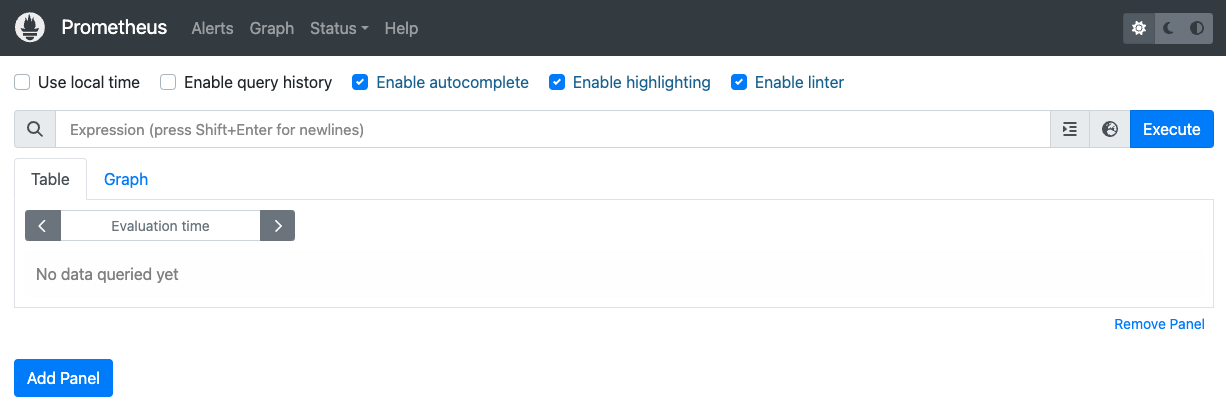
隨即會顯示下列 Prometheus 網頁版 UI。
在「Expression」(運算式) 查詢方塊中,輸入下列查詢,建立第一個面板來監控
cq-team-aClusterQueue 的現行工作負載:kueue_pending_workloads{cluster_queue="cq-team-a", status="active"} or kueue_admitted_active_workloads{cluster_queue="cq-team-a"}按一下「新增面板」。
在「Expression」(運算式) 查詢方塊中,輸入下列查詢,建立另一個面板來監控
cq-team-bClusterQueue 的作用中工作負載:kueue_pending_workloads{cluster_queue="cq-team-b", status="active"} or kueue_admitted_active_workloads{cluster_queue="cq-team-b"}按一下「新增面板」。
在「Expression」(運算式) 查詢方塊中,輸入下列查詢,建立監控叢集節點數量的面板:
count(kube_node_info)
(選用) 使用 Google Cloud Managed Service for Prometheus 監控工作負載
您可以使用 Google Cloud Managed Service for Prometheus 監控作用中和待處理的 Kueue 工作負載。如需完整的指標清單,請參閱 Kueue 說明文件。
設定身分和 RBAC,以存取指標:
下列設定會建立 4 個 Kubernetes 資源,為 Google Cloud Managed Service for Prometheus 收集器提供指標存取權。
存取 Kueue 指標時,系統會使用
kueue-system命名空間中的kueue-metrics-readerServiceAccount 進行驗證。與
kueue-metrics-reader服務帳戶相關聯的 Secret 會儲存驗證權杖,收集器會使用該權杖向 Kueue 部署作業公開的指標端點進行驗證。kueue-system命名空間中名為kueue-secret-reader的角色,可讀取含有服務帳戶權杖的密鑰。ClusterRoleBinding,將
kueue-metrics-reader服務帳戶的kueue-metrics-readerClusterRole 授予該帳戶。
apiVersion: v1
kind: ServiceAccount
metadata:
 name: kueue-metrics-reader
 namespace: kueue-system
---
apiVersion: v1
kind: Secret
metadata:
 name: kueue-metrics-reader-token
 namespace: kueue-system
 annotations:
   kubernetes.io/service-account.name: kueue-metrics-reader
type: kubernetes.io/service-account-token
---
apiVersion: rbac.authorization.k8s.io/v1
kind: Role
metadata:
 name: kueue-secret-reader
 namespace: kueue-system
rules:
-   resources:
 -   secrets
 apiGroups: [""]
 verbs: ["get", "list", "watch"]
 resourceNames: ["kueue-metrics-reader-token"]
---
apiVersion: rbac.authorization.k8s.io/v1
kind: ClusterRoleBinding
metadata:
 name: kueue-metrics-reader
subjects:
-   kind: ServiceAccount
 name: kueue-metrics-reader
 namespace: kueue-system
roleRef:
 kind: ClusterRole
 name: kueue-metrics-reader
 apiGroup: rbac.authorization.k8s.io
為 Google Cloud Managed Service for Prometheus 設定 RoleBinding:
視您使用的是 Autopilot 或 Standard 叢集而定,您需要在
gke-gmp-system或gmp-system命名空間中建立 RoleBinding。這個資源可讓收集器服務帳戶存取kueue-metrics-reader-token密鑰,以驗證及擷取 Kueue 指標。Autopilot
  apiVersion: rbac.authorization.k8s.io/v1
  kind: RoleBinding
  metadata:
    name: gmp-system:collector:kueue-secret-reader
    namespace: kueue-system
  roleRef:
    name: kueue-secret-reader
    kind: Role
    apiGroup: rbac.authorization.k8s.io
  subjects:
  -   name: collector
    namespace: gke-gmp-system
    kind: ServiceAccount
標準
  apiVersion: rbac.authorization.k8s.io/v1
  kind: RoleBinding
  metadata:
    name: gmp-system:collector:kueue-secret-reader
    namespace: kueue-system
  roleRef:
    name: kueue-secret-reader
    kind: Role
    apiGroup: rbac.authorization.k8s.io
  subjects:
  -   name: collector
    namespace: gmp-system
    kind: ServiceAccount
設定 Pod 監控資源:
下列資源會設定 Kueue 部署作業的監控功能,並指定透過 HTTPS 在 /metrics 路徑公開指標。在擷取指標時,系統會使用
kueue-metrics-reader-token密鑰進行驗證。apiVersion: monitoring.googleapis.com/v1 kind: PodMonitoring metadata: name: kueue namespace: kueue-system spec: selector: matchLabels: control-plane: controller-manager endpoints: - port: 8443 interval: 30s path: /metrics scheme: https tls: insecureSkipVerify: true authorization: type: Bearer credentials: secret: name: kueue-metrics-reader-token key: token
查詢匯出的指標
監控以 Kueue 為基礎的系統時,可使用的 PromQL 查詢範例
您可以透過這些 PromQL 查詢監控重要的 Kueue 指標,例如工作輸送量、佇列的資源使用率和工作負載等待時間,瞭解系統效能並找出潛在瓶頸。
工作處理量
這會計算每個 cluster_queue 在 5 分鐘內允許的工作負載每秒速率。這項指標有助於按佇列細分,找出瓶頸,加總後即可得出整體系統輸送量。
查詢:
sum(rate(kueue_admitted_workloads_total[5m])) by (cluster_queue)
資源使用率
前提是 metrics.enableClusterQueueResources 已啟用。系統會計算每個佇列的目前 CPU 使用量與名義 CPU 配額比率。值越接近 1,表示用量越高。您可以變更資源標籤,將此範例用於記憶體或其他資源。
如要在叢集中安裝自訂設定的 Kueue 發布版本,請參閱 Kueue 說明文件。
查詢:
sum(kueue_cluster_queue_resource_usage{resource="cpu"}) by (cluster_queue) / sum(kueue_cluster_queue_nominal_quota{resource="cpu"}) by (cluster_queue)佇列等待時間
這項指標會顯示特定佇列中工作負載的第 90 百分位等待時間。您可以修改分位數值 (例如中位數為 0.5,第 99 個百分位數為 0.99),瞭解等待時間分布情形。
查詢:
histogram_quantile(0.9, kueue_admission_wait_time_seconds_bucket{cluster_queue="QUEUE_NAME"})建立工作並觀察允許的工作負載
在本節中,您將在 team-a 和 team-b 命名空間下建立 Kubernetes Job。Kubernetes 中的 Job 控制器會建立一或多個 Pod,並確保這些 Pod 成功執行特定工作。
產生要傳送至兩個 ClusterQueue 的工作,這些工作會休眠 10 秒,並以三個平行工作完成。然後在 60 秒後清除。
job-team-a.yaml 會在 team-a 命名空間下建立 Job,並指向 LocalQueue lq-team-a 和 ClusterQueue cq-team-a。
同樣地,job-team-b.yaml 會在 team-b 命名空間下建立 Job,並指向 LocalQueue lq-team-b 和 ClusterQueue cq-team-b。
啟動新的終端機,然後前往
kueue-cohort目錄:cd ~/kubernetes-engine-samples/batch/kueue-cohort如要每秒產生一個 Job,請執行下列指令碼:
./create_jobs.sh job-team-a.yaml 1啟動另一個終端機,然後前往
kueue-cohort目錄:cd ~/kubernetes-engine-samples/batch/kueue-cohort為
team-b命名空間建立 Job:./create_jobs.sh job-team-b.yaml 1觀察 Prometheus 中排入佇列的工作。或使用下列指令:
watch -n 2 kubectl get clusterqueues -o wide
畫面會顯示如下的輸出內容:
    NAME        COHORT      STRATEGY         PENDING WORKLOADS   ADMITTED WORKLOADS
    cq-team-a   all-teams   BestEffortFIFO   0                   5
    cq-team-b   all-teams   BestEffortFIFO   0                   4
透過同類群組借用未使用的配額
ClusterQueues 可能無法隨時達到最大容量。如果工作負載未平均分配到各個 ClusterQueue,配額使用量就不會達到上限。如果 ClusterQueue 彼此共用同類群組,ClusterQueue 就能向其他 ClusterQueue 借用配額,盡可能提高配額使用率。
當 ClusterQueues
cq-team-a和cq-team-b都有排隊等待的工作時,請在對應的終端機上按下CTRL+c,停止team-b命名空間的指令碼。處理完命名空間
team-b的所有待處理工作後,命名空間team-a的工作即可借用cq-team-b中的可用資源:kubectl describe clusterqueue cq-team-a由於
cq-team-a和cq-team-b共用名為all-teams的同類群組,因此這些 ClusterQueue 可以共用未使用的資源。Flavors Usage: Name: on-demand Resources: Borrowed: 5 Name: cpu Total: 15 Borrowed: 5Gi Name: memory Total: 15Gi繼續執行
team-b命名空間的指令碼。./create_jobs.sh job-team-b.yaml 3觀察從
cq-team-a借用的資源如何返回0,而cq-team-b的資源則用於自身的工作負載:kubectl describe clusterqueue cq-team-aFlavors Usage: Name: on-demand Resources: Borrowed: 0 Name: cpu Total: 9 Borrowed: 0 Name: memory Total: 9Gi
使用 Spot VM 提高配額
如果需要暫時增加配額 (例如滿足待處理工作負載的高需求),您可以設定 Kueue,在同類群組中新增更多 ClusterQueue,以滿足需求。如果 ClusterQueue 有未使用的資源,可以與同類群組的其他 ClusterQueue 共用這些資源。
在本教學課程的開頭,您使用 Spot VM 建立名為 spot 的節點集區,並建立名為 spot 的 ResourceFlavor,標籤設為 cloud.google.com/gke-provisioning: spot。建立 ClusterQueue,以使用這個節點集區和代表該節點集區的 ResourceFlavor:
建立名為
cq-spot的新 ClusterQueue,並將同類群組設為all-teams:由於這個 ClusterQueue 與
cq-team-a和cq-team-b共用相同群組,因此 ClusterQueuecq-team-a和cq-team-b最多可借用 15 個 CPU 要求和 15 Gi 的記憶體。cd ~/kubernetes-engine-samples/batch/kueue-cohort kubectl apply -f cq-spot.yaml在 Prometheus 中,觀察
cq-team-a和cq-team-b的已允許工作負載如何因cq-spot新增配額而大幅增加,因為他們共用同一個同類群組。或使用下列指令:watch -n 2 kubectl get clusterqueues -o wide在 Prometheus 中,觀察叢集中的節點數量。或使用下列指令:
watch -n 2 kubectl get nodes -o wide按
CTRL+c停止team-a和team-b命名空間的兩個指令碼。
清除所用資源
為避免因為本教學課程所用資源,導致系統向 Google Cloud 收取費用,請刪除含有相關資源的專案,或者保留專案但刪除個別資源。
刪除專案
- 前往 Google Cloud 控制台的「Manage resources」(管理資源) 頁面。
- 在專案清單中選取要刪除的專案,然後點選「Delete」(刪除)。
- 在對話方塊中輸入專案 ID,然後按一下 [Shut down] (關閉) 以刪除專案。
刪除個別資源
刪除 Kueue 配額系統:
kubectl delete -n team-a localqueue lq-team-a
kubectl delete -n team-b localqueue lq-team-b
kubectl delete clusterqueue cq-team-a
kubectl delete clusterqueue cq-team-b
kubectl delete clusterqueue cq-spot
kubectl delete resourceflavor default
kubectl delete resourceflavor on-demand
kubectl delete resourceflavor spot
刪除 Kueue 資訊清單:
VERSION=VERSION
kubectl delete -f \
  https://github.com/kubernetes-sigs/kueue/releases/download/$VERSION/manifests.yaml
刪除叢集:
gcloud container clusters delete kueue-cohort --location=COMPUTE_REGION
後續步驟
進一步瞭解如何使用 Kueue 部署批次系統。
進一步瞭解 GKE 中的工作。