

This page provides a general overview of how Google Kubernetes Engine (GKE) creates and manages Google Cloud load balancers when you apply a Kubernetes LoadBalancer Services manifest. It describes LoadBalancer types, configuration parameters, and provides best practice recommendations.
Before reading this page, ensure that you're familiar with GKE networking concepts.
Overview
When you create a LoadBalancer Service, GKE configures a Google Cloud pass-through load balancer whose characteristics depend on parameters of your Service manifest.
Customize your LoadBalancer Service
When you choose which LoadBalancer Service configuration to use, consider the following aspects:
- Type of load balancer – Internal or External
- External traffic policy
- Weighted load balancing
- Zonal affinity
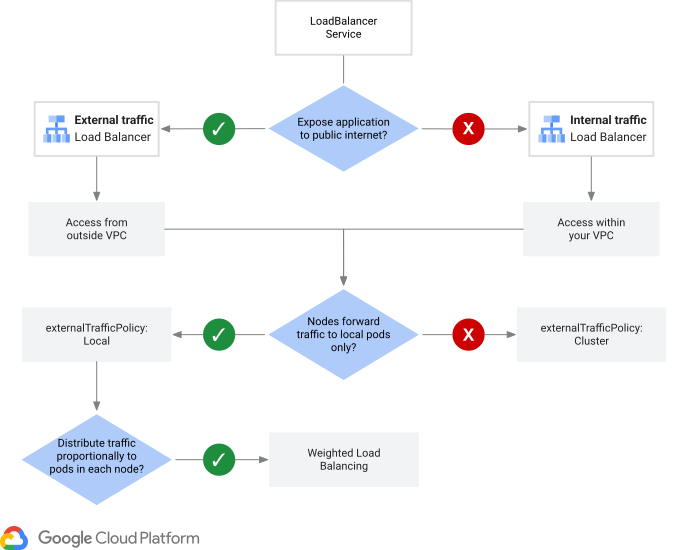
Type of load balancer – Internal or External
When you create a LoadBalancer Service in GKE, you specify whether the load balancer has an internal or external address:
External LoadBalancer Services are implemented by using regional external passthrough Network Load Balancers. Clients located outside your VPC network and Google Cloud VMs with internet access can access an external LoadBalancer Service.
To create an external LoadBalancer Service, use one of the following techniques:
In clusters that run GKE 1.33.1-gke.1779000 or later, add
spec.loadBalancerClass: "networking.gke.io/l4-regional-external"to the Service manifest before you submit the manifest to the cluster. We recommend that you use this field because it always creates a backend service-based regional external passthrough Network Load Balancer withGCE_VM_IPNEG backends. Thespec.loadBalancerClassfield is immutable and cannot be changed after you create the Service.In clusters that run any supported GKE version, you can add the
cloud.google.com/l4-rbs: "enabled"annotation to the Service manifest before you submit the manifest to the cluster. This annotation also creates a backend service-based regional external passthrough Network Load Balancer. The load balancer usesGCE_VM_IPNEG backends if the manifest is submitted to a cluster that runs GKE 1.32.2-gke.1652000 or later. Otherwise, the load balancer uses instance group backends. GKE only evaluates this annotation when the Service manifest is first applied to the cluster.
Internal LoadBalancer Services are implemented by using internal passthrough Network Load Balancers. Clients located in the same VPC network or in a network connected to the cluster's VPC network can access an internal LoadBalancer Service.
As a best practice, before you create an internal LoadBalancer Service, ensure that GKE subsetting is enabled. GKE subsetting is automatically enabled if your cluster runs GKE 1.36 or later. For earlier GKE versions, you should explicitly enable GKE subsetting.
To create an internal LoadBalancer Service, use one of the following techniques:
In clusters that run GKE 1.33.1-gke.1779000 or later that have GKE subsetting enabled, add
spec.loadBalancerClass: "networking.gke.io/l4-regional-internal"to the Service manifest before you submit the manifest to the cluster. We recommend that you use this field because it always creates an internal passthrough Network Load Balancer withGCE_VM_IPNEG backends. Thespec.loadBalancerClassfield is immutable and cannot be changed after you create the Service.In clusters that run any supported GKE version, you can add the
networking.gke.io/load-balancer-type: "Internal"annotation to the Service manifest before submitting the manifest to the cluster. This also creates an internal passthrough Network Load Balancer. The load balancer usesGCE_VM_IPNEG backends if the manfiest is submitted to a cluster that has GKE subsetting enabled. Otherwise, the load balancer uses instance group backends.
LoadBalancer Service manifests that don't have a spec.loadBalancerClass and that
don't have the cloud.google.com/l4-rbs: "enabled" or
networking.gke.io/load-balancer-type: "Internal" annotations create a target
pool-based regional external passthrough Network Load Balancer.
We don't recommend using target pool-based regional external passthrough Network Load Balancers.
HttpLoadBalancing prerequisite
To create LoadBalancer Services powered by backend service-based regional external passthrough Network Load Balancers
or internal passthrough Network Load Balancers, ensure that the HttpLoadBalancing add-on is enabled if your
cluster runs a GKE version before 1.36. The HttpLoadBalancing
add-on is enabled by default.
LoadBalancer Services in GKE version 1.36 and later don't depend on
the HttpLoadBalancing add-on.
Effect of externalTrafficPolicy
The externalTrafficPolicy parameter controls the following:
- Which nodes receive packets from the load balancer
- Whether packets might be routed between nodes in the cluster, after the load balancer delivers the packets to a node
- Whether the original client IP address is preserved or lost
The externalTrafficPolicy can be either Local or Cluster:
- Use
externalTrafficPolicy: Localto ensure that packets are only delivered to a node with at least one serving, ready, non-terminating Pod, preserving the original client source IP address. This option is best for workloads with a relatively constant number of nodes with serving Pods, even if the overall number of nodes in the cluster varies. This option is required to support weighted load balancing.
- Use
externalTrafficPolicy: Clusterin situations where the overall number of nodes in your cluster is relatively constant, but the number of nodes with serving Pods varies. This option doesn't preserve original client source IP addresses, and can add latency because packets might be routed to a serving Pod on another node after being delivered to a node from the load balancer. This option is incompatible with weighted load balancing.
For more information about how externalTrafficPolicy affects packet routing
within the nodes, see packet processing.
Weighted load balancing
External LoadBalancer Services support weighted load balancing, which allows nodes with more serving, ready, non-terminating Pods to receive a larger proportion of new connections compared to nodes with fewer Pods. For more information about how load balancer configurations change with weighted load balancing, see Effect of weighted load balancing.

As the diagram illustrates, Services with weighted load balancing enabled distribute new connections proportionally to the number of ready Pods on each node.
To use weighted load balancing, you must meet all of the following requirements:
Your GKE cluster must use version 1.31.0-gke.1506000 or later.
You must create an external LoadBalancer Service that results in a backend service-based regional external passthrough Network Load Balancer. You can use either of the following techniques:
In clusters that run GKE 1.33.1-gke.1779000 or later, add
spec.loadBalancerClass: "networking.gke.io/l4-regional-external"to the Service manifest before you submit the manifest to the cluster. This is the preferred method.In clusters that run any supported GKE version, add the
cloud.google.com/l4-rbs: "enabled"annotation to the Service manifest before you submit the manifest to the cluster.
You must include the
networking.gke.io/weighted-load-balancing: pods-per-nodeannotation in the Service manifest to enable the weighted load balancing feature.The LoadBalancer Service manifest must use
externalTrafficPolicy: Local. GKE doesn't prevent you from usingexternalTrafficPolicy: Cluster, butexternalTrafficPolicy: Clustereffectively disables weighted load balancing because the packet might be routed, after the load balancer, to a different node.
To use weighted load balancing, see Enable weighted load balancing.
Zonal affinity
Internal LoadBalancer Services support zonal affinity, which can route new connections to nodes with serving Pods in the same zone as a client. If there are no healthy Pods in the zone, GKE routes traffic to another zone. Keeping traffic within a zone can minimize cross-zone traffic, which reduces cost and latency. To enable zonal affinity in a GKE cluster, you must have GKE subsetting enabled.
When you configure zonal affinity for an internal LoadBalancer Service,
GKE configures the corresponding internal passthrough Network Load Balancer with the
ZONAL_AFFINITY_SPILL_CROSS_ZONE option and a zero spillover ratio (0.0).
This configuration helps ensure that traffic drops within the zone rather than
spilling over to other zones. The load balancer narrows the original set of
eligible node backends to only the eligible node backends that are in the same
zone as the client when all of the following are true:
The client is compatible with zonal affinity.
At least one healthy, eligible node backend is in the client's zone.
In all other situations, the load balancer continues to use the original set of eligible node backends, without applying any zonal affinity optimization.
For more details of how zonal affinity configuration affects load balancer
behavior, see the zonal affinity
documentation. For more information about how zonal affinity and
externalTrafficPolicy influence packet routing on node VMs, see
Source Network Address Translation and routing on nodes.
Scaling considerations with zonal affinity
Because zonal affinity does not natively integrate with the HorizontalPodAutoscaler (HPA), scaling issues can occur when traffic within a zone exceeds the capacity of Pods in that zone. The HPA scales Pods based on aggregate cluster metrics rather than per-zone load. As a result, a zone experiencing high traffic (zonal overload) might not receive additional Pods, leading to degraded performance or dropped connections for clients in that zone, even if the cluster overall is underutilized.
Special considerations for internal LoadBalancer Services
This section describes the GKE subsetting feature, which is unique
to internal LoadBalancer Services, and how GKE subsetting
interacts with the externalTrafficPolicy to influence the maximum number of
load-balanced nodes.
GKE subsetting
GKE subsetting for internal LoadBalancer Services is enabled
by default for GKE clusters that run version 1.36 and later. For
these versions, GKE subsetting remains active even if the
cluster-level --enable-l4-ilb-subsetting flag is set to false in your cluster
configuration or Infrastructure as Code (IaC) tools such as Terraform.
This cluster-wide configuration option improves the scalability of
internal passthrough Network Load Balancers by more efficiently grouping node endpoints into GCE_VM_IP
network endpoint groups (NEGs). The NEGs are used as the backends of the load
balancer.
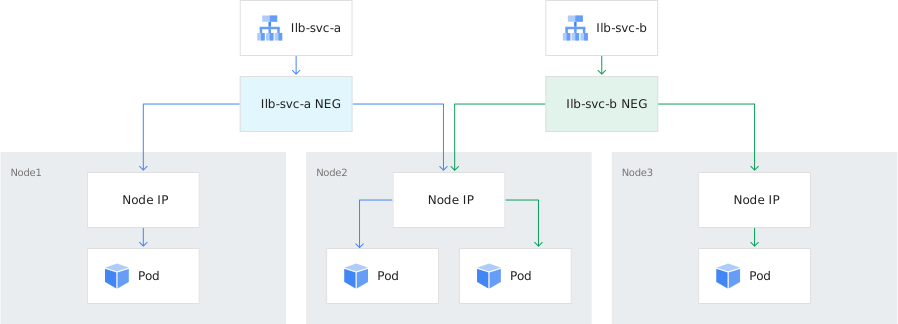
The following diagram shows two Services in a zonal cluster with three nodes.
The cluster has GKE subsetting enabled. Each Service has two
Pods. GKE creates one GCE_VM_IP NEG for each Service. Endpoints
in each NEG are the nodes with the serving Pods for the respective Service.
For clusters that run versions earlier than 1.36, you can manually enable GKE subsetting when you create a cluster or update an existing cluster. After GKE subsetting is enabled, you cannot disable it.
GKE subsetting requires:
- GKE version 1.18.19-gke.1400 or later, and
- If your cluster is on a version earlier than 1.36, the
HttpLoadBalancingadd-on must be enabled. This add-on is enabled by default. It allows the cluster to manage load balancers which use backend services. If your cluster is on version 1.36 and later, theHttpLoadBalancingadd-on is not a prerequisite for GKE subsetting.
Node count
A cluster with GKE subsetting disabled can experience problems with internal LoadBalancer Services if the cluster has more than 250 total nodes (among all node pools). This happens because Internal passthrough Network Load Balancers created by GKE can only distribute packets to 250 or fewer backend node VMs. This limitation exists because of the following two reasons:
- GKE doesn't use load balancer backend subsetting.
- An internal passthrough Network Load Balancer is limited to distributing packets to 250 or fewer backends when load balancer backend subsetting is disabled.
A cluster with GKE subsetting supports internal LoadBalancer Services in clusters with more than 250 total nodes.
The number of nodes supported with GKE subsetting depends on the
value of the externalTrafficPolicy field for the internal LoadBalancer
Service:
externalTrafficPolicy: Local: supports up to 250 nodes with serving Pods for a given Service.externalTrafficPolicy: Cluster: does not impose a limit on the number of nodes with serving Pods. This behavior occurs because GKE configures a maximum of 25 node endpoints inGCE_VM_IPNEGs for each Service. For more information, see Node membership inGCE_VM_IPNEG backends.
Traffic distribution
By default, internal and external LoadBalancer Services create passthrough Network Load Balancers
with session affinity set to NONE. Passthrough Network Load Balancers use session
affinity, health information, and—in certain circumstances—details
like weight to identify and select an eligible node backend for a new connection.
New connections create connection tracking table entries, which are used to quickly route subsequent packets for the connection to the previously-selected eligible node backend. For more information about how passthrough Network Load Balancers identify and select eligible backends, and use connection tracking, see the following:
Traffic distribution for internal passthrough Network Load Balancers
Traffic distribution for regional external passthrough Network Load Balancers
Effect of weighted load balancing
When you configure weighted load balancing for an external Load
Balancer Service, GKE enables weighted load balancing on the
corresponding regional external passthrough Network Load Balancer. GKE configures the kube-proxy or cilium-agent
software to include a response header in the answer to the load balancer health
check. This response header defines a weight that is proportional to the number
of serving, ready, and non-terminating Pods on each node.
The load balancer uses the weight information as follows:
The load balancer's set of eligible node backends consists of all healthy, non-zero weight nodes.
The load balancer takes weight into account when it selects one of the eligible node backends. When the Service uses
externalTrafficPolicy: Local(required for weighted load balancing to be effective), an eligible node backend that has more serving, ready, non-terminating Pods is more likely to be selected than an eligible node backend with fewer Pods.
Node grouping
The GKE version, Service manifest annotations, and, for Internal LoadBalancer Services, the GKE subsetting option determine the resulting Google Cloud load balancer and the type of backends.
The following table outlines the node grouping methods for different LoadBalancer Service configurations:
| Service and cluster details | Resulting Google Cloud load balancer | Node grouping method |
|---|---|---|
| Internal LoadBalancer Services | ||
GKE version 1.33.1-gke.1779000 or later in a cluster with
GKE subsetting enabled1. Service manifest
submitted to the cluster with
spec.loadBalancerClass: "networking.gke.io/l4-regional-internal".
|
An internal passthrough Network Load Balancer whose backend service uses GCE_VM_IP
network endpoint group (NEG) backends |
Node VMs are grouped into The |
All supported GKE versions in a cluster with
GKE subsetting enabled1. Service manifest
submitted to the cluster with the
networking.gke.io/load-balancer-type: "Internal" annotation.
|
||
GKE versions before 1.36 in a cluster with
GKE subsetting disabled1. Service manifest
submitted to the cluster with the
networking.gke.io/load-balancer-type: "Internal" annotation.
|
An internal passthrough Network Load Balancer whose backend service uses zonal unmanaged instance group backends | All node VMs are placed into zonal unmanaged instance groups which GKE uses as backends for the internal passthrough Network Load Balancer's backend service. The The same unmanaged instance groups are used for other load balancer backend services created in the cluster because of the single load-balanced instance group limitation. |
| External LoadBalancer Services | ||
GKE version 1.33.1-gke.1779000 or later. Service manifest
submitted to the cluster with
spec.loadBalancerClass: "networking.gke.io/l4-regional-external".
|
A backend service-based regional external passthrough Network Load Balancer with GCE_VM_IP
network endpoint group (NEG) backends |
Node VMs are grouped into The |
GKE version 1.32.2-gke.1652000 or later. Service manifest
submitted to the cluster with the
cloud.google.com/l4-rbs: "enabled" annotation2.
|
||
GKE version before 1.32.2-gke.16520003. Service manifest
submitted to the cluster with the
cloud.google.com/l4-rbs: "enabled" annotation2.
|
A backend service-based regional external passthrough Network Load Balancer with zonal unmanaged instance group backends | All node VMs are placed into zonal unmanaged instance groups which GKE uses as backends for the regional external passthrough Network Load Balancer's backend service. The The same unmanaged instance groups are used for other load balancer backend services created in the cluster because of the single load-balanced instance group limitation. |
All supported GKE versions. Service manifest submitted to
the cluster without all of the following:
|
A target pool-based regional external passthrough Network Load Balancer whose target pool contains all nodes of the cluster | The target pool is a legacy API which does not rely on NEGs or instance groups. All nodes have direct membership in the target pool. The |
1GKE subsetting is automatically enabled in GKE version 1.36 and later. GKE subsetting can't be disabled after you enable it.
2The cloud.google.com/l4-rbs: "enabled" annotation
is only honored when the Service manifest is submitted to the cluster. Adding
this annotation to an existing Service manifest doesn't convert a target
pool-based regional external passthrough Network Load Balancer to a backend service-based regional external passthrough Network Load Balancer.
3GKE doesn't automatically update backend
service-based regional external passthrough Network Load Balancers with instance group backends to backend
service-based regional external passthrough Network Load Balancers with GCE_VM_IP NEG backends.
For manual migration instructions, see
Migrate to GCE_VM_IP NEG backends.
Node membership in GCE_VM_IP NEG backends
When GKE creates an internal passthrough Network Load Balancer or backend service-based
regional external passthrough Network Load Balancer with GCE_VM_IP NEG backends, it creates and manages the
NEGs like this:
GKE creates a unique
GCE_VM_IPNEG in each zone for each LoadBalancer Service. Unlike instance groups, nodes can be members of more than one load-balancedGCE_VM_IPNEG.The
externalTrafficPolicyof the Service and the number of nodes in the cluster determine which nodes are added as endpoints to the Service'sGCE_VM_IPNEG(s).
The cluster's control plane manages node endpoints in GCE_VM_IP NEGs
according to the value of the Service's externalTrafficPolicy and the number
of nodes in the cluster, as summarized in the following tables.
Nodes in internal passthrough Network Load Balancer
externalTrafficPolicy |
Number of nodes in the cluster | Endpoint membership |
|---|---|---|
Cluster |
1 to 25 nodes | GKE uses all nodes in the cluster as endpoints for the Service's NEG(s), even if a node does not contain a serving Pod for the Service. |
Cluster |
more than 25 nodes | GKE uses a random subset of up to 25 nodes as endpoints for the Service's NEG(s), even if a node does not contain a serving Pod for the Service. |
Local |
any number of nodes1 | GKE only uses nodes which have at least one of the Service's serving Pods as endpoints for the Service's NEG(s). |
1Limited to 250 nodes with serving Pods. More than 250 nodes can be present in the cluster, but internal passthrough Network Load Balancers can only distribute to 250 backend VMs when internal passthrough Network Load Balancer backend subsetting is disabled. Even with GKE subsetting enabled, GKE never configures internal passthrough Network Load Balancers with internal passthrough Network Load Balancer backend subsetting. For details about this limit, see Maximum number of VM instances per internal backend service.
Nodes in regional external passthrough Network Load Balancer
externalTrafficPolicy |
Number of nodes in the cluster | Endpoint membership |
|---|---|---|
Cluster |
1 to 250 nodes | GKE uses all nodes in the cluster as endpoints for the Service's NEG(s), even if a node does not contain a serving Pod for the Service. |
Cluster |
more than 250 nodes | GKE uses a random subset of up to 250 nodes as endpoints for the Service's NEG(s), even if a node does not contain a serving Pod for the Service. |
Local |
any number of nodes1 | GKE only uses nodes which have at least one of the Service's serving Pods as endpoints for the Service's NEG(s). |
1Limited to 3,000 nodes with serving Pods. More
than 3,000 nodes can be present in the cluster, but GKE
only supports creating up to 3,000 endpoints when it creates backend
service-based regional external passthrough Network Load Balancers that use GCE_VM_IP NEG
backends.
Single load-balanced instance group limitation
The Compute Engine API prohibits VMs from being members of more than one load-balanced instance group. GKE nodes are subject to this constraint.
When using unmanaged instance group backends, GKE creates or updates unmanaged instance groups containing all nodes from all node pools in each zone the cluster uses. These unmanaged instance groups are backends for the following GKE-created load balancers:
- An internal passthrough Network Load Balancer created for an internal LoadBalancer Service whose manifest
has the
networking.gke.io/load-balancer-type: "Internal"annotation, submitted to a cluster running a GKE version before 1.36, with GKE subsetting disabled. - A backend service-based regional external passthrough Network Load Balancer created for an external LoadBalancer
Service whose manifest has the
cloud.google.com/l4-rbs: "enabled"annotation, submitted to a cluster running a GKE version before 1.32.2-gke.1652000. - An external Application Load Balancer created for an external GKE Ingress, using the GKE Ingress controller, but not using container-native load balancing.
Because node VMs can't be members of more than one load-balanced instance group, GKE can't create and manage internal passthrough Network Load Balancers, backend service-based regional external passthrough Network Load Balancers, and external Application Load Balancers created for GKE Ingress resources if either of the following is true:
- Outside of GKE, you created at least one backend service based load balancer, and you used the cluster's managed instance groups as backends for the load balancer's backend service.
- Outside of GKE, you create a custom unmanaged instance group that contains some or all of the cluster's nodes, then attach that custom unmanaged instance group to a backend service for a load balancer.
To work around this limitation, you can instruct GKE to use NEG backends:
- Create LoadBalancer Services that use
GCE_VM_IPNEGs. For more information, see Node grouping. - Configure external GKE Ingress resources to use container native load balancing. For more information, see GKE container-native load balancing.
Load balancer health checks
All GKE LoadBalancer Services implement a load balancer health check. The load balancer health check system operates outside of the cluster and is different from a Pod readiness, liveness, or startup probe.
Load balancer health check packets are answered by either the kube-proxy
(legacy dataplane) or cilium-agent (GKE Dataplane V2) software running on each
node. Load balancer health checks for LoadBalancer Services cannot be answered
by Pods.
The externalTrafficPolicy of the Service determines which nodes pass the load
balancer health check. For more information about how the load balancer uses
health check information, see Traffic distribution.
externalTrafficPolicy |
Which nodes pass the health check | What port is used |
|---|---|---|
Cluster |
All nodes of the cluster pass the health check, including nodes without serving Pods. If at least one serving Pod exists on a node, that node passes the load balancer health check regardless of the state of its Pod. | The load balancer health check port must be TCP port 10256. It cannot be customized. |
Local |
The load balancer health check considers a node healthy if at least one ready, non-terminating serving Pod exists on the node, regardless of the state of any other Pods. Nodes without a serving Pod, nodes whose serving Pods all fail readiness probes, and nodes whose serving Pods are all terminating fail the load balancer health check. During state transitions, a node still passes the load balancer health check until the load balancer health check unhealthy threshold has been reached. The transition state occurs when all serving Pods on a node begin to fail readiness probes or when all serving Pods on a node are terminating. How the packet is processed in this situation depends on the GKE version. For additional details, see the next section, Packet processing. |
The Kubernetes control plane assigns the health check port from the node port range unless you specify a custom health check port. |
When weighted load balancing is enabled, the load balancer uses both health and weight information to identify the set of eligible node backends. For more information, see Effect of weighted load balancing.
When zonal affinity is enabled, the load balancer might refine the set of eligible node backends. For more information, see Zonal affinity.
Packet processing
The following sections detail how the load balancer and cluster nodes work together to route packets received for LoadBalancer Services.
Pass-through load balancing
Passthrough Network Load Balancers route packets to the nic0 interface of the
GKE cluster's nodes. Each load-balanced packet received on a node
has the following characteristics:
- The packet's destination IP address matches the load balancer's forwarding rule IP address.
- The protocol and destination port of the packet match both of these:
- a protocol and port specified in
spec.ports[]of the Service manifest - a protocol and port configured on the load balancer's forwarding rule
- a protocol and port specified in
Destination Network Address Translation on nodes
After the node receives the packet, the node performs additional packet
processing. In GKE clusters that use the legacy dataplane,
nodes use iptables to process load-balanced packets. In GKE
clusters with GKE Dataplane V2
enabled, nodes use
eBPF instead. The node-level packet
processing always includes the following actions:
- The node performs Destination Network Address Translation (DNAT) on the packet, setting its destination IP address to a serving Pod IP address.
- The node changes the packet's destination port to the
targetPortof the corresponding Service'sspec.ports[].
Source Network Address Translation and routing on nodes
The following table shows the relationship between externalTrafficPolicy
and whether the node that received load-balanced packets performs source network
address translation (SNAT) before sending the load-balanced packets to a Pod:
externalTrafficPolicy |
SNAT behavior |
|---|---|
Cluster |
In GKE clusters that use the legacy dataplane, each node that received load-balanced packets always changes the source IP address of those packets to match the node's IP address, whether the node routes the packets to a local Pod or a Pod on a different node. In GKE clusters that use GKE Dataplane V2, each node that received load-balanced packets changes the source IP address of those packets to match the node's IP address only if the receiving node routes the packets to a Pod on a different node. If the node that received load-balanced packets routes the packets to a local Pod, the node doesn't change the source IP address of those packets. |
Local |
Each node that received load-balanced packets routes the packets exclusively to a local Pod, and the node doesn't change the source IP address of those packets. |
The following table shows how externalTrafficPolicy controls how nodes route
load-balanced packets and response packets:
externalTrafficPolicy |
Load-balanced packet routing | Response packet routing |
|---|---|---|
Cluster |
The following is the baseline behavior for routing load-balanced packets:
In regional clusters, if the node that received load-balanced packets routes packets to a different node, zonal affinity has the following effect:
As a last resort, if there are no serving, ready, non-terminating Pods for the Service on all nodes in the cluster, the following occurs:
|
Response packets are always sent from a node by using Direct Server Return:
|
Local |
The following is the baseline behavior for routing load-balanced packets: the node that received load-balanced packets generally has a serving, ready, non-terminating Pod (because having such a Pod is required to pass the load balancer health check). The node routes load-balanced packets to a local Pod. In regional clusters, zonal affinity doesn't change the baseline behavior for routing load-balanced packets. As a last resort, if there are no serving, ready, non-terminating Pods for the Service on the node that received load-balanced packets, the following occurs:
|
The node with the serving Pod is always the node that received the load-balanced packets, and that node sends the response packets by using Direct Server Return. |
1 Proxy Terminating Endpoints is enabled in these configurations:
- GKE clusters that use the legacy dataplane: GKE version 1.26 and later
- GKE clusters that use GKE Dataplane V2: GKE version 1.26.4-gke.500 and later
Pricing and quotas
Network pricing applies to packets processed by a load balancer. For more information, see Cloud Load Balancing and forwarding rules pricing. You can also estimate billing charges using the Google Cloud pricing calculator.
The number of forwarding rules you can create is controlled by load balancer quotas:
- Internal passthrough Network Load Balancers use the per-project backend services quota, the per-project health checks quota, and the Internal passthrough Network Load Balancer forwarding rules per Virtual Private Cloud network quota.
- Backend service-based regional external passthrough Network Load Balancers use the per-project backend services quota, the per-project health checks quota, and the per-project regional external passthrough Network Load Balancer forwarding rules quota.
- Target pool-based regional external passthrough Network Load Balancers use the per-project target pools quota, the per-project health checks quota, and the per-project regional external passthrough Network Load Balancer forwarding rules quota.
What's next
- Learn about LoadBalancer Service parameters.
- Learn how to set up an internal load balancer.
- Read an overview of Ingress for Application Load Balancers.
- Learn how to use standalone NEGs.
- Learn about the Gateway API.