
To deploy Google Distributed Cloud software only for VMware with kubeception user clusters, you must allocate enough CPU, RAM, and storage in VMware vSphere for your admin workstation, admin cluster, and user cluster worker nodes. With kubeception, the admin cluster also hosts the control-plane nodes for each user cluster, so it needs additional capacity. We require Controlplane V2 instead of kubeception. For more information, see Migrate user clusters to Controlplane V2 For the requirements of a Controlplane V2 installation, see CPU, RAM, and storage requirements.
What is kubeception?
The term kubeception is used to convey the idea that a Kubernetes cluster is used to create and manage other Kubernetes clusters. In the context of Google Distributed Cloud software only for VMware, kubeception refers to the case where the control plane for a user cluster runs on one or more nodes in an admin cluster.
We don't recommend using kubeception. Instead, we recommend using Controlplane V2. With Controlplane V2, the control-plane nodes for the user cluster are in the user cluster itself.
For resource requirements in an installation that uses Controlplane V2, see CPU, RAM, and storage requirements.
CPU, RAM, and storage requirements for an admin workstation
Before you create an admin workstation, you fill in an admin workstation configuration file. In the configuration file, you specify a vSphere cluster, a vSphere resource pool, and a vSphere datastore.
The vSphere cluster is a set of physical hosts running ESXi, and the resource pool has a reservation for a portion of the resources available on those ESXi hosts.
The resource pool must have enough CPU and RAM to support the requirements of your admin workstation and any other VMs that belong to the pool. Likewise, the datastore must have enough storage to support the requirements of your admin workstation and any other VMs that use the datastore.
The admin workstation has the following requirements:
- 4 vCPUs (virtual CPUs)
- 8 GiB of RAM
- 100 GiB of storage
Google Distributed Cloud software only for VMware supports only x86-64 vCPUs at the CPU microarchitecture level v3 (x86-64-v3) and higher.
CPU, RAM, and storage requirements for an admin cluster
Before you create an admin cluster, you fill in an admin cluster configuration file. In the configuration file, you specify a vSphere cluster, a vSphere resource pool, and a vSphere datastore.
The resource pool must have enough CPU and RAM to support the requirements of your admin cluster and any other VMs that belong to the pool. Likewise, the datastore must have enough storage to support the requirements of your admin cluster and any other VMs that use the datastore.
The admin cluster has one or more associated user clusters. For each associated user cluster, the admin cluster has one or three nodes. These nodes run the control-plane components for the user cluster, and they are called user cluster control-plane nodes.
For a high-availability (HA) user cluster, the admin cluster has three control-plane nodes. For a non-HA user cluster, the admin cluster has one control-plane node.
The admin cluster has the following storage requirements:
40 GiB for a VM template
100 GiB to store etcd object data
240 GiB for Google Cloud Observability to buffer logs and metrics during a network outage
If Prometheus is enabled, 506 GiB for Prometheus to store metrics data
For each node, 40 GiB. This includes the nodes that serve as user cluster control planes.
For each user cluster control-plane node:
- An additional 10 GiB to fulfill PVCs created for audit logs
- An additional 5 GiB to fulfill PVCs created for etcd object data
- An additional 5 GiB to fulfill PVCs created for etcd event data
The following table gives the CPU, RAM, and storage requirements for nodes in the admin cluster:
| Node | Requirements | Purpose |
|---|---|---|
| Admin cluster control-plane |
|
Runs the control plane for the admin cluster. |
| Add-ons |
Two VMs, each of which has the following requirements:
|
Runs add-ons for the admin cluster. |
| User cluster control plane |
For each user cluster, one or three VMs. Each VM has the following requirements:
|
Runs the control plane for a user cluster. |
Google Distributed Cloud software only for VMware supports only x86-64 vCPUs at the CPU microarchitecture level v3 (x86-64-v3) and higher.
CPU, RAM, and storage requirements for a user cluster
Before you create a user cluster, you fill in a user cluster configuration file. In the configuration file, you specify a vSphere cluster, a vSphere resource pool, and a vSphere datastore.
The resource pool must have enough CPU and RAM to support the requirements of your user cluster and any other VMs that belong to the pool. Likewise, the datastore must have enough storage to support the requirements of your user cluster and any other VMs that use the datastore.
A user cluster has the following storage requirements:
For each node, 40 GiB
240 GiB for Google Cloud Observability to buffer logs and metrics during a network outage
If Prometheus is enabled, 506 GiB for Prometheus to store metrics data
Depending on the needs of your workloads, you might want to adjust the default
values for CPU, RAM, and storage for each node in a user cluster. To determine
how much CPU and RAM are available on a node for your workloads, see
Resources available for your workloads.
You can specify values for CPU and RAM in the
nodePools
section of the user cluster configuration file. The following table gives
default values for CPU, RAM, and storage for each node in a user cluster:
| Node | Requirements | Purpose |
|---|---|---|
| User cluster control plane |
For each user cluster, one or three VMs. Each VM has the following requirements:
|
Runs the control plane for a user cluster. |
| Worker node |
These are the default values for an individual worker node:
|
A user cluster node is a virtual machine where your workloads run. The resources required for your user cluster nodes depend on the workloads you intend to run. |
Google Distributed Cloud software only for VMware supports only x86-64 vCPUs at the CPU microarchitecture level v3 (x86-64-v3) and higher.
Example of CPU, RAM, and storage requirements
Suppose you have two vSphere data centers:
Data center 1 has a vSphere cluster named Cluster 1, and Cluster 1 has a resource pool named Resource Pool 1. There are four physical hosts running ESXi in Cluster 1.
Data center 2 has a vSphere cluster named Cluster 2, and Cluster 2 has a resource pool named Resource Pool 2. There are eight physical hosts running ESXi in Cluster 2.
You decide that your admin workstation and your admin cluster will be in Resource Pool 1 and use Datastore 1.
You decide that your user clusters will be in Resource Pool 2 and use Datastore 2. You don't intend to enable Prometheus in your user clusters.
You want to create these two user clusters:
A user cluster where you think each worker node will need 6 vCPUs, 16 GiB of RAM, and 40 GiB of storage. This user cluster will have 20 nodes. You want an HA control plane for this user cluster, so there will be three nodes in the admin cluster that serve as control planes for this user cluster. Each user cluster control-plane node will be configured with 4 vCPUs and 8 GiB of RAM.
A second user cluster where you think each worker node will need 4 vCPUs, 8 GiB of RAM, and 40 GiB of storage. This user cluster will have eight nodes. You don't need an HA control plane for this user cluster, so there will be only one node in the admin cluster that serves as control plane for this user cluster. The user cluster control-plane node will be configured with 3 vCPUs and 5 GiB of RAM.
Requirements for Resource Pool 1 and Datastore 1
Resource Pool 1 has reserved a portion of the CPU and RAM provided by the four ESXi hosts in Cluster 1. Resource Pool 1 must have enough CPU and RAM to meet the requirements of the admin workstation and the admin cluster. And Datastore 1 must have enough storage to meet the requirements of the admin workstation and the admin cluster.
The admin cluster has its own control-plane node, two nodes for add-ons, three nodes for the control plane of your first user cluster, and one node for the control plane of your second user cluster. So the admin cluster has seven nodes.
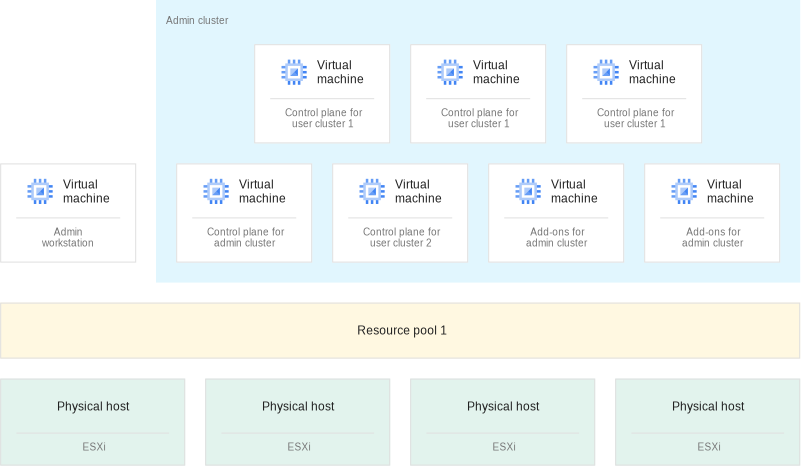
Recall that the admin workstation has these resource requirements:
| Resource | Requirement |
|---|---|
| vCPU | 4 vCPUs |
| RAM | 8 GiB |
| Storage | 50 GiB |
The admin cluster has these resource requirements:
| Component | vCPU | RAM | Storage |
|---|---|---|---|
| 1 admin cluster control-plane node | 2 vCPUs (1 × 2) | 4 GiB (1 × 4) | 40 GiB (1 × 40) |
| 2 add-on nodes | 8 vCPUs (2 × 4) | 32 GiB (2 × 16) | 80 GiB (2 × 40) |
| 3 user cluster 1 control-plane nodes | 12 vCPUs (3 × 4) | 24 GiB (3 × 8) | 180 GiB (3 × 60) |
| 1 user cluster 2 control-plane node | 3 vCPUs (1 × 3) | 5 GiB (1 × 5) | 60 GiB (1 × 60) |
| VM template | 0 vCPUs | 0 GiB | 40 GiB |
| etcd object data | 0 vCPUs | 0 GiB | 100 GiB |
| Google Cloud Observability | 0 vCPUs | 0 GiB | 240 GiB |
| Total | 25 vCPUs | 65 GiB | 740 GiB |
The following table gives the total CPU, RAM, and storage requirements for the admin workstation and admin cluster. Resource Pool 1 and Datastore 1 must be able to provide these resources:
| Resource | Total requirement |
|---|---|
| vCPU | 29 vCPUs |
| RAM | 73 GiB |
| Storage | 790 GiB |
Requirements for Resource Pool 2 and Datastore 2
Resource Pool 2 has reserved a portion of the CPU and RAM provided by the eight ESXi hosts in Cluster 2. Resource Pool 2 must have enough CPU and RAM to meet the requirements of both user clusters. And Datastore 2 must have enough storage to meet the requirements of both user clusters.
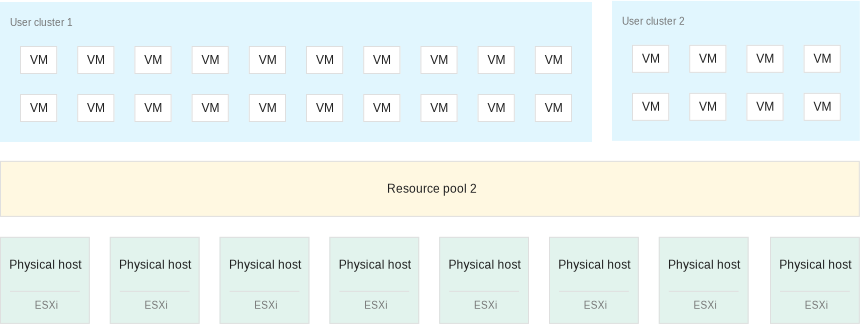
The first user cluster has these resource requirements:
| Resource | Calculation | Requirement |
|---|---|---|
| CPU | 20 nodes × 6 vCPUs/node | 120 vCPUs |
| RAM | 20 nodes × 16 GiB/node | 320 GiB |
| Storage | 240 GiB for Google Cloud Observability + 20 nodes × 40 GiB/node | 1,040 GiB |
The second user cluster has these resource requirements:
| Resource | Calculation | Requirement |
|---|---|---|
| CPU | 8 nodes × 4 vCPUs/node | 32 vCPUs |
| RAM | 8 nodes × 8 GiB/node | 64 GiB |
| Storage | 240 GiB for Google Cloud Observability + 8 nodes × 40 GiB/node | 560 GiB |
The following table gives the total CPU, RAM, and storage requirements for the two user clusters. Resource Pool 2 and Datastore 2 must be able to provide these resources:
| Resource | Total requirement |
|---|---|
| CPU | 152 vCPUs |
| RAM | 384 GiB |
| Storage | 1,600 GiB |
Resource overcommitment
vSphere supports resource overcommitment, for example memory overcommitment and CPU overcommitment. So the total resources reserved by the resource pools in a cluster can be greater than the physical resources provided by the ESXi hosts in the cluster.
The requirements given in this document are for reserved virtual resources. For the minimum CPU, RAM, and storage requirements for a proof-of-concept demonstration, see Set up minimal infrastructure.
Monitor resource contention
You should monitor resource contention signals to make sure that your resource pools and datastores can support your configured virtual resources. For more information, see Create a VM health status dashboard.
Disk provisioning
The following table shows the VMware thin and thick disk provisioning policies for different storage disks:
| Storage disks | Size | Disk provision policy — Default | Disk provision policy — User choice |
|---|---|---|---|
| Admin etcd | 100 GB | Thin | No |
| User etcd | 40 GB | Thin | No |
| Node OS/boot disk |
40 GB - default and minimum (user configurable) |
Thick (lazy zeroed) |
No |
| Other (for example, logs) | 240 GB | Thin | No |
| User workloads | Not applicable | Thin | Yes |