


以下是您可能想使用主體存取權範圍政策的常見情況,以及您在每種情況下可能建立的政策和政策繫結範例。如要瞭解如何建立主體存取邊界政策,並將政策繫結至主體集,請參閱「建立及套用主體存取邊界政策」。
禁止使用者存取機構外部的資源
由於主體存取邊界政策與主體相關聯,而非與資源相關聯,因此您可以使用這類政策,禁止主體存取您不擁有的資源。舉例來說,請參考下列情境:
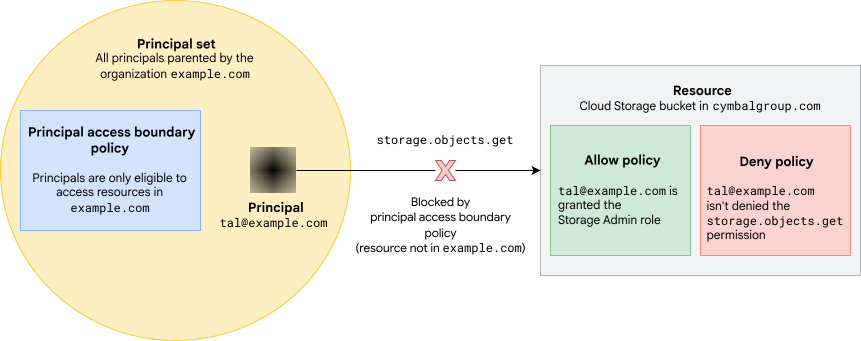
- 校長 Tal (
tal@example.com) 是 Google Workspace 機構example.com的成員。 - Tal 在另一個組織 (
cymbalgroup.com) 的 Cloud Storage bucket 中,獲派 Storage 管理員 (roles/storage.admin) 角色。這個角色包含storage.objects.get權限,可查看值區中的物件。 cymbalgroup.com中沒有任何拒絕政策,可防止 Tal 使用storage.objects.get權限。
example.com 管理員無法使用允許和拒絕政策,防止 Tal 查看這個外部值區中的物件。沒有任何 example.com 主體有權編輯值區的允許政策,因此無法撤銷 Tal 的角色。他們也沒有在 cymbalgroup.com 中建立任何拒絕政策的權限,因此無法使用拒絕政策來禁止 Tal 存取該值區。
不過,透過主體存取邊界政策,example.com 管理員可以禁止 Tal 查看 cymbalgroup.com 值區中的物件,或 example.com 以外的任何值區。
為此,管理員可以建立主體存取邊界政策,規定「example.com」主體只能存取「example.com」中的資源:
{
  "name": "organizations/0123456789012/locations/global/principalAccessBoundaryPolicies/example-org-only",
  "displayName": "Boundary for principals in example.org",
  "details": {
    "rules": [
      {
        "description": "Principals are only eligible to access resources in example.org",
        "resources": [
            "//cloudresourcemanager.googleapis.com/organizations/0123456789012"
        ],
        "effect": "ALLOW"
      }
    ],
    "enforcementVersion": "4"
  }
}
然後,他們可以建立政策繫結,將這項政策附加至機構 example.com 中的所有主體:
{
  "name": "organizations/0123456789012/locations/global/policyBindings/example-org-only-binding",
  "displayName": "Bind policy to all principals in example.com",
  "target": {
    "principalSet": "//cloudresourcemanager.googleapis.com/organizations/0123456789012"
  },
  "policyKind": "PRINCIPAL_ACCESS_BOUNDARY",
  "policy": "organizations/0123456789012/locations/global/principalAccessBoundaryPolicies/example-org-only"
}
example.com 中的主體包括 example.com 網域中的所有身分、example.com 中的所有員工身分集區,以及 example.com 中任何專案的所有服務帳戶和工作負載身分集區。
設定這項政策後,example.com 中的主體就無法使用主體存取邊界政策封鎖的權限,存取 example.com 以外的資源,即使主體在這些資源上擁有這些權限也一樣。
在本例中,主體存取邊界政策使用強制執行版本4,因此能夠封鎖 storage.objects.get 權限。因此,即使 Tal 在 cymbalgroup.com 值區中獲派 Storage 管理員角色,也無法檢視該值區中的物件。
讓服務帳戶有權存取單一專案中的資源
您也可以使用主體存取邊界政策,讓部分主體有權存取機構中的部分資源。
舉例來說,假設您有一個專案 example-dev,專案編號為 901234567890。您希望確保 example-dev 中的服務帳戶只能存取 example-dev 中的資源。
如要這麼做,請先建立新的主體存取邊界政策,讓主體有權存取 dev-project 中的資源:
{
  "name": "organizations/0123456789012/locations/global/principalAccessBoundaryPolicies/example-dev-only",
  "displayName": "Boundary for principals in example-dev",
  "details": {
    "rules": [
      {
        "description": "Principals are only eligible to access resources in example-dev",
        "resources": [
          "//cloudresourcemanager.googleapis.com/projects/example-dev"
        ],
        "effect": "ALLOW"
      }
    ],
    "enforcementVersion": "4"
  }
}
這項主體存取邊界政策使用強制執行版本 4,因此能夠封鎖強制執行版本 4 支援的所有權限。
建立主體存取權範圍政策後,請建立政策繫結,將新政策繫結至「example-dev」中的所有主體,並新增條件,確保政策繫結只適用於服務帳戶:
{
  "name": "organizations/0123456789012/locations/global/policyBindings/example-dev-only-binding",
  "displayName": "Bind policy to all service accounts in example-dev",
  "target": {
    "principalSet": "//cloudresourcemanager.googleapis.com/projects/example-dev"
  },
  "policyKind": "PRINCIPAL_ACCESS_BOUNDARY",
  "policy": "organizations/0123456789012/locations/global/principalAccessBoundaryPolicies/example-dev-only",
  "condition": {
    "title": "Only service accounts",
    "description": "Only enforce the policy if the principal in the request is a service account",
    "expression": "principal.type == 'iam.googleapis.com/ServiceAccount'"
  }
}
如果服務帳戶只受這項主體存取權範圍政策限制,則服務帳戶無法使用主體存取權範圍政策可封鎖的任何權限,存取 example-dev 以外的任何資源。
管理不同主體群組的資格
您可以在同一個機構中使用多項主體存取邊界政策,讓不同的主體有權存取不同的資源。使用多個主體存取邊界政策時,請在政策繫結中使用條件,確保每項政策只會套用至您要套用的主體。
舉例來說,假設您希望大部分主體都能存取機構中的所有資源,如「禁止使用者存取機構外部資源」一文所示。不過,您也想確保 example-dev 中的服務帳戶只能存取 example-dev 中的資源,如「讓服務帳戶有權存取單一專案中的資源」一文所示。
如要達成這個目標,請按照下列步驟操作:
按照「禁止使用者存取機構外部資源」一文中的範例,建立主體存取邊界政策,讓主體有權存取
example.com中的資源,並將政策繫結至機構主體集。按照「讓服務帳戶有權存取單一專案中的資源」一文中的範例,建立主體存取權界線政策,讓
example-dev中的服務帳戶有權存取example-dev中的資源,並將該政策繫結至example-dev中的服務帳戶。您從主體存取邊界政策中排除
example-dev中的服務帳戶,讓主體有權存取example.com中的所有資源。如要這麼做,請將下列條件新增至政策繫結,將該主體存取邊界政策附加至機構的主體集:"condition": { "title": "Exempt example-dev service accounts", "description": "Don't enforce the policy for service accounts in the example-dev project", "expression": "principal.type != 'iam.googleapis.com/ServiceAccount' || (!principal.subject.endsWith('@example-dev.iam.gserviceaccount.com') && principal.subject != 'example-dev@appspot.gserviceaccount.com' && principal.subject != '901234567890-compute@developer.gserviceaccount.com')" }
最後一個步驟至關重要,如果沒有從初始主體存取邊界政策中排除 example-dev 服務帳戶,該政策就會讓這些帳戶有權存取 example.com 中的所有資源,無論這些帳戶是否受到其他主體存取邊界政策的約束。詳情請參閱「定義符合條件的資源」。
此外,請務必先為 example-dev 服務帳戶建立並附加新的主體存取權範圍政策,再將這些帳戶從初始主體存取權範圍政策中排除。按照這個程序操作,可確保服務帳戶一律受至少一項主體存取邊界政策限制,避免服務帳戶有權存取所有 Google Cloud資源。如要進一步瞭解如何安全地減少主體可存取的資源,請參閱「減少主體可存取的資源」。
後續步驟
- 瞭解如何建立及套用主體存取邊界政策。
- 查看各個主體存取邊界政策強制執行版本封鎖的權限。