


CodeMender は、継続的インテグレーションと継続的デリバリー(CI/CD)パイプラインの各 pull リクエストをスキャンできます。CodeMender がプルリクエストで変更されたコードに CRITICAL または HIGH の重大度の脆弱性を検出すると、チェックは失敗します。プルリクエストで変更されていないコードの検出結果はレポートに表示されますが、チェックは失敗しません。
このドキュメントでは、次の方法について説明します。
- GitHub Actions で pull リクエストをスキャンし、CodeMender に修正を含む pull リクエストを開かせます。
- Cloud Build で pull リクエストをスキャンする。
- Git pre-commit フックを使用して、commit のたびに変更をスキャンします。
プルリクエスト スキャンの仕組み
プルリクエストをスキャンするには、--diff フラグとプルリクエストのベースブランチを指定して cm find を実行します。
cm find . --diff=origin/main
このコマンドに応答して、CodeMender は次の処理を行います。
- プルリクエストのブランチをベースブランチと比較し、変更されたソースファイルと、それらに直接依存するファイル(呼び出し元やインポーターなど)をスキャンします。
- プルリクエストで導入または公開された新しい脆弱性と、
[LEGACY /
UNTOUCHED]
というラベルが付いた既存の検出結果を区別します。CI チェックは、プルリクエストによって発生した脆弱性でのみブロックされます。 - pull リクエストによって発生した検出結果が
--fail-onの重大度と一致すると、ステータス 1 で終了します。デフォルトはCRITICAL,HIGHです。
--diff と他のスキャンモードの比較については、CodeMender の検索モードをご覧ください。
始める前に
CodeMender は、パブリック プレビューで一部のお客様にご利用いただけます。アクセスするには、セールスチームにお問い合わせください。
- Google Cloud アカウントにログインします。 Google Cloudを初めて使用する場合は、 アカウントを作成して、実際のシナリオで Google プロダクトのパフォーマンスを評価してください。新規のお客様には、ワークロードの実行、テスト、デプロイができる無料クレジット $300 分も差し上げます。
-
In the Google Cloud console, on the project selector page, select or create a Google Cloud project.
Roles required to select or create a project
- Select a project: Selecting a project doesn't require a specific IAM role—you can select any project that you've been granted a role on.
-
Create a project: To create a project, you need the Project Creator role
(
roles/resourcemanager.projectCreator), which contains theresourcemanager.projects.createpermission. Learn how to grant roles.
-
If you're using an existing project for this guide, verify that you have the permissions required to complete this guide. If you created a new project, then you already have the required permissions.
-
Verify that billing is enabled for your Google Cloud project.
Enable the Agent Platform API and Cloud Resource Manager API APIs, if any are not already enabled.
Roles required to enable APIs
To enable APIs, you need the
serviceusage.services.enablepermission. If you created the project, then you likely already have this permission through the Owner role (roles/owner). Otherwise, you can get this permission through the Service Usage Admin role (roles/serviceusage.serviceUsageAdmin). Learn how to grant roles.-
Install the Google Cloud CLI.
-
If you're using an external identity provider (IdP), you must first sign in to the gcloud CLI with your federated identity.
-
To initialize the gcloud CLI, run the following command:
gcloud init -
In the Google Cloud console, on the project selector page, select or create a Google Cloud project.
Roles required to select or create a project
- Select a project: Selecting a project doesn't require a specific IAM role—you can select any project that you've been granted a role on.
-
Create a project: To create a project, you need the Project Creator role
(
roles/resourcemanager.projectCreator), which contains theresourcemanager.projects.createpermission. Learn how to grant roles.
-
If you're using an existing project for this guide, verify that you have the permissions required to complete this guide. If you created a new project, then you already have the required permissions.
-
Verify that billing is enabled for your Google Cloud project.
Enable the Agent Platform API and Cloud Resource Manager API APIs, if any are not already enabled.
Roles required to enable APIs
To enable APIs, you need the
serviceusage.services.enablepermission. If you created the project, then you likely already have this permission through the Owner role (roles/owner). Otherwise, you can get this permission through the Service Usage Admin role (roles/serviceusage.serviceUsageAdmin). Learn how to grant roles.-
Install the Google Cloud CLI.
-
If you're using an external identity provider (IdP), you must first sign in to the gcloud CLI with your federated identity.
-
To initialize the gcloud CLI, run the following command:
gcloud init
CodeMender CLI リリースが pull リクエストのスキャンをサポートしていることを確認します。このドキュメントのパイプラインは、実行するたびに最新の安定版をダウンロードします。ローカル インストールを確認するには、cm find --help を実行して --diff フラグを探します。CLI を更新するには、cm update を実行します。詳細については、CLI のインストールと構成をご覧ください。
必要なロール
CodeMender の CI/CD 統合の設定に必要な権限を取得するには、プロジェクトに対する次の IAM ロールを付与するよう管理者に依頼してください。
- サービス アカウント管理者 (
roles/iam.serviceAccountAdmin) - プロジェクト IAM 管理者 (
roles/resourcemanager.projectIamAdmin) -
GitHub Actions 用の Workload Identity 連携を設定する: Workload Identity プール管理者 (
roles/iam.workloadIdentityPoolAdmin) -
Cloud Build トリガーを作成します。
- Cloud Build 編集者 (
roles/cloudbuild.builds.editor) - サービス アカウント ユーザー(
roles/iam.serviceAccountUser)
- Cloud Build 編集者 (
-
Git pre-commit フックをローカルで実行する: Agent Platform ユーザー (
roles/aiplatform.user)
ロールの付与については、プロジェクト、フォルダ、組織へのアクセス権の管理をご覧ください。
必要な権限は、カスタムロールや他の事前定義ロールから取得することもできます。
CI/CD サービス アカウントに CI/CD パイプラインで CodeMender を実行するために必要な権限があることを確認するには、CI/CD サービス アカウントに次の IAM ロールを付与するよう管理者に依頼してください。
- プロジェクトに対する Agent Platform ユーザー (
roles/aiplatform.user) -
Cloud Build ビルドログを書き込む: プロジェクトに対するログ書き込み (
roles/logging.logWriter) -
SARIF レポートを Cloud Storage バケットに保存する: バケットに対するStorage オブジェクト ユーザー (
roles/storage.objectUser)
ロールの付与については、プロジェクト、フォルダ、組織へのアクセス権の管理をご覧ください。
管理者は、カスタムロールや他の事前定義ロールを使用して、CI/CD サービス アカウントに必要な権限を付与することもできます。
セキュリティ上の考慮事項
GitHub Actions ワークフロー、Cloud Build トリガー、Git プリコミット フックで CodeMender を実行すると、確認を求められることなく CodeMender が実行されます。これらの統合を設定する前に、次の点を考慮してください。
- 確認プロンプト:
--yesフラグは、エージェントのコマンドとファイル書き込みの確認を求めるプロンプトをオフにします。--bypass-warningフラグは、エージェントがシステム上のファイルを変更してコマンドを実行できるという警告をスキップします。これらのフラグを使用する前に、このドキュメントの冒頭にあるプレビュー版の利用規約(人間の確認を無効にするための規約を含む)をお読みください。 - サンドボックス: パイプラインは
--sandbox=falseで CodeMender サンドボックスをオフにします。エージェントが検出結果を修正するときに実行するコマンド(ビルドやテストなど)は、ジョブと同じアクセス権を持ちます。これには、Google Cloud 認証情報やネットワーク アクセスも含まれます。Linux サンドボックスはユーザー名前空間を使用しますが、権限のないコンテナなど、一部の CI 環境ではサポートされていません。サンドボックスは、分離された使い捨て環境でのみオフにしてください。CI 環境がサンドボックスをサポートしている場合は、--sandbox=falseを削除します。 - ランナー:
ubuntu-24.04などの GitHub ホスト型ランナーで GitHub Actions ワークフローを実行します。これにより、各ジョブが新しい仮想マシンで実行されます。ジョブ間で再利用されるセルフホスト ランナーは使用しないでください。 - 信頼できないコード: pull リクエストのコードには、エージェントを誘導しようとするテキストが含まれている可能性があります。GitHub Actions ワークフローは、同じリポジトリ内のブランチからの pull リクエストのみをスキャンします。このブランチは、書き込みアクセス権を持つユーザーのみが作成できます。Cloud Build の場合は、所有者または共同編集者が他の投稿者からの pull リクエストのビルドを承認する必要があるように、コメント制御を使用します。
- アクセス: 各サービス アカウントに、パイプラインに必要な Identity and Access Management(IAM)ロールのみを付与します。
GitHub Actions で pull リクエストをスキャンする
このセクションのワークフローでは、GitHub.com のリポジトリ内の各 pull リクエストをスキャンします。CodeMender が pull リクエストの変更で CRITICAL または HIGH の重大度の脆弱性を検出すると、ワークフローは次の処理を行います。
- CodeMender スキャンのチェックに失敗します。
- 各検出結果に対して
cm fixを実行し、修正を含む pull リクエストを pull リクエストのブランチに開きます。
また、このワークフローでは、検出結果が GitHub コード スキャンにアップロードされます。
Workload Identity 連携を設定する
ワークフローは Workload Identity 連携を使用して Google Cloud に対して認証を行うため、GitHub にサービス アカウント キーを保存する必要はありません。Google Cloud CLI で次のコマンドを実行します。
プロジェクトとリポジトリのシェル変数を設定します。
PROJECT_ID="PROJECT_ID"
GITHUB_ORG="GITHUB_ORG"
REPO="GITHUB_ORG/REPOSITORY"
次のように置き換えます。
PROJECT_ID: 実際の Google Cloud プロジェクト ID。GITHUB_ORG: GitHub 組織名、または個人アカウントのリポジトリの GitHub ユーザー名。REPOSITORY: GitHub リポジトリの名前。
Workload Identity 連携で使用される API を有効にします。
gcloud services enable iam.googleapis.com \
    cloudresourcemanager.googleapis.com iamcredentials.googleapis.com \
    sts.googleapis.com --project="${PROJECT_ID}"
ワークフローのサービス アカウントを作成し、Agent Platform ユーザー IAM ロール(
roles/aiplatform.user)を付与します。gcloud iam service-accounts create codemender-ci \ --project="${PROJECT_ID}" \ --display-name="CodeMender CI" gcloud projects add-iam-policy-binding "${PROJECT_ID}" \ --member="serviceAccount:codemender-ci@${PROJECT_ID}.iam.gserviceaccount.com" \ --role="roles/aiplatform.user"Workload Identity プールを作成します。GitHub Actions のプールがすでに存在する場合は、この手順をスキップして、次の手順で
githubの代わりにプールの ID を使用します。gcloud iam workload-identity-pools create github \ --project="${PROJECT_ID}" \ --location="global" \ --display-name="GitHub Actions"プールに GitHub のプロバイダを作成します。属性条件は、
GITHUB_ORGが所有するリポジトリからのトークンのみを受け入れます。gcloud iam workload-identity-pools providers create-oidc codemender \ --project="${PROJECT_ID}" \ --location="global" \ --workload-identity-pool="github" \ --display-name="CodeMender" \ --attribute-mapping="google.subject=assertion.sub,attribute.repository=assertion.repository,attribute.repository_owner=assertion.repository_owner" \ --attribute-condition="assertion.repository_owner == '${GITHUB_ORG}'" \ --issuer-uri="https://token.actions.githubusercontent.com"リポジトリ内のワークフローでサービス アカウントを使用できるようにします。
POOL_ID=$(gcloud iam workload-identity-pools describe github \
    --project="${PROJECT_ID}" \
    --location="global" \
    --format="value(name)")

gcloud iam service-accounts add-iam-policy-binding \
    "codemender-ci@${PROJECT_ID}.iam.gserviceaccount.com" \
    --project="${PROJECT_ID}" \
    --role="roles/iam.workloadIdentityUser" \
    --member="principalSet://iam.googleapis.com/${POOL_ID}/attribute.repository/${REPO}"
プロバイダのフルネームを取得します。コピーしたメールアドレスは次のセクションで必要になります。
gcloud iam workload-identity-pools providers describe codemender \
    --project="${PROJECT_ID}" \
    --location="global" \
    --workload-identity-pool="github" \
    --format="value(name)"
出力は次のようになります。
projects/123456789/locations/global/workloadIdentityPools/github/providers/codemender
Workload Identity 連携と IAM の変更が有効になるまで、最長で 5 分ほどかかることがあります。詳細については、デプロイ パイプラインを使用して Workload Identity 連携を構成するをご覧ください。
リポジトリ シークレットを追加する
リポジトリで、[設定] > [シークレットと変数] > [アクション] に移動し、次のリポジトリ シークレットを追加します。
| Secret | 値 |
|---|---|
GCP_PROJECT_ID |
プロジェクト ID。 |
GCP_WIF_PROVIDER |
前のセクションで指定したプロバイダのフルネーム。 |
GCP_WIF_SERVICE_ACCOUNT |
codemender-ci@PROJECT_ID.iam.gserviceaccount.com。ここで、PROJECT_ID はプロジェクト ID です。 |
詳細については、GitHub Actions でシークレットを使用するをご覧ください。
リポジトリ設定を構成する
- 自動修正ジョブでプルリクエストを開くには、[設定] > [アクション] > [全般] に移動します。[ワークフローの権限] で、[GitHub Actions による pull リクエストの作成と承認を許可する] を選択し、[保存] をクリックします。組織内のリポジトリは、この設定を組織から継承します。変更できない場合は、組織のオーナーにお問い合わせください。自動修正を使用しない場合は、この手順をスキップします。詳細については、リポジトリの GitHub Actions 設定を管理するをご覧ください。
- GitHub コード スキャンがリポジトリで使用可能であることを確認します。非公開リポジトリと内部リポジトリの場合、コード スキャンには GitHub Code Security が必要です。コード スキャンが利用できない場合は、スキャンジョブから [Upload results to code scanning] ステップと
security-events権限とactions権限を削除します。それ以外の場合、アップロードは失敗し、スキャンジョブも失敗します。詳細については、GitHub への SARIF ファイルのアップロードをご覧ください。
ワークフローを追加する
次のワークフローを .github/workflows/codemender.yml としてリポジトリに commit します。
name: CodeMender

on:
  pull_request:

permissions: {}

defaults:
  run:
    shell: bash

env:
  CM_DOWNLOAD_URL: https://artifactregistry.googleapis.com/download/v1/projects/cmoc-prod/locations/us/repositories/codemender-cli-production/files/cm%3Astable%3Acm-linux-amd64.zip:download?alt=media

jobs:
  scan:
    name: CodeMender scan
    # Workflows for fork and Dependabot pull requests can't read this
    # repository's secrets, so they can't authenticate to Google Cloud.
    if: >-
      github.event.pull_request.head.repo.full_name == github.repository &&
      github.actor != 'dependabot[bot]'
    runs-on: ubuntu-24.04
    timeout-minutes: 15
    permissions:
      contents: read
      id-token: write         # Workload Identity Federation
      security-events: write  # Upload SARIF to code scanning
      actions: read           # Upload SARIF from a private repository
    outputs:
      findings: ${{ steps.scan.outputs.findings }}
    steps:
      - uses: actions/checkout@v7
        with:
          fetch-depth: 0  # cm needs the base branch history
          persist-credentials: false

      - uses: google-github-actions/auth@v3
        with:
          project_id: ${{ secrets.GCP_PROJECT_ID }}
          workload_identity_provider: ${{ secrets.GCP_WIF_PROVIDER }}
          service_account: ${{ secrets.GCP_WIF_SERVICE_ACCOUNT }}

      - name: Install the CodeMender CLI
        run: |
          curl -fsSL -o "$RUNNER_TEMP/cm.zip" "$CM_DOWNLOAD_URL"
          unzip -q -o "$RUNNER_TEMP/cm.zip" -d "$RUNNER_TEMP/cm"
          echo "$RUNNER_TEMP/cm" >> "$GITHUB_PATH"

      - name: Scan the pull request
        id: scan
        env:
          BASE_REF: ${{ github.base_ref }}
          FAIL_ON: CRITICAL,HIGH
        run: |
          cm init
          status=0
          cm find . \
            --diff="origin/$BASE_REF" \
            --diff-workers=16 \
            --fail-on="$FAIL_ON" \
            --format=sarif \
            --output=codemender.sarif \
            --sandbox=false \
            --yes \
            --bypass-warning || status=$?

          # Save the findings that failed the scan for the autofix job. Like the
          # CI gate, skip findings labeled [LEGACY / UNTOUCHED]: they're in code
          # that the pull request didn't change.
          echo '[]' > "$RUNNER_TEMP/codemender-findings.json"
          if [ "$status" -ne 0 ]; then
            cm report --format=json --status=OPEN \
              | jq --arg fail_on "$FAIL_ON" '
                  ($fail_on | ascii_upcase | split(",")) as $severities
                  | [.[]
                     | select(.title | startswith("[LEGACY / UNTOUCHED]") | not)
                     | select(.severity | ascii_upcase | IN($severities[]))]' \
              > "$RUNNER_TEMP/codemender-findings.json"
          fi
          echo "findings=$(jq length "$RUNNER_TEMP/codemender-findings.json")" >> "$GITHUB_OUTPUT"
          exit "$status"

      - name: Upload results to code scanning
        if: ${{ !cancelled() && hashFiles('codemender.sarif') != '' }}
        uses: github/codeql-action/upload-sarif@v4
        with:
          sarif_file: codemender.sarif
          category: codemender

      - name: Save findings for autofix
        if: ${{ !cancelled() && steps.scan.outputs.findings > 0 }}
        uses: actions/upload-artifact@v7
        with:
          name: codemender-findings
          path: ${{ runner.temp }}/codemender-findings.json
          retention-days: 1

  autofix:
    name: CodeMender autofix
    needs: scan
    if: ${{ !cancelled() && needs.scan.outputs.findings > 0 }}
    runs-on: ubuntu-24.04
    timeout-minutes: 60
    permissions:
      contents: write        # Push the fix branch
      pull-requests: write   # Open the fix pull request
      id-token: write        # Workload Identity Federation
    steps:
      - uses: actions/checkout@v7
        with:
          ref: ${{ github.head_ref }}
          persist-credentials: false

      - uses: google-github-actions/auth@v3
        with:
          project_id: ${{ secrets.GCP_PROJECT_ID }}
          workload_identity_provider: ${{ secrets.GCP_WIF_PROVIDER }}
          service_account: ${{ secrets.GCP_WIF_SERVICE_ACCOUNT }}

      - name: Install the CodeMender CLI
        run: |
          curl -fsSL -o "$RUNNER_TEMP/cm.zip" "$CM_DOWNLOAD_URL"
          unzip -q -o "$RUNNER_TEMP/cm.zip" -d "$RUNNER_TEMP/cm"
          echo "$RUNNER_TEMP/cm" >> "$GITHUB_PATH"

      - uses: actions/download-artifact@v8
        with:
          name: codemender-findings
          path: ${{ runner.temp }}/codemender

      - name: Fix findings
        run: |
          # Keep CodeMender state and the auth action's credentials file out of
          # the commits, and out of the `git clean` that cm fix runs.
          printf '%s\n' .cm_project 'gha-creds-*.json' >> .git/info/exclude

          cm init
          # Fix in the repository root instead of each file's directory.
          printf 'project_paths:\n  - "%s"\n' "$GITHUB_WORKSPACE" \
            >> ~/.codemender/config.yaml
          cm report import -f "$RUNNER_TEMP/codemender/codemender-findings.json"

          git config user.name "github-actions[bot]"
          git config user.email \
            "41898282+github-actions[bot]@users.noreply.github.com"

          cm report --format=json --status=OPEN \
            | jq -r '.[] | [.finding_id, .title] | @tsv' \
            > "$RUNNER_TEMP/findings.tsv"
          while IFS=$'\t' read -r id title; do
            # cm fix exits 0 when it makes no edits, so also check for changes.
            if cm fix "$id" \
                 --sandbox=false --yes --bypass-warning < /dev/null &&
               ! git diff --quiet; then
              git commit -q -a -m "Fix $title" -m "CodeMender finding $id"
            else
              echo "::warning::CodeMender didn't fix \"$title\" ($id)."
            fi
            # Discard files the fix agent created, such as test output.
            git reset -q --hard
            git clean -q -fd
          done < "$RUNNER_TEMP/findings.tsv"

      - uses: peter-evans/create-pull-request@v8
        with:
          branch: codemender/fix-pr-${{ github.event.pull_request.number }}
          base: ${{ github.head_ref }}
          title: "CodeMender fixes for #${{ github.event.pull_request.number }}"
          body: |
            CodeMender generated these fixes for findings in #${{ github.event.pull_request.number }}.
            Review each commit before you merge this pull request into `${{ github.head_ref }}`.
ワークフローの詳細
次の図は、プルリクエストのスキャンと自動修正ジョブの連携を示しています。
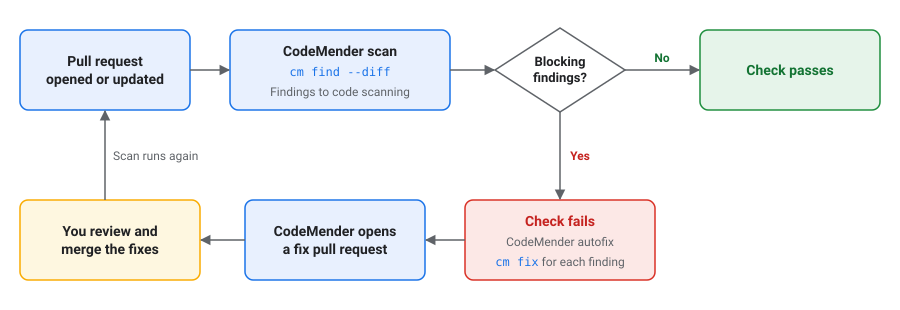
CodeMender スキャンジョブは次の処理を行います。
- 履歴全体を含む pull リクエストをチェックアウトします。pull リクエストの場合、GitHub は pull リクエスト ブランチの merge commit をベースブランチにチェックアウトします。
- Google Cloud に対する認証を行い、CodeMender CLI の最新の安定版リリースをダウンロードします。
- ベースブランチに対して
cm find --diffを実行します。CodeMender が、プルリクエストの変更でFAIL_ONに記載されている重大度の脆弱性を検出すると、ジョブは失敗します。 - スキャンがジョブに失敗した場合でも、レポートを GitHub コード スキャンにアップロードします。レポートには、
[LEGACY / UNTOUCHED]というラベルの付いた検出結果が含まれます。コード スキャンでは、検出結果のすべての行がプルリクエストの差分に含まれている場合、プルリクエストのチェックで検出結果も表示されます。 - ジョブが失敗した検出結果を自動修正ジョブ用に保存します。
フォークまたは Dependabot からの pull リクエストでは、スキャンジョブは実行されません。これは、これらの pull リクエストのワークフローがリポジトリのシークレットを読み取ることができないためです。GitHub はスキップされたジョブを成功として報告するため、このチェックを必須チェックにしても、これらの pull リクエストはブロックされません。これらの pull リクエストを自分で確認するか、cm find --diff を使用してローカルでスキャンします。
CodeMender 自動修正ジョブは、スキャンジョブが検出結果を保存するときに実行されます。次の処理を行います。
- pull リクエストのブランチをチェックアウトします。
- 検出結果ごとに
cm fixを実行し、各修正を個別にコミットします。CodeMender で検出結果が修正されない場合、ジョブは警告をログに記録します。このジョブは、リポジトリにすでに存在するファイルに対する変更のみを commit し、テスト出力など、修正エージェントが作成したファイルは破棄します。 codemender/fix-pr-NUMBERブランチから pull リクエスト ブランチに pull リクエストを開きます。ここで、NUMBERは pull リクエスト番号です。修正プルリクエストがすでに存在する場合、ジョブはそれを更新します。CodeMender で検出結果が修正されない場合、またはジョブが 60 分のタイムアウトに達した場合、ジョブは pull リクエストを開きません。
修正内容を確認して統合する
GitHub では、ワークフローが GITHUB_TOKEN で作成した pull リクエストのワークフローは自動的に実行されません。修正 pull リクエストをスキャンするには、リポジトリへの書き込みアクセス権を持つユーザーが、修正 pull リクエストで [ワークフローの実行を承認] をクリックします。
修正 pull リクエストをマージすると、pull リクエスト ブランチが変更され、ワークフローは元の pull リクエストを再度スキャンします。
ワークフローをカスタマイズする
ワークフローは次の方法でカスタマイズできます。
- チェックに失敗する重大度を変更するには、[Scan the pull request] ステップで、
FAIL_ONをスペースなしの重大度のカンマ区切りのリスト(CRITICAL,HIGH,MEDIUMなど)に設定します。有効な値はCRITICAL、HIGH、MEDIUM、LOWです。 - チェックを失敗させずに検出結果を報告するには、
FAIL_ON: ""を設定します。ワークフローは引き続きコード スキャンに結果をアップロードしますが、自動修正ジョブは実行しません。 一部のブランチのみに pull リクエストをスキャンするには、
pull_requestトリガーにbranchesフィルタを追加します。ワークフローは、ベースがプルリクエスト ブランチであるため、修正プルリクエストをスキャンしません。on: pull_request: branches: [main]自動修正をオフにするには、
autofixジョブと [自動修正の結果を保存] ステップを削除します。
Cloud Build で pull リクエストをスキャンする
このセクションのビルドでは、Cloud Build に接続されている GitHub リポジトリの各 pull リクエストをスキャンします。CodeMender が pull リクエストの変更で CRITICAL または HIGH の重大度の脆弱性を検出すると、ビルドとその GitHub チェックは失敗します。ビルドでは検出結果は修正されません。
始める前に、次の操作を行います。
- リポジトリを第 2 世代リポジトリとして Cloud Build に接続します。詳細については、GitHub リポジトリに接続するをご覧ください。
CodeMender にアクセスできるプロジェクトで、Cloud Build API と IAM API を有効にします。ビルドは、ビルドを実行するプロジェクトで CodeMender を使用します。
PROJECT_ID="PROJECT_ID" gcloud services enable cloudbuild.googleapis.com iam.googleapis.com \ --project="${PROJECT_ID}"PROJECT_IDは、実際の Google Cloudプロジェクト ID に置き換えます。
サービス アカウントを作成する
ビルドのサービス アカウントを作成します。CodeMender を使用するには Agent Platform ユーザー IAM ロール(roles/aiplatform.user)を付与し、ビルドログを書き込むにはログ書き込みロール(roles/logging.logWriter)を付与します。
SA="codemender-build@${PROJECT_ID}.iam.gserviceaccount.com"

gcloud iam service-accounts create codemender-build \
    --project="${PROJECT_ID}" \
    --display-name="CodeMender Cloud Build"

gcloud projects add-iam-policy-binding "${PROJECT_ID}" \
    --member="serviceAccount:${SA}" \
    --role="roles/aiplatform.user"

gcloud projects add-iam-policy-binding "${PROJECT_ID}" \
    --member="serviceAccount:${SA}" \
    --role="roles/logging.logWriter"
SARIF レポートを Cloud Storage バケットに保存するには、サービス アカウントにバケットへのアクセス権も付与します。
BUCKET="BUCKET"

gcloud storage buckets add-iam-policy-binding "gs://${BUCKET}" \
    --member="serviceAccount:${SA}" \
    --role="roles/storage.objectUser"
BUCKET を Cloud Storage バケットの名前に置き換えます。
ビルド構成を追加する
次のビルド構成をリポジトリのルートに cloudbuild.yaml として commit します。
# Scans a pull request with CodeMender. The build fails when CodeMender finds
# a CRITICAL or HIGH vulnerability in the pull request's changes.
steps:
  - id: install-codemender
    name: gcr.io/google.com/cloudsdktool/google-cloud-cli:slim
    script: |
      #!/usr/bin/env bash
      set -euo pipefail
      curl -fsSL -o /tmp/cm.zip "$_CM_DOWNLOAD_URL"
      python3 -m zipfile -e /tmp/cm.zip /workspace/.codemender-cli
      chmod +x /workspace/.codemender-cli/cm

  - id: fetch-history
    name: gcr.io/google.com/cloudsdktool/google-cloud-cli:slim
    script: |
      #!/usr/bin/env bash
      set -euo pipefail
      : "${_BASE_BRANCH:?Run this build from a pull request trigger.}"
      # Triggers check out only the pull request's commit. CodeMender needs the
      # history back to where the pull request branched from the base branch.
      # Fetch from origin, or from GitHub if origin isn't configured.
      refspec="+refs/heads/$_BASE_BRANCH:refs/remotes/origin/$_BASE_BRANCH"
      git fetch --quiet --unshallow origin "$refspec" ||
        git fetch --quiet --unshallow \
          "https://github.com/$REPO_FULL_NAME.git" "$refspec"
      merge_base=$(git merge-base HEAD "origin/$_BASE_BRANCH")
      echo "Merge base with $_BASE_BRANCH: $merge_base"

  - id: scan
    name: gcr.io/google.com/cloudsdktool/google-cloud-cli:slim
    script: |
      #!/usr/bin/env bash
      set -uo pipefail
      export PATH="/workspace/.codemender-cli:$PATH"
      # The project that has access to CodeMender.
      export GOOGLE_CLOUD_PROJECT="$PROJECT_ID"
      cm init || exit 1
      status=0
      cm find . \
        --diff="origin/$_BASE_BRANCH" \
        --diff-workers=16 \
        --fail-on=CRITICAL,HIGH \
        --format=sarif \
        --output=codemender.sarif \
        --sandbox=false \
        --yes \
        --bypass-warning || status=$?

      # cm find writes the SARIF report when the scan completes.
      if [ -f codemender.sarif ]; then
        # cm find doesn't print finding details, so print them here.
        cm report --status=OPEN --format=md
        if [ -n "${_REPORT_BUCKET:-}" ]; then
          gcloud storage cp codemender.sarif \
            "gs://$_REPORT_BUCKET/codemender/$BUILD_ID.sarif" || status=1
        fi
      fi
      exit "$status"

substitutions:
  _CM_DOWNLOAD_URL: https://artifactregistry.googleapis.com/download/v1/projects/cmoc-prod/locations/us/repositories/codemender-cli-production/files/cm%3Astable%3Acm-linux-amd64.zip:download?alt=media
  _REPORT_BUCKET: ''  # Optional: a bucket to save the SARIF report in.

timeout: 1200s
options:
  automapSubstitutions: true
  logging: CLOUD_LOGGING_ONLY
トリガーを作成する
main への pull リクエストごとにビルドを実行するトリガーを作成します。
REGION="REGION"
CONNECTION="CONNECTION"
REPOSITORY="REPOSITORY"

gcloud builds triggers create github \
    --project="${PROJECT_ID}" \
    --region="${REGION}" \
    --name="codemender-scan" \
    --repository="projects/${PROJECT_ID}/locations/${REGION}/connections/${CONNECTION}/repositories/${REPOSITORY}" \
    --pull-request-pattern='^main$' \
    --comment-control=COMMENTS_ENABLED_FOR_EXTERNAL_CONTRIBUTORS_ONLY \
    --build-config=cloudbuild.yaml \
    --service-account="projects/${PROJECT_ID}/serviceAccounts/${SA}"
次のように置き換えます。
REGION: Cloud Build リポジトリ接続のリージョン。CONNECTION: Cloud Build リポジトリ接続の名前。REPOSITORY: Cloud Build で接続されているリポジトリの名前。
次のオプションに注意してください。
--pull-request-patternは、pull リクエストのベースブランチの正規表現です。^と$を使用して、ブランチ名全体を照合します。--comment-control=COMMENTS_ENABLED_FOR_EXTERNAL_CONTRIBUTORS_ONLYを使用すると、リポジトリのオーナーと共同編集者からの pull リクエストに対してビルドが自動的に実行されます。他の投稿者からの pull リクエストの場合、所有者または共同編集者が pull リクエストに/gcbrunとコメントした後にビルドが実行されます。- SARIF レポートをバケットに保存するには、
--substitutions=_REPORT_BUCKET="${BUCKET}"を追加します。
Google Cloud コンソールでトリガーを作成することもできます。詳細については、GitHub からのリポジトリのビルドをご覧ください。
GitHub にビルドログを表示するには、トリガーの作成時に --include-logs-with-status を追加し、サービス アカウントにログ閲覧者ロール(roles/logging.viewer)を付与します。これにより、GitHub でチェックを表示できるユーザーは、検出結果を含むビルドログを読み取ることができます。
ビルドの仕組み
ビルドには次の 3 つのステップがあります。
install-codemenderは、CodeMender CLI の最新の安定版をダウンロードします。fetch-historyは、CodeMender が必要とするベースブランチと履歴を取得します。Cloud Build は、ビルドを開始した commit のみをチェックアウトします。このステップでは、originリモートから取得します。originが構成されていない場合、このステップでは認証情報なしで GitHub から取得されます。これは、公開リポジトリでのみ機能します。この場合、非公開リポジトリには SSH 認証鍵などの認証情報が必要です。詳細については、SSH 認証鍵を使用してビルドから GitHub にアクセスするをご覧ください。scanは、ベースブランチに対してcm find --diffを実行します。スキャンが完了すると、このステップではビルドログにすべての検出結果が出力されます。_REPORT_BUCKETを設定すると、このステップで SARIF レポートがgs://BUCKET/codemender/BUILD_ID.sarifにコピーされます。
ビルドを失敗させる重大度を変更するには、scan ステップで --fail-on を編集します。pull リクエスト トリガーなしでビルドを実行すると、Run this build from a pull request trigger. というメッセージが表示されて失敗します。
コミット前にスキャンする
Git の pre-commit フックは、ステージングされた変更をスキャンし、CodeMender が CRITICAL または HIGH の重大度の脆弱性を検出したときに commit をブロックできます。デベロッパーはフックをスキップできるため、CI でのスキャンの代わりではなく、スキャンに加えて使用してください。
フックを使用する各デベロッパーには、次のものが必要です。
- CLI のインストールと構成の説明に沿ってインストールして設定した CodeMender CLI(
gcloud auth application-default loginとcm initを含む)。フックにはPATHのcmが必要です。 - CodeMender にアクセスできるプロジェクトの Agent Platform ユーザーロール(
roles/aiplatform.user)。CodeMender は、GOOGLE_CLOUD_PROJECT環境変数のプロジェクトを使用します。この変数が設定されていない場合、CodeMender はアプリケーションのデフォルト認証情報または gcloud CLI のデフォルト プロジェクトからプロジェクトを使用します。
フックを追加するには、次のスクリプトをリポジトリに .git/hooks/pre-commit として保存します。
#!/bin/sh
# Scans staged changes with CodeMender before each commit.
if ! cm find . --diff --staged --fail-on=CRITICAL,HIGH \
    --yes --bypass-warning; then
  echo "CodeMender blocked this commit. To see the findings, run:" >&2
  echo "  cm report --status=OPEN" >&2
  echo "To commit anyway, run git commit --no-verify." >&2
  exit 1
fi
スクリプトを実行可能にして、.gitignore ファイルに .cm_project を追加します。これにより、CodeMender がリポジトリを追跡するために作成するファイルがコミットされなくなります。
chmod +x .git/hooks/pre-commit
echo .cm_project >> .gitignore
git commit を実行すると、フックはステージングされた変更を含むファイルをスキャンします。スキャンには数分かかることがあります。このフックは CodeMender サンドボックスをオフにしません。
スキャンなしで commit するには、git commit --no-verify を実行します。
スキャンフラグ
次の cm find フラグは、pull リクエストのスキャンを制御します。すべてのフラグに対して cm
find --help を実行します。
| フラグ | デフォルト | 説明 |
|---|---|---|
--diff[=REF] |
オフ |
REF と比較して変更をスキャンします(origin/main など)。REF を指定しない場合、追跡対象ファイルの commit されていない変更をスキャンします(HEAD と比較)。--deep と一緒に使用することはできません。 |
--staged |
オフ | --diff を使用すると、スキャンは変更をステージングするだけになります。 |
--diff-depth DEPTH |
1 |
影響分析のトラバーサル深度(1 ~ 3、デフォルト: 1 ホップ)。 |
--diff-workers COUNT |
4 |
同時にスキャンするファイルの数(1 ~ 16)。 |
--diff-max-neighbors COUNT |
10 |
スキャンする依存ファイルの最大数。 |
--fail-on SEVERITIES |
CRITICAL,HIGH |
--diff を使用すると、cm find がステータス 1 で終了する重大度が指定されます。値が空の場合、検出結果は終了ステータスに影響しません。 |
--fail-on-truncation |
オフ |
--diff を指定すると、CodeMender が --diff-max-neighbors で許可されている数よりも多くの依存ファイルを見つけた場合、ステータス 1 で終了します。 |
--format FORMAT |
table |
レポート形式: table、json、sarif。 |
--output FILE |
標準出力 | レポートの書き込み先ファイル。 |
トラブルシューティング
このセクションでは、CI/CD パイプラインで CodeMender を実行する際に発生する一般的な問題の解決方法について説明します。
アクセスが拒否されました
ログには次のような行が表示されます。
[1/1] ❌ src/app.py: start session failed: StartSession failed with HTTP 403 Forbidden.
メッセージに Permission 'aiplatform.interactions.create'
denied を含めることもできます。以下を確認します。
- プロジェクトが CodeMender にアクセスできる。
- サービス アカウントまたはユーザーに、プロジェクトの Agent Platform ユーザー ロール(
roles/aiplatform.user)が付与されている。 - プロジェクトで Agent Platform API が有効になっている。
- CodeMender が正しいプロジェクトを使用している。GitHub Actions で、
GCP_PROJECT_IDシークレットを確認します。Cloud Build は、ビルドを実行するプロジェクトを使用します。ローカルで、GOOGLE_CLOUD_PROJECT環境変数を確認します。変数が設定されていない場合は、デフォルトのプロジェクトを確認します。
リソースのセットアップが進行中
ログに Resource setup has just started. Please try again shortly. または Resource setup is in progress. Please try again shortly. が表示されている場合、CodeMender はプロジェクトのリソースを設定しています。通常、この処理には数分かかります。後でジョブを再度実行します。
不明なフラグ: --diff
cm find が Error: unknown flag: --diff で失敗した場合、CLI リリースは pull リクエスト スキャンをサポートしていません。cm update を実行するか、最新のリリースをダウンロードします。
ベースブランチが見つかりません
cm find が次のようなエラーで失敗した場合、ベースブランチはチェックアウトされていません。
Error: retrieving VCS diff: git diff failed: exit status 128: fatal: ambiguous argument 'origin/main': unknown revision or path not in the working tree.
cm find を実行する前に、ベースブランチとその履歴を取得します。GitHub Actions で、actions/checkout の fetch-depth: 0 を設定します。
スキャンされていないファイル
[1/1] ❌ src/app.py: start session failed などの ❌ が付いている行は、CodeMender がそのファイルをスキャンできなかったことを意味します。行のエラーを確認して、ジョブをもう一度実行します。
修正プルリクエストなし
ワークフローで修正 pull リクエストが開かない場合は、次の点を確認してください。
- pull リクエストの作成時に自動修正ジョブが失敗した場合は、[GitHub Actions による pull リクエストの作成と承認を許可する] をオンにします。詳細については、リポジトリ設定を構成するをご覧ください。
- プルリクエストを開かずに自動修正ジョブが成功した場合、CodeMender は検出結果を修正していません。ジョブログには、CodeMender が修正しなかった検出結果ごとに警告が表示されます。
コード スキャンのアップロードが失敗する
アップロード ステップが GitHub Code Security or GitHub Advanced Security
must be enabled for this repository to use code scanning で失敗した場合は、リポジトリの GitHub Code Security を有効にするか、アップロード ステップを削除します。詳細については、リポジトリ設定を構成するをご覧ください。
警告が確認されていない
cm が warning not acknowledged. Please run interactively once to
acknowledge or pass --bypass-warning で失敗した場合、CodeMender は非インタラクティブ環境で要求できないことを確認する必要があります。コマンドに --bypass-warning を追加します。その前に、このページの上部にあるプレビュー版の利用規約をお読みください。
詳しくは、セールスチームにお問い合わせください。