טיפול בתשובת העיבוד

התשובה לבקשת עיבוד מכילה אובייקט Document שכולל את כל מה שידוע על המסמך שעבר עיבוד, כולל כל המידע המובנה ש-Document AI הצליח לחלץ.

בדף הזה מוסבר הפריסה של אובייקט Document באמצעות מסמכים לדוגמה, ולאחר מכן ממופים היבטים של תוצאות ה-OCR לרכיבים הספציפיים של אובייקט Document בפורמט JSON. בנוסף, האתר כולל ספריות לקוח, דוגמאות קוד ודוגמאות קוד של Document AI Toolbox SDK. בדוגמאות הקוד האלה נעשה שימוש בעיבוד אונליין, אבל ניתוח האובייקט Document פועל באותו אופן גם בעיבוד באצווה.
handle-response-1

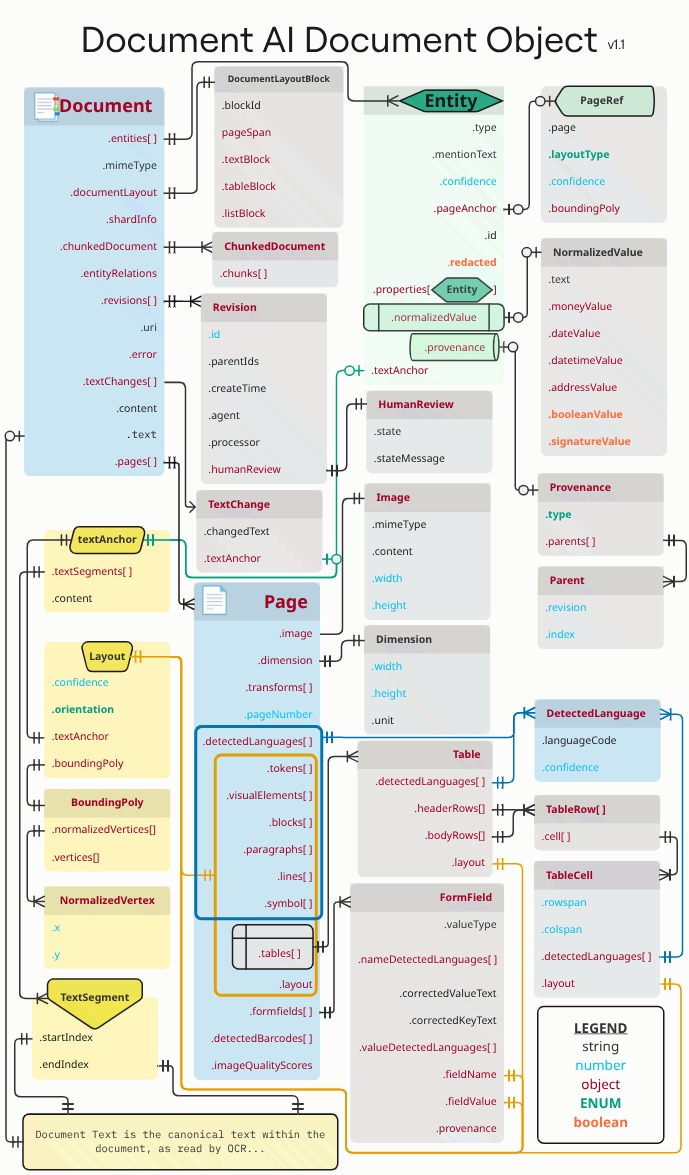
המלבנים והחיצים הכתומים והכחולים מייצגים שלפחות שדה אחד של האובייקטים המקושרים הוא .layout או detectedLanguage, בהתאמה. התרשים משתמש בסימון של רגל עורב.

משתמשים בכלי לצפייה ב-JSON או בכלי לעריכה שנועד במיוחד להרחבה או לכיווץ של אלמנטים. בדיקת JSON גולמי בכלי טקסט פשוט היא לא יעילה.

טקסט, פריסה וציוני איכות

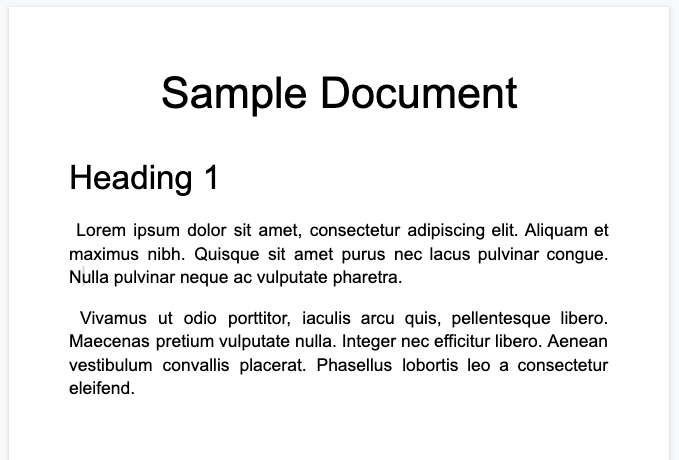
דוגמה למסמך טקסט:
handle-response-2

זהו אובייקט המסמך המלא שמוחזר על ידי מעבד Enterprise Document OCR:

הורדת קובץ JSON

הפלט של ה-OCR תמיד נכלל גם בפלט של מעבד Document AI, כי המעבדים מריצים OCR. הוא משתמש בנתוני ה-OCR הקיימים, ולכן אפשר להזין נתוני JSON כאלה למעבדי Document AI באמצעות האפשרות 'מסמך מוטבע'.

  image=None, # all our samples pass this var
  mime_type="application/json",
  inline_document=document_response # pass OCR output to CDE input - undocumented

אלה כמה מהשדות החשובים:

טקסט גולמי

השדה text מכיל את הטקסט שמזוהה על ידי Document AI. הטקסט הזה לא מכיל מבנה פריסה מלבד רווחים, טאבים ומעברי שורה. זהו השדה היחיד שבו מאוחסן מידע טקסטואלי של מסמך, והוא משמש כמקור האמת של הטקסט במסמך. בשדות אחרים אפשר להפנות לחלקים בשדה הטקסט לפי מיקום (startIndex ו-endIndex).

  {
    text: "Sample Document\nHeading 1\nLorem ipsum dolor sit amet, ..."
  }

גודל הדף ושפות

כל page באובייקט המסמך תואם לדף פיזי ממסמך הדוגמה. פלט ה-JSON לדוגמה מכיל דף אחד כי מדובר בתמונה אחת בפורמט PNG.

  {
    "pages:" [
      {
        "pageNumber": 1,
        "dimension": {
          "width": 679.0,
          "height": 460.0,
          "unit": "pixels"
        },
      }
    ]
  }
  • השדה pages[].detectedLanguages[] מכיל את השפות שנמצאו בדף מסוים, יחד עם ציון רמת הביטחון.
{
  "pages": [
    {
      "detectedLanguages": [
        {
          "confidence": 0.98009938,
          "languageCode": "en"
        },
        {
          "confidence": 0.01990064,
          "languageCode": "und"
        }
      ]
    }
  ]
}

נתוני OCR

‫OCR ב-Document AI מזהה טקסט עם רמות שונות של פירוט או ארגון בדף, כמו בלוקים של טקסט, פסקאות, טוקנים וסמלים (רמת הסמל היא אופציונלית, אם המערכת מוגדרת להפקת נתונים ברמת הסמל). אלה כל החברים באובייקט הדף.

לכל רכיב יש layout תואם שמתאר את המיקום והטקסט שלו. אלמנטים חזותיים שאינם טקסט (כמו תיבות סימון) נמצאים גם הם ברמת הדף.

{
  "pages": [
    {
      "paragraphs": [
        {
          "layout": {
            "textAnchor": {
              "textSegments": [
                {
                  "endIndex": "16"
                }
              ]
            },
            "confidence": 0.9939527,
            "boundingPoly": {
              "vertices": [ ... ],
              "normalizedVertices": [ ... ]
            },
            "orientation": "PAGE_UP"
          }
        }
      ]
    }
  ]
}

הטקסט הגולמי מופיע באובייקט textAnchor, שממופתח במחרוזת הטקסט הראשית באמצעות startIndex ו-endIndex.

יכול להיות שהערך
  • במקרה של boundingPoly, הפינה הימנית העליונה של הדף היא נקודת המוצא (0,0). ערכי X חיוביים הם מימין, וערכי Y חיוביים הם למטה.

  • האובייקט vertices משתמש באותן קואורדינטות כמו התמונה המקורית, ואילו הערכים של normalizedVertices הם בטווח [0,1]. יש מטריצת טרנספורמציה שמציינת את המדדים של תיקון העיוות ומאפיינים אחרים של הנורמליזציה של התמונה.

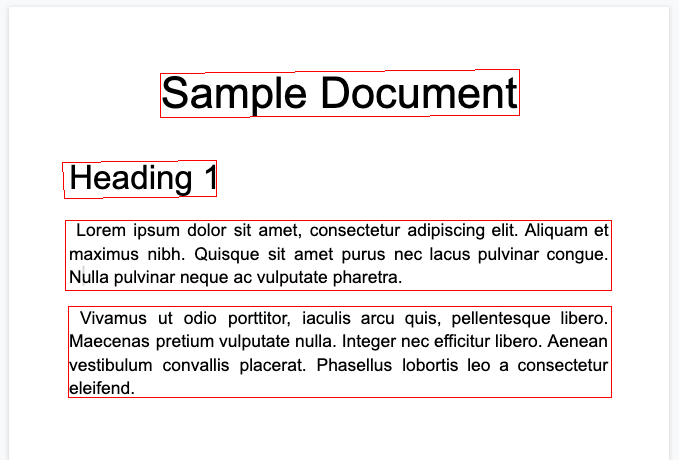
  • כדי לשרטט את הצורה boundingPoly, מציירים קטעי קו מקודקוד אחד לקודקוד הבא. לאחר מכן, סוגרים את הפוליגון על ידי שרטוט של קטע קו מהקודקוד האחרון חזרה לקודקוד הראשון. רכיב הכיוון בפריסה מציין אם הטקסט סובב ביחס לדף.

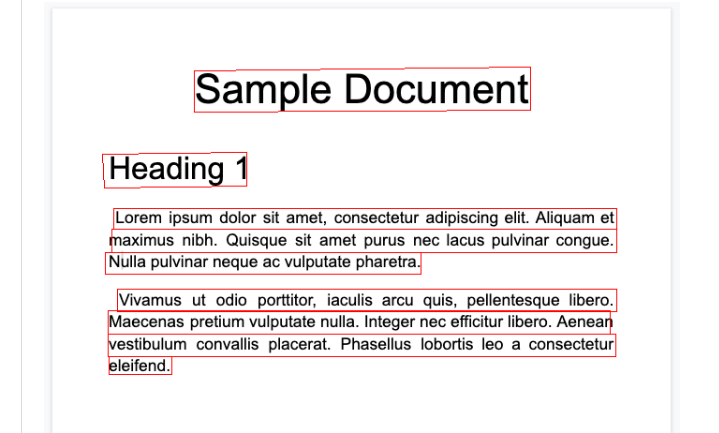
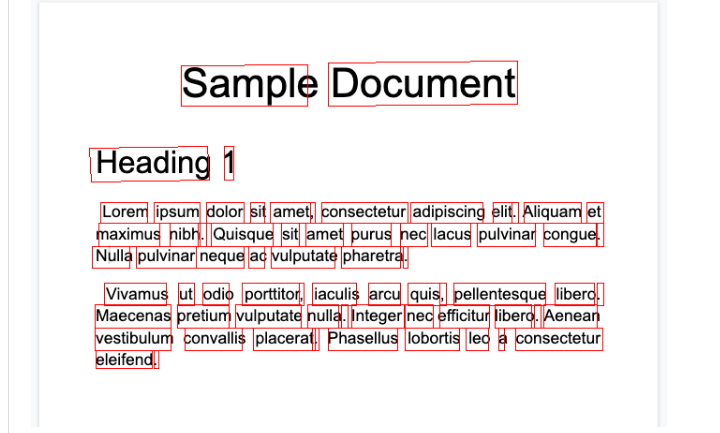
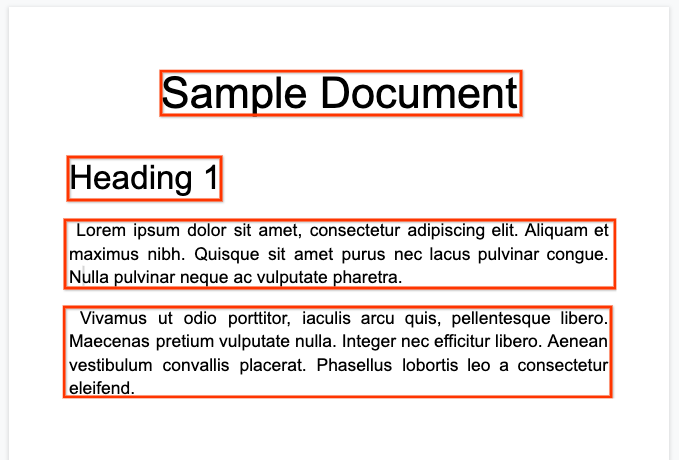
כדי לעזור לכם להמחיש את מבנה המסמך, בתמונות הבאות מצוירים מצולעים תוחמים עבור page.paragraphs, page.lines ו-page.tokens.

פסקאות
handle-response-3

שורות

handle-response-4

טוקנים

handle-response-5

אבני בניין

handle-response-6

מעבד Enterprise Document OCR יכול לבצע הערכת איכות של מסמך על סמך קלות הקריאה שלו.

הערכת האיכות הזו היא ציון איכות ב[0, 1], כאשר 1 מייצג איכות מושלמת. ציון האיכות מוחזר בשדה Page.imageQualityScores. כל הפגמים שזוהו מפורטים כ-quality/defect_* וממוינים בסדר יורד לפי ערך מהימנות.

זוהי דוגמה לקובץ PDF כהה ומטושטש מדי לקריאה נוחה:

הורדת קובץ PDF

הנה מידע על איכות המסמך שמוחזר על ידי מעבד Enterprise Document OCR:

  {
    "pages": [
      {
        "imageQualityScores": {
          "qualityScore": 0.7811847,
          "detectedDefects": [
            {
              "type": "quality/defect_document_cutoff",
              "confidence": 1.0
            },
            {
              "type": "quality/defect_glare",
              "confidence": 0.97849524
            },
            {
              "type": "quality/defect_text_cutoff",
              "confidence": 0.5
            }
          ]
        }
      }
    ]
  }

דוגמאות קוד

בדוגמאות הקוד הבאות אפשר לראות איך לשלוח בקשת עיבוד, ואז לקרוא את השדות ולהדפיס אותם במסוף:

Java

למידע נוסף, קראו את מאמרי העזרה של Document AI Java API.

כדי לבצע אימות ב-Document AI, צריך להגדיר את Application Default Credentials. מידע נוסף זמין במאמר הגדרת אימות לסביבת פיתוח מקומית.


import com.google.cloud.documentai.v1beta3.Document;
import com.google.cloud.documentai.v1beta3.DocumentProcessorServiceClient;
import com.google.cloud.documentai.v1beta3.DocumentProcessorServiceSettings;
import com.google.cloud.documentai.v1beta3.ProcessRequest;
import com.google.cloud.documentai.v1beta3.ProcessResponse;
import com.google.cloud.documentai.v1beta3.RawDocument;
import com.google.protobuf.ByteString;
import java.io.IOException;
import java.nio.file.Files;
import java.nio.file.Paths;
import java.util.List;
import java.util.concurrent.ExecutionException;
import java.util.concurrent.TimeoutException;

public class ProcessOcrDocument {
  public static void processOcrDocument()
      throws IOException, InterruptedException, ExecutionException, TimeoutException {
    // TODO(developer): Replace these variables before running the sample.
    String projectId = "your-project-id";
    String location = "your-project-location"; // Format is "us" or "eu".
    String processerId = "your-processor-id";
    String filePath = "path/to/input/file.pdf";
    processOcrDocument(projectId, location, processerId, filePath);
  }

  public static void processOcrDocument(
      String projectId, String location, String processorId, String filePath)
      throws IOException, InterruptedException, ExecutionException, TimeoutException {
    // Initialize client that will be used to send requests. This client only needs
    // to be created
    // once, and can be reused for multiple requests. After completing all of your
    // requests, call
    // the "close" method on the client to safely clean up any remaining background
    // resources.
    String endpoint = String.format("%s-documentai.googleapis.com:443", location);
    DocumentProcessorServiceSettings settings =
        DocumentProcessorServiceSettings.newBuilder().setEndpoint(endpoint).build();
    try (DocumentProcessorServiceClient client = DocumentProcessorServiceClient.create(settings)) {
      // The full resource name of the processor, e.g.:
      // projects/project-id/locations/location/processor/processor-id
      // You must create new processors in the Cloud Console first
      String name =
          String.format("projects/%s/locations/%s/processors/%s", projectId, location, processorId);

      // Read the file.
      byte[] imageFileData = Files.readAllBytes(Paths.get(filePath));

      // Convert the image data to a Buffer and base64 encode it.
      ByteString content = ByteString.copyFrom(imageFileData);

      RawDocument document =
          RawDocument.newBuilder().setContent(content).setMimeType("application/pdf").build();

      // Configure the process request.
      ProcessRequest request =
          ProcessRequest.newBuilder().setName(name).setRawDocument(document).build();

      // Recognizes text entities in the PDF document
      ProcessResponse result = client.processDocument(request);
      Document documentResponse = result.getDocument();

      System.out.println("Document processing complete.");

      // Read the text recognition output from the processor
      // For a full list of Document object attributes,
      // please reference this page:
      // https://googleapis.dev/java/google-cloud-document-ai/latest/index.html

      // Get all of the document text as one big string
      String text = documentResponse.getText();
      System.out.printf("Full document text: '%s'\n", escapeNewlines(text));

      // Read the text recognition output from the processor
      List<Document.Page> pages = documentResponse.getPagesList();
      System.out.printf("There are %s page(s) in this document.\n", pages.size());

      for (Document.Page page : pages) {
        System.out.printf("Page %d:\n", page.getPageNumber());
        printPageDimensions(page.getDimension());
        printDetectedLanguages(page.getDetectedLanguagesList());
        printParagraphs(page.getParagraphsList(), text);
        printBlocks(page.getBlocksList(), text);
        printLines(page.getLinesList(), text);
        printTokens(page.getTokensList(), text);
      }
    }
  }

  private static void printPageDimensions(Document.Page.Dimension dimension) {
    String unit = dimension.getUnit();
    System.out.printf("    Width: %.1f %s\n", dimension.getWidth(), unit);
    System.out.printf("    Height: %.1f %s\n", dimension.getHeight(), unit);
  }

  private static void printDetectedLanguages(
      List<Document.Page.DetectedLanguage> detectedLangauges) {
    System.out.println("    Detected languages:");
    for (Document.Page.DetectedLanguage detectedLanguage : detectedLangauges) {
      String languageCode = detectedLanguage.getLanguageCode();
      float confidence = detectedLanguage.getConfidence();
      System.out.printf("        %s (%.2f%%)\n", languageCode, confidence * 100.0);
    }
  }

  private static void printParagraphs(List<Document.Page.Paragraph> paragraphs, String text) {
    System.out.printf("    %d paragraphs detected:\n", paragraphs.size());
    Document.Page.Paragraph firstParagraph = paragraphs.get(0);
    String firstParagraphText = getLayoutText(firstParagraph.getLayout().getTextAnchor(), text);
    System.out.printf("        First paragraph text: %s\n", escapeNewlines(firstParagraphText));
    Document.Page.Paragraph lastParagraph = paragraphs.get(paragraphs.size() - 1);
    String lastParagraphText = getLayoutText(lastParagraph.getLayout().getTextAnchor(), text);
    System.out.printf("        Last paragraph text: %s\n", escapeNewlines(lastParagraphText));
  }

  private static void printBlocks(List<Document.Page.Block> blocks, String text) {
    System.out.printf("    %d blocks detected:\n", blocks.size());
    Document.Page.Block firstBlock = blocks.get(0);
    String firstBlockText = getLayoutText(firstBlock.getLayout().getTextAnchor(), text);
    System.out.printf("        First block text: %s\n", escapeNewlines(firstBlockText));
    Document.Page.Block lastBlock = blocks.get(blocks.size() - 1);
    String lastBlockText = getLayoutText(lastBlock.getLayout().getTextAnchor(), text);
    System.out.printf("        Last block text: %s\n", escapeNewlines(lastBlockText));
  }

  private static void printLines(List<Document.Page.Line> lines, String text) {
    System.out.printf("    %d lines detected:\n", lines.size());
    Document.Page.Line firstLine = lines.get(0);
    String firstLineText = getLayoutText(firstLine.getLayout().getTextAnchor(), text);
    System.out.printf("        First line text: %s\n", escapeNewlines(firstLineText));
    Document.Page.Line lastLine = lines.get(lines.size() - 1);
    String lastLineText = getLayoutText(lastLine.getLayout().getTextAnchor(), text);
    System.out.printf("        Last line text: %s\n", escapeNewlines(lastLineText));
  }

  private static void printTokens(List<Document.Page.Token> tokens, String text) {
    System.out.printf("    %d tokens detected:\n", tokens.size());
    Document.Page.Token firstToken = tokens.get(0);
    String firstTokenText = getLayoutText(firstToken.getLayout().getTextAnchor(), text);
    System.out.printf("        First token text: %s\n", escapeNewlines(firstTokenText));
    Document.Page.Token lastToken = tokens.get(tokens.size() - 1);
    String lastTokenText = getLayoutText(lastToken.getLayout().getTextAnchor(), text);
    System.out.printf("        Last token text: %s\n", escapeNewlines(lastTokenText));
  }

  // Extract shards from the text field
  private static String getLayoutText(Document.TextAnchor textAnchor, String text) {
    if (textAnchor.getTextSegmentsList().size() > 0) {
      int startIdx = (int) textAnchor.getTextSegments(0).getStartIndex();
      int endIdx = (int) textAnchor.getTextSegments(0).getEndIndex();
      return text.substring(startIdx, endIdx);
    }
    return "[NO TEXT]";
  }

  private static String escapeNewlines(String s) {
    return s.replace("\n", "\\n").replace("\r", "\\r");
  }
}

Node.js

למידע נוסף, קראו את מאמרי העזרה של Document AI Node.js API.

כדי לבצע אימות ב-Document AI, צריך להגדיר את Application Default Credentials. מידע נוסף זמין במאמר הגדרת אימות לסביבת פיתוח מקומית.

/**
 * TODO(developer): Uncomment these variables before running the sample.
 */
// const projectId = 'YOUR_PROJECT_ID';
// const location = 'YOUR_PROJECT_LOCATION'; // Format is 'us' or 'eu'
// const processorId = 'YOUR_PROCESSOR_ID'; // Create processor in Cloud Console
// const filePath = '/path/to/local/pdf';

const {DocumentProcessorServiceClient} =
  require('@google-cloud/documentai').v1beta3;

// Instantiates a client
const client = new DocumentProcessorServiceClient();

async function processDocument() {
  // The full resource name of the processor, e.g.:
  // projects/project-id/locations/location/processor/processor-id
  // You must create new processors in the Cloud Console first
  const name = `projects/${projectId}/locations/${location}/processors/${processorId}`;

  // Read the file into memory.
  const fs = require('fs').promises;
  const imageFile = await fs.readFile(filePath);

  // Convert the image data to a Buffer and base64 encode it.
  const encodedImage = Buffer.from(imageFile).toString('base64');

  const request = {
    name,
    rawDocument: {
      content: encodedImage,
      mimeType: 'application/pdf',
    },
  };

  // Recognizes text entities in the PDF document
  const [result] = await client.processDocument(request);

  console.log('Document processing complete.');

  // Read the text recognition output from the processor
  // For a full list of Document object attributes,
  // please reference this page: https://googleapis.dev/nodejs/documentai/latest/index.html
  const {document} = result;
  const {text} = document;

  // Read the text recognition output from the processor
  console.log(`Full document text: ${JSON.stringify(text)}`);
  console.log(`There are ${document.pages.length} page(s) in this document.`);
  for (const page of document.pages) {
    console.log(`Page ${page.pageNumber}`);
    printPageDimensions(page.dimension);
    printDetectedLanguages(page.detectedLanguages);
    printParagraphs(page.paragraphs, text);
    printBlocks(page.blocks, text);
    printLines(page.lines, text);
    printTokens(page.tokens, text);
  }
}

const printPageDimensions = dimension => {
  console.log(`    Width: ${dimension.width}`);
  console.log(`    Height: ${dimension.height}`);
};

const printDetectedLanguages = detectedLanguages => {
  console.log('    Detected languages:');
  for (const lang of detectedLanguages) {
    const code = lang.languageCode;
    const confPercent = lang.confidence * 100;
    console.log(`        ${code} (${confPercent.toFixed(2)}% confidence)`);
  }
};

const printParagraphs = (paragraphs, text) => {
  console.log(`    ${paragraphs.length} paragraphs detected:`);
  const firstParagraphText = getText(paragraphs[0].layout.textAnchor, text);
  console.log(
    `        First paragraph text: ${JSON.stringify(firstParagraphText)}`
  );
  const lastParagraphText = getText(
    paragraphs[paragraphs.length - 1].layout.textAnchor,
    text
  );
  console.log(
    `        Last paragraph text: ${JSON.stringify(lastParagraphText)}`
  );
};

const printBlocks = (blocks, text) => {
  console.log(`    ${blocks.length} blocks detected:`);
  const firstBlockText = getText(blocks[0].layout.textAnchor, text);
  console.log(`        First block text: ${JSON.stringify(firstBlockText)}`);
  const lastBlockText = getText(
    blocks[blocks.length - 1].layout.textAnchor,
    text
  );
  console.log(`        Last block text: ${JSON.stringify(lastBlockText)}`);
};

const printLines = (lines, text) => {
  console.log(`    ${lines.length} lines detected:`);
  const firstLineText = getText(lines[0].layout.textAnchor, text);
  console.log(`        First line text: ${JSON.stringify(firstLineText)}`);
  const lastLineText = getText(
    lines[lines.length - 1].layout.textAnchor,
    text
  );
  console.log(`        Last line text: ${JSON.stringify(lastLineText)}`);
};

const printTokens = (tokens, text) => {
  console.log(`    ${tokens.length} tokens detected:`);
  const firstTokenText = getText(tokens[0].layout.textAnchor, text);
  console.log(`        First token text: ${JSON.stringify(firstTokenText)}`);
  const firstTokenBreakType = tokens[0].detectedBreak.type;
  console.log(`        First token break type: ${firstTokenBreakType}`);
  const lastTokenText = getText(
    tokens[tokens.length - 1].layout.textAnchor,
    text
  );
  console.log(`        Last token text: ${JSON.stringify(lastTokenText)}`);
  const lastTokenBreakType = tokens[tokens.length - 1].detectedBreak.type;
  console.log(`        Last token break type: ${lastTokenBreakType}`);
};

// Extract shards from the text field
const getText = (textAnchor, text) => {
  if (!textAnchor.textSegments || textAnchor.textSegments.length === 0) {
    return '';
  }

  // First shard in document doesn't have startIndex property
  const startIndex = textAnchor.textSegments[0].startIndex || 0;
  const endIndex = textAnchor.textSegments[0].endIndex;

  return text.substring(startIndex, endIndex);
};

Python

למידע נוסף, קראו את מאמרי העזרה של Document AI Python API.

כדי לבצע אימות ב-Document AI, צריך להגדיר את Application Default Credentials. מידע נוסף זמין במאמר הגדרת אימות לסביבת פיתוח מקומית.


from typing import Optional, Sequence

from google.api_core.client_options import ClientOptions
from google.cloud import documentai

# TODO(developer): Uncomment these variables before running the sample.
# project_id = "YOUR_PROJECT_ID"
# location = "YOUR_PROCESSOR_LOCATION" # Format is "us" or "eu"
# processor_id = "YOUR_PROCESSOR_ID" # Create processor before running sample
# processor_version = "rc" # Refer to https://cloud.google.com/document-ai/docs/manage-processor-versions for more information
# file_path = "/path/to/local/pdf"
# mime_type = "application/pdf" # Refer to https://cloud.google.com/document-ai/docs/file-types for supported file types


def process_document_ocr_sample(
    project_id: str,
    location: str,
    processor_id: str,
    processor_version: str,
    file_path: str,
    mime_type: str,
) -> None:
    # Optional: Additional configurations for Document OCR Processor.
    # For more information: https://cloud.google.com/document-ai/docs/enterprise-document-ocr
    process_options = documentai.ProcessOptions(
        ocr_config=documentai.OcrConfig(
            enable_native_pdf_parsing=True,
            enable_image_quality_scores=True,
            enable_symbol=True,
            # OCR Add Ons https://cloud.google.com/document-ai/docs/ocr-add-ons
            premium_features=documentai.OcrConfig.PremiumFeatures(
                compute_style_info=True,
                enable_math_ocr=False,  # Enable to use Math OCR Model
                enable_selection_mark_detection=True,
            ),
        )
    )
    # Online processing request to Document AI
    document = process_document(
        project_id,
        location,
        processor_id,
        processor_version,
        file_path,
        mime_type,
        process_options=process_options,
    )

    text = document.text
    print(f"Full document text: {text}\n")
    print(f"There are {len(document.pages)} page(s) in this document.\n")

    for page in document.pages:
        print(f"Page {page.page_number}:")
        print_page_dimensions(page.dimension)
        print_detected_languages(page.detected_languages)

        print_blocks(page.blocks, text)
        print_paragraphs(page.paragraphs, text)
        print_lines(page.lines, text)
        print_tokens(page.tokens, text)

        if page.symbols:
            print_symbols(page.symbols, text)

        if page.image_quality_scores:
            print_image_quality_scores(page.image_quality_scores)

        if page.visual_elements:
            print_visual_elements(page.visual_elements, text)


def print_page_dimensions(dimension: documentai.Document.Page.Dimension) -> None:
    print(f"    Width: {str(dimension.width)}")
    print(f"    Height: {str(dimension.height)}")


def print_detected_languages(
    detected_languages: Sequence[documentai.Document.Page.DetectedLanguage],
) -> None:
    print("    Detected languages:")
    for lang in detected_languages:
        print(f"        {lang.language_code} ({lang.confidence:.1%} confidence)")


def print_blocks(blocks: Sequence[documentai.Document.Page.Block], text: str) -> None:
    print(f"    {len(blocks)} blocks detected:")
    first_block_text = layout_to_text(blocks[0].layout, text)
    print(f"        First text block: {repr(first_block_text)}")
    last_block_text = layout_to_text(blocks[-1].layout, text)
    print(f"        Last text block: {repr(last_block_text)}")


def print_paragraphs(
    paragraphs: Sequence[documentai.Document.Page.Paragraph], text: str
) -> None:
    print(f"    {len(paragraphs)} paragraphs detected:")
    first_paragraph_text = layout_to_text(paragraphs[0].layout, text)
    print(f"        First paragraph text: {repr(first_paragraph_text)}")
    last_paragraph_text = layout_to_text(paragraphs[-1].layout, text)
    print(f"        Last paragraph text: {repr(last_paragraph_text)}")


def print_lines(lines: Sequence[documentai.Document.Page.Line], text: str) -> None:
    print(f"    {len(lines)} lines detected:")
    first_line_text = layout_to_text(lines[0].layout, text)
    print(f"        First line text: {repr(first_line_text)}")
    last_line_text = layout_to_text(lines[-1].layout, text)
    print(f"        Last line text: {repr(last_line_text)}")


def print_tokens(tokens: Sequence[documentai.Document.Page.Token], text: str) -> None:
    print(f"    {len(tokens)} tokens detected:")
    first_token_text = layout_to_text(tokens[0].layout, text)
    first_token_break_type = tokens[0].detected_break.type_.name
    print(f"        First token text: {repr(first_token_text)}")
    print(f"        First token break type: {repr(first_token_break_type)}")
    if tokens[0].style_info:
        print_style_info(tokens[0].style_info)

    last_token_text = layout_to_text(tokens[-1].layout, text)
    last_token_break_type = tokens[-1].detected_break.type_.name
    print(f"        Last token text: {repr(last_token_text)}")
    print(f"        Last token break type: {repr(last_token_break_type)}")
    if tokens[-1].style_info:
        print_style_info(tokens[-1].style_info)


def print_symbols(
    symbols: Sequence[documentai.Document.Page.Symbol], text: str
) -> None:
    print(f"    {len(symbols)} symbols detected:")
    first_symbol_text = layout_to_text(symbols[0].layout, text)
    print(f"        First symbol text: {repr(first_symbol_text)}")
    last_symbol_text = layout_to_text(symbols[-1].layout, text)
    print(f"        Last symbol text: {repr(last_symbol_text)}")


def print_image_quality_scores(
    image_quality_scores: documentai.Document.Page.ImageQualityScores,
) -> None:
    print(f"    Quality score: {image_quality_scores.quality_score:.1%}")
    print("    Detected defects:")

    for detected_defect in image_quality_scores.detected_defects:
        print(f"        {detected_defect.type_}: {detected_defect.confidence:.1%}")


def print_style_info(style_info: documentai.Document.Page.Token.StyleInfo) -> None:
    """
    Only supported in version `pretrained-ocr-v2.0-2023-06-02`
    """
    print(f"           Font Size: {style_info.font_size}pt")
    print(f"           Font Type: {style_info.font_type}")
    print(f"           Bold: {style_info.bold}")
    print(f"           Italic: {style_info.italic}")
    print(f"           Underlined: {style_info.underlined}")
    print(f"           Handwritten: {style_info.handwritten}")
    print(
        f"           Text Color (RGBa): {style_info.text_color.red}, {style_info.text_color.green}, {style_info.text_color.blue}, {style_info.text_color.alpha}"
    )


def print_visual_elements(
    visual_elements: Sequence[documentai.Document.Page.VisualElement], text: str
) -> None:
    """
    Only supported in version `pretrained-ocr-v2.0-2023-06-02`
    """
    checkboxes = [x for x in visual_elements if "checkbox" in x.type]
    math_symbols = [x for x in visual_elements if x.type == "math_formula"]

    if checkboxes:
        print(f"    {len(checkboxes)} checkboxes detected:")
        print(f"        First checkbox: {repr(checkboxes[0].type)}")
        print(f"        Last checkbox: {repr(checkboxes[-1].type)}")

    if math_symbols:
        print(f"    {len(math_symbols)} math symbols detected:")
        first_math_symbol_text = layout_to_text(math_symbols[0].layout, text)
        print(f"        First math symbol: {repr(first_math_symbol_text)}")


def process_document(
    project_id: str,
    location: str,
    processor_id: str,
    processor_version: str,
    file_path: str,
    mime_type: str,
    process_options: Optional[documentai.ProcessOptions] = None,
) -> documentai.Document:
    # You must set the `api_endpoint` if you use a location other than "us".
    client = documentai.DocumentProcessorServiceClient(
        client_options=ClientOptions(
            api_endpoint=f"{location}-documentai.googleapis.com"
        )
    )

    # The full resource name of the processor version, e.g.:
    # `projects/{project_id}/locations/{location}/processors/{processor_id}/processorVersions/{processor_version_id}`
    # You must create a processor before running this sample.
    name = client.processor_version_path(
        project_id, location, processor_id, processor_version
    )

    # Read the file into memory
    with open(file_path, "rb") as image:
        image_content = image.read()

    # Configure the process request
    request = documentai.ProcessRequest(
        name=name,
        raw_document=documentai.RawDocument(content=image_content, mime_type=mime_type),
        # Only supported for Document OCR processor
        process_options=process_options,
    )

    result = client.process_document(request=request)

    # For a full list of `Document` object attributes, reference this page:
    # https://cloud.google.com/document-ai/docs/reference/rest/v1/Document
    return result.document


def layout_to_text(layout: documentai.Document.Page.Layout, text: str) -> str:
    """
    Document AI identifies text in different parts of the document by their
    offsets in the entirety of the document"s text. This function converts
    offsets to a string.
    """
    # If a text segment spans several lines, it will
    # be stored in different text segments.
    return "".join(
        text[int(segment.start_index) : int(segment.end_index)]
        for segment in layout.text_anchor.text_segments
    )

טפסים וטבלאות

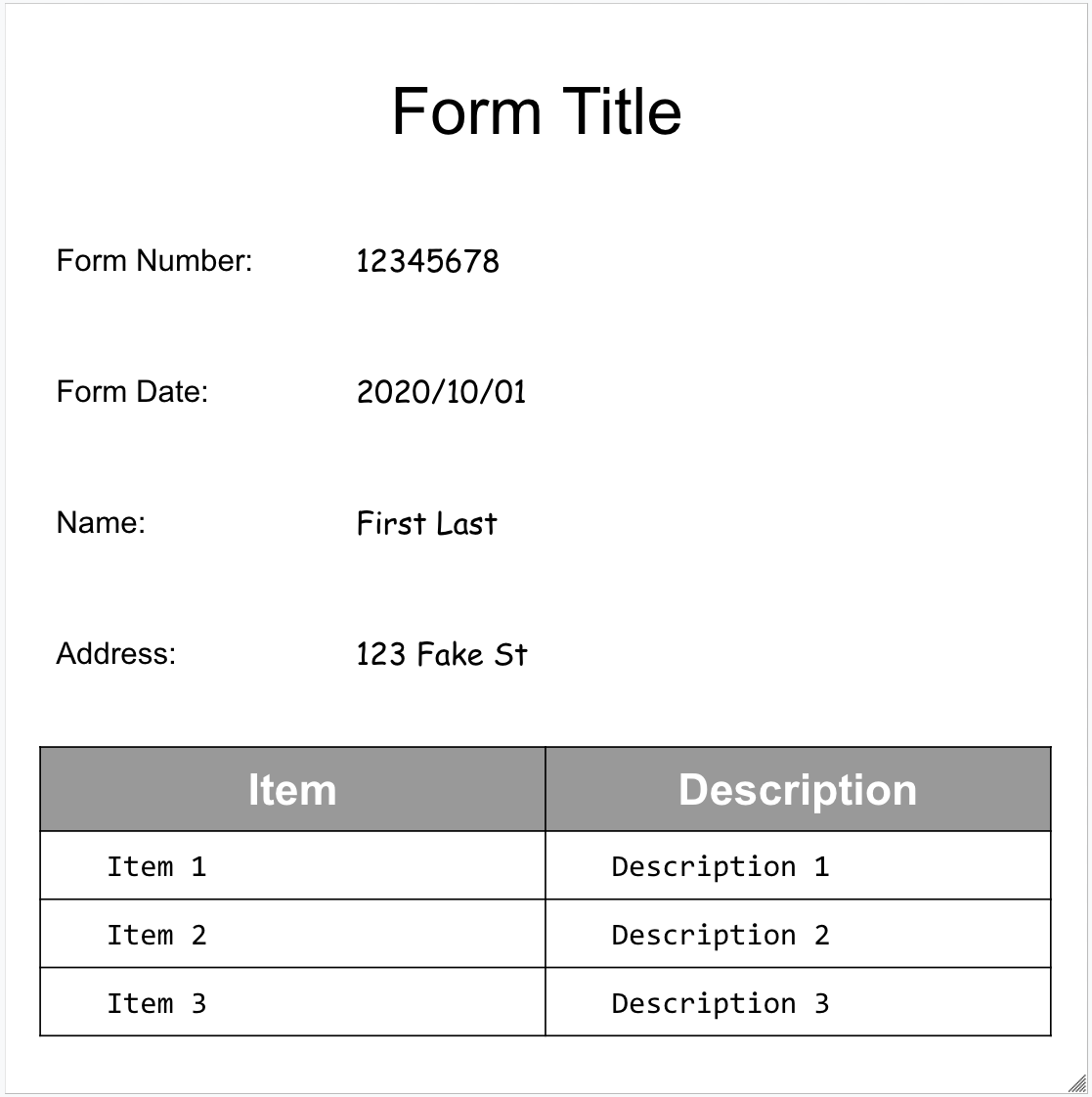
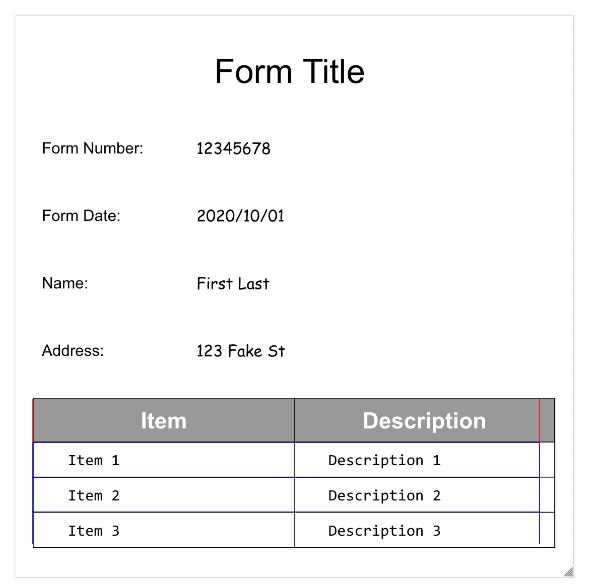
הנה דוגמה לטופס:

handle-response-7

זהו אובייקט המסמך המלא שמוחזר על ידי Form Parser:

הורדת קובץ JSON

אלה כמה מהשדות החשובים:

הכלי Form Parser יכול לזהות FormFields בדף. לכל שדה בטופס יש שם וערך. הם נקראים גם צמדים של מפתח/ערך (KVP). הערה: זוגות של מפתח/ערך שונים מישויות (סכמה) בכלי חילוץ אחרים:

השמות של הישויות מוגדרים. המקשים ב-KVP הם בדיוק הטקסט של המקש במסמך.

{
  "pages:" [
    {
      "formFields": [
        {
          "fieldName": { ... },
          "fieldValue": { ... }
        }
      ]
    }
  ]
}
  • ‫Document AI יכול גם לזהות Tables בדף.
{
  "pages:" [
    {
      "tables": [
        {
          "layout": { ... },
          "headerRows": [
            {
              "cells": [
                {
                  "layout": { ... },
                  "rowSpan": 1,
                  "colSpan": 1
                },
                {
                  "layout": { ... },
                  "rowSpan": 1,
                  "colSpan": 1
                }
              ]
            }
          ],
          "bodyRows": [
            {
              "cells": [
                {
                  "layout": { ... },
                  "rowSpan": 1,
                  "colSpan": 1
                },
                {
                  "layout": { ... },
                  "rowSpan": 1,
                  "colSpan": 1
                }
              ]
            }
          ]
        }
      ]
    }
  ]
}

הטבלה שמופקת באמצעות הכלי 'ניתוח טפסים' מזהה רק טבלאות רגילות, כלומר טבלאות ללא תאים שמשתרעים על פני שורות או עמודות. לכן rowSpan וcolSpan תמיד 1.

  • החל מגרסת המעבד pretrained-form-parser-v2.0-2022-11-10, הכלי Form Parser יכול לזהות גם ישויות כלליות. מידע נוסף זמין במאמר בנושא כלי לניתוח טפסים.

  • כדי לעזור לכם להבין את מבנה המסמך, בתמונות הבאות מוצגים פוליגונים של תיבות תוחמות עבור page.formFields ו-page.tables.

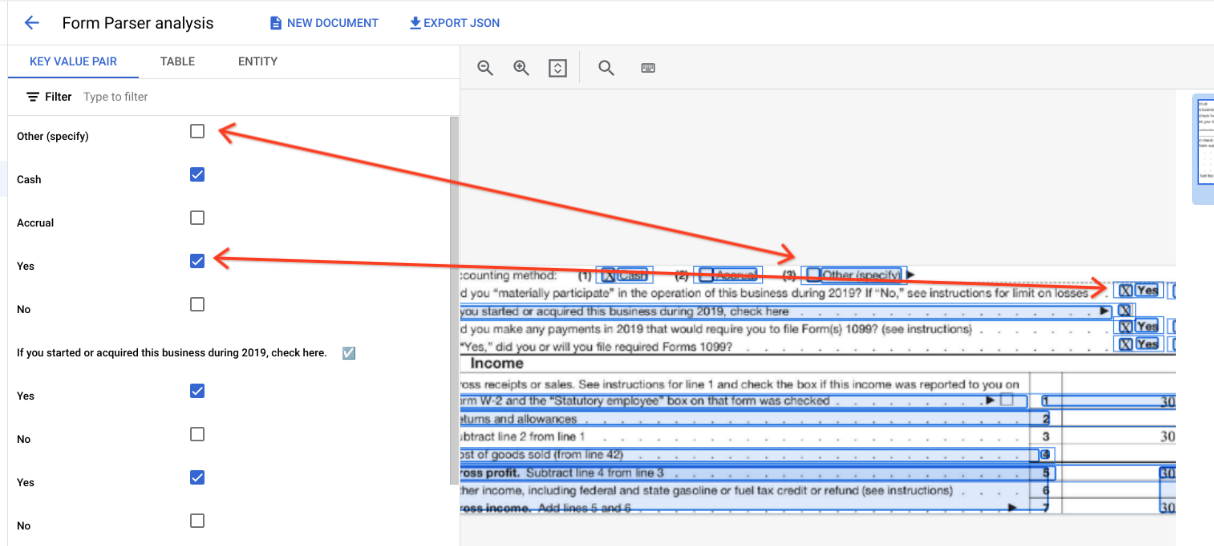
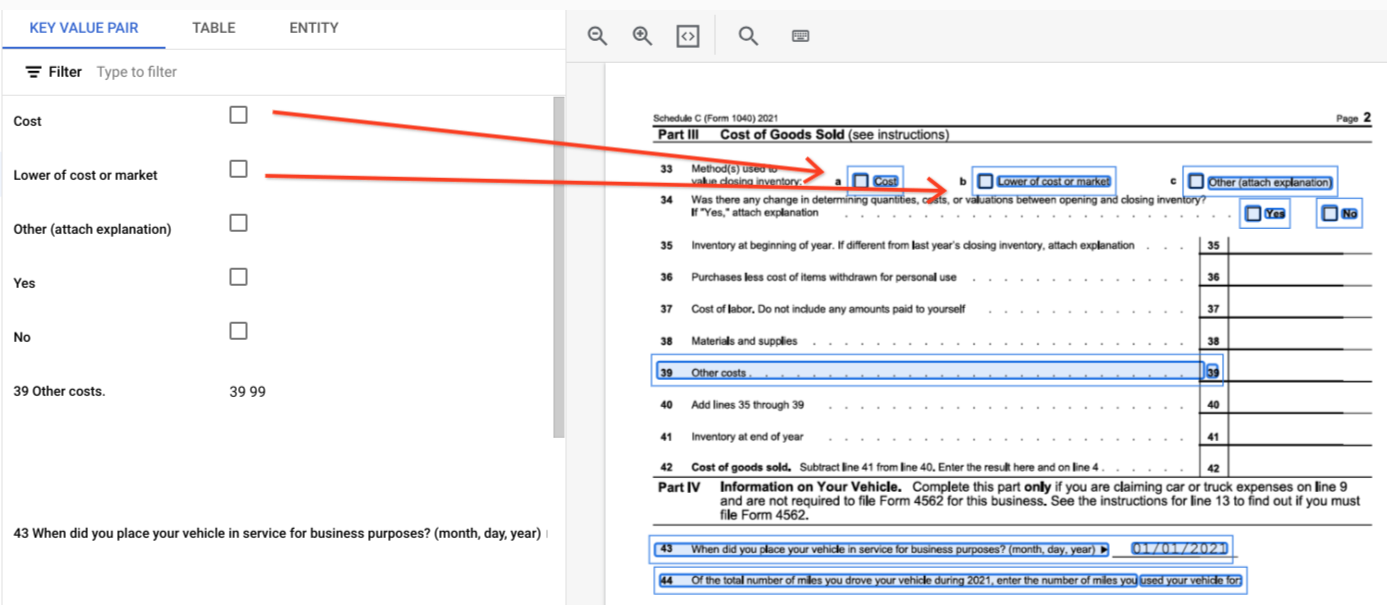
  • תיבות סימון בטבלאות. הכלי Form Parser יכול לבצע דיגיטציה של תיבות סימון מתמונות ומקובצי PDF כזוגות של מפתח/ערך. דוגמה לדיגיטציה של תיבת סימון כצמד מפתח/ערך.
handle-response-8

מחוץ לטבלאות, תיבות הסימון מיוצגות כרכיבים חזותיים בכלי Form Parser. הדגשה של התיבות המרובעות עם סימני וי בממשק המשתמש ושל סימן היוניקוד ב-JSON.

handle-response-9

"pages:" [
    {
      "tables": [
        {
          "layout": { ... },
          "headerRows": [
            {
              "cells": [
                {
                  "layout": { ... },
                  "rowSpan": 1,
                  "colSpan": 1
                },
                {
                  "layout": { ... },
                  "rowSpan": 1,
                  "colSpan": 1
                }
              ]
            }
          ],
          "bodyRows": [
            {
              "cells": [
                {
                  "layout": { ... },
                  "rowSpan": 1,
                  "colSpan": 1
                },
                {
                  "layout": { ... },
                  "rowSpan": 1,
                  "colSpan": 1
                }
              ]
            }
          ]
        }
      ]
    }
  ]
}

בטבלאות, תיבות הסימון מופיעות כתווי Unicode כמו (מסומן) או (לא מסומן).

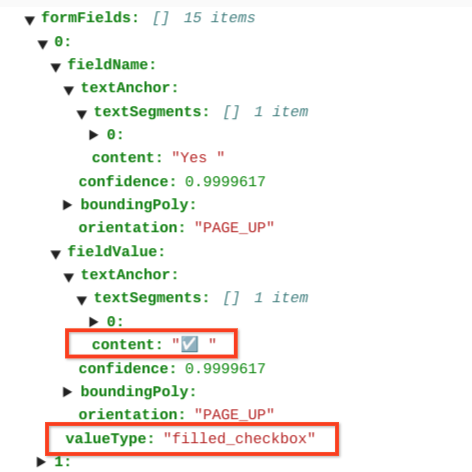
תיבות הסימון שמסומנות מקבלות את הערך filled_checkbox: under pages > x > formFields > x > fieldValue > valueType.. הערך של תיבות הסימון שלא מסומנות הוא unfilled_checkbox.
handle-response-10

בשדות התוכן מוצג ערך התוכן של תיבת הסימון כשהוא מודגש בנתיב pages>formFields>x>fieldValue>textAnchor>content.

כדי לעזור לכם להמחיש את מבנה המסמך, בתמונות הבאות מצוירים מצולעים תוחמים עבור page.formFields ו-page.tables.

שדות בטופס
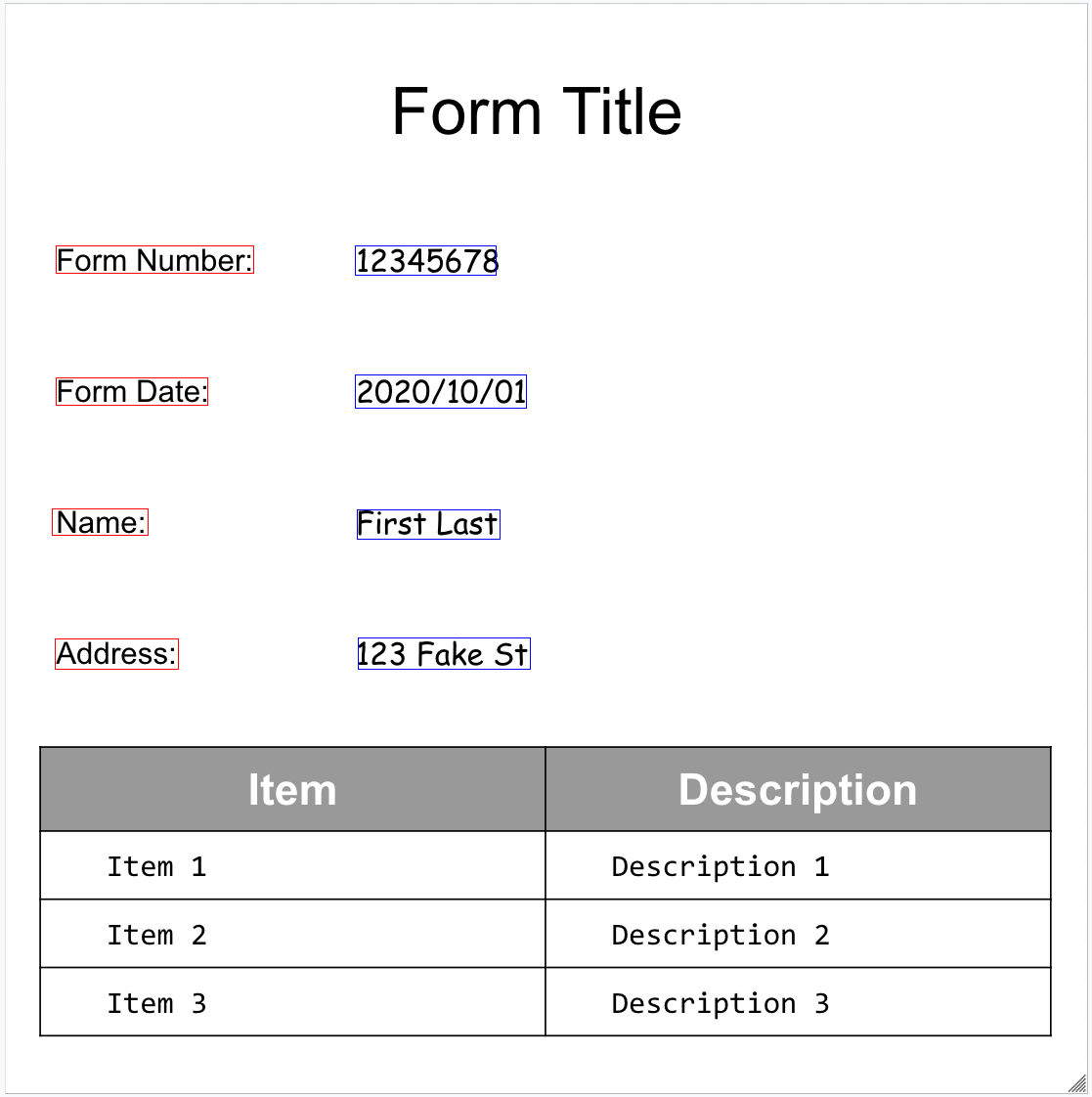
handle-response-11

Tables

handle-response-12

דוגמאות קוד

בדוגמאות הקוד הבאות אפשר לראות איך לשלוח בקשת עיבוד, ואז לקרוא את השדות ולהדפיס אותם במסוף:

Java

למידע נוסף, קראו את מאמרי העזרה של Document AI Java API.

כדי לבצע אימות ב-Document AI, צריך להגדיר את Application Default Credentials. מידע נוסף זמין במאמר הגדרת אימות לסביבת פיתוח מקומית.


import com.google.cloud.documentai.v1beta3.Document;
import com.google.cloud.documentai.v1beta3.DocumentProcessorServiceClient;
import com.google.cloud.documentai.v1beta3.DocumentProcessorServiceSettings;
import com.google.cloud.documentai.v1beta3.ProcessRequest;
import com.google.cloud.documentai.v1beta3.ProcessResponse;
import com.google.cloud.documentai.v1beta3.RawDocument;
import com.google.protobuf.ByteString;
import java.io.IOException;
import java.nio.file.Files;
import java.nio.file.Paths;
import java.util.List;
import java.util.concurrent.ExecutionException;
import java.util.concurrent.TimeoutException;

public class ProcessFormDocument {
  public static void processFormDocument()
      throws IOException, InterruptedException, ExecutionException, TimeoutException {
    // TODO(developer): Replace these variables before running the sample.
    String projectId = "your-project-id";
    String location = "your-project-location"; // Format is "us" or "eu".
    String processerId = "your-processor-id";
    String filePath = "path/to/input/file.pdf";
    processFormDocument(projectId, location, processerId, filePath);
  }

  public static void processFormDocument(
      String projectId, String location, String processorId, String filePath)
      throws IOException, InterruptedException, ExecutionException, TimeoutException {
    // Initialize client that will be used to send requests. This client only needs
    // to be created
    // once, and can be reused for multiple requests. After completing all of your
    // requests, call
    // the "close" method on the client to safely clean up any remaining background
    // resources.
    String endpoint = String.format("%s-documentai.googleapis.com:443", location);
    DocumentProcessorServiceSettings settings =
        DocumentProcessorServiceSettings.newBuilder().setEndpoint(endpoint).build();
    try (DocumentProcessorServiceClient client = DocumentProcessorServiceClient.create(settings)) {
      // The full resource name of the processor, e.g.:
      // projects/project-id/locations/location/processor/processor-id
      // You must create new processors in the Cloud Console first
      String name =
          String.format("projects/%s/locations/%s/processors/%s", projectId, location, processorId);

      // Read the file.
      byte[] imageFileData = Files.readAllBytes(Paths.get(filePath));

      // Convert the image data to a Buffer and base64 encode it.
      ByteString content = ByteString.copyFrom(imageFileData);

      RawDocument document =
          RawDocument.newBuilder().setContent(content).setMimeType("application/pdf").build();

      // Configure the process request.
      ProcessRequest request =
          ProcessRequest.newBuilder().setName(name).setRawDocument(document).build();

      // Recognizes text entities in the PDF document
      ProcessResponse result = client.processDocument(request);
      Document documentResponse = result.getDocument();

      System.out.println("Document processing complete.");

      // Read the text recognition output from the processor
      // For a full list of Document object attributes,
      // please reference this page:
      // https://googleapis.dev/java/google-cloud-document-ai/latest/index.html

      // Get all of the document text as one big string
      String text = documentResponse.getText();
      System.out.printf("Full document text: '%s'\n", removeNewlines(text));

      // Read the text recognition output from the processor
      List<Document.Page> pages = documentResponse.getPagesList();
      System.out.printf("There are %s page(s) in this document.\n", pages.size());

      for (Document.Page page : pages) {
        System.out.printf("\n\n**** Page %d ****\n", page.getPageNumber());

        List<Document.Page.Table> tables = page.getTablesList();
        System.out.printf("Found %d table(s):\n", tables.size());
        for (Document.Page.Table table : tables) {
          printTableInfo(table, text);
        }

        List<Document.Page.FormField> formFields = page.getFormFieldsList();
        System.out.printf("Found %d form fields:\n", formFields.size());
        for (Document.Page.FormField formField : formFields) {
          String fieldName = getLayoutText(formField.getFieldName().getTextAnchor(), text);
          String fieldValue = getLayoutText(formField.getFieldValue().getTextAnchor(), text);
          System.out.printf(
              "    * '%s': '%s'\n", removeNewlines(fieldName), removeNewlines(fieldValue));
        }
      }
    }
  }

  private static void printTableInfo(Document.Page.Table table, String text) {
    Document.Page.Table.TableRow firstBodyRow = table.getBodyRows(0);
    int columnCount = firstBodyRow.getCellsCount();
    System.out.printf(
        "    Table with %d columns and %d rows:\n", columnCount, table.getBodyRowsCount());

    Document.Page.Table.TableRow headerRow = table.getHeaderRows(0);
    StringBuilder headerRowText = new StringBuilder();
    for (Document.Page.Table.TableCell cell : headerRow.getCellsList()) {
      String columnName = getLayoutText(cell.getLayout().getTextAnchor(), text);
      headerRowText.append(String.format("%s | ", removeNewlines(columnName)));
    }
    headerRowText.setLength(headerRowText.length() - 3);
    System.out.printf("        Collumns: %s\n", headerRowText.toString());

    StringBuilder firstRowText = new StringBuilder();
    for (Document.Page.Table.TableCell cell : firstBodyRow.getCellsList()) {
      String cellText = getLayoutText(cell.getLayout().getTextAnchor(), text);
      firstRowText.append(String.format("%s | ", removeNewlines(cellText)));
    }
    firstRowText.setLength(firstRowText.length() - 3);
    System.out.printf("        First row data: %s\n", firstRowText.toString());
  }

  // Extract shards from the text field
  private static String getLayoutText(Document.TextAnchor textAnchor, String text) {
    if (textAnchor.getTextSegmentsList().size() > 0) {
      int startIdx = (int) textAnchor.getTextSegments(0).getStartIndex();
      int endIdx = (int) textAnchor.getTextSegments(0).getEndIndex();
      return text.substring(startIdx, endIdx);
    }
    return "[NO TEXT]";
  }

  private static String removeNewlines(String s) {
    return s.replace("\n", "").replace("\r", "");
  }
}

Node.js

למידע נוסף, קראו את מאמרי העזרה של Document AI Node.js API.

כדי לבצע אימות ב-Document AI, צריך להגדיר את Application Default Credentials. מידע נוסף זמין במאמר הגדרת אימות לסביבת פיתוח מקומית.

/**
 * TODO(developer): Uncomment these variables before running the sample.
 */
// const projectId = 'YOUR_PROJECT_ID';
// const location = 'YOUR_PROJECT_LOCATION'; // Format is 'us' or 'eu'
// const processorId = 'YOUR_PROCESSOR_ID'; // Create processor in Cloud Console
// const filePath = '/path/to/local/pdf';

const {DocumentProcessorServiceClient} =
  require('@google-cloud/documentai').v1beta3;

// Instantiates a client
const client = new DocumentProcessorServiceClient();

async function processDocument() {
  // The full resource name of the processor, e.g.:
  // projects/project-id/locations/location/processor/processor-id
  // You must create new processors in the Cloud Console first
  const name = `projects/${projectId}/locations/${location}/processors/${processorId}`;

  // Read the file into memory.
  const fs = require('fs').promises;
  const imageFile = await fs.readFile(filePath);

  // Convert the image data to a Buffer and base64 encode it.
  const encodedImage = Buffer.from(imageFile).toString('base64');

  const request = {
    name,
    rawDocument: {
      content: encodedImage,
      mimeType: 'application/pdf',
    },
  };

  // Recognizes text entities in the PDF document
  const [result] = await client.processDocument(request);

  console.log('Document processing complete.');

  // Read the table and form fields output from the processor
  // The form processor also contains OCR data. For more information
  // on how to parse OCR data please see the OCR sample.
  // For a full list of Document object attributes,
  // please reference this page: https://googleapis.dev/nodejs/documentai/latest/index.html
  const {document} = result;
  const {text} = document;
  console.log(`Full document text: ${JSON.stringify(text)}`);
  console.log(`There are ${document.pages.length} page(s) in this document.`);

  for (const page of document.pages) {
    console.log(`\n\n**** Page ${page.pageNumber} ****`);

    console.log(`Found ${page.tables.length} table(s):`);
    for (const table of page.tables) {
      const numCollumns = table.headerRows[0].cells.length;
      const numRows = table.bodyRows.length;
      console.log(`Table with ${numCollumns} columns and ${numRows} rows:`);
      printTableInfo(table, text);
    }
    console.log(`Found ${page.formFields.length} form field(s):`);
    for (const field of page.formFields) {
      const fieldName = getText(field.fieldName.textAnchor, text);
      const fieldValue = getText(field.fieldValue.textAnchor, text);
      console.log(
        `\t* ${JSON.stringify(fieldName)}: ${JSON.stringify(fieldValue)}`
      );
    }
  }
}

const printTableInfo = (table, text) => {
  // Print header row
  let headerRowText = '';
  for (const headerCell of table.headerRows[0].cells) {
    const headerCellText = getText(headerCell.layout.textAnchor, text);
    headerRowText += `${JSON.stringify(headerCellText.trim())} | `;
  }
  console.log(
    `Collumns: ${headerRowText.substring(0, headerRowText.length - 3)}`
  );
  // Print first body row
  let bodyRowText = '';
  for (const bodyCell of table.bodyRows[0].cells) {
    const bodyCellText = getText(bodyCell.layout.textAnchor, text);
    bodyRowText += `${JSON.stringify(bodyCellText.trim())} | `;
  }
  console.log(
    `First row data: ${bodyRowText.substring(0, bodyRowText.length - 3)}`
  );
};

// Extract shards from the text field
const getText = (textAnchor, text) => {
  if (!textAnchor.textSegments || textAnchor.textSegments.length === 0) {
    return '';
  }

  // First shard in document doesn't have startIndex property
  const startIndex = textAnchor.textSegments[0].startIndex || 0;
  const endIndex = textAnchor.textSegments[0].endIndex;

  return text.substring(startIndex, endIndex);
};

Python

למידע נוסף, קראו את מאמרי העזרה של Document AI Python API.

כדי לבצע אימות ב-Document AI, צריך להגדיר את Application Default Credentials. מידע נוסף זמין במאמר הגדרת אימות לסביבת פיתוח מקומית.


from typing import Optional, Sequence

from google.api_core.client_options import ClientOptions
from google.cloud import documentai

# TODO(developer): Uncomment these variables before running the sample.
# project_id = "YOUR_PROJECT_ID"
# location = "YOUR_PROCESSOR_LOCATION" # Format is "us" or "eu"
# processor_id = "YOUR_PROCESSOR_ID" # Create processor before running sample
# processor_version = "rc" # Refer to https://cloud.google.com/document-ai/docs/manage-processor-versions for more information
# file_path = "/path/to/local/pdf"
# mime_type = "application/pdf" # Refer to https://cloud.google.com/document-ai/docs/file-types for supported file types


def process_document_form_sample(
    project_id: str,
    location: str,
    processor_id: str,
    processor_version: str,
    file_path: str,
    mime_type: str,
) -> documentai.Document:
    # Online processing request to Document AI
    document = process_document(
        project_id, location, processor_id, processor_version, file_path, mime_type
    )

    # Read the table and form fields output from the processor
    # The form processor also contains OCR data. For more information
    # on how to parse OCR data please see the OCR sample.

    text = document.text
    print(f"Full document text: {repr(text)}\n")
    print(f"There are {len(document.pages)} page(s) in this document.")

    # Read the form fields and tables output from the processor
    for page in document.pages:
        print(f"\n\n**** Page {page.page_number} ****")

        print(f"\nFound {len(page.tables)} table(s):")
        for table in page.tables:
            num_columns = len(table.header_rows[0].cells)
            num_rows = len(table.body_rows)
            print(f"Table with {num_columns} columns and {num_rows} rows:")

            # Print header rows
            print("Columns:")
            print_table_rows(table.header_rows, text)
            # Print body rows
            print("Table body data:")
            print_table_rows(table.body_rows, text)

        print(f"\nFound {len(page.form_fields)} form field(s):")
        for field in page.form_fields:
            name = layout_to_text(field.field_name, text)
            value = layout_to_text(field.field_value, text)
            print(f"    * {repr(name.strip())}: {repr(value.strip())}")

    # Supported in version `pretrained-form-parser-v2.0-2022-11-10` and later.
    # For more information: https://cloud.google.com/document-ai/docs/form-parser
    if document.entities:
        print(f"Found {len(document.entities)} generic entities:")
        for entity in document.entities:
            print_entity(entity)
            # Print Nested Entities
            for prop in entity.properties:
                print_entity(prop)

    return document


def print_table_rows(
    table_rows: Sequence[documentai.Document.Page.Table.TableRow], text: str
) -> None:
    for table_row in table_rows:
        row_text = ""
        for cell in table_row.cells:
            cell_text = layout_to_text(cell.layout, text)
            row_text += f"{repr(cell_text.strip())} | "
        print(row_text)


def print_entity(entity: documentai.Document.Entity) -> None:
    # Fields detected. For a full list of fields for each processor see
    # the processor documentation:
    # https://cloud.google.com/document-ai/docs/processors-list
    key = entity.type_

    # Some other value formats in addition to text are available
    # e.g. dates: `entity.normalized_value.date_value.year`
    text_value = entity.text_anchor.content or entity.mention_text
    confidence = entity.confidence
    normalized_value = entity.normalized_value.text
    print(f"    * {repr(key)}: {repr(text_value)} ({confidence:.1%} confident)")

    if normalized_value:
        print(f"    * Normalized Value: {repr(normalized_value)}")


def process_document(
    project_id: str,
    location: str,
    processor_id: str,
    processor_version: str,
    file_path: str,
    mime_type: str,
    process_options: Optional[documentai.ProcessOptions] = None,
) -> documentai.Document:
    # You must set the `api_endpoint` if you use a location other than "us".
    client = documentai.DocumentProcessorServiceClient(
        client_options=ClientOptions(
            api_endpoint=f"{location}-documentai.googleapis.com"
        )
    )

    # The full resource name of the processor version, e.g.:
    # `projects/{project_id}/locations/{location}/processors/{processor_id}/processorVersions/{processor_version_id}`
    # You must create a processor before running this sample.
    name = client.processor_version_path(
        project_id, location, processor_id, processor_version
    )

    # Read the file into memory
    with open(file_path, "rb") as image:
        image_content = image.read()

    # Configure the process request
    request = documentai.ProcessRequest(
        name=name,
        raw_document=documentai.RawDocument(content=image_content, mime_type=mime_type),
        # Only supported for Document OCR processor
        process_options=process_options,
    )

    result = client.process_document(request=request)

    # For a full list of `Document` object attributes, reference this page:
    # https://cloud.google.com/document-ai/docs/reference/rest/v1/Document
    return result.document


def layout_to_text(layout: documentai.Document.Page.Layout, text: str) -> str:
    """
    Document AI identifies text in different parts of the document by their
    offsets in the entirety of the document"s text. This function converts
    offsets to a string.
    """
    # If a text segment spans several lines, it will
    # be stored in different text segments.
    return "".join(
        text[int(segment.start_index) : int(segment.end_index)]
        for segment in layout.text_anchor.text_segments
    )

ישויות, ישויות מוטמעות וערכים מנורמלים

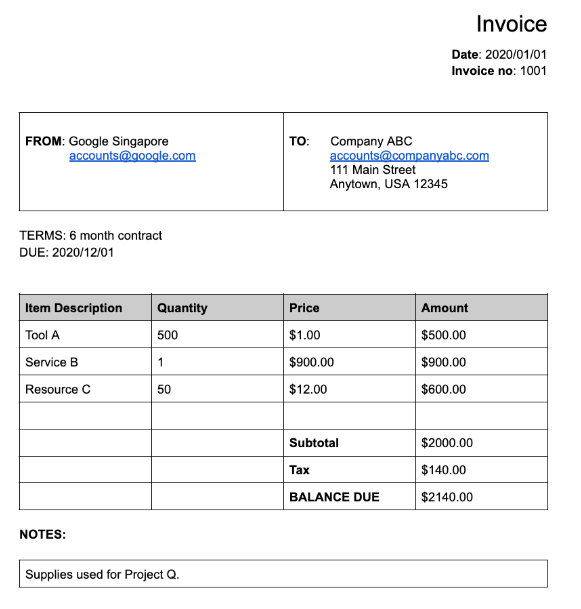
רבים מהמעבדים המיוחדים מחלצים נתונים מובְנים שמבוססים על סכמה מוגדרת היטב. לדוגמה, כלי לניתוח חשבוניות מזהה שדות ספציפיים כמו invoice_date ו-supplier_name. לדוגמה, הנה חשבונית:

handle-response-13

זה אובייקט המסמך המלא שמוחזר על ידי כלי הניתוח של חשבוניות:

הורדת קובץ JSON

אלה כמה מהחלקים החשובים של אובייקט המסמך:

  • שדות שזוהו: Entities מכיל את השדות שהמעבד הצליח לזהות, לדוגמה, invoice_date:

    {
     "entities": [
        {
          "textAnchor": {
            "textSegments": [
              {
                "startIndex": "14",
                "endIndex": "24"
              }
            ],
            "content": "2020/01/01"
          },
          "type": "invoice_date",
          "confidence": 0.9938466,
          "pageAnchor": { ... },
          "id": "2",
          "normalizedValue": {
            "text": "2020-01-01",
            "dateValue": {
              "year": 2020,
              "month": 1,
              "day": 1
            }
          }
        }
      ]
    }
    

    במקרים מסוימים, המעבד גם מנרמל את הערך של השדה. בדוגמה הזו, התאריך עבר נירמול מ-2020/01/01 ל-2020-01-01.

  • נרמול: עבור הרבה שדות ספציפיים נתמכים, המעבד גם מנרמל את הערך וגם מחזיר entity. השדה normalizedValue מתווסף לשדה הגולמי שחולץ באמצעות textAnchor של כל ישות. לכן, הוא מבצע נורמליזציה של הטקסט המילולי, ולעתים קרובות מחלק את ערך הטקסט לשדות משנה. לדוגמה, תאריך כמו 1 בספטמבר 2024 ייוצג כך:

  normalizedValue": {
    "text": "2020-09-01",
    "dateValue": {
      "year": 2024,
      "month": 9,
      "day": 1
  }

בדוגמה הזו, התאריך עבר נרמול מ-2020/01/01 ל-2020-01-01, שהוא פורמט סטנדרטי שמקטין את הצורך בעיבוד שלאחר ההמרה ומאפשר המרה לפורמט שנבחר.

בנוסף, הכתובות עוברות לעיתים קרובות נורמליזציה, שבה האלמנטים של הכתובת מפורקים לשדות נפרדים. המספרים עוברים נורמליזציה כך שnormalizedValue הוא מספר שלם או מספר עם נקודה עשרונית.

  • העשרה: מעבדים ושדות מסוימים תומכים גם בהעשרה. לדוגמה, המונח המקורי supplier_name במסמך Google Singapore עבר נורמליזציה בהשוואה ל-Enterprise Knowledge Graph והפך ל-Google Asia Pacific, Singapore. שימו לב גם שבגלל שתרשים הידע של Enterprise מכיל מידע על Google, ‏ Document AI מסיק את supplier_address למרות שהוא לא הופיע במסמך לדוגמה.
  {
    "entities": [
      {
        "textAnchor": {
          "textSegments": [ ... ],
          "content": "Google Singapore"
        },
        "type": "supplier_name",
        "confidence": 0.39170802,
        "pageAnchor": { ... },
        "id": "12",
        "normalizedValue": {
          "text": "Google Asia Pacific, Singapore"
        }
      },
      {
        "type": "supplier_address",
        "id": "17",
        "normalizedValue": {
          "text": "70 Pasir Panjang Rd #03-71 Mapletree Business City II Singapore 117371",
          "addressValue": {
            "regionCode": "SG",
            "languageCode": "en-US",
            "postalCode": "117371",
            "addressLines": [
              "70 Pasir Panjang Rd",
              "#03-71 Mapletree Business City II"
            ]
          }
        }
      }
    ]
  }
  • שדות מוטמעים: אפשר ליצור סכימה מוטמעת (שדות) על ידי הכרזה על ישות כהורה, ואז יצירת ישויות צאצא מתחת להורה. תגובת הניתוח של ההורה כוללת את שדות הצאצא ברכיב properties של שדה ההורה. בדוגמה הבאה, line_item הוא שדה הורה שיש לו שני שדות צאצא: line_item/description ו-line_item/quantity.

    {
      "entities": [
        {
          "textAnchor": { ... },
          "type": "line_item",
          "confidence": 1.0,
          "pageAnchor": { ... },
          "id": "19",
          "properties": [
            {
              "textAnchor": {
                "textSegments": [ ... ],
                "content": "Tool A"
              },
              "type": "line_item/description",
              "confidence": 0.3461604,
              "pageAnchor": { ... },
              "id": "20"
            },
            {
              "textAnchor": {
                "textSegments": [ ... ],
                "content": "500"
              },
              "type": "line_item/quantity",
              "confidence": 0.8077843,
              "pageAnchor": { ... },
              "id": "21",
              "normalizedValue": {
                "text": "500"
              }
            }
          ]
        }
      ]
    }
    

הנתונים הבאים מנותחים על ידי מנתחים:

  • חילוץ (כלי מותאם אישית לחילוץ)
  • קודם
    • מנתח דפי חשבון בנק
    • מנתח הוצאות
    • כלי לניתוח חשבוניות
    • PaySlip parser
    • W2 Parser

דוגמאות קוד

בדוגמאות הקוד הבאות אפשר לראות איך לשלוח בקשת עיבוד, ואז לקרוא ולהדפיס את השדות ממעבד ייעודי במסוף:

Java

למידע נוסף, קראו את מאמרי העזרה של Document AI Java API.

כדי לבצע אימות ב-Document AI, צריך להגדיר את Application Default Credentials. מידע נוסף זמין במאמר הגדרת אימות לסביבת פיתוח מקומית.


import com.google.cloud.documentai.v1beta3.Document;
import com.google.cloud.documentai.v1beta3.DocumentProcessorServiceClient;
import com.google.cloud.documentai.v1beta3.DocumentProcessorServiceSettings;
import com.google.cloud.documentai.v1beta3.ProcessRequest;
import com.google.cloud.documentai.v1beta3.ProcessResponse;
import com.google.cloud.documentai.v1beta3.RawDocument;
import com.google.protobuf.ByteString;
import java.io.IOException;
import java.nio.file.Files;
import java.nio.file.Paths;
import java.util.concurrent.ExecutionException;
import java.util.concurrent.TimeoutException;

public class ProcessSpecializedDocument {
  public static void processSpecializedDocument()
      throws IOException, InterruptedException, ExecutionException, TimeoutException {
    // TODO(developer): Replace these variables before running the sample.
    String projectId = "your-project-id";
    String location = "your-project-location"; // Format is "us" or "eu".
    String processerId = "your-processor-id";
    String filePath = "path/to/input/file.pdf";
    processSpecializedDocument(projectId, location, processerId, filePath);
  }

  public static void processSpecializedDocument(
      String projectId, String location, String processorId, String filePath)
      throws IOException, InterruptedException, ExecutionException, TimeoutException {
    // Initialize client that will be used to send requests. This client only needs
    // to be created
    // once, and can be reused for multiple requests. After completing all of your
    // requests, call
    // the "close" method on the client to safely clean up any remaining background
    // resources.
    String endpoint = String.format("%s-documentai.googleapis.com:443", location);
    DocumentProcessorServiceSettings settings =
        DocumentProcessorServiceSettings.newBuilder().setEndpoint(endpoint).build();
    try (DocumentProcessorServiceClient client = DocumentProcessorServiceClient.create(settings)) {
      // The full resource name of the processor, e.g.:
      // projects/project-id/locations/location/processor/processor-id
      // You must create new processors in the Cloud Console first
      String name =
          String.format("projects/%s/locations/%s/processors/%s", projectId, location, processorId);

      // Read the file.
      byte[] imageFileData = Files.readAllBytes(Paths.get(filePath));

      // Convert the image data to a Buffer and base64 encode it.
      ByteString content = ByteString.copyFrom(imageFileData);

      RawDocument document =
          RawDocument.newBuilder().setContent(content).setMimeType("application/pdf").build();

      // Configure the process request.
      ProcessRequest request =
          ProcessRequest.newBuilder().setName(name).setRawDocument(document).build();

      // Recognizes text entities in the PDF document
      ProcessResponse result = client.processDocument(request);
      Document documentResponse = result.getDocument();

      System.out.println("Document processing complete.");

      // Read fields specificly from the specalized US drivers license processor:
      // https://cloud.google.com/document-ai/docs/processors-list#processor_us-driver-license-parser
      // retriving data from other specalized processors follow a similar pattern.
      // For a complete list of processors see:
      // https://cloud.google.com/document-ai/docs/processors-list
      //
      // OCR and other data is also present in the quality processor's response.
      // Please see the OCR and other samples for how to parse other data in the
      // response.
      for (Document.Entity entity : documentResponse.getEntitiesList()) {
        // Fields detected. For a full list of fields for each processor see
        // the processor documentation:
        // https://cloud.google.com/document-ai/docs/processors-list
        String entityType = entity.getType();
        // some other value formats in addition to text are availible
        // e.g. dates: `entity.getNormalizedValue().getDateValue().getYear()`
        // check for normilized value with `entity.hasNormalizedValue()`
        String entityTextValue = escapeNewlines(entity.getTextAnchor().getContent());
        float entityConfidence = entity.getConfidence();
        System.out.printf(
            "    * %s: %s (%.2f%% confident)\n",
            entityType, entityTextValue, entityConfidence * 100.0);
      }
    }
  }

  private static String escapeNewlines(String s) {
    return s.replace("\n", "\\n").replace("\r", "\\r");
  }
}

Node.js

למידע נוסף, קראו את מאמרי העזרה של Document AI Node.js API.

כדי לבצע אימות ב-Document AI, צריך להגדיר את Application Default Credentials. מידע נוסף זמין במאמר הגדרת אימות לסביבת פיתוח מקומית.

/**
 * TODO(developer): Uncomment these variables before running the sample.
 */
// const projectId = 'YOUR_PROJECT_ID';
// const location = 'YOUR_PROJECT_LOCATION'; // Format is 'us' or 'eu'
// const processorId = 'YOUR_PROCESSOR_ID'; // Create processor in Cloud Console
// const filePath = '/path/to/local/pdf';

const {DocumentProcessorServiceClient} =
  require('@google-cloud/documentai').v1beta3;

// Instantiates a client
const client = new DocumentProcessorServiceClient();

async function processDocument() {
  // The full resource name of the processor, e.g.:
  // projects/project-id/locations/location/processor/processor-id
  // You must create new processors in the Cloud Console first
  const name = `projects/${projectId}/locations/${location}/processors/${processorId}`;

  // Read the file into memory.
  const fs = require('fs').promises;
  const imageFile = await fs.readFile(filePath);

  // Convert the image data to a Buffer and base64 encode it.
  const encodedImage = Buffer.from(imageFile).toString('base64');

  const request = {
    name,
    rawDocument: {
      content: encodedImage,
      mimeType: 'application/pdf',
    },
  };

  // Recognizes text entities in the PDF document
  const [result] = await client.processDocument(request);

  console.log('Document processing complete.');

  // Read fields specificly from the specalized US drivers license processor:
  // https://cloud.google.com/document-ai/docs/processors-list#processor_us-driver-license-parser
  // retriving data from other specalized processors follow a similar pattern.
  // For a complete list of processors see:
  // https://cloud.google.com/document-ai/docs/processors-list
  //
  // OCR and other data is also present in the quality processor's response.
  // Please see the OCR and other samples for how to parse other data in the
  // response.
  const {document} = result;
  for (const entity of document.entities) {
    // Fields detected. For a full list of fields for each processor see
    // the processor documentation:
    // https://cloud.google.com/document-ai/docs/processors-list
    const key = entity.type;
    // some other value formats in addition to text are availible
    // e.g. dates: `entity.normalizedValue.dateValue.year`
    const textValue =
      entity.textAnchor !== null ? entity.textAnchor.content : '';
    const conf = entity.confidence * 100;
    console.log(
      `* ${JSON.stringify(key)}: ${JSON.stringify(textValue)}(${conf.toFixed(
        2
      )}% confident)`
    );
  }
}

Python

למידע נוסף, קראו את מאמרי העזרה של Document AI Python API.

כדי לבצע אימות ב-Document AI, צריך להגדיר את Application Default Credentials. מידע נוסף זמין במאמר הגדרת אימות לסביבת פיתוח מקומית.


from typing import Optional, Sequence

from google.api_core.client_options import ClientOptions
from google.cloud import documentai

# TODO(developer): Uncomment these variables before running the sample.
# project_id = "YOUR_PROJECT_ID"
# location = "YOUR_PROCESSOR_LOCATION" # Format is "us" or "eu"
# processor_id = "YOUR_PROCESSOR_ID" # Create processor before running sample
# processor_version = "rc" # Refer to https://cloud.google.com/document-ai/docs/manage-processor-versions for more information
# file_path = "/path/to/local/pdf"
# mime_type = "application/pdf" # Refer to https://cloud.google.com/document-ai/docs/file-types for supported file types


def process_document_entity_extraction_sample(
    project_id: str,
    location: str,
    processor_id: str,
    processor_version: str,
    file_path: str,
    mime_type: str,
) -> None:
    # Online processing request to Document AI
    document = process_document(
        project_id, location, processor_id, processor_version, file_path, mime_type
    )

    # Print extracted entities from entity extraction processor output.
    # For a complete list of processors see:
    # https://cloud.google.com/document-ai/docs/processors-list
    #
    # OCR and other data is also present in the processor's response.
    # Refer to the OCR samples for how to parse other data in the response.

    print(f"Found {len(document.entities)} entities:")
    for entity in document.entities:
        print_entity(entity)
        # Print Nested Entities (if any)
        for prop in entity.properties:
            print_entity(prop)


def print_entity(entity: documentai.Document.Entity) -> None:
    # Fields detected. For a full list of fields for each processor see
    # the processor documentation:
    # https://cloud.google.com/document-ai/docs/processors-list
    key = entity.type_

    # Some other value formats in addition to text are available
    # e.g. dates: `entity.normalized_value.date_value.year`
    text_value = entity.text_anchor.content or entity.mention_text
    confidence = entity.confidence
    normalized_value = entity.normalized_value.text
    print(f"    * {repr(key)}: {repr(text_value)} ({confidence:.1%} confident)")

    if normalized_value:
        print(f"    * Normalized Value: {repr(normalized_value)}")


def process_document(
    project_id: str,
    location: str,
    processor_id: str,
    processor_version: str,
    file_path: str,
    mime_type: str,
    process_options: Optional[documentai.ProcessOptions] = None,
) -> documentai.Document:
    # You must set the `api_endpoint` if you use a location other than "us".
    client = documentai.DocumentProcessorServiceClient(
        client_options=ClientOptions(
            api_endpoint=f"{location}-documentai.googleapis.com"
        )
    )

    # The full resource name of the processor version, e.g.:
    # `projects/{project_id}/locations/{location}/processors/{processor_id}/processorVersions/{processor_version_id}`
    # You must create a processor before running this sample.
    name = client.processor_version_path(
        project_id, location, processor_id, processor_version
    )

    # Read the file into memory
    with open(file_path, "rb") as image:
        image_content = image.read()

    # Configure the process request
    request = documentai.ProcessRequest(
        name=name,
        raw_document=documentai.RawDocument(content=image_content, mime_type=mime_type),
        # Only supported for Document OCR processor
        process_options=process_options,
    )

    result = client.process_document(request=request)

    # For a full list of `Document` object attributes, reference this page:
    # https://cloud.google.com/document-ai/docs/reference/rest/v1/Document
    return result.document

כלי מותאם אישית לחילוץ מסמכים

מעבד מותאם אישית לחילוץ מסמכים יכול לחלץ ישויות מותאמות אישית ממסמכים שאין להם מעבד שאומן מראש. אפשר לעשות את זה באמצעות אימון של מודל בהתאמה אישית או באמצעות שימוש במודלים בסיסיים של AI גנרטיבי כדי לחלץ ישויות בעלות שם בלי אימון. מידע נוסף זמין במאמר יצירת כלי מותאם אישית לחילוץ מסמכים במסוף.

  • אם מאמנים מודל בהתאמה אישית, אפשר להשתמש במעבד בדיוק כמו במעבד של ישות שחולצה שאומן מראש.
  • אם אתם משתמשים במודל בסיסי, אתם יכולים ליצור גרסת מעבד כדי לחלץ ישויות ספציפיות לכל בקשה, או להגדיר את זה לכל בקשה בנפרד.

למידע על מבנה הפלט, אפשר לעיין במאמר ישויות, ישויות מקוננות וערכים מנורמלים.

דוגמאות קוד

אם אתם משתמשים במודל בהתאמה אישית או שיצרתם גרסת מעבד באמצעות מודל בסיסי, אתם צריכים להשתמש בדוגמאות קוד לחילוץ ישויות.

בדוגמת הקוד הבאה אפשר לראות איך מגדירים ישויות ספציפיות ל-Custom Document Extractor של מודל בסיסי על בסיס כל בקשה, ומדפיסים את הישויות שחולצו:

Python

למידע נוסף, קראו את מאמרי העזרה של Document AI Python API.

כדי לבצע אימות ב-Document AI, צריך להגדיר את Application Default Credentials. מידע נוסף זמין במאמר הגדרת אימות לסביבת פיתוח מקומית.


from typing import Optional, Sequence

from google.api_core.client_options import ClientOptions
from google.cloud import documentai

# TODO(developer): Uncomment these variables before running the sample.
# project_id = "YOUR_PROJECT_ID"
# location = "YOUR_PROCESSOR_LOCATION" # Format is "us" or "eu"
# processor_id = "YOUR_PROCESSOR_ID" # Create processor before running sample
# processor_version = "rc" # Refer to https://cloud.google.com/document-ai/docs/manage-processor-versions for more information
# file_path = "/path/to/local/pdf"
# mime_type = "application/pdf" # Refer to https://cloud.google.com/document-ai/docs/file-types for supported file types


def process_document_custom_extractor_sample(
    project_id: str,
    location: str,
    processor_id: str,
    processor_version: str,
    file_path: str,
    mime_type: str,
) -> None:
    # Entities to extract from Foundation Model CDE
    properties = [
        documentai.DocumentSchema.EntityType.Property(
            name="invoice_id",
            value_type="string",
            occurrence_type=documentai.DocumentSchema.EntityType.Property.OccurrenceType.REQUIRED_ONCE,
        ),
        documentai.DocumentSchema.EntityType.Property(
            name="notes",
            value_type="string",
            occurrence_type=documentai.DocumentSchema.EntityType.Property.OccurrenceType.OPTIONAL_MULTIPLE,
        ),
        documentai.DocumentSchema.EntityType.Property(
            name="terms",
            value_type="string",
            occurrence_type=documentai.DocumentSchema.EntityType.Property.OccurrenceType.OPTIONAL_MULTIPLE,
        ),
    ]
    # Optional: For Generative AI processors, request different fields than the
    # schema for a processor version
    process_options = documentai.ProcessOptions(
        schema_override=documentai.DocumentSchema(
            display_name="CDE Schema",
            description="Document Schema for the CDE Processor",
            entity_types=[
                documentai.DocumentSchema.EntityType(
                    name="custom_extraction_document_type",
                    base_types=["document"],
                    properties=properties,
                )
            ],
        )
    )

    # Online processing request to Document AI
    document = process_document(
        project_id,
        location,
        processor_id,
        processor_version,
        file_path,
        mime_type,
        process_options=process_options,
    )

    for entity in document.entities:
        print_entity(entity)
        # Print Nested Entities (if any)
        for prop in entity.properties:
            print_entity(prop)


def print_entity(entity: documentai.Document.Entity) -> None:
    # Fields detected. For a full list of fields for each processor see
    # the processor documentation:
    # https://cloud.google.com/document-ai/docs/processors-list
    key = entity.type_

    # Some other value formats in addition to text are available
    # e.g. dates: `entity.normalized_value.date_value.year`
    text_value = entity.text_anchor.content or entity.mention_text
    confidence = entity.confidence
    normalized_value = entity.normalized_value.text
    print(f"    * {repr(key)}: {repr(text_value)} ({confidence:.1%} confident)")

    if normalized_value:
        print(f"    * Normalized Value: {repr(normalized_value)}")


def process_document(
    project_id: str,
    location: str,
    processor_id: str,
    processor_version: str,
    file_path: str,
    mime_type: str,
    process_options: Optional[documentai.ProcessOptions] = None,
) -> documentai.Document:
    # You must set the `api_endpoint` if you use a location other than "us".
    client = documentai.DocumentProcessorServiceClient(
        client_options=ClientOptions(
            api_endpoint=f"{location}-documentai.googleapis.com"
        )
    )

    # The full resource name of the processor version, e.g.:
    # `projects/{project_id}/locations/{location}/processors/{processor_id}/processorVersions/{processor_version_id}`
    # You must create a processor before running this sample.
    name = client.processor_version_path(
        project_id, location, processor_id, processor_version
    )

    # Read the file into memory
    with open(file_path, "rb") as image:
        image_content = image.read()

    # Configure the process request
    request = documentai.ProcessRequest(
        name=name,
        raw_document=documentai.RawDocument(content=image_content, mime_type=mime_type),
        # Only supported for Document OCR processor
        process_options=process_options,
    )

    result = client.process_document(request=request)

    # For a full list of `Document` object attributes, reference this page:
    # https://cloud.google.com/document-ai/docs/reference/rest/v1/Document
    return result.document

סיכום

מעבד הסיכום משתמש במודלים בסיסיים של AI גנרטיבי כדי לסכם את הטקסט שחולץ ממסמך. אפשר להתאים אישית את האורך והפורמט של התשובה בדרכים הבאות:

  • אורך
    • BRIEF: סיכום קצר של משפט או שניים
    • MODERATE: סיכום באורך פסקה
    • COMPREHENSIVE: האפשרות הכי ארוכה שזמינה
  • פורמט

אפשר ליצור גרסת מעבד לאורך ופורמט ספציפיים, או להגדיר אותה לכל בקשה בנפרד.

הטקסט המסוכם מופיע בDocument.entities.normalizedValue.text. אפשר לראות קובץ JSON מלא לדוגמה בפלט לדוגמה של מעבד.

מידע נוסף מופיע במאמר בנושא יצירת כלי לסיכום מסמכים במסוף.

דוגמאות קוד

בדוגמת הקוד הבאה אפשר לראות איך מגדירים אורך ופורמט ספציפיים בבקשת עיבוד ומדפיסים את הטקסט המסוכם:

Python

למידע נוסף, קראו את מאמרי העזרה של Document AI Python API.

כדי לבצע אימות ב-Document AI, צריך להגדיר את Application Default Credentials. מידע נוסף זמין במאמר הגדרת אימות לסביבת פיתוח מקומית.

from typing import Optional

from google.api_core.client_options import ClientOptions
from google.cloud import documentai_v1beta3 as documentai


# TODO(developer): Uncomment these variables before running the sample.
# project_id = "YOUR_PROJECT_ID"
# location = "YOUR_PROCESSOR_LOCATION" # Format is "us" or "eu"
# processor_id = "YOUR_PROCESSOR_ID" # Create processor before running sample
# processor_version = "rc" # Refer to https://cloud.google.com/document-ai/docs/manage-processor-versions for more information
# file_path = "/path/to/local/pdf"
# mime_type = "application/pdf" # Refer to https://cloud.google.com/document-ai/docs/file-types for supported file types

def process_document_summarizer_sample(
    project_id: str,
    location: str,
    processor_id: str,
    processor_version: str,
    file_path: str,
    mime_type: str,
) -> None:
    # For supported options, refer to:
    # https://cloud.google.com/document-ai/docs/reference/rest/v1beta3/projects.locations.processors.processorVersions#summaryoptions
    summary_options = documentai.SummaryOptions(
        length=documentai.SummaryOptions.Length.BRIEF,
        format=documentai.SummaryOptions.Format.BULLETS,
    )

    properties = [
        documentai.DocumentSchema.EntityType.Property(
            name="summary",
            value_type="string",
            occurrence_type=documentai.DocumentSchema.EntityType.Property.OccurrenceType.REQUIRED_ONCE,
            property_metadata=documentai.PropertyMetadata(
                field_extraction_metadata=documentai.FieldExtractionMetadata(
                    summary_options=summary_options
                )
            ),
        )
    ]

    # Optional: Request specific summarization format other than the default
    # for the processor version.
    process_options = documentai.ProcessOptions(
        schema_override=documentai.DocumentSchema(
            entity_types=[
                documentai.DocumentSchema.EntityType(
                    name="summary_document_type",
                    base_types=["document"],
                    properties=properties,
                )
            ]
        )
    )

    # Online processing request to Document AI
    document = process_document(
        project_id,
        location,
        processor_id,
        processor_version,
        file_path,
        mime_type,
        process_options=process_options,
    )

    for entity in document.entities:
        print_entity(entity)
        # Print Nested Entities (if any)
        for prop in entity.properties:
            print_entity(prop)


def print_entity(entity: documentai.Document.Entity) -> None:
    # Fields detected. For a full list of fields for each processor see
    # the processor documentation:
    # https://cloud.google.com/document-ai/docs/processors-list
    key = entity.type_

    # Some other value formats in addition to text are availible
    # e.g. dates: `entity.normalized_value.date_value.year`
    text_value = entity.text_anchor.content
    confidence = entity.confidence
    normalized_value = entity.normalized_value.text
    print(f"    * {repr(key)}: {repr(text_value)}({confidence:.1%} confident)")

    if normalized_value:
        print(f"    * Normalized Value: {repr(normalized_value)}")


def process_document(
    project_id: str,
    location: str,
    processor_id: str,
    processor_version: str,
    file_path: str,
    mime_type: str,
    process_options: Optional[documentai.ProcessOptions] = None,
) -> documentai.Document:
    # You must set the `api_endpoint` if you use a location other than "us".
    client = documentai.DocumentProcessorServiceClient(
        client_options=ClientOptions(
            api_endpoint=f"{location}-documentai.googleapis.com"
        )
    )

    # The full resource name of the processor version, e.g.:
    # `projects/{project_id}/locations/{location}/processors/{processor_id}/processorVersions/{processor_version_id}`
    # You must create a processor before running this sample.
    name = client.processor_version_path(
        project_id, location, processor_id, processor_version
    )

    # Read the file into memory
    with open(file_path, "rb") as image:
        image_content = image.read()

    # Configure the process request
    request = documentai.ProcessRequest(
        name=name,
        raw_document=documentai.RawDocument(content=image_content, mime_type=mime_type),
        # Only supported for Document OCR processor
        process_options=process_options,
    )

    result = client.process_document(request=request)

    # For a full list of `Document` object attributes, reference this page:
    # https://cloud.google.com/document-ai/docs/reference/rest/v1/Document
    return result.document

פיצול וסיווג

הנה קובץ PDF מורכב בן 10 עמודים שמכיל סוגים שונים של מסמכים וטפסים:

הורדת קובץ PDF

זה אובייקט המסמך המלא שמוחזר על ידי כלי החלוקה והסיווג של מסמכי הלוואות:

הורדת קובץ JSON

כל מסמך שמזוהה על ידי הכלי לפיצול מיוצג על ידי התג entity. לדוגמה:

  {
    "entities": [
      {
        "textAnchor": {
          "textSegments": [
            {
              "startIndex": "13936",
              "endIndex": "21108"
            }
          ]
        },
        "type": "1040se_2020",
        "confidence": 0.76257163,
        "pageAnchor": {
          "pageRefs": [
            {
              "page": "6"
            },
            {
              "page": "7"
            }
          ]
        }
      }
    ]
  }
  • Entity.pageAnchor מציין שהמסמך הזה כולל 2 דפים. הערה: הערך pageRefs[].page מבוסס על אפסים והוא האינדקס בשדה document.pages[].

  • Entity.type מציין שהמסמך הזה הוא טופס 1040 Schedule SE. רשימה מלאה של סוגי המסמכים שאפשר לזהות מופיעה בקטע סוגי המסמכים שזוהו בתיעוד של המעבד.

מידע נוסף זמין במאמר בנושא התנהגות של כלי לפיצול מסמכים.

דוגמאות קוד

הכלי לפיצול מזהה את הגבולות בין הדפים, אבל הוא לא מפצל את מסמך הקלט בפועל. אתם יכולים להשתמש בארגז הכלים של Document AI כדי לפצל פיזית קובץ PDF באמצעות גבולות הדפים. בדוגמאות הקוד הבאות מודפסים טווחי הדפים בלי לפצל את קובץ ה-PDF:

Java

למידע נוסף, קראו את מאמרי העזרה של Document AI Java API.

כדי לבצע אימות ב-Document AI, צריך להגדיר את Application Default Credentials. מידע נוסף זמין במאמר הגדרת אימות לסביבת פיתוח מקומית.


import com.google.cloud.documentai.v1beta3.Document;
import com.google.cloud.documentai.v1beta3.DocumentProcessorServiceClient;
import com.google.cloud.documentai.v1beta3.DocumentProcessorServiceSettings;
import com.google.cloud.documentai.v1beta3.ProcessRequest;
import com.google.cloud.documentai.v1beta3.ProcessResponse;
import com.google.cloud.documentai.v1beta3.RawDocument;
import com.google.protobuf.ByteString;
import java.io.IOException;
import java.nio.file.Files;
import java.nio.file.Paths;
import java.util.List;
import java.util.concurrent.ExecutionException;
import java.util.concurrent.TimeoutException;

public class ProcessSplitterDocument {
  public static void processSplitterDocument()
      throws IOException, InterruptedException, ExecutionException, TimeoutException {
    // TODO(developer): Replace these variables before running the sample.
    String projectId = "your-project-id";
    String location = "your-project-location"; // Format is "us" or "eu".
    String processerId = "your-processor-id";
    String filePath = "path/to/input/file.pdf";
    processSplitterDocument(projectId, location, processerId, filePath);
  }

  public static void processSplitterDocument(
      String projectId, String location, String processorId, String filePath)
      throws IOException, InterruptedException, ExecutionException, TimeoutException {
    // Initialize client that will be used to send requests. This client only needs
    // to be created
    // once, and can be reused for multiple requests. After completing all of your
    // requests, call
    // the "close" method on the client to safely clean up any remaining background
    // resources.
    String endpoint = String.format("%s-documentai.googleapis.com:443", location);
    DocumentProcessorServiceSettings settings =
        DocumentProcessorServiceSettings.newBuilder().setEndpoint(endpoint).build();
    try (DocumentProcessorServiceClient client = DocumentProcessorServiceClient.create(settings)) {
      // The full resource name of the processor, e.g.:
      // projects/project-id/locations/location/processor/processor-id
      // You must create new processors in the Cloud Console first
      String name =
          String.format("projects/%s/locations/%s/processors/%s", projectId, location, processorId);

      // Read the file.
      byte[] imageFileData = Files.readAllBytes(Paths.get(filePath));

      // Convert the image data to a Buffer and base64 encode it.
      ByteString content = ByteString.copyFrom(imageFileData);

      RawDocument document =
          RawDocument.newBuilder().setContent(content).setMimeType("application/pdf").build();

      // Configure the process request.
      ProcessRequest request =
          ProcessRequest.newBuilder().setName(name).setRawDocument(document).build();

      // Recognizes text entities in the PDF document
      ProcessResponse result = client.processDocument(request);
      Document documentResponse = result.getDocument();

      System.out.println("Document processing complete.");

      // Read the splitter output from the document splitter processor:
      // https://cloud.google.com/document-ai/docs/processors-list#processor_doc-splitter
      // This processor only provides text for the document and information on how
      // to split the document on logical boundaries. To identify and extract text,
      // form elements, and entities please see other processors like the OCR, form,
      // and specalized processors.
      List<Document.Entity> entities = documentResponse.getEntitiesList();
      System.out.printf("Found %d subdocuments:\n", entities.size());
      for (Document.Entity entity : entities) {
        float entityConfidence = entity.getConfidence();
        String pagesRangeText = pageRefsToString(entity.getPageAnchor().getPageRefsList());
        String subdocumentType = entity.getType();
        if (subdocumentType.isEmpty()) {
          System.out.printf(
              "%.2f%% confident that %s a subdocument.\n", entityConfidence * 100, pagesRangeText);
        } else {
          System.out.printf(
              "%.2f%% confident that %s a '%s' subdocument.\n",
              entityConfidence * 100, pagesRangeText, subdocumentType);
        }
      }
    }
  }

  // Converts page reference(s) to a string describing the page or page range.
  private static String pageRefsToString(List<Document.PageAnchor.PageRef> pageRefs) {
    if (pageRefs.size() == 1) {
      return String.format("page %d is", pageRefs.get(0).getPage() + 1);
    } else {
      long start = pageRefs.get(0).getPage() + 1;
      long end = pageRefs.get(1).getPage() + 1;
      return String.format("pages %d to %d are", start, end);
    }
  }
}

Node.js

למידע נוסף, קראו את מאמרי העזרה של Document AI Node.js API.

כדי לבצע אימות ב-Document AI, צריך להגדיר את Application Default Credentials. מידע נוסף זמין במאמר הגדרת אימות לסביבת פיתוח מקומית.

/**
 * TODO(developer): Uncomment these variables before running the sample.
 */
// const projectId = 'YOUR_PROJECT_ID';
// const location = 'YOUR_PROJECT_LOCATION'; // Format is 'us' or 'eu'
// const processorId = 'YOUR_PROCESSOR_ID'; // Create processor in Cloud Console
// const filePath = '/path/to/local/pdf';

const {DocumentProcessorServiceClient} =
  require('@google-cloud/documentai').v1beta3;

// Instantiates a client
const client = new DocumentProcessorServiceClient();

async function processDocument() {
  // The full resource name of the processor, e.g.:
  // projects/project-id/locations/location/processor/processor-id
  // You must create new processors in the Cloud Console first
  const name = `projects/${projectId}/locations/${location}/processors/${processorId}`;

  // Read the file into memory.
  const fs = require('fs').promises;
  const imageFile = await fs.readFile(filePath);

  // Convert the image data to a Buffer and base64 encode it.
  const encodedImage = Buffer.from(imageFile).toString('base64');

  const request = {
    name,
    rawDocument: {
      content: encodedImage,
      mimeType: 'application/pdf',
    },
  };

  // Recognizes text entities in the PDF document
  const [result] = await client.processDocument(request);

  console.log('Document processing complete.');

  // Read fields specificly from the specalized US drivers license processor:
  // https://cloud.google.com/document-ai/docs/processors-list#processor_us-driver-license-parser
  // retriving data from other specalized processors follow a similar pattern.
  // For a complete list of processors see:
  // https://cloud.google.com/document-ai/docs/processors-list
  //
  // OCR and other data is also present in the quality processor's response.
  // Please see the OCR and other samples for how to parse other data in the
  // response.
  const {document} = result;
  console.log(`Found ${document.entities.length} subdocuments:`);
  for (const entity of document.entities) {
    const conf = entity.confidence * 100;
    const pagesRange = pageRefsToRange(entity.pageAnchor.pageRefs);
    if (entity.type !== '') {
      console.log(
        `${conf.toFixed(2)}% confident that ${pagesRange} a "${
          entity.type
        }" subdocument.`
      );
    } else {
      console.log(
        `${conf.toFixed(2)}% confident that ${pagesRange} a subdocument.`
      );
    }
  }
}

// Converts a page ref to a string describing the page or page range.
const pageRefsToRange = pageRefs => {
  if (pageRefs.length === 1) {
    const num = parseInt(pageRefs[0].page) + 1 || 1;
    return `page ${num} is`;
  } else {
    const start = parseInt(pageRefs[0].page) + 1 || 1;
    const end = parseInt(pageRefs[1].page) + 1;
    return `pages ${start} to ${end} are`;
  }
};

Python

למידע נוסף, קראו את מאמרי העזרה של Document AI Python API.

כדי לבצע אימות ב-Document AI, צריך להגדיר את Application Default Credentials. מידע נוסף זמין במאמר הגדרת אימות לסביבת פיתוח מקומית.


from typing import Optional, Sequence

from google.api_core.client_options import ClientOptions
from google.cloud import documentai

# TODO(developer): Uncomment these variables before running the sample.
# project_id = "YOUR_PROJECT_ID"
# location = "YOUR_PROCESSOR_LOCATION" # Format is "us" or "eu"
# processor_id = "YOUR_PROCESSOR_ID" # Create processor before running sample
# processor_version = "rc" # Refer to https://cloud.google.com/document-ai/docs/manage-processor-versions for more information
# file_path = "/path/to/local/pdf"
# mime_type = "application/pdf" # Refer to https://cloud.google.com/document-ai/docs/file-types for supported file types


def process_document_splitter_sample(
    project_id: str,
    location: str,
    processor_id: str,
    processor_version: str,
    file_path: str,
    mime_type: str,
) -> None:
    # Online processing request to Document AI
    document = process_document(
        project_id, location, processor_id, processor_version, file_path, mime_type
    )

    # Read the splitter output from a document splitter/classifier processor:
    # e.g. https://cloud.google.com/document-ai/docs/processors-list#processor_procurement-document-splitter
    # This processor only provides text for the document and information on how
    # to split the document on logical boundaries. To identify and extract text,
    # form elements, and entities please see other processors like the OCR, form,
    # and specalized processors.

    print(f"Found {len(document.entities)} subdocuments:")
    for entity in document.entities:
        conf_percent = f"{entity.confidence:.1%}"
        pages_range = page_refs_to_string(entity.page_anchor.page_refs)

        # Print subdocument type information, if available
        if entity.type_:
            print(
                f"{conf_percent} confident that {pages_range} a '{entity.type_}' subdocument."
            )
        else:
            print(f"{conf_percent} confident that {pages_range} a subdocument.")


def page_refs_to_string(
    page_refs: Sequence[documentai.Document.PageAnchor.PageRef],
) -> str:
    """Converts a page ref to a string describing the page or page range."""
    pages = [str(int(page_ref.page) + 1) for page_ref in page_refs]
    if len(pages) == 1:
        return f"page {pages[0]} is"
    else:
        return f"pages {', '.join(pages)} are"


def process_document(
    project_id: str,
    location: str,
    processor_id: str,
    processor_version: str,
    file_path: str,
    mime_type: str,
    process_options: Optional[documentai.ProcessOptions] = None,
) -> documentai.Document:
    # You must set the `api_endpoint` if you use a location other than "us".
    client = documentai.DocumentProcessorServiceClient(
        client_options=ClientOptions(
            api_endpoint=f"{location}-documentai.googleapis.com"
        )
    )

    # The full resource name of the processor version, e.g.:
    # `projects/{project_id}/locations/{location}/processors/{processor_id}/processorVersions/{processor_version_id}`
    # You must create a processor before running this sample.
    name = client.processor_version_path(
        project_id, location, processor_id, processor_version
    )

    # Read the file into memory
    with open(file_path, "rb") as image:
        image_content = image.read()

    # Configure the process request
    request = documentai.ProcessRequest(
        name=name,
        raw_document=documentai.RawDocument(content=image_content, mime_type=mime_type),
        # Only supported for Document OCR processor
        process_options=process_options,
    )

    result = client.process_document(request=request)

    # For a full list of `Document` object attributes, reference this page:
    # https://cloud.google.com/document-ai/docs/reference/rest/v1/Document
    return result.document

בדוגמת הקוד הבאה נעשה שימוש ב-Document AI Toolbox כדי לפצל קובץ PDF באמצעות גבולות הדפים מ-Document שעבר עיבוד.

Python

למידע נוסף, קראו את מאמרי העזרה של Document AI Python API.

כדי לבצע אימות ב-Document AI, צריך להגדיר את Application Default Credentials. מידע נוסף זמין במאמר הגדרת אימות לסביבת פיתוח מקומית.


from google.cloud.documentai_toolbox import document

# TODO(developer): Uncomment these variables before running the sample.
# Given a local document.proto or sharded document.proto from a splitter/classifier in path
# document_path = "path/to/local/document.json"
# pdf_path = "path/to/local/document.pdf"
# output_path = "resources/output/"


def split_pdf_sample(document_path: str, pdf_path: str, output_path: str) -> None:
    wrapped_document = document.Document.from_document_path(document_path=document_path)

    output_files = wrapped_document.split_pdf(
        pdf_path=pdf_path, output_path=output_path
    )

    print("Document Successfully Split")
    for output_file in output_files:
        print(output_file)

ארגז הכלים של Document AI

Document AI Toolbox הוא SDK ל-Python שמספק פונקציות עזר לניהול, לעריכה ולחילוץ מידע מהתגובה של המסמך. היא יוצרת אובייקט מסמך 'עטוף' מתגובת מסמך מעובד מקובצי JSON ב-Cloud Storage, מקובצי JSON מקומיים או מפלט ישירות מהשיטה process_document().

הוא יכול לבצע את הפעולות הבאות:

דוגמאות קוד

בדוגמאות הקוד הבאות אפשר לראות איך להשתמש ב-Document AI Toolbox.

מדריך למתחילים

from typing import Optional

from google.cloud import documentai
from google.cloud.documentai_toolbox import document, gcs_utilities

# TODO(developer): Uncomment these variables before running the sample.
# Given a Document JSON or sharded Document JSON in path gs://bucket/path/to/folder
# gcs_bucket_name = "bucket"
# gcs_prefix = "path/to/folder"

# Or, given a Document JSON in path gs://bucket/path/to/folder/document.json
# gcs_uri = "gs://bucket/path/to/folder/document.json"

# Or, given a Document JSON in path local/path/to/folder/document.json
# document_path = "local/path/to/folder/document.json"

# Or, given a Document object from Document AI
# documentai_document = documentai.Document()

# Or, given a BatchProcessMetadata object from Document AI
# operation = client.batch_process_documents(request)
# operation.result(timeout=timeout)
# batch_process_metadata = documentai.BatchProcessMetadata(operation.metadata)

# Or, given a BatchProcessOperation name from Document AI
# batch_process_operation = "projects/project_id/locations/location/operations/operation_id"


def quickstart_sample(
    gcs_bucket_name: Optional[str] = None,
    gcs_prefix: Optional[str] = None,
    gcs_uri: Optional[str] = None,
    document_path: Optional[str] = None,
    documentai_document: Optional[documentai.Document] = None,
    batch_process_metadata: Optional[documentai.BatchProcessMetadata] = None,
    batch_process_operation: Optional[str] = None,
) -> document.Document:
    if gcs_bucket_name and gcs_prefix:
        # Load from Google Cloud Storage Directory
        print("Document structure in Cloud Storage")
        gcs_utilities.print_gcs_document_tree(
            gcs_bucket_name=gcs_bucket_name, gcs_prefix=gcs_prefix
        )

        wrapped_document = document.Document.from_gcs(
            gcs_bucket_name=gcs_bucket_name, gcs_prefix=gcs_prefix
        )
    elif gcs_uri:
        # Load a single Document from a Google Cloud Storage URI
        wrapped_document = document.Document.from_gcs_uri(gcs_uri=gcs_uri)
    elif document_path:
        # Load from local `Document` JSON file
        wrapped_document = document.Document.from_document_path(document_path)
    elif documentai_document:
        # Load from `documentai.Document` object
        wrapped_document = document.Document.from_documentai_document(
            documentai_document
        )
    elif batch_process_metadata:
        # Load Documents from `BatchProcessMetadata` object
        wrapped_documents = document.Document.from_batch_process_metadata(
            metadata=batch_process_metadata
        )
        wrapped_document = wrapped_documents[0]
    elif batch_process_operation:
        wrapped_documents = document.Document.from_batch_process_operation(
            location="us", operation_name=batch_process_operation
        )
        wrapped_document = wrapped_documents[0]
    else:
        raise ValueError("No document source provided.")

    # For all properties and methods, refer to:
    # https://cloud.google.com/python/docs/reference/documentai-toolbox/latest/google.cloud.documentai_toolbox.wrappers.document.Document

    print("Document Successfully Loaded!")
    print(f"\t Number of Pages: {len(wrapped_document.pages)}")
    print(f"\t Number of Entities: {len(wrapped_document.entities)}")

    for page in wrapped_document.pages:
        print(f"Page {page.page_number}")
        for block in page.blocks:
            print(block.text)
        for paragraph in page.paragraphs:
            print(paragraph.text)
        for line in page.lines:
            print(line.text)
        for token in page.tokens:
            print(token.text)

        # Only supported with Form Parser processor
        # https://cloud.google.com/document-ai/docs/form-parser
        for form_field in page.form_fields:
            print(f"{form_field.field_name} : {form_field.field_value}")

        # Only supported with Enterprise Document OCR version `pretrained-ocr-v2.0-2023-06-02`
        # https://cloud.google.com/document-ai/docs/process-documents-ocr#enable_symbols
        for symbol in page.symbols:
            print(symbol.text)

        # Only supported with Enterprise Document OCR version `pretrained-ocr-v2.0-2023-06-02`
        # https://cloud.google.com/document-ai/docs/process-documents-ocr#math_ocr
        for math_formula in page.math_formulas:
            print(math_formula.text)

    # Only supported with Entity Extraction processors
    # https://cloud.google.com/document-ai/docs/processors-list
    for entity in wrapped_document.entities:
        print(f"{entity.type_} : {entity.mention_text}")
        if entity.normalized_text:
            print(f"\tNormalized Text: {entity.normalized_text}")

    # Only supported with Layout Parser
    for chunk in wrapped_document.chunks:
        print(f"Chunk {chunk.chunk_id}: {chunk.content}")

    for block in wrapped_document.document_layout_blocks:
        print(f"Document Layout Block {block.block_id}")

        if block.text_block:
            print(f"{block.text_block.type_}: {block.text_block.text}")
        if block.list_block:
            print(f"{block.list_block.type_}: {block.list_block.list_entries}")
        if block.table_block:
            print(block.table_block.header_rows, block.table_block.body_rows)

Tables


from google.cloud.documentai_toolbox import document

# TODO(developer): Uncomment these variables before running the sample.
# Given a local document.proto or sharded document.proto in path
# document_path = "path/to/local/document.json"
# output_file_prefix = "output/table"


def table_sample(document_path: str, output_file_prefix: str) -> None:
    wrapped_document = document.Document.from_document_path(document_path=document_path)

    print("Tables in Document")
    for page in wrapped_document.pages:
        for table_index, table in enumerate(page.tables):
            # Convert table to Pandas Dataframe
            # Refer to https://pandas.pydata.org/docs/reference/frame.html for all supported methods
            df = table.to_dataframe()
            print(df)

            output_filename = f"{output_file_prefix}-{page.page_number}-{table_index}"

            # Write Dataframe to CSV file
            df.to_csv(f"{output_filename}.csv", index=False)

            # Write Dataframe to HTML file
            df.to_html(f"{output_filename}.html", index=False)

            # Write Dataframe to Markdown file
            df.to_markdown(f"{output_filename}.md", index=False)

ייצוא ל-BigQuery


from google.cloud.documentai_toolbox import document

# TODO(developer): Uncomment these variables before running the sample.
# Given a document.proto or sharded document.proto in path gs://bucket/path/to/folder
# gcs_bucket_name = "bucket"
# gcs_prefix = "path/to/folder"
# dataset_name = "test_dataset"
# table_name = "test_table"
# project_id = "YOUR_PROJECT_ID"


def entities_to_bigquery_sample(
    gcs_bucket_name: str,
    gcs_prefix: str,
    dataset_name: str,
    table_name: str,
    project_id: str,
) -> None:
    wrapped_document = document.Document.from_gcs(
        gcs_bucket_name=gcs_bucket_name, gcs_prefix=gcs_prefix
    )

    job = wrapped_document.entities_to_bigquery(
        dataset_name=dataset_name, table_name=table_name, project_id=project_id
    )

    # Also supported:
    # job = wrapped_document.form_fields_to_bigquery(
    #     dataset_name=dataset_name, table_name=table_name, project_id=project_id
    # )

    print("Document entities loaded into BigQuery")
    print(f"Job ID: {job.job_id}")
    print(f"Table: {job.destination.path}")

פיצול קובץ PDF


from google.cloud.documentai_toolbox import document

# TODO(developer): Uncomment these variables before running the sample.
# Given a local document.proto or sharded document.proto from a splitter/classifier in path
# document_path = "path/to/local/document.json"
# pdf_path = "path/to/local/document.pdf"
# output_path = "resources/output/"


def split_pdf_sample(document_path: str, pdf_path: str, output_path: str) -> None:
    wrapped_document = document.Document.from_document_path(document_path=document_path)

    output_files = wrapped_document.split_pdf(
        pdf_path=pdf_path, output_path=output_path
    )

    print("Document Successfully Split")
    for output_file in output_files:
        print(output_file)

חילוץ תמונות


from google.cloud.documentai_toolbox import document

# TODO(developer): Uncomment these variables before running the sample.
# Given a local document.proto or sharded document.proto from an identity processor in path
# document_path = "path/to/local/document.json"
# output_path = "resources/output/"
# output_file_prefix = "exported_photo"
# output_file_extension = "png"


def export_images_sample(
    document_path: str,
    output_path: str,
    output_file_prefix: str,
    output_file_extension: str,
) -> None:
    wrapped_document = document.Document.from_document_path(document_path=document_path)

    output_files = wrapped_document.export_images(
        output_path=output_path,
        output_file_prefix=output_file_prefix,
        output_file_extension=output_file_extension,
    )
    print("Images Successfully Exported")
    for output_file in output_files:
        print(output_file)

המרת ראייה


from google.cloud.documentai_toolbox import document

# TODO(developer): Uncomment these variables before running the sample.
# Given a document.proto or sharded document.proto in path gs://bucket/path/to/folder
# gcs_bucket_name = "bucket"
# gcs_prefix = "path/to/folder"


def convert_document_to_vision_sample(
    gcs_bucket_name: str,
    gcs_prefix: str,
) -> None:
    wrapped_document = document.Document.from_gcs(
        gcs_bucket_name=gcs_bucket_name, gcs_prefix=gcs_prefix
    )

    # Converting wrapped_document to vision AnnotateFileResponse
    annotate_file_response = (
        wrapped_document.convert_document_to_annotate_file_response()
    )

    print("Document converted to AnnotateFileResponse!")
    print(
        f"Number of Pages : {len(annotate_file_response.responses[0].full_text_annotation.pages)}"
    )

המרה ל-hOCR


from google.cloud.documentai_toolbox import document

# TODO(developer): Uncomment these variables before running the sample.
# Given a document.proto or sharded document.proto in path gs://bucket/path/to/folder
# document_path = "path/to/local/document.json"
# document_title = "your-document-title"


def convert_document_to_hocr_sample(document_path: str, document_title: str) -> str:
    wrapped_document = document.Document.from_document_path(document_path=document_path)

    # Converting wrapped_document to hOCR format
    hocr_string = wrapped_document.export_hocr_str(title=document_title)

    print("Document converted to hOCR!")
    return hocr_string

המרות של צד שלישי


from google.cloud.documentai_toolbox import converter

# TODO(developer): Uncomment these variables before running the sample.
# This sample will convert external annotations to the Document.json format used by Document AI Workbench for training.
# To process this the external annotation must have these type of objects:
#       1) Type
#       2) Text
#       3) Bounding Box (bounding boxes must be 1 of the 3 optional types)
#
# This is the bare minimum requirement to convert the annotations but for better accuracy you will need to also have:
#       1) Document width & height
#
# Bounding Box Types:
#   Type 1:
#       bounding_box:[{"x":1,"y":2},{"x":2,"y":2},{"x":2,"y":3},{"x":1,"y":3}]
#   Type 2:
#       bounding_box:{ "Width": 1, "Height": 1, "Left": 1, "Top": 1}
#   Type 3:
#       bounding_box: [1,2,2,2,2,3,1,3]
#
#   Note: If these types are not sufficient you can propose a feature request or contribute the new type and conversion functionality.
#
# Given a folders in gcs_input_path with the following structure :
#
# gs://path/to/input/folder
#   ├──test_annotations.json
#   ├──test_config.json
#   └──test.pdf
#
# An example of the config is in sample-converter-configs/Azure/form-config.json
#
# location = "us",
# processor_id = "my_processor_id"
# gcs_input_path = "gs://path/to/input/folder"
# gcs_output_path = "gs://path/to/input/folder"


def convert_external_annotations_sample(
    location: str,
    processor_id: str,
    project_id: str,
    gcs_input_path: str,
    gcs_output_path: str,
) -> None:
    converter.convert_from_config(
        project_id=project_id,
        location=location,
        processor_id=processor_id,
        gcs_input_path=gcs_input_path,
        gcs_output_path=gcs_output_path,
    )

אצוות של מסמכים


from google.cloud import documentai
from google.cloud.documentai_toolbox import gcs_utilities

# TODO(developer): Uncomment these variables before running the sample.
# Given unprocessed documents in path gs://bucket/path/to/folder
# gcs_bucket_name = "bucket"
# gcs_prefix = "path/to/folder"
# batch_size = 50


def create_batches_sample(
    gcs_bucket_name: str,
    gcs_prefix: str,
    batch_size: int = 50,
) -> None:
    # Creating batches of documents for processing
    batches = gcs_utilities.create_batches(
        gcs_bucket_name=gcs_bucket_name, gcs_prefix=gcs_prefix, batch_size=batch_size
    )

    print(f"{len(batches)} batch(es) created.")
    for batch in batches:
        print(f"{len(batch.gcs_documents.documents)} files in batch.")
        print(batch.gcs_documents.documents)

        # Use as input for batch_process_documents()
        # Refer to https://cloud.google.com/document-ai/docs/send-request
        # for how to send a batch processing request
        request = documentai.BatchProcessRequest(
            name="processor_name", input_documents=batch
        )
        print(request)

מיזוג של רסיסי מסמכים


from google.cloud import documentai
from google.cloud.documentai_toolbox import document

# TODO(developer): Uncomment these variables before running the sample.
# Given a document.proto or sharded document.proto in path gs://bucket/path/to/folder
# gcs_bucket_name = "bucket"
# gcs_prefix = "path/to/folder"
# output_file_name = "path/to/folder/file.json"


def merge_document_shards_sample(
    gcs_bucket_name: str, gcs_prefix: str, output_file_name: str
) -> None:
    wrapped_document = document.Document.from_gcs(
        gcs_bucket_name=gcs_bucket_name, gcs_prefix=gcs_prefix
    )

    merged_document = wrapped_document.to_merged_documentai_document()

    with open(output_file_name, "w") as f:
        f.write(documentai.Document.to_json(merged_document))

    print(f"Document with {len(wrapped_document.shards)} shards successfully merged.")