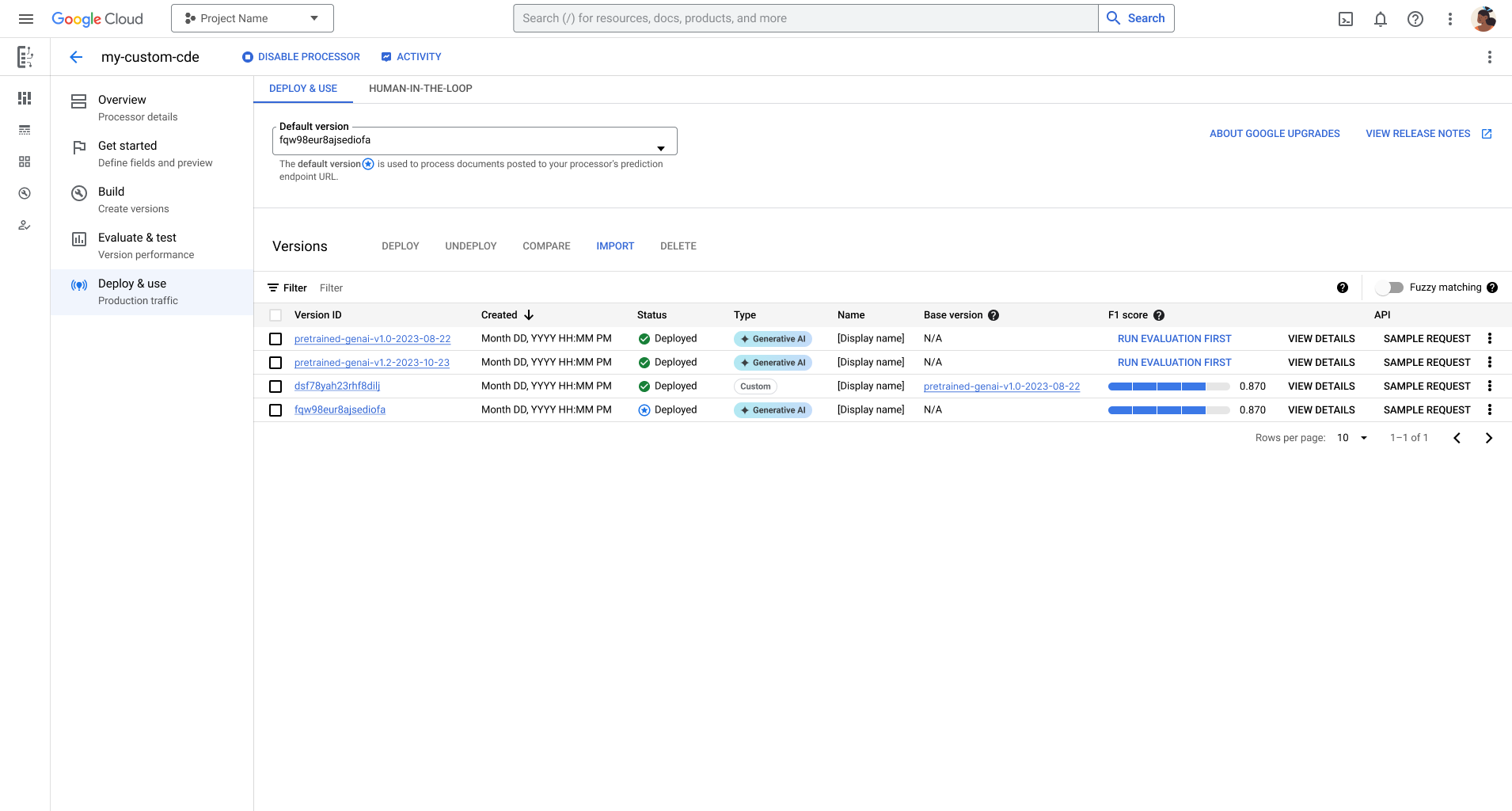
ניהול גרסאות של מעבדי מידע

גרסאות חדשות יוצאות מסיבות שונות, למשל כדי לשפר את הדיוק, להגדיל את הזמינות ולתמוך ברכיבים חדשים של מסמכים, כמו סימני בחירה.

מכיוון ש-Document AI מבוסס על AI גנרטיבי, גרסאות עתידיות ישתמשו במודלים חדשים של AI גנרטיבי כדי שתוכלו ליהנות משיפורים של AI גנרטיבי.

אנחנו משפרים את המודלים הבסיסיים, ולכן מודלים בסיסיים קודמים מוצאים משימוש. באופן דומה, גרסאות של מעבדים מוצאות משימוש 6 חודשים אחרי שגרסאות חדשות יוצאות.

למעבד יכול להיות אחד מהגרסאות הבאות:

בדף הזה מוסבר איך מעבדים מקבלים גרסאות, ואיך אפשר לראות ולבחור גרסה מסוימת.
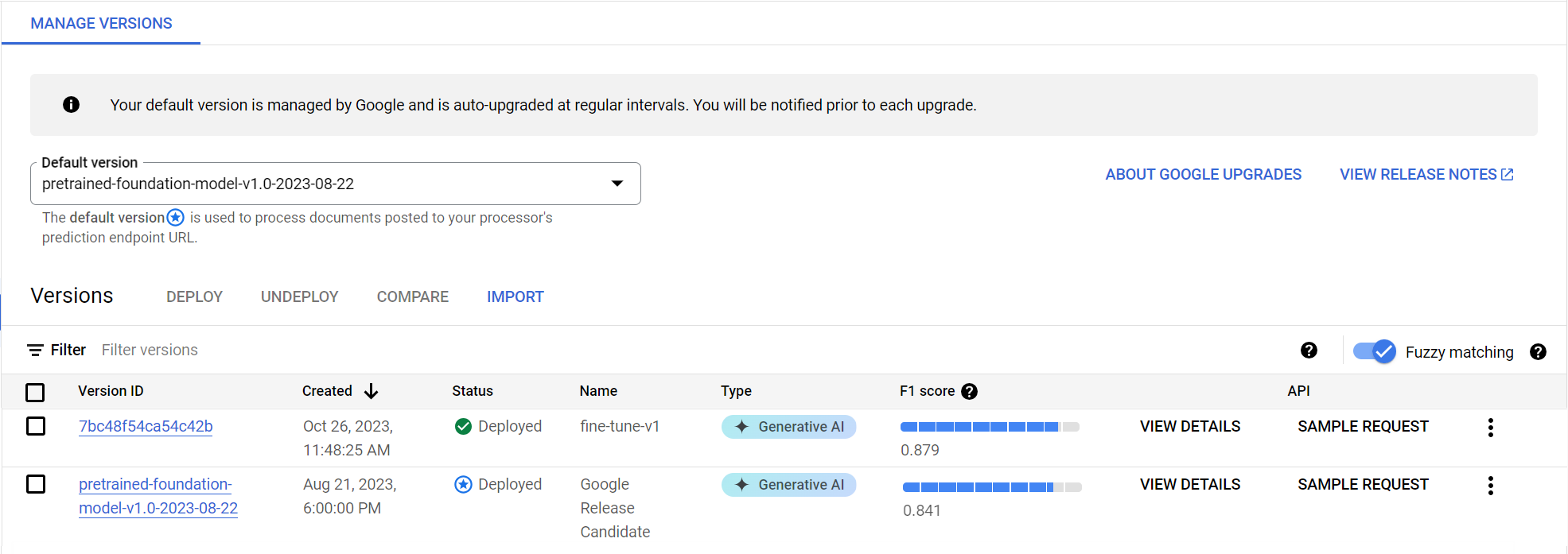
managing-processor-versions-1

סקירה כללית של גרסאות המעבד

יש שתי קטגוריות של גרסאות מעבד:

  • גרסאות Google הן יציבות (לתרחישי שימוש בייצור) או גרסאות מועמדות (ניסיוניות עם הפונקציונליות העדכנית ביותר).
  • גרסאות משתמש נוצרות על ידכם כדי להתאים אישית את התחזיות למסמכים שלכם, ויש להן מזהי גרסה אלפאנומריים.

גרסאות Google

כל גרסה של Google מזוהה באמצעות מזהה גרסה, למשל pretrained-TYPE-vX.X-YYYY-MM-DD. לכל גרסה של מעבד ש-Google מציעה יש שם: Google Stable או Google Release Candidate (RC).

גרסאות יציבות של Google

גרסאות יציבות הן באיכות של גרסאות ייצור ומוכנות לשימוש.

  • ‫Google נותנת עדיפות ליציבות של התנהגות המעבד, אבל עדיין כוללת תיקונים קריטיים.
  • גרסאות יציבות קודמות של Google מוצאות משימוש שישה חודשים אחרי שגרסת היציבות החדשה ביותר יוצאת, כמו שמוצג באיור הבא.
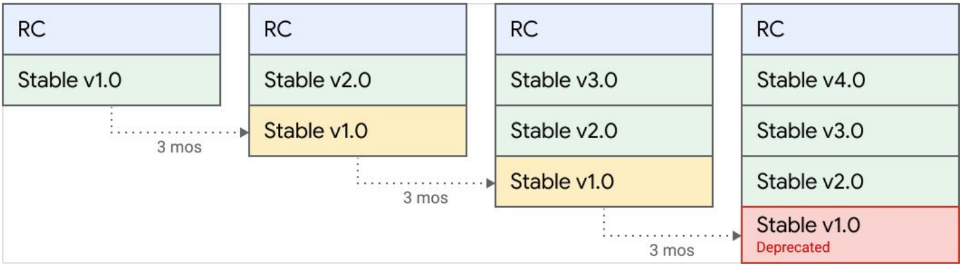
managing-processor-versions-2

גרסאות מועמדות להפצה (RC) של Google

גרסאות מועמדות הן גרסאות ניסיוניות שמשודרגות באופן קבוע עם התכונות העדכניות ביותר. אלה לא גרסאות באיכות של מוצר, והיציבות שלהן עשויה להשתנות.

גרסאות מותאמות אישית

גרסאות בהתאמה אישית הן גרסאות של מעבד שאפשר ליצור על סמך המסמכים שלכם כדי להתאים אישית את התחזיות. לגרסאות מותאמות אישית יש Type, שבו מצוין סוג המודל שמשמש לחיזויים. אם יוצרים גרסה באמצעות מודל בסיסי (על ידי יצירת גרסה או כוונון עדין), הסוג הוא AI גנרטיבי. אם יוצרים גרסת מעבד על ידי אימון של מודל קטן יותר בהתאמה אישית (מבוסס על מודל או על תבנית), הסוג הוא Custom (בהתאמה אישית). אם יוצרים גרסאות של מעבד, אתם קובעים את השם והמזהה.

גרסאות בסיס

אם יוצרים גרסת מעבד, ב'גרסת הבסיס' מוצגת הגרסה של Google שמפעילה את גרסת המשתמש המותאמת. גרסת הבסיס קובעת את מחזור החיים של גרסת המשתמש. אתם צריכים להחליט איך לנהל את מחזור החיים של גרסת המשתמש המותאמת.

גרסאות יציבות זמינות של מעבדים

בטבלאות הבאות אפשר לראות את הגרסאות היציבות הזמינות של מעבדים מסוגים שונים.

חילוץ מותאם אישית תאריך השקה תאריך הפסקת התמיכה
pretrained-foundation-model-v1.5-2025-05-05 ‫5 במאי 2025 לא רלוונטי
pretrained-foundation-model-v1.5-pro-2025-06-20 ‫20 ביוני 2025 לא רלוונטי
Form Parser תאריך השקה תאריך הפסקת התמיכה
pretrained-form-parser-v1.0-2020-09-23 ‫23 בספטמבר 2020 לא רלוונטי
pretrained-form-parser-v2.0-2022-11-10 ‫10 בנובמבר 2022 לא רלוונטי
Layout Parser תאריך השקה תאריך הפסקת התמיכה
pretrained-layout-parser-v1.0-2024-06-03 ‫3 ביוני 2024 לא רלוונטי
Bank Statement Parser תאריך השקה תאריך הפסקת התמיכה
pretrained-bankstatement-v1.0-2021-08-08 ‫8 באוגוסט 2021 לא רלוונטי
pretrained-bankstatement-v1.1-2021-08-13 ‫13 באוגוסט 2021 לא רלוונטי
pretrained-bankstatement-v2.0-2021-12-10 10 בדצמבר 2021 לא רלוונטי
pretrained-bankstatement-v3.0-2022-05-16 16 במאי 2022 לא רלוונטי
pretrained-bankstatement-v5.0-2023-12-06 ‫6 בדצמבר 2023 לא רלוונטי
W2 Parser תאריך השקה תאריך הפסקת התמיכה
pretrained-w2-v1.0-2020-10-01 ‫1 באוקטובר 2020 ‫31 במרץ 2024
pretrained-w2-v1.1-2022-01-27 27 בינואר 2022 ‫31 במרץ 2024
pretrained-w2-v1.2-2022-01-28 ‫28 בינואר 2022 לא רלוונטי
pretrained-w2-v2.1-2022-06-08 ‫8 ביוני 2022 לא רלוונטי
US Passport Parser תאריך השקה תאריך הפסקת התמיכה
pretrained-us-passport-v1.0-2021-06-14 ‫14 ביוני 2021 ‫30 ביוני 2026
כלי לניתוח נתונים תאריך השקה תאריך הפסקת התמיכה
pretrained-utility-v1.1-2021-04-09 ‫9 באפריל 2021 ‫30 ביוני 2026
כלי לניתוח הוכחות של תעודות מזהות תאריך השקה תאריך הפסקת התמיכה
pretrained-id-proofing-v1.0-2022-10-03 ‫3 באוקטובר 2022 לא רלוונטי
Pay Slip Parser תאריך השקה תאריך הפסקת התמיכה
pretrained-paystub-v1.0-2021-03-19 ‫19 במרץ 2021 לא רלוונטי
pretrained-paystub-v1.1-2021-08-13 ‫13 באוגוסט 2021 לא רלוונטי
pretrained-paystub-v1.2-2021-12-10 10 בדצמבר 2021 לא רלוונטי
pretrained-paystub-v2.0-2022-07-22 ‫22 ביולי 2022 לא רלוונטי
pretrained-paystub-v3.0-2023-12-06 ‫6 בדצמבר 2023 לא רלוונטי
US Driver License Parser תאריך השקה תאריך הפסקת התמיכה
pretrained-us-driver-license-v1.0-2021-06-14 ‫14 ביוני 2021 לא רלוונטי
Expense Parser תאריך השקה תאריך הפסקת התמיכה
pretrained-expense-v1.1-2021-04-09 ‫9 באפריל 2024 לא רלוונטי
pretrained-expense-v1.4-2022-11-18 ‫18 בנובמבר 2022 לא רלוונטי
pretrained-expense-v1.4.2-2024-09-12 ‫12 בספטמבר 2024 לא רלוונטי
כלי לניתוח חשבוניות תאריך השקה תאריך הפסקת התמיכה
pretrained-invoice-v1.1-2021-04-09 ‫9 באפריל 2024 לא רלוונטי
pretrained-invoice-v1.2-2022-02-18 ‫18 בפברואר 2022 לא רלוונטי
pretrained-invoice-v1.3-2022-07-15 ‫15 ביולי 2022 לא רלוונטי
pretrained-invoice-v2.0-2023-12-06 ‫6 בדצמבר 2023 לא רלוונטי
Summarizer תאריך השקה תאריך הפסקת התמיכה
pretrained-foundation-model-v1.0-2023-08-22 ‫22 באוגוסט 2023 ‫30 ביוני 2026
Enterprise Document OCR (זיהוי תווים אופטי) תאריך השקה תאריך הפסקת התמיכה
pretrained-ocr-v1.2-2022-11-10 ‫10 בנובמבר 2022 לא רלוונטי
pretrained-ocr-v2.0-2023-06-02 ‫2 ביוני 2023 לא רלוונטי
pretrained-ocr-v2.1-2024-08-07 ‫7 באוגוסט 2024 לא רלוונטי

managing-processor-versions-3

מחזור החיים של גרסת מעבד

ברגע שגרסה חדשה של Google תהיה זמינה, מומלץ ליצור גרסאות חדשות של משתמשים ולהעריך אותן באמצעות גרסת הבסיס החדשה. לאחר מכן, פורסים את הגרסה החדשה ומבטלים את הפריסה (או מוחקים) של גרסאות משתמש קודמות שמבוססות על הגרסה היציבה הקודמת. אחרי שגרסה חדשה יוצאת, אנחנו מפסיקים את התמיכה בגרסאות יציבות. ‫Google תודיע לכם על כך לפחות שישה חודשים מראש.

מה קורה כשמוציאים משימוש גרסת בסיס?

גרסאות משתמשים שמבוססות על גרסאות בסיס קודמות מפסיקות להחזיר תחזיות כשגרסת הבסיס יוצאת משימוש.

איך נבחרות גרסאות המעבד לבקשות שלכם?

כשמתקשרים לנקודת קצה של מעבד בלי לציין את גרסת המעבד, נעשה שימוש בגרסת ברירת המחדל של המעבד. כשגרסת ברירת המחדל של המעבד משתנה, יכול להיות שתצטרכו לעדכן את הקוד.

נקודת קצה בשימוש חוויית צפייה
אם לא מציינים מזהה גרסה של מעבד בקשות שעובדו באמצעות גרסה חדשה של מעבד ברירת המחדל.
אם הגרסה של המעבד שמוגדרת כברירת מחדל הוצאה משימוש, ברירת המחדל תתעדכן לגרסה היציבה העדכנית ביותר של Google כשהגרסה הישנה יותר של ברירת המחדל תוצא משימוש.
אם מציינים את מזהה גרסת המעבד התגובה תיכשל אם תתקשרו לנקודת קצה של מעבד ותציינו מזהה גרסה שהוצא משימוש.

דוגמה להוצאה משימוש של גרסה בהתאמה אישית

לצורך המחשה, נבחן את התרחיש הבא שמתאר את רצף האירועים בהוצאה משימוש של גרסה מותאמת אישית:

  1. אתם מפתחים שמשתמשים בכלי לחילוץ מותאם אישית כדי לקבל נתונים ממסמכים. בהתחשב במורכבות ובנפח המסמכים שאתם מעבדים, אתם מבצעים כוונון עדין של מודל בסיסי כדי ליצור גרסה בשם fine-tune-A. אתם מגדירים את גרסה fine-tune-A כגרסת ברירת המחדל של המעבד ומשתמשים בה לעיבוד מסמכים. גרסת הבסיס שמפעילה את מודל fine-tune-A היא הגרסה היציבה pretrained-foundation-model-v1.0-2023-08-22 (v1.0).

  2. ‫Google פרסמה גרסה יציבה חדשה בשם pretrained-foundation-model-v1.2-2024-05-10 (v1.2) והודיעה שגרסת v1.0 היציבה תוצא משימוש ב-9 באפריל 2025.

  3. מכיוון ששמרתם את מסמכי ההדרכה והבדיקה במערך הנתונים של המעבד, אתם יכולים לבצע התאמה עדינה של גרסה נוספת על סמך הגרסה היציבה העדכנית ביותר של Google, ‏ v1.2, ולתת לה את השם fine-tune-B. אחרי שמעריכים את הביצועים שלה, מגדירים את גרסה fine-tune-B כגרסת ברירת המחדל החדשה של המעבד ומוציאים משימוש את גרסה fine-tune-A. הגרסה החדשה שלכם משתמשת עכשיו בגרסה היציבה העדכנית ביותר של Google שנתמכת.

לעומת זאת, אם לא הייתם יוצרים ומעריכים את הגרסה המותאמת אישית fine-tune-B של המעבד, Google הייתה מעדכנת את גרסת ברירת המחדל של המעבד ל-v1.2 ב-9 באפריל 2025. מכיוון שאתם קוראים לנקודת הקצה של המעבד ולא מציינים גרסת מעבד, גרסה v1.2 החדשה משמשת כברירת המחדל החדשה לעיבוד הבקשות שלכם.

מקורות מידע על הוצאה משימוש והעברה

לגבי מנתחים ומעבדים שיצאו משימוש, אפשר לעיין במאמר יציאה משימוש של Document AI.

כדאי לעיין במקורות המידע הבאים בנושא העברות:

בחירת גרסת מעבד

יש שלוש דרכים לציין באיזו גרסת מעבד להשתמש לעיבוד אונליין ולעיבוד ברצף (batch processing):

  • אם לא מציינים גרסה, המערכת משתמשת בברירת המחדל של המעבד.

    • לדוגמה: projects/my-proj/locations/us/processors/my-processor:process
  • אם מציינים גרסה, נעשה שימוש בגרסה הספציפית הזו. אם הגרסה הספציפית לא קיימת, הבקשה תיכשל ותוצג שגיאה.

    • לדוגמה: projects/my-proj/locations/us/processors/my-processor/processorVersions/pretrained-invoice-v1.2-2022-02-18:process
  • אם מציינים ערוץ, המערכת משתמשת בגרסה האחרונה בערוץ הזה. (אפשרויות: stable, rc)

    • לדוגמה: projects/my-proj/locations/us/processors/my-processor/processorVersions/stable:process

צפייה בגרסה הזמינה

המסוף

  1. במסוף Google Cloud , בקטע Document AI, עוברים לדף Processors.

    מעבר אל 'מעבדים'

  2. ברשימת המעבדים, לוחצים על שם המעבד שרוצים לראות את הפרטים שלו.

  3. בוחרים בכרטיסייה Manage Versions (ניהול גרסאות) או Deploy & use (פריסה ושימוש), שבה מוצגות כל הגרסאות הזמינות של המעבד.

REST

בדוגמה הזו אפשר לראות איך מציגים את הגרסאות הזמינות של המעבד באמצעות השיטה processorVersions.list.

לפני שמשתמשים בנתוני הבקשה, צריך להחליף את הנתונים הבאים:

  • LOCATION: המיקום של המעבד, לדוגמה:
    • us – ארצות הברית
    • eu - האיחוד האירופי
  • PROJECT_ID: מזהה הפרויקט ב- Google Cloud .
  • PROCESSOR_ID: המזהה של המעבד בהתאמה אישית.

ה-method של ה-HTTP וכתובת ה-URL:

GET https://LOCATION-documentai.googleapis.com/v1/projects/PROJECT_ID/locations/LOCATION/processors/PROCESSOR_ID/processorVersions

כדי לשלוח את הבקשה אתם צריכים לבחור אחת מהאפשרויות הבאות:

curl

מריצים את הפקודה הבאה:

curl -X GET \
-H "Authorization: Bearer $(gcloud auth print-access-token)" \
"https://LOCATION-documentai.googleapis.com/v1/projects/PROJECT_ID/locations/LOCATION/processors/PROCESSOR_ID/processorVersions"

PowerShell

מריצים את הפקודה הבאה:

$cred = gcloud auth print-access-token
$headers = @{ "Authorization" = "Bearer $cred" }

Invoke-WebRequest `
-Method GET `
-Headers $headers `
-Uri "https://LOCATION-documentai.googleapis.com/v1/projects/PROJECT_ID/locations/LOCATION/processors/PROCESSOR_ID/processorVersions" | Select-Object -Expand Content

התשובה מכילה רשימה של ProcessorVersions, שכוללת מידע על כל גרסת מעבד, כמו name, state ופרטים אחרים.

{
  "processorVersions": [
    {
      "name": "projects/PROJECT_ID/locations/LOCATION/processors/PROCESSOR_ID/processorVersions/pretrained-ocr-v1.1-2022-09-12",
      "displayName": "Google Release Candidate",
      "state": "DEPLOYED",
      "createTime": "2022-09-13T23:39:12.156648Z",
      "googleManaged": true
    },
    {
      "name": "projects/PROJECT_ID/locations/LOCATION/processors/PROCESSOR_ID/processorVersions/pretrained-ocr-v1.0-2020-09-23",
      "displayName": "Google Stable",
      "state": "DEPLOYED",
      "createTime": "2022-09-12T23:35:09.829557Z",
      "googleManaged": true,
      "deprecationInfo": {
        "deprecationTime": "1970-01-01T00:00:00Z"
      }
    }
  ]
}

C#

למידע נוסף, קראו את מאמרי העזרה של Document AI C# API.

כדי לבצע אימות ב-Document AI, צריך להגדיר את Application Default Credentials. מידע נוסף זמין במאמר הגדרת אימות לסביבת פיתוח מקומית.

using Google.Api.Gax;
using Google.Cloud.DocumentAI.V1;
using System;

public sealed partial class GeneratedDocumentProcessorServiceClientSnippets
{
    /// <summary>Snippet for ListProcessorVersions</summary>
    /// <remarks>
    /// This snippet has been automatically generated and should be regarded as a code template only.
    /// It will require modifications to work:
    /// - It may require correct/in-range values for request initialization.
    /// - It may require specifying regional endpoints when creating the service client as shown in
    ///   https://cloud.google.com/dotnet/docs/reference/help/client-configuration#endpoint.
    /// </remarks>
    public void ListProcessorVersionsRequestObject()
    {
        // Create client
        DocumentProcessorServiceClient documentProcessorServiceClient = DocumentProcessorServiceClient.Create();
        // Initialize request argument(s)
        ListProcessorVersionsRequest request = new ListProcessorVersionsRequest
        {
            ParentAsProcessorName = ProcessorName.FromProjectLocationProcessor("[PROJECT]", "[LOCATION]", "[PROCESSOR]"),
        };
        // Make the request
        PagedEnumerable<ListProcessorVersionsResponse, ProcessorVersion> response = documentProcessorServiceClient.ListProcessorVersions(request);

        // Iterate over all response items, lazily performing RPCs as required
        foreach (ProcessorVersion item in response)
        {
            // Do something with each item
            Console.WriteLine(item);
        }

        // Or iterate over pages (of server-defined size), performing one RPC per page
        foreach (ListProcessorVersionsResponse page in response.AsRawResponses())
        {
            // Do something with each page of items
            Console.WriteLine("A page of results:");
            foreach (ProcessorVersion item in page)
            {
                // Do something with each item
                Console.WriteLine(item);
            }
        }

        // Or retrieve a single page of known size (unless it's the final page), performing as many RPCs as required
        int pageSize = 10;
        Page<ProcessorVersion> singlePage = response.ReadPage(pageSize);
        // Do something with the page of items
        Console.WriteLine($"A page of {pageSize} results (unless it's the final page):");
        foreach (ProcessorVersion item in singlePage)
        {
            // Do something with each item
            Console.WriteLine(item);
        }
        // Store the pageToken, for when the next page is required.
        string nextPageToken = singlePage.NextPageToken;
    }
}

Go

למידע נוסף, קראו את מאמרי העזרה של Document AI Go API.

כדי לבצע אימות ב-Document AI, צריך להגדיר את Application Default Credentials. מידע נוסף זמין במאמר הגדרת אימות לסביבת פיתוח מקומית.


//go:build examples

package main

import (
	"context"

	documentai "cloud.google.com/go/documentai/apiv1"
	documentaipb "cloud.google.com/go/documentai/apiv1/documentaipb"
	"google.golang.org/api/iterator"
)

func main() {
	ctx := context.Background()
	// This snippet has been automatically generated and should be regarded as a code template only.
	// It will require modifications to work:
	// - It may require correct/in-range values for request initialization.
	// - It may require specifying regional endpoints when creating the service client as shown in:
	//   https://pkg.go.dev/cloud.google.com/go#hdr-Client_Options
	c, err := documentai.NewDocumentProcessorClient(ctx)
	if err != nil {
		// TODO: Handle error.
	}
	defer c.Close()

	req := &documentaipb.ListProcessorVersionsRequest{
		// TODO: Fill request struct fields.
		// See https://pkg.go.dev/cloud.google.com/go/documentai/apiv1/documentaipb#ListProcessorVersionsRequest.
	}
	it := c.ListProcessorVersions(ctx, req)
	for {
		resp, err := it.Next()
		if err == iterator.Done {
			break
		}
		if err != nil {
			// TODO: Handle error.
		}
		// TODO: Use resp.
		_ = resp

		// If you need to access the underlying RPC response,
		// you can do so by casting the `Response` as below.
		// Otherwise, remove this line. Only populated after
		// first call to Next(). Not safe for concurrent access.
		_ = it.Response.(*documentaipb.ListProcessorVersionsResponse)
	}
}

Java

למידע נוסף, קראו את מאמרי העזרה של Document AI Java API.

כדי לבצע אימות ב-Document AI, צריך להגדיר את Application Default Credentials. מידע נוסף זמין במאמר הגדרת אימות לסביבת פיתוח מקומית.

import com.google.cloud.documentai.v1.DocumentProcessorServiceClient;
import com.google.cloud.documentai.v1.ListProcessorVersionsRequest;
import com.google.cloud.documentai.v1.ProcessorName;
import com.google.cloud.documentai.v1.ProcessorVersion;

public class SyncListProcessorVersions {

  public static void main(String[] args) throws Exception {
    syncListProcessorVersions();
  }

  public static void syncListProcessorVersions() throws Exception {
    // This snippet has been automatically generated and should be regarded as a code template only.
    // It will require modifications to work:
    // - It may require correct/in-range values for request initialization.
    // - It may require specifying regional endpoints when creating the service client as shown in
    // https://cloud.google.com/java/docs/setup#configure_endpoints_for_the_client_library
    try (DocumentProcessorServiceClient documentProcessorServiceClient =
        DocumentProcessorServiceClient.create()) {
      ListProcessorVersionsRequest request =
          ListProcessorVersionsRequest.newBuilder()
              .setParent(ProcessorName.of("[PROJECT]", "[LOCATION]", "[PROCESSOR]").toString())
              .setPageSize(883849137)
              .setPageToken("pageToken873572522")
              .build();
      for (ProcessorVersion element :
          documentProcessorServiceClient.listProcessorVersions(request).iterateAll()) {
        // doThingsWith(element);
      }
    }
  }
}

Python

למידע נוסף, קראו את מאמרי העזרה של Document AI Python API.

כדי לבצע אימות ב-Document AI, צריך להגדיר את Application Default Credentials. מידע נוסף זמין במאמר הגדרת אימות לסביבת פיתוח מקומית.


from google.api_core.client_options import ClientOptions
from google.cloud import documentai  # type: ignore

# TODO(developer): Uncomment these variables before running the sample.
# project_id = 'YOUR_PROJECT_ID'
# location = 'YOUR_PROCESSOR_LOCATION' # Format is 'us' or 'eu'
# processor_id = 'YOUR_PROCESSOR_ID' # Create processor before running sample


def list_processor_versions_sample(
    project_id: str, location: str, processor_id: str
) -> None:
    # You must set the `api_endpoint` if you use a location other than "us".
    opts = ClientOptions(api_endpoint=f"{location}-documentai.googleapis.com")

    client = documentai.DocumentProcessorServiceClient(client_options=opts)

    # The full resource name of the processor
    # e.g.: projects/project_id/locations/location/processors/processor_id
    parent = client.processor_path(project_id, location, processor_id)

    # Make ListProcessorVersions request
    processor_versions = client.list_processor_versions(parent=parent)

    # Print the processor version information
    for processor_version in processor_versions:
        processor_version_id = client.parse_processor_version_path(
            processor_version.name
        )["processor_version"]

        print(f"Processor Version: {processor_version_id}")
        print(f"Display Name: {processor_version.display_name}")
        print(f"DEPLOYED: {processor_version.state}")
        print("")

Ruby

למידע נוסף, קראו את מאמרי העזרה של Document AI Ruby API.

כדי לבצע אימות ב-Document AI, צריך להגדיר את Application Default Credentials. מידע נוסף זמין במאמר הגדרת אימות לסביבת פיתוח מקומית.

require "google/cloud/document_ai/v1"

##
# Snippet for the list_processor_versions call in the DocumentProcessorService service
#
# This snippet has been automatically generated and should be regarded as a code
# template only. It will require modifications to work:
# - It may require correct/in-range values for request initialization.
# - It may require specifying regional endpoints when creating the service
# client as shown in https://cloud.google.com/ruby/docs/reference.
#
# This is an auto-generated example demonstrating basic usage of
# Google::Cloud::DocumentAI::V1::DocumentProcessorService::Client#list_processor_versions.
#
def list_processor_versions
  # Create a client object. The client can be reused for multiple calls.
  client = Google::Cloud::DocumentAI::V1::DocumentProcessorService::Client.new

  # Create a request. To set request fields, pass in keyword arguments.
  request = Google::Cloud::DocumentAI::V1::ListProcessorVersionsRequest.new

  # Call the list_processor_versions method.
  result = client.list_processor_versions request

  # The returned object is of type Gapic::PagedEnumerable. You can iterate
  # over elements, and API calls will be issued to fetch pages as needed.
  result.each do |item|
    # Each element is of type ::Google::Cloud::DocumentAI::V1::ProcessorVersion.
    p item
  end
end

צפייה בפרטים של גרסה

המסוף

  1. במסוף Google Cloud , בקטע Document AI, עוברים לדף Processors.

    מעבר אל 'מעבדים'

  2. ברשימת המעבדים, לוחצים על שם המעבד שרוצים לראות את הפרטים שלו.

  3. בוחרים בכרטיסייה Manage Versions (ניהול גרסאות) או Deploy & use (פריסה ושימוש). בכרטיסייה הזו מוצגות כל הגרסאות הזמינות של המעבד והפרטים שלהן.

REST

בדוגמה הזו מוסבר איך לקבל פרטים על גרסת מעבד עבור המעבד באמצעות השיטה processorVersions.get.

לפני שמשתמשים בנתוני הבקשה, צריך להחליף את הנתונים הבאים:

  • LOCATION: המיקום של המעבד, לדוגמה:
    • us – ארצות הברית
    • eu - האיחוד האירופי
  • PROJECT_ID: מזהה הפרויקט ב- Google Cloud .
  • PROCESSOR_ID: המזהה של המעבד בהתאמה אישית.
  • PROCESSOR_VERSION: מזהה גרסת המעבד. מידע נוסף זמין במאמר בנושא בחירת גרסת מעבד. לדוגמה:
    • pretrained-TYPE-vX.X-YYYY-MM-DD
    • stable
    • rc

ה-method של ה-HTTP וכתובת ה-URL:

GET https://LOCATION-documentai.googleapis.com/v1/projects/PROJECT_ID/locations/LOCATION/processors/PROCESSOR_ID/processorVersions/PROCESSOR_VERSION

כדי לשלוח את הבקשה אתם צריכים לבחור אחת מהאפשרויות הבאות:

curl

מריצים את הפקודה הבאה:

curl -X GET \
-H "Authorization: Bearer $(gcloud auth print-access-token)" \
"https://LOCATION-documentai.googleapis.com/v1/projects/PROJECT_ID/locations/LOCATION/processors/PROCESSOR_ID/processorVersions/PROCESSOR_VERSION"

PowerShell

מריצים את הפקודה הבאה:

$cred = gcloud auth print-access-token
$headers = @{ "Authorization" = "Bearer $cred" }

Invoke-WebRequest `
-Method GET `
-Headers $headers `
-Uri "https://LOCATION-documentai.googleapis.com/v1/projects/PROJECT_ID/locations/LOCATION/processors/PROCESSOR_ID/processorVersions/PROCESSOR_VERSION" | Select-Object -Expand Content

התגובה היא ProcessorVersion, שכוללת מידע על גרסת המעבד, כמו name, state ופרטים נוספים.

{
  "name": "projects/PROJECT_ID/locations/LOCATION/processors/PROCESSOR_ID/processorVersions/pretrained-ocr-v1.1-2022-09-12",
  "displayName": "Google Release Candidate",
  "state": "DEPLOYED",
  "createTime": "2022-09-13T23:39:12.156648Z",
  "googleManaged": true
}

C#

למידע נוסף, קראו את מאמרי העזרה של Document AI C# API.

כדי לבצע אימות ב-Document AI, צריך להגדיר את Application Default Credentials. מידע נוסף זמין במאמר הגדרת אימות לסביבת פיתוח מקומית.

using Google.Cloud.DocumentAI.V1;

public sealed partial class GeneratedDocumentProcessorServiceClientSnippets
{
    /// <summary>Snippet for GetProcessorVersion</summary>
    /// <remarks>
    /// This snippet has been automatically generated and should be regarded as a code template only.
    /// It will require modifications to work:
    /// - It may require correct/in-range values for request initialization.
    /// - It may require specifying regional endpoints when creating the service client as shown in
    ///   https://cloud.google.com/dotnet/docs/reference/help/client-configuration#endpoint.
    /// </remarks>
    public void GetProcessorVersionRequestObject()
    {
        // Create client
        DocumentProcessorServiceClient documentProcessorServiceClient = DocumentProcessorServiceClient.Create();
        // Initialize request argument(s)
        GetProcessorVersionRequest request = new GetProcessorVersionRequest
        {
            ProcessorVersionName = ProcessorVersionName.FromProjectLocationProcessorProcessorVersion("[PROJECT]", "[LOCATION]", "[PROCESSOR]", "[PROCESSOR_VERSION]"),
        };
        // Make the request
        ProcessorVersion response = documentProcessorServiceClient.GetProcessorVersion(request);
    }
}

Go

למידע נוסף, קראו את מאמרי העזרה של Document AI Go API.

כדי לבצע אימות ב-Document AI, צריך להגדיר את Application Default Credentials. מידע נוסף זמין במאמר הגדרת אימות לסביבת פיתוח מקומית.


//go:build examples

package main

import (
	"context"

	documentai "cloud.google.com/go/documentai/apiv1"
	documentaipb "cloud.google.com/go/documentai/apiv1/documentaipb"
)

func main() {
	ctx := context.Background()
	// This snippet has been automatically generated and should be regarded as a code template only.
	// It will require modifications to work:
	// - It may require correct/in-range values for request initialization.
	// - It may require specifying regional endpoints when creating the service client as shown in:
	//   https://pkg.go.dev/cloud.google.com/go#hdr-Client_Options
	c, err := documentai.NewDocumentProcessorClient(ctx)
	if err != nil {
		// TODO: Handle error.
	}
	defer c.Close()

	req := &documentaipb.GetProcessorVersionRequest{
		// TODO: Fill request struct fields.
		// See https://pkg.go.dev/cloud.google.com/go/documentai/apiv1/documentaipb#GetProcessorVersionRequest.
	}
	resp, err := c.GetProcessorVersion(ctx, req)
	if err != nil {
		// TODO: Handle error.
	}
	// TODO: Use resp.
	_ = resp
}

Java

למידע נוסף, קראו את מאמרי העזרה של Document AI Java API.

כדי לבצע אימות ב-Document AI, צריך להגדיר את Application Default Credentials. מידע נוסף זמין במאמר הגדרת אימות לסביבת פיתוח מקומית.

import com.google.cloud.documentai.v1.DocumentProcessorServiceClient;
import com.google.cloud.documentai.v1.GetProcessorVersionRequest;
import com.google.cloud.documentai.v1.ProcessorVersion;
import com.google.cloud.documentai.v1.ProcessorVersionName;

public class SyncGetProcessorVersion {

  public static void main(String[] args) throws Exception {
    syncGetProcessorVersion();
  }

  public static void syncGetProcessorVersion() throws Exception {
    // This snippet has been automatically generated and should be regarded as a code template only.
    // It will require modifications to work:
    // - It may require correct/in-range values for request initialization.
    // - It may require specifying regional endpoints when creating the service client as shown in
    // https://cloud.google.com/java/docs/setup#configure_endpoints_for_the_client_library
    try (DocumentProcessorServiceClient documentProcessorServiceClient =
        DocumentProcessorServiceClient.create()) {
      GetProcessorVersionRequest request =
          GetProcessorVersionRequest.newBuilder()
              .setName(
                  ProcessorVersionName.of(
                          "[PROJECT]", "[LOCATION]", "[PROCESSOR]", "[PROCESSOR_VERSION]")
                      .toString())
              .build();
      ProcessorVersion response = documentProcessorServiceClient.getProcessorVersion(request);
    }
  }
}

Python

למידע נוסף, קראו את מאמרי העזרה של Document AI Python API.

כדי לבצע אימות ב-Document AI, צריך להגדיר את Application Default Credentials. מידע נוסף זמין במאמר הגדרת אימות לסביבת פיתוח מקומית.


from google.api_core.client_options import ClientOptions
from google.cloud import documentai  # type: ignore

# TODO(developer): Uncomment these variables before running the sample.
# project_id = 'YOUR_PROJECT_ID'
# location = 'YOUR_PROCESSOR_LOCATION' # Format is 'us' or 'eu'
# processor_id = 'YOUR_PROCESSOR_ID' # Create processor before running sample
# processor_version_id = 'YOUR_PROCESSOR_VERSION_ID'


def get_processor_version_sample(
    project_id: str, location: str, processor_id: str, processor_version_id: str
) -> None:
    # You must set the api_endpoint if you use a location other than 'us'.
    opts = ClientOptions(api_endpoint=f"{location}-documentai.googleapis.com")

    client = documentai.DocumentProcessorServiceClient(client_options=opts)

    # The full resource name of the processor version
    # e.g.: projects/project_id/locations/location/processors/processor_id/processorVersions/processor_version_id
    name = client.processor_version_path(
        project_id, location, processor_id, processor_version_id
    )

    # Make GetProcessorVersion request
    processor_version = client.get_processor_version(name=name)

    # Print the processor version information
    print(f"Processor Version: {processor_version_id}")
    print(f"Display Name: {processor_version.display_name}")
    print(f"DEPLOYED: {processor_version.state}")

Ruby

למידע נוסף, קראו את מאמרי העזרה של Document AI Ruby API.

כדי לבצע אימות ב-Document AI, צריך להגדיר את Application Default Credentials. מידע נוסף זמין במאמר הגדרת אימות לסביבת פיתוח מקומית.

require "google/cloud/document_ai/v1"

##
# Snippet for the get_processor_version call in the DocumentProcessorService service
#
# This snippet has been automatically generated and should be regarded as a code
# template only. It will require modifications to work:
# - It may require correct/in-range values for request initialization.
# - It may require specifying regional endpoints when creating the service
# client as shown in https://cloud.google.com/ruby/docs/reference.
#
# This is an auto-generated example demonstrating basic usage of
# Google::Cloud::DocumentAI::V1::DocumentProcessorService::Client#get_processor_version.
#
def get_processor_version
  # Create a client object. The client can be reused for multiple calls.
  client = Google::Cloud::DocumentAI::V1::DocumentProcessorService::Client.new

  # Create a request. To set request fields, pass in keyword arguments.
  request = Google::Cloud::DocumentAI::V1::GetProcessorVersionRequest.new

  # Call the get_processor_version method.
  result = client.get_processor_version request

  # The returned object is of type Google::Cloud::DocumentAI::V1::ProcessorVersion.
  p result
end

שינוי גרסת ברירת המחדל

גרסת ברירת המחדל של מעבד מציינת את הגרסה שמשמשת לעיבוד מסמכים כשלא מציינים גרסה ספציפית. כשיוצרים מעבד, גרסת ברירת המחדל הראשונית היא הגרסה האחרונה בערוץ היציב.

אם משנים את גרסת ברירת המחדל, בקשות נכנסות מעובדות באמצעות הגרסה שנבחרה. אם תשנו את גרסת ברירת המחדל בזמן שהמעבד נמצא באמצע בקשה, הבקשה תמשיך להשתמש בגרסה שנבחרה קודם.

כדי לשנות את גרסת ברירת המחדל:

המסוף

  1. במסוף Google Cloud , בקטע Document AI, עוברים לדף Processors.

    כניסה לדף Processors

  2. ברשימת המעבדים, לוחצים על שם המעבד שרוצים לראות את הפרטים שלו.

  3. בכרטיסייה Manage Versions (ניהול גרסאות) או Deploy & use (פריסה ושימוש) של המעבד, בתפריט הנפתח Default version (גרסת ברירת מחדל), בוחרים את גרסת המעבד שרוצים להשתמש בה כגרסת ברירת המחדל.

REST

בדוגמה הזו מוצג איך להגדיר את גרסת ברירת המחדל של המעבד באמצעות השיטה processors.setDefaultProcessorVersion.

לפני שמשתמשים בנתוני הבקשה, צריך להחליף את הנתונים הבאים:

  • LOCATION: המיקום של המעבד, לדוגמה:
    • us – ארצות הברית
    • eu - האיחוד האירופי
  • PROJECT_ID: מזהה הפרויקט ב- Google Cloud .
  • PROCESSOR_ID: המזהה של המעבד בהתאמה אישית.
  • PROCESSOR_VERSION: מזהה גרסת המעבד. מידע נוסף זמין במאמר בנושא בחירת גרסת מעבד. לדוגמה:
    • pretrained-TYPE-vX.X-YYYY-MM-DD
    • stable
    • rc

ה-method של ה-HTTP וכתובת ה-URL:

POST https://LOCATION-documentai.googleapis.com/v1/projects/PROJECT_ID/locations/LOCATION/processors/PROCESSOR_ID:setDefaultProcessorVersion

גוף בקשת JSON:

{
  "defaultProcessorVersion": "PROCESSOR_VERSION"
}

כדי לשלוח את הבקשה עליכם לבחור אחת מהאפשרויות הבאות:

curl

שומרים את גוף הבקשה בקובץ בשם request.json ומריצים את הפקודה הבאה:

curl -X POST \
-H "Authorization: Bearer $(gcloud auth print-access-token)" \
-H "Content-Type: application/json; charset=utf-8" \
-d @request.json \
"https://LOCATION-documentai.googleapis.com/v1/projects/PROJECT_ID/locations/LOCATION/processors/PROCESSOR_ID:setDefaultProcessorVersion"

PowerShell

שומרים את גוף הבקשה בקובץ בשם request.json ומריצים את הפקודה הבאה:

$cred = gcloud auth print-access-token
$headers = @{ "Authorization" = "Bearer $cred" }

Invoke-WebRequest `
-Method POST `
-Headers $headers `
-ContentType: "application/json; charset=utf-8" `
-InFile request.json `
-Uri "https://LOCATION-documentai.googleapis.com/v1/projects/PROJECT_ID/locations/LOCATION/processors/PROCESSOR_ID:setDefaultProcessorVersion" | Select-Object -Expand Content

התגובה היא פעולה ממושכת. כדי לדגום את הפעולה הממושכת, קוראים ל-method‏ operations.get.

הערך SetDefaultProcessorVersionMetadata בתשובה מציין את מצב הפעולה.

{
  "name": "projects/PROJECT_ID/locations/LOCATION/operations/OPERATION",
  "metadata": {
    "@type": "type.googleapis.com/google.cloud.documentai.v1.SetDefaultProcessorVersionMetadata",
    "commonMetadata": {
      "state": "SUCCEEDED",
      "createTime": "2022-03-02T22:52:49.957096Z",
      "updateTime": "2022-03-02T22:52:50.175976Z",
      "resource": "projects/PROJECT_ID/locations/LOCATION/processors/PROCESSOR_ID/processorVersions/PROCESSOR_VERSION"
    }
  },
  "done": true,
  "response": {
    "@type": "type.googleapis.com/google.cloud.documentai.v1.SetDefaultProcessorVersionResponse"
  }
}

C#

למידע נוסף, קראו את מאמרי העזרה של Document AI C# API.

כדי לבצע אימות ב-Document AI, צריך להגדיר את Application Default Credentials. מידע נוסף זמין במאמר הגדרת אימות לסביבת פיתוח מקומית.

using Google.Cloud.DocumentAI.V1;
using Google.LongRunning;

public sealed partial class GeneratedDocumentProcessorServiceClientSnippets
{
    /// <summary>Snippet for SetDefaultProcessorVersion</summary>
    /// <remarks>
    /// This snippet has been automatically generated and should be regarded as a code template only.
    /// It will require modifications to work:
    /// - It may require correct/in-range values for request initialization.
    /// - It may require specifying regional endpoints when creating the service client as shown in
    ///   https://cloud.google.com/dotnet/docs/reference/help/client-configuration#endpoint.
    /// </remarks>
    public void SetDefaultProcessorVersionRequestObject()
    {
        // Create client
        DocumentProcessorServiceClient documentProcessorServiceClient = DocumentProcessorServiceClient.Create();
        // Initialize request argument(s)
        SetDefaultProcessorVersionRequest request = new SetDefaultProcessorVersionRequest
        {
            ProcessorAsProcessorName = ProcessorName.FromProjectLocationProcessor("[PROJECT]", "[LOCATION]", "[PROCESSOR]"),
            DefaultProcessorVersionAsProcessorVersionName = ProcessorVersionName.FromProjectLocationProcessorProcessorVersion("[PROJECT]", "[LOCATION]", "[PROCESSOR]", "[PROCESSOR_VERSION]"),
        };
        // Make the request
        Operation<SetDefaultProcessorVersionResponse, SetDefaultProcessorVersionMetadata> response = documentProcessorServiceClient.SetDefaultProcessorVersion(request);

        // Poll until the returned long-running operation is complete
        Operation<SetDefaultProcessorVersionResponse, SetDefaultProcessorVersionMetadata> completedResponse = response.PollUntilCompleted();
        // Retrieve the operation result
        SetDefaultProcessorVersionResponse result = completedResponse.Result;

        // Or get the name of the operation
        string operationName = response.Name;
        // This name can be stored, then the long-running operation retrieved later by name
        Operation<SetDefaultProcessorVersionResponse, SetDefaultProcessorVersionMetadata> retrievedResponse = documentProcessorServiceClient.PollOnceSetDefaultProcessorVersion(operationName);
        // Check if the retrieved long-running operation has completed
        if (retrievedResponse.IsCompleted)
        {
            // If it has completed, then access the result
            SetDefaultProcessorVersionResponse retrievedResult = retrievedResponse.Result;
        }
    }
}

Go

למידע נוסף, קראו את מאמרי העזרה של Document AI Go API.

כדי לבצע אימות ב-Document AI, צריך להגדיר את Application Default Credentials. מידע נוסף זמין במאמר הגדרת אימות לסביבת פיתוח מקומית.


//go:build examples

package main

import (
	"context"

	documentai "cloud.google.com/go/documentai/apiv1"
	documentaipb "cloud.google.com/go/documentai/apiv1/documentaipb"
)

func main() {
	ctx := context.Background()
	// This snippet has been automatically generated and should be regarded as a code template only.
	// It will require modifications to work:
	// - It may require correct/in-range values for request initialization.
	// - It may require specifying regional endpoints when creating the service client as shown in:
	//   https://pkg.go.dev/cloud.google.com/go#hdr-Client_Options
	c, err := documentai.NewDocumentProcessorClient(ctx)
	if err != nil {
		// TODO: Handle error.
	}
	defer c.Close()

	req := &documentaipb.SetDefaultProcessorVersionRequest{
		// TODO: Fill request struct fields.
		// See https://pkg.go.dev/cloud.google.com/go/documentai/apiv1/documentaipb#SetDefaultProcessorVersionRequest.
	}
	op, err := c.SetDefaultProcessorVersion(ctx, req)
	if err != nil {
		// TODO: Handle error.
	}

	resp, err := op.Wait(ctx)
	if err != nil {
		// TODO: Handle error.
	}
	// TODO: Use resp.
	_ = resp
}

Java

למידע נוסף, קראו את מאמרי העזרה של Document AI Java API.

כדי לבצע אימות ב-Document AI, צריך להגדיר את Application Default Credentials. מידע נוסף זמין במאמר הגדרת אימות לסביבת פיתוח מקומית.

import com.google.cloud.documentai.v1.DocumentProcessorServiceClient;
import com.google.cloud.documentai.v1.ProcessorName;
import com.google.cloud.documentai.v1.ProcessorVersionName;
import com.google.cloud.documentai.v1.SetDefaultProcessorVersionRequest;
import com.google.cloud.documentai.v1.SetDefaultProcessorVersionResponse;

public class SyncSetDefaultProcessorVersion {

  public static void main(String[] args) throws Exception {
    syncSetDefaultProcessorVersion();
  }

  public static void syncSetDefaultProcessorVersion() throws Exception {
    // This snippet has been automatically generated and should be regarded as a code template only.
    // It will require modifications to work:
    // - It may require correct/in-range values for request initialization.
    // - It may require specifying regional endpoints when creating the service client as shown in
    // https://cloud.google.com/java/docs/setup#configure_endpoints_for_the_client_library
    try (DocumentProcessorServiceClient documentProcessorServiceClient =
        DocumentProcessorServiceClient.create()) {
      SetDefaultProcessorVersionRequest request =
          SetDefaultProcessorVersionRequest.newBuilder()
              .setProcessor(ProcessorName.of("[PROJECT]", "[LOCATION]", "[PROCESSOR]").toString())
              .setDefaultProcessorVersion(
                  ProcessorVersionName.of(
                          "[PROJECT]", "[LOCATION]", "[PROCESSOR]", "[PROCESSOR_VERSION]")
                      .toString())
              .build();
      SetDefaultProcessorVersionResponse response =
          documentProcessorServiceClient.setDefaultProcessorVersionAsync(request).get();
    }
  }
}

Python

למידע נוסף, קראו את מאמרי העזרה של Document AI Python API.

כדי לבצע אימות ב-Document AI, צריך להגדיר את Application Default Credentials. מידע נוסף זמין במאמר הגדרת אימות לסביבת פיתוח מקומית.


from google.api_core.client_options import ClientOptions
from google.api_core.exceptions import NotFound
from google.cloud import documentai  # type: ignore

# TODO(developer): Uncomment these variables before running the sample.
# project_id = 'YOUR_PROJECT_ID'
# location = 'YOUR_PROCESSOR_LOCATION' # Format is 'us' or 'eu'
# processor_id = 'YOUR_PROCESSOR_ID' # Create processor before running sample
# processor_version_id = 'YOUR_PROCESSOR_VERSION_ID'


def set_default_processor_version_sample(
    project_id: str, location: str, processor_id: str, processor_version_id: str
) -> None:
    # You must set the api_endpoint if you use a location other than 'us'.
    opts = ClientOptions(api_endpoint=f"{location}-documentai.googleapis.com")

    client = documentai.DocumentProcessorServiceClient(client_options=opts)

    # The full resource name of the processor
    # e.g.: projects/project_id/locations/location/processors/processor_id
    processor = client.processor_path(project_id, location, processor_id)

    # The full resource name of the processor version
    # e.g.: projects/project_id/locations/location/processors/processor_id/processorVersions/processor_version_id
    processor_version = client.processor_version_path(
        project_id, location, processor_id, processor_version_id
    )

    request = documentai.SetDefaultProcessorVersionRequest(
        processor=processor, default_processor_version=processor_version
    )

    # Make SetDefaultProcessorVersion request
    try:
        operation = client.set_default_processor_version(request)
        # Print operation details
        print(operation.operation.name)
        # Wait for operation to complete
        operation.result()
    except NotFound as e:
        print(e.message)

Ruby

למידע נוסף, קראו את מאמרי העזרה של Document AI Ruby API.

כדי לבצע אימות ב-Document AI, צריך להגדיר את Application Default Credentials. מידע נוסף זמין במאמר הגדרת אימות לסביבת פיתוח מקומית.

require "google/cloud/document_ai/v1"

##
# Snippet for the set_default_processor_version call in the DocumentProcessorService service
#
# This snippet has been automatically generated and should be regarded as a code
# template only. It will require modifications to work:
# - It may require correct/in-range values for request initialization.
# - It may require specifying regional endpoints when creating the service
# client as shown in https://cloud.google.com/ruby/docs/reference.
#
# This is an auto-generated example demonstrating basic usage of
# Google::Cloud::DocumentAI::V1::DocumentProcessorService::Client#set_default_processor_version.
#
def set_default_processor_version
  # Create a client object. The client can be reused for multiple calls.
  client = Google::Cloud::DocumentAI::V1::DocumentProcessorService::Client.new

  # Create a request. To set request fields, pass in keyword arguments.
  request = Google::Cloud::DocumentAI::V1::SetDefaultProcessorVersionRequest.new

  # Call the set_default_processor_version method.
  result = client.set_default_processor_version request

  # The returned object is of type Gapic::Operation. You can use it to
  # check the status of an operation, cancel it, or wait for results.
  # Here is how to wait for a response.
  result.wait_until_done! timeout: 60
  if result.response?
    p result.response
  else
    puts "No response received."
  end
end

פריסת גרסת מעבד

אחרי יצירת גרסה חדשה של מעבד באמצעות Document AI, צריך לפרוס אותה כדי שיהיה אפשר לעבד מסמכים באמצעות הגרסה הזו.

המסוף

  1. במסוף Google Cloud , בקטע Document AI, עוברים לדף Processors.

    כניסה לדף Processors

  2. ברשימת המעבדים, לוחצים על שם המעבד שרוצים לראות את הפרטים שלו.

  3. בכרטיסייה Manage Versions (ניהול גרסאות) או Deploy & use (פריסה ושימוש) של המעבד, מסמנים את התיבה לצד גרסת המעבד שרוצים לפרוס.

  4. לוחצים על Deploy (פריסה) ואז שוב על Deploy (פריסה) בתיבת הדו-שיח. התהליך הזה נמשך כמה דקות.

REST

בדוגמה הזו מוצג איך פורסים גרסה של מעבד עבור המעבד באמצעות השיטה processorVersions.deploy.

לפני שמשתמשים בנתוני הבקשה, צריך להחליף את הנתונים הבאים:

  • LOCATION: המיקום של המעבד, לדוגמה:
    • us – ארצות הברית
    • eu - האיחוד האירופי
  • PROJECT_ID: מזהה הפרויקט ב- Google Cloud .
  • PROCESSOR_ID: המזהה של המעבד בהתאמה אישית.
  • PROCESSOR_VERSION: מזהה גרסת המעבד.

ה-method של ה-HTTP וכתובת ה-URL:

POST https://LOCATION-documentai.googleapis.com/v1/projects/PROJECT_ID/locations/LOCATION/processors/PROCESSOR_ID/processorVersions/PROCESSOR_VERSION:deploy

כדי לשלוח את הבקשה אתם צריכים לבחור אחת מהאפשרויות הבאות:

curl

מריצים את הפקודה הבאה:

curl -X POST \
-H "Authorization: Bearer $(gcloud auth print-access-token)" \
-H "Content-Type: application/json; charset=utf-8" \
-d "" \
"https://LOCATION-documentai.googleapis.com/v1/projects/PROJECT_ID/locations/LOCATION/processors/PROCESSOR_ID/processorVersions/PROCESSOR_VERSION:deploy"

PowerShell

מריצים את הפקודה הבאה:

$cred = gcloud auth print-access-token
$headers = @{ "Authorization" = "Bearer $cred" }

Invoke-WebRequest `
-Method POST `
-Headers $headers `
-Uri "https://LOCATION-documentai.googleapis.com/v1/projects/PROJECT_ID/locations/LOCATION/processors/PROCESSOR_ID/processorVersions/PROCESSOR_VERSION:deploy" | Select-Object -Expand Content

התגובה היא פעולה ממושכת. כדי לדגום את הפעולה הממושכת, קוראים ל-method‏ operations.get.

הערך DeployProcessorVersionMetadata בתשובה מציין את מצב הפעולה.

{
  "name": "projects/PROJECT_ID/locations/LOCATION/operations/OPERATION",
  "metadata": {
    "@type": "type.googleapis.com/google.cloud.documentai.v1.DeployProcessorVersionMetadata",
    "commonMetadata": {
      "state": "SUCCEEDED",
      "createTime": "2022-08-29T16:27:00.195539Z",
      "updateTime": "2022-08-29T16:32:01.963962Z",
      "resource": "projects/PROJECT_ID/locations/LOCATION/processors/PROCESSOR_ID/processorVersions/PROCESSOR_VERSION"
    }
  },
  "done": true,
  "response": {
    "@type": "type.googleapis.com/google.cloud.documentai.v1.DeployProcessorVersionResponse"
  }
}

C#

למידע נוסף, קראו את מאמרי העזרה של Document AI C# API.

כדי לבצע אימות ב-Document AI, צריך להגדיר את Application Default Credentials. מידע נוסף זמין במאמר הגדרת אימות לסביבת פיתוח מקומית.

using Google.Cloud.DocumentAI.V1;
using Google.LongRunning;

public sealed partial class GeneratedDocumentProcessorServiceClientSnippets
{
    /// <summary>Snippet for DeployProcessorVersion</summary>
    /// <remarks>
    /// This snippet has been automatically generated and should be regarded as a code template only.
    /// It will require modifications to work:
    /// - It may require correct/in-range values for request initialization.
    /// - It may require specifying regional endpoints when creating the service client as shown in
    ///   https://cloud.google.com/dotnet/docs/reference/help/client-configuration#endpoint.
    /// </remarks>
    public void DeployProcessorVersionRequestObject()
    {
        // Create client
        DocumentProcessorServiceClient documentProcessorServiceClient = DocumentProcessorServiceClient.Create();
        // Initialize request argument(s)
        DeployProcessorVersionRequest request = new DeployProcessorVersionRequest
        {
            ProcessorVersionName = ProcessorVersionName.FromProjectLocationProcessorProcessorVersion("[PROJECT]", "[LOCATION]", "[PROCESSOR]", "[PROCESSOR_VERSION]"),
        };
        // Make the request
        Operation<DeployProcessorVersionResponse, DeployProcessorVersionMetadata> response = documentProcessorServiceClient.DeployProcessorVersion(request);

        // Poll until the returned long-running operation is complete
        Operation<DeployProcessorVersionResponse, DeployProcessorVersionMetadata> completedResponse = response.PollUntilCompleted();
        // Retrieve the operation result
        DeployProcessorVersionResponse result = completedResponse.Result;

        // Or get the name of the operation
        string operationName = response.Name;
        // This name can be stored, then the long-running operation retrieved later by name
        Operation<DeployProcessorVersionResponse, DeployProcessorVersionMetadata> retrievedResponse = documentProcessorServiceClient.PollOnceDeployProcessorVersion(operationName);
        // Check if the retrieved long-running operation has completed
        if (retrievedResponse.IsCompleted)
        {
            // If it has completed, then access the result
            DeployProcessorVersionResponse retrievedResult = retrievedResponse.Result;
        }
    }
}

Go

למידע נוסף, קראו את מאמרי העזרה של Document AI Go API.

כדי לבצע אימות ב-Document AI, צריך להגדיר את Application Default Credentials. מידע נוסף זמין במאמר הגדרת אימות לסביבת פיתוח מקומית.


//go:build examples

package main

import (
	"context"

	documentai "cloud.google.com/go/documentai/apiv1"
	documentaipb "cloud.google.com/go/documentai/apiv1/documentaipb"
)

func main() {
	ctx := context.Background()
	// This snippet has been automatically generated and should be regarded as a code template only.
	// It will require modifications to work:
	// - It may require correct/in-range values for request initialization.
	// - It may require specifying regional endpoints when creating the service client as shown in:
	//   https://pkg.go.dev/cloud.google.com/go#hdr-Client_Options
	c, err := documentai.NewDocumentProcessorClient(ctx)
	if err != nil {
		// TODO: Handle error.
	}
	defer c.Close()

	req := &documentaipb.DeployProcessorVersionRequest{
		// TODO: Fill request struct fields.
		// See https://pkg.go.dev/cloud.google.com/go/documentai/apiv1/documentaipb#DeployProcessorVersionRequest.
	}
	op, err := c.DeployProcessorVersion(ctx, req)
	if err != nil {
		// TODO: Handle error.
	}

	resp, err := op.Wait(ctx)
	if err != nil {
		// TODO: Handle error.
	}
	// TODO: Use resp.
	_ = resp
}

Java

למידע נוסף, קראו את מאמרי העזרה של Document AI Java API.

כדי לבצע אימות ב-Document AI, צריך להגדיר את Application Default Credentials. מידע נוסף זמין במאמר הגדרת אימות לסביבת פיתוח מקומית.

import com.google.cloud.documentai.v1.DeployProcessorVersionRequest;
import com.google.cloud.documentai.v1.DeployProcessorVersionResponse;
import com.google.cloud.documentai.v1.DocumentProcessorServiceClient;
import com.google.cloud.documentai.v1.ProcessorVersionName;

public class SyncDeployProcessorVersion {

  public static void main(String[] args) throws Exception {
    syncDeployProcessorVersion();
  }

  public static void syncDeployProcessorVersion() throws Exception {
    // This snippet has been automatically generated and should be regarded as a code template only.
    // It will require modifications to work:
    // - It may require correct/in-range values for request initialization.
    // - It may require specifying regional endpoints when creating the service client as shown in
    // https://cloud.google.com/java/docs/setup#configure_endpoints_for_the_client_library
    try (DocumentProcessorServiceClient documentProcessorServiceClient =
        DocumentProcessorServiceClient.create()) {
      DeployProcessorVersionRequest request =
          DeployProcessorVersionRequest.newBuilder()
              .setName(
                  ProcessorVersionName.of(
                          "[PROJECT]", "[LOCATION]", "[PROCESSOR]", "[PROCESSOR_VERSION]")
                      .toString())
              .build();
      DeployProcessorVersionResponse response =
          documentProcessorServiceClient.deployProcessorVersionAsync(request).get();
    }
  }
}

Python

למידע נוסף, קראו את מאמרי העזרה של Document AI Python API.

כדי לבצע אימות ב-Document AI, צריך להגדיר את Application Default Credentials. מידע נוסף זמין במאמר הגדרת אימות לסביבת פיתוח מקומית.


from google.api_core.client_options import ClientOptions
from google.api_core.exceptions import FailedPrecondition
from google.cloud import documentai  # type: ignore

# TODO(developer): Uncomment these variables before running the sample.
# project_id = 'YOUR_PROJECT_ID'
# location = 'YOUR_PROCESSOR_LOCATION' # Format is 'us' or 'eu'
# processor_id = 'YOUR_PROCESSOR_ID'
# processor_version_id = 'YOUR_PROCESSOR_VERSION_ID'


def deploy_processor_version_sample(
    project_id: str, location: str, processor_id: str, processor_version_id: str
) -> None:
    # You must set the api_endpoint if you use a location other than 'us'.
    opts = ClientOptions(api_endpoint=f"{location}-documentai.googleapis.com")

    client = documentai.DocumentProcessorServiceClient(client_options=opts)

    # The full resource name of the processor version
    # e.g.: projects/project_id/locations/location/processors/processor_id/processorVersions/processor_version_id
    name = client.processor_version_path(
        project_id, location, processor_id, processor_version_id
    )

    # Make DeployProcessorVersion request
    try:
        operation = client.deploy_processor_version(name=name)
        # Print operation details
        print(operation.operation.name)
        # Wait for operation to complete
        operation.result()
    # Deploy request will fail if the
    # processor version is already deployed
    except FailedPrecondition as e:
        print(e.message)

Ruby

למידע נוסף, קראו את מאמרי העזרה של Document AI Ruby API.

כדי לבצע אימות ב-Document AI, צריך להגדיר את Application Default Credentials. מידע נוסף זמין במאמר הגדרת אימות לסביבת פיתוח מקומית.

require "google/cloud/document_ai/v1"

##
# Snippet for the deploy_processor_version call in the DocumentProcessorService service
#
# This snippet has been automatically generated and should be regarded as a code
# template only. It will require modifications to work:
# - It may require correct/in-range values for request initialization.
# - It may require specifying regional endpoints when creating the service
# client as shown in https://cloud.google.com/ruby/docs/reference.
#
# This is an auto-generated example demonstrating basic usage of
# Google::Cloud::DocumentAI::V1::DocumentProcessorService::Client#deploy_processor_version.
#
def deploy_processor_version
  # Create a client object. The client can be reused for multiple calls.
  client = Google::Cloud::DocumentAI::V1::DocumentProcessorService::Client.new

  # Create a request. To set request fields, pass in keyword arguments.
  request = Google::Cloud::DocumentAI::V1::DeployProcessorVersionRequest.new

  # Call the deploy_processor_version method.
  result = client.deploy_processor_version request

  # The returned object is of type Gapic::Operation. You can use it to
  # check the status of an operation, cancel it, or wait for results.
  # Here is how to wait for a response.
  result.wait_until_done! timeout: 60
  if result.response?
    p result.response
  else
    puts "No response received."
  end
end

ביטול הפריסה של גרסת מעבד

אחרי יצירת גרסה חדשה של מעבד באמצעות Document AI ופריסתה, אפשר לבטל את הפריסה אם לא רוצים שהגרסה של המעבד תוכל לטפל בבקשות עיבוד.

המסוף

  1. במסוף Google Cloud , בקטע Document AI, עוברים לדף Processors.

    כניסה לדף Processors

  2. ברשימת המעבדים, לוחצים על שם המעבד שרוצים לראות את הפרטים שלו.

  3. בכרטיסייה Manage Versions (ניהול גרסאות) או Deploy & use (פריסה ושימוש) של המעבד, מסמנים את התיבה לצד גרסת המעבד שרוצים לבטל את הפריסה שלה.

  4. לוחצים על ביטול הפריסה, ואז שוב על ביטול הפריסה בתיבת הדו-שיח. התהליך הזה נמשך כמה דקות.

REST

בדוגמה הזו מוצג איך לבטל את הפריסה של גרסת מעבד למעבד באמצעות השיטה processorVersions.undeploy.

לפני שמשתמשים בנתוני הבקשה, צריך להחליף את הנתונים הבאים:

  • LOCATION: המיקום של המעבד, לדוגמה:
    • us – ארצות הברית
    • eu - האיחוד האירופי
  • PROJECT_ID: מזהה הפרויקט ב- Google Cloud .
  • PROCESSOR_ID: המזהה של המעבד בהתאמה אישית.
  • PROCESSOR_VERSION: מזהה גרסת המעבד.

ה-method של ה-HTTP וכתובת ה-URL:

POST https://LOCATION-documentai.googleapis.com/v1/projects/PROJECT_ID/locations/LOCATION/processors/PROCESSOR_ID/processorVersions/PROCESSOR_VERSION:undeploy

כדי לשלוח את הבקשה אתם צריכים לבחור אחת מהאפשרויות הבאות:

curl

מריצים את הפקודה הבאה:

curl -X POST \
-H "Authorization: Bearer $(gcloud auth print-access-token)" \
-H "Content-Type: application/json; charset=utf-8" \
-d "" \
"https://LOCATION-documentai.googleapis.com/v1/projects/PROJECT_ID/locations/LOCATION/processors/PROCESSOR_ID/processorVersions/PROCESSOR_VERSION:undeploy"

PowerShell

מריצים את הפקודה הבאה:

$cred = gcloud auth print-access-token
$headers = @{ "Authorization" = "Bearer $cred" }

Invoke-WebRequest `
-Method POST `
-Headers $headers `
-Uri "https://LOCATION-documentai.googleapis.com/v1/projects/PROJECT_ID/locations/LOCATION/processors/PROCESSOR_ID/processorVersions/PROCESSOR_VERSION:undeploy" | Select-Object -Expand Content

התגובה היא פעולה ממושכת. כדי לדגום את הפעולה הממושכת, קוראים ל-method‏ operations.get.

הערך UndeployProcessorVersionMetadata בתשובה מציין את מצב הפעולה.

{
  "name": "projects/PROJECT_ID/locations/LOCATION/operations/OPERATION",
  "metadata": {
    "@type": "type.googleapis.com/google.cloud.documentai.v1.UndeployProcessorVersionMetadata",
    "commonMetadata": {
      "state": "SUCCEEDED",
      "createTime": "2022-08-29T16:27:00.195539Z",
      "updateTime": "2022-08-29T16:32:01.963962Z",
      "resource": "projects/PROJECT_ID/locations/LOCATION/processors/PROCESSOR_ID/processorVersions/PROCESSOR_VERSION"
    }
  },
  "done": true,
  "response": {
    "@type": "type.googleapis.com/google.cloud.documentai.v1.UndeployProcessorVersionResponse"
  }
}

C#

למידע נוסף, קראו את מאמרי העזרה של Document AI C# API.

כדי לבצע אימות ב-Document AI, צריך להגדיר את Application Default Credentials. מידע נוסף זמין במאמר הגדרת אימות לסביבת פיתוח מקומית.

using Google.Cloud.DocumentAI.V1;
using Google.LongRunning;

public sealed partial class GeneratedDocumentProcessorServiceClientSnippets
{
    /// <summary>Snippet for UndeployProcessorVersion</summary>
    /// <remarks>
    /// This snippet has been automatically generated and should be regarded as a code template only.
    /// It will require modifications to work:
    /// - It may require correct/in-range values for request initialization.
    /// - It may require specifying regional endpoints when creating the service client as shown in
    ///   https://cloud.google.com/dotnet/docs/reference/help/client-configuration#endpoint.
    /// </remarks>
    public void UndeployProcessorVersionRequestObject()
    {
        // Create client
        DocumentProcessorServiceClient documentProcessorServiceClient = DocumentProcessorServiceClient.Create();
        // Initialize request argument(s)
        UndeployProcessorVersionRequest request = new UndeployProcessorVersionRequest
        {
            ProcessorVersionName = ProcessorVersionName.FromProjectLocationProcessorProcessorVersion("[PROJECT]", "[LOCATION]", "[PROCESSOR]", "[PROCESSOR_VERSION]"),
        };
        // Make the request
        Operation<UndeployProcessorVersionResponse, UndeployProcessorVersionMetadata> response = documentProcessorServiceClient.UndeployProcessorVersion(request);

        // Poll until the returned long-running operation is complete
        Operation<UndeployProcessorVersionResponse, UndeployProcessorVersionMetadata> completedResponse = response.PollUntilCompleted();
        // Retrieve the operation result
        UndeployProcessorVersionResponse result = completedResponse.Result;

        // Or get the name of the operation
        string operationName = response.Name;
        // This name can be stored, then the long-running operation retrieved later by name
        Operation<UndeployProcessorVersionResponse, UndeployProcessorVersionMetadata> retrievedResponse = documentProcessorServiceClient.PollOnceUndeployProcessorVersion(operationName);
        // Check if the retrieved long-running operation has completed
        if (retrievedResponse.IsCompleted)
        {
            // If it has completed, then access the result
            UndeployProcessorVersionResponse retrievedResult = retrievedResponse.Result;
        }
    }
}

Go

למידע נוסף, קראו את מאמרי העזרה של Document AI Go API.

כדי לבצע אימות ב-Document AI, צריך להגדיר את Application Default Credentials. מידע נוסף זמין במאמר הגדרת אימות לסביבת פיתוח מקומית.


//go:build examples

package main

import (
	"context"

	documentai "cloud.google.com/go/documentai/apiv1"
	documentaipb "cloud.google.com/go/documentai/apiv1/documentaipb"
)

func main() {
	ctx := context.Background()
	// This snippet has been automatically generated and should be regarded as a code template only.
	// It will require modifications to work:
	// - It may require correct/in-range values for request initialization.
	// - It may require specifying regional endpoints when creating the service client as shown in:
	//   https://pkg.go.dev/cloud.google.com/go#hdr-Client_Options
	c, err := documentai.NewDocumentProcessorClient(ctx)
	if err != nil {
		// TODO: Handle error.
	}
	defer c.Close()

	req := &documentaipb.UndeployProcessorVersionRequest{
		// TODO: Fill request struct fields.
		// See https://pkg.go.dev/cloud.google.com/go/documentai/apiv1/documentaipb#UndeployProcessorVersionRequest.
	}
	op, err := c.UndeployProcessorVersion(ctx, req)
	if err != nil {
		// TODO: Handle error.
	}

	resp, err := op.Wait(ctx)
	if err != nil {
		// TODO: Handle error.
	}
	// TODO: Use resp.
	_ = resp
}

Java

למידע נוסף, קראו את מאמרי העזרה של Document AI Java API.

כדי לבצע אימות ב-Document AI, צריך להגדיר את Application Default Credentials. מידע נוסף זמין במאמר הגדרת אימות לסביבת פיתוח מקומית.

import com.google.cloud.documentai.v1.DocumentProcessorServiceClient;
import com.google.cloud.documentai.v1.ProcessorVersionName;
import com.google.cloud.documentai.v1.UndeployProcessorVersionRequest;
import com.google.cloud.documentai.v1.UndeployProcessorVersionResponse;

public class SyncUndeployProcessorVersion {

  public static void main(String[] args) throws Exception {
    syncUndeployProcessorVersion();
  }

  public static void syncUndeployProcessorVersion() throws Exception {
    // This snippet has been automatically generated and should be regarded as a code template only.
    // It will require modifications to work:
    // - It may require correct/in-range values for request initialization.
    // - It may require specifying regional endpoints when creating the service client as shown in
    // https://cloud.google.com/java/docs/setup#configure_endpoints_for_the_client_library
    try (DocumentProcessorServiceClient documentProcessorServiceClient =
        DocumentProcessorServiceClient.create()) {
      UndeployProcessorVersionRequest request =
          UndeployProcessorVersionRequest.newBuilder()
              .setName(
                  ProcessorVersionName.of(
                          "[PROJECT]", "[LOCATION]", "[PROCESSOR]", "[PROCESSOR_VERSION]")
                      .toString())
              .build();
      UndeployProcessorVersionResponse response =
          documentProcessorServiceClient.undeployProcessorVersionAsync(request).get();
    }
  }
}

Python

למידע נוסף, קראו את מאמרי העזרה של Document AI Python API.

כדי לבצע אימות ב-Document AI, צריך להגדיר את Application Default Credentials. מידע נוסף זמין במאמר הגדרת אימות לסביבת פיתוח מקומית.


from google.api_core.client_options import ClientOptions
from google.api_core.exceptions import FailedPrecondition
from google.api_core.exceptions import InvalidArgument
from google.cloud import documentai  # type: ignore

# TODO(developer): Uncomment these variables before running the sample.
# project_id = 'YOUR_PROJECT_ID'
# location = 'YOUR_PROCESSOR_LOCATION' # Format is 'us' or 'eu'
# processor_id = 'YOUR_PROCESSOR_ID' # Create processor before running sample
# processor_version_id = 'YOUR_PROCESSOR_VERSION_ID'


def undeploy_processor_version_sample(
    project_id: str, location: str, processor_id: str, processor_version_id: str
) -> None:
    # You must set the api_endpoint if you use a location other than 'us'.
    opts = ClientOptions(api_endpoint=f"{location}-documentai.googleapis.com")

    client = documentai.DocumentProcessorServiceClient(client_options=opts)

    # The full resource name of the processor version
    # e.g.: projects/project_id/locations/location/processors/processor_id/processorVersions/processor_version_id
    name = client.processor_version_path(
        project_id, location, processor_id, processor_version_id
    )

    # Make UndeployProcessorVersion request
    try:
        operation = client.undeploy_processor_version(name=name)
        # Print operation details
        print(operation.operation.name)
        # Wait for operation to complete
        operation.result()
    # Undeploy request will fail if the
    # processor version is already undeployed
    # or if a request is made on a pretrained processor version
    except (FailedPrecondition, InvalidArgument) as e:
        print(e.message)

Ruby

למידע נוסף, קראו את מאמרי העזרה של Document AI Ruby API.

כדי לבצע אימות ב-Document AI, צריך להגדיר את Application Default Credentials. מידע נוסף זמין במאמר הגדרת אימות לסביבת פיתוח מקומית.

require "google/cloud/document_ai/v1"

##
# Snippet for the undeploy_processor_version call in the DocumentProcessorService service
#
# This snippet has been automatically generated and should be regarded as a code
# template only. It will require modifications to work:
# - It may require correct/in-range values for request initialization.
# - It may require specifying regional endpoints when creating the service
# client as shown in https://cloud.google.com/ruby/docs/reference.
#
# This is an auto-generated example demonstrating basic usage of
# Google::Cloud::DocumentAI::V1::DocumentProcessorService::Client#undeploy_processor_version.
#
def undeploy_processor_version
  # Create a client object. The client can be reused for multiple calls.
  client = Google::Cloud::DocumentAI::V1::DocumentProcessorService::Client.new

  # Create a request. To set request fields, pass in keyword arguments.
  request = Google::Cloud::DocumentAI::V1::UndeployProcessorVersionRequest.new

  # Call the undeploy_processor_version method.
  result = client.undeploy_processor_version request

  # The returned object is of type Gapic::Operation. You can use it to
  # check the status of an operation, cancel it, or wait for results.
  # Here is how to wait for a response.
  result.wait_until_done! timeout: 60
  if result.response?
    p result.response
  else
    puts "No response received."
  end
end

מחיקה של גרסת מעבד

אחרי יצירת גרסה חדשה של מעבד באמצעות Document AI, אפשר למחוק אותה אם אין לכם יותר שימוש בגרסת המעבד.

המסוף

  1. במסוף Google Cloud , בקטע Document AI, עוברים לדף Processors.

    כניסה לדף Processors

  2. ברשימת המעבדים, לוחצים על שם המעבד שרוצים לראות את הפרטים שלו.

  3. בכרטיסייה Manage Versions (ניהול גרסאות) או Deploy & use (פריסה ושימוש) של המעבד, לוחצים על תפריט הפעולות לצד גרסת המעבד שרוצים למחוק.

  4. לוחצים על מחיקה ואז שוב על מחיקה בתיבת הדו-שיח.

REST

בדוגמה הזו מוצג איך מוחקים גרסת מעבד למעבד באמצעות השיטה processorVersions.delete.

לפני שמשתמשים בנתוני הבקשה, צריך להחליף את הנתונים הבאים:

  • LOCATION: המיקום של המעבד, לדוגמה:
    • us – ארצות הברית
    • eu - האיחוד האירופי
  • PROJECT_ID: מזהה הפרויקט ב- Google Cloud .
  • PROCESSOR_ID: המזהה של המעבד בהתאמה אישית.
  • PROCESSOR_VERSION: מזהה גרסת המעבד.

ה-method של ה-HTTP וכתובת ה-URL:

DELETE https://LOCATION-documentai.googleapis.com/v1/projects/PROJECT_ID/locations/LOCATION/processors/PROCESSOR_ID/processorVersions/PROCESSOR_VERSION

כדי לשלוח את הבקשה אתם צריכים לבחור אחת מהאפשרויות הבאות:

curl

מריצים את הפקודה הבאה:

curl -X DELETE \
-H "Authorization: Bearer $(gcloud auth print-access-token)" \
"https://LOCATION-documentai.googleapis.com/v1/projects/PROJECT_ID/locations/LOCATION/processors/PROCESSOR_ID/processorVersions/PROCESSOR_VERSION"

PowerShell

מריצים את הפקודה הבאה:

$cred = gcloud auth print-access-token
$headers = @{ "Authorization" = "Bearer $cred" }

Invoke-WebRequest `
-Method DELETE `
-Headers $headers `
-Uri "https://LOCATION-documentai.googleapis.com/v1/projects/PROJECT_ID/locations/LOCATION/processors/PROCESSOR_ID/processorVersions/PROCESSOR_VERSION" | Select-Object -Expand Content

התגובה היא פעולה ממושכת. כדי לדגום את הפעולה הממושכת, קוראים ל-method‏ operations.get.

הערך DeleteProcessorVersionMetadata בתשובה מציין את מצב הפעולה.

{
  "name": "projects/PROJECT_ID/locations/LOCATION/operations/OPERATION",
  "metadata": {
    "@type": "type.googleapis.com/google.cloud.documentai.v1.DeleteProcessorVersionMetadata",
    "commonMetadata": {
      "state": "SUCCEEDED",
      "createTime": "2022-08-29T16:27:00.195539Z",
      "updateTime": "2022-08-29T16:32:01.963962Z",
      "resource": "projects/PROJECT_ID/locations/LOCATION/processors/PROCESSOR_ID/processorVersions/PROCESSOR_VERSION"
    }
  },
  "done": true,
  "response": {
    "@type": "type.googleapis.com/google.protobuf.Empty"
  }
}

C#

למידע נוסף, קראו את מאמרי העזרה של Document AI C# API.

כדי לבצע אימות ב-Document AI, צריך להגדיר את Application Default Credentials. מידע נוסף זמין במאמר הגדרת אימות לסביבת פיתוח מקומית.

using Google.Cloud.DocumentAI.V1;
using Google.LongRunning;
using Google.Protobuf.WellKnownTypes;

public sealed partial class GeneratedDocumentProcessorServiceClientSnippets
{
    /// <summary>Snippet for DeleteProcessorVersion</summary>
    /// <remarks>
    /// This snippet has been automatically generated and should be regarded as a code template only.
    /// It will require modifications to work:
    /// - It may require correct/in-range values for request initialization.
    /// - It may require specifying regional endpoints when creating the service client as shown in
    ///   https://cloud.google.com/dotnet/docs/reference/help/client-configuration#endpoint.
    /// </remarks>
    public void DeleteProcessorVersionRequestObject()
    {
        // Create client
        DocumentProcessorServiceClient documentProcessorServiceClient = DocumentProcessorServiceClient.Create();
        // Initialize request argument(s)
        DeleteProcessorVersionRequest request = new DeleteProcessorVersionRequest
        {
            ProcessorVersionName = ProcessorVersionName.FromProjectLocationProcessorProcessorVersion("[PROJECT]", "[LOCATION]", "[PROCESSOR]", "[PROCESSOR_VERSION]"),
        };
        // Make the request
        Operation<Empty, DeleteProcessorVersionMetadata> response = documentProcessorServiceClient.DeleteProcessorVersion(request);

        // Poll until the returned long-running operation is complete
        Operation<Empty, DeleteProcessorVersionMetadata> completedResponse = response.PollUntilCompleted();
        // Retrieve the operation result
        Empty result = completedResponse.Result;

        // Or get the name of the operation
        string operationName = response.Name;
        // This name can be stored, then the long-running operation retrieved later by name
        Operation<Empty, DeleteProcessorVersionMetadata> retrievedResponse = documentProcessorServiceClient.PollOnceDeleteProcessorVersion(operationName);
        // Check if the retrieved long-running operation has completed
        if (retrievedResponse.IsCompleted)
        {
            // If it has completed, then access the result
            Empty retrievedResult = retrievedResponse.Result;
        }
    }
}

Go

למידע נוסף, קראו את מאמרי העזרה של Document AI Go API.

כדי לבצע אימות ב-Document AI, צריך להגדיר את Application Default Credentials. מידע נוסף זמין במאמר הגדרת אימות לסביבת פיתוח מקומית.


//go:build examples

package main

import (
	"context"

	documentai "cloud.google.com/go/documentai/apiv1"
	documentaipb "cloud.google.com/go/documentai/apiv1/documentaipb"
)

func main() {
	ctx := context.Background()
	// This snippet has been automatically generated and should be regarded as a code template only.
	// It will require modifications to work:
	// - It may require correct/in-range values for request initialization.
	// - It may require specifying regional endpoints when creating the service client as shown in:
	//   https://pkg.go.dev/cloud.google.com/go#hdr-Client_Options
	c, err := documentai.NewDocumentProcessorClient(ctx)
	if err != nil {
		// TODO: Handle error.
	}
	defer c.Close()

	req := &documentaipb.DeleteProcessorVersionRequest{
		// TODO: Fill request struct fields.
		// See https://pkg.go.dev/cloud.google.com/go/documentai/apiv1/documentaipb#DeleteProcessorVersionRequest.
	}
	op, err := c.DeleteProcessorVersion(ctx, req)
	if err != nil {
		// TODO: Handle error.
	}

	err = op.Wait(ctx)
	if err != nil {
		// TODO: Handle error.
	}
}

Java

למידע נוסף, קראו את מאמרי העזרה של Document AI Java API.

כדי לבצע אימות ב-Document AI, צריך להגדיר את Application Default Credentials. מידע נוסף זמין במאמר הגדרת אימות לסביבת פיתוח מקומית.

import com.google.cloud.documentai.v1.DeleteProcessorVersionRequest;
import com.google.cloud.documentai.v1.DocumentProcessorServiceClient;
import com.google.cloud.documentai.v1.ProcessorVersionName;
import com.google.protobuf.Empty;

public class SyncDeleteProcessorVersion {

  public static void main(String[] args) throws Exception {
    syncDeleteProcessorVersion();
  }

  public static void syncDeleteProcessorVersion() throws Exception {
    // This snippet has been automatically generated and should be regarded as a code template only.
    // It will require modifications to work:
    // - It may require correct/in-range values for request initialization.
    // - It may require specifying regional endpoints when creating the service client as shown in
    // https://cloud.google.com/java/docs/setup#configure_endpoints_for_the_client_library
    try (DocumentProcessorServiceClient documentProcessorServiceClient =
        DocumentProcessorServiceClient.create()) {
      DeleteProcessorVersionRequest request =
          DeleteProcessorVersionRequest.newBuilder()
              .setName(
                  ProcessorVersionName.of(
                          "[PROJECT]", "[LOCATION]", "[PROCESSOR]", "[PROCESSOR_VERSION]")
                      .toString())
              .build();
      documentProcessorServiceClient.deleteProcessorVersionAsync(request).get();
    }
  }
}

Python

למידע נוסף, קראו את מאמרי העזרה של Document AI Python API.

כדי לבצע אימות ב-Document AI, צריך להגדיר את Application Default Credentials. מידע נוסף זמין במאמר הגדרת אימות לסביבת פיתוח מקומית.


from google.api_core.client_options import ClientOptions
from google.api_core.exceptions import FailedPrecondition
from google.api_core.exceptions import InvalidArgument
from google.cloud import documentai  # type: ignore

# TODO(developer): Uncomment these variables before running the sample.
# project_id = 'YOUR_PROJECT_ID'
# location = 'YOUR_PROCESSOR_LOCATION' # Format is 'us' or 'eu'
# processor_id = 'YOUR_PROCESSOR_ID' # Create processor before running sample
# processor_version_id = 'YOUR_PROCESSOR_VERSION_ID'


def delete_processor_version_sample(
    project_id: str, location: str, processor_id: str, processor_version_id: str
) -> None:
    # You must set the api_endpoint if you use a location other than 'us'.
    opts = ClientOptions(api_endpoint=f"{location}-documentai.googleapis.com")

    client = documentai.DocumentProcessorServiceClient(client_options=opts)

    # The full resource name of the processor version
    # e.g.: projects/project_id/locations/location/processors/processor_id/processorVersions/processor_version_id
    name = client.processor_version_path(
        project_id, location, processor_id, processor_version_id
    )

    # Make DeleteProcessorVersion request
    try:
        operation = client.delete_processor_version(name=name)
        # Print operation details
        print(operation.operation.name)
        # Wait for operation to complete
        operation.result()
    # Delete request will fail if the
    # processor version doesn't exist
    # or if a request is made on a pretrained processor version
    # or the default processor version
    except (FailedPrecondition, InvalidArgument) as e:
        print(e.message)

Ruby

למידע נוסף, קראו את מאמרי העזרה של Document AI Ruby API.

כדי לבצע אימות ב-Document AI, צריך להגדיר את Application Default Credentials. מידע נוסף זמין במאמר הגדרת אימות לסביבת פיתוח מקומית.

require "google/cloud/document_ai/v1"

##
# Snippet for the delete_processor_version call in the DocumentProcessorService service
#
# This snippet has been automatically generated and should be regarded as a code
# template only. It will require modifications to work:
# - It may require correct/in-range values for request initialization.
# - It may require specifying regional endpoints when creating the service
# client as shown in https://cloud.google.com/ruby/docs/reference.
#
# This is an auto-generated example demonstrating basic usage of
# Google::Cloud::DocumentAI::V1::DocumentProcessorService::Client#delete_processor_version.
#
def delete_processor_version
  # Create a client object. The client can be reused for multiple calls.
  client = Google::Cloud::DocumentAI::V1::DocumentProcessorService::Client.new

  # Create a request. To set request fields, pass in keyword arguments.
  request = Google::Cloud::DocumentAI::V1::DeleteProcessorVersionRequest.new

  # Call the delete_processor_version method.
  result = client.delete_processor_version request

  # The returned object is of type Gapic::Operation. You can use it to
  # check the status of an operation, cancel it, or wait for results.
  # Here is how to wait for a response.
  result.wait_until_done! timeout: 60
  if result.response?
    p result.response
  else
    puts "No response received."
  end
end

ייבוא גרסת מעבד

אחרי יצירת מעבד חדש באמצעות Document AI, אפשר לייבא גרסת מעבד מאותו פרויקט או מפרויקט אחר.

ב-destination project מתחילים את הייבוא, ושם הגרסה של המעבד תהיה זמינה אחרי הייבוא.

source project הוא המקום שבו נמצאת גרסת מעבד המקור.

כדי לייבא, המעבדים של המקור או היעד צריכים לעמוד בדרישות הבאות:

  • סוגי המעבדים צריכים להיות זהים. דוגמאות: CUSTOM_EXTRACTION_PROCESSOR או INVOICE_PROCESSOR
  • אסור שתהיה סתירה בין סכימות של מעבדי מידע.
  • מעבד היעד יכול להכיל מערכי נתונים וגרסאות קיימים.
  • מעבד היעד חייב להיות במצב ENABLED.
  • גרסת המעבד של המקור חייבת להיות באחד מהסטטוסים הבאים:
    • DEPLOYED
    • DEPLOYING
    • UNDEPLOYED
    • UNDEPLOYING

כדי למנוע שגיאה של דחיית הרשאה, צריך לתת הרשאה לסוכן של חשבון שירות הליבה ב-DocumentAI של פרויקט היעד Document AI Editor בפרויקט המקור.

בגרסאות של מעבדים שמבוססות על Gemini 1.5 ואילך, כמו custom extractors pretrained-foundation-model-v1.2-2024-05-10, אפשר לייבא גרסאות של מעבדים שעברו כוונון עדין.

כדי להגדיר הרשאה לפני ייבוא של גרסת מעבד:

המסוף

  1. מחפשים את סוכן של חשבון שירות הליבה ב-DocumentAI ומזינים את מספר פרויקט היעד. הפורמט של סוכן חשבון השירות ב-DocumentAI Core הוא כמו כתובת אימייל. לדוגמה: service-123@gcp-sa-prod-dai-core.iam.gserviceaccount.com

  2. פותחים את הדף IAM במסוף Google Cloud .

    כניסה לדף IAM

  3. בוחרים את פרויקט המקור.

  4. לוחצים על 'אישור גישה'.

  5. מוסיפים את סוכן חשבון השירות הליבה ב-DocumentAI של פרויקט היעד כגורם חדש, ומקצים את התפקיד Document AI Editor.

gcloud

משתמשים בפקודה gcloud הבאה כדי לתת את ההרשאות הנדרשות:

gcloud projects add-iam-policy-binding SOURCE_PROJECT \
    --member=serviceAccount:service-DESTINATION_PROJECT NUMBER@gcp-sa-prod-dai-core.iam.gserviceaccount.com \
    --role=roles/documentai.editor

מספקים את הערכים הבאים:

  • SOURCE_PROJECT: מספר הפרויקט או מזהה הפרויקט של המקור.
  • DESTINATION_PROJECT NUMBER: מספר פרויקט היעד.

אחרי שמעדכנים את ההרשאות, פועלים לפי השלבים הבאים כדי לייבא גרסה של מעבד:

המסוף

  1. במסוף Google Cloud , בקטע Document AI, עוברים לדף Processors.

    כניסה לדף Processors

  2. ברשימת המעבדים, לוחצים על השם של המעבד שאליו רוצים לייבא גרסת מעבד כיעד.

  3. עוברים לכרטיסייה ניהול גרסאות (או פריסה ושימוש) ולוחצים על ייבוא.

  4. בחלון, בוחרים את הפרויקט, את המעבד ואת גרסת המעבד בתור גרסת המעבד של המקור.

  5. לוחצים על הלחצן IMPORT בחלון, ופעולת הייבוא תתחיל.

REST

בדוגמה הזו מוסבר איך להשתמש בשיטה processorVersions.importProcessorVersion כדי לייבא גרסה של מעבד.

לפני שמשתמשים בנתוני הבקשה, צריך להחליף את הנתונים הבאים:

  • פרויקט היעד
    • DESTINATION_PROJECT_ID: מזהה הפרויקט של היעד ב- Google Cloud .
    • DESTINATION_LOCATION: המיקום של מעבד היעד.
    • DESTINATION_PROCESSOR_ID: המזהה של מעבד היעד.
  • פרויקט המקור
    • SOURCE_PROJECT_ID: מזהה הפרויקט של Google Cloud המקור.
    • SOURCE_LOCATION: המיקום של מעבד המקור.
    • SOURCE_PROCESSOR_ID: המזהה של מעבד המקור.
    • SOURCE_PROCESSOR_VERSION: גרסת מעבד המקור לייבוא.

ה-method של ה-HTTP וכתובת ה-URL:

POST https://DESTINATION_LOCATION-documentai.googleapis.com/v1beta3/projects/DESTINATION_PROJECT_ID/locations/DESTINATION_LOCATION/processors/DESTINATION_PROCESSOR_ID/processorVersions:importProcessorVersion

גוף בקשת JSON:

{
  "processorVersionSource": "projects/SOURCE_PROJECT_ID/locations/SOURCE_LOCATION/processors/SOURCE_PROCESSOR_ID/processorVersions/SOURCE_PROCESSOR_VERSION"
}

כדי לשלוח את הבקשה עליכם לבחור אחת מהאפשרויות הבאות:

curl

שומרים את גוף הבקשה בקובץ בשם request.json ומריצים את הפקודה הבאה:

curl -X POST \
-H "Authorization: Bearer $(gcloud auth print-access-token)" \
-H "Content-Type: application/json; charset=utf-8" \
-d @request.json \
"https://DESTINATION_LOCATION-documentai.googleapis.com/v1beta3/projects/DESTINATION_PROJECT_ID/locations/DESTINATION_LOCATION/processors/DESTINATION_PROCESSOR_ID/processorVersions:importProcessorVersion"

PowerShell

שומרים את גוף הבקשה בקובץ בשם request.json ומריצים את הפקודה הבאה:

$cred = gcloud auth print-access-token
$headers = @{ "Authorization" = "Bearer $cred" }

Invoke-WebRequest `
-Method POST `
-Headers $headers `
-ContentType: "application/json; charset=utf-8" `
-InFile request.json `
-Uri "https://DESTINATION_LOCATION-documentai.googleapis.com/v1beta3/projects/DESTINATION_PROJECT_ID/locations/DESTINATION_LOCATION/processors/DESTINATION_PROCESSOR_ID/processorVersions:importProcessorVersion" | Select-Object -Expand Content

אתם אמורים לקבל תגובת JSON שדומה לזו:

{
  "name": "projects/DESTINATION_PROJECT_ID/locations/DESTINATION_LOCATION/operations/OPERATION_ID"
}

אם אתם מייבאים דרך service perimeter של Virtual Private Cloud Service Controls ‏(VPC-SC), כדאי לעיין במאמרים בנושא הגדרת מדיניות תעבורת נתונים נכנסת (ingress) ותעבורת נתונים יוצאת (egress) והגדרת service perimeter של VPC Service Controls, ואז להגדיר את הכללים הבאים.

מציינים את הערכים הבאים עבור ingress:

  • DESTINATION_PROJECT: מספר פרויקט היעד.
  • SOURCE_PROJECT: מספר פרויקט המקור.
- ingressFrom:
    identities:
    - ANY_SERVICE_ACCOUNT
    sources:
    - resource: DESTINATION_PROJECT
  ingressTo:
    operations:
    - serviceName: aiplatform.googleapis.com
      methodSelectors:
      - method: all actions
    - serviceName: documentai.googleapis.com
      methodSelectors:
      - method: all actions
    resources:
    - projects/SOURCE_PROJECT

מציינים את הערכים הבאים עבור egress:

- egressTo:
    operations:
    - serviceName: storage.googleapis.com
      methodSelectors:
      - method: google.storage.objects.create
      - method: google.storage.buckets.testIamPermissions
    resources:
    - projects/DESTINATION_PROJECT
  egressFrom:
    identities:
    - ANY_SERVICE_ACCOUNT

מגדירים את היקף היעד של ה-VPC עם הערכים הבאים.

- egressTo:
    operations:
    - serviceName: aiplatform.googleapis.com
      methodSelectors:
      - method: all actions
    - serviceName: documentai.googleapis.com
      methodSelectors:
      - method: all actions
    - serviceName: storage.googleapis.com
      methodSelectors:
      - method: google.storage.buckets.testIamPermissions
      - method: google.storage.objects.get
      - method: google.storage.objects.create
    resources:
    - projects/SOURCE_PROJECT
  egressFrom:
    identities:
    - ANY_SERVICE_ACCOUNT
    sourceRestriction: DISABLED

מה השלב הבא?