

Advanced AI models have changed the speed and scale that security teams and attackers find vulnerabilities. AI can find vulnerabilities within minutes, and attackers can exploit these vulnerabilities more quickly than ever.
At Google, we've transformed vulnerability management using AI, as demonstrated in the Naptime and Bigsleep projects. We use AI to scan, identify, and remediate vulnerabilities in our own infrastructure. We also work with partners across the industry—with open-source maintainers, chip vendors, and hardware manufacturers—to find and fix bugs with AI before the bugs can be exploited.
This document describes how you can find and patch vulnerabilities in your applications by adopting AI technologies that help you do the following:
- Develop an AI threat defense program.
- Scan for external vulnerabilities.
- Prioritize assets and issues.
- Remediate critical vulnerabilities.
- Monitor using active response playbooks.
Build an AI threat defense program
AI threats differ from conventional threats in both time and scale. Manual processes for developing, testing, and deploying fixes for your applications are no longer sufficient. Instead, you must implement new strategies that include automated patch management, continuous monitoring, tighter integration with development pipelines, and software modernization.
To help change your organization's approach to vulnerability management, consider the following tenets:
- Vulnerability management must include AI and agentic options.
- All software must be patched.
- Controls must continuously discover and govern shadow AI, unauthorized internal API integrations, browser extensions, and local developer-managed tools.
- Your organization's critical risk definition must acknowledge that models can exploit attack paths, not just single vulnerabilities.
- Your organization must be able to take remediative action within minutes.
To create an AI threat defense program, you require support from executive sponsorship and collaborative partners across your development, operations, security, and business teams. As part of your initial plan, complete the following:
- Establish clear governance and ownership, including a defined committee, roles, and decision-making process.
- Define outcomes and key metrics (such as SLA adherence, exception volume, and asset coverage) to track progress and report back to executive leadership.
- Create policies, SLAs, and exception processes.
The following diagram shows the phases for building an effective AI threat defense program. Each phase is described in the remaining sections of this document.
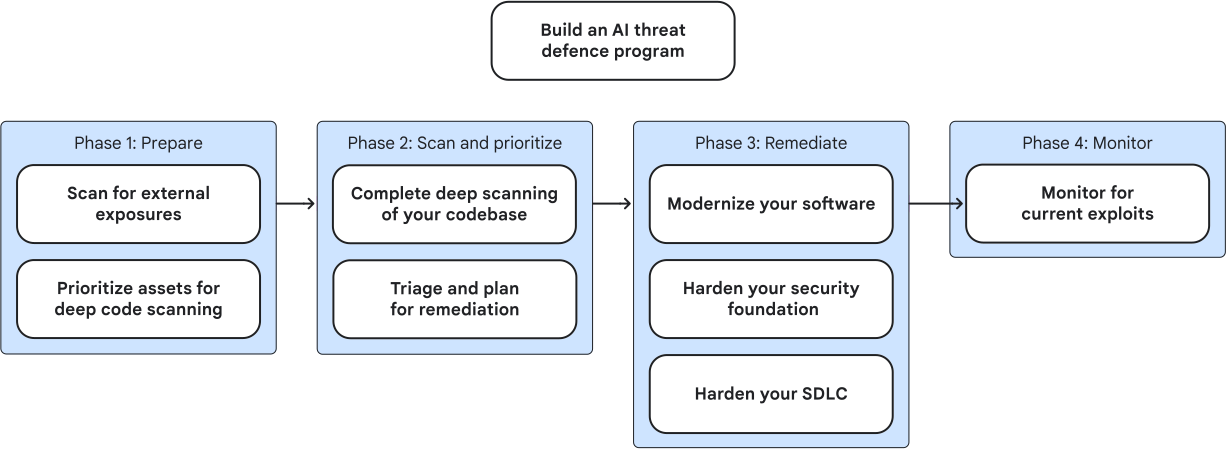
To help you create and implement a threat defense program, contact Mandiant Cybersecurity Consulting.
Phase 1: Prepare
Before you deploy AI vulnerability scanners across your codebase, assess the risk to your assets. Prioritize the types of scans and assets that you need to scan using AI to avoid overwhelming your triage pipeline.
Scan for external exposures
The assets that are most vulnerable to AI threats are internet-facing assets, like the following:
- Compute Engine VMs
- Cloud Run functions
- Google Kubernetes Engine (GKE) clusters
- Public Cloud Storage buckets
To maintain a comprehensive list of these assets over time, enable continuous discovery using a product such as Wiz Red Agent. Continuous discovery is an ongoing, automated process that scans assets in real time as they're created or changed. Wiz Red Agent can proactively scan your internet-facing network to find active web applications, publicly exposed APIs, custom-built software, and even vibe-coded applications.
After finding an asset, Wiz Red Agent can simulate real-world attacks to find vulnerabilities and create attack chains. When Wiz Red Agent finds a vulnerability, it sends the data to Wiz Security Graph. Wiz Security Graph lets you see which internal assets the internet-facing asset is connecting to, so you can map out the potential impact of an external breach.
For example, suppose that a developer creates a test environment for a new chatbot. The developer wants to test how the chatbot interacts with live data, so they deploy a prototype using Cloud Run. To simplify testing, the developer permits unauthenticated invocations, which makes the prototype public. The developer connects a temporary Cloud Storage bucket that contains a snapshot of real user data to the prototype. However, the developer forgets to delete their test environment.
In this example, Wiz Red Agent can find the new *.run.app
subdomain and flag the asset as an internet-facing asset through its continuous
discovery capability. Wiz Red Agent can then interact with the
chatbot prototype to determine that the chatbot is connected to an API endpoint.
Wiz Red Agent simulates various attacks, such as a prompt
injection attack, to determine any vulnerabilities. Because the developer didn't
set up appropriate security, Wiz Red Agent finds a vulnerability
and determines it can move laterally into the Cloud Storage bucket.
Wiz Red Agent sends the data to
Wiz Security Graph, which flags this vulnerability as a critical
priority. Your processes can shut down this prototype within minutes.
Prioritize assets for deep code scanning
Deep code scanning tracks data flow and source code to find structural errors and security backdoors while developers are still writing the software. However, deep code scanning is a resource-heavy and time-consuming process to implement for all your code.
To prioritize which code bases require deep code scanning, you must create an inventory of all repositories by platform or environment, such as SaaS or self-hosted. Consider the following:
- The accessibility of your source code or binaries (whether they are publicly available or internal). If your binaries are publicly available, no real protection against LLM-powered reverse engineering exists.
- The programming language (whether your code is in a memory-safe language such as Go, Rust, Java, or Python).
- The privileges that the code requires to run.
- The sensitivity of the assets that the code must access.
Implement deep code scanning for code that has the highest risk: code that is publicly accessible, uses memory-unsafe languages, requires high privileges to run, and must access highly sensitive data.
In addition, determine if you can take other mitigation measures to help protect your code. Consider the following:
- Before scanning legacy or underused components, evaluate if they can be retired or deprecated entirely, eliminating the maintenance and security burden. In some cases, you can migrate to alternatives with a smaller attack surface.
- Review your patching state. If patching has fallen behind, prioritize upgrading those dependencies to modern supported versions.
- As a longer-term prioritization strategy, identify critical components written in memory-unsafe languages and look for memory-safe alternatives. If no safer alternatives exist, consider placing them on a roadmap for rewrites in memory-safe languages to reduce memory-safety vulnerabilities. In the short term, consider sandboxing as a risk mitigation, such as with GKE sandbox.
To help prioritize assets, you can use Wiz features such as the following:
Wiz Service Catalog and Wiz inventory to determine the exposure and impact risks associated with your assets.
Wiz inventory automatically discovers assets such as virtual machines, databases, and code repositories. Wiz inventory can determine whether an asset is publicly accessible, handles untrusted user inputs or external API traffic, and the environment that the asset is running in. Wiz Service Catalog can group these assets into business services (for example, the Billing System or Customer Portal) that you can assign ownership to. These groups help identify which assets are critical business systems, which systems have access to sensitive data, and who is responsible for the application.
Wiz Security Graph and Wiz Workload Scanner to identify the source code repositories that are used in a live production environment.
Wiz Workload Scanner looks at your environment to determine whether code is actually running in your environment and traces the software lineage for your code. Wiz Security Graph discovers toxic combinations to determine whether a potential issue is high-risk. You can use this information to prioritize deep code scanning on high-risk attack paths and potential lateral movement vulnerabilities.
Wiz Code-to-Cloud Pipeline maps the lineage of an asset in production.
Wiz Code-to-Cloud Pipeline can prioritize code that is active and reachable in production, determine the originating repository for vulnerabilities, and harden your infrastructure as code (IaC) configurations. Wiz Code-to-Cloud Pipeline lets you tie your code repository to actual usage.
Phase 2: Scan and prioritize
After you create your program and prioritize your assets based on risk, you can use AI to help find and triage the vulnerabilities in your environment.
Complete deep scanning of your codebase
When you complete deep code scanning, you use advanced AI reasoning to find complex code flaws, associate the flaws to cloud vulnerabilities, and reduce false positives. Complete the following types of scans:
- Baseline scans: Continuously scan code in your IDE and CI/CD pipeline to find common coding errors, hardcoded secrets, and vulnerable dependencies.
- Deep AI scans: Analyze highly critical code bases with complex business logic and identify chained vulnerabilities or zero-day vulnerabilities that SAST might miss.
To complete a baseline scan, you can use Wiz Code to scan for secrets, find IaC misconfigurations, complete static application security testing (SAST), and identify security risks in third-party software using software composition analysis (SCA).
Wiz Code helps enforce your security policies by evaluating code in the CI/CD baseline and blocking any builds that don't meet your standards. Wiz Code can check your inventory to determine which vulnerabilities are reachable in production. When Wiz Code finds a vulnerability, Wiz Green Agent automatically analyzes the surrounding code and creates a patch to address the issue. If the issue is found in the developer's IDE, Green Agent can refactor the code before the developer commits the change to the pipeline. If an issue is found in the CI/CD pipeline, Wiz Green Agent can automatically create a pull request in GitHub or GitLab with the code patch.
To complete a deep AI scan, you can deploy CodeMender (Preview) with Gemini Enterprise Agent Platform. CodeMender (developed by Google DeepMind) is a highly specialized, autonomous AI engineering agent that's focused on deep code-level reasoning, debugging, and patching. CodeMender acts like an autonomous senior software engineer who pulls code into a sandbox, runs a variety of tests, and fixes the core logic. Test runs might include dynamic analysis, fuzz testing, and automated compilation testing. CodeMender can autonomously prioritize bugs based on structural impact, patch issues, and refactor code using an iterative method.
Triage and plan for remediation
After you compile a list of vulnerabilities, you can route the findings from Wiz Code and CodeMender to engines such as the Wiz SAST Triage AI Engine to enhance your findings and help determine whether the attack vectors are exploitable. Wiz Security Graph can also help enrich context using the code-to-cloud pipeline. Wiz Red Agent can probe the active site and validate the attack path.
After you complete your triage work, consider the following recommendations to fine-tune your AI agents and remove false positives:
- Request senior engineers to review a small, random sample of findings to identify patterns, clarify trust boundaries, and refine your AI processes.
- Create AI skills based on your vulnerability reporting guide that defines what your organization considers a real vulnerability, and not a false positive or a non-security bug.
- Use an AI agent to plan and write test cases and execute them in a sandbox environment.
- Run your AI agents against new sample findings and tune your prompts and AI skills until they match your human decisions.
If proving a vulnerability is exploitable takes more time than implementing a low-risk fix, skip the reproduction process and proceed to the remediation stage.
Phase 3: Remediate
To remediate issues, you must implement high-speed workflows that can autonomously verify, patch, and validate vulnerabilities at scale, in the developer IDE, the code repository, and the production environment.
Wiz Green Agent can automatically create a remediation plan based on the available data. It triggers Wiz Workflows to alert your SecOps teams using your ticketing system and send the remediation plan to CodeMender. CodeMender authors the patch, tests the fix in a secure sandbox to prevent regressions, and creates the pull request to patch your system. A developer can then review the pull request and click to deploy the change.
Although the core practices for upgrading dependencies are not new, maintaining a healthy, automated patching system is a critical necessity to cope with the sheer volume of patches that are generated by AI-driven discovery. Your organization needs to be prepared to ingest updates rapidly without breaking production systems.
We recommend the following practices to optimize the remediation process:
- Establish dependency visibility: Maintain a continuous inventory of your software dependencies.
- Automate your build and release machinery: After test and qualification work is complete, minimize the manual steps required to get the code released and upgrades started.
- Establish a continuous upgrade cadence: Keeping your dependencies updated regularly minimizes the code delta when a security patch is released. A smaller delta means less risk of breaking changes and faster deployment times during an emergency patch.
- Test rollouts with canary deployments: Implement automated canary deployments and robust rollback mechanisms for dependency upgrades. Canary deployments let you test patches in production with minimal impact.
Modernize your software
Moving from a conventional development workflow to an agentic framework requires the orchestration of specialized AI agents that are focused on specific tasks like authoring, test generation, and security auditing. The following examples describe how you can introduce AI agents to your software development lifecycle:
- Development: Developers design and prototype applications with in-IDE chat or CLI natural language prompts.
- Build: AI processes assist developers with generating code or modifying existing code with code completions.
- Test and maintain: Developers and quality assurance teams use AI-driven testing and automated refactoring.
- Review and deploy: Developers use AI-powered code reviews and support for infrastructure-as-code.
- Troubleshoot: Developers use AI-driven issue analysis in tools such as Firebase Crashlytics for crashes and errors.
- Operate: Developers and software engineers use AI agents to understand and modify existing applications.
With software modernization, security and technical debt mitigation is shifted left to autonomous agents that are designed to make small, iterative changes to your environment. Software modernization relies on Model Context Protocol (MCP) servers, which give models direct, real-time access to external tools and live environmental data.
To mitigate insecure code risk at the start of the software development lifecycle, deploy independent agents that can analyze dependencies during planning, generate unit tests using tool integrations, and conduct automated code reviews directly within the source repository. By embedding project-specific rules, specialized skills, and deterministic command hooks directly into the developer workspace, coding agents become the primary frontline for risk reduction. To force agents to take the right steps, use deterministic scripts and invoke peer reviews using separate, specialized agents. Specialized agents can include a security scanner agent, a debugging agent, or an automated red teaming agent.
To help with software modernization, tools such as Google Antigravity and Gemini Code Assist can function as independent collaborators that capture, test, and repair issues before human review or central pipeline builds occur. Google Antigravity provides a complete agent manager and IDE experience, and Gemini Code Assist in Gemini CLI provides a terminal CLI for headless execution. You can use various agent skills in Wiz and across other Google products to assist with your development process. Agent Platform includes models, such as Gemini 3.5 Pro and Flash, which provide multi-step reasoning, long-context windows, and built-in tool execution.
To obtain higher development velocity, use agents that can plan incrementally, test continuously, and scan small changes locally before committing. These agents help ensure codebase stability and perform rollbacks when commits are small and isolated.
Harden your security foundation
Before introducing agents to your environment, ensure you've appropriately hardened your infrastructure and SDLC pipeline. Consider the following actions to create a secure foundation:
- Configure policies and access controls to get visibility into your software components, help detect vulnerabilities, and remediate issues before deploying software into production.
- Use hardened base images with Shielded VM, Confidential Computing, and WizOS to protect the application layer, OS layer, and hardware layer.
- Monitor developer workstations and CI/CD build runners using Wiz Runtime Sensor to detect live CI/CD pipeline attacks and provide active-in-memory context.
- Find and remediate drift from your security posture service to maintain an environment that is consistent with your security policies.
- Configure a secure gateway for open-source usage to enforce your security policies using Wiz Registry Connectors.
- Isolate development, staging, and production environments using strict network segmentation and firewall rules.
- Store all pipeline, deployment, and access logs in a centralized, immutable storage location for continuous monitoring and forensics.
- Treat the CI/CD pipeline as immutable infrastructure to avoid tampering and configuration drift. Immutable infrastructure also requires the use of ephemeral, short-lived runners that don't permit an attacker to gain a permanent foothold in your infrastructure.
- Store all changes to applications and clusters in source repositories that enable version control and review before deployment.
For more best practices, see Google Cloud minimum viable secure platform.
Harden your SDLC
The Secure AI Framework (SAIF) describes the controls you must implement to ensure the secure use of AI in your SDLC pipeline. Key items to consider when adding AI include the following:
- Humans must remain in control to ensure accountability and to prevent agents from acting autonomously in critical situations without clear human oversight or attribution. You require distinct agent identities, user consent mechanisms, and secure inputs.
- Agent powers must remain limited to ensure agents can only complete their intended purpose and not escalate privileges inappropriately. You must configure appropriate access controls, scoped credential management, and use sandboxing to isolate components appropriately.
- All actions must be observable to ensure transparency and auditability and enable security decisions and user understanding.
Supply chain attacks can compromise a trusted agent to modify a critical database, tamper with code, or expose production secrets. To mitigate, SDLC pipelines that use AI rely on security best practices such as the following:
- IDE and workspace settings that control browser extensions, CLI utilities, and IDE plugins to prevent unsanctioned AI coding assistants from exfiltrating proprietary codebase lines to unvetted external model endpoints.
- Strict access controls to prevent unauthorized modifications. Strict Identity and Access Management (IAM) and authentication controls help ensure that you grant pipeline service accounts, including agent accounts, only the mandatory minimum permissions, enforce multi-factor authentication for all human users, and regularly review the access that users and agents have to ensure that they remain current.
- Source code and configuration protections to ensure that malicious or
accidental code never makes it to the build phase. Consider the following:
- Ensure that branches are reviewed and pull or merge requests are reviewed from authorized peers, especially human reviewers.
- Don't permit bypass options for merging.
- Ensure all commits are signed to verify code authenticity and prevent unauthorized tampering.
- Restrict the ability to fork internal code or accidentally make private repositories public.
- Dynamic secret management to avoid compromised credentials. To handle secrets dynamically, eliminate hardcoded passwords, API keys, and tokens in source code and configuration files. Automated secret scanning tools in your IaC and configuration files help find any secrets before commits are accepted. Secret Manager lets you inject credentials dynamically at runtime.
- Security check automation within the pipeline to catch vulnerabilities early. Consider a test strategy that includes SAST, SCA, and DAST testing so that you can find vulnerabilities during development, in third-party libraries, and when running applications.
- Secured application packages to help prevent tampering. Use immutable versioning for your build packages, and scan container images and packages before pushing them to your artifact registry. Promote the same container images across all environments, including development, staging, and production.
Phase 4: Monitor
Because agentic attacks change the threat landscape quickly, you must continually monitor processes and identify automation opportunities. You must also be able to detect and respond to threats created by vulnerabilities in code, no matter where the code exists. To monitor threats effectively, you must ensure sensors are in place, establish appropriate metrics, complete simulation runs, and use rehearsed, active response playbooks.
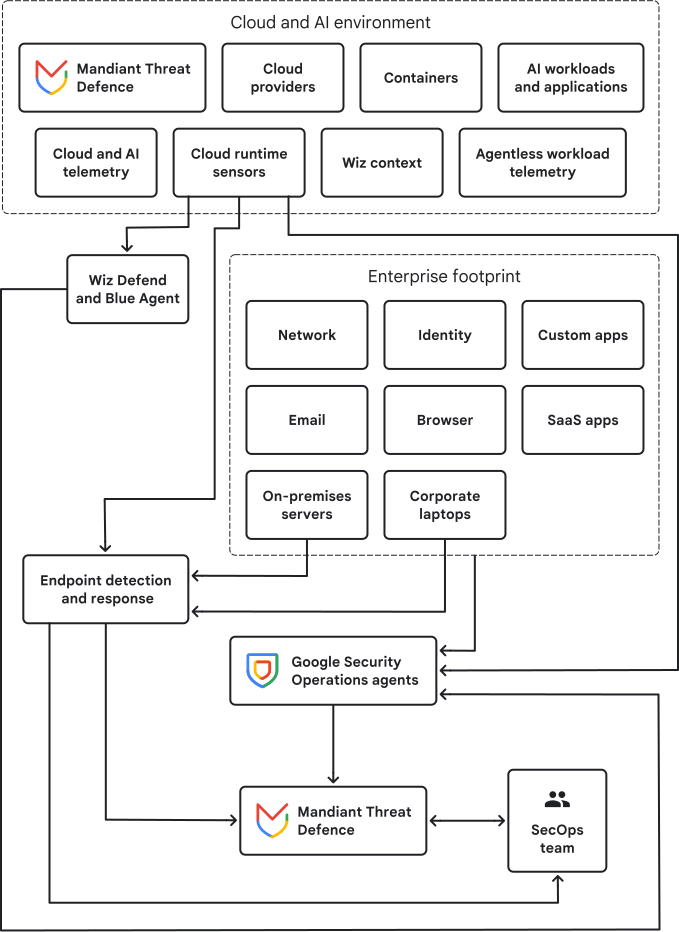
Wiz Defend integrates with Google Security Operations to enhance your SOC workflows with alerts and context from the Wiz platform. Wiz Defend monitors runtime behavior, cloud configurations, identities, and vulnerabilities directly inside your cloud environment. Wiz Defend organizes real-time alerts and processes forensic evidence into high-fidelity detections and consolidated threats. Wiz Blue Agent can investigate the data to determine whether a threat is real. Wiz can then send prioritized alerts to Google SecOps for further response activities.
Google SecOps can ingest telemetry from your entire environment to correlate events and coordinate response playbooks. This telemetry includes on-premises servers, SaaS identity providers, endpoints, firewalls, and multi-cloud environments. Google SecOps includes an agentic SOC that can automatically investigate alerts to provide additional context. Analysts can ask questions in natural language, and the agent can provide technical context, telemetry, and recommendations on addressing issues. The agent can also automate the creation and management of threat detection rules, identify detection gaps, and automatically generate detection rules for the gaps.
Agentic Threat Intelligence can use data from Mandiant and VirusTotal to speed up investigations. Agentic Threat Intelligence automates complex and time-consuming tasks such as reverse engineering code, analyzing malware, and generating custom threat briefings, freeing up security teams for other critical work.
The following diagram shows how the various monitoring tools work together to add context, complete automated tasks, and prioritize alerts.
What's next
- Review the best practices in the Google Cloud minimum viable secure platform.
- Learn about the Google Secure AI Framework (SAIF).
- Read about Wiz AI Security Posture Management.
- Understand how the Agentic SOC in Google SecOps uses autonomous security agents.
- Explore how Wiz Red Agent validates threat exposures.