

This document describes a typical Google Kubernetes Engine (GKE) architecture in Google Cloud. It also lists the security best practices that are applicable to GKE workloads.
Architecture
The following diagram shows the Google Cloud services in a typical GKE deployment.
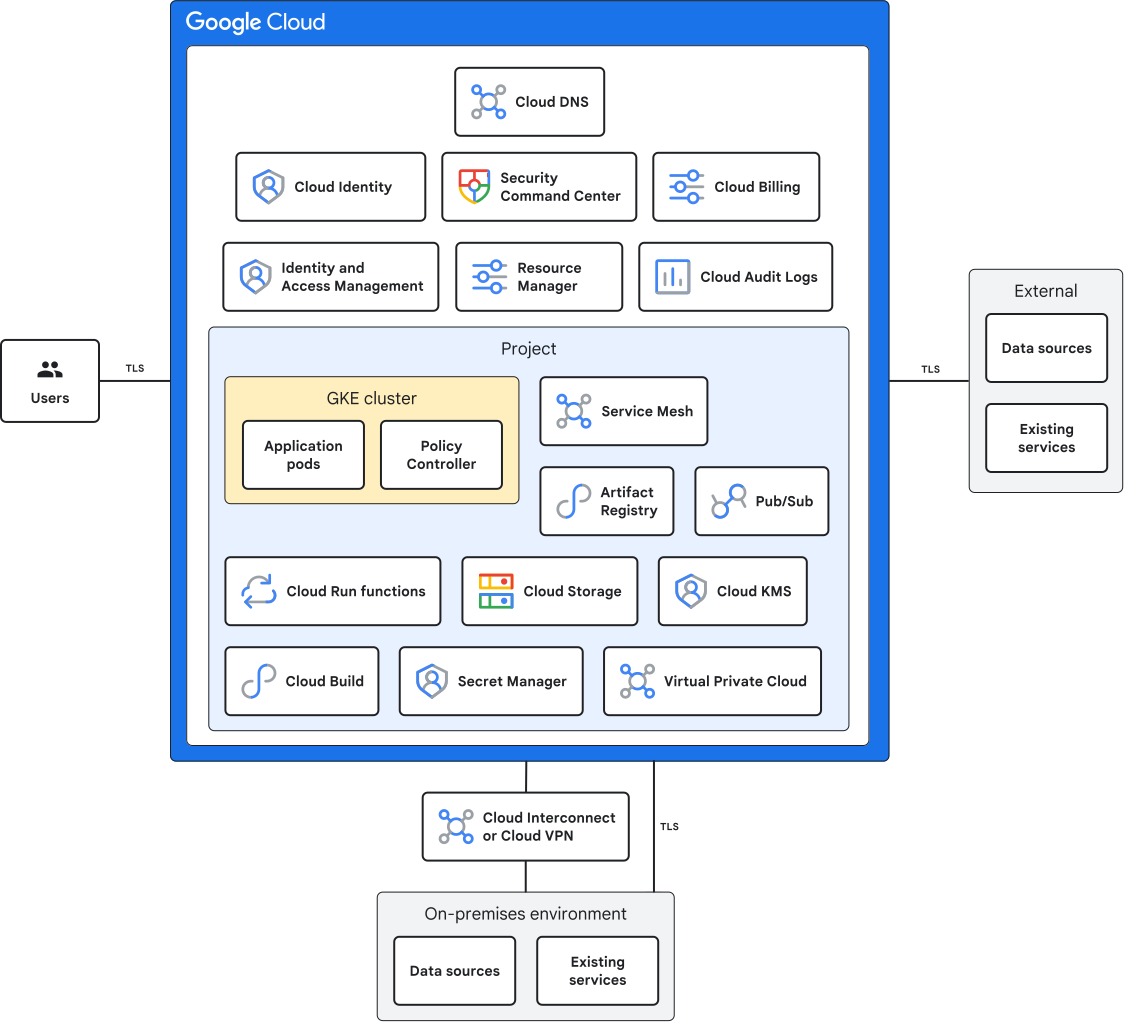
This diagram includes the following:
GKE is a managed implementation of the Kubernetes open source container orchestration platform that lets you run containerized apps. GKE clusters include your application pods and Policy Controller. Policy Controller helps you enforce policies on your Kubernetes clusters.
Artifact Registry streamlines your container and app development and deployment process, improves collaboration, and helps improve the security and reliability of your apps.
Cloud Audit Logs tracks the actions that your users take in your environment, which enhances your troubleshooting, auditing, and incident response capabilities.
Cloud Billing dashboards and alerts let you review usage and billing of GKE workloads.
Cloud Build lets you build, test, and deploy a serverless CI/CD platform on Google Cloud.
Cloud Identity unifies identity, access, application, and management for Google Cloud.
Cloud Key Management Service creates and manages encryption keys.
Cloud Run functions automates tasks, triggers jobs, integrates with other services, and builds event-driven development pipelines.
Cloud Service Mesh lets Kubernetes services communicate with each other.
Cloud Storage stores the data that's required for your containers and apps to run.
Cloud DNS registers, manages, and serves your domain.
Identity and Access Management (IAM) controls who can perform specific actions on your GKE workload resources, such as creating, editing, or deleting them.
Organization Policy Service centrally manages and enforces policies across your Google Cloud environment. Organization Policy helps to ensure consistent configuration and security compliance across the projects and resources within your organization.
Pub/Sub enables efficient communication and automation within your workflows.
Resource Manager helps you group and manage the logical components of your GKE workloads.
Secret Manager helps you protect the sensitive data and credentials that are used in GKE projects.
Security Command Center helps you protect your cloud organization, your GKE workloads, and the data that you store on Google Cloud. Security Command Center provides the following:
- Centralized security management
- Threat detection and incident response
- Automated security assessments
- Compliance and regulatory reporting
- Security recommendations and best practices
Virtual Private Cloud (VPC) isolates your GKE resources from the internet in a secure environment. This network configuration helps protect sensitive data and workloads from unauthorized access and potential cyberattacks.
Cloud VPN or Cloud Interconnect lets you establish a secure network connection between your on-premises infrastructure and your GKE environment. Cloud VPN or Cloud Interconnect helps enable seamless data transfer and communication between your private network and Google Cloud resources. Consider this integration for scenarios like accessing on-premises data for model training or deploying models to on-premises resources for inference.
Best practices for GKE workloads
This section provides links to the best practices for workloads that use GKE.
- Recommended user groups and IAM roles
Secure enterprise foundation best practices
Authentication and authorization best practices
- Disable automatic IAM grants for default service accounts
- Block the creation of external service account keys
- Block service account key uploads
- Configure separation of duties for organization policy administrators
- Enable two-step verification for super admin accounts
- Enforce two-step verification on the super admin organization unit
- Create an exclusive email address for the primary super admin
- Create redundant administrator accounts
- Implement tags to efficiently assign IAM policies and organization policies
- Audit high-risk changes to IAM
- Block access to Cloud Shell for Cloud Identity managed user accounts
- Configure Context-Aware Access for Google consoles
- Block account self-recovery for super admin accounts
- Turn off unused Google services
Organization best practices
Networking best practices
Logging, monitoring, and alerting best practices
Key and secret management best practices
- Encrypt data at rest in Google Cloud
- Use NIST-approved algorithms for encryption and decryption
- Set the purpose for Cloud Key Management Service keys
- Ensure that CMEK settings are appropriate for secure BigQuery data warehouses
- Rotate encryption key every 90 days
- Set up automatic secret rotation
- Restrict customer-managed encryption keys location
- Use CMEK for Google Cloud services
- Replicate secrets automatically
Security posture and analytics best practices
Infrastructure best practices
Compute best practices
Container best practices
- Restrict control plane access
- Use least-privilege firewall rules
- Use Google Groups for RBAC
- Enable Shielded GKE Nodes
- Use Container-Optimized OS with containerd runtime
- Use Workload Identity Federation for GKE
- Enable GKE Sandbox
- Disable the kubelet read-only port
- Use namespace and RBAC to restrict access to cluster resources
- Restrict traffic among pods
- Use admission controllers to enforce policies
- Restrict ability for workloads to self modify
- Monitor your cluster configurations
- Enforce Binary Authorization
Data management best practices
Storage best practices
- Block public access to Cloud Storage buckets
- Use uniform bucket-level access
- Protect HMAC keys for service accounts
- Detect enumeration of Cloud Storage buckets by service accounts
- Ensure Cloud Storage bucket retention policy uses Bucket Lock
- Set lifecycle rules for the SetStorageClass action
- Set permitted regions for storage classes
- Enable lifecycle management for Cloud Storage buckets
- Review and evaluate temporary holds on active objects
- Enforce retention policies on Cloud Storage buckets
- Enforce classification tags for Cloud Storage buckets
- Enforce log buckets for Cloud Storage buckets
- Configure deletion rules for Cloud Storage buckets
- Ensure isLive condition is False for deletion rules
- Enforce versioning for Cloud Storage buckets
- Enforce owners for Cloud Storage buckets
- Enable logging of key Cloud Storage activities
Agent and application best practices
What's next
- Learn how to deploy an enterprise developer platform on Google Cloud.