

This content was last updated in October 2026, and represents the status quo as of the time it was written. Google's security policies and systems may change going forward, as we continually improve protection for our customers.
This document gives an overview of the secured process that occurs when you delete your customer data on Google Cloud. As defined in the Google Cloud Terms of Service, customer data is data that is provided to Google by customers or end users through the services under the account.
This document describes how customer data is stored at rest in Google Cloud, the deletion pipeline, and how we prevent any reconstruction of data that is stored in our platform. This document doesn't apply to data that's processed ephemerally in memory (such as generative AI workloads that are configured for zero data retention).
For information about our data deletion commitments, see Cloud Data Processing Addendum (Customers).
Data storage and replication
Google Cloud offers databases and analytics services such as Bigtable and Spanner. Most Google Cloud applications and services access Google's storage infrastructure indirectly using these cloud services.
Data replication is critical to achieving low latency, highly available, scalable, and durable solutions. Redundant copies of customer data can be stored locally and regionally and even globally, depending on your configuration and the demands of your projects. Actions taken on data in Google Cloud might be simultaneously replicated in multiple data centers, so that customer data is highly available. When performance-impacting changes occur in the hardware, software, or network environment, customer data is automatically shifted from one system or facility to another, subject to customers' configuration settings. Shifting systems or facilities lets customer projects continue performing at scale and without interruption.
At the physical storage level, customer data is stored at rest in two types of systems: active storage systems and backup storage systems. These two types of systems process data differently. Active storage systems are Google Cloud's production servers that run Google's application and storage layers. Active systems are mass arrays of disks and drives used to write new data as well as store and retrieve data in multiple replicated copies. Active storage systems are optimized to perform live read and write operations on customer data at speed and scale.
Google's backup storage systems store full and incremental copies of Google's active systems for a defined period of time to help Google recover data and systems in the event of a catastrophic outage or disaster. Unlike active systems, backup systems are designed to receive periodic snapshots of Google systems and backup copies are retired after a limited window of time as new backup copies are made.
Throughout the storage systems, customer data is encrypted when stored at rest. For more information, see Default encryption at rest.
Data deletion pipeline
After customer data is stored in Google Cloud, our systems are designed to store the data securely until the data deletion pipeline completes its stages. This section describes the deletion stages.
Stage 1: Deletion request
The deletion of customer data begins when you initiate a deletion request. Generally, a deletion request is directed to a specific resource, a Google Cloud project, or your Google Account. Deletion requests might be handled in different ways depending on the scope of your request:
Resource deletion: Individual resources that contain customer data, such as Cloud Storage buckets, can be deleted in a number of ways from the Google Cloud console or using an API. For more information, see Delete buckets.
For AI and agentic workloads, deleting a resource might require deleting child resources or derived artifacts. For example, the deletion process might also delete agent sessions, memories in Memory Bank, and the source conversation history.
Project deletion: As a Google Cloud project owner, you can shut down a project. Deleting a project acts as a bulk deletion request for all resources tied to the corresponding project number.
Google Account deletion: When you delete your Google Account, it deletes all projects that aren't associated with an organization and that are solely owned by you. When there are multiple owners for a non-organization project, the project is not deleted until all owners are removed from the project or delete their Google Accounts. This process ensures that projects continue so long as they have an owner.
Google Workspace or Cloud Identity account deletion: Organizations that are bound to a Google Workspace or Cloud Identity account are deleted when you delete a Google Workspace or Cloud Identity account. For more information, see Delete your organization's Google Account.
Service account and agent identity deletion: You can delete service accounts directly through Identity and Access Management (IAM). However, an agent identity is bound to the lifecycle of its hosting agent resource and is deleted when you delete the underlying agent.
You use deletion requests primarily to manage your data. However, Google can issue deletion requests automatically; for instance when you end your relationship with Google.
Stage 2: Soft deletion
Soft deletion provides a brief internal staging and recovery period to help ensure that there is time to recover any data that has been marked for deletion by accident or error. Individual Google Cloud products might adopt and configure such a defined recovery period before the data is deleted from the underlying storage systems so long as the period fits within Google's overall deletion timeline. For example, deleted service accounts enter a 30-day recovery period during which they are disabled but can be restored.
When projects are deleted, Google Cloud first identifies the unique project number, and then it broadcasts a suspension signal to the Google Cloud products that are tied to that project number. The project enters a recovery period of up to 30 days. During this period, most services suspend operations and retain resources tied to that project number. For example, Compute Engine suspends instances and Bigtable disables access to relevant tables. Some services, such as Cloud Storage and Pub/Sub, might begin deleting resources sooner.
At the end of the recovery period, Google Cloud broadcasts a purge signal to the applicable products to complete logical deletion of remaining resources tied to the project number. Google then waits, rebroadcasting the signal when necessary, to collect an acknowledgment signal (ACK) from each product to complete project deletion.
When a Google Account is closed, Google might impose an internal recovery period of up to 30 days, depending on past account activity. After that recovery period expires, Google broadcasts a signal that contains the deleted Google Account user ID to Google products, and Google Cloud projects and resources tied solely to that user ID are marked for deletion.
Stage 3: Logical deletion from active systems
After the data is marked for deletion and any recovery period has expired, the data is deleted successively from Google's active and backup storage systems. On active systems, data is deleted in two ways.
In most Google Cloud products that store data, copies of the deleted data are marked as available storage and overwritten over time. In an active storage system like Bigtable, deleted data is stored as entries within a massive structured table. Compacting existing tables to overwrite deleted data can be expensive, as it requires rewriting tables of existing (non-deleted) data. Therefore, mark-and-sweep garbage collection and major compaction events are scheduled to occur at regular intervals to reclaim storage space and overwrite deleted data.
In services such as Cloud Storage, customer data is also deleted through cryptographic erasure. This is an industry-standard technique that renders data unreadable by deleting the encryption keys that are needed to decrypt that data. One advantage of using cryptographic erasure, whether it involves Google-supplied or customer-supplied encryption keys, is that logical deletion can be completed even before all deleted blocks of that data are overwritten in Google Cloud's active and backup storage systems.
Stage 4: Expiration from backup systems
Similar to deletion from Google's active systems, deleted data is eliminated from backup systems using both overwriting and cryptographic techniques. In the case of backup systems, however, customer data is typically stored within large aggregate snapshots of active systems. These systems are retained for static periods of time to ensure business continuity in the event of a disaster (for example, an outage affecting an entire data center). Consistent with reasonable business continuity practices, full and incremental snapshots of active systems are made on daily, weekly, and monthly cycles and retired after a predefined period of time to make room for the newest snapshots.
When a backup is retired, it is marked as available space and overwritten as new daily, weekly, or monthly backups are performed.
A reasonable backup cycle imposes a predefined delay in propagating a data deletion request through backup systems. When customer data is deleted from active systems, it is no longer copied into backup systems. Backups that were performed before deletion are expired regularly based on the predefined backup cycle.
Finally, cryptographic erasure of the deleted data might occur before the backup that contains customer data has expired. Without the encryption key that was used to encrypt specific customer data, the customer data is unrecoverable even during its remaining lifespan on Google's backup systems.
Deletion timeline
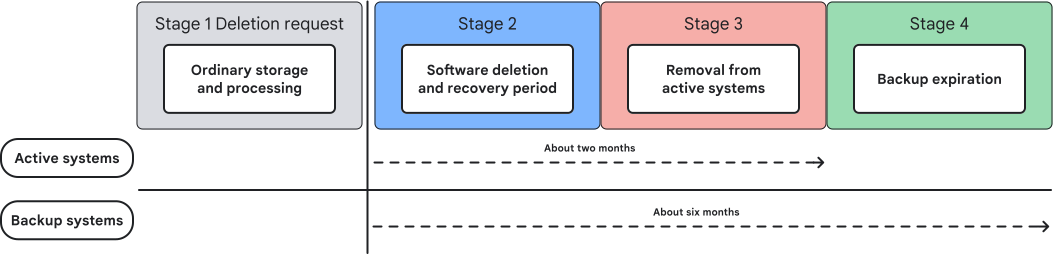
Google Cloud is engineered to achieve a high degree of speed, availability, durability, and consistency. The design of systems optimized for these performance attributes must be balanced carefully with the need to achieve timely data deletion. Google Cloud commits to delete customer data within a maximum period of about six months (180 days). This commitment incorporates the stages of Google's deletion pipeline described earlier, including the following:
- Stage 2: After the deletion request is made, data is typically marked for deletion immediately. Our goal is to perform this step within a maximum period of 24 hours. After the data is marked for deletion, an internal recovery period of up to 30 days might apply depending on the service or deletion request.
- Stage 3: Logical deletion from active systems requires time to complete garbage collection tasks. These processes might occur immediately after the deletion request is received, depending on the level of data replication and the timing of ongoing garbage collection cycles. After the deletion request is made, it generally takes about two months to delete data from active systems. This two-month window is typically enough time to account for any recovery period, complete two major garbage collection cycles, and ensure that logical deletion is completed.
- Stage 4: The Google backup cycle is designed to expire deleted data within data center backups within six months of the deletion request. Deletion might occur sooner depending on the level of data replication and the timing of Google's ongoing backup cycles.
The following diagram shows the stages of Google Cloud's deletion pipeline and when data is erased from active and backup systems.
Media sanitization
A disciplined media sanitization program enhances the security of the deletion process by preventing forensic or laboratory attacks on the physical storage media after it has reached the end of its lifecycle.
Google meticulously tracks the location and status of all storage equipment within our data centers, through acquisition, installation, retirement, and destruction, using barcodes and asset tags that are tracked in Google's asset database. Various techniques such as biometric identification, metal detection, cameras, vehicle barriers, and laser-based intrusion detection systems are used to prevent equipment from leaving the data center floor without authorization. For more information, see the Google infrastructure security design overview.
Physical storage media can be decommissioned for a range of reasons. If a component fails to pass a performance test at any point during its lifecycle, it is removed from inventory and retired. Google also upgrades obsolete hardware to improve processing speed and energy efficiency, or increase storage capacity. Whether hardware is decommissioned due to failure, upgrade, or any other reason, storage media is decommissioned using appropriate safeguards.
Google hard drives use technologies like full disk encryption (FDE) and drive locking to help protect data at rest during decommission. When a hard drive is retired, authorized individuals verify that the disk is erased by overwriting the drive with zeros and performing a multi-step verification process to ensure the drive contains no data.
If the storage media cannot be erased for any reason, it is stored securely until it can be physically destroyed. Depending on available equipment, we either crush and deform the drive or shred the drive into small pieces. In either case, the disk is recycled at a secure facility, ensuring that no one can read data on retired Google disks. Each data center adheres to a strict disposal policy and uses the techniques described to achieve compliance with NIST SP 800-88 Rev. 2 Guidelines for Media Sanitization and DoD 5220.22-M National Industrial Security Program Operating Manual.