

Spend-based committed use discounts (CUDs) provide a discount in exchange for your commitment to spend a minimum amount per hour for a product. The discount applies to the set of eligible resources for the product. For other types of CUDs, see Committed use discounts.
Products covered by spend-based commitments
You must purchase separate spend-based commitments for each Google Cloud product that CUDs are available for. The CUDs apply to eligible usage in any projects that the Cloud Billing account pays for.
The following table shows which CUDs migrated to the new consumption model (direct discount, no credits) and which remain on the legacy credit model (list price charge + credit offset). This doesn't apply to Resource-based CUDs (for example, specific machine type commitments).
| Affected CUDs (new CUD model using discounts) | Unaffected CUDs (legacy CUD model using credits) |
|---|---|
|
Compute flexible CUDs (covers eligible spend on Compute Engine, Google Kubernetes Engine, and Cloud Run) |
All VMware Engine CUDs |
| AlloyDB for PostgreSQL | Backup and DR (for VMware Engine) |
| Backup and DR (for Oracle) | NetApp Volumes |
| BigQuery |
Backup for GKE (no longer available for purchase) |
| Bigtable | |
| Cloud SQL | |
| Dataflow | |
| Firestore | |
| Managed Service for Apache Kafka | |
| Memorystore | |
| Spanner | |
|
Cloud Run (no longer available for purchase) |
|
|
Google Kubernetes Engine (GKE) Autopilot (no longer available for purchase) |
How spend-based CUDs work
When you purchase a commitment, you are committing to a specific hourly spend amount. The system checks your usage every hour to apply the discount. It is crucial to understand the boundaries of CUDs, specifically overage and underutilization scenarios.
Overutilized CUDs (exceeding your commitment)
If your eligible usage in a given hour exceeds the amount you committed to, the CUD covers usage up to your limit, and the remainder is billed at the standard rate.
- Mechanism: The system applies the CUD discount to the first block of usage equal to your commitment.
- Cost: Any usage beyond that limit is charged at the standard on-demand price (the "Default" consumption model). You don't receive any discount on the overage.
Underutilized CUDs (not meeting your commitment)
If your eligible usage in a given hour is less than your committed amount, you are still responsible for the full cost of the commitment.
- No rollover: Unused commitment does not carry over to the next hour.
- Cost: You pay for the full commitment amount you purchased.
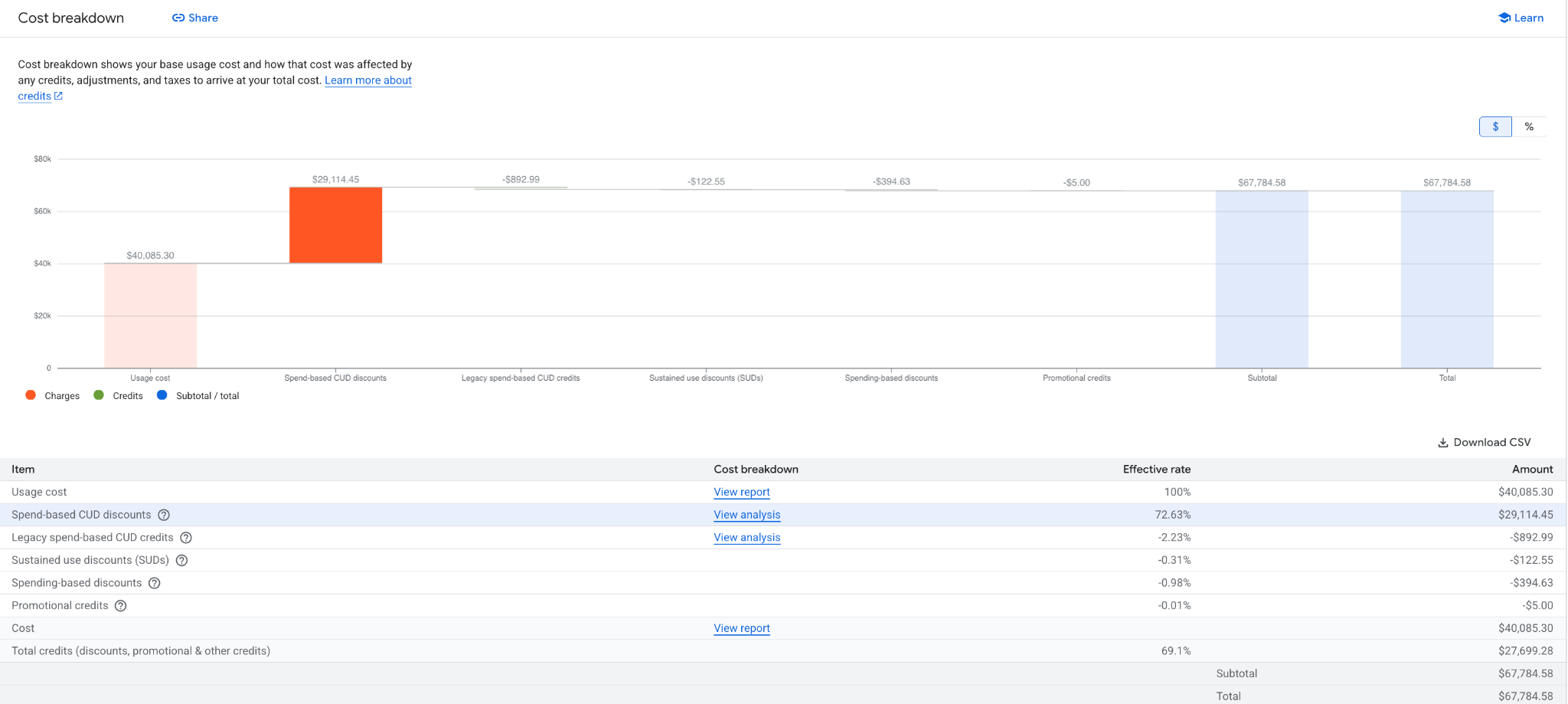
- In the new consumption model: Because you did not fully use the commitment, the FEE_UTILIZATION_OFFSET credit won't be large enough to fully negate the $1 CUD fee SKU. The remaining balance on the fee SKU represents your cost for the unused commitment.
The following screenshot shows how an underutilized CUD might appear in the Cost breakdown report.
Commitment amount and usage billing calculations
The CUD model determines how your commitment amount and usage billing is calculated, including how your savings are displayed:
| Affected CUDs (new CUD model using discounts) | Unaffected CUDs (legacy CUD model using credits) | |
|---|---|---|
Commitment amount |
You commit to the discounted spend (the actual amount you pay). |
You commit to the on-demand spend (the list price value). |
Usage charges |
Usage is billed directly at the discounted rate. |
Usage is billed at list price; a credit offsets the cost. |
Savings display |
Reports show net savings (calculated difference). |
Reports show the gross credit amount. |
Consumption models
The new CUD program introduces the concept of consumption models. In
Cloud Billing, a consumption model represents the price you pay for a
certain amount of SKU usage within a certain context. A SKU can have several
consumption models, but only one applies to any given amount of usage at a
particular time. Each SKU has at least one consumption model, whose description
is Default.
Consumption models often represent various kinds of discounted SKU usage,
such as committed use discounts (CUDs). For example, if a one year Flex CUD
covers a particular VM usage, then the consumption model that applies to that
SKU usage has the description Compute Flexible CUD - 1 Year.
For spend-based CUDs, consumption models replace the legacy system of using credits to offset usage costs calculated at list price. The new model also changes how commitments are purchased.
To support consumption models, several fields were added or updated in the Cloud Billing data model.
For each SKU, a new metadata field, Consumption Model, represents the price of
usage for that SKU. This price applies when the system monetizes usage for that
SKU under this particular consumption model. For example, if a 1-Year Flex CUD
covers VM usage, then the consumption model of the usage has a value of 1 Year
Flex CUD.
Each commitment consumption model corresponds to a specific offer ID. For a list of the offer IDs, see the Use the API to purchase a spend-based commitment page or the Migrated CUD SKUs, offers, and consumption model IDs page. For details about how the data model uses these IDs, see Offers and consumption model IDs.
SKU and fee structure changes
The new CUD model introduces structural changes to how SKUs appear in your data and how fees are calculated.
- Usage list prices vs. Fee list prices: The list price of your SKU usage (for example, the cost of running a VM) has not changed. However, the list price of the Fee SKUs has changed to $1. This is a structural change to the data model to support the new discount method.
- Direct comparison: Because the Fee SKUs are now $1 (unlike the old model where they were priced lower to reflect the discount), you cannot compare the raw Fee SKU costs directly between models. To get an accurate comparison of your costs, you must calculate the total net cost including credits.
- Savings calculation formula: In the new model, the Cost Management user
interface reflects your savings using this formula:
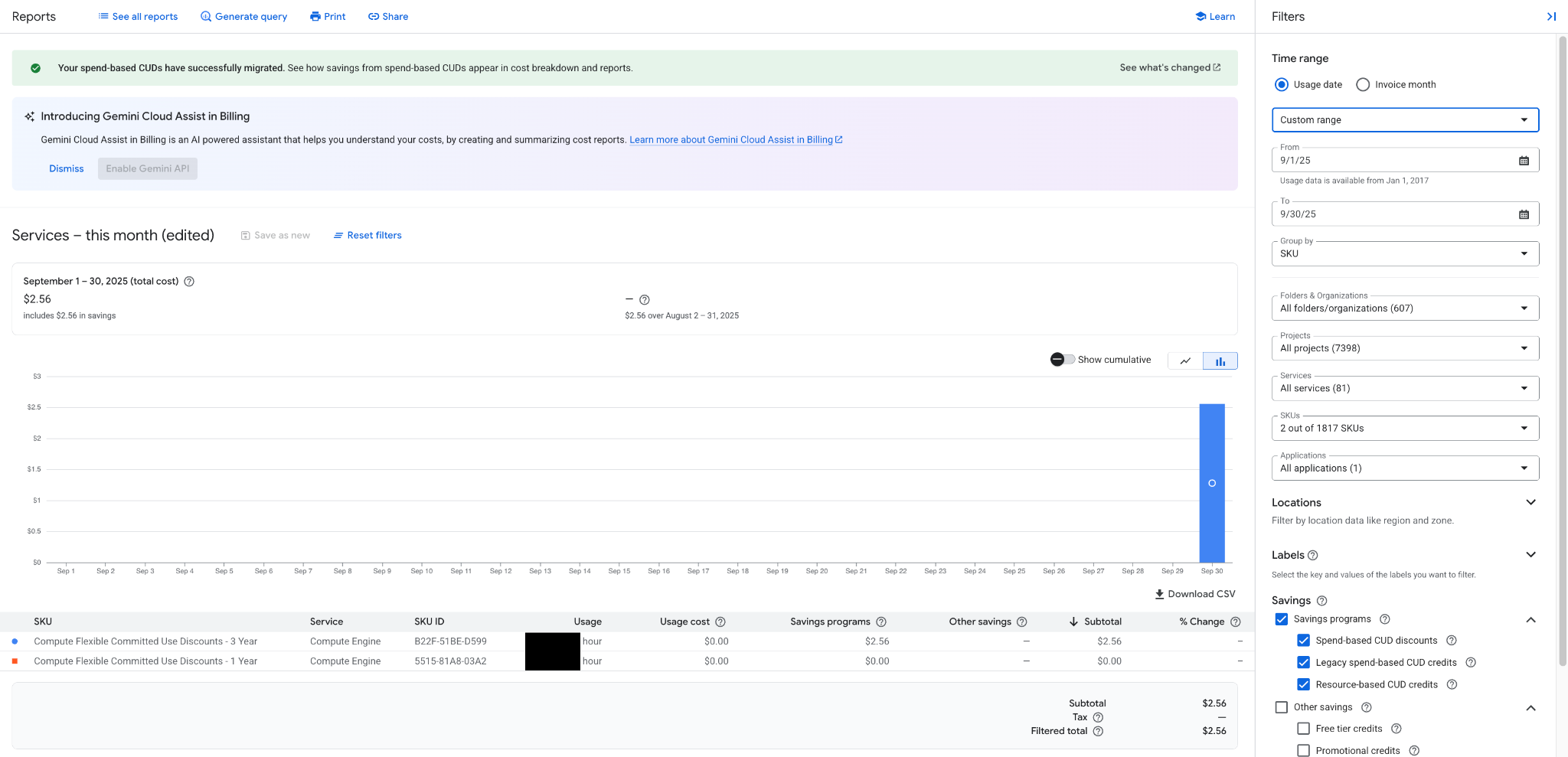
Cost at on-demand rates - Cost at CUD consumption rate + CUD Fees Fee utilization offset: When you use your CUD, the system applies a credit called FEE_UTILIZATION_OFFSET that specifically negates the cost of the CUD fee SKU. If you are fully utilizing a CUD, the fee SKU will have a zero net cost.
The following screenshot shows how a fully utilized CUD might appear in your reports.
Consumption models for usage: A single SKU (for example, a specific VM instance type) can now have multiple consumption models.
- Default: Represents the standard list price.
- CUD model: Represents the discounted price (for example, "Compute Flexible CUD - 1 Year").
- Logic: The system automatically applies the correct consumption model to your usage. If a 1-year Flex CUD covers a particular VM, that usage is recorded under the "1 Year Flex CUD" consumption model rather than "Default".
New CUD fee SKUs
The existing CUD fee SKUs are replaced with new SKUs. These SKUs are priced at $1/hr, unlike the existing SKUs, which are priced at a lower rate to indicate the CUD benefit. The CUD benefit is now reflected using the consumption model prices described in Consumption models. This doesn't affect your costs.
New Offer IDs and Consumption model IDs are shared for all in-scope CUDs.
Flexible Savings Plans
A Flexible Savings Plan (FSP) is a type of spend-based commitment that lets you commit to a minimum monthly spend on a collection of eligible products. Unlike standard spend-based CUDs that use an hourly entitlement window, FSPs use a monthly entitlement window.
For more information, see Flexible Savings Plans.
Common spend-based CUD tasks
For the most common spend-based CUD tasks, see the following:
- Purchase spend-based commitments.
- View your commitments.
- Verify your discounts after migration.
- Analyze the effectiveness of your CUDs.
Purchase spend-based commitments
Before purchasing, review these details to ensure the commitment aligns with your situation.
- Region specificity: Most spend-based CUDs are restricted to the region you select during purchase. Eligible usage in other regions will not count toward the commitment and will be charged at on-demand rates.
- Billing account scope: Commitments are tied to the specific billing account used for purchase. You cannot share the discount across different billing accounts, even if they belong to the same organization.
- Irreversibility: Once purchased, you cannot cancel a commitment. You are obligated to pay the agreed-upon amount for the full duration of the term (1 or 3 years), regardless of changes in your business needs or usage patterns.
- No modifications: You cannot lower your commitment amount or change the region or term after purchase. However, you can purchase additional CUDs to stack on top of existing ones if your usage grows.
You can purchase spend-based CUDs in the Google Cloud console.
Permissions required
To purchase or manage spend-based CUDs for your billing account, you must be a Billing Account Administrator.
Steps to purchase
- Sign in to the Google Cloud console.
- Open the Navigation menu and select Billing.
- If you have multiple billing accounts, select Go to linked billing account or Manage billing accounts to choose the correct one.
- From the Cloud Billing menu, select Committed use discounts (CUDs).
- Select Purchase CUD in the action bar.
- Select the Product (for example, Compute Engine).
- Enter a Name for your commitment.
- Choose a Commitment term (1 or 3 years).
- Enter your hourly commitment amount.
- For new model CUDs: Enter the equivalent discounted spend.
- For legacy model CUDs: Enter the equivalent on-demand spend.
- Use the CUD recommendations tool in the console. It automatically calculates the correct amount based on your historical usage.
- Review the Commitment summary.
- Click Purchase to preview, and then click Purchase again to confirm.
CUD activation time
After purchase, the commitment goes into effect based on the time of purchase:
- Purchased at :00 to :49 (first 50 mins of the hour): Starts at the beginning of the next hour.
- Purchased at :50 to :59 (last 10 mins of the hour): Skips an hour and starts at the beginning of the hour after next.
CUD program changes
As part of the CUD migration, the majority of spend-based CUDs have moved to a new consumption model that charges the discounted price directly. However, a small subset of CUDs remain on the legacy credit-based model. Existing CUD customers might need to take action to adopt the new CUD program.
The changes include:
- Simplified billing: Google Cloud uses discounted prices to represent savings from spend-based CUDs, making it easier for you to calculate the total cost of your CUDs and savings. This moves away from the legacy concept of offering credits to offset costs.
- Greater flexibility: Expands the scope for some spend-based CUDs. As a result, a larger portion of your usage might be eligible for discounts. These changes don't increase your total costs.
- Added consumption models: A better way to understand and track your cloud spending, especially concerning promotional offers and discounts. For more information, see consumption models.
- Expanded product coverage for CUDs. For more information, see affected CUDs.
- Changed display of direct savings: We now display the direct CUD savings on your bill. For more information, see Understand how CUDs impact your bill.
- Simplified CUD fee SKUs: New CUD fee SKUs replace existing CUD fee SKUs. The price for these new SKUs is $1. For more information, see Simplified CUD fee SKUs.
- Updates to the CUD purchasing experience: Your hourly commitment amount is now the discounted price instead of the on-demand price. For more information, see CUD purchasing experience.
- New CUD metadata export to BigQuery. For more information, see CUD metadata export.
Determine any required action
Depending on your configuration, you might need to take action to ensure compatibility with the CUD data model:
- For BigQuery users: If you export Cloud Billing data to BigQuery, you must update any internal systems that depend on the previous data schema. This includes updating FinOps cost management reporting dashboards to match the new schema.
- For Cloud Commerce Consumer Procurement API users: The API is updated to enable purchasing of CUDs in the new model. It requires you to update any code that automates purchases of spend-based CUDs to use the new offer names and commitment amounts.
Helpful resources
Use the following resources to update your internal systems that might be affected by the CUD data model:
- Spend-based CUDs data model updates: Details about the spend-based CUD data model changes and tools to help you adopt the changes.
- Verify your discounts after migration: Explains how to view and confirm your discount percentages, savings, and ROI after migration.
- CUD KPI example queries: Example queries that show how to use Key Performance Indicators (KPIs) metrics to validate that your systems are functioning well with the CUD data model.
- List of new CUD fields: Descriptions of new fields, such as CUD Fee SKU IDs, offer names, and consumption model IDs.
- Migrated CUD SKUs, offers, and new consumption models: Information on migrated CUD SKUs, offers, and consumption model IDs within the new program data model.
- CUD metadata export to BigQuery: Provides a daily snapshot of your spend-based CUDs commitment metadata to a BigQuery table.
Billing user interface improvements
We improved the Billing section of the Google Cloud console to better enable accurate cost management and optimization experiences for CUDs.
To see the list of improvements to the Cloud Billing user interface, see Billing user interface improvements.
Get support
If you have questions regarding how CUDs appear on your bill or need assistance with the data model, contact Cloud Billing support.
Next steps
Related topics
- Migrated CUD SKUs, offers, and consumption model IDs
- Committed use discounts
- Flexible Savings Plans
- Analyze the effectiveness of your CUDs
- Verify your discounts
- View the credits you are receiving in reports
- Understand your savings with cost breakdown reports