

This overview page explains the operating model for IP addresses in a Google Distributed Cloud (GDC) air-gapped universe. IP addresses are divided into subnetworks, or subnets, to provide manageable segments that you can allocate to your services. You can define subnets with specific IP address ranges, or configure them for dynamic allocation.
This page is for network administrators within the platform administrator group and application developers within the application operator group, who are responsible for managing network traffic for their services in a GDC universe. For more information, see Audiences for GDC air-gapped documentation.
Networks in GDC
There are two distinct network types available in a GDC organization for which you can allocate IP addresses:
- Virtual Private Cloud (VPC): A network that is allocated internal IP addresses that are only accessible by workloads inside your organization.
- External network segment: A network that is allocated external IP addresses that are accessible by external networks connected to your organization.
You can allocate subnets within each network type to accomplish specific goals. A subnet is a logical subdivision of an IP address network, defined by classless inter-domain routing (CIDR) ranges. CIDR ranges let you represent IP addresses and their corresponding networks for a service to use. Each network within these network types has an independent subnet tree.
Subnets within a VPC are accessible from within the GDC network and cannot be reached outside GDC. VPC subnets are available to allocate internal IP addresses within your organization. Network segment subnets are exposed to external networks connected to an organization, and let you provide external IP addresses available to networks outside of your organization.
VPC network
A VPC network uses internal IP addresses that are only accessible within your organization that cannot be reached by networks outside your organization.
There are two VPC networks available within your GDC universe:
- Default VPC: A VPC that is allocated IP addresses for internal workloads, such as containers and virtual machines (VM), within and across multiple zones.
- Infra VPC: A system-managed VPC that hosts first-party GDC air-gapped services, such as Vertex AI, Observability APIs, and the GDC console. You only define IP addresses within this VPC when planning your organization's IP address architecture.
IP addresses within the Default VPC and Infra VPC cannot overlap with each other within the same organization. For more information, see IPv4 usage and limitations.
Create a subnet in a VPC network to allocate additional IP addresses for internal workloads.
External network segment
An external network segment is allocated external IP addresses that are accessible by external networks connected to your organization. Network segments in GDC are only allocated external IP addresses.
GDC provides the following logically isolated network segments:
- Admin Network Segment: A network that is allocated external IP addresses for administrative services during organization creation, such as the GDC console and management APIs. You only define IP addresses within this network segment when planning your organization's IP address architecture.
- Data Network Segment: A network that is allocated external IP addresses for services such as egress network address translation (NAT) and external load balancers.
You can use distinct interconnects to connect network segments to other external networks. IP addresses within the network segments cannot overlap with each other. For more information, see IPv4 usage and limitations.
Create a subnet in a network segment to allocate additional external IP addresses for services that must connect to networks outside your GDC organization.
Subnet hierarchy
Subnets are categorized by their type:
- Root: Top-level subnets from which other subnets can be derived. A global root subnet is created in each network during the provisioning of your organization.
- Branch: Subnets derived from a root or another branch subnet, used to further subdivide IP address space.
- Leaf: The smallest subdivision, typically used to allocate IP addresses for a specific service or resource.

This example diagram illustrates how the different subnet types connect to each other:
- A root subnet of
10.0.0.0/16that serves as the top-level block for major IP address allocations. - From the root subnet, two branch subnets with values of
10.0.1.0/24and10.0.2.0/24are derived. These branch subnets represent subdivisions of the root's address space, intended for more specific purposes. - The branch subnets are further subdivided into leaf subnets with values like
10.0.1.10/32,10.0.1.11/32, and10.0.2.12/24. These leaf subnets are typically the smallest subdivisions, often allocating single IP addresses for specific services or resources.
This subnet hierarchical structure lets you delegate and organize your network efficiently across the workloads and services that rely on the IP addresses within your network.
Global and zonal subnets
In GDC, you can provision subnets within two different scopes: zonal and global. Zonal and global subnets are defined and operate within distinct API servers and offer different capabilities.
After your organization is provisioned, each network has a global root subnet
that is hosted in the global API server of your organization. To provision IP
addresses from the global root subnet, you must create a global Subnet
resource in the global API server that provisions a CIDR block to a zone or
across multiple zones. Within the global subnet, you define the
propagationStrategy
field to indicate how you want to allocate your CIDR block across zones. This IP
address range is provisioned to a zone as a zonal root subnet.
After a zone has its own zonal root subnet, you can create zonal Subnet
resources in the zone's management API server to further divide the IP address
range of the subnet into additional branch subnets within the zone, or leaf
subnets that are available for individual workloads and services within the
zone.
Global subnets
You must create a global subnet to allocate IP addresses from the root subnet hosted in the global API server to a zone or multiple zones in your GDC universe.
Global subnets are created in the global API server using the
ipam.global.gdc.goog/v1 API group, and include optional fields like zone and
propagationStrategy to define their interaction with specific zones.
Global subnets host a CIDR block as a branch subnet range that is consumed by zones across a GDC universe. For more information on where to create your global subnets, see Networks in GDC.
Zonal subnets
A zonal subnet is linked to a specific operational zone, often including direct network configurations. Zonal subnets operate strictly within a single zone, and are mainly provided for virtual machine and container workloads within that zone. A zonal subnet further allocates IP addresses that have already been provisioned for the zone to use by a global subnet.
For VPC-to-VPC communication across zones to function properly, non-overlapping subnets must be used in each zone.
Zonal subnets are created in the management API server using the
ipam.gdc.goog/v1 API group, and include an optional
networkSpec field in
their specification, so you can define zone-specific network elements like
gateways and VLAN IDs.
Subnet labeling
There are four kinds of labels:
ipam.gdc.goog/vpcandipam.gdc.goog/network-segmentare used to identify the network this subnet belongs to.ipam.gdc.goog/usagereflects the purpose this subnet will be used as.ipam.gdc.goog/subnet-groupidentifies the subnet group this subnet belongs to. The subnet group feature will be introduced in the following section, Subnet groups.
The following table show the mapping between the networks and the network labels:
| Network | Label |
|---|---|
| Default VPC | ipam.gdc.goog/vpc: default-vpc |
| Infra VPC | ipam.gdc.goog/vpc: infra-vpc |
| Admin Network Segment | ipam.gdc.goog/network-segment: admin |
| Data Network Segment | ipam.gdc.goog/network-segment: data |
The four networks' CIDR ranges were set in your organization as part of the bootstrap
process. The four corresponding global subnets reside in the global API server.
Those global subnets are the root-level CIDR range for each network across all
the zones in an organization. All the root-level global subnets have another
label ipam.gdc.goog/usage: network-root-range.
For each zone, a zonal network root subnet is initially available in the global
API server that originates from the organization provisioning. You can create
additional root subnets to expand your IP address space. Each root subnet hosts
a CIDR range for a network in the specific zone, and logically serves as the
zonally-scoped root subnet with the label ipam.gdc.goog/usage: zone-network-root-range.
This root subnet must be initially created in the
global API server and is automatically propagated to a specified zone. For more
information on subnet scopes, see
Global and zonal subnets.
You must use the defined labels when creating a Subnet custom resource to
apply it to the appropriate GDC network.
The following diagram illustrates global and zonal networks within a
GDC universe:
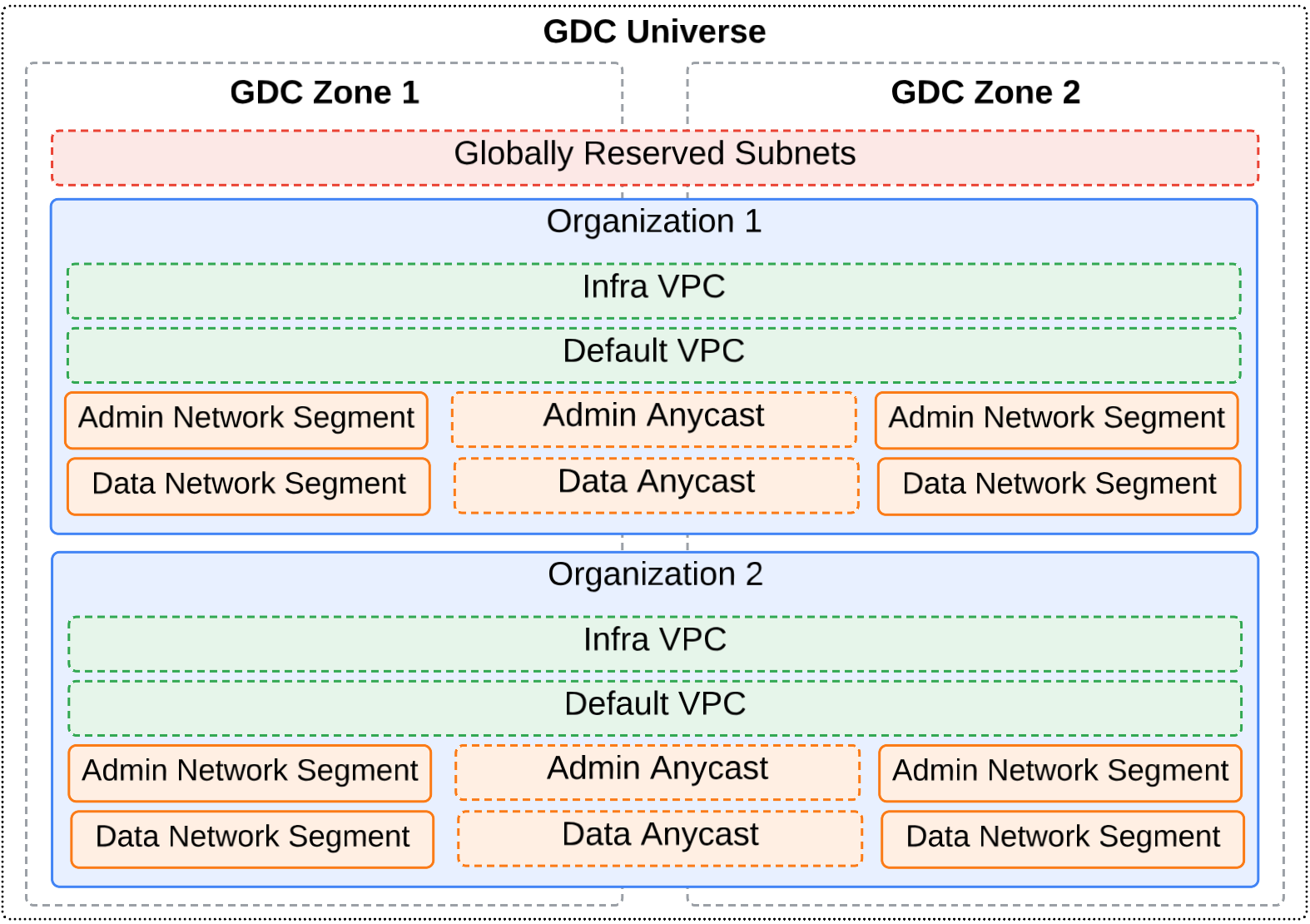
In this diagram, there are two organizations that span a multi-zone universe. Each organization defines the VPC networks and external network segments. In this example, anycast IP addresses are used to route traffic between the zonal external network segments so the closest or best-performing zone services the networking request. For more information on anycast IP addresses, see IP addresses in GDC.
Subnet Groups
A subnet group is a set of subnets with the same subnet group label (e.g.
*ipam.gdc.goog/subnet-group: subnetgroup1). Organizing subnets into a group
provides the following benefits:
- A subnet group simplifies the upscaling of the IP resources which are owned by the same entity or used for the same purpose. A subnet is not upscalable by itself, but a subnet group can be upscaled by attaching a new subnet to it. Users can reference a subnet group as their IP resource and utilize its upscaling convenience.
- When creating a child subnet, users can reference a subnet group as parent instead of a single subnet. By using a subnet group in this way, users don't need to find the a parent subnet which has available IP space by themselves: instead, IPAM will automatically find a subnet in the subnet group with enough available IP space as its parent.
- When the IP resources for a single purpose or entity are used up, with the subnet group as the parent, the error information in the child subnet will be more straightforward and reduce the toil of checking all the subnets one by one.
All of the subnet group features apply to both global subnets and zonal subnets.
Creating and upscaling a subnet group
There is no API or object for a subnet group. Instead, a subnet group is identified by a subnet group label. To create or add to a subnet group, add a subnet group label to an existing subnet, or create a new subnet with a subnet group label.
If the subnet group doesn't exist yet, then a new subnet group is created. If there are other subnets with the same subnet group label already in the same namespace, then the new subnet will be added to the existing subnet group.
The following example shows the definition of a subnet that is attached to a
subnet group named default-vpc-us-east67-b-group.
apiVersion: ipam.gdc.goog/v1
kind: Subnet
metadata:
  ...
  labels:
    ipam.gdc.goog/subnet-group: default-vpc-us-east67-b-group
    ipam.gdc.goog/usage: zone-network-root-range
    ipam.gdc.goog/vpc: default-vpc
  name: default-vpc-us-east67-b-root-cidr
  namespace: platform
  ...
spec:
  ipv4Request:
    cidr: 10.99.0.0/16
  parentReference:
    name: default-vpc-root-cidr
    namespace: platform
    type: SingleSubnet
  type: Branch
Rules for creating and upscaling subnet groups
- subnet groups are defined per namespace scope. Subnets with the same subnet group label but in two different namespaces will be regarded as being part of two different subnet groups.
- A subnet cannot be the descendant of another subnet in the same group.
- Subnets in the same group must belong to the same VPC or network segment.
- A subnet can only be attached to one subnet group.
Using a subnet group as Parent
When creating a child subnet, as an alternative to using a Single subnet as parent, the user can reference a subnet group as parent. To reference a subnet group as the parent, you will need to:
- Explicitly set the
spec.parentReference.typetoSubnetGroup. If left empty, the default value isSingleSubnet. - If the parent subnet group is in different namespace than the child subnet,
the
spec.parentReference.namespacemust be specified to the namespace of the parent subnet group
After a child subnet is created from a subnet group, IPAM will allocate a CIDR from the subnet group based on the child subnet's request and the availability of the subnets in the parent subnet group. If a suitable parent subnet is found, the child subnet will get its CIDR from it, and the parent subnet's reference will be updated in the child subnet's status.
The subnet in the following example requests CIDR from the
default-vpc-zone1-group, and gets allocated a parent
platform/default-vpc-zone1-root-cidr in the status.
apiVersion: ipam.gdc.goog/v1
kind: Subnet
metadata:
...
  labels:
    ipam.gdc.goog/vpc: default-vpc
  name: default-vpc-default-node-subnet
  namespace: platform
...
spec:
  ipv4Request:
    prefixLength: 23
  networkSpec:
    enableGateway: true
    enableVLANID: false
  parentReference:
    name: default-vpc-zone1-group
    namespace: platform
    type: SubnetGroup
  type: Branch
status:
  allocatedParent:
    name: default-vpc-zone1-root-cidr
    namespace: platform
    type: SingleSubnet
...
Rules for referencing a subnet group as parent
- When referencing a subnet group as the parent, the creator of the child subnet must have "use" permission on all the subnets in the subnet group.
- The child subnet must be in the same VPC or network segment as the subnet group.
Static and dynamic CIDR configuration
When defining subnets, you can use a static or dynamic configuration for assigning the CIDR blocks.
Static CIDR configuration lets you explicitly specify the exact CIDR block for
your subnet. Statically allocate your CIDR block when you require precise
control over your IP address space. Use the spec.ipv4Request.cidr field in the
Subnet custom resource to specify the exact, predefined IP address range.
Dynamic CIDR configuration offers greater flexibility by allowing the system to
automatically allocate a CIDR block for your subnet. Instead of providing a full
CIDR, you specify the required prefix length in the
spec.ipv4Request.prefixLength field. Dynamically allocate your CIDR block if
you prefer the system to automatically delegate IP addresses to your subnets,
simplifying network planning and reducing the risk of IP address conflicts. The
system selects an available CIDR block of the specified size from the parent
network.
For more information, see the
SubnetRequest API.
IP addresses in GDC
Resources such as VMs and load balancers have IP addresses in GDC. These IP addresses let GDC resources communicate with other resources within an organization or to external networks connected to your organization. The following IP address types are available in a GDC universe:
- External IP address
External IP addresses are advertised to external networks connected to an organization. Resources with external IP addresses, such as load balancers and NAT, can communicate with external networks. With GDC, you can use private or public IP addresses as external addresses. Provide external IPv4 addresses for resources in the following ways:
- Bring your own external IP addresses (BYOIP): You provide these external IP addresses for your organization. BYOIP external IP addresses can overlap with other organizations as long as they don't connect to the same external network.
- IO-provided external IP addresses: Organizations can use the external IP addresses provided by the infrastructure operator group when connecting to an external network. The infrastructure operator group is the provider of the connectivity to that network.
- Internal IP address
Internal IP addresses cannot be reached from outside GDC directly and are not publicly routable. Internal IP addresses are local to a VPC network, a VPC network connected by using VPC network peering, or an on-premises network connected to a VPC network by using Cloud VPN. Resources with internal IP addresses communicate with other resources as if they're all on the same private network.
- Anycast IP address
Anycast IP addresses are a special type of external address which are always scoped to the entire GDC universe. GDC leverages anycast IP addresses along with Border Gateway Protocol (BGP) to route traffic to the closest or best-performing zone. Each global Layer 4 service running across two or more zones receives an anycast IP address from the anycast subnet, an external subnet. Each zone advertises the same anycast IP address, but your network picks the best one based on its routing rules. If a zone fails, it withdraws its IP address, and your network automatically reroutes traffic to another zone. This automatic routing provides seamless connectivity even during outages.
- Private IP address
Private IP addresses are addresses that cannot be routed on the internet. For a list of private IPv4 ranges, see the entries for private IP address ranges in the Valid IPv4 ranges table.
- Public IP address
Public IP addresses are internet routable addresses. In GDC, external IP addresses can be public or private. You can also use public IPv4 addresses as internal addresses when you configure the primary IPv4 address range of a subnet in your VPC network. These addresses are referred to as privately used public IP addresses.
IPv4 usage and limitations
Each network in your GDC universe has some IPv4 address range usage limitations you must consider when allocating IP addresses. IPv6 address ranges are not supported in the Default VPC and Data Network Segment. Reach out to your infrastructure operator group for IPv6 range possibilities in other networks.
Limitations for all IPv4 subnets
These limitations apply to VPC network subnets and external network segment subnets.
- All subnets must be a unique valid CIDR block.
- After you create a subnet, it cannot be upscaled, replaced, or shrunk.
- GDC does not enforce a limit on how large of a CIDR
can be created. However, for most IP address ranges larger than
/8, additional validations prevent you from creating a subnet that is this large. For example, a subnet cannot overlap with a prohibited subnet. To minimize the chance of choosing an invalid subnet, we recommend that you limit your maximum subnet size to/8. You can't create subnets that overlap with any prohibited subnets, any other subnet in the same VPC network, any subnet in an attached external network segment, or any subnet in a peered network. You must work with your infrastructure operator group to make sure that you don't create overlapping subnets in these scenarios.
GDC creates corresponding routes for subnets. VPC network subnets have routes created in your organization's virtual network stack, and external network segment subnets have routes created in your external peered network's routing table.
Verify that subnets don't conflict with on-premises IP addressing if you have connected your VPC network to another network using managed VPN, or a shared or dedicated interconnect.
Subnets must not match, be narrower, or be broader than a prohibited range. For example,
169.0.0.0/8is not a valid subnet because it overlaps with the link-local range169.254.0.0/16(RFC 3927), which is restricted.Subnets must not span an RFC range, as described in Valid IPv4 ranges, and a privately used public IP address range. For example,
172.0.0.0/10is not a valid subnet because it includes both the172.16.0.0/12private IP address range and public IP addresses.Subnets must not span multiple RFC ranges. For example,
192.0.0.0/8isn't a valid subnet because it includes both192.168.0.0/16(RFC 1918) and192.0.0.0/24(RFC 6890). However, you can create two subnets, one with192.168.0.0/16and one with192.0.0.0/24.
Valid IPv4 ranges
The following table describes valid ranges.
| Range | Description |
|---|---|
| Private IPv4 address ranges | |
10.0.0.0/8172.16.0.0/12192.168.0.0/16
|
Private IP addresses RFC 1918 For information about using |
100.64.0.0/10 |
Shared address space RFC 6598 |
192.0.0.0/24 |
IETF protocol assignments RFC 6890 |
192.0.2.0/24 (TEST-NET-1)198.51.100.0/24 (TEST-NET-2)203.0.113.0/24 (TEST-NET-3) |
Documentation RFC 5737 |
192.88.99.0/24 |
IPv6 to IPv4 relay (deprecated) RFC 7526 |
198.18.0.0/15 |
Benchmark testing RFC 2544 |
240.0.0.0/4 |
Reserved for future use (Class E) as noted in RFC 5735 and RFC 1112. Some operating systems don't support the use of this range, so verify that your OS supports it before creating subnets that use this range. |
| Privately used public IP address ranges | |
| Privately used public IPv4 addresses |
Privately used public IPv4 addresses:
GDC air-gapped does not assume connectivity to the internet. As a result, GDC air-gapped advertises any public IP address ranges as if they are private to your organization. If your imported bring your own IP (BYOIP) addresses are public IP address ranges, you must verify that they don't cause network issues in any external networks. Your BYOIP addresses must not overlap with other subnets in your organization. |
Prohibited IPv4 subnets
Prohibited subnet ranges include commonly reserved RFC ranges and any globally reserved subnets in your specific GDC universe, as described in the following table. These ranges cannot be used for subnets.
| Range | Description |
|---|---|
| GDC infrastructure range |
A globally reserved CIDR used by the GDC system. If this range is not specified for the zone-infra-cidr field of the customer intake questionnaire (CIQ), GDC uses 172.16.0.0/12 as the GDC infrastructure range by default. |
| Universe-specific ranges | Additional ranges reserved by the infrastructure operator group. |
0.0.0.0/8
|
Current (local) network RFC 1122 |
127.0.0.0/8
|
Local host RFC 1122 |
169.254.0.0/16
|
Link-local RFC 3927 |
224.0.0.0/4
|
Multicast (Class D) RFC 5771 |
255.255.255.255/32
|
Limited broadcast destination address RFC 8190 and RFC 919 |
Unusable addresses in IPv4 subnets
GDC uses the first two and last two IPv4 addresses in each subnet to host the subnet.
| Unusable IPv4 address | Description | Example |
|---|---|---|
| Network address | First address in the primary IPv4 range. | 10.1.2.0 from range 10.1.2.0/24 |
| Default gateway address | Second address in the primary IPv4 range. | 10.1.2.1 from range 10.1.2.0/24 |
| Second-to-last address | Second-to-last address in the primary IPv4 range.
This range is reserved by Google Cloud for potential future use. |
10.1.2.254 from range 10.1.2.0/24 |
| Broadcast address | Last address in the primary IPv4 range. | 10.1.2.255 from range 10.1.2.0/24 |
Additional considerations
Some Google and third-party products use 172.17.0.0/16 for routing within the
guest operating system. For example, the default Docker bridge network uses this
range. If you depend on a product that uses 172.17.0.0/16, don't use it as any
subnet IPv4 address range.
IAM permissions for subnets
Google Distributed Cloud air-gapped supports a rich set of IAM permissions for managing subnets.
- Subnet Organization Admin (global): Manages multiple zone subnets within
the organization. Ask your Organization IAM Admin to grant you the Subnet
Organization Admin (
subnet-org-admin) cluster role. - Subnet Organization Admin: Manages zonal subnets within the
organization. Ask your Organization IAM Admin to grant you the Subnet
Organization Admin (
subnet-org-admin) cluster role. - Subnet Project Admin (global): Manages multiple zone subnets within
projects. Ask your Organization IAM Admin to grant you the Subnet Project
Admin (
subnet-project-admin) role. - Subnet Project Admin: Manages zonal subnets within projects. Ask your
Organization IAM Admin to grant you the Subnet Project Admin
(
subnet-project-admin) role.- This role has permission to read all subnets in the project namespace
and to create/update/delete most subnets in the project namespaces.
However, this role does not grant permission to create/update/delete the
root type subnets (
subnet.Spec.Type== Root)
- This role has permission to read all subnets in the project namespace
and to create/update/delete most subnets in the project namespaces.
However, this role does not grant permission to create/update/delete the
root type subnets (
- Subnet Project Operator: Manages leaf type auto-allocated subnets within
projects. Ask your Organization IAM Admin to grant you the Subnet Project
Operator (
subnet-project-operator) role.- This role has permission to read all subnets in the project ns and to
create/update/delete only the auto-allocated leaf subnets in the project
namespaces. This role does not grant the permission to
create/update/delete the following subnets:
- Root or branch type subnets (
subnet.Spec.Type== Root ||subnet.Spec.Type== Branch) - network subnets (
subnet.Spec.NetworkSpec!= nil) - subnets with dedicated CIDR (
subnet.Spec.Ipv4Request.CIDR!= nil ||subnet.Spec.Ipv6Request.CIDR!= nil)
- Root or branch type subnets (
- This role has permission to read all subnets in the project ns and to
create/update/delete only the auto-allocated leaf subnets in the project
namespaces. This role does not grant the permission to
create/update/delete the following subnets:
- Subnet Platform Viewer: Get subnets in
platformnamespace. Ask your Organization IAM Admin to grant you the Subnet Platform Viewer (subnet-platform-viewer) role. - To use a shared subnet in platform namespace as parent to allocate subnet
inside the project, Ask your Organization IAM Admin to grant you the
shared-subnet-userrole. - To grant a dedicated subnet in the platform namespace to be used as parent
to allocate subnet inside the project,
subnet-org-adminmust create or update a subnet and set the annotation"ipam.gdc.goog/subnet-delegation-role": autoon it. Then ask your Organization IAM Admin to grant the user the<subnetName>-userrole. - To enable a subnet group within the platform namespace for project-internal
subnet allocation, the
subnet-org-adminmust create or update all subnets in the group. For each subnet, the annotation"ipam.gdc.goog/subnet-delegation-role": autoneeds to be set. Then, ask the Organization IAM Admin to grant the<subnetName>-userrole for each subnet in the group.
What's next
- Networking overview
- Provision IP addresses for workloads
- Bring your own external IP addresses
- Multi-zone overview