

This document explains how to create a shared Kubernetes cluster in a Google Distributed Cloud (GDC) air-gapped zone. A shared cluster spans multiple projects, and includes comprehensive GDC-managed services that offer a highly opinionated Kubernetes cluster configuration that is less configurable than the standard cluster. For more information about standard clusters, see Kubernetes cluster configurations.
Shared clusters are a zonal resource and cannot span multiple zones. To operate clusters in a multi-zone universe, you must manually create clusters in each zone.
This document is for audiences such as application developers within the application operator group, who are responsible for managing container workloads within their organization. For more information, see Audiences for GDC air-gapped documentation.
Before you begin
To get the permissions needed to create a shared cluster, ask your Organization IAM Admin to grant you the User Cluster Admin role (
user-cluster-admin). This role is not bound to a namespace.Plan for the following Google Distributed Cloud (GDC) air-gapped limits for Kubernetes clusters:
- 16 clusters per organization
- 42 worker nodes per cluster, and a minimum of three worker nodes
- 4620 pods per cluster
- 110 pods per node
Plan the pod CIDR block
To allocate the appropriate sized pod CIDR block for your workloads, you must calculate the amount of IP addresses that are required for your Kubernetes cluster before you create it. Most networking parameters cannot be changed after the cluster is created.
A Kubernetes cluster follows the proceeding logic when allocating IP addresses:
- Kubernetes assigns a
/24CIDR block consisting of 256 addresses to each of the nodes. This amount adheres to the default maximum of 110 pods per node for Kubernetes clusters. - The size of the CIDR block assigned to a node depends on the maximum pods per node value.
- The block always contains at least twice as many addresses as the maximum number of pods per node.
See the following example to understand how the default value of Per node mask size= /24 was calculated to accommodate 110 pods:
Maximum pods per node = 110
Total number of IP addresses required = 2 * 110 = 220

Per node mask size = /24
Number of IP addresses in a /24 = 2(32 - 24) = 256
Determine the required pod CIDR mask to configure for the Kubernetes cluster based on the required number of nodes. Plan for future node additions to the cluster while configuring the CIDR range:
Total number of nodes supported = 2(Per node mask size - pod CIDR mask)
Given there's a default Per node mask size= /24 , refer to the following table that maps the pod CIDR mask to the number of nodes supported.
| Pod CIDR Mask | Calculation: 2(Per node mask size - CIDR mask) | Maximum number of nodes supported including control plane nodes |
|---|---|---|
| /21 | 2(24 - 21) | 8 |
| /20 | 2(24-20) | 16 |
| /19 | 2(24 - 19) | 32 |
| /18 | 2(24 - 18) | 64 |
After calculating your pod CIDR block for your Kubernetes cluster, configure it as part of the cluster creation workflow in the next section.
Create a shared cluster
Complete the following steps to create a shared Kubernetes cluster:
Console
In the navigation menu, select Kubernetes Engine > Clusters.
Click Create Cluster.
In the Name field, specify a name for the cluster.
Select the Kubernetes version for the cluster.
Select the zone in which to create the cluster.
Click Attach Project and select an existing project to attach to your cluster. Then click Save. You can attach or detach projects after creating the cluster from the project details page. You must have a project attached to your cluster before deploying container workloads it.
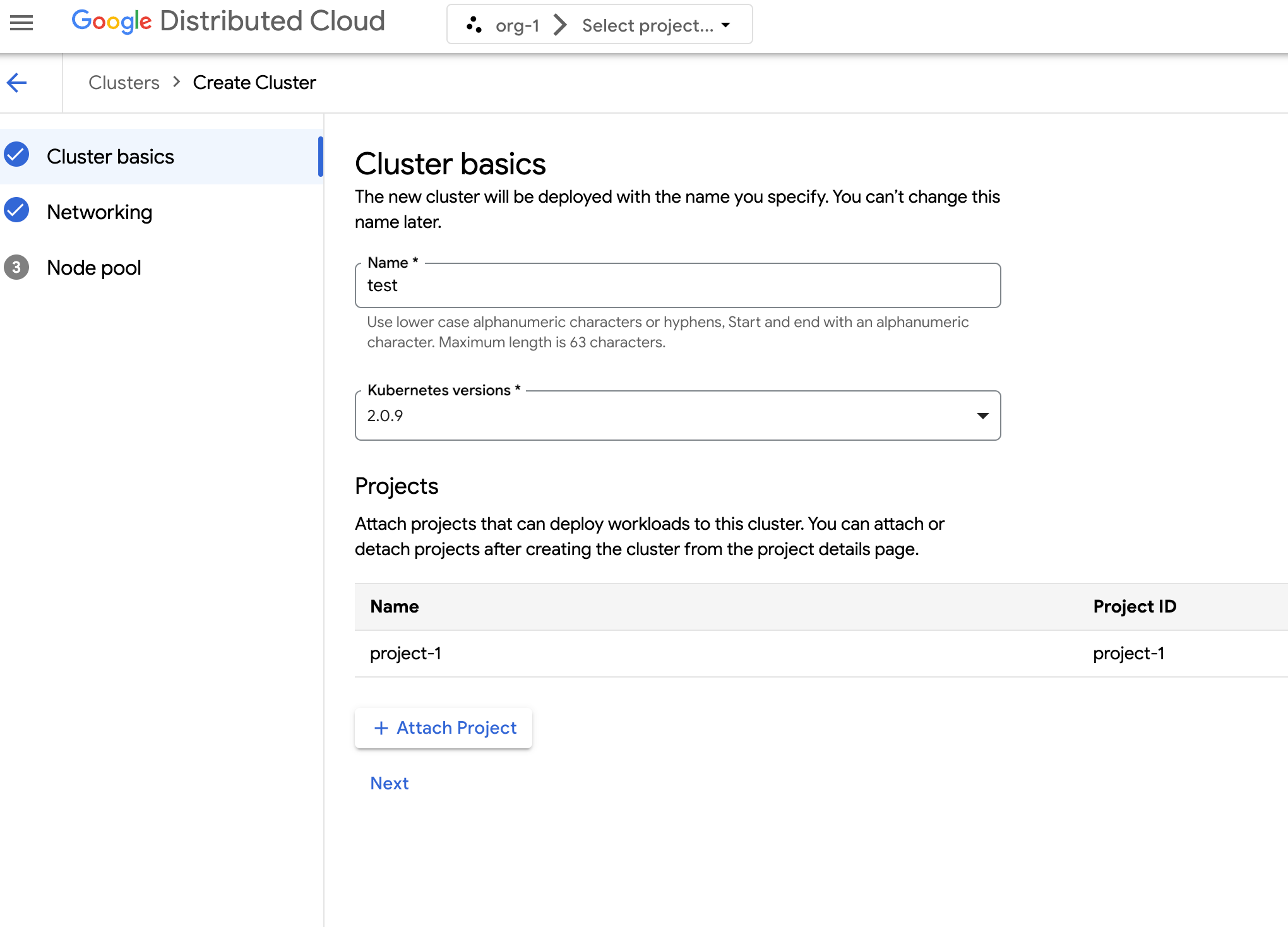
Click Next.
Configure the network settings for your cluster. You can't change these network settings after you create the cluster. The default and only supported Internet Protocol for Kubernetes clusters is Internet Protocol version 4 (IPv4).
If you want to create dedicated load balancer nodes, enter the number of nodes to create. By default, you receive zero nodes, and load balancer traffic runs through the control nodes.
Select the Service CIDR (Classless Inter-Domain Routing) to use. Your deployed services, such as load balancers, are allocated IP addresses from this range.
Select the Pod CIDR to use. The cluster allocates IP addresses from this range to your pods and VMs.
Click Next.
Review the details of the auto-generated default node pool for the cluster. Click edit Edit to modify the default node pool.
To create additional node pools, select Add node pool. When editing the default node pool or adding a new node pool, you customize it with the following options:
- Assign a name for the node pool. You cannot modify the name after you create the node pool.
- Specify the number of worker nodes to create in the node pool.
Select your machine class that best suits your workload requirements. View the list of the following settings:
- Machine type
- CPU
- Memory
Click Save.
Click Create to create the cluster.
Shared cluster creation can take up to 90 minutes to complete.
API
To create a new cluster using the API directly, apply a custom resource to your GDC zone:
Create a
Clustercustom resource and save it as a YAML file, such ascluster.yaml:apiVersion: cluster.gdc.goog/v1 kind: Cluster metadata: name: CLUSTER_NAME namespace: platform spec: clusterNetwork: podCIDRSize: POD_CIDR serviceCIDRSize: SERVICE_CIDR initialVersion: kubernetesVersion: KUBERNETES_VERSION nodePools: - machineTypeName: MACHINE_TYPE name: NODE_POOL_NAME nodeCount: NUMBER_OF_WORKER_NODES taints: TAINTS labels: LABELS acceleratorOptions: gpuPartitionScheme: GPU_PARTITION_SCHEME releaseChannel: channel: UNSPECIFIEDReplace the following:
CLUSTER_NAME: the name of the cluster. The cluster name must not end with-system. The-systemsuffix is reserved for clusters created by GDC.POD_CIDR: the size of network ranges from which pod virtual IP addresses are allocated. If unset, a default value21is used.SERVICE_CIDR: the size of network ranges from which service virtual IP addresses are allocated. If unset, a default value23is used.KUBERNETES_VERSION: the Kubernetes version of the cluster, such as1.26.5-gke.2100. To list the available Kubernetes versions to configure, see List available Kubernetes versions for a cluster.MACHINE_TYPE: the machine type for the worker nodes of the node pool. View the available machine types for what is available to configure.NODE_POOL_NAME: the name of the node pool.NUMBER_OF_WORKER_NODES: the number of worker nodes to provision in the node pool.TAINTS: the taints to apply to the nodes of this node pool. This is an optional field.LABELS: the labels to apply to the nodes of this node pool. It contains a list of key-value pairs. This is an optional field.GPU_PARTITION_SCHEME: the GPU partitioning scheme, if you're running GPU workloads. This is an optional field. For example,mixed-2. The GPU is not partitioned if this field is not set. For more information about available Multi-Instance GPU (MIG) profiles, see Supported MIG profiles.
Apply the custom resource to your GDC instance:
kubectl apply -f cluster.yaml --kubeconfig MANAGEMENT_API_SERVERReplace
MANAGEMENT_API_SERVERwith the zonal API server's kubeconfig path. If you have not yet generated a kubeconfig file for the API server in your targeted zone, see Sign in.
Shared cluster creation can take up to 90 minutes to complete.
Terraform
In a Terraform configuration file, insert the following code snippet:
provider "kubernetes" {
  config_path = "MANAGEMENT_API_SERVER"
}

resource "kubernetes_manifest" "cluster-create" {
  manifest = {
    "apiVersion" = "cluster.gdc.goog/v1"
    "kind" = "Cluster"
    "metadata" = {
      "name" = "CLUSTER_NAME"
      "namespace" = "platform"
    }
    "spec" = {
      "clusterNetwork" = {
        "podCIDRSize" = "POD_CIDR"
        "serviceCIDRSize" = "SERVICE_CIDR"
      }
      "initialVersion" = {
        "kubernetesVersion" = "KUBERNETES_VERSION"
      }
      "nodePools" = [{
        "machineTypeName" = "MACHINE_TYPE"
        "name" = "NODE_POOL_NAME"
        "nodeCount" = "NUMBER_OF_WORKER_NODES"
        "taints" = "TAINTS"
        "labels" = "LABELS"
        "acceleratorOptions" = {
          "gpuPartitionScheme" = "GPU_PARTITION_SCHEME"
        }
      }]
      "releaseChannel" = {
        "channel" = "UNSPECIFIED"
      }
    }
  }
}
Replace the following:
MANAGEMENT_API_SERVER: the zonal API server's kubeconfig path. If you have not yet generated a kubeconfig file for the API server in your targeted zone, see Sign in.CLUSTER_NAME: the name of the cluster. The cluster name must not end with-system. The-systemsuffix is reserved for clusters created by GDC.POD_CIDR: the size of network ranges from which pod virtual IP addresses are allocated. If unset, a default value21is used.SERVICE_CIDR: the size of network ranges from which service virtual IP addresses are allocated. If unset, a default value23is used.KUBERNETES_VERSION: the Kubernetes version of the cluster, such as1.26.5-gke.2100. To list the available Kubernetes versions to configure, see List available Kubernetes versions for a cluster.MACHINE_TYPE: the machine type for the worker nodes of the node pool. View the available machine types for what is available to configure.NODE_POOL_NAME: the name of the node pool.NUMBER_OF_WORKER_NODES: the number of worker nodes to provision in the node pool.TAINTS: the taints to apply to the nodes of this node pool. This is an optional field.LABELS: the labels to apply to the nodes of this node pool. It contains a list of key-value pairs. This is an optional field.GPU_PARTITION_SCHEME: the GPU partitioning scheme, if you're running GPU workloads. This is an optional field. For example,mixed-2. The GPU is not partitioned if this field is not set. For more information about available Multi-Instance GPU (MIG) profiles, see Supported MIG profiles.
Apply the new shared Kubernetes cluster using Terraform:
terraform apply
Shared cluster creation can take up to 90 minutes to complete.