

前提条件
ゲートウェイを設定する前に、適切な Identity and Access Management(IAM)権限を取得し、プロジェクトに適切なネットワーク ポリシーがあることを確認して、下り(外向き)を有効にする必要があります。
詳細については、Cloud NAT を始める前にをご覧ください。
Cloud NAT ゲートウェイは、外部 leaf サブネットを入力として使用します。Cloud NAT の外部サブネットの構成の詳細については、Cloud NAT の外部サブネットを作成するをご覧ください。
接続タイムアウトを使用して Cloud NAT ゲートウェイを作成して管理する
このドキュメントでは、接続タイムアウトを使用して Cloud NAT ゲートウェイを作成、管理する方法について説明します。このユースケースでは、最初のシナリオと同様の設定を作成しますが、Cloud NAT ゲートウェイを介して確立された接続のタイムアウトを指定します。
次の図は、複数の下り(外向き)IP を使用したゲートウェイ設定の例を示しています。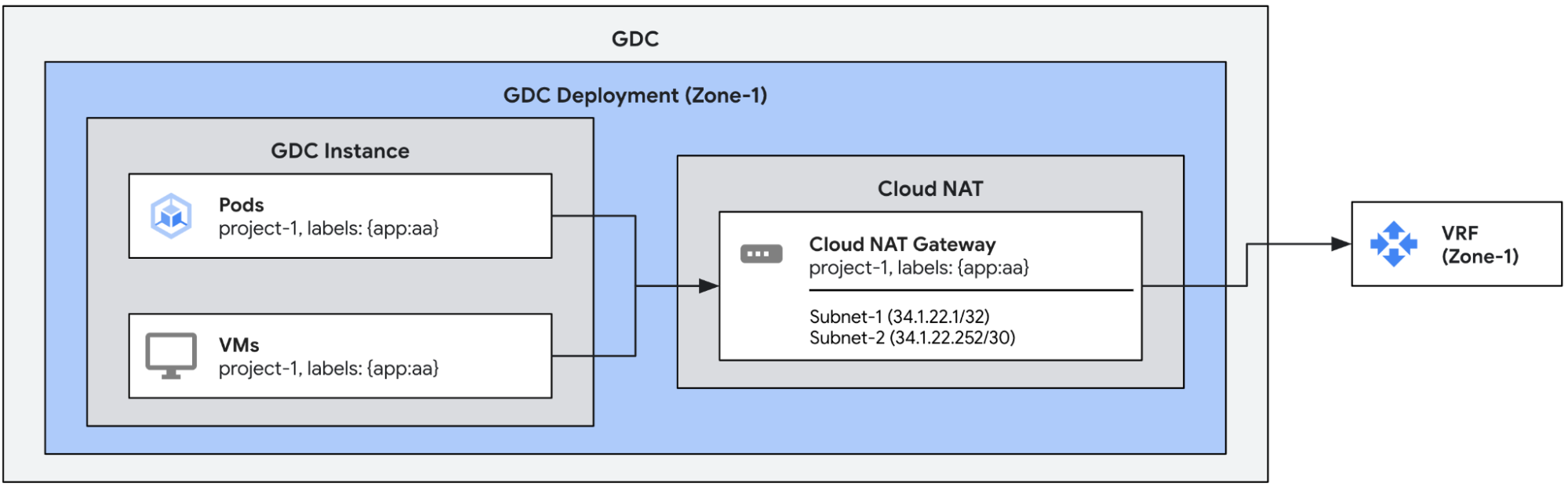
デフォルトでは、Cloud NAT ゲートウェイを介して作成された下り(外向き)接続には次のタイムアウトがあります。必要に応じて手動で構成できます。
| Timeout | デフォルト(秒) |
| 非 TCP 接続 | 60 |
| アイドル状態の TCP 接続 | 8000 |
| TCP 接続の切断 | 10 |
| TCP 接続の確立 | 60 |
タイムアウト付きの Cloud NAT ゲートウェイを作成する
この例では、接続タイムアウトのある単一の Cloud NAT ゲートウェイを定義します。前の例と同様に、この構成では、subnet-1 と subnet-2 の下り(外向き)IP が app:aa ラベルを持つエンドポイントからの送信トラフィックに割り当てられます。また、この構成では、デフォルトのタイムアウトがカスタム値でオーバーライドされます。
apiVersion: networking.gdc.goog/v1
kind: CloudNATGateway
metadata:
  namespace: project-1
  name: gateway-1
spec:
  workloadSelector:   # Immutable
    labelSelector:
      workloads:
        matchLabels:
          app: aa
  subnetRefs:          # Mutable
  - subnet-1
  - subnet-2
  connectionOptions:   # Mutable
    nonTCPTimeoutSeconds: 10            # All non-TCP connections. 60 by default
    tcpTimeoutSeconds: 900              # Established TCP connections. 8000 by default
    tcpTeardownTimeoutSeconds: 10       # TCP connection teardown. 10 by default
    tcpEstablishmentTimeoutSeconds: 10  # TCP connection establishment. 60 by default
次の kubectl コマンドを使用して、ゲートウェイのステータスを確認できます。
export MGMT_KUBECONFIG=<path_to_management_kubeconfig>
kubectl get cloudnatgateways gateway-1 -n project-1 --kubeconfig "${MGMT_KUBECONFIG:?}"
正しく構成されている場合、Cloud NAT ゲートウェイのステータス条件フィールドには、次の出力例に示すように、タイプ Ready の条件が true に設定され、サブネットが OK としてマークされていることが示されます。
apiVersion: networking.gdc.goog/v1
kind: CloudNATGateway
metadata:
  namespace: project-1
  name: gateway-1
spec:
  workloadSelector:   # Immutable
    labelSelector:
      workloads:
        matchLabels:
          app: aa
  subnetRefs:         # Mutable
  - subnet-1
  - subnet-2
  connectionOptions:   # Mutable
    nonTCPTimeoutSeconds: 10
    tcpTimeoutSeconds: 900
    tcpTeardownTimeoutSeconds: 10
    tcpEstablishmentTimeoutSeconds: 10
status:
  conditions:
  - lastTransitionTime: "2025-08-20T21:31:36Z"
    message: ""
    observedGeneration: 1
    reason: Ready
    status: "True"
    type: Ready
  - lastTransitionTime: "2025-08-20T21:31:36Z"
    message: ""
    observedGeneration: 1
    reason: Ready
    status: "True"
    type: SubnetsReady
  - lastTransitionTime: "2025-08-20T21:31:36Z"
    message: ""
    observedGeneration: 1
    reason: Ready
    status: "True"
    type: PerimeterConfigurationReady
  - lastTransitionTime: "2025-08-20T21:31:36Z"
    message: ""
    observedGeneration: 1
    reason: Ready
    status: "True"
    type: EgressRoutesReady
  subnets:
  - name: subnet-1
    status: OK
  - name: subnet-2
    status: OK
新しい構成が有効になっていることを確認するには、ゲートウェイのステータスを確認します。