

總覽
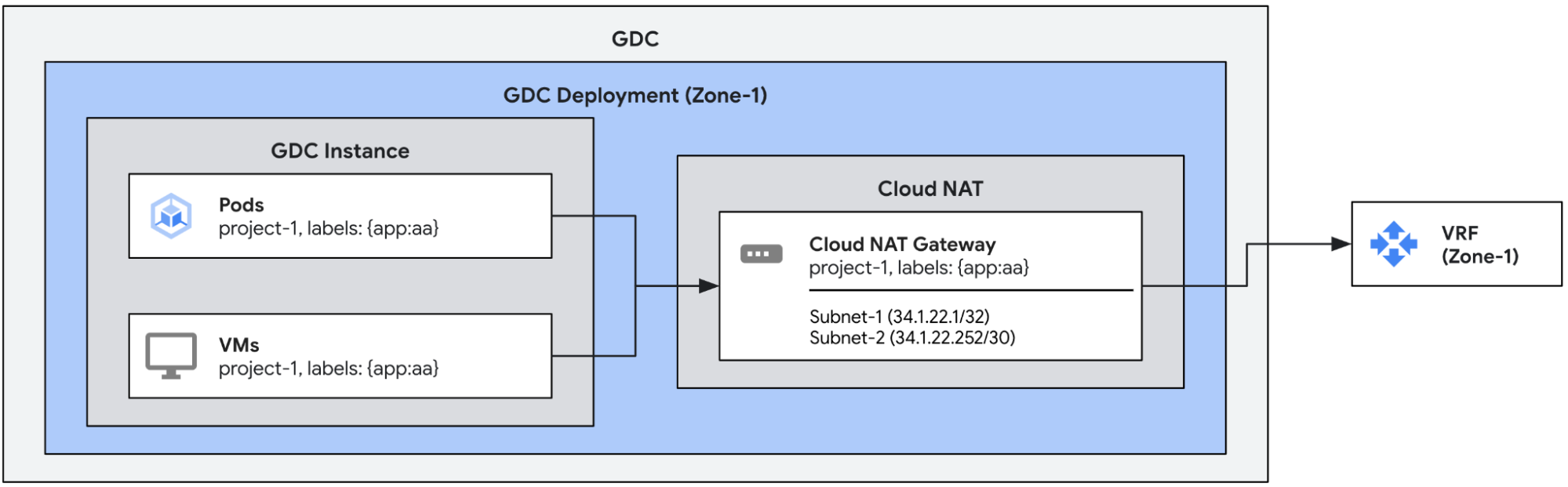
在這個應用實例中,我們將建立 Cloud NAT 閘道,並指派多個輸出 IP。這些閘道會從符合閘道中設定相符標籤的 Pod 和 VM 輸出流量。閘道會自動為每個可透過閘道傳輸外向流量的端點指派外向 IP。
必要條件
設定閘道前,請先取得適當的 Identity and Access Management (IAM) 權限,確保專案具備適當的網路政策,並啟用輸出。
詳情請參閱「開始使用 Cloud NAT 的事前準備」。
Cloud NAT 閘道會使用外部 leaf 子網路做為輸入內容。如要進一步瞭解如何為 Cloud NAT 設定外部子網路,請參閱「為 Cloud NAT 建立外部子網路」。
確認 Pod 或 VM 設定相容
如「NAT 總覽」一文所述,Cloud NAT 與預設專案輸出設定不相容。確認要搭配 Cloud NAT 使用的任何 Pod 或 VM「沒有」egress.networking.gke.io/enabled:true 標籤。
根據預設,虛擬機器外部存取 (VMEA) 會設定 VM,使用預設專案輸出設定輸出流量。換句話說,系統會自動將 egress.networking.gke.io/enabled:"true" 標籤新增至 VM。如果該 VM 也設定為使用 Cloud NAT 閘道輸出流量,就會導致 NAT 設定發生衝突。為避免發生這類衝突,請確保與 VM 相關聯的每個 VMEA 都具有 egress.networking.gke.io/use-cloud-nat:"true" 註解,因為這些 VM 設定為透過 Cloud NAT 閘道輸出流量。相關聯的 VM 隨後會專門透過 Cloud NAT 閘道輸出流量。
建立 Cloud NAT 閘道
以下範例定義了具有兩個外部葉子子網路 (subnet-1 和 subnet-2) 的 Cloud NAT 閘道。閘道會使用這些子網路中的所有 IP (subnet-1 中的一個和 subnet-2 中的四個),並自動將這些 IP 指派給每個 VM 或 Pod 中具有指定標籤的端點。多個 Pod 或 VM 可以獲派相同的輸出 IP。
apiVersion: networking.gdc.goog/v1
kind: CloudNATGateway
metadata:
  namespace: project-1
  name: gateway-1
spec:
  workloadSelector:  # Immutable
    labelSelector:
      workloads:
        matchLabels:
          app: aa
  subnetRefs:        # Mutable
  - subnet-1
  - subnet-2
檢查閘道狀態
執行下列 kubectl 指令,檢查閘道的狀態。
export MGMT_KUBECONFIG=<path_to_management_kubeconfig>
kubectl get cloudnatgateways gateway-1 -n project-1 --kubeconfig "${MGMT_KUBECONFIG:?}"
如果設定正確,Cloud NAT 閘道的狀態條件欄位應會顯示類型為 Ready 的條件設為 true,且子網路標示為 OK,如下列範例輸出內容所示。
apiVersion: networking.gdc.goog/v1
kind: CloudNATGateway
metadata:
  namespace: project-1
  name: gateway-1
spec:
  workloadSelector:
    labelSelector:
      workloads:
        matchLabels:
          app: aa
  subnetRefs:
  - subnet-1
  - subnet-2
status:
  conditions:
  - lastTransitionTime: "2025-08-20T21:31:36Z"
    message: ""
    observedGeneration: 1
    reason: Ready
    status: "True"
    type: Ready
  - lastTransitionTime: "2025-08-20T21:31:36Z"
    message: ""
    observedGeneration: 1
    reason: Ready
    status: "True"
    type: SubnetsReady
  - lastTransitionTime: "2025-08-20T21:31:36Z"
    message: ""
    observedGeneration: 1
    reason: Ready
    status: "True"
    type: PerimeterConfigurationReady
  - lastTransitionTime: "2025-08-20T21:31:36Z"
    message: ""
    observedGeneration: 1
    reason: Ready
    status: "True"
    type: EgressRoutesReady
  subnets:
  - name: subnet-1
    status: OK
  - name: subnet-2
    status: OK
Cloud NAT 閘道狀態包含下列類型的 4 種條件:
Ready:這個條件會彙整 Cloud NAT 閘道的狀態。如果閘道已完成設定,這個條件會設為 true。SubnetsReady:這個條件表示指派給閘道的子網路是否有效。PerimeterConfigurationReady:這個條件表示是否已設定周邊設定 (例如指派給面向外部節點的外部 IP 等)。EgressRoutesReady:這個條件表示是否已設定從來源端點輸出流量的路徑。
測試流量
我們可以從指派給閘道的其中一個 Pod 或 VM,向外部端點發出 curl 指令,藉此測試流量。接收端點應會看到與閘道相關聯的其中一個輸出 IP。