

Google Distributed Cloud (GDC) air-gapped lets you manage your Kubernetes clusters after creation using GKE on GDC. This service lets you adapt to your evolving container workload requirements and maintain your existing cluster nodes with the following workflows:
Attach and detach shared clusters to projects: Attach and detach you shared cluster to multiple projects after cluster creation to change the scope of your shared cluster's workloads.
View clusters in your organization: List the clusters in your organization to track what is available for your container workloads.
List Kubernetes versions: View the Kubernetes version of your cluster for awareness of the cluster's capabilities corresponding to the latest Kubernetes releases.
View updateable cluster properties: View the properties available to change within the
Clustercustom resource definition.
This document is for IT administrators within the platform administrator group who manage container workloads that are hosted in clusters spanning multiple projects, and developers within the application operator group who are responsible for creating application workloads within a single project. For more information, see Audiences for GDC air-gapped documentation.
Before you begin
To complete the tasks in this document, you must have the following resources and roles:
To view and manage node pools in a shared Kubernetes cluster, ask your Organization IAM Admin to grant you the following roles:
- User Cluster Admin (
user-cluster-admin) - User Cluster Node Viewer (
user-cluster-node-viewer)
These roles are not bound to a project namespace.
- User Cluster Admin (
To view and manage node pools in a standard Kubernetes cluster, ask your Organization IAM Admin to grant you the Standard Cluster Admin (
standard-cluster-admin) role. This role is bound to your project namespace.To run commands against a Kubernetes cluster, make sure you have the following resources:
Locate the Kubernetes cluster name, or ask a member of the platform administrator group what the cluster name is.
Sign in and generate the kubeconfig file for the Kubernetes cluster if you don't have one.
Use the kubeconfig path of the Kubernetes cluster to replace
KUBERNETES_CLUSTER_KUBECONFIGin these instructions.
Move clusters in project hierarchy
Projects provide logical grouping of service instances. You can add and remove shared Kubernetes clusters from the GDC project hierarchy to group your services appropriately. You can't move standard clusters in the project hierarchy since they are scoped to a single project only.
Attach project to a shared cluster
When creating a shared cluster from the GDC console, you must attach at least one project before you can successfully deploy container workloads to it. If you must add additional projects to an existing cluster, complete the following steps:
- In the navigation menu, select Kubernetes Engine > Clusters.
- Click the cluster from the cluster list to open the Cluster details page.
- Select Attach Project.
- Select the available projects to add from the project list. Click Save.
Detach project from a shared cluster
To detach a project from an existing shared cluster, complete the following steps:
- In the navigation menu, select Kubernetes Engine > Clusters.
- Click the cluster from the cluster list to open the Cluster details page.
Click delete Detach for the project to detach from the cluster.
View all clusters in an organization
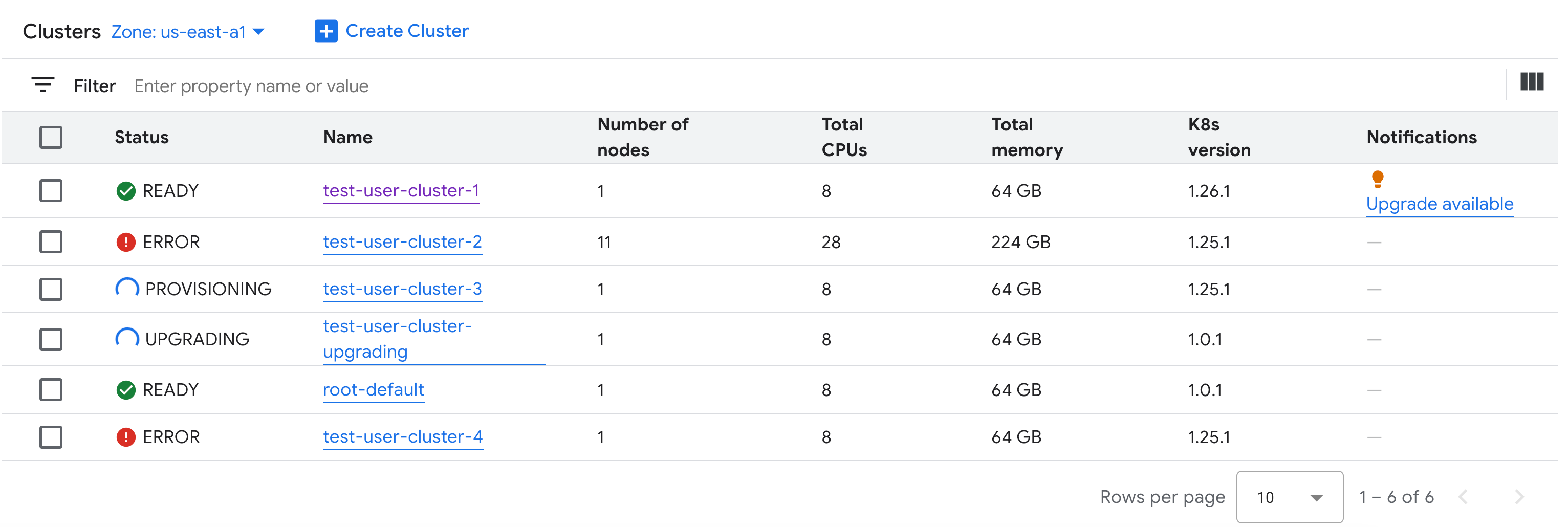
You can view all available Kubernetes clusters in an organization, including their statuses, Kubernetes versions, and other details.
Since Kubernetes clusters are a zonal resource, you can only list clusters per zone.
Console
In the navigation menu, select Kubernetes Engine > Clusters.
All available shared clusters in the organization with their statuses and other information are displayed:
gdcloud
List the zone's available shared clusters in an organization:
gdcloud clusters listThe output is similar to the following:
CLUSTERREF.NAME   READINESS.STATE   TYPE   CURRENTVERSION.USERCLUSTERVERSION     CURRENTVERSION.SUPPORT.STATUS
user-vm-1         Ready             user   1.15.0-gdch.394225-1.28.15-gke.1200   In Support
user-vm-2         Ready             user   1.15.0-gdch.394225-1.29.12-gke.800    In Support
API
List the zone's available Kubernetes clusters in an organization:
kubectl get clusters.cluster.gdc.goog -n KUBERNETES_CLUSTER_NAMESPACE \
    --kubeconfig MANAGEMENT_API_SERVER
Replace the following:
MANAGEMENT_API_SERVER: the zonal API server's kubeconfig path. If you have not yet generated a kubeconfig file for the API server in your targeted zone, see Sign in for details.KUBERNETES_CLUSTER_NAMESPACE: the namespace of the cluster. For shared clusters, use theplatformnamespace. For standard clusters, use the project namespace of the cluster.
The output is similar to the following:
NAME        STATE     K8S VERSION
user-vm-1   Running   1.25.10-gke.2100
user-test   Running   1.26.5-gke.2100
List available Kubernetes versions for a cluster
You can list the available Kubernetes versions in your GDC zone to verify the Kubernetes features you can access in the cluster.
List the available Kubernetes versions in your zone:
kubectl get userclustermetadata.upgrade.private.gdc.goog \
    -o=custom-columns=K8S-VERSION:.spec.kubernetesVersion \
    --kubeconfig MANAGEMENT_API_SERVER
Replace
MANAGEMENT_API_SERVERwith the kubeconfig file of your cluster's zonal API server.The output looks similar to the following:
K8S-VERSION
1.25.10-gke.2100
1.26.5-gke.2100
1.27.4-gke.500
View updatable properties
For each Kubernetes cluster, a set of properties are available to change after it is
created. You can only change the mutable properties that are in the spec of
the Cluster custom resource. Not all properties in the spec are eligible to
update after the cluster is provisioned. To view these updatable properties,
complete the following steps:
Console
In the navigation menu, select Kubernetes Engine > Clusters.
In the list of Kubernetes clusters, click a cluster name to view its properties.
Editable properties have an edit Edit icon.
kubectl
View the list of properties for the
Clusterspec and the valid values corresponding to each property:kubectl explain clusters.cluster.gdc.goog.spec \ --kubeconfig MANAGEMENT_API_SERVERReplace
MANAGEMENT_API_SERVERwith the zonal API server's kubeconfig path. If you have not yet generated a kubeconfig file for the API server in your targeted zone, see Sign in for details.The output is similar to the following:
KIND:     Cluster
VERSION:  cluster.gdc.goog/v1

RESOURCE: spec <Object>

DESCRIPTION:
    <empty>

FIELDS:
  clusterNetwork    <Object>
    The cluster network configuration. If unset, the default configurations
    with pod and service CIDR sizes are used. Optional. Mutable.

  initialVersion    <Object>
    The GDC air-gapped version information of the user cluster during cluster creation.
    Optional. Default to use the latest applicable version. Immutable.

  loadBalancer  <Object>
    The load balancer configuration. If unset, the default configuration with
    the ingress service IP address size is used. Optional. Mutable.

  nodePools <[]Object>
    The list of node pools for the cluster worker nodes. Optional. Mutable.

  releaseChannel    <Object>
    The release channel a cluster is subscribed to. When a cluster is
    subscribed to a release channel, GDC maintains the cluster versions for
    users. Optional. Mutable.
Update these settings by using the GDC console or kubectl CLI. For example, you can resize a node pool.